
“Where is my order?” is the question every Shopify support team answers most. Re:amaze answers it before a shopper even starts a chat.
On our test store, the Re:amaze widget listed a signed-in customer’s recent orders automatically. It also let a shopper look up an order by number and email. The result matched the order in Shopify exactly, with no agent and no AI involved.
That self-service lookup is the strongest thing we saw. The rest of the picture is more mixed. Re:amaze has been on the Shopify App Store since 2014 and has no free plan. Its paid plans ration AI to a handful of “resolutions” per user each month, and its 4.4 rating trails the 4.9 we saw on Chatty, Commslayer and Richpanel.
We installed Re:amaze AI Helpdesk & Chat on a Shopify development store, connected it, published the chat widget, and tested the order lookup from the storefront.
Key Takeaways
- Order self-service worked. The widget showed the shopper’s two recent orders, and a lookup for order #2757 returned “Processing” and $1,286.01, matching Shopify exactly.
- Setup is connected end to end. Re:amaze reported the store connected, the theme embed enabled, and the chat widget published to the live theme.
- There is no free plan. Plans run from $29 to $69 per user a month, plus a $59 volume-based Starter plan, all with a 14-day trial.
- AI is capped per user. Basic includes 5 AI Agent resolutions per user a month, Pro 10 and Plus 20. We switched the AI Agent on but did not test it.
- Turning on the AI Agent changes how bots work. Re:amaze warns that classic chatbots stop running and conversation statuses change once it is enabled.
Our Verdict
Re:amaze is a reasonable choice for Shopify stores with a small support team that want a mature, all-in-one helpdesk at a moderate per-user price, and that value order self-service more than AI.
The parts we tested worked as they should. The store connected cleanly, the widget went live on the theme, and the order lookup gave shoppers the right answer without anyone replying. That alone can take a large share of “where is my order” messages off a team’s plate.
Our reservations are about AI and fit. If AI answers are why you are shopping for a helpdesk, Re:amaze’s allowance is small: five AI resolutions per user a month on Basic. We did not test the AI Agent, so we cannot judge its answers. Public reviews also point to a hard-to-learn interface, and the app’s 4.4 rating trails its newer rivals.
What Re:amaze Offers
Re:amaze AI Helpdesk & Chat is published by Reamaze of Tempe, Arizona. Its Shopify App Store listing carries the Built for Shopify badge and shows a launch date of April 1, 2014, so it has been around far longer than most AI helpdesks in this category. The install dialog and theme embed still use the older name, “Reamaze Live Chat & Helpdesk.”
The listing describes one inbox for email, live chat, social, SMS and calls, an AI Agent that answers from your knowledge sources, and AI tools to write replies, build chatbots, summarise conversations and create FAQ articles. It also says agents can manage, modify and create Shopify orders inside support chats. Extras include workflows, satisfaction surveys, status pages and push notifications. Listed integrations include Klaviyo, Loop Returns, RingCentral, ShipStation and Yotpo, with more than 20 in total.
What We Tested
We tested Re:amaze in October 2026 on a Shopify development store called zenden. It runs the Horizon theme with a nine-product football jersey catalogue and about 1,700 orders of history.
Our test covered the install permissions, creating a Re:amaze account, the theme app embed, the Shopify integration status, the AI and chatbot settings, the chat widget configuration, and the storefront widget as a signed-in customer. On the storefront, we checked the automatic order list and looked up a real order by number and email, then compared the result with the same order in Shopify.
We did not test the AI Agent’s answers, classic chatbots, a full live chat conversation, email, social, SMS or voice channels, editing or creating orders from the inbox, workflows, reports, surveys or billing. We stayed on the 14-day trial. Pricing comes from the App Store listing, checked on October 14, 2026.
Setup: Account, Store and Widget
The install dialog asks to view customer data, including sensitive, device and activity data, and staff and blog-contributor data. It also asks to view and edit customers, products, orders, discounts and the online store.
Re:amaze then asks you to create an account: your name, industry, how you heard about it, a company name shown to customers, and an account subdomain. Ours was zenden.reamaze.com, which is where the help center and admin login live.
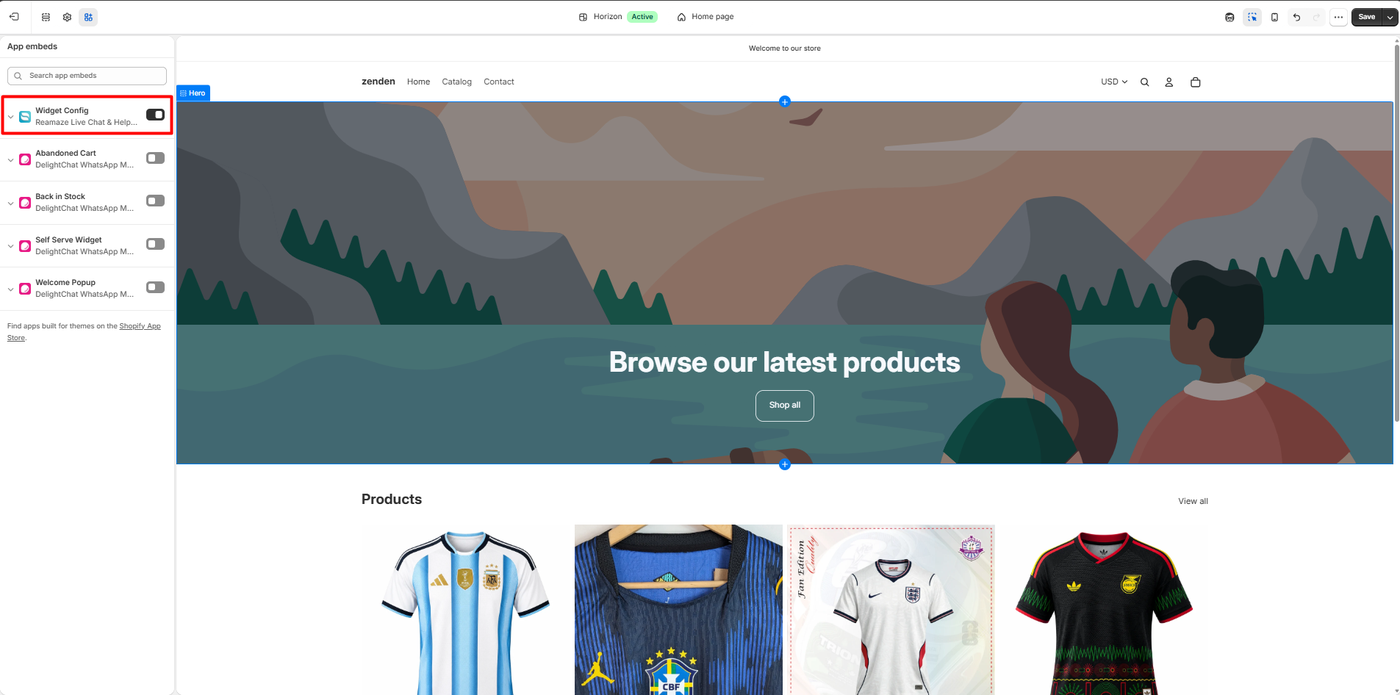
In the theme editor, Re:amaze adds one app embed, Widget Config, which you switch on. That is the only theme step.
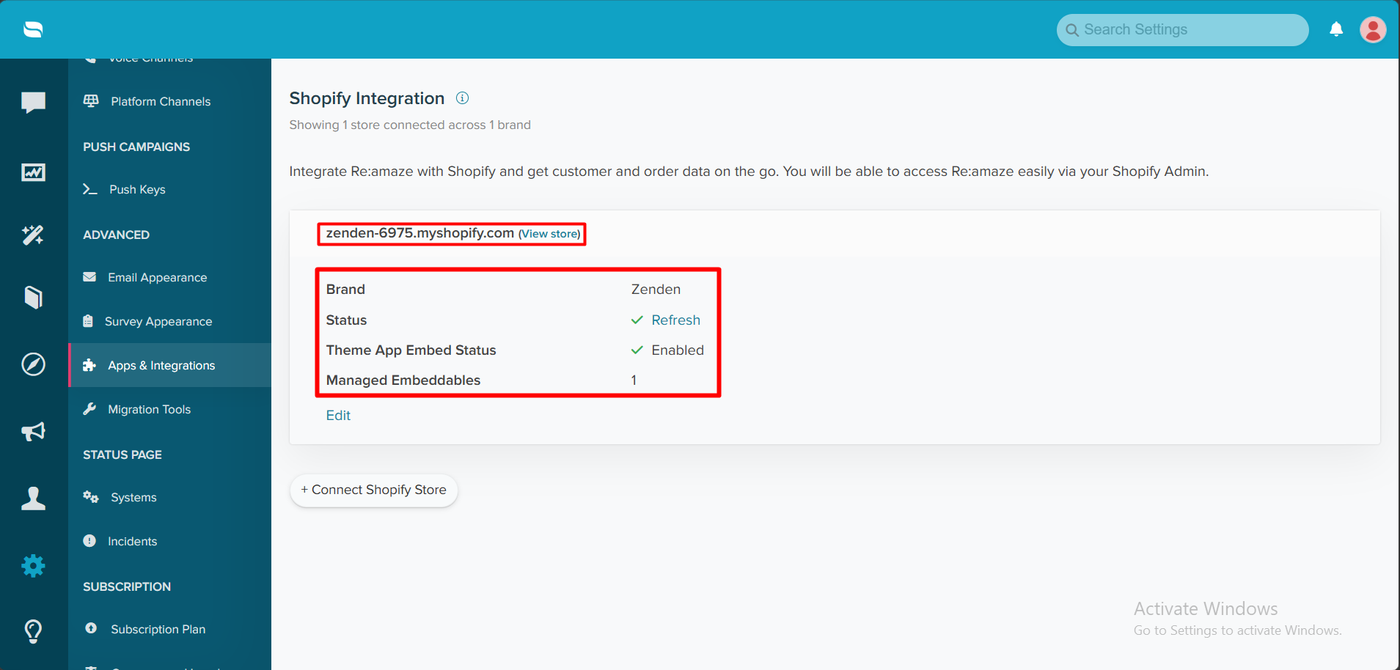
Re:amaze’s Shopify Integration page then confirmed the connection: 1 store connected across 1 brand, a status tick with a Refresh link, Theme App Embed Status: Enabled, and 1 managed embeddable. It is a clear, single-page check that everything is wired up.
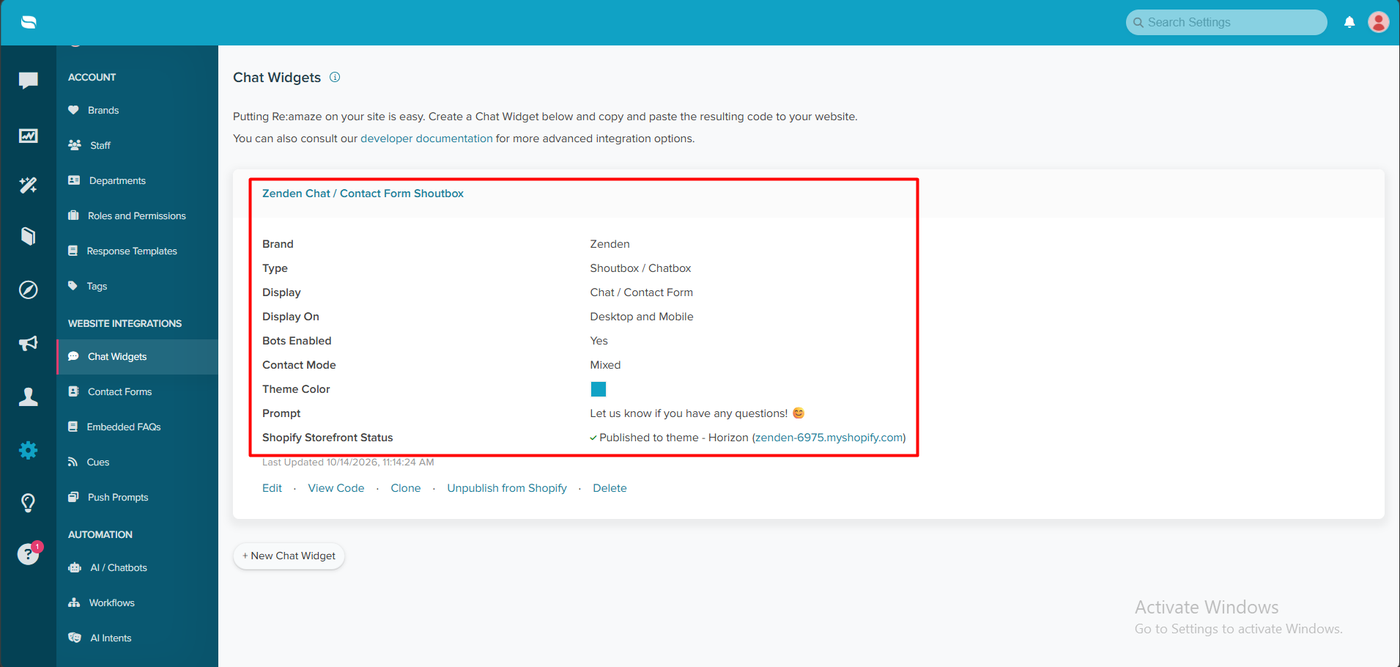
The Chat Widgets page listed our widget, “Zenden Chat / Contact Form Shoutbox.” It showed a shoutbox chat type, chat and contact form display, desktop and mobile, bots enabled, mixed contact mode, the prompt “Let us know if you have any questions! 😊,” and Shopify Storefront Status: Published to theme - Horizon. Links let you edit it, view its code, clone it, unpublish it from Shopify or delete it.
The setup takes more steps than a simple chat app, but every step reports its status clearly.
Order Status Without an Agent
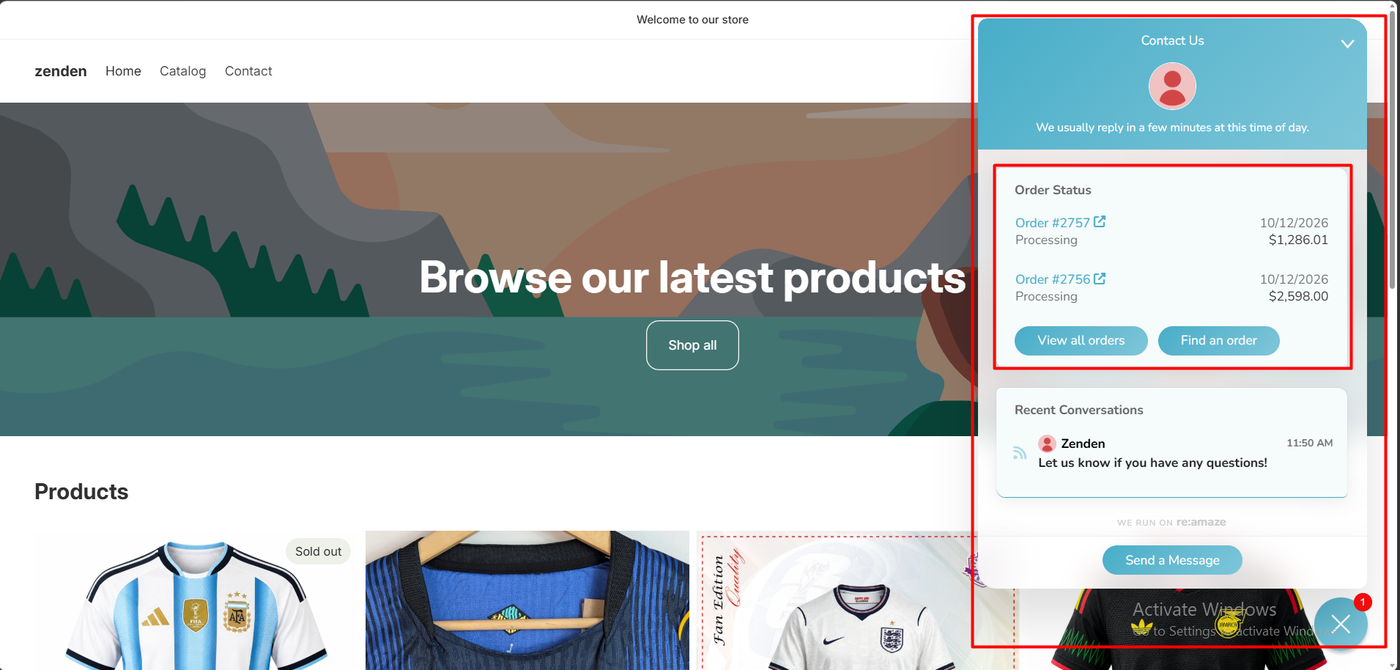
On the storefront, signed in as a customer, the widget opened on a Contact Us panel reading “We usually reply in a few minutes at this time of day.”
Below it, an Order Status card already listed the customer’s two most recent orders: #2757, Processing, 10/12/2026, $1,286.01 and #2756, Processing, 10/12/2026, $2,598.00. Each linked to the order, with View all orders and Find an order buttons underneath. The shopper did not have to type anything.
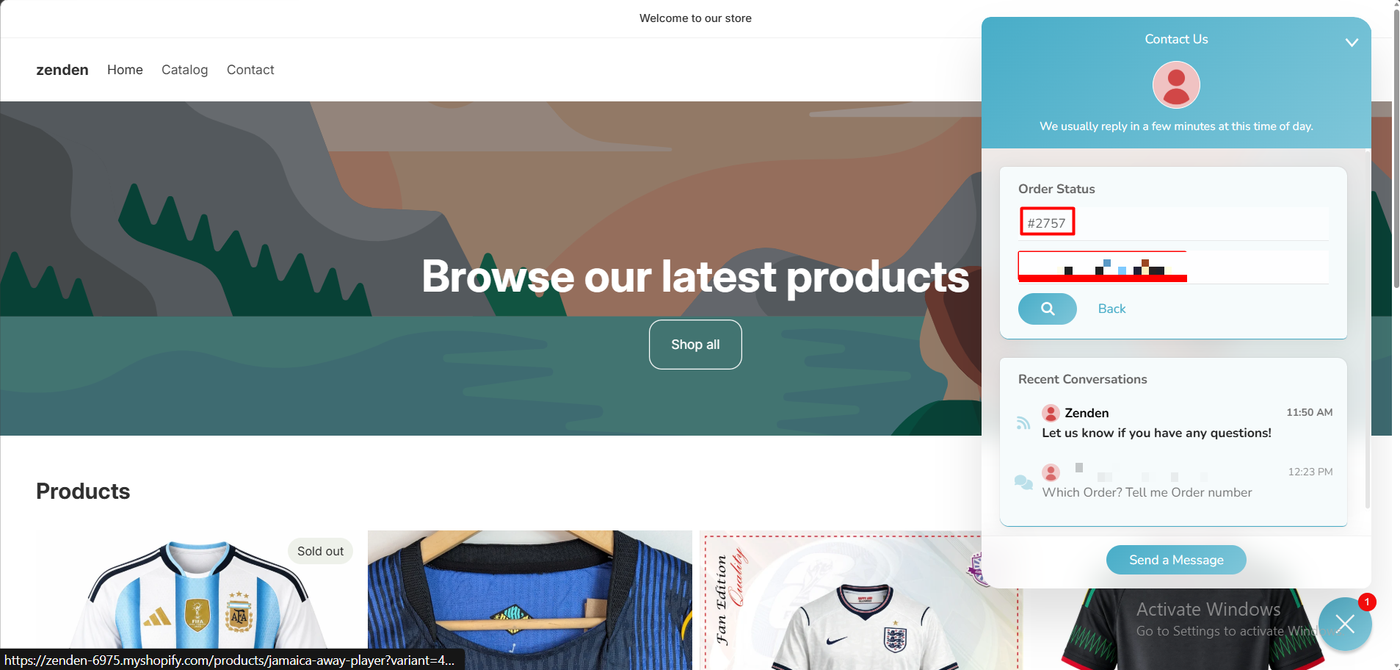
We then tried Find an order, which is what a guest shopper would use. The form asks for an order number and an email address. We entered #2757 and the customer’s email.
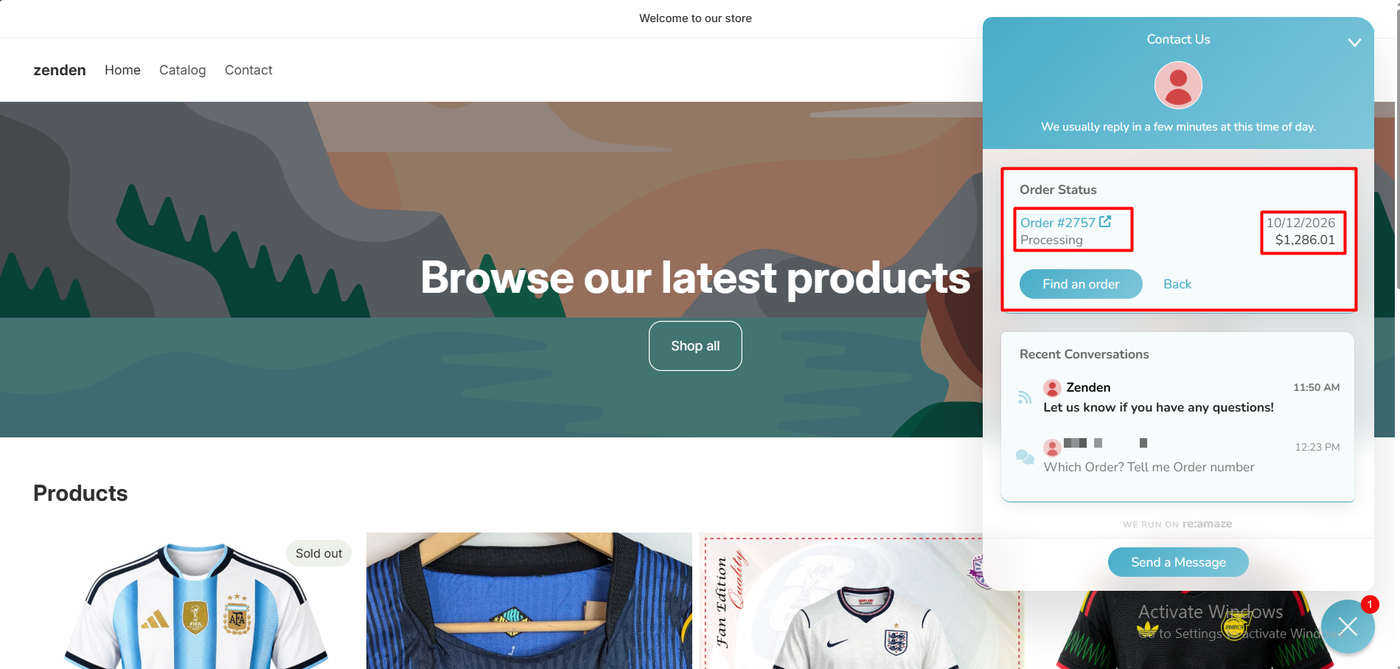
The widget returned Order #2757, Processing, 10/12/2026, $1,286.01, with a link to the order.
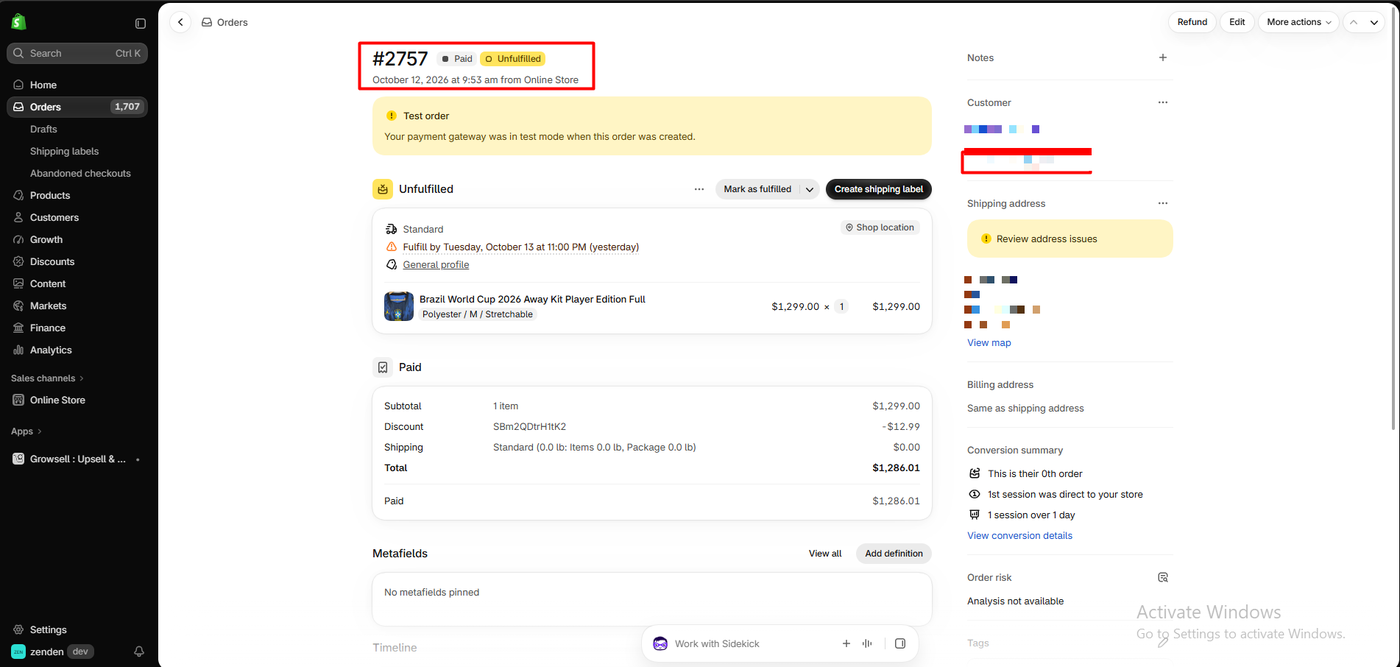
We checked it against Shopify. Order #2757 was Paid and Unfulfilled, placed on October 12, 2026, with a total of $1,286.01. The date and total match exactly. Re:amaze shows “Processing” where Shopify shows “Unfulfilled,” which is a friendlier label for a shopper and means the same thing here.
This is the most useful thing Re:amaze did in our test. Requiring both the order number and the email is sensible, since it stops one shopper from seeing another’s order. And because the answer comes straight from Shopify data, it involves no AI and uses none of your AI allowance.
The widget’s Recent Conversations list also showed an earlier chat in which a team member had replied, “Which Order? Tell me Order number.” With self-service lookup switched on, that question does not need asking.
The AI Agent: Switched On, Not Tested
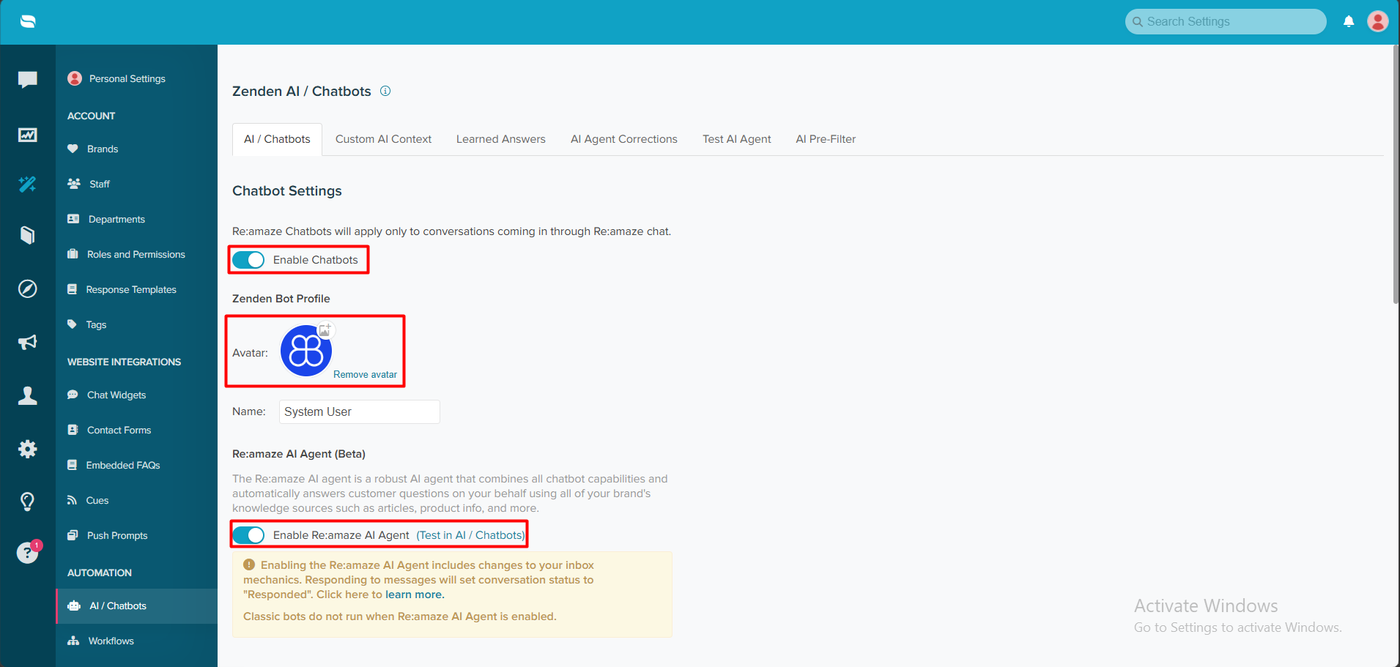
Under AI / Chatbots, we turned on Enable Chatbots and Enable Re:amaze AI Agent, which is labelled Beta. Re:amaze describes it as an agent that “automatically answers customer questions on your behalf using all of your brand’s knowledge sources such as articles, product info, and more.” The page also has tabs for Custom AI Context, Learned Answers, AI Agent Corrections, Test AI Agent and an AI Pre-Filter.
A yellow warning comes with it, and it is worth reading before you switch on. Enabling the AI Agent “includes changes to your inbox mechanics.” Responding to messages sets the conversation status to “Responded,” and “Classic bots do not run when Re:amaze AI Agent is enabled.” So you choose between the newer AI Agent and the older rule-based chatbots. You cannot run both.
We did not have the AI Agent answer a shopper question, so we cannot judge its accuracy. That matters because of how Re:amaze prices AI, covered below.
Re:amaze Pricing
These plans come from the App Store listing, checked on October 14, 2026.
| Plan | Price | AI Agent resolutions | Highlights |
|---|---|---|---|
| Basic | $29/month per user ($313.20/year) | 5 per user a month | Unlimited email inboxes, social, unlimited live chat and chatbots, trainable AI intents, workflows, macros, FAQ, 1,000 push notifications |
| Pro | $49/month per user | 10 per user a month | Adds multi-store, SMS and VoIP, live view, advanced reports, custom domains, status page |
| Plus | $69/month per user | 20 per user a month | Adds staff reports, roles and shifts, departments, satisfaction surveys, co-browse, 2,000 push notifications |
| Starter | $59/month | Not stated | Includes 500 responded conversations; extra packs of 100 for $15 |
Every plan has a 14-day free trial, and annual billing saves 10%. The listing also mentions ticket-volume options with unlimited users.
Three things to work out before you choose:
- Per-user pricing adds up. Three agents on Basic cost $87 a month, or $147 on Pro.
- The AI allowance is small. A one-person store on Basic gets five AI Agent resolutions a month. Even three agents on Plus get 60. If you want AI to handle a real share of chats, ask how extra resolutions are priced.
- Starter is volume-based. At $59 for 500 responded conversations, it may suit a store with a few agents and moderate volume better than paying per user.
What Public Sources Add
On October 14, 2026 the listing showed a 4.4 rating from 181 reviews: 158 at five stars, 5 at four, 2 at three, 4 at two and 12 at one star. That one-star share, about 7%, compares with about 1% for Chatty, Commslayer and Richpanel.
Praise focuses on a mix of features for the price, stability and helpful staff. Several 2026 reviews name an account manager who ran onboarding and AI demos. A long-time user called it “probably the overall best option I have managed a team on” for value, while adding that “the AI is terrible for our needs.”
The criticism is consistent across years:
- Interface. Reviewers in 2023 and 2026 called the dashboard hard to learn, with one describing it as “engineer-level.”
- AI quality. A UK merchant of four years said in 2025 that the AI shopping and FAQ bots “can’t answer the most basic customer question like how much is shipping.”
- Channel reliability. A six-year user said in May 2026 that replying to Facebook messages from Re:amaze stopped working, and that support kept blaming Facebook.
- Support and language. A French store said in August 2026 that it could not show the widget in two languages. Re:amaze confirmed this and flagged it as a feature request.
- Price. Some small merchants call it too expensive. Others say it is good value against Zendesk or Gorgias.
Re:amaze replied to most recent complaints, and in one case said it had shipped two requested fixes. We reproduced none of these issues.
What We Liked
- Self-service order status that matched Shopify exactly, without an agent or AI.
- Automatic order lists for signed-in shoppers, and a secure lookup for guests.
- Clear status pages for the store connection, theme embed and published widget.
- One theme toggle to put the widget on the store.
- A mature, all-in-one helpdesk with workflows, FAQs, surveys and status pages.
- A clear warning about what changes when you enable the AI Agent.
What Could Be Better
- No free plan, and per-user pricing from $29.
- A small AI allowance: 5 to 20 AI Agent resolutions per user a month.
- AI Agent or classic bots, not both.
- Mixed naming, with “Re:amaze AI Helpdesk & Chat” on the listing and “Reamaze Live Chat & Helpdesk” in Shopify.
- A lower rating than newer rivals, with sourced complaints about the interface, AI and Facebook replies, none of which we tested.
- Our test did not cover the AI Agent’s answers.
Who Is Re:amaze Best For?
Re:amaze suits small and mid-sized Shopify stores with a few support agents that want one mature helpdesk for email, chat and social, with order self-service built in, at a moderate per-user price. It fits teams that will rely mainly on people, macros and self-service, with AI as an extra.
Look elsewhere if you want AI to answer most chats, need a free plan, or need a multilingual widget.
Here is how its entry price compares with the other support apps we have reviewed:
| App | Entry price |
|---|---|
| Commslayer | Free plan, unlimited agents, 300 conversations a month |
| Chatty | Free plan, 50 AI conversations a month |
| Willdesk | Free plan, 20 conversations a month |
| Re:amaze | No free plan; $29 a month per user, 14-day trial |
| Richpanel | No free plan; $89 a month per user, 14-day trial |
These figures come from each app’s published plan information, and the products differ in scope.
Final Verdict
Re:amaze did the most important job well. We connected the store, published the widget to the live theme, and watched it show a shopper’s orders and look up order #2757 by number and email, matching Shopify’s date and total exactly.
What you take on with it is a per-user bill, a small AI allowance, an AI Agent still labelled beta, and a rating that trails newer rivals.
Recommended for small support teams that want a mature helpdesk with strong order self-service at $29 per user, and that do not need AI to carry the load. Test the AI Agent on your own questions during the trial.
Frequently Asked Questions
Is Re:amaze free?
No. There is no free plan on the Shopify App Store listing. Paid plans cost $29, $49 or $69 per user a month, or $59 a month for the volume-based Starter plan, all with a 14-day free trial.
Can customers check their order status in the Re:amaze widget?
Yes, in our test. Signed-in customers saw their recent orders automatically. A lookup by order number and email returned order #2757 as Processing with a total of $1,286.01, matching Shopify.
How many AI answers does Re:amaze include?
The listing includes 5 AI Agent resolutions per user a month on Basic, 10 on Pro and 20 on Plus. Order lookups in the widget come from Shopify data and did not use the AI in our test.
Can I use Re:amaze’s AI Agent and chatbots together?
No. Re:amaze warns that classic bots do not run when the AI Agent is enabled, and that enabling it changes how conversation statuses work.
Did you test Re:amaze’s AI Agent?
We switched it on but did not have it answer shopper questions, so we cannot judge its accuracy. Public reviews are mixed on Re:amaze’s AI.
Does Re:amaze work without coding?
In our test, yes. We switched on the Widget Config app embed in the theme editor, and Re:amaze published the chat widget to the Horizon theme without any code.