
Most helpdesk apps are sold on the conversations they let you have. The better question is how many conversations they stop you from needing.
Willdesk answers that directly. Its storefront widget carries an order-tracking panel, and in our test a customer used it to look up a real order, see its status and shipping destination, and reach Cancel and Return buttons — without an agent touching it.
That is the single most valuable thing a support app can do for a small Shopify store. What sits around it is less tidy: a free plan capped at twenty conversations a month, an AI agent that answered from a stored note rather than the live catalogue, and a pricing screen running a countdown clock.
Key Takeaways
- Self-service order tracking worked end to end. An order number and email returned the live order, its paid status, its ship-to location, and Cancel and Return actions inside the chat widget.
- The free plan is capped at 20 conversations a month, with 20 order-tracking lookups. Most active stores will pass that in days.
- The AI answered from a saved question-and-answer entry, naming two products with no prices, rather than reading the live catalogue.
- AI conversations are billed separately. Overage on the paid plans runs to $20 per 100 AI conversations on Basic and $200 per 1,000 on Pro.
- The in-app pricing screen ran a 48-hour countdown beside 35%-off prices that do not appear on the public listing.
Our Verdict
Willdesk is a sensible pick for a small Shopify store whose support load is mostly “where is my order” — provided you treat the free plan as a trial and price the paid tier honestly.
The core deflection loop worked. The widget installed from one theme toggle, the order lookup returned real Shopify data, and the customer reached cancel and return options without a human. The merchant inbox showed the same order inline beside the conversation, so an agent picking it up already had the context.
The reservations are about scope and cost. Twenty conversations a month is a demonstration, not a plan. The AI is a separate meter with its own charges, and in our test it behaved like a stored FAQ rather than a catalogue-aware agent. And the upgrade screen used urgency tactics that sit oddly against a product otherwise pitched on good value.
What Willdesk Offers
Willdesk is a live chat, helpdesk and self-service app from Channelwill. Its Shopify App Store listing carries the Built for Shopify badge and describes a unified inbox across email, live chat and social, AI automation for order tracking, returns, cancellations and address updates, a ticketing system, workflow automation and a customisable help centre. The app launched in February 2021 and the listing claims support for more than twenty languages.
Listed integrations include Shopify Checkout and Flow, Gmail, Outlook, Microsoft 365, Zoho, Klaviyo, Mailchimp, Messenger, Parcel Panel and TrackingMore.
What We Tested
We tested Willdesk in October 2026 on a Shopify development store called zenden, running the Horizon theme with a jersey catalogue. This is a different store from the one used for our Tidio and Zipchat reviews, so nothing here is a like-for-like comparison with those apps.
Our test covered the install permissions, the in-app plan screen, enabling the Helpdesk app embed in the theme editor, the storefront widget, a real $1,299 Shopify order placed for the test, the widget’s order-tracking flow through to the order detail view, the merchant inbox with its order context and customer panel, the AI agent’s knowledge configuration, and a live AI answer on the storefront.
We did not test email, Instagram, Messenger or WhatsApp channels, ticketing workflows, macros, the help centre or FAQ builder, automation rules, the mobile app, multi-language behaviour, or the mobile rendering of the widget. We did not press Cancel or Return, so we saw the buttons but not what they do. We stayed on the free plan throughout, so no billing event, overage charge or trial occurred. Pricing was read from the in-app plan screen and the App Store listing.
What Public Sources Add
On October 8, 2026 the listing showed a 4.8 rating from 386 reviews, with 95% at five stars and 2% at one star. Recent reviews run to July 2026.
Praise concentrates on named support staff, a clean modern interface, the unified inbox, the mobile app, and value for money, with several merchants describing the free plan as unusually generous for what it includes.
The small negative set is specific and relevant. Two merchants describe charges continuing despite an annual subscription. One reports bugs in macro editing, note length and data export going unfixed for months with slow support. One describes the chatbot replying automatically even after AI features were switched off. Another says the Shopify integration returned incomplete order data, missing product variants and shipping details. And more than one flags that AI pricing is not made clear upfront — which matches what we found on the pricing screen.
We did not reproduce any of this. The AI-cost complaint is the one our own research independently landed on.
Setup: One Toggle, Then a Widget
The install dialog requests customer data including sensitive device and activity data, staff and contributor data, and read-write access to customers, products, orders, discounts, store analytics and the online store.
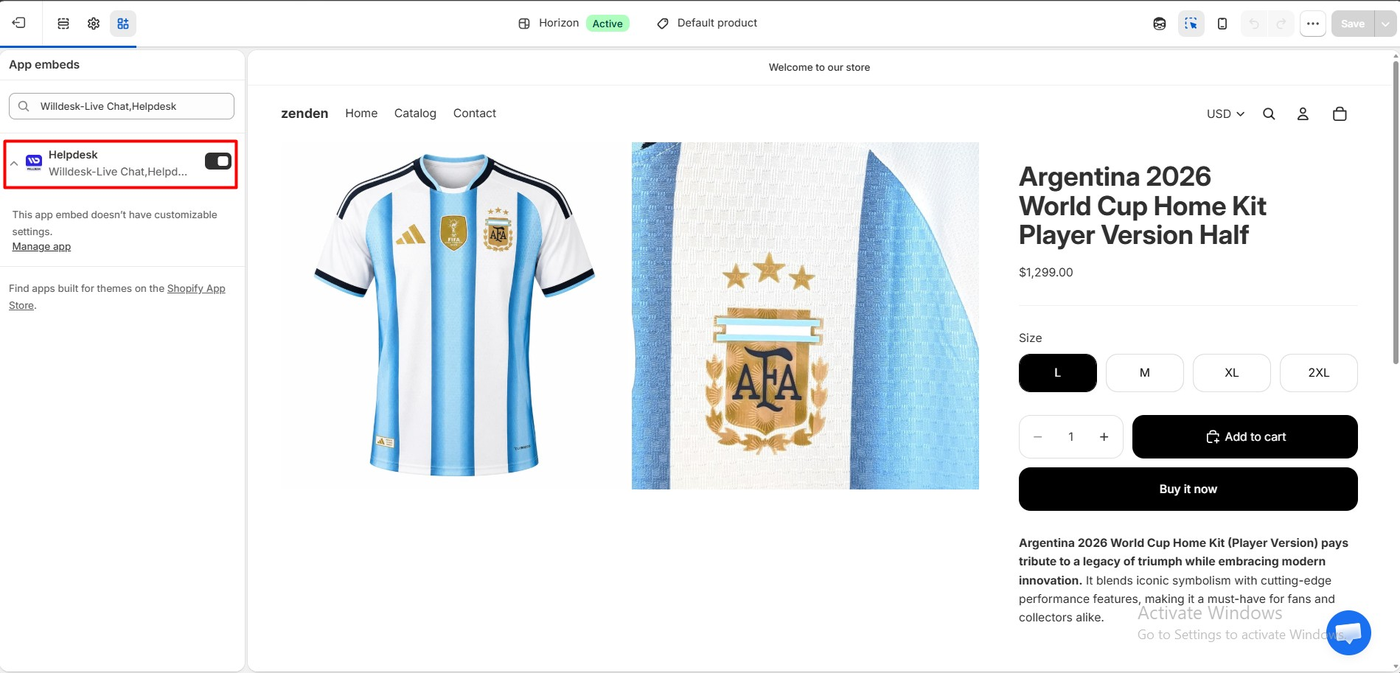
Going live meant enabling the Helpdesk app embed in the theme editor. Like most apps in this category, it exposes no settings there — appearance is managed inside Willdesk.
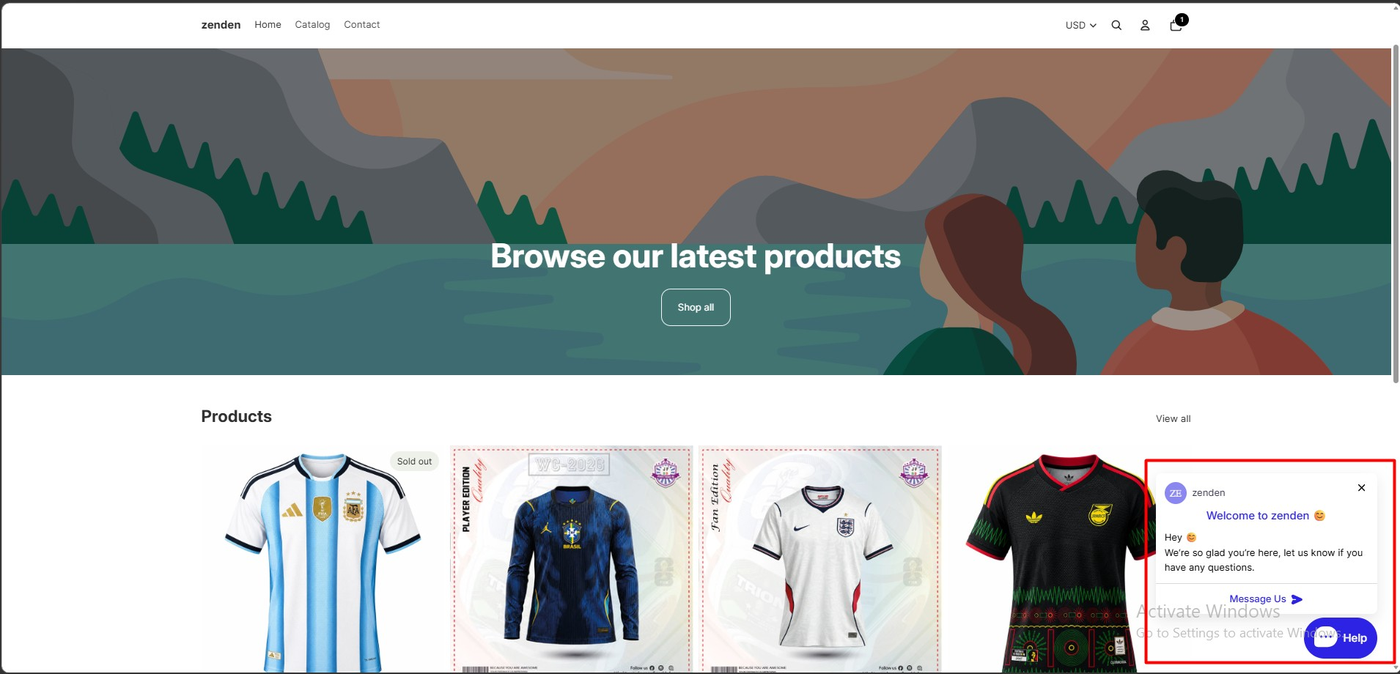
On the storefront a “Help” launcher appeared at the bottom right, opening to a branded greeting card and a Message Us button. Nothing required code.
The Order-Tracking Loop That Actually Deflects
This is the part worth installing the app for.
For a signed-in customer the widget opened on a panel offering Contact us with an online indicator, a Resume chat button, an email option, a search box for support articles, and an Order Track row.
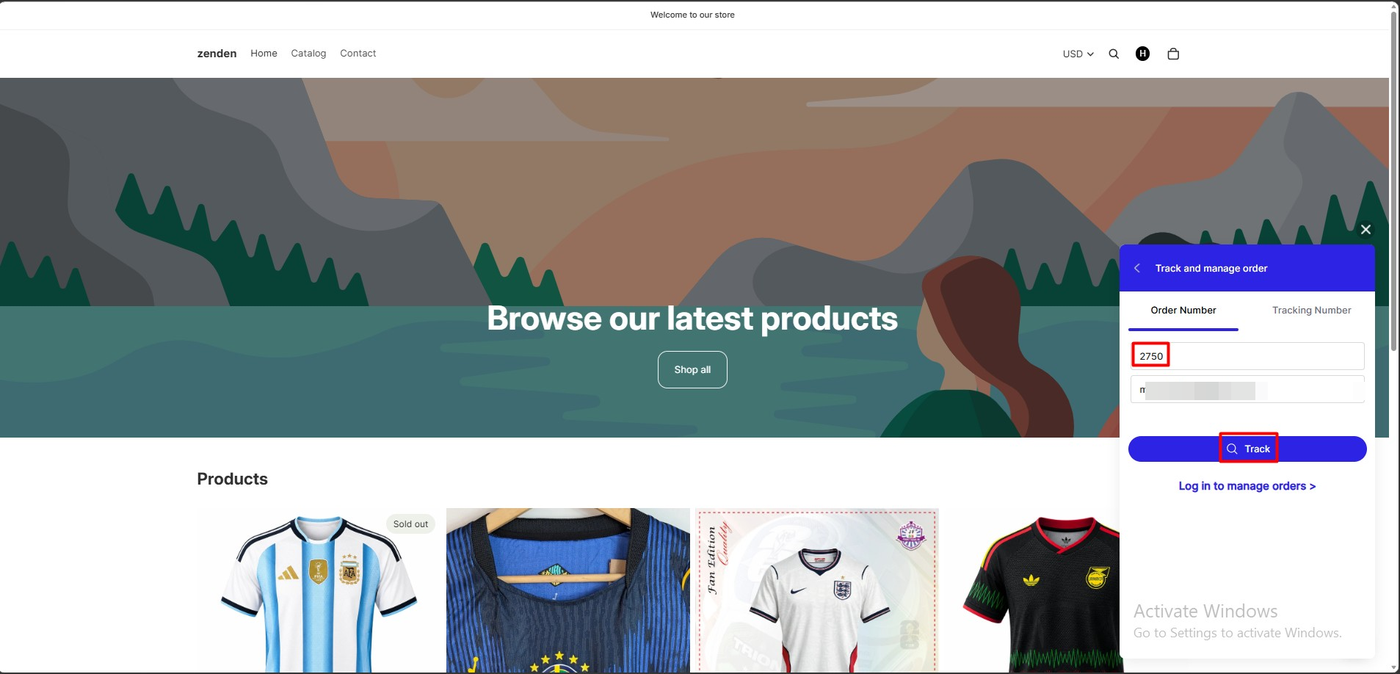
Opening it gave a “Track and manage order” form with two tabs — Order Number and Tracking Number — plus fields for the order number and email, a Track button, and a link to log in and manage orders.
We had placed a real order on the store for the test: #2750, a $1,299 jersey, paid, visible in the Shopify admin. We entered that number and the customer’s email.
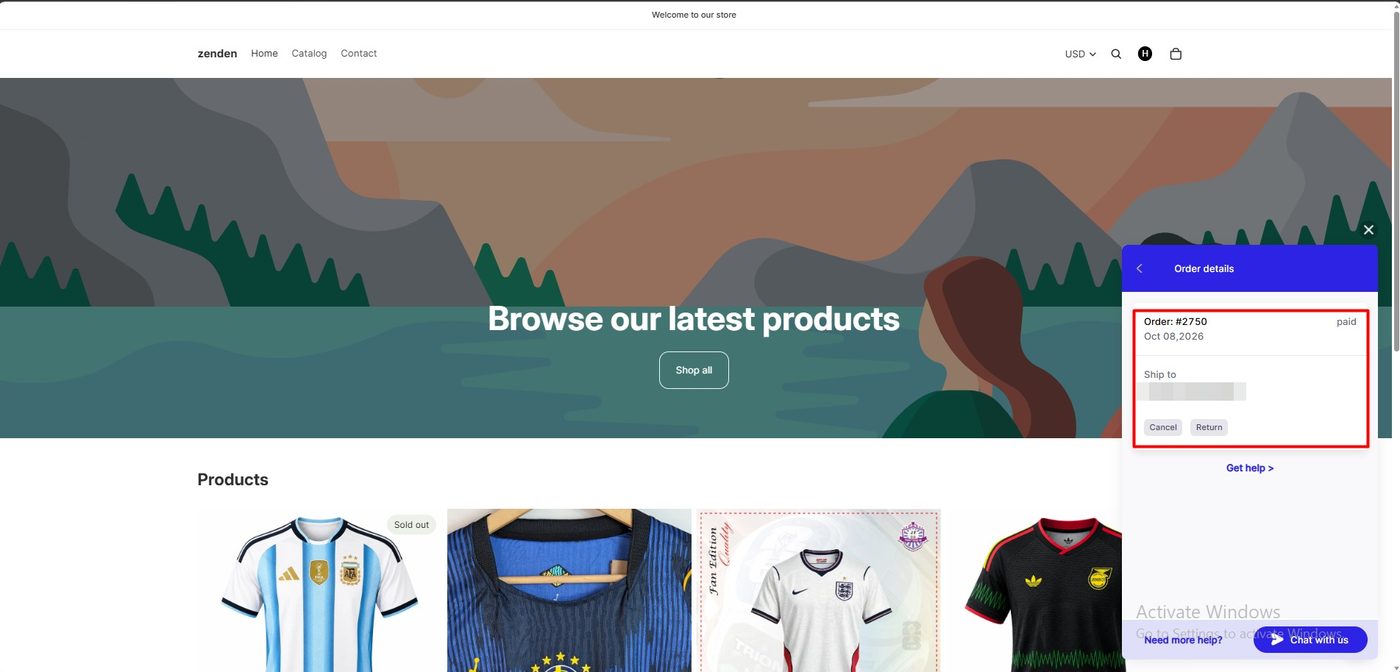
The widget returned the order: #2750, marked paid, dated Oct 08 2026, with the ship-to location, a “Get help” link, and two action buttons — Cancel and Return.
That is a complete self-service path. A customer with a question about an existing order can answer it, and start a cancellation or return, without creating a conversation at all. For a store whose inbox is mostly order-status questions, this is the feature that changes the workload — and it matters doubly here, because conversations are the billing unit.
We did not press Cancel or Return, so we cannot say what happens next, whether it creates a Shopify request, or what guardrails apply. That is the obvious next thing to test before launch.
What the Merchant Sees
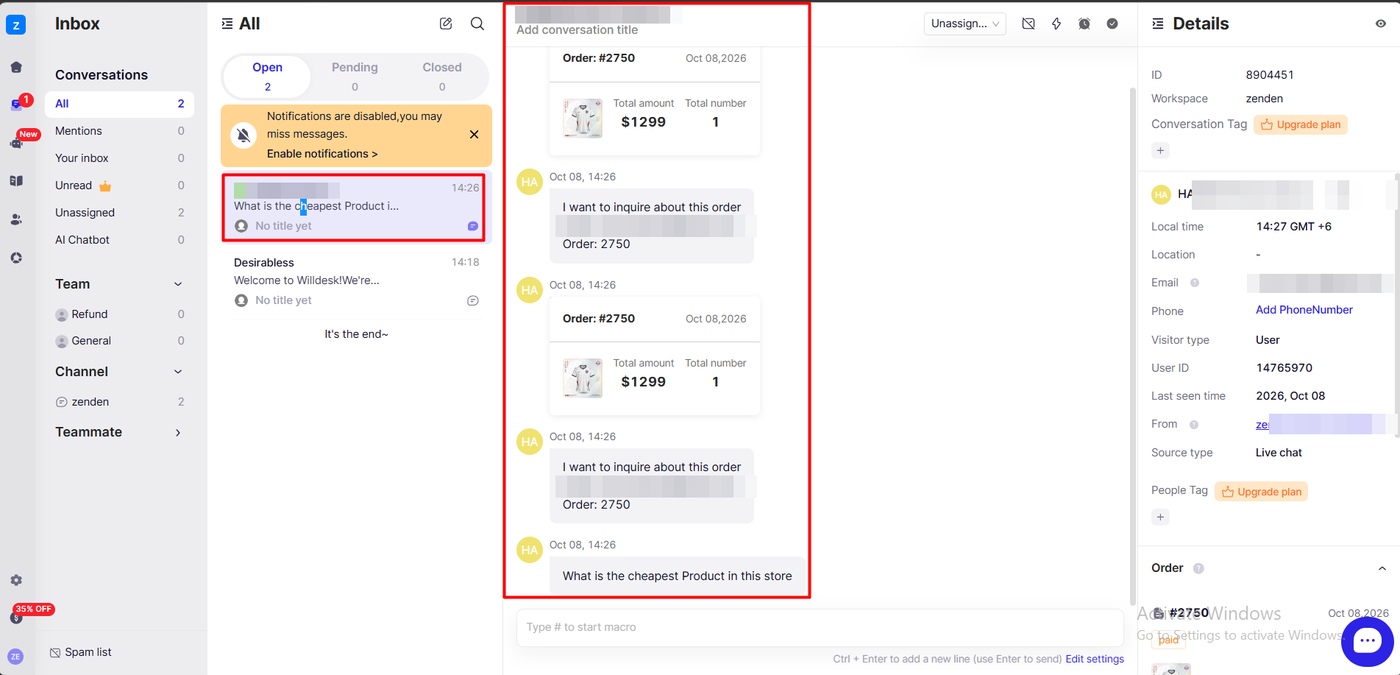
The Willdesk inbox splits conversations into Open, Pending and Closed, with folders for mentions, unread, unassigned and AI chatbot, plus team and channel groupings.
Our conversation arrived with an order card rendered inline — order number, date, product thumbnail, total amount and item count — above the customer’s messages. The details rail carried the workspace, local time, email, visitor type, user ID, last seen time, source channel and the linked order with its paid status.
Two things stood out. An agent opening this has the order in front of them without switching to Shopify, which is exactly right. But Conversation Tag and People Tag both carry “Upgrade plan” badges, so tagging — a basic organisational tool — is gated on the free plan. A banner also warned that notifications were disabled, which on a free plan with a 20-conversation ceiling is a combination worth fixing on day one.
The AI Answered From a Stored Note
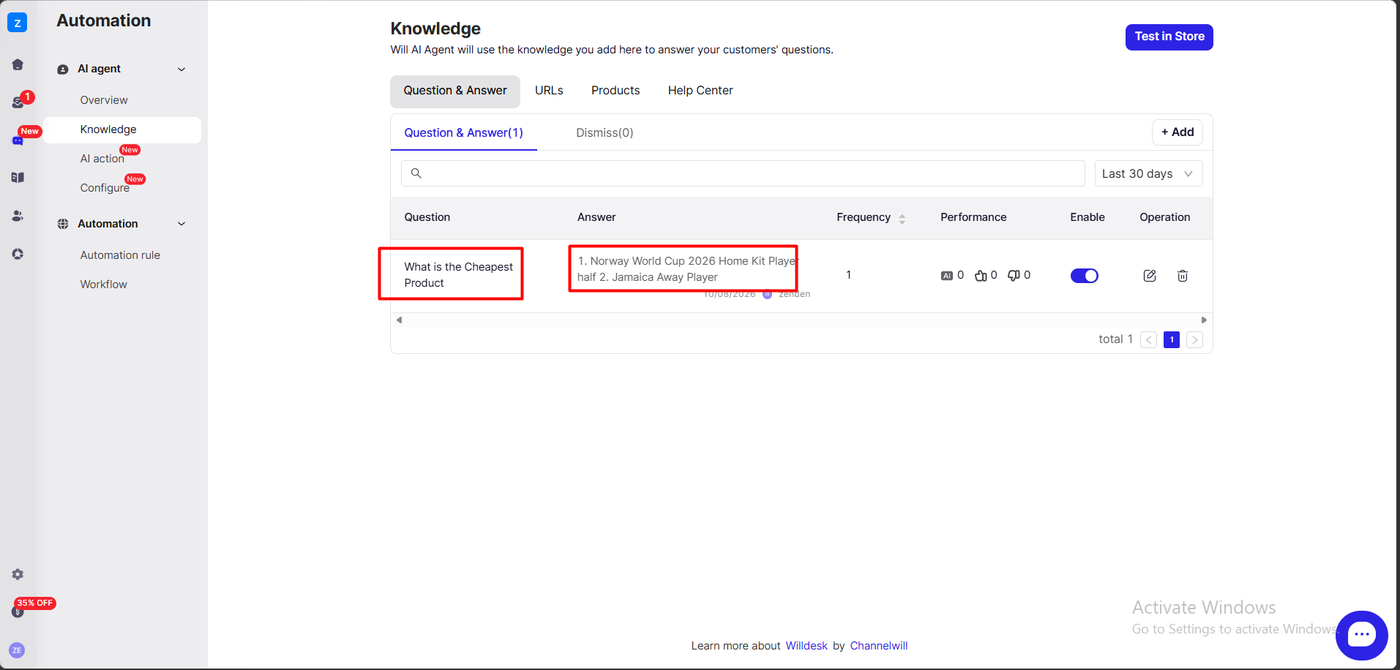
Willdesk’s AI agent is configured under Automation. Its Knowledge area has four tabs — Question & Answer, URLs, Products and Help Center — and a Test in Store button. The Configure screen showed the AI Agent and AI Assistance toggles enabled for the store’s channel, with knowledge associated to it.
Our store had exactly one Question & Answer entry: “What is the Cheapest Product”, answered with “1. Norway World Cup 2026 Home Kit Player half 2. Jamaica Away Player”. The row showed a frequency of 1 and zero feedback either way.
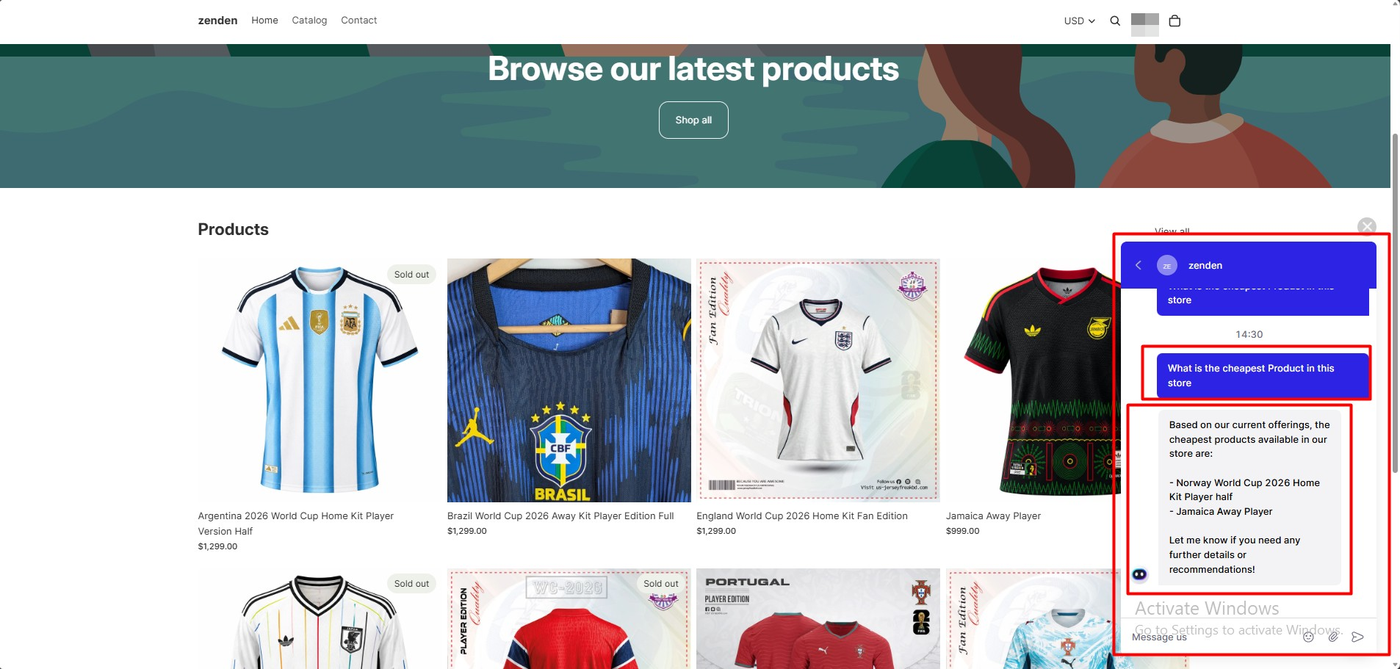
Asked the same question on the storefront, the agent replied that the cheapest products available were those same two items, and offered further details — repeating the stored entry almost verbatim.
Three observations, carefully bounded. The answer contained no prices, which is a strange omission for a cheapest-product question, and gave no ordering between the two. We could not verify one of the named products against the visible catalogue, where the lowest price on screen was $999. And the behaviour is consistent with answering from a saved note rather than reading live product data — the Products tab exists in Knowledge, but we did not inspect whether it was populated.
So this is not a hallucination finding. It is a configuration finding: on this store the agent behaved like a well-organised FAQ, and a merchant expecting live catalogue awareness would need to confirm the Products source is doing work. We asked one question in one session, which is enough to describe what happened and not enough to characterise the AI generally.
Pricing, and the Clock on the Screen
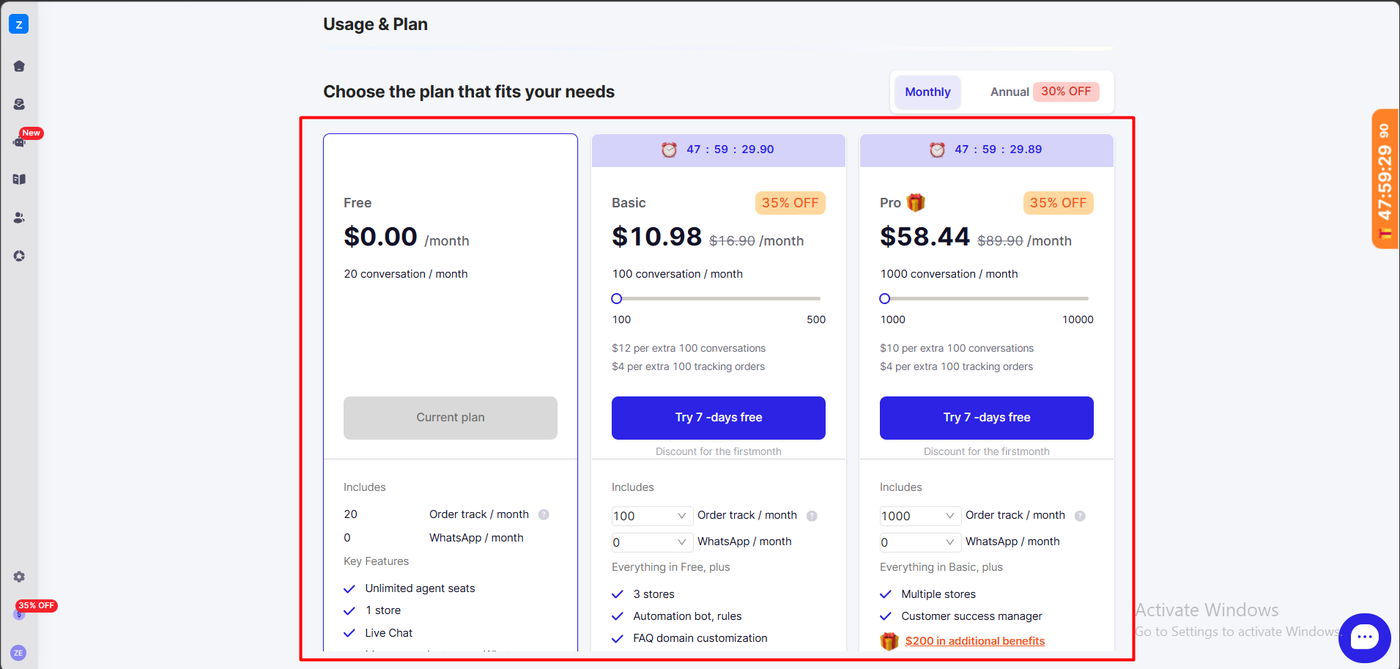
The in-app plan screen and the public listing tell different stories, and the gap is the finding.
The App Store listing, checked October 8, 2026:
| Plan | Price | Includes | Overage |
|---|---|---|---|
| Free | $0 | 1 store, 20 conversations, live chat, contact form, order tracking, help centre, macros | — |
| Basic | $16.90/mo or $141.96/yr | 3 stores, 100 conversations, 100 order-tracking quota, automation bot, custom FAQ domain | $12/100 conversations, $4/100 tracked orders, $20/100 AI conversations |
| Pro | $89.90/mo or $755.16/yr | Multiple stores, 1,000 conversations, 1,000 order-tracking quota, customer success manager | $10/100 conversations, $4/100 tracked orders, $200/1,000 AI conversations |
The in-app screen showed the same tiers at 35% off — Basic at $10.98 and Pro at $58.44 — under a live countdown timer reading just under 48 hours, with a second countdown pinned to the screen edge and a floating discount badge. A note under each button read that the discount applies to the first month.
Three things a merchant should take from that.
Twenty conversations is the real constraint. Not twenty a day — twenty a month, alongside twenty order-tracking lookups. Any store with genuine support volume is on a paid plan quickly, which makes Basic the honest starting price.
The AI is a separate meter. Conversations and AI conversations are billed differently, and $20 per 100 AI conversations on Basic is steep next to $12 per 100 ordinary ones. Public reviewers have made the same complaint about AI costs not being obvious upfront.
Treat the countdown as marketing. A 48-hour timer on an upgrade screen is a pressure tactic, not a deadline you can verify. Decide from the listing prices, and if a discount is genuinely available it will still be there when you have done the maths.
Worth running the numbers before you choose a tier. A store handling 300 support conversations a month on Basic pays the $16.90 base plus 200 conversations of overage at $12 per hundred, or $24, and if it also tracks 300 orders that is another $8 — roughly $49 a month before any AI usage. At that point Pro at $89.90, which includes 1,000 conversations and 1,000 tracking lookups, starts to look like the cheaper ceiling rather than the expensive tier. The jump is worth modelling against your own volumes rather than reading the headline prices.
What We Liked
- Self-service order tracking that reaches cancel and return, resolving the commonest support question without a conversation.
- Order context inline in the inbox, so an agent has the order without leaving Willdesk.
- One-toggle activation with no theme code.
- A genuinely free tier that includes order tracking and the help centre rather than gating them.
- Broad language support claimed on the listing, unusual at this price.
What Could Be Better
- 20 conversations a month makes the free plan an evaluation, not an operating plan.
- AI billed on its own meter, at rates that are easy to miss until you read the overage line.
- A countdown timer and struck-through prices on the upgrade screen, with discounts that do not appear publicly.
- Tagging is gated, so free-plan inboxes cannot be organised.
- The AI behaved like a stored FAQ in our test, answering without prices.
- Sourced complaints about billing continuing on annual plans, incomplete order data, slow bug fixes, and the chatbot replying after AI was disabled. We experienced none of these.
Who Willdesk Is For, and Who Should Look Elsewhere
Willdesk suits small Shopify stores whose support is dominated by order-status questions, and who want the help centre, contact form and tracking widget working on day one at low cost. If most of your inbox is “where is my order”, the tracking panel alone may justify it.
Look elsewhere if you need a catalogue-aware AI agent out of the box, if you depend on tagging and reporting to run a queue, or if unpredictable AI metering is a problem for your budget. Merchants who have read the billing complaints should check their invoice after any plan change.
Our other reviews in this category, Tidio and Zipchat, cover AI-led tools tested on a different store; both are stronger on conversational AI and neither was tested on self-service order tracking.
Final Verdict
Willdesk did the thing we most wanted to see. A customer looked up a real Shopify order from the storefront widget, saw its status and destination, and reached cancel and return options without an agent — and the merchant inbox showed that same order beside the conversation. For a small store drowning in order-status questions, that is the whole value proposition, and it works.
What surrounds it needs clear eyes: a free plan that is really a trial, an AI meter priced separately from conversations, tagging behind an upgrade, and an urgency clock on the pricing screen.
Recommended for order-status-heavy stores that budget for the Basic plan from the start and verify the AI costs before switching it on.
Frequently Asked Questions
Is Willdesk free?
There is a free plan: one store, 20 conversations a month and 20 order-tracking lookups, with live chat, contact form, order tracking, help centre and macros included. Paid plans are $16.90 and $89.90 a month on the listing, each with a 7-day trial.
Can customers track orders without contacting support?
In our test, yes. The storefront widget’s Order Track panel accepted an order number and email and returned the real order with its paid status, date, ship-to location, and Cancel and Return buttons. We did not press those buttons, so we cannot say what they trigger.
Does Willdesk charge extra for AI?
Yes. AI conversations are metered separately from ordinary conversations. The listing states overage of $20 per 100 AI conversations on Basic and $200 per 1,000 on Pro. Several public reviewers say this is not obvious before you commit.
Why does the in-app price differ from the App Store price?
Our plan screen showed 35%-off prices — $10.98 and $58.44 — under a 48-hour countdown, described as a first-month discount. Those figures do not appear on the public listing. Budget from the listing prices and confirm what you will actually be billed.
Does Willdesk replace a full helpdesk?
It depends on your queue. In our test the inbox handled conversations with order context attached, but tagging sat behind an upgrade and we did not test ticketing workflows, macros, automation rules or reporting. Treat it as a capable live-chat and self-service layer first, and verify the queue-management tools against your own process before moving a support team onto it.