
Most helpdesk apps we review compete on a free plan. Richpanel does not have one.
Its Shopify App Store listing starts at $89 a month per agent, adds $0.20 for each AI conversation, and offers a 14-day trial. That price puts it up against Gorgias rather than the free chat apps, and the listing pitches it accordingly: “an AI support team that resolves tickets end to end.”
So the question for this review was whether the helpdesk underneath is good enough to justify the bill. We installed Richpanel on a Shopify development store, set up live chat, chatted as a shopper, answered from the inbox, and looked at the automation tools.
One thing to say up front: we tested the helpdesk, not the AI agent. Every reply in our test came from a team member. That is why this review is marked as a partial hands-on test.
Key Takeaways
- Live chat went live quickly. A three-step wizard enabled the widget, verified it, and confirmed “Live chat is now active on your store.”
- The inbox is the highlight. Each chat showed the customer’s total spend, tags and Shopify orders, with Refund and Cancel buttons beside the conversation.
- There is no free plan. Pro costs $89 a month for one user and $89 for each extra user. AI conversations cost from $0.20 each on every plan.
- We did not test the AI agent. Our shopper chat was answered by a team member, so we cannot judge the AI that the listing leads with.
- Setup is a workspace, not a widget. Richpanel asks you to create a company workspace with a help-center domain and connect your store to it.
Our Verdict
Richpanel is a sensible choice for established Shopify brands with a support team, more than one channel, and a budget built around per-agent pricing. It is a poor fit for a small store looking for a free or cheap chat tool.
The parts we tested were polished. The setup flow is clear, the live chat widget was verified before it went live, and the inbox puts order details beside every conversation. Merchant reviews consistently praise the people behind it, often by name.
The reservations are about cost and evidence. At $89 per agent plus $0.20 per AI conversation, a three-person team handling a thousand AI chats a month would pay about $467 before any add-ons. The AI agent is the reason most people will consider Richpanel, and our test did not reach it. Run it on your own tickets during the 14-day trial before you commit.
What Richpanel Offers
Richpanel: AI Customer Support is published by Richpanel Inc of San Jose, California. Its Shopify App Store listing carries the Built for Shopify badge and shows a launch date of November 15, 2019.
The listing describes an “AI-native helpdesk.” A manager AI studies your tickets and policies and writes playbooks for AI agents. Those agents handle order status, returns, refunds, cancellations and subscriptions. Merchants set guardrails such as refund limits and approval rules, and a QA agent reviews closed conversations. The team works from one inbox covering email, chat, social and SMS across several stores. The listing also says Richpanel is SOC 2 Type II, HIPAA and GDPR audited.
It lists more than 20 integrations, including Aircall, Klaviyo, ReCharge, Returnly and Yotpo. In the admin, the channel settings also showed WhatsApp, Attentive, Talkdesk, JustCall, RingCentral and TikTok Shop.
What We Tested
We tested Richpanel in October 2026 on a Shopify development store called zenden. It runs the Horizon theme with a nine-product football jersey catalogue and about 1,700 orders of history.
Our test covered the install permissions, the product choice at sign-up, creating a workspace, connecting the store, the theme app embed, the live chat setup wizard, a real storefront chat, the conversation in the inbox, and the Task Bot settings. We stayed on the 14-day trial.
We did not test the AI agent, the manager AI or QA agent, Sidekick, email, social, SMS or phone channels, the self-service portal, returns, refunds or cancellations, reports, the MCP integration, or any billing. The cheapest-product question we ask every support app was answered by a team member, not by AI. Pricing comes from the App Store listing, checked on October 14, 2026.
Setup: A Workspace First
The install dialog asks to view customer data, including sensitive, device and activity data, and store-owner data. It also asks to view and edit customers, products, orders and the online store. That is a narrower request than some of the AI chat apps we have reviewed.
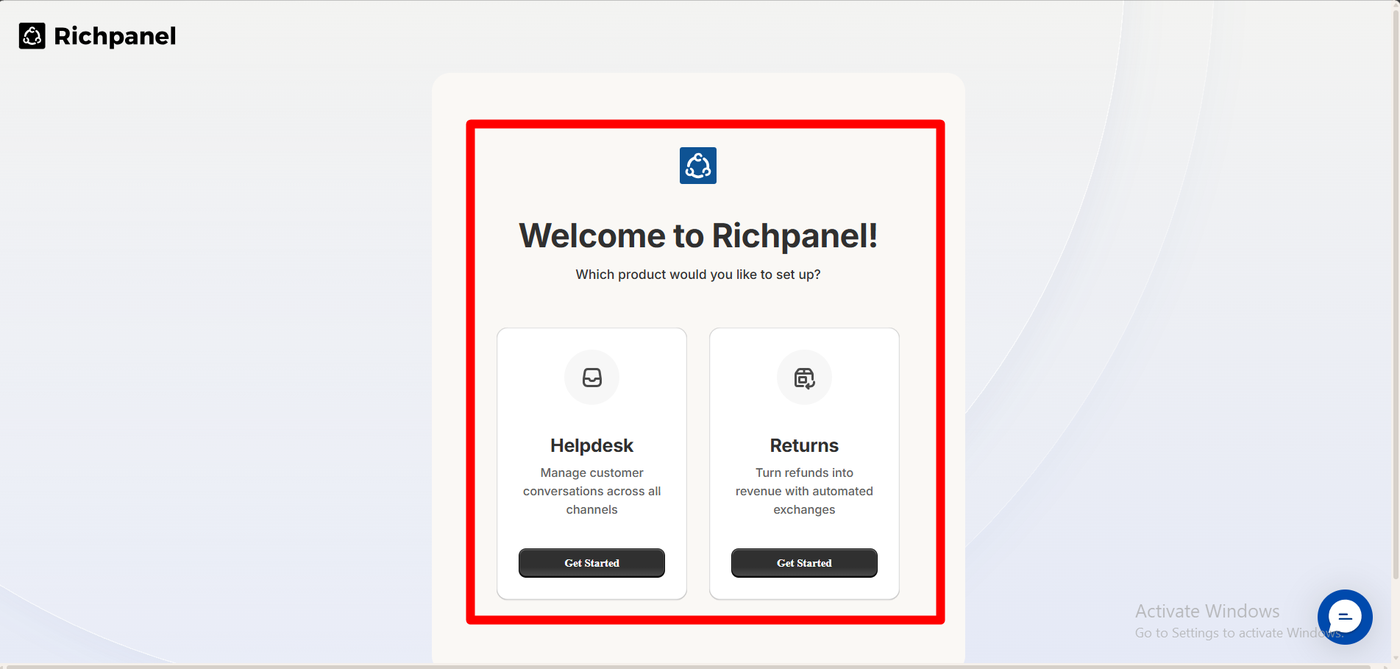
Richpanel then asks which product you want to set up: Helpdesk, to manage conversations across channels, or Returns, to “turn refunds into revenue with automated exchanges.” We chose Helpdesk.
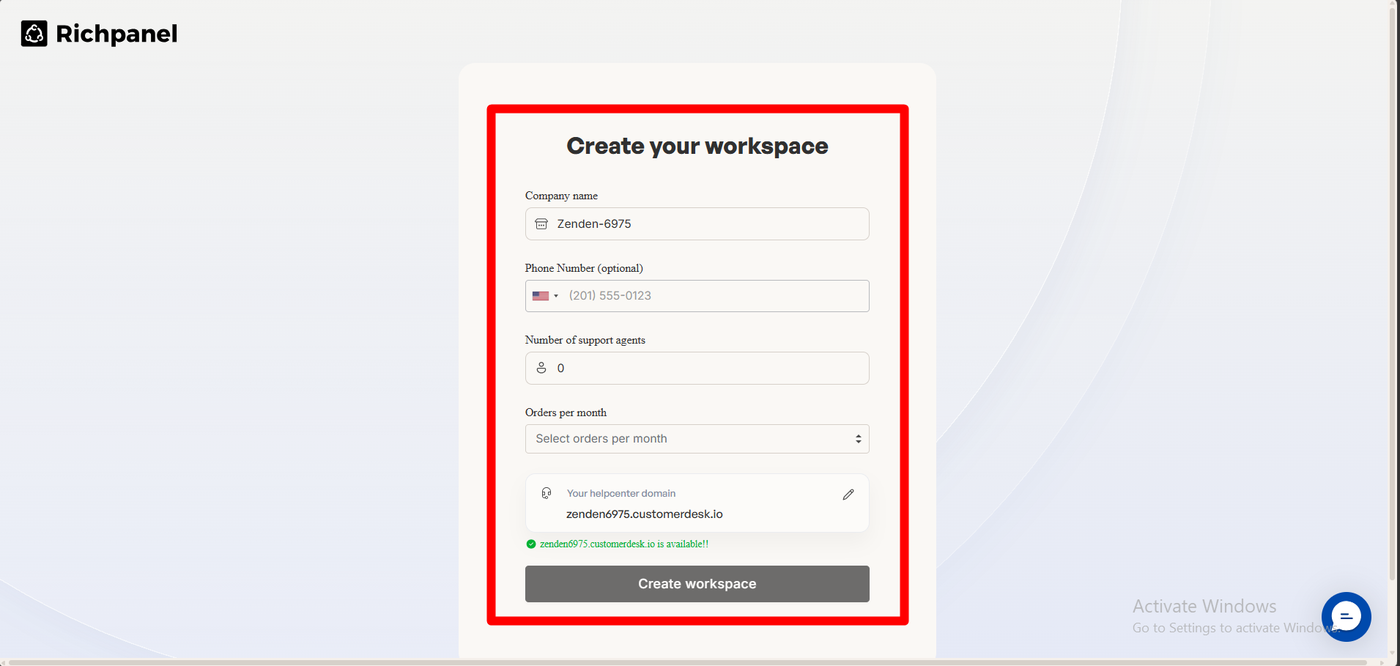
Next comes Create your workspace: a company name, an optional phone number, the number of support agents, orders per month, and a help-center address. Ours was offered as zenden6975.customerdesk.io, marked available. You then pick an organisation and brand and press Connect Store, which links the Shopify store to the workspace. After that, a banner read “Shopify import started,” and the top of the admin showed “Your full-access free trial ends in 14 days.”
This takes longer than switching on a chat widget, but it is how full helpdesks work. Richpanel is built to handle several brands and stores in one workspace.
Live Chat: Verified Before It Goes Live
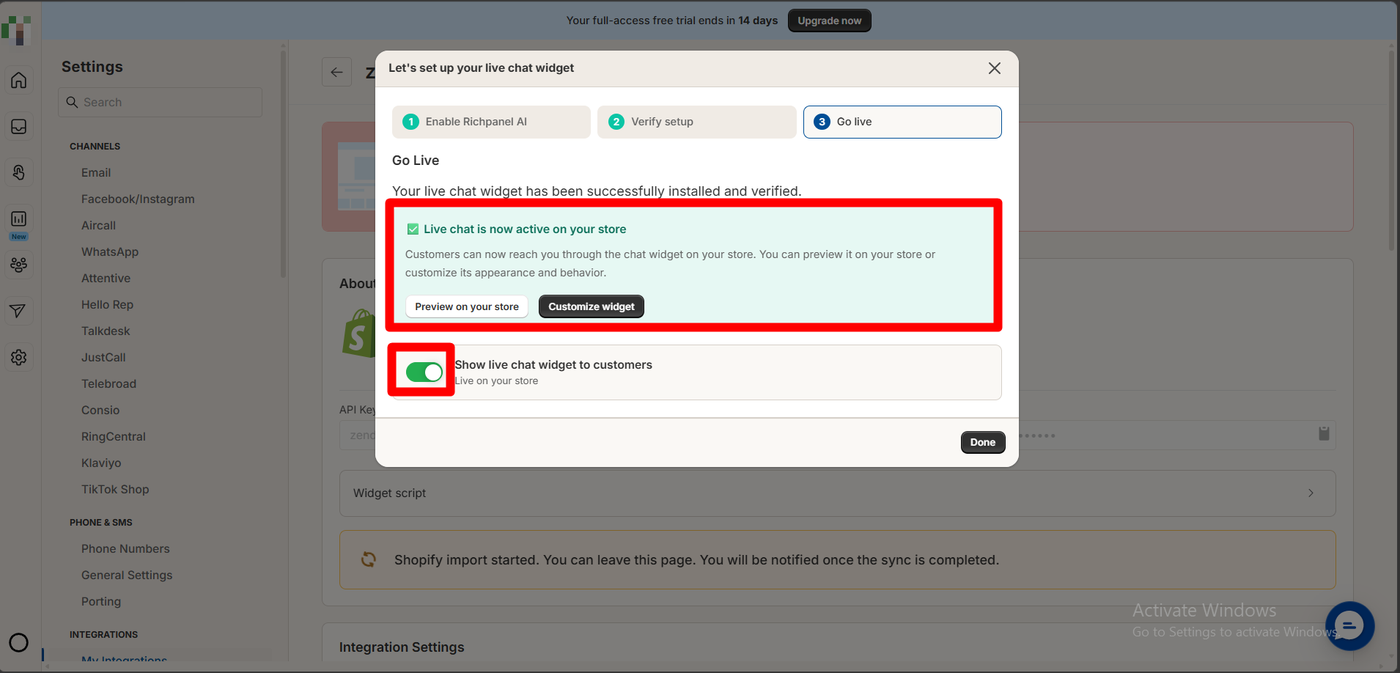
The live chat wizard has three steps: Enable Richpanel AI, Verify setup and Go live. On the last screen it reported: “Your live chat widget has been successfully installed and verified,” with “Live chat is now active on your store,” buttons to preview or customise the widget, and a toggle to show it to customers.
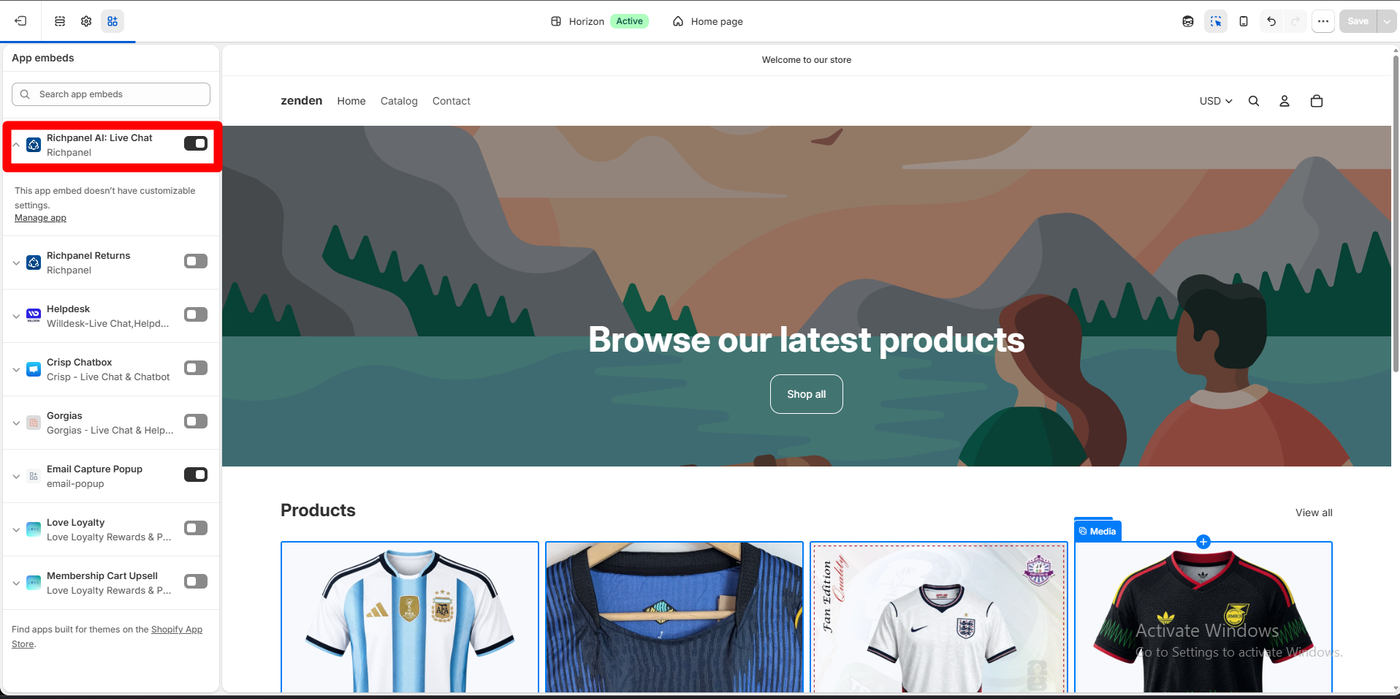
The theme side is one toggle: Richpanel AI: Live Chat in the theme’s App embeds, which has no settings of its own. A separate Richpanel Returns embed sits below it for the returns product.
The verification step is a nice touch. Instead of leaving you to check the storefront yourself, Richpanel confirms the widget is installed before it goes live.
A Real Chat, Answered From the Inbox
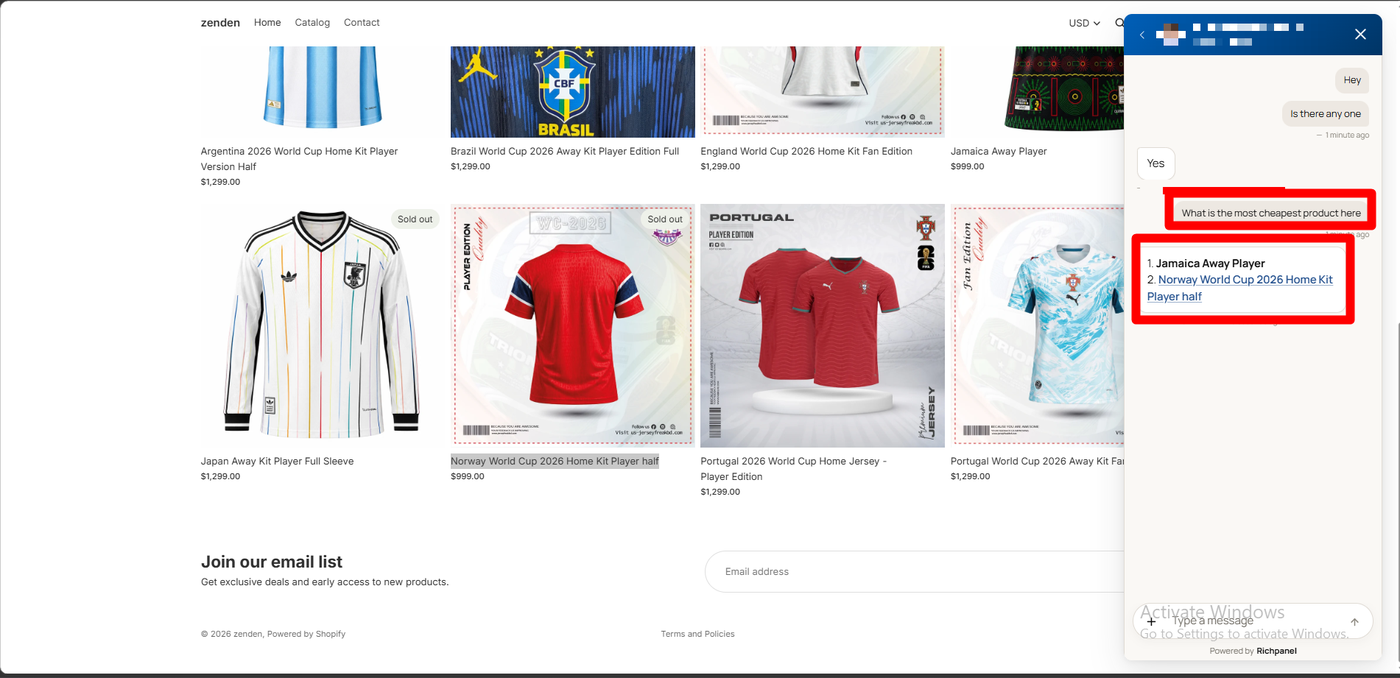
On the storefront, the widget opened with the agent’s name and photo, a reply-time note of “a few hours,” and “Powered by Richpanel” at the bottom.
We chatted as a shopper. After a greeting, we asked the question we put to every support app: “What is the most cheapest product here?” A team member replied from the inbox: 1. Jamaica Away Player, 2. Norway World Cup 2026 Home Kit Player half. That is correct. Both cost $999 on the product grid behind the chat, and every other jersey costs $1,299.
To be clear, this was a human answer. The inbox shows the reply under the team member’s name. It tells us the chat and inbox work. It tells us nothing about Richpanel’s AI.
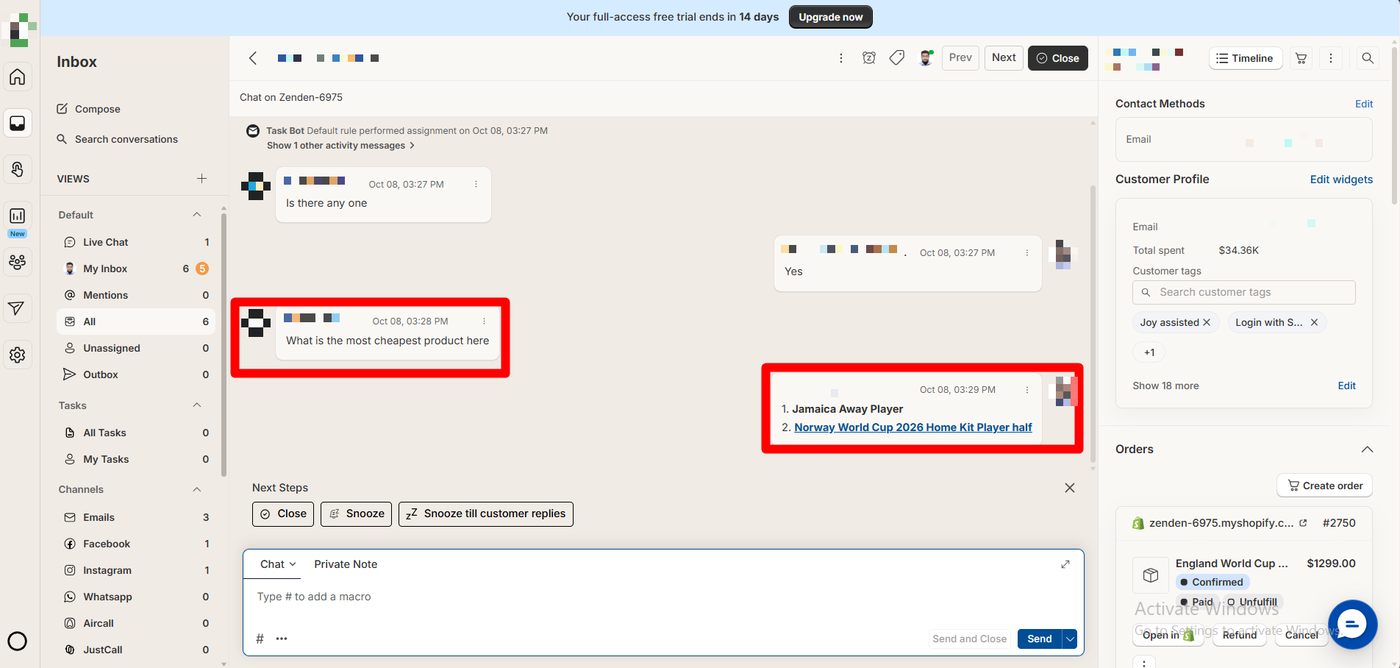
The inbox is where Richpanel earns its price. Above the chat, a note read “Task Bot Default rule performed assignment,” so the conversation was routed automatically. Below the chat sit Next Steps buttons: Close, Snooze, and Snooze till customer replies. The reply box supports chat, private notes and macros.
The right-hand panel shows the customer’s contact methods and a Customer Profile with their total spend ($34.36K on our test store), customer tags carried over from other apps, and their Shopify orders. Each order card shows its status, with Open in Shopify, Refund and Cancel buttons, plus a Create order button above.
The left side lists views (Live Chat, My Inbox, Mentions, Unassigned), tasks, and channels: Emails, Facebook, Instagram, WhatsApp, Aircall and JustCall. For a team answering order questions all day, having refunds and cancellations one click away from the chat is the main time saver.
Task Bots and Automation
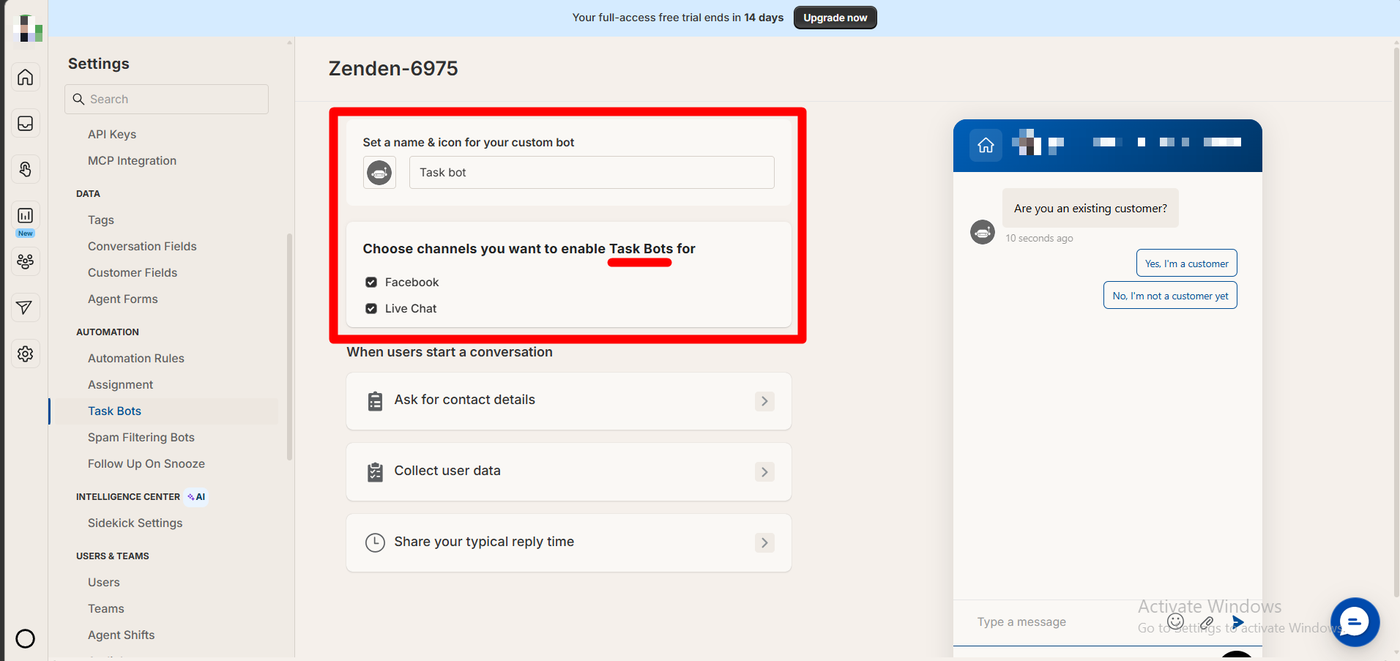
Under Automation, Richpanel lists Automation Rules, Assignment, Task Bots, Spam Filtering Bots and Follow Up On Snooze. A separate Intelligence Center holds the AI settings, labelled Sidekick.
The Task Bot is a rules-based assistant, not AI. Ours was named “Task bot” and enabled for Facebook and Live Chat. It can ask for contact details, collect user data and share your typical reply time when a conversation starts. The preview opened with “Are you an existing customer?” and two buttons. It is a simple way to qualify chats before a person picks them up.
Richpanel Pricing
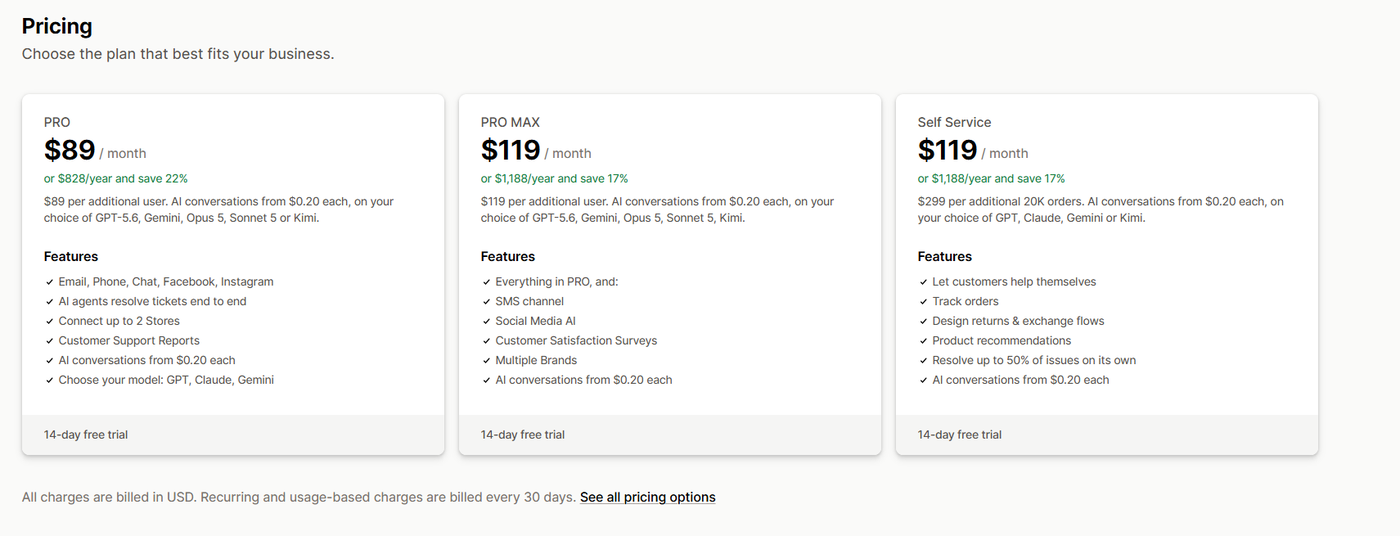
These plans come from the App Store listing, checked on October 14, 2026.
| Plan | Price | Extra cost | Highlights |
|---|---|---|---|
| Pro | $89/month ($828/year) | $89 per additional user | Email, phone, chat, Facebook, Instagram; AI agents; up to 2 stores; reports; choice of AI model |
| Pro Max | $119/month ($1,188/year) | $119 per additional user | Adds SMS, social media AI, CSAT surveys, multiple brands |
| Self Service | $119/month ($1,188/year) | $299 per additional 20,000 orders | Self-help portal, order tracking, returns and exchange flows, product recommendations |
Every plan adds AI conversations from $0.20 each, on your choice of model (the listing names GPT, Claude, Gemini and Kimi models), and every plan has a 14-day free trial.
Here is what that means in practice:
- Price grows with your team. One agent on Pro is $89. Three agents is $267 a month.
- AI adds a usage bill. At $0.20 each, 1,000 AI conversations add about $200 a month. Three agents plus 1,000 AI chats comes to roughly $467 a month on Pro.
- Self Service is a separate plan. One merchant said in September 2025 that the Self-Service add-on was needed to use live chat and pop-ups effectively. Our live chat worked during the trial, so we could not check what changes after it ends. Ask before you subscribe.
Against the free plans in this category, that is a big jump. Against Gorgias-style helpdesks, which several merchants say they left for Richpanel, it is the price of the category.
What Public Sources Add
On October 14, 2026 the listing showed a 4.9 rating from 137 reviews: 130 at five stars, 3 at four, none at three, 3 at two and 1 at one.
Praise centres on the team. Merchants name support staff and account managers, describe help with migrations and second stores, and several say they moved from Gorgias for a better price and more features. One says order and customer details in the conversation help them “answer faster and get it right first time.” A merchant using it for over a year calls the new AI “a great addition,” while another notes “occasional issues with AI” that the team fixed quickly.
The criticism is older but specific:
- Hidden costs. An Australian merchant said in September 2025 that it is “way more expensive than you initially think,” because the Self-Service add-on was needed for live chat and pop-ups.
- AI quality. A US merchant using it for a year said in January 2025 that the AI only drafted replies from manually written help topics and still needed a human to send them. The listing now describes AI agents that resolve tickets end to end. We could not check how much has changed.
- Billing after trial. A January 2024 merchant was charged $129 after the trial while stuck in setup. The developer said it refunded the charge.
- Missing SMS. A 2024 complaint about SMS predates the SMS channel now listed on Pro Max.
We did not reproduce any of these.
What We Liked
- A clear, guided setup, from product choice to workspace to connected store.
- Live chat verified before going live, with one theme toggle.
- An inbox built for order work, with spend, tags and orders beside each chat, and refund and cancel one click away.
- Automatic routing and rules-based Task Bots.
- A narrower permission request than many AI chat apps.
- Strong merchant praise for support and migrations.
What Could Be Better
- No free plan, and per-agent pricing that adds up fast.
- AI conversations billed on top, from $0.20 each.
- A longer setup, with a workspace and help-center domain to create.
- A default reply time of “a few hours” shown to shoppers in the widget, which is worth changing for live chat.
- Sourced complaints about add-on costs and earlier AI limits, which we did not test.
- Our test did not reach the AI agent, the feature the listing leads with.
Who Is Richpanel Best For?
Richpanel suits established Shopify brands with a support team handling a steady volume of order questions across chat, email and social, especially brands running more than one store or brand, and teams moving from Gorgias.
Look elsewhere if you are a small store, a one-person team, or simply want live chat. The support apps we have reviewed all start cheaper:
| App | Entry price |
|---|---|
| Commslayer | Free plan, unlimited agents, 300 conversations a month |
| Chatty | Free plan, 50 AI conversations a month |
| Willdesk | Free plan, 20 conversations a month |
| Chatra | Free plan, 5 chats a month |
| Richpanel | No free plan; $89 a month per agent, 14-day trial |
These figures come from each app’s published plan information, and the products differ in scope. Richpanel is a full helpdesk, so it is better compared with Gorgias than with a chat widget.
Final Verdict
Richpanel’s helpdesk did what we asked of it. We created a workspace, connected the store, put a verified live chat widget on the storefront, and answered a shopper from an inbox that showed their spend and orders, with refunds one click away.
What we could not judge is the AI agent. That is the core of Richpanel’s pitch and the part of its pricing that grows with use.
Recommended for support teams at established brands that want a capable, order-focused helpdesk and can afford per-agent pricing. Test the AI on your own tickets during the 14-day trial before you commit.
Frequently Asked Questions
Is Richpanel free?
No. There is no free plan on the Shopify App Store listing. Pro starts at $89 a month for one user, with $89 for each additional user, and every plan has a 14-day free trial.
How much do Richpanel’s AI conversations cost?
The listing says AI conversations cost from $0.20 each on every plan, on top of the subscription. You can choose the AI model, with GPT, Claude, Gemini and Kimi models named on the listing.
Did Richpanel’s AI answer customer questions in your test?
No. Our shopper chat was answered by a team member from the inbox, so we did not test the AI agent. The live chat, routing and inbox worked as expected.
Can you refund or cancel orders from the Richpanel inbox?
The inbox showed the customer’s Shopify orders with Refund and Cancel buttons beside the chat, plus a Create order button. We did not use them.
What is the Task Bot in Richpanel?
It is a rules-based bot, separate from the AI. In our test it could ask for contact details, collect user data and share your reply time on Facebook and live chat, starting with “Are you an existing customer?”
Does Richpanel work without coding?
In our test, yes. The live chat wizard enabled and verified the widget, and we switched on the Richpanel AI: Live Chat app embed in the theme editor without touching theme code.