
When a catalog grows past a few thousand products, the default Shopify search starts to show its limits. Shoppers type a SKU, a misspelled brand, or “red kurta size M”, and they get either nothing or a page of near-misses. That’s usually the moment merchants start looking at a dedicated search app with “AI” in its name.
Wizzy AI Search & Filter replaces your store’s search, autocomplete, and collection page filters with its own. Made by Wizzy Softech, a company based in India, it launched on the Shopify App Store in November 2022 and holds a 4.9 rating from 43 reviews as of October 14, 2026. Forty of those are five stars and three are four stars.
It’s also not cheap. There is no free plan. The entry plan, Starter, costs $199 a month, and according to the App Store listing, AI-powered search starts on the $399 Growth plan. Conversational AI and visual search are on the $799 Scale plan. So the question we wanted to answer is: what does $199 actually get you, and how much of the “AI” do you need to pay more for?
We installed Wizzy on a Shopify development store, started the free trial, and went through every area of its admin. It’s a capable, detailed control panel. But it expects you to do real configuration work, and the plan that matches the app’s name isn’t the one at the bottom of the price list.
Key Takeaways
- No free plan, and a high starting price: Starter is $199 a month for 25,000 products and 100,000 search queries, with a 14-day trial.
- The AI is mostly on higher plans: The listing puts AI-powered search on Growth ($399) and conversational AI and visual search on Scale ($799). Starter is described as contextual and keyword search.
- Plan details don’t fully match: The in-app billing screen and the App Store listing show different analytics history and a different product limit on Scale. Confirm before you subscribe.
- Setup is a configuration project: Attributes, catalog rules, filters, collection pages, and a full catalog sync all come before you go live.
- Deep filter control: Facets, sort order per collection, custom filter trees, and attributes from tags and metafields are all configurable.
- Best fit: Larger stores with big catalogs, steady search traffic, and someone who’s comfortable with catalog data, or who wants the Wizzy team’s setup help.
Our Verdict
A serious search and filter tool for large catalogs. Too expensive and too hands-on for small stores, and Starter buyers should be clear on which AI features they’re not getting.
Wizzy’s admin gives you a lot of control. You decide which tags and metafields become filters, how facets look, how each collection is sorted, and how brands and genders are read from your catalog. A row of AI agents for catalog clean-up and query tuning sits in its own menu. Merchant reviews are consistently positive about search speed, relevance, and the team’s help during setup.
The trade-off is price and effort. At $199 a month with no free tier, Wizzy costs more to start than many search apps, and the listing reserves its AI-powered search for the $399 plan. Getting it live also means working through a long list of settings that use technical terms, before you run a complete catalog sync.
If your store has tens of thousands of products and search is a real sales channel, start the 14-day trial on a duplicate theme and ask the Wizzy team for a demo. If you have a smaller catalog, Shopify’s free Search & Discovery app or a lower-priced search app is the sensible starting point.
What Wizzy AI Search & Filter Offers
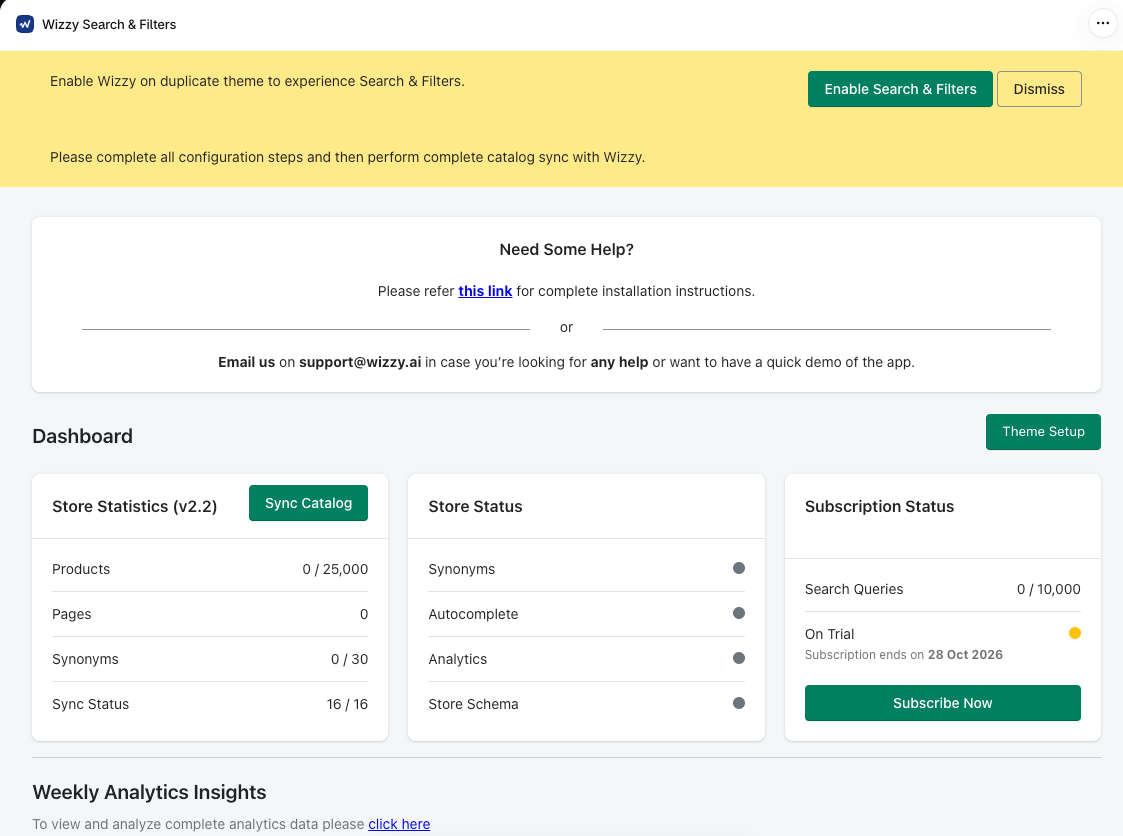
Wizzy runs inside the Shopify admin, and its menu is long. It has 14 areas: Dashboard, Attributes, Catalog Index, Product Listing Page, Filters, Collection Pages, Autocomplete Menu, Agents, Synonyms, Advanced, Integrations, Sync Processes, Configuration, and Billing.
The Dashboard shows three status cards. Store Statistics counts synced products, pages, and synonyms against your plan and has a Sync Catalog button. Store Status has indicators for synonyms, autocomplete, analytics, and the store schema. Subscription Status tracks search queries used and when your trial ends.
According to the listing, the storefront side covers:
- Search and autocomplete: typo tolerance, spell correction, synonyms, recent and trending searches, and search by SKU, barcode, tags, metafields, and description.
- Filters: built from tags, sizes, colors, vendors, brands, inventory locations, and more, with color swatches and individual variants shown on search and collection pages.
- Merchandising: product boosts, custom ranking, keyword redirects, and recommendations on search, collection, and 404 pages.
- Analytics: search queries, filter usage, and conversion tracking.
The Agents page lists four AI modules: AI Mode in Search, Catalog Enrichment, Catalog Taxonomy, and an AI Conversational module whose full name is cut off on screen. Below them are counters for what each agent has done, such as products enriched, categories cleaned, genders identified, types and categories generated, suggestions cleaned or renamed, and non-relevant products found by a Query Optimiser Agent. On our trial store, every module showed as inactive and every counter was at zero, so we can’t say what these agents produce.
The Integrations page showed one category, Reviews, where you pick a review app from a dropdown and connect it.
What We Tested
We installed Wizzy on a Shopify development store running the Dawn theme and started the 14-day free trial. We did not subscribe to a paid plan.
We went through the Dashboard, the theme setup screen, Attributes, Catalog Index, Product Listing Page, Filters, Collection Pages, Agents, Synonyms, Integrations, Sync Processes, and Billing.
We did not test the storefront. When we reviewed the admin, the product counter on the Dashboard read zero, the Store Status indicators were all inactive, and the AI modules were off. So we did not see Wizzy’s search, autocomplete, filters, or AI agents working on a live theme. We also did not add synonyms, build filter trees, connect a review app, view analytics with real traffic, or contact support.
This review covers the admin, setup path, plan limits, and pricing. It makes no claims about search accuracy, speed, storefront design, or sales impact.
Getting Started: More Configuration Than Most Search Apps
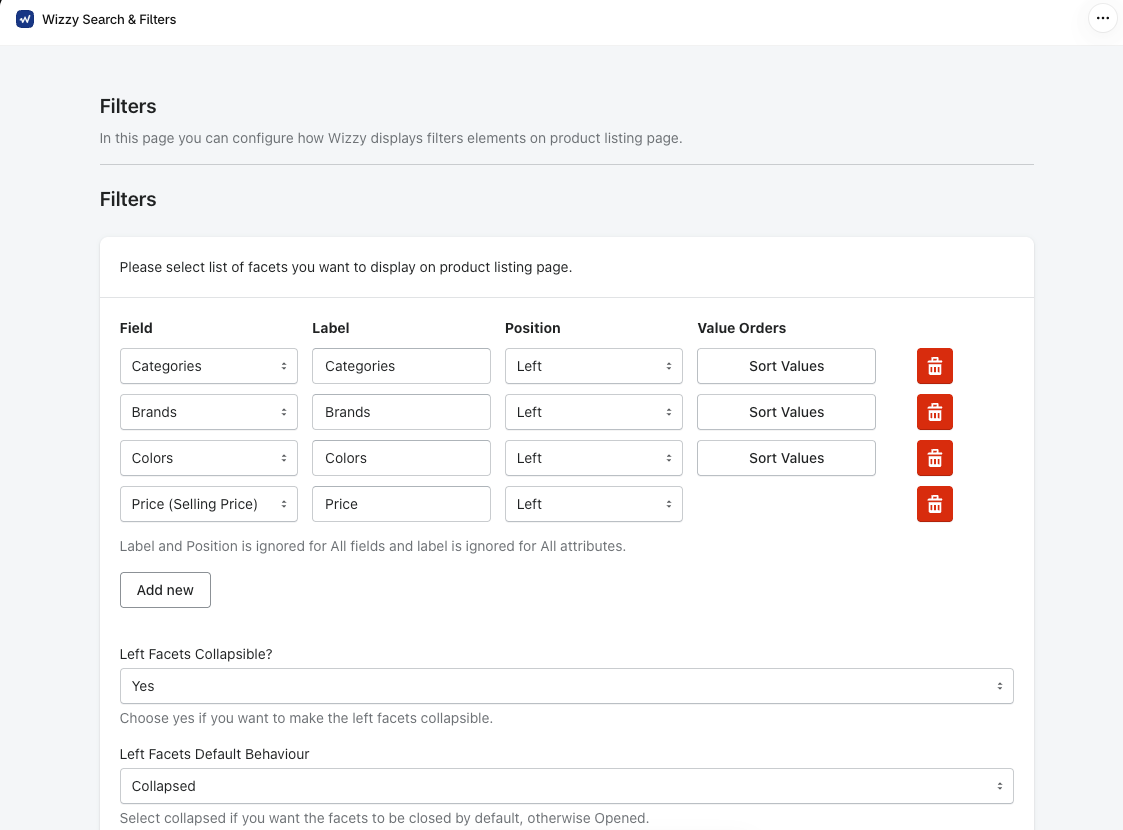
As soon as we opened the app, a yellow banner asked us to enable Wizzy on a duplicate theme first and to complete all configuration steps before running a complete catalog sync. That second line sets the tone. Wizzy wants your catalog rules in place before it indexes anything.
The theme setup screen is simple. You pick a theme, which defaulted to our current Dawn theme, then click two buttons, Styles App Embed and Scripts App Embed. Each opens the theme editor, where you save the embed.
The configuration before it takes longer. Here’s what we found in each area:
- Catalog Index asks how Wizzy should read your catalog. Do you sell for multiple age groups or genders? Do you sell multiple brands, and if so, which field holds the brand? It defaulted to the Shopify Product Vendor field.
- Product Listing Page controls products per page (20 by default), whether to show out-of-stock products (off by default), whether to show every variant as its own tile (off), and whether to show Add to Cart (on), Quick View (off), and a tile view (off).
- Filters came with four facets ready: Categories, Brands, Colors, and Price. Each has a label, a left-side position, and a Sort Values button for ordering its options. You can add more, make the left facets collapsible, and choose whether they start open or closed.
- Collection Pages lets you set a default sort order per collection, and build Custom Filter Trees and Custom Grid Filter Trees for specific collections.
- Synonyms is a simple table of keywords, types, and related words.
- Sync Processes shows a queue of sync jobs with tries, errors, and status, plus Sync Now and Clear Queue buttons, so you can see when a sync fails and retry it.
The good news is that the defaults are sensible. Out-of-stock items are hidden, filters start with the four facets most stores need, and brand detection uses the field most stores already fill in.
Where It Falls Short: Setup Assumes You Know Your Catalog Data
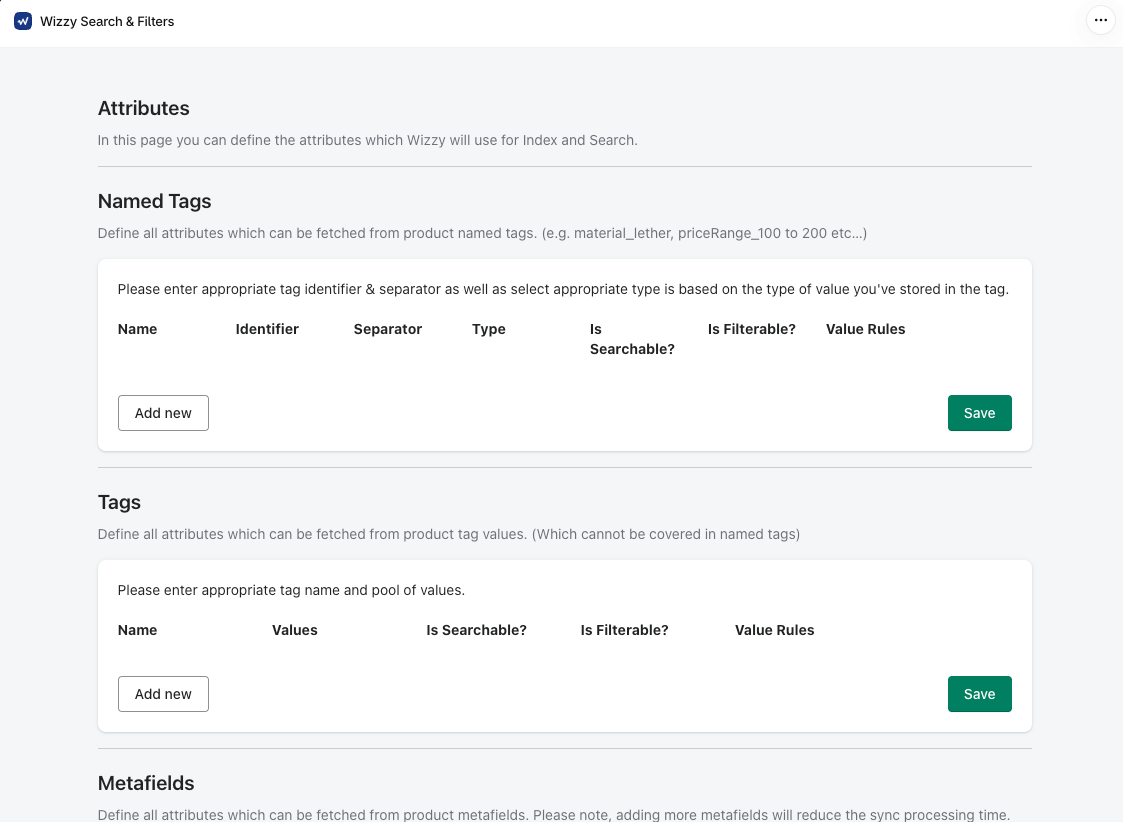
The Attributes page is where Wizzy turns your product data into searchable and filterable fields, and it’s the most technical screen in the app.
It has three sources. Named Tags reads attributes from structured tags, such as a material or price-range tag, and asks for an identifier, a separator, a value type, whether the attribute is searchable or filterable, and value rules. Tags handles plain tags with a pool of values. Metafields reads attributes from a metafield namespace and key, with a note that adding more metafields affects sync processing time and a recommendation to use tags instead.
If you already keep product attributes in metafields, which is Shopify’s own structured approach, that’s a trade-off to raise with Wizzy before you commit. And for a merchant who isn’t sure what a tag separator or a metafield namespace is, this page is hard going. The Product Listing Page screen says as much. It advises you to consult your developer or contact Wizzy if you’re unsure about any technical input.
A few other things stood out:
- The trial is capped. Our trial Dashboard showed 10,000 search queries and 30 synonyms, against 100,000 queries and 100 synonyms on Starter. That’s enough to test, but not to judge a full month of real traffic.
- The AI isn’t on by default. Every AI module on the Agents page was inactive on our trial store, and the listing places AI-powered search on Growth and above.
- Rough edges in the copy. The admin has several spelling and grammar slips. They don’t affect how the app works, but they make some instructions harder to follow.
None of this makes Wizzy hard to use once it’s set up. Some merchant reviews describe the admin as easy enough to make changes on their own, and many credit Wizzy’s team with helping during setup. But plan on either doing the catalog work yourself or leaning on that team before launch.
Pricing and Value
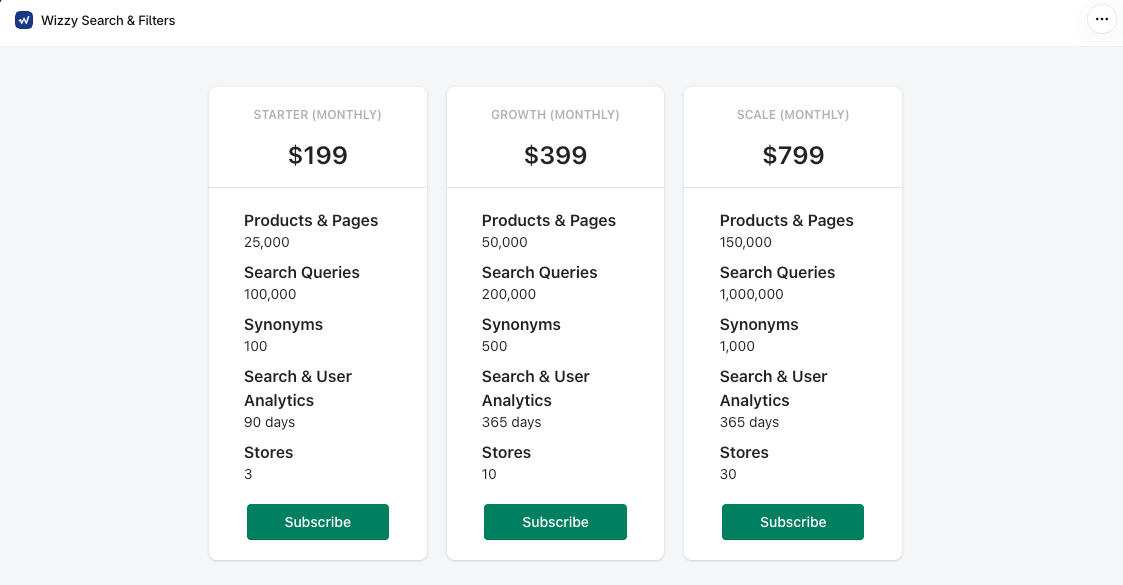
Here are the plans as shown on the in-app billing screen on October 14, 2026, in US dollars:
| Plan | Monthly | Products & pages | Search queries | Synonyms | Analytics history | Stores |
|---|---|---|---|---|---|---|
| Starter | $199 | 25,000 | 100,000 | 100 | 90 days | 3 |
| Growth | $399 | 50,000 | 200,000 | 500 | 365 days | 10 |
| Scale | $799 | 150,000 | 1,000,000 | 1,000 | 365 days | 30 |
All three plans come with a 14-day free trial, and billing runs through Shopify every 30 days.
The App Store listing adds what each plan includes:
- Starter: contextual and keyword search, limited custom filter trees, limited daily sync, and email support.
- Growth: AI-powered search, advanced merchandising, unlimited custom filter trees, and real-time sync.
- Scale: everything in Growth, plus conversational AI, visual search, and priority support.
The two sources don’t fully agree. The listing shows 30 days of analytics on Starter and 90 days on Growth, where the in-app cards show 90 and 365. The listing also puts Scale at 250,000 products, where the app says 150,000. Neither source explains what the Stores line means. Ask Wizzy to confirm all three before you choose a plan.
What it costs per query. Starter and Growth both work out to about $2 per 1,000 search queries. Scale drops to about $0.80. So Growth doesn’t make search cheaper. What the extra $200 buys is the AI search, real-time sync, unlimited filter trees, and double the catalog room.
Starter’s real catch. For a store with a large catalog, a “limited daily sync” is a meaningful limit. Prices and stock levels can change many times a day, and the listing says Starter syncs less often than Growth. Combined with the lack of AI-powered search, Starter looks more like a strong keyword search and filter engine than an AI product.
What it costs a smaller store. $199 a month is a lot for a store with a few hundred products. Shopify’s free Search & Discovery app covers basic filters, synonyms, and boosts. Prefixbox, which Blinto also reviewed this month, offers a free plan and starts paid plans at $139. Wizzy makes more sense when the catalog is large enough that 25,000 products and 100,000 queries are a realistic fit.
What Merchants Say
As of October 14, 2026, Wizzy has 43 reviews: 40 five-star and 3 four-star. There are no one-, two-, or three-star reviews.
The patterns are consistent:
- Setup help. Many merchants say the Wizzy team guided them through setup, and several describe the process as smooth.
- Support. Responsiveness and helpfulness come up in most reviews that mention support.
- Search quality and speed. Reviewers describe faster, more relevant results, including for SKU searches and large catalogs with many brands or styles.
- Custom work. A few merchants mention extra discovery features that the Wizzy team built with them.
Many of the reviews we read come from stores that had used Wizzy for six months to two years, which says more about long-term use than reviews posted in the first week. Most reviewers are stores based in India, with others from the UAE, the United States, Kuwait, and Europe.
Keep in mind that the four-star reviews don’t say what held them back, and there’s no critical feedback to learn from. We didn’t see developer replies on the recent reviews we read.
What We Liked
- Fine control over filters: Facets, value order, collapsed or open states, and per-collection filter trees are all configurable.
- Per-collection sort order: You can set a different default sort for each collection.
- Sensible defaults: Out-of-stock hiding, four ready-made facets, and vendor-based brand detection give you a reasonable starting point.
- A visible sync queue: Sync Processes shows tries, errors, and status, so you can see when something fails.
- Large plan allowances: Even Starter covers 25,000 products and 100,000 queries a month.
- Strong merchant feedback: Reviews praise speed, relevance, and the team’s hands-on setup help, often after months of use.
What Could Be Better
- No free plan: The cheapest way in is $199 a month after the trial.
- AI on higher plans: The listing reserves AI-powered search for Growth and conversational AI and visual search for Scale.
- Technical setup: Named tags, separators, and metafield namespaces will be unfamiliar to many merchants.
- Metafields discouraged: The app advises tags over metafields because of sync time.
- Plan details conflict: Analytics history and the Scale product limit differ between the listing and the app.
- Capped trial: 10,000 queries and 30 synonyms make it hard to test at real volume.
- No critical reviews to weigh: With no rating below four stars, there’s little independent evidence about problems.
Who Wizzy AI Search & Filter Is Best For
Wizzy suits stores with large catalogs, roughly in the tens of thousands of products, where search and filters drive real sales. For them, 25,000 to 150,000 products and 100,000 or more queries a month are realistic allowances.
It fits stores with many brands, styles, or audiences that need precise filters, such as fashion, eyewear, books, or electronics retailers who rely on tags and vendor data.
And it suits merchants who want a team to help set it up, or who have a developer who’s comfortable mapping catalog data. That help is the most consistent theme in its reviews.
Who Should Consider an Alternative
Small and mid-sized stores will struggle to justify $199 a month. Shopify’s free Search & Discovery app or a lower-priced search app is a better place to start.
Merchants who want AI search on a budget should note that the listing puts it on the $399 plan.
Stores that keep most product attributes in metafields should ask Wizzy how that will affect sync time before committing.
Final Verdict
Wizzy AI Search & Filter has one of the more detailed admins in this category, with fine control over filters, sorting, and how your catalog data becomes searchable. Merchants who use it describe fast, relevant search and a team that helps with setup.
So, is $199 a month worth it? For a large catalog that needs strong keyword search and precise filters, Starter can earn its price. If the AI is the reason you’re looking, budget for Growth at $399. Starter, as the listing describes it, is contextual and keyword search with limited daily sync.
Our advice: enable Wizzy on a duplicate theme, ask the team for a demo, and use the 14-day trial to map your attributes and run a full catalog sync. Before you subscribe, confirm three things in writing: which AI modules your plan includes, how often it syncs, and the plan’s analytics history.
Frequently Asked Questions
Is Wizzy AI Search & Filter free?
No. There’s no free plan. Paid plans start at $199 a month for Starter, with a 14-day free trial on every plan.
Does the Starter plan include AI search?
According to the App Store listing, no. Starter covers contextual and keyword search. AI-powered search starts on Growth at $399 a month, and conversational AI and visual search are on Scale at $799.
Can Wizzy use my product metafields?
Yes. The Attributes page reads attributes from metafields as well as tags. But the app notes that adding more metafields affects sync processing time and recommends using tags where you can.
Does Wizzy show out-of-stock products?
Not by default. The Product Listing Page setting for out-of-stock products was set to No on our trial store, and you can switch it on.
Did Blinto test Wizzy on a live storefront?
No. We installed the app on a development store, started the free trial, and reviewed the admin, setup path, and plans. We did not test storefront search, filters, the AI agents, search quality, or support.