
When shoppers can’t find a product, they leave. A store with a big catalog feels this first. Shopify’s built-in search and filters cover the basics, but collection pages can turn into long scrolls with too few ways to narrow them down.
Boost AI Search & Filter is one of the oldest answers to that problem. It adds filters, a smarter search bar, merchandising tools, and product recommendations. On the Shopify App Store it holds a 4.7 rating from more than 1,600 reviews and carries the Built for Shopify badge.
So the question is not whether Boost is a serious tool. It is. The question we wanted to answer is simpler: can a merchant get it onto a store without a developer, and which plan do they actually need?
We installed Boost on a Shopify development store, went through the full onboarding, and explored every main area of the app. The install flow was clear and guided. The pricing path was the part that needed the most care.
Key Takeaways
- Guided install: Boost walks you through features, theme, and template in a few short screens. No code was needed in the flow.
- AI search is on from the start: Semantic search was already switched on after install. Personalized search was off.
- Watch the trial button: The “Start free trial” button opened a request to approve the $299 Convert plan, even on a store with almost no sales.
- Install on a copy first: Boost will install straight onto your live theme if you pick it. It warns you, but it does not stop you.
- The best AI features sit on the top tier: Personalization is marked Premium and belongs to the highest plan.
- Best fit: Growing stores with large catalogs where search and filters drive sales, and where the monthly cost makes sense.
Our Verdict
Recommended for growing catalog stores. Overkill for very small shops.
Boost made a good first impression. The setup wizard is short and clear. The admin is well organized, with a separate tab for each job. Semantic AI search is ready from the start, so you are not left to switch on the basics yourself.
The weak spot is pricing. Plans scale with your sales, and the trial screen nudges you toward a $299 plan. A small store can end up paying for far more than it needs. Public merchant feedback points the same way. Price rises as stores grow are one of the most common complaints.
If search and filtering are a real sales problem for your store, Boost is worth a trial. Start on a duplicate theme, read the plan screen closely, and decide on a plan before the trial ends.
What Boost AI Search & Filter Offers
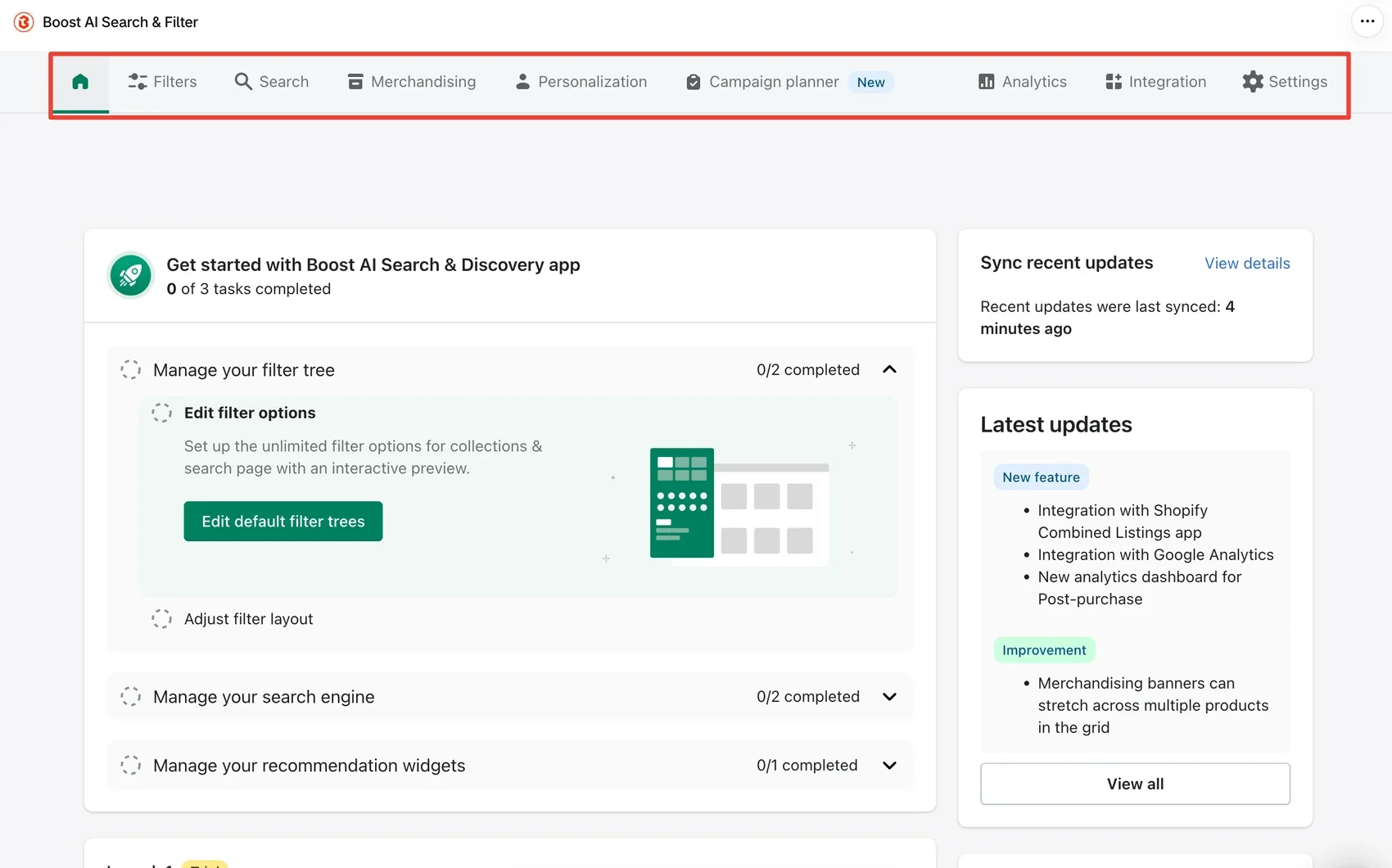
Boost replaces Shopify’s basic search and collection filtering with its own system. After install, the app opens on a home screen with a short checklist. It asks you to set up your filter tree, tune your search engine, and add recommendation widgets.
The tabs across the top show how wide the app goes:
- Filters for collection and search page filters.
- Search for AI search and ranking rules.
- Merchandising for pinning and boosting products.
- Personalization for AI-driven results per shopper.
- Campaign planner for scheduled sales campaigns.
- Analytics for revenue and conversion reports.
- Integration for theme setup.
- Settings for sync, markets, wholesale, translation, metafields, sort options, variants, and swatches.
That is a lot for one app. For a large store, having filters, search, and merchandising in one place is the main appeal. For a small store, much of it will go unused.
What We Tested
We installed Boost AI Search & Filter on a Shopify development store with almost no sales history. We stayed on the trial and did not approve a paid plan.
During the test, we:
- reviewed the plan screen and the trial offer;
- opened the trial subscription screen, then cancelled it;
- skipped plan selection and continued setup;
- selected all four feature groups for install;
- installed Boost on the live Dawn theme with the Default template;
- checked the Search, Personalization, Campaign planner, Analytics, Integration, and Settings areas.
We did not check how the filters or search results looked on the storefront. We did not edit a filter tree, build merchandising rules, or test recommendations. We did not measure page speed, test mobile, or contact support. We also did not approve a plan, so we did not see how billing works in practice.
This review covers setup, admin structure, and pricing. It makes no claims about search quality or sales impact.
How Easy Is It to Install?
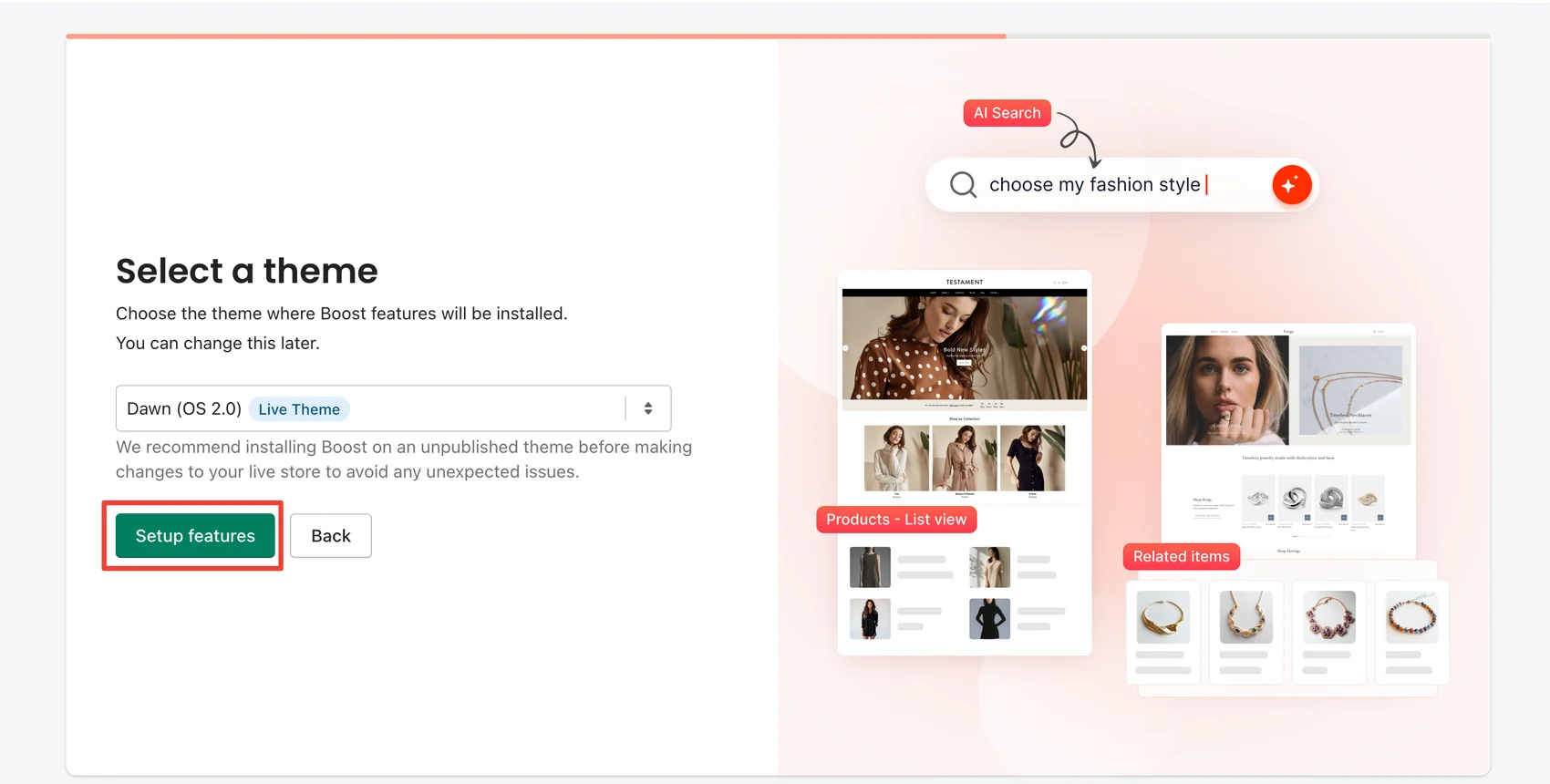
The install wizard is the best part of the first-run experience. It has three short steps after the plan screen.
First, you choose features. Four cards show what Boost will add: filters on collection pages, filters on the search page, instant search, and a group for recommendations and bundles. Each one has a picture of the result, so it is easy to see what you are turning on. We kept all four.
Next, you choose a theme. The dropdown listed every theme in our store, including an older vintage theme. When we picked the live Dawn theme, Boost showed a clear note. It recommends installing on an unpublished theme first, to avoid problems on the live store. That is good advice, and we would follow it on a real store. But it is only a note. Boost let us continue on the live theme with one click.
Last, you choose a template design. Boost offers several layouts. The Default template is marked as the most popular. Others are matched to specific Shopify themes, such as Warehouse, Venue, and Testament. We chose Default and clicked install.
After install, the Integration tab listed Dawn as integrated, with the other themes marked “Not integrated yet.” The other themes each had an Integrate button. So you can add Boost to a duplicate theme later, test it there, and publish when you are happy.
The whole flow needed no code. That answers the first half of our question. A merchant can get Boost installed on a standard Shopify theme without a developer. Public reviews suggest custom themes are a different story. Several merchants mention needing Boost’s team to adjust their theme.
AI Search Is Ready Out of the Box
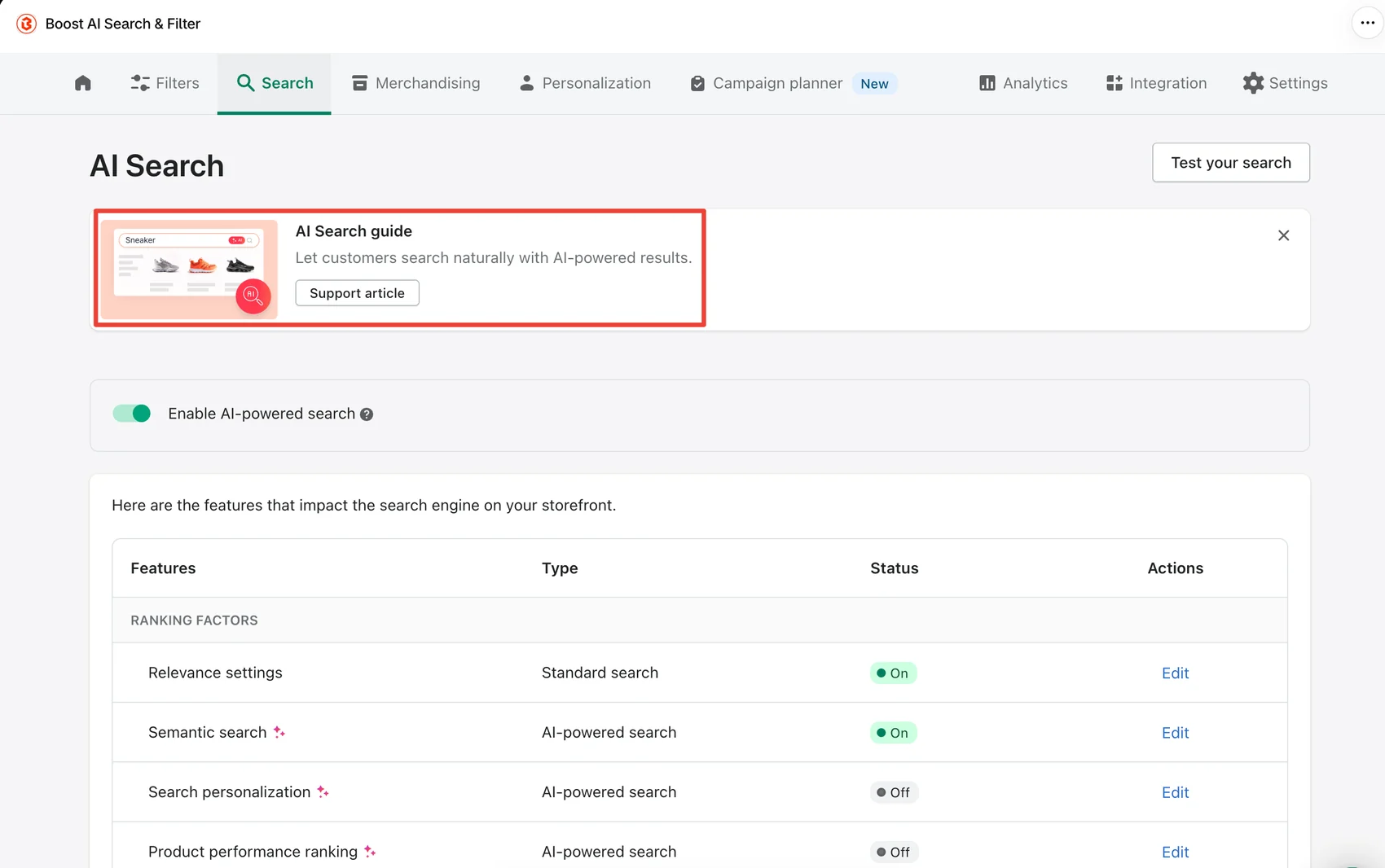
The Search tab opens with a switch for AI-powered search. In our store it was already on.
Below that, a table lists the ranking factors that shape results. Standard relevance settings and semantic search were both on. Semantic search aims to understand what a shopper means, not only the exact words typed. Search personalization and product performance ranking were off.
We like that this table shows each factor’s status in one place. You can see what is shaping results and edit each part. A “Test your search” button sits at the top right, so you can try queries before shoppers do.
We did not run search tests on the storefront. So we can confirm the controls are there and switched on, but not how good the results are for a real catalog.
Where It Gets Expensive: Premium AI Features
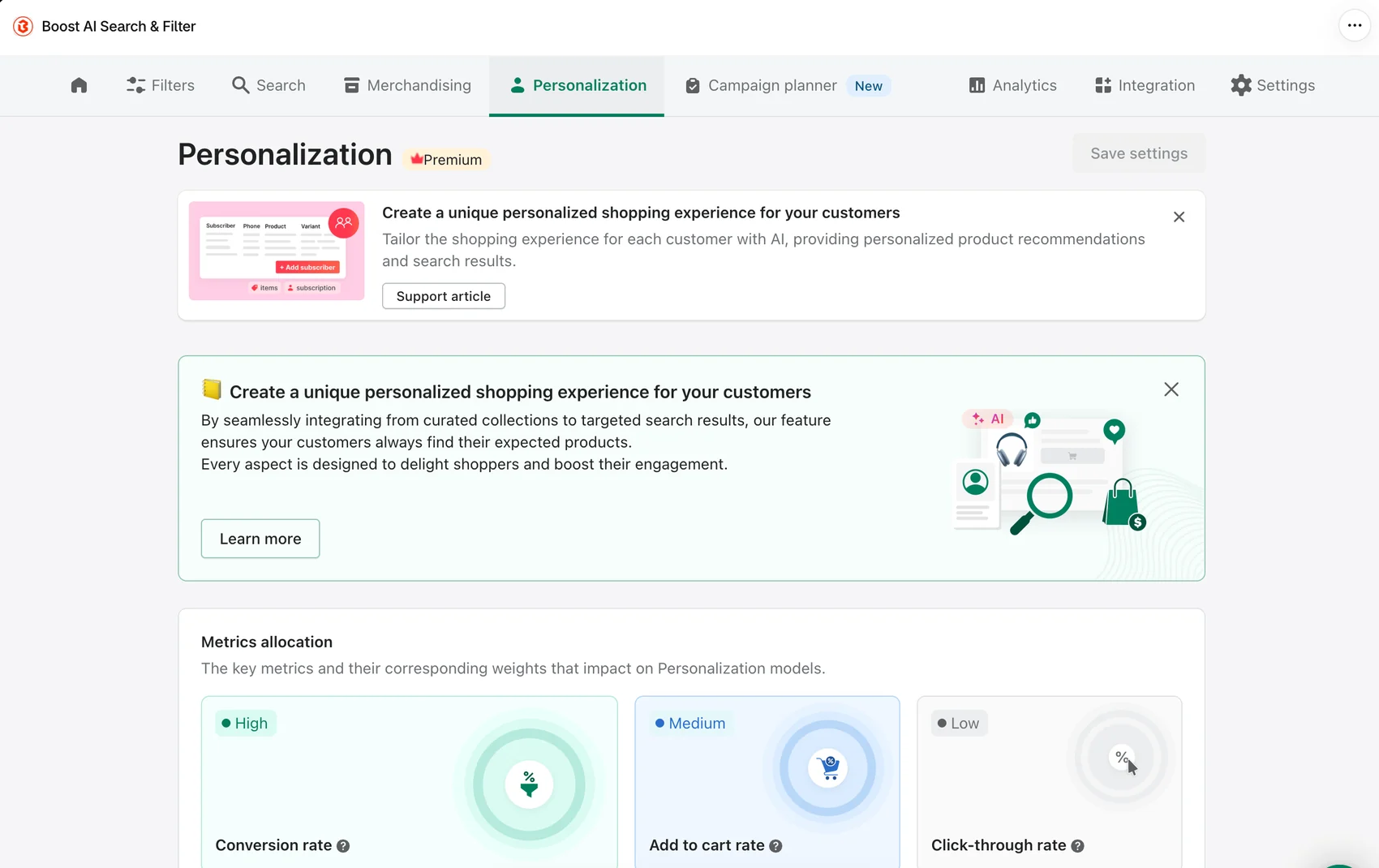
Boost’s headline AI features are not all on the starting plan. The Personalization tab carries a Premium label. It shows how the model weighs shopper actions. In our store, conversion rate was set to high, add-to-cart rate to medium, and click-through rate to low.
On the plan screen, AI-personalized search, AI-personalized recommendations, AI-personalized bundles, and variant display were listed as “extra features unlocked during trial.” The App Store listing places these on the top Accelerate plan.
So the trial gives you a look at the full product. After 21 days, a Launch or Convert store loses those extras. That is fair, but merchants should know it before they get used to them.
The bigger issue is how the trial is offered. The main button on the plan screen says “Start free trial & unlock all features.” When we clicked it, Boost opened a subscription screen for the Convert plan at $299 a month. It would send us to Shopify to approve that plan, with no charge until the trial ended.
Our store’s base sales figure on that screen was $2.04. A store that small has no need for a $299 plan. If a merchant approves it and forgets to change plans, the charge starts when the trial ends.
We cancelled and used the Skip link instead. Boost then placed our store on a Launch trial with 21 days left. Boost’s help docs say skipping does not charge you and keeps you on Launch features for the trial. For most new stores, Skip is the safer first click.
Pricing and Value
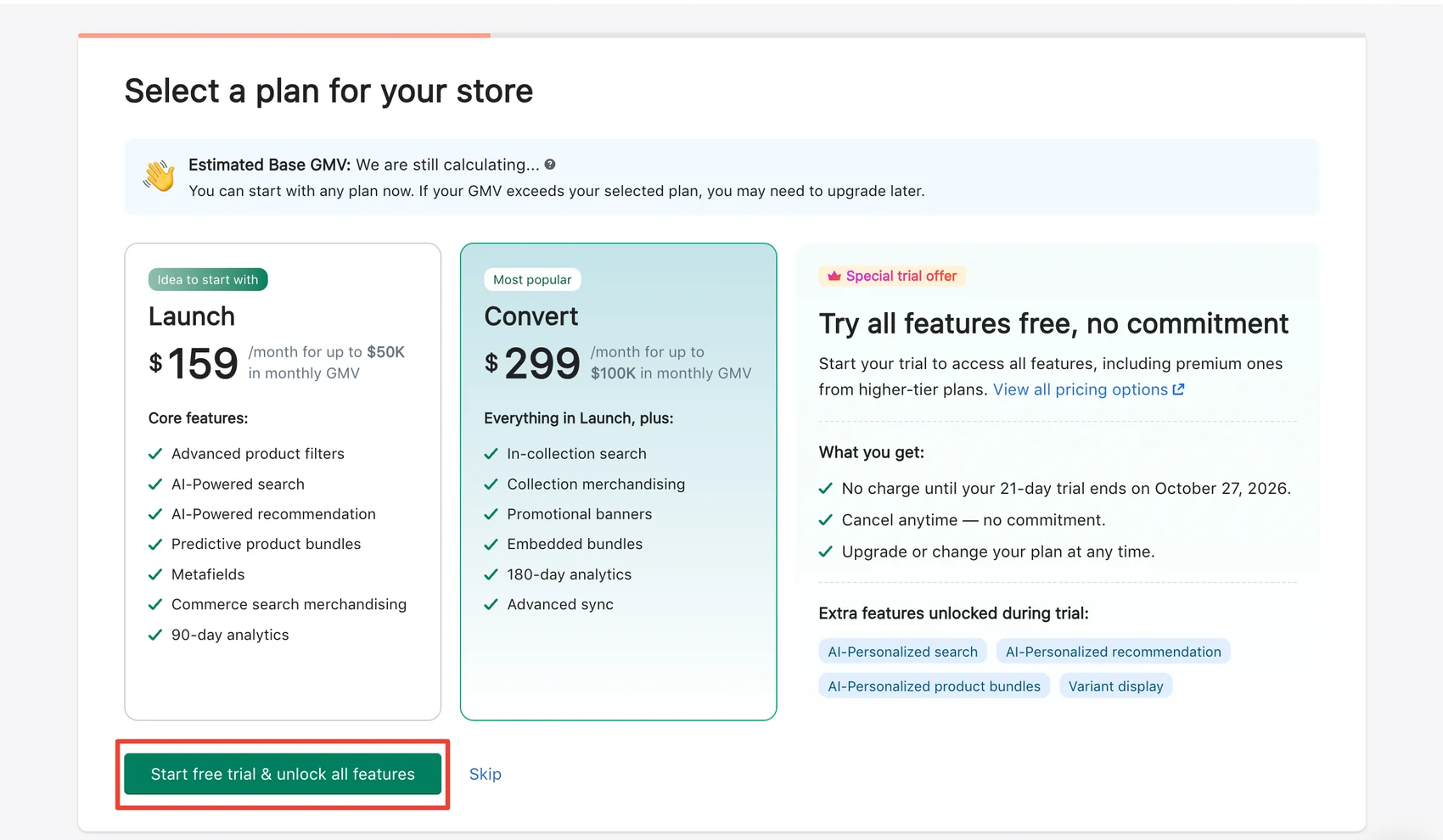
Boost has no free plan. Every plan comes with a 21-day free trial, and prices scale with your store’s monthly sales (GMV).
This is what our in-app plan screen showed on October 6, 2026:
| Plan | Price shown in app | Sales cap shown |
|---|---|---|
| Launch | $159/month | Up to $50K monthly GMV |
| Convert | $299/month | Up to $100K monthly GMV |
The Shopify App Store listing shows Launch starting at $29 a month for smaller stores, rising with sales. The top Accelerate plan is listed from $699 a month. Our store had almost no sales, yet the app showed Launch at $159. The plan screen also said our sales estimate was “still calculating.” So check the exact price in your own admin before you approve anything.
What do you get at each level?
- Launch covers the core: filters, AI-powered search and recommendations, product bundles, metafields, search merchandising, and 90 days of analytics.
- Convert adds in-collection search, collection merchandising, promotional banners, embedded bundles, 180 days of analytics, and faster sync.
- Accelerate adds AI personalization, variant display, and more.
For a store doing real volume, Launch or Convert can make sense. Better search and filters may be worth the cost if shoppers find products faster. We did not measure that, and the app’s analytics were empty in our test store.
The risk is the climb. As sales grow, the plan grows with them. Price rises are one of the most common themes in Boost’s low-star reviews. Budget for the plan you will need in six months, not only the one you need today.
What We Liked
- Short, guided install: Features, theme, and template took three clear screens, with pictures of each result.
- Safe-install advice: Boost recommends a duplicate theme and lets you integrate other themes later.
- AI search on by default: Semantic search was active right after install.
- Clear search controls: One table shows every ranking factor and whether it is on.
- Well-organized admin: Each job has its own tab, and a checklist points to the first tasks.
- Wide feature set: Merchandising, campaigns, wholesale, markets, metafields, and swatches are all built in.
What Could Be Better
- The trial button points to a $299 plan: Even a near-empty store was offered Convert first.
- Live-theme install is too easy: The warning is useful, but one click installs on the live store anyway.
- Price shown in app differed from the listing: We saw $159 for Launch while the listing starts it at $29.
- Top AI features cost the most: Personalization and variant display need the highest plan after the trial.
- Custom themes may need help: Public merchant reviews mention needing Boost’s team for theme changes.
Who Boost AI Search & Filter Is Best For
Boost is a strong fit for stores with large or complex catalogs. Think fashion with many sizes and colors, electronics with many specs, or any store where shoppers need to narrow down hundreds of products.
It also suits merchants who want filters, search, and merchandising in one app, rather than juggling several tools. Stores selling across markets or to wholesale buyers will find settings for both.
The best candidates have enough sales to justify the cost and a standard theme that the guided install supports.
Who Should Consider an Alternative
Very small stores should be careful. If your catalog is small, Shopify’s free Search & Discovery app may cover the filters you need. Boost’s pricing makes the most sense once search is a real sales problem.
Stores on heavily customized themes should plan for extra setup help. And merchants who want AI personalization on a tight budget should know it sits on the most expensive plan.
Final Verdict
Boost AI Search & Filter answers the first half of our question well. A merchant can install it without a developer. The wizard is short, the admin is clear, and AI search is ready from the start.
The second half needs more care. Plans scale with sales, the trial button leads to a $299 plan, and the in-app price may differ from the listing. Small stores can easily pay for more than they need.
Our advice: install Boost on a duplicate theme, click Skip rather than the trial button, and test your own search and filters during the 21 days. Then pick the plan your sales actually call for.
Frequently Asked Questions
Does Boost AI Search & Filter have a free plan?
No. Boost offers a 21-day free trial, then a paid plan. Prices scale with your store’s monthly sales.
Will I be charged if I click “Start free trial”?
Not right away. In our test, that button opened a request to approve the $299 Convert plan, with no charge until the trial ended. If you approve it and keep it, billing starts after the trial. Choosing Skip kept us on a Launch trial with no plan approved.
Can I install Boost without a developer?
On a standard theme, yes. We installed it on Dawn through the built-in wizard with no code. Public reviews suggest custom themes may need help from Boost’s team.
Should I install Boost on my live theme?
Boost itself recommends an unpublished copy first. The Integration tab lets you add Boost to any theme in your store and test it before you publish.
Is AI personalization included in every plan?
No. The app marks Personalization as Premium. The App Store listing places AI-personalized search and recommendations on the top Accelerate plan. You can try them during the trial.
Did Blinto test Boost’s search results on a live storefront?
No. We tested the install flow, admin settings, and pricing screens. We did not test storefront search quality, filters in action, speed, or sales impact.