
A shopper types a product name into your search bar and gets nothing useful back. Or they land on a collection page with hundreds of items and no way to narrow it down by size or color. Either way, many of them simply leave.
Searchanise Search & Filter is built for that problem. It replaces Shopify’s basic search with an instant search dropdown, a full search results page, and filters on collection pages. It has been on the Shopify App Store since 2015 and holds a 4.7 rating from more than 1,250 reviews.
Some search apps, such as Boost AI Search & Filter, charge more as your sales grow. Searchanise prices by how many products you have. That makes the buying question different: can a merchant get Searchanise running without a developer, and which plan does their catalog actually push them into?
We installed Searchanise on a Shopify development store, went through the full onboarding, and checked the main admin areas. Setup was straightforward. The plan table is where merchants need to slow down.
Key Takeaways
- Ready-made filters: After indexing our test catalog, the filter list already included price, size, color, vendor, availability, and more.
- One manual step matters: The app only goes live after you switch on its app embed in the theme editor and save. The wizard flags it, but lets you move on without it.
- Pricing follows product count: The live-store Free plan stops at 25 products. Paid plans start at $16 a month billed annually for up to 1,500 products.
- Some useful features sit higher up: Showing variants as separate products starts on the Growth plan, at $116 a month billed annually.
- Dev stores see a different plan: Our development store was offered a free dev plan for up to 2 million products, which a live store will not get.
- Best fit: Small and mid-sized catalogs that want search, filters, and merchandising in one app at a price tied to catalog size.
Our Verdict
Recommended for small and mid-sized catalogs. Check the plan table before you commit.
Searchanise made a solid first impression. The onboarding is clear, the admin is well organized, and the core filters were already in place once our products were indexed. The instant search widget comes with ready-made templates and a live preview, so you can shape the dropdown without code.
The trade-offs are about pricing and setup detail. Almost every real store will outgrow the 25-product Free plan right away. Prices step up as your catalog crosses each product limit, and features like separate variants need one of the higher plans. The theme activation step is also easy to skip by accident.
Public merchant feedback is mostly positive, with support the most praised part of the app. Low-star reviews raise search results that miss relevant products, past outages, and setup that gets harder once you want a custom look.
If your search and filters are holding back sales and your catalog sits in the low thousands, Searchanise is worth a trial. Start with the 14-day trial, confirm the embed is active, and check which product tier you fall into.
What Searchanise Search & Filter Offers
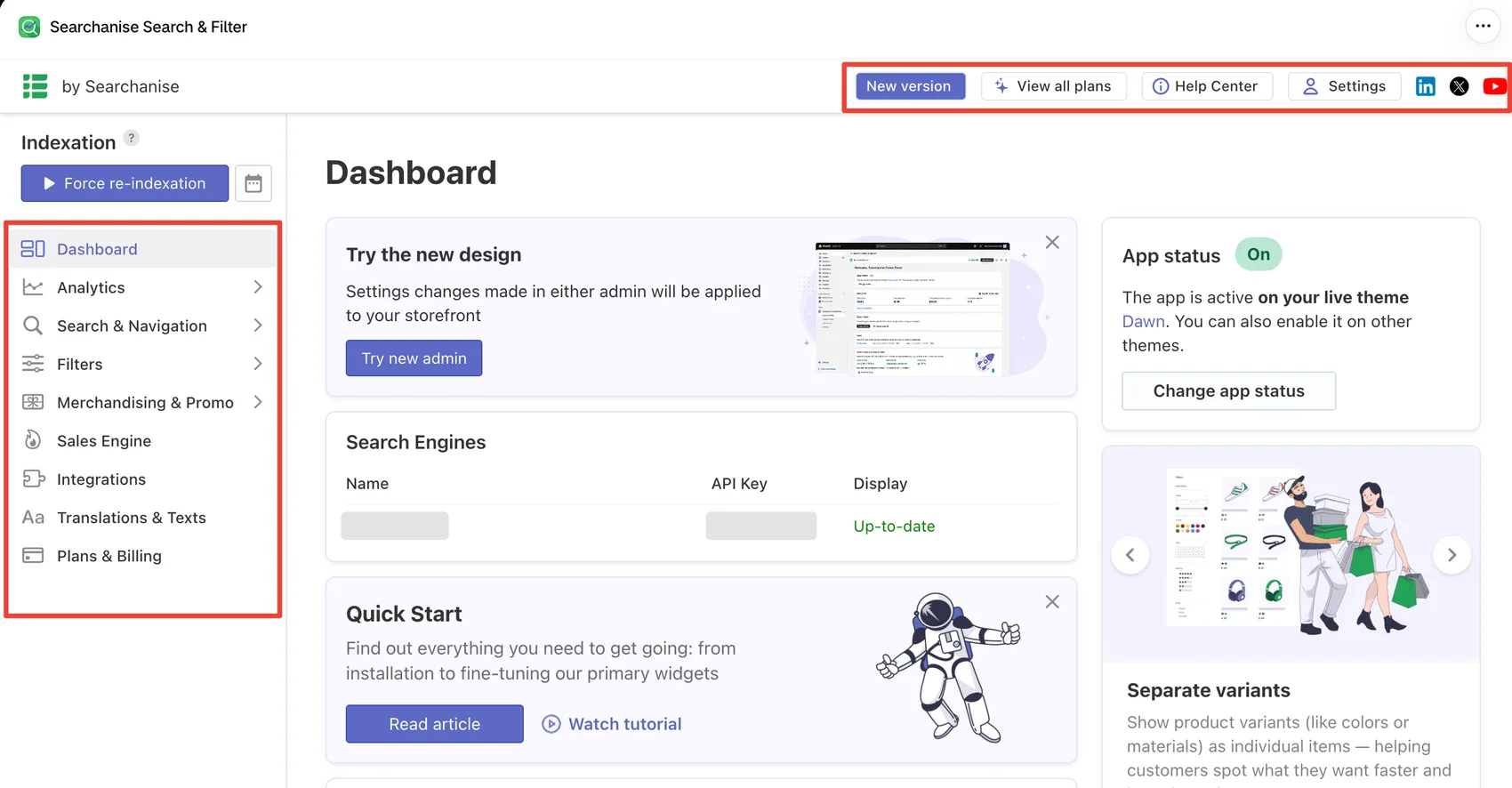
Searchanise covers three jobs: search, filters, and merchandising. The dashboard makes that clear. The left menu holds:
- Analytics for search, collection, and export reports.
- Search & Navigation for the instant search widget, search results page, suggestions, synonyms, and stop words.
- Filters for the filter list, filters on collections, and color families.
- Merchandising & Promo for ranking rules, banners, and labels.
- Sales Engine, Integrations, Translations & Texts, and Plans & Billing.
Above the menu sits an Indexation panel with a Force re-indexation button, so you can make Searchanise re-read your catalog on demand.
The dashboard also shows an App status card. In our store it read On, active on the live Dawn theme, with a button to change the status on other themes.
One thing to be aware of: Searchanise currently has two admins. A New version button and a “Try the new design” card point to a redesigned admin. The app says settings changed in either one apply to the storefront. We reviewed the classic admin shown in this article.
What We Tested
We installed Searchanise Search & Filter on a Shopify development store with 14 products, running the Dawn theme. We chose the free dev plan Searchanise offered for development stores. We did not subscribe to a paid plan.
During the test, we:
- went through the welcome tour and the onboarding questions;
- followed the theme activation step for the live Dawn theme;
- reviewed the dev plan screen and the full in-app plan comparison;
- checked the dashboard and the app status;
- opened the analytics overview;
- reviewed the instant search widget settings and the Search & Navigation menu;
- reviewed the default filter list and the Filters menu.
We did not check how search or filters looked or behaved on the storefront. We did not test search quality, build merchandising rules, set up banners or labels, or connect integrations. We did not try the new admin, measure page speed, test on mobile, or contact support.
This review covers setup, admin structure, default configuration, and pricing. It makes no claims about search accuracy or sales impact.
How Easy Is It to Set Up?
Searchanise opens with a short welcome tour. Four cards explain the main areas: instant search, filters and product cards, merchandising, and analytics. Then come three quick questions. The app asks which features you need most, what kind of store you run, and how many people work in it. It says the answers help it tailor the app and suggest a plan.
Next is a mailing preferences screen. You can opt in to feature and discount emails and to a monthly analytics report. The app notes that service emails about your subscription still arrive either way, and that you can change these choices later in Settings.
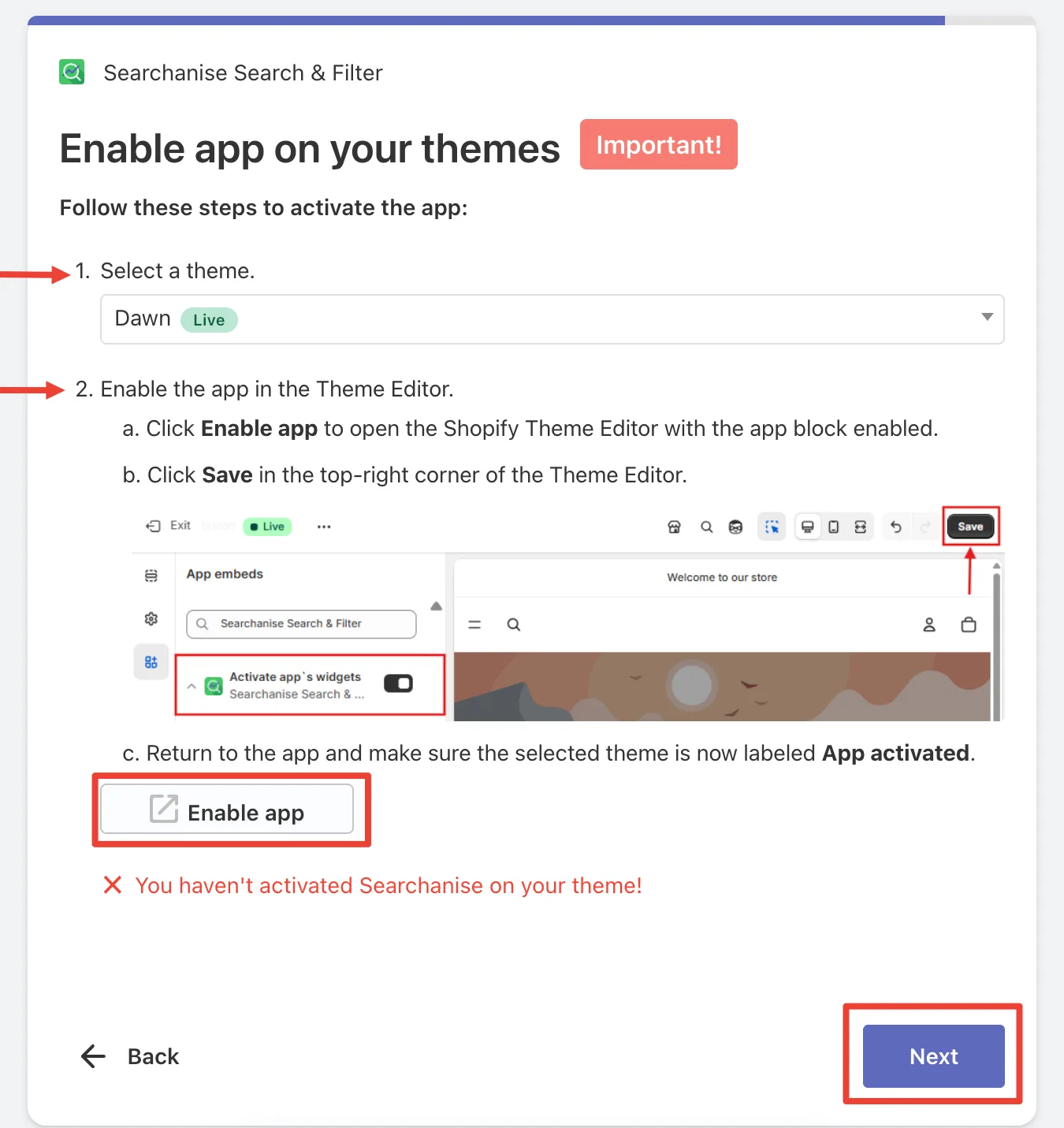
The most important step comes next. Searchanise marks it with an “Important!” label. You pick a theme, click Enable app, and the Shopify theme editor opens with the Searchanise app embed. You then need to click Save in the theme editor. Until you do, the step shows a red message saying Searchanise is not active on your theme.
The instructions are clear and include a small picture of the theme editor. But the Next button is still there while the warning is showing. A merchant in a hurry could finish onboarding without the app ever reaching the storefront. Once the embed was active in our store, the dashboard showed the app as On for the live Dawn theme.
Searchanise’s help docs explain that the app is switched on or off separately for each theme. If you change your live theme later, you need to enable it again on the new one. That is worth remembering before a theme switch.
The last onboarding screen asks you to accept the terms and privacy documents. On our development store, the next page offered a free dev plan. After that, the dashboard opened.
The whole flow needed no code. That answers the first half of our question. On a standard theme like Dawn, a merchant can get Searchanise installed without a developer, as long as they finish the theme editor step.
Filters Are Ready Before You Touch Them
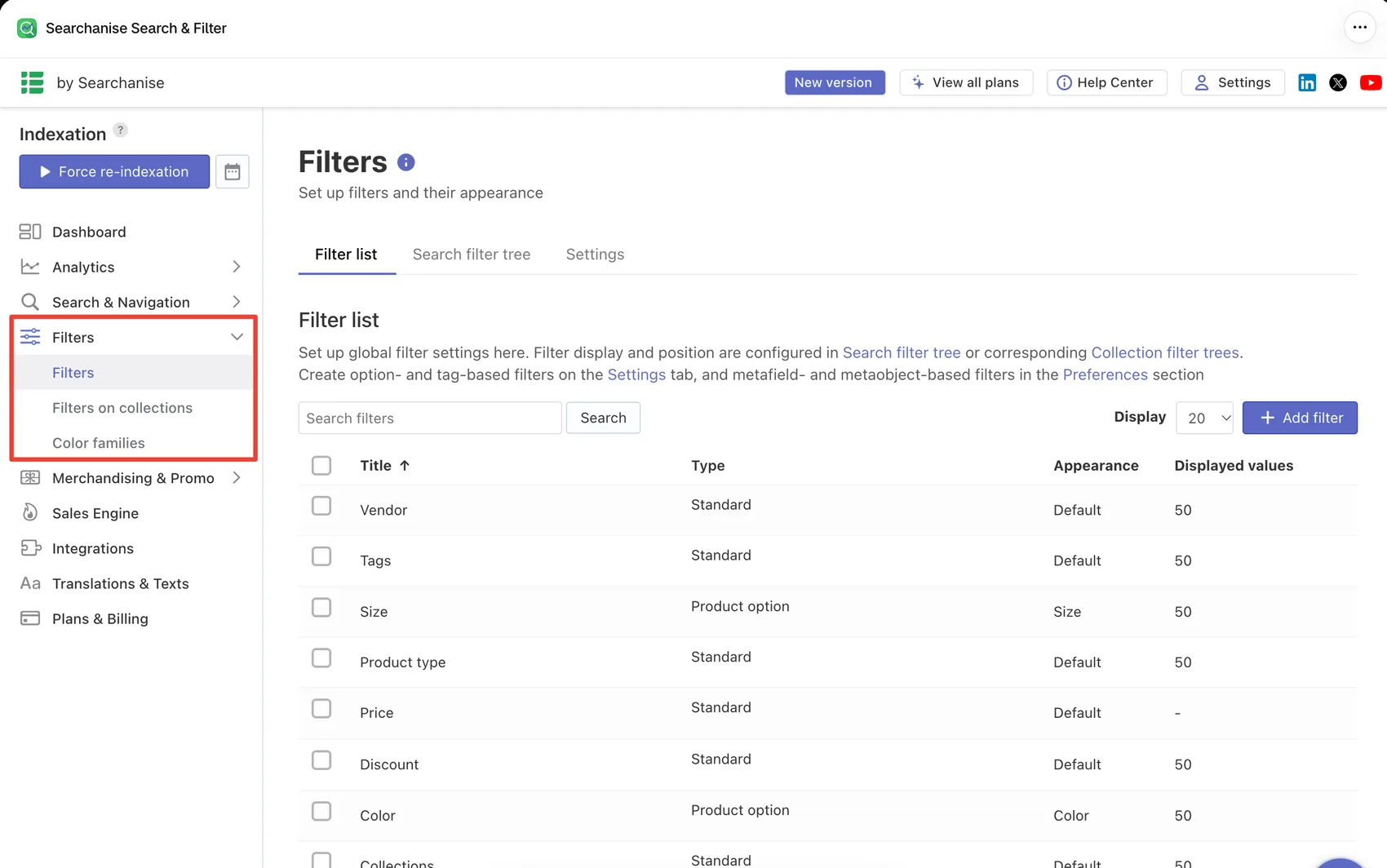
This was the most useful thing we found. After indexing, the Filter list was already filled in. It included Vendor, Tags, Size, Product type, Price, Discount, Color, Collections, and Availability.
Size and Color were set up as product option filters with their own display styles. The rest used the standard style. Most showed up to 50 values each. An Add filter button sits at the top for anything extra.
The page explains where the deeper settings live. Filter display and position are set in the Search filter tree or in each collection’s filter tree. Option- and tag-based filters are created on the Settings tab, and metafield- and metaobject-based filters in the Preferences section. The Filters menu also includes Filters on collections and Color families.
That split takes a little learning. Global filter settings, per-collection trees, and metafield filters live in different places. But for a store with clean product options, the defaults give you a working starting point straight away.
The onboarding tour also mentions slider filters, location-based filters, and syncing with Shopify’s collection sorting. We did not set those up, so we are reporting them as the app’s own description.
Instant Search You Can Shape Without Code
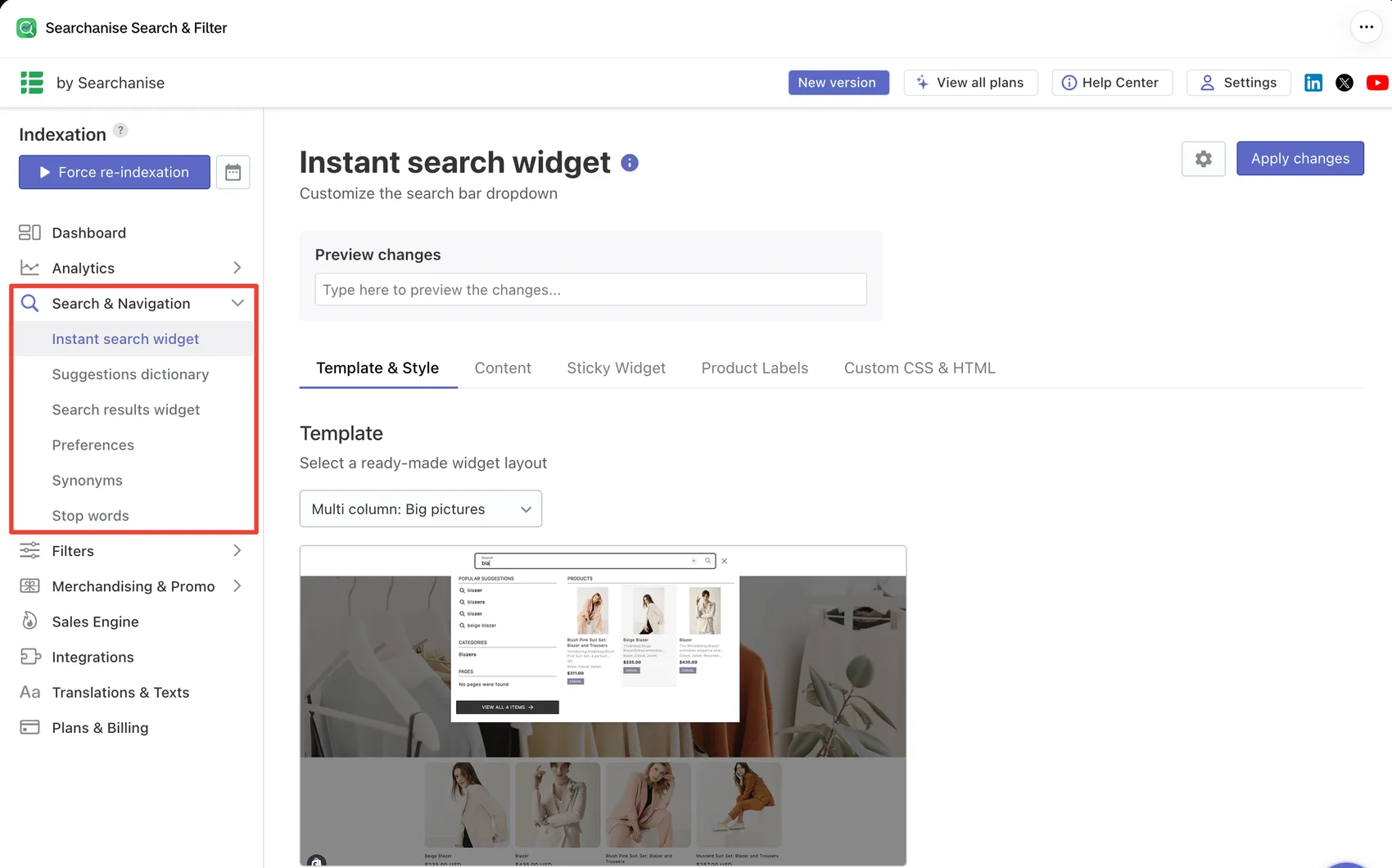
The Instant search widget page controls the dropdown shoppers see as they type. It starts with a Preview changes box, so you can type a search and see the result before you apply anything.
Below that are five tabs: Template & Style, Content, Sticky Widget, Product Labels, and Custom CSS & HTML. The template picker offers ready-made layouts. Ours was set to Multi column: Big pictures, which shows suggestions, categories, and pages beside a grid of product images.
The Search & Navigation menu goes further. It has separate pages for the Suggestions dictionary, Search results widget, Preferences, Synonyms, and Stop words. Synonyms matter more than they sound. If shoppers say “sofa” and your products say “couch”, this is where you fix it.
The tour also lists typo correction, voice search, redirects, and AI personalization. We did not test search quality on the storefront. So we can confirm the controls are there, but not how good the results are for a real catalog.
Some merchants raise this point in low-star reviews. A few report searches that miss products they expected to see. Synonyms and the suggestions dictionary are the tools for that, but they need someone to tend them.
Analytics Show Where Search Fails
Searchanise has its own analytics. The overview shows total clicks, total searches, searches with zero results, filters applied, and the value of clicked and bought products. Below the chart are tables for top search queries, top clicked products, top searches with no results, and top bought products.
The “no results” table is the most practical one. It shows what shoppers want that your store is not returning. That feeds straight back into synonyms and product data.
In our test store, every number was zero, since the store had no real traffic. We can confirm the reports exist, but not how accurate they are.
Pricing and Value
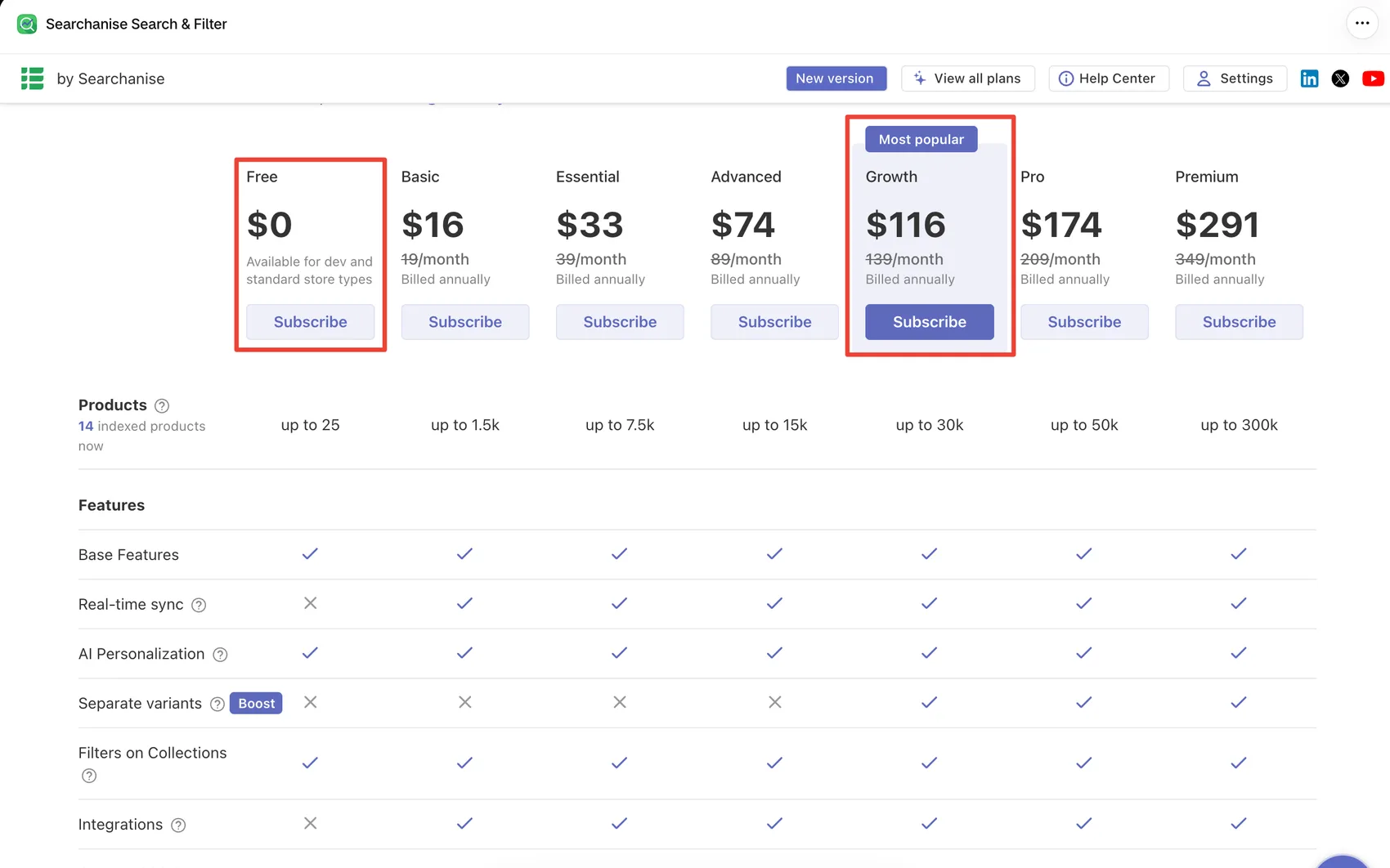
Searchanise prices by product count, not by revenue. Here is what the in-app plan table showed on October 6, 2026, with annual billing:
| Plan | Price (billed annually) | Products |
|---|---|---|
| Free | $0 | up to 25 |
| Basic | $16/month | up to 1,500 |
| Essential | $33/month | up to 7,500 |
| Advanced | $74/month | up to 15,000 |
| Growth | $116/month | up to 30,000 |
| Pro | $174/month | up to 50,000 |
| Premium | $291/month | up to 300,000 |
Monthly billing costs more: $19, $39, $89, $139, $209, and $349. Searchanise says annual billing saves up to 17%. Paid plans come with a 14-day trial, and Searchanise says no credit card is needed to start it.
Where Free stops. The live-store Free plan covers up to 25 products. That is enough to try the app, but almost no real store fits inside it. In the in-app table, Free also lacked real-time sync and integrations. The App Store listing describes Free a little differently, so check the current table before relying on it.
The jump points. The price is set by which product band you fall into. A store with 1,500 products pays $16 a month. At 1,501, it moves into Essential at $33. Plan for where your catalog will be, not only where it is today.
Features that need a higher plan. The in-app table marks separate variants, which shows each color or material as its own item in results, as available only from Growth upward. A small store that wants this pays $116 a month on annual billing, even with a few hundred products. Merchants who rely on variant-heavy catalogs should factor that in.
The dev-store catch. Our development store was offered a separate free dev plan covering up to 2 million products, with features such as real-time sync and integrations included. That plan is for testing. If you evaluate Searchanise on a dev store, expect the live-store plan table to look different.
For a small or mid-sized catalog, Basic or Essential is low cost for search and filters, especially next to apps that charge by sales volume. The value drops if you need separate variants on a small catalog, since that pushes you up several tiers.
What We Liked
- Filters ready out of the box: Size, color, price, availability, and other filters were set up after indexing.
- Clear onboarding: A short tour, three questions, and a well-explained theme activation step.
- Live preview for the search dropdown: You can test changes before applying them.
- Good control over search language: Synonyms, stop words, and a suggestions dictionary each have their own page.
- Useful analytics: Reports on zero-result searches show what shoppers cannot find.
- Price tied to catalog size: Small and mid-sized catalogs can stay on low-cost plans as sales grow.
What Could Be Better
- Easy to skip activation: The wizard warns you, but you can finish onboarding without enabling the app on your theme.
- Free is mostly a trial: The live-store Free plan stops at 25 products and lacks real-time sync and integrations in the in-app table.
- Separate variants cost more: The feature starts on the Growth plan, well above what a small catalog would otherwise pay.
- Two admins at once: The classic and new admins run side by side, which can make help articles and settings harder to follow.
- Mixed reports on reliability: Most merchant feedback is positive, but low-star reviews mention search gaps, past outages, and setup that needs technical help for custom designs.
Who Searchanise Search & Filter Is Best For
Searchanise suits stores with small to mid-sized catalogs, roughly from a few hundred to several thousand products. Stores whose products have clean size and color options get the most from the default filters.
It also suits merchants who want search, filters, analytics, and merchandising in one app, and who prefer a price that follows catalog size rather than revenue. A growing store with a stable product count can keep the same plan while sales rise.
Who Should Consider an Alternative
Stores with very few products may not need a paid search app at all. Shopify’s free Search & Discovery app may cover basic filters for a small catalog.
Stores with very large catalogs should price out the higher tiers carefully. Merchants who need variants shown as separate items, but have a small catalog, will pay Growth prices for one feature. And stores with heavily customized themes should expect extra setup work. Some merchants mention relying on Searchanise’s team for custom changes.
If you would rather pay by sales than by product count, apps such as Boost AI Search & Filter use a different pricing model and may suit you better.
Final Verdict
Searchanise Search & Filter answers the first half of our question well. A merchant can install it on a standard theme without a developer. The filters arrive ready, the search dropdown has templates and a live preview, and the admin is easy to find your way around.
The second half depends on your catalog. Pricing follows product count, the Free plan stops at 25 products, and some features need a higher tier. The theme activation step also needs care, because the wizard lets you move past it.
Our advice: start the 14-day trial, make sure the app embed is saved on your live theme, and check which product band your catalog falls into. If you need separate variants, look at the Growth price before you decide.
Frequently Asked Questions
Does Searchanise Search & Filter have a free plan?
Yes, but it is small. The live-store Free plan covers up to 25 products. Paid plans start at $16 a month billed annually, or $19 billed monthly, for up to 1,500 products.
How does Searchanise pricing work?
Plans are based on how many products you have, not your sales. Each plan covers a product range, from up to 25 on Free to up to 300,000 on Premium. Annual billing is cheaper than monthly.
Why is Searchanise not showing on my storefront?
The most likely reason is the theme app embed. Searchanise needs to be switched on in the Shopify theme editor, and the change must be saved. It is enabled separately for each theme, so a new live theme needs it switched on again.
Can I install Searchanise without a developer?
On a standard theme, yes. We installed it on Dawn through the onboarding steps with no code. Some merchants report needing help from Searchanise’s team for custom designs.
Which plan includes separate variants?
In the in-app plan table, separate variants start on the Growth plan, at $116 a month billed annually.
Did Blinto test Searchanise’s search results on a live storefront?
No. We tested onboarding, theme activation, admin settings, default filters, analytics, and pricing screens. We did not test storefront search quality, filters in action, speed, or sales impact.