
A shopper types “running shoe” into your search bar and gets nothing because your products say “trainer”. Another types “nike air” and gets a sock first. Search that misses like this costs sales, and Shopify’s built-in search only gives you so much control over it.
Algolia AI Search & Discovery connects your Shopify store to Algolia, one of the best-known hosted search engines. It replaces your store’s search with Algolia’s autocomplete and results page, and it can take over collection pages too. It has been on the Shopify App Store since October 2016 and holds a 3.7 rating from 44 reviews as of October 14, 2026.
That rating is split. Most reviews are five stars, but more than a quarter are one star, and many of those are about setup and getting help. So the question we wanted to answer is: can a Shopify store without a developer get real value from Algolia, or is it built for teams with engineering help?
We created an Algolia account, went through its onboarding, and explored the dashboard with Algolia’s sample dataset. The search engine and its tools are impressive. But the onboarding asks if you write code before anything else, the AI features are locked on the free plan, and costs are billed by Algolia rather than through Shopify.
Key Takeaways
- Built for teams with technical help: The engine is powerful and the dashboard is deep, but it is a developer-grade product. Setup and support are the most common complaints in low-star reviews.
- No-code Shopify setup is possible: Algolia’s docs describe a guided setup that adds search through theme app embeds and app blocks on a duplicate theme, with no code needed for the standard version.
- AI features need Grow Plus: On the free plan, AI Synonyms, Re-Ranking, Query Categorization, and Personalization showed lock icons in our dashboard.
- Usage-based cost, billed outside Shopify: You pay per 1,000 search requests and records past the included amount. Algolia bills you directly, not through your Shopify invoice.
- Best fit: Larger stores with a developer or agency, and enough search traffic to justify tuning it.
Our Verdict
Recommended for stores with developer or agency support. Not the easy choice for a small store setting up search on its own.
Algolia gives you a lot of control. Its dashboard covers indexes, query suggestions, rules, analytics, A/B testing, recommendations, and AI agents. Merchants who like the app praise its speed and the control it gives over ranking, synonyms, and merchandising.
The trade-offs are effort, cost model, and access to help. The guided onboarding we went through assumes some technical knowledge, the AI features sit on Grow Plus or above, and usage-based billing takes some planning. Several merchants on smaller plans say they could not get timely support.
If you have a developer or agency and search drives real revenue, Algolia is worth a serious look. Start on the free plan and test it on a duplicate theme first. If you’re a small store that wants to install a search app and be done, an app with a fixed monthly price and support included will be simpler.
What Algolia AI Search & Discovery Offers
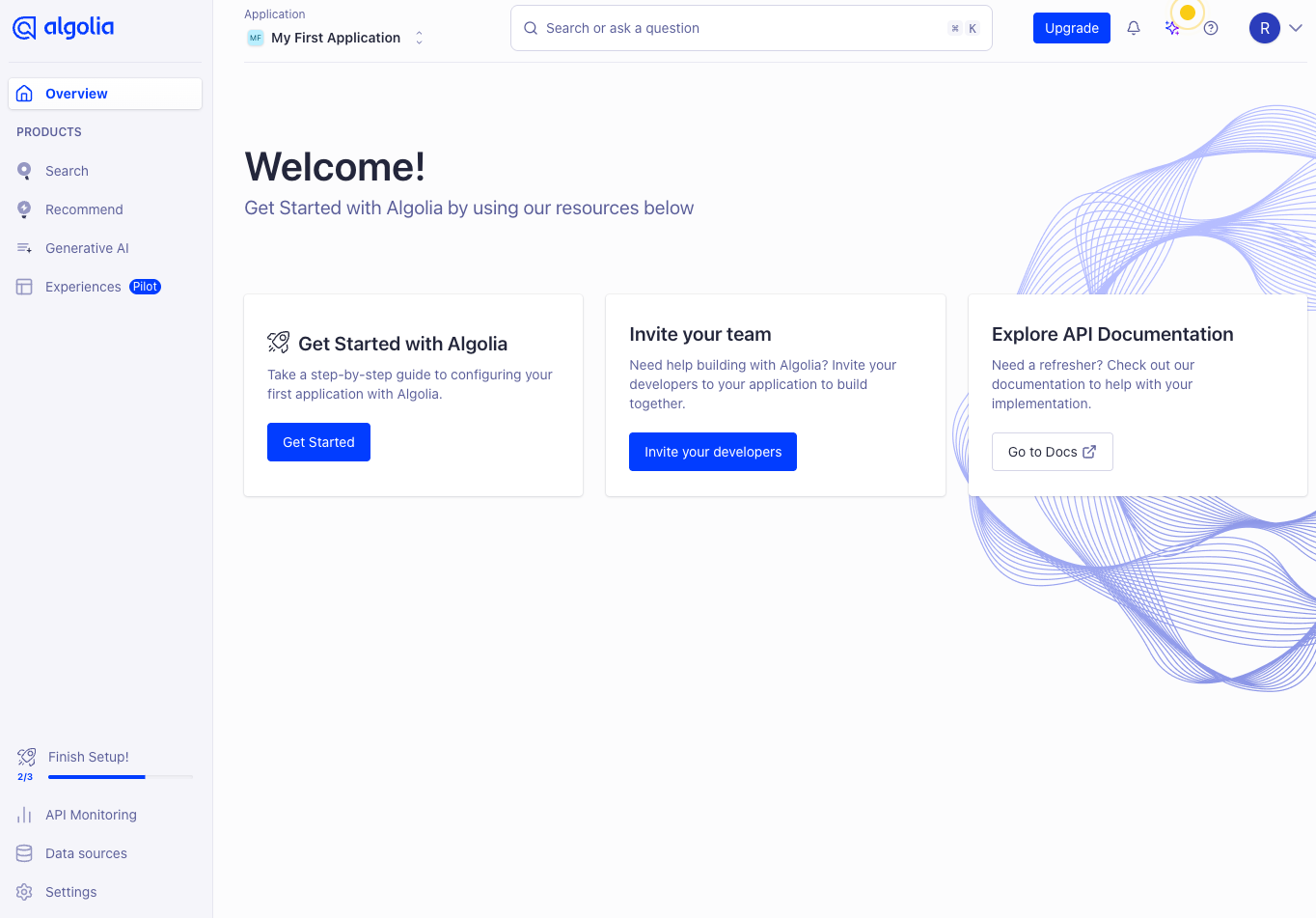
The Shopify app is a connector. Most of the work happens in Algolia’s own dashboard, which is a separate website with its own login. You need an Algolia account before you install the app.
Our dashboard listed four products:
- Search, the core engine with indexes, rules, and analytics.
- Recommend, for product carousels such as similar items and frequently bought together.
- Generative AI, home of Agent Studio for building AI shopping assistants.
- Experiences, marked Pilot, a visual builder for search interfaces.
On the Shopify side, Algolia’s docs say the app indexes products with their variants, collections, blog posts, and pages. Shopper-facing search comes in two parts. Autocomplete is the dropdown that appears as someone types, and it is added through a theme app embed. InstantSearch is the full results page with filters and sorting, added through app blocks. InstantSearch can also replace the product grid on collection pages.
The listing also covers custom ranking, synonym groups, product boosts, AI recommendations, and A/B testing. Tags and metafields can be used as filters.
What We Tested
We created a new Algolia account on the free plan and went through Algolia’s guided onboarding. We loaded Algolia’s sample movie dataset of 25,572 records, went through the step that maps fields to result cards, and explored the dashboard’s Search, Recommend, Generative AI, and Experiences areas.
We did not connect a Shopify store. So we did not test product indexing, the Shopify app’s own settings, the theme app embed, storefront search, collection pages, or search quality on real products. We also did not upgrade to a paid plan, train recommendation models, build an AI agent, or contact support.
This review covers Algolia’s onboarding, dashboard, plan limits, and cost model, plus the Shopify setup as Algolia documents it. It makes no claims about how search performs on a live Shopify store.
Can You Set It Up Without a Developer?
One of the first questions in Algolia’s onboarding was “Do you write code?” We answered No. It then offered a sample dataset so we could try search without our own data, and asked us to turn on automatic click and view events. These track which results shoppers see and click, and Algolia uses them for analytics and its AI features. The toggle was on, and Algolia recommends leaving it that way.
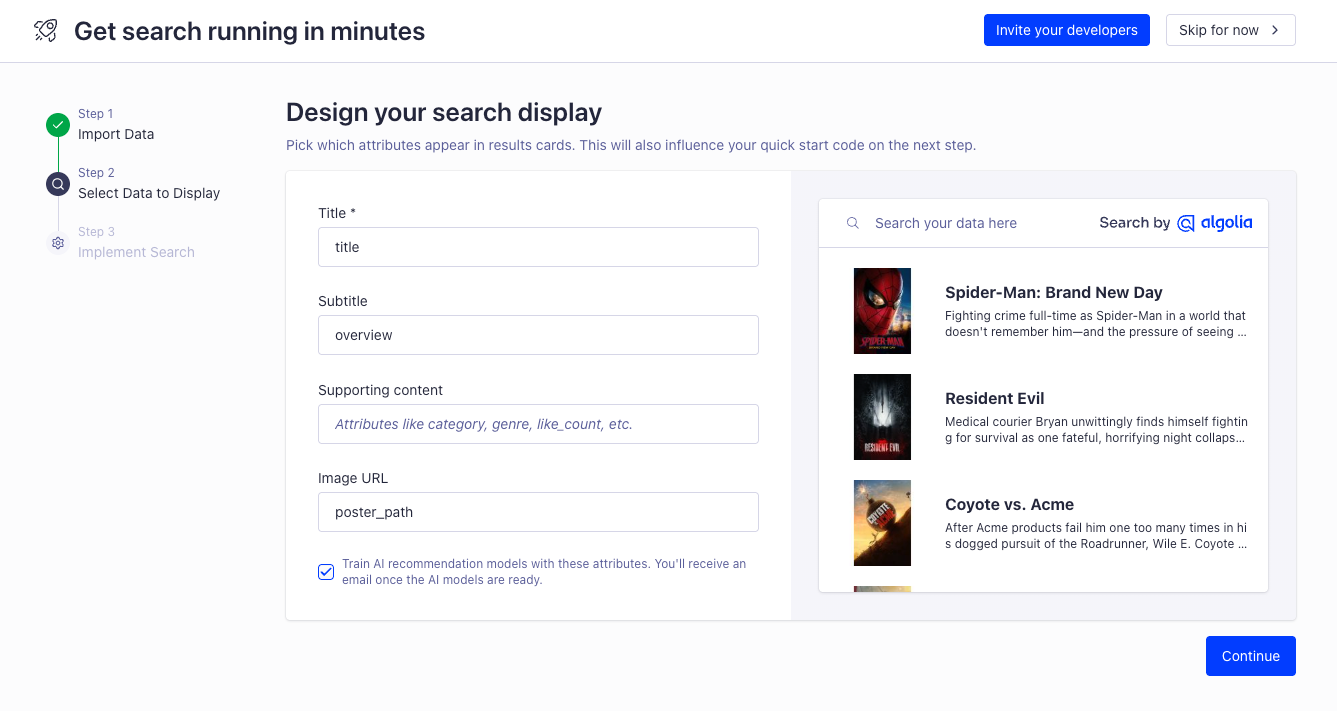
Next came a three-step guide called “Get search running in minutes”: Import Data, Select Data to Display, and Implement Search. In step two, you map your fields to a result card: a title, a subtitle, supporting details, and an image. A live preview updates as you go. A ticked checkbox uses those fields to train AI recommendation models, and Algolia emails you when they’re ready.
This part is friendly. The last step, though, gave us a script tag to paste before the closing body tag of our site. An Invite your developers button sat at the top of the guide. That flow is Algolia’s general website setup, and it shows who the product is mainly built for.
For Shopify, the docs describe a different path. You install the app, sign in to Algolia, and pick your Algolia application. The app creates its API keys for you. Then you choose a duplicate of your theme, turn on Autocomplete and InstantSearch, switch off Shopify’s default search results, and publish the duplicate when you’re happy. The live theme stays untouched until then, and the docs say the standard setup needs no code.
That is a reasonable no-code route on paper. But low-star reviews tell a mixed story. Some merchants got stuck at the credentials step or weren’t sure their account had been created. Others say a proper setup needed a developer, especially for custom designs. One merchant reports that code left behind after uninstalling caused search problems for their customers.
There is also a split between the two admins. The docs say facet and sort settings changed in Shopify’s app overwrite those set in Algolia’s dashboard, and the other way round. Pick one place to manage them, or your changes may disappear.
Where It Falls Short: AI Features Sit Behind Grow Plus
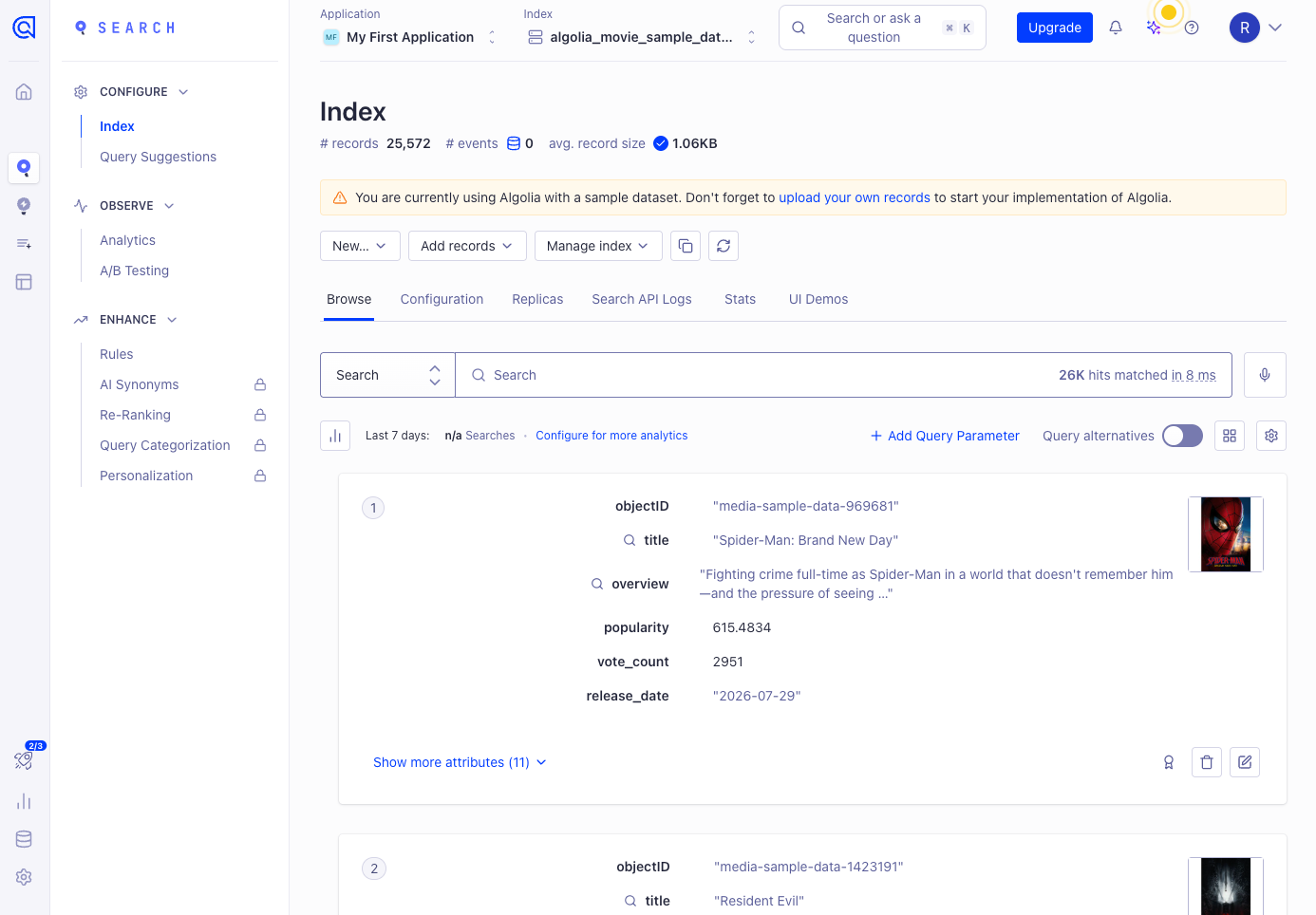
The Index page is where you see and tune your search data. Ours showed 25,572 records with an average size of about 1 KB. An empty search matched all of them, shown as 26K hits in 8 milliseconds. That speed is on Algolia’s sample data, not a Shopify catalog, but it shows why many merchants pick it.
The tabs go deep: Browse, Configuration, Replicas, Search API Logs, Stats, and UI Demos. The side menu adds Query Suggestions, Analytics, A/B Testing, and Rules. A banner reminded us we were still on the sample data and should upload our own records.
Under Enhance, four items had lock icons on our free plan: AI Synonyms, Re-Ranking, Query Categorization, and Personalization. Algolia’s pricing page places these on Grow Plus and Elevate. NeuralSearch, its semantic AI search, is listed for Elevate only.
This matters because AI is in the app’s name. Below Grow Plus, you tune results yourself with rules and settings. The features that learn from shopper behavior, such as re-ranking popular products higher, need Grow Plus. And they need click and conversion events flowing in before they have anything to learn from.
Rules are limited too. Free and Grow allow 10 rules per index, while Grow Plus and Elevate allow 10,000. A store that wants to pin products for many search terms will hit that limit fast on the lower plans.
Recommendations and AI Agents
Recommend offers model types such as Looking similar, Related items, and Frequently bought together. The setup page lists four steps: create an index, send events (live, or a CSV of past events), choose a model, and add it to your site. The Shopify docs say Recommend is supported in the app’s blocks. We did not train a model, so we can’t speak to the quality of its suggestions.
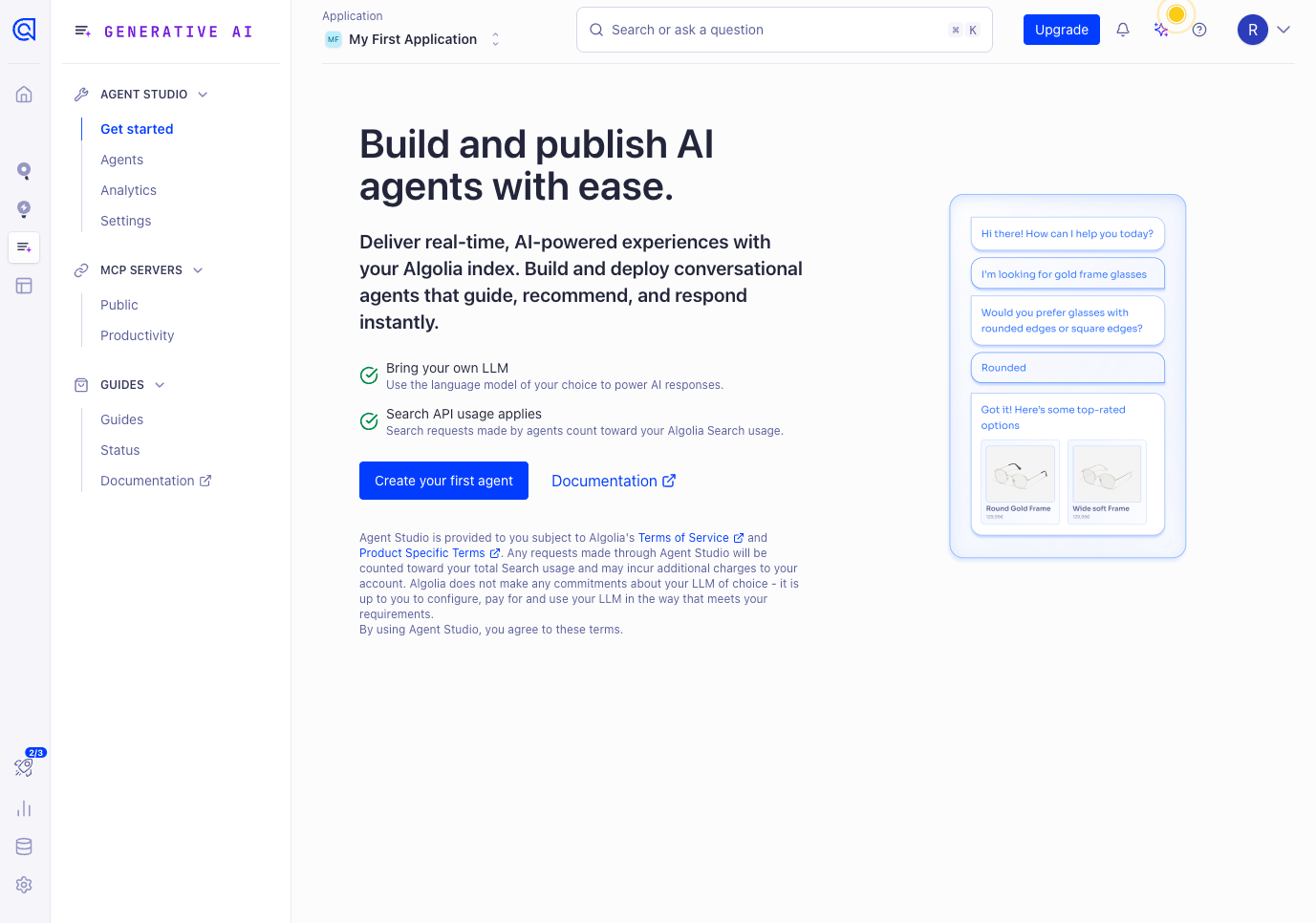
Agent Studio, under Generative AI, lets you build a conversational shopping assistant on top of your Algolia index. Two notes on its start page matter for cost. First, it is bring your own LLM: you choose the language model, and the terms say you configure and pay for it yourself. Second, searches made by agents count toward your Algolia search usage and may add charges. So an AI assistant here means two bills: your model provider’s and Algolia’s.
The dashboard also had Experiences, a pilot visual builder. Its Autocomplete block let us set the placeholder, recent searches, suggestions, a dropdown or dialog layout, a one- or two-column panel, and an AI Mode toggle, with desktop and mobile previews. It is the most beginner-friendly part of the dashboard, though it was still labelled a pilot and we did not publish anything from it.
Pricing and Value
The Shopify app is free to install. You pay Algolia for usage, and the listing notes that Algolia bills you separately from your Shopify invoice. Here are the plans on Algolia’s pricing page as of October 14, 2026:
| Plan | Included each month | After that | Notes |
|---|---|---|---|
| Free | 10K search requests, 50K records | No overage listed | 7-day analytics, 10 rules per index, no card needed |
| Grow | 10K search requests, 100K records | $0.50 per 1K searches, $0.40 per 1K records | 30-day analytics, 10 rules per index |
| Grow Plus | 10K search requests, 100K records | $1.75 per 1K searches, $0.40 per 1K records | Adds AI Synonyms, Re-Ranking, Query Categorization, Personalization; 90-day analytics; 10,000 rules |
| Elevate | Custom | Custom | Annual contract; adds NeuralSearch |
Search requests add up faster than you might expect. With search-as-you-type, Algolia counts each keystroke as a search request. A shopper typing “jacket” can send six requests before seeing the results page. So 10,000 free requests a month goes a lot less far than 10,000 shoppers.
To put the overage rates in context: 50,000 search requests in a month would cost about $20 in overage on Grow and about $70 on Grow Plus, before any record charges. These are list prices only. Your real bill depends on traffic, catalog size, how many indices and sort orders you run, and any agent usage.
Records count more than products. The app indexes products with their variants, plus collections, blog posts, and pages. The docs also say standard sort replicas, such as “price low to high”, copy your records and count toward your quota.
Support is sold separately. Algolia’s pricing page describes support plans as an add-on, from community access up to 24/7 enterprise response. Several merchants on free or pay-as-you-go plans report slow replies or being told technical help wasn’t included. Budget for support or agency help if you don’t have a developer.
Compared with Shopify search apps that charge a flat monthly price by product count, Algolia is harder to predict. For a high-traffic store with developer support, usage pricing can be good value. For a small store, the cost may be low, but the setup and support gaps are the bigger risk.
What Merchants Say
As of October 14, 2026, the app has 44 reviews and a 3.7 rating. About 64% are five stars and 27% are one star. Only four reviews sit in between.
Many of the positive reviews come from established brands that have used Algolia for a year or more. They praise search speed, control over ranking, synonyms, and merchandising, and help from a dedicated account or customer success manager.
The low-star reviews show clear patterns:
- Setup needs technical skills: Several merchants say they needed a developer, or got stuck during onboarding and credentials.
- Support depends on your plan: Merchants on free or pay-as-you-go plans report slow or no replies, and some were told support costs extra.
- Cost and contracts: Some older reviews describe unexpected bills or contracts they couldn’t leave early.
- Bugs and leftovers: Reviews from 2026 mention intermittent errors, the app and dashboard conflicting, and some products missing from search. An older review reports leftover code after uninstalling.
Algolia has replied to some reviews, most recently in January 2026, usually pointing the merchant to support. We did not run into these issues ourselves because we did not connect a store.
What We Liked
- Fast, deep search engine: Our sample index returned 26K hits in 8 milliseconds, and the index tools cover configuration, replicas, logs, and stats.
- Clear onboarding preview: Mapping fields to a result card with a live preview made it easy to see how results would look.
- Safe Shopify rollout: The documented setup works on a duplicate theme, so your live store isn’t touched until you publish.
- Free plan with no card: You can explore the full dashboard and try search on sample data before paying.
- Room to grow: Recommend, A/B testing, Agent Studio, and the Experiences builder sit in the same account.
What Could Be Better
- AI features locked on Free and Grow: AI Synonyms, Re-Ranking, Query Categorization, and Personalization need Grow Plus or above.
- Built with developers in mind: The onboarding starts by asking if you code and ends with a script tag, and low-star reviews often mention needing a developer.
- Hard-to-predict cost: Each keystroke counts as a request, sort replicas add records, and AI agents add search usage.
- Billed outside Shopify: Charges come from Algolia directly, not through your Shopify bill.
- Support isn’t included by default: Merchants on smaller plans report slow or paid support.
- Two places to manage settings: Facet and sort changes in the Shopify app and the Algolia dashboard can overwrite each other.
Who Algolia AI Search & Discovery Is Best For
Algolia suits larger Shopify stores with a developer, agency, or in-house tech team. Those teams can make the most of rules, replicas, events, and custom ranking, and handle the custom design work.
It is also a good fit for stores where search drives a big share of revenue and the team is ready to pay for Grow Plus or Elevate. That’s where the behavior-based AI features and longer analytics history become available.
And it suits stores that want one platform for search, recommendations, and AI assistants, and are comfortable managing usage-based costs.
Who Should Consider an Alternative
Small stores without technical help should think twice. The setup and support complaints in reviews come largely from smaller merchants. A search app with a fixed price and support included will be easier to run.
Stores that want AI search without a big bill should note that Algolia’s AI features start at Grow Plus, and NeuralSearch needs Elevate. Compare that cost with other search apps before you commit.
Stores with simple needs may not need a paid app at all. Shopify’s free Search & Discovery app covers basic filters, synonyms, and product boosts.
Final Verdict
Algolia AI Search & Discovery connects your store to one of the most capable search engines available. The dashboard is deep, search is fast, and the Shopify setup is documented as a no-code process on a duplicate theme.
So, can a store run it without a developer? You can install it without one, but you’ll get much more out of it with one. The onboarding assumes technical knowledge, the AI features sit on Grow Plus or above, and many merchants on smaller plans say they struggled to get help.
Our advice: create a free Algolia account and connect it to a duplicate theme first. Check how your search requests add up over a normal week, and decide who will support it before you upgrade. If nobody on your team can do that, start with a simpler app.
Frequently Asked Questions
Is Algolia AI Search & Discovery free?
The app is free to install, and Algolia has a free plan with 10,000 search requests and 50,000 records a month. No credit card is needed for Free. Paid plans charge per 1,000 search requests and records past the included amount.
Is Algolia billed through Shopify?
No. The listing says Algolia bills its charges separately from your Shopify invoice.
Do I need an Algolia account before installing?
Yes. Algolia’s docs say you need an Algolia account first. During setup, the Shopify app connects to it and creates its API keys for you.
Which plan includes Algolia’s AI features?
Grow Plus and Elevate include AI Synonyms, Re-Ranking, Query Categorization, and Personalization. NeuralSearch is Elevate only. On our free plan, these features showed lock icons.
Does each keystroke count as a search?
With search-as-you-type, yes. Algolia counts each keystroke as a search request, which affects how far your quota goes.
Did Blinto test Algolia on a live Shopify store?
No. We created an Algolia account, explored the dashboard with a sample dataset, and reviewed the Shopify setup in Algolia’s docs. We did not connect a Shopify store or test storefront search, recommendations, AI agents, or support.