
Shopify’s own filters and search do the basics. But once a catalog grows past a few hundred products, shoppers need more. They want to filter by brand, color, price, and stock in one go, and they want search to suggest products while they type. Many merchants who hit that wall look for a paid search and filter app with a low monthly price.
Sparq Product Filter & Search is one of those apps. It replaces Shopify’s default search with its own instant search and adds filters to collection and search pages. The developer is Sparq, based in New Delhi, and the app has been on the Shopify App Store since April 2019. As of October 14, 2026, it holds a 4.3 rating from 74 reviews and does not carry the Built for Shopify badge.
The entry plan is $19 a month, and that price includes up to 2,500 products. That sounds generous. But the plan is also capped by impressions, a count of how often shoppers use Sparq’s filters and search. So the question we wanted to answer is: can a growing store stay on the $19 Standard plan, or will the product and impression limits push the bill up?
We installed Sparq on a Shopify development store and went through onboarding and the main admin areas during the free trial. Setup is short and well guided, and the filters arrive ready-made. The cost is the part that needs the most homework.
Key Takeaways
- Fast, guided setup: Onboarding walks you through enabling the theme app embed, then builds default filters for collection and search pages for you.
- Usable filters from day one: Our store got nine ready-made filters, including tags, vendor, availability, price, and color, which you can switch on, off, or reorder.
- The bill depends on traffic, not just catalog size: Every plan has a product limit and an impression limit. Going over either one adds charges.
- Support level depends on the plan: The in-app plan screen lists email-only support on Standard. Chat starts on Premium, and phone support on Enterprise.
- Mixed merchant signals: Most reviews praise hands-on setup help, but a small cluster of one-star reviews mention cost at very large catalog sizes and theme code left behind after uninstalling.
- Best fit: Stores with up to a few thousand products and modest traffic that want ready-made filters and instant search for a low starting price.
Our Verdict
A solid low-cost option for small and mid-sized catalogs, as long as you watch the impression count.
Sparq gets a store from install to working filters in a few guided steps. The onboarding is clear, the default filters cover what most stores need, and the settings let you choose exactly which parts of your storefront Sparq takes over. For $19 a month, Standard includes collection filters, meta tag filters, synonyms, and 30 days of analytics.
The trade-off is pricing that moves with traffic. Standard includes 30,000 impressions a month, and Sparq’s own estimate puts a store with about 10,000 monthly users close to that line. Past the cap, you pay per 1,000 impressions. You also can’t see your real impression count until shoppers start using the app, so the true monthly cost is hard to know before you install.
If your store has a few thousand products and steady but modest traffic, Standard is good value. If you expect heavy traffic, need chat support, or want redirects and banners, plan on Premium at $59 from the start.
What Sparq Product Filter & Search Offers
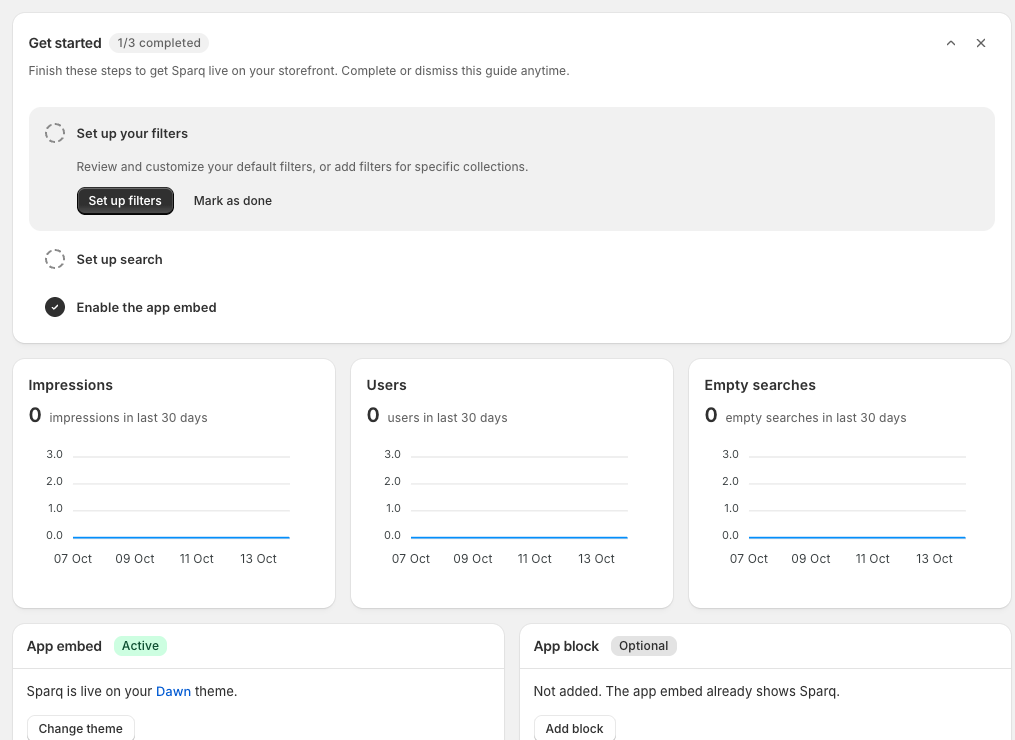
In the Shopify admin, the app shows up as Sparq Filter & Search. Its menu has Filters, Data, Merchandising, Analytics, Settings, and Billing.
The app covers four main jobs:
- Collection page filters, so shoppers can narrow a collection by tag, type, vendor, price, color, and more.
- A Sparq search results page with its own filters, sorting, and pagination.
- Instant search suggestions for products, collections, and pages as shoppers type.
- Search analytics, including searches that return no results.
The dashboard opens with a short Get started checklist: set up your filters, set up search, and enable the app embed. Below it are three charts for the last 30 days: Impressions, Users, and Empty searches. Further down are cards for the app embed, an optional app block, sync status, and billing.
Putting impressions first on the dashboard is useful. Impressions are what your plan is measured by, so this is the number to keep an eye on once the app is live.
What We Tested
We installed Sparq Product Filter & Search on a Shopify development store running the Dawn theme. The store used Shopify’s sample snowboard products. We stayed on the app’s 14-day free trial and did not pay for a plan.
We went through:
- the full onboarding flow, including the theme app embed step, plan screen, and initial sync;
- the dashboard and its setup checklist;
- the Filters list;
- the Data area for products, collections, and pages;
- the Merchandising area (synonyms, redirects, and banners);
- the Analytics page;
- the General settings page;
- the in-app Billing screen.
We did not check Sparq’s filters or search on the storefront. We did not test search quality, typo handling, or AI search. We did not create synonyms, redirects, or banners, promote products, measure page speed, contact support, go over a plan limit, or uninstall the app. Our store had no real traffic, so every chart and counter showed zero.
So this review covers setup, admin design, default settings, plan limits, and pricing. It makes no claims about search accuracy, storefront design, speed, or sales impact.
Setup: A Short, Guided Path to a Live App
Sparq’s onboarding is one of its strongest parts. It runs in four short steps, and each one tells you what is about to happen.
Step 1: Choose the core features. The first screen lists the three features Sparq will turn on: collection page filters, an upgraded search results page, and instant search suggestions. It notes that you can change these later.
Step 2: Set up the theme. You pick a theme from a dropdown (ours showed Dawn (live)), then open the theme editor. There you switch on the Sparq Filter & Search app embed and click Save. The onboarding page updates by itself once the embed is on. There is also a Skip for now button if you want to set up the theme later.
Step 3: Pick a plan, or don’t. The plan screen offers Standard, Premium, and Enterprise with a 14-day free trial. Ours showed full access until October 28, 2026. An “I’ll choose a plan later” link lets you keep going without picking one.
Step 4: Let it sync. Sparq syncs your store data, sets up instant search, and creates filters for search and collection pages. A note warns that large catalogs can take a few minutes to finish in the background. The last screen offers Go to dashboard or Preview your store.
After onboarding, the dashboard showed the app embed as Active on our Dawn theme. The app block was marked Optional with a note that the embed already shows Sparq. So on a standard theme like Dawn, you don’t need to place any extra blocks to get started.
One thing to note: Sparq’s help docs say that if the trial ends without a plan, the app moves to a no-plan state and search and filters stop working on your search and collection pages. The “choose later” link is handy, but set a reminder before the trial ends.
Filters: Ready-Made and Easy to Reorder
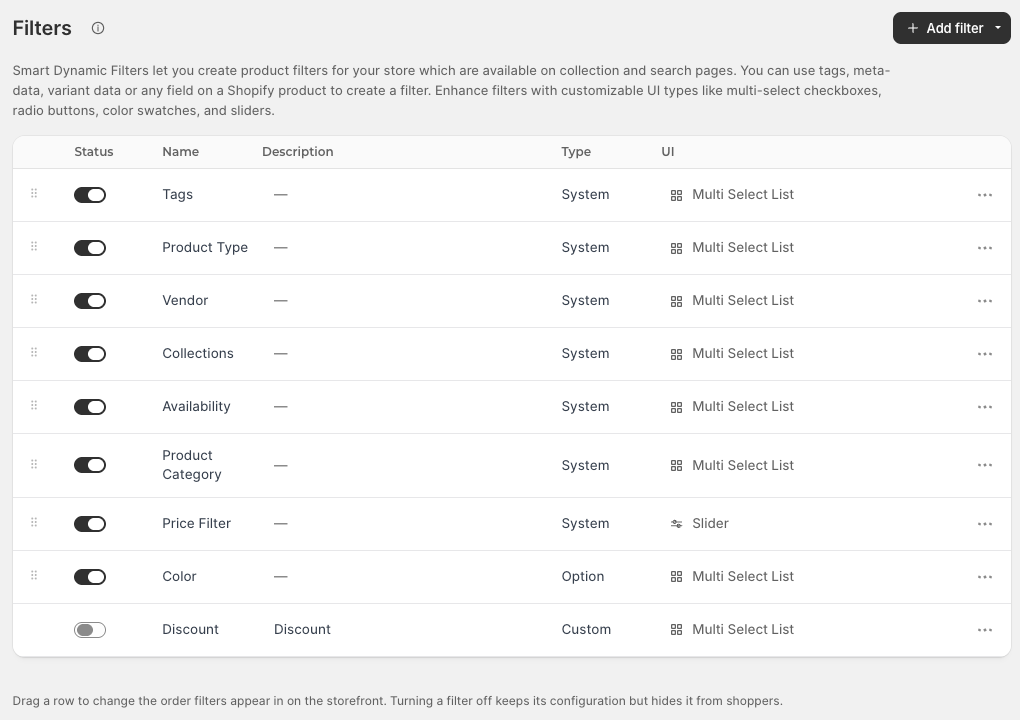
After onboarding, the Filters page already had nine filters. Eight were switched on:
- Tags, Product Type, Vendor, Collections, Availability, and Product Category, all marked System and shown as a multi-select list;
- Price Filter, a System filter shown as a slider;
- Color, an Option filter built from product variants, shown as a multi-select list.
A ninth filter, Discount, was marked Custom and switched off. If you run regular sales, it’s worth turning on so shoppers can find discounted items.
The page explains how filters work in plain words. You can build a filter from tags, metafields, variant data, or any other product field. You can then display it as multi-select checkboxes, radio buttons, color swatches, or sliders. To change the order shoppers see, you drag a row. Turning a filter off hides it from shoppers but keeps its settings, so you can test a filter and bring it back later without rebuilding it.
Sparq’s help docs add a few details. System filters are created automatically and can’t be deleted, but you can rename them and choose whether they show on search pages, collection pages, or both. Tag-based filters can be created in any number. Metafield filters are built from a namespace and key, which the docs describe as an option for advanced users.
For a store with tidy tags and variant options, this is a good starting point. You get usable filters without building anything by hand, and you can refine them as you learn what shoppers use.
Settings, Data, and Merchandising
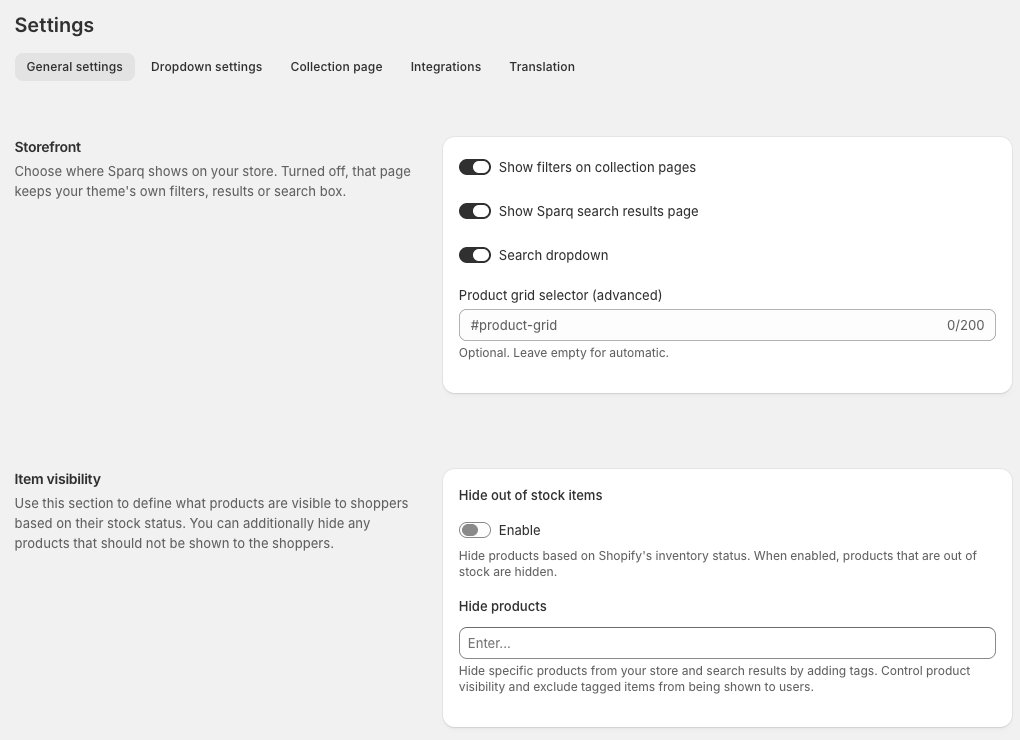
Settings has five tabs: General settings, Dropdown settings, Collection page, Integrations, and Translation.
The Storefront section on the General tab is the most useful control in the app. It has three separate toggles:
- Show filters on collection pages
- Show Sparq search results page
- Search dropdown
All three were on in our store. If you turn one off, that part of the store goes back to your theme’s own filters, results, or search box. That means you can roll Sparq out in stages, for example filters first and search later, or keep a theme feature you already like.
There is also an optional Product grid selector field for themes where Sparq can’t find the product grid by itself. The field says to leave it empty for automatic detection, so most stores on a standard theme won’t need it.
Under Item visibility, Hide out of stock items was off by default. When it’s on, Sparq hides products that Shopify marks as out of stock. A Hide products field lets you hide specific products by tag, such as wholesale items or old stock. Further down, a Search fields list controls which product fields search reads. Ours included tags, product type, and vendor.
The Data area has tabs for Products, Collections, Pages, Sync setting, and Sync logs. Each product row has a Promote dropdown. We didn’t open its options, but it lines up with the product boosting the App Store listing describes. The sync logs are worth knowing about if a product change doesn’t show up on the storefront.
Merchandising has three tabs: Synonyms, Redirects, and Banners. The Synonyms page explains that synonyms work both ways. For example, a search for “trousers” finds “pants”, and the other way round. There is an Import button for adding them in bulk. Our store had none set up.
Analytics has tabs for Search requests, Search users, and Empty searches, plus lists of Top queries and Empty queries. The page explains that empty queries usually point to products you don’t stock, or to missing synonyms or tags. That is the right advice. The empty-searches report is where synonyms and tags pay off, because it tells you exactly which words shoppers use that your catalog doesn’t match. Standard keeps 30 days of analytics and Premium keeps 90.
Where It Falls Short: A Bill That Grows With Traffic
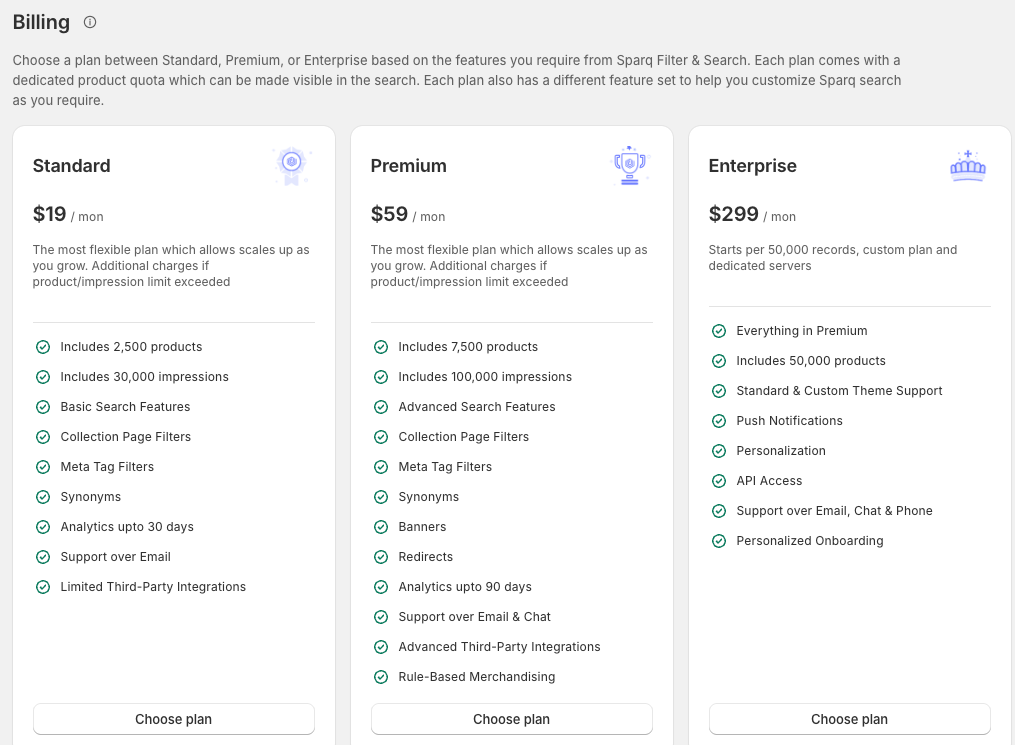
The Standard and Premium plan cards both carry the same line: additional charges apply if the product or impression limit is exceeded. This is the main thing to understand before choosing Sparq.
Products are easy to plan for. You know your catalog size. Sparq’s pricing page says only active products published to the Online Store count.
Impressions are harder. Sparq’s billing help page counts each shopper interaction with its filters and search as one impression. It estimates that a store with about 10,000 monthly users builds up around 25,000 impressions. Standard includes 30,000. So a store with modest traffic is already close to the line, and a busy sale month could push it over.
What happens past the limits, according to Sparq’s billing help page:
- Extra impressions cost $0.60 per 1,000 on every plan.
- Extra products are charged pro rata. Sparq’s own example puts 5,000 products on Standard at $38 a month, twice the base price.
By those rates, a Standard store that doubles its impressions to 60,000 would pay about $18 extra, or roughly $37 for the month. If the catalog also grows to 5,000 products, the two charges together would bring Standard close to Premium’s $59.
The other problem is timing. During the trial, you can’t see your real impression count until shoppers use the app. Our dashboard showed zero because the store had no traffic. A new store will only find out where it lands after a few weeks live.
There is also some mismatch in how plans are described. The App Store listing groups synonyms and redirects under Enterprise. The in-app billing screen lists synonyms on Standard and redirects and banners on Premium. Premium’s card also lists rule-based merchandising, but the Merchandising area in our trial showed only Synonyms, Redirects, and Banners. If one of those features is the reason you’d pick a plan, confirm with Sparq which plan includes it before you subscribe.
Pricing and Value
Here is what the in-app billing screen and Sparq’s pricing page showed on October 14, 2026, billed monthly:
| Plan | Price | Products included | Impressions included | Analytics | Support |
|---|---|---|---|---|---|
| Standard | $19/month | 2,500 | 30,000 | 30 days | |
| Premium | $59/month | 7,500 | 100,000 | 90 days | Email and chat |
| Enterprise | $299/month | 50,000 | 500,000 | 1 year | Email, chat, and phone |
Every paid plan comes with a 14-day free trial. Sparq’s help docs say the trial gives you the full Enterprise feature set.
What each plan adds. On the in-app screen, Standard covers basic search, collection page filters, meta tag filters, synonyms, and limited third-party integrations. Premium adds advanced search features, banners, redirects, rule-based merchandising, and more integrations. Enterprise adds custom theme support, push notifications, personalization, API access, phone support, and personalized onboarding. It’s described as a custom plan with dedicated servers, priced from $299 per 50,000 records.
Synonym limits. Sparq’s pricing page caps synonyms at 100 on Standard, 1,000 on Premium, and 10,000 on Enterprise. A hundred is enough for common swaps like “hoodie” and “sweatshirt”, but a store with lots of jargon or part names may hit it.
Support targets. The same page lists response targets of 24 hours by email on Standard, 12 hours on Premium, and 4 hours on Enterprise. We didn’t contact support, so we can’t say whether those targets are met.
No free plan for live stores. The listing’s free plan only covers development and affiliate stores, stores on a Shopify free trial, dormant stores, and partner test stores. A live store pays from the end of the trial.
How it compares on price. The 2,500 products included in Standard are generous for $19. When we reviewed Globo’s Smart Product Filter & Search on October 9, 2026, its Basic plan was $29 a month at 2,500 products, priced on catalog size. So Sparq is cheaper on paper for a mid-sized catalog. Sparq’s impression limit is what can close that gap.
For a store with 1,000 to 2,500 products and a few thousand visitors a month, Standard is fair value. For anything busier, price Premium from the start rather than paying overages on Standard.
What Merchants Say
As of October 14, 2026, the app shows a 4.3-star rating from 74 reviews. The split is uneven: 64 five-star reviews, two four-star reviews, eight one-star reviews, and none at two or three stars.
The positive reviews focus on support. Many merchants say the team set up the app for them, matched filters to their theme, or made custom changes on request. A few say the filters are highly customizable and work well for large catalogs.
The one-star reviews are few, but they show some patterns:
- Cost at very large catalogs: Two merchants with big catalogs objected to monthly bills in the hundreds of dollars.
- Theme code after uninstalling: Two merchants, one in 2021 and one in 2026, reported leftover theme changes or a broken search bar after removing the app.
- Setup and sync problems: A few older reviews describe the app not working properly, an onboarding error, or a sync button that stopped working.
- Marketing emails: One 2026 reviewer objected to unsolicited emails from the company.
Sparq has replied publicly to several older critical reviews, most recently in 2024. The two one-star reviews from 2026 had no public reply when we checked.
The review count is small for an app launched in 2019, so each review carries more weight than it would on a larger app. We didn’t uninstall Sparq or contact support, so we can’t confirm or rule out these issues. They are good reasons to keep a theme backup before installing and to ask how removal works.
What We Liked
- Guided onboarding: The four-step setup explained each step, and the dashboard confirmed the app embed was active on our theme without any code edits.
- Default filters out of the box: Nine filters were created for us during onboarding, including a price slider and a color filter built from variant options.
- Stage-by-stage rollout: Separate toggles for collection filters, the search results page, and the search dropdown let you switch on only the parts you want.
- Turning filters off keeps their settings: You can hide a filter while you test it and bring it back later.
- Impressions front and centre: The dashboard shows the number your bill depends on before anything else.
- Helpful empty-search guidance: The analytics page explains what empty queries mean and how to fix them with synonyms or tags.
- 2,500 products for $19: A large product allowance for an entry plan.
What Could Be Better
- Impression-based pricing is hard to predict: You only learn your real usage after going live, and overages are charged per 1,000 impressions.
- Email-only support on Standard: Chat support needs Premium, which matters if something breaks during a sale.
- Plan features are described differently in different places: The App Store listing and the in-app billing screen don’t match on which plan includes synonyms and redirects.
- Rule-based merchandising wasn’t visible: Premium lists it, but we only saw Synonyms, Redirects, and Banners in the Merchandising area.
- No free plan for live stores: The free plan is for development and test stores only.
- Small review base with a few serious complaints: 74 reviews in total, including reports of leftover theme code after uninstalling.
Who Sparq Product Filter & Search Is Best For
Sparq suits small and mid-sized stores with 500 to 2,500 products and steady but modest traffic. Standard gives them ready-made filters, instant search, synonyms, and basic analytics for $19 a month.
It’s also a good fit for merchants who want help with setup. Many reviews describe the team doing the theme work for the merchant. If you’d rather not edit your theme yourself, that’s a real plus.
Stores that want to roll out search and filters in stages will like the storefront toggles. You can start with collection filters, keep your theme’s search, and switch on Sparq’s search later.
Who Should Consider an Alternative
High-traffic stores should do the impression math before choosing Standard. If your monthly users are well above 10,000, Premium or a plan without an impression cap may cost less overall.
Merchants who need fast help during sales should note that Standard is email-only. If live chat matters, budget for Premium.
Very large catalogs should get a written quote. Enterprise is priced per 50,000 records, and some of the strongest complaints come from stores at that size.
Stores with only a few products and simple needs may not need a paid app. Shopify’s free Search & Discovery app covers basic filters and synonyms.
Final Verdict
Sparq Product Filter & Search makes setup easy. Onboarding is clear, the app embed works on a standard theme without code edits, and default filters are ready by the end of setup. The settings let you decide exactly which parts of your storefront Sparq controls.
So, will the $19 plan hold up as your store grows? For a few thousand products and modest traffic, yes. It stops being cheap when impressions climb past 30,000 a month or your catalog passes 2,500 products. At that point, Premium is often the better buy.
Our advice: use the trial to test the filters on your own collection pages, especially on mobile. Then check the Impressions chart on the dashboard after the first week of real traffic, and set a reminder to choose a plan before the trial ends so your filters don’t switch off.
Frequently Asked Questions
Does Sparq Product Filter & Search have a free plan?
Only for development stores, affiliate stores, stores on a Shopify free trial, dormant stores, and partner test stores. Live stores pay from $19 a month after a 14-day free trial.
What is an impression in Sparq’s pricing?
Sparq counts each shopper interaction with its filters and search as one impression. Standard includes 30,000 a month, Premium 100,000. Extra impressions cost $0.60 per 1,000.
What happens if I go over my product limit?
Sparq charges extra on a pro rata basis. Its own example puts 5,000 products on the Standard plan at $38 a month.
What happens when the free trial ends?
According to Sparq’s help docs, if you haven’t chosen a plan, the app moves to a no-plan state and search and filters stop working on your search and collection pages until you upgrade.
Do I need to edit my theme code to install Sparq?
Not on our Dawn test store. Onboarding asked us to switch on the Sparq app embed in the theme editor and save. Sparq’s help docs note that some themes need extra setup for collection pages, and the support team offers help with that.
Did Blinto test the filters and search on a live storefront?
No. We reviewed onboarding, the admin settings, filters, data, merchandising, analytics, and pricing on a development store. We did not test storefront output, search quality, speed, overage billing, uninstalling, or support.