
A shopper types “snowboard” into your search bar. Maybe the best seller shows up first. Maybe a gift card does. With basic store search, you don’t get much say in which products appear, in what order, or what happens when a search finds nothing.
Doofinder is built to give you that say. Made by Doofinder, S.L., it replaces your store’s search with its own search layer and adds tools to shape the results: boosting, custom results, banners, redirects, and excluded products. It also offers product recommendation carousels, a quiz maker, and an AI shopping assistant. It has been on the Shopify App Store since July 2015 and holds a 4.7 rating from 763 reviews as of October 14, 2026. It does not carry the Built for Shopify badge.
What sets Doofinder apart is how it charges. Plans are not set by how many products you sell or how many orders you take. They are set by requests, the calls your store makes to Doofinder’s servers. Basic costs $61 a month with 10,000 monthly requests. Pro costs $186 with 150,000. So the question we wanted to answer is: will a growing Shopify store fit on Basic, or will its traffic push it to Pro?
We connected Doofinder to a Shopify development store with Shopify’s sample snowboard catalog and went through its admin on the free plan, before starting the trial. The control panel is broad and well organized. The request limits are where merchants need to do their homework.
Key Takeaways
- Real control over results: Boosting, custom results, banners, redirects, and excluded results sit in one place, and a preview table shows how each product is scored for a search.
- Plans are measured in requests, not searches: Doofinder counts a request each time its server responds. One search can create several, and catalog indexing counts too.
- A high starting price: There is no paid plan under $61 a month. Before the trial, our store’s free plan was capped at 1,000 requests a month, with synonyms, suggestions, and analytics locked.
- AI Assistant is not on Basic: The plan screen offers it as an option on Pro and Advanced, with 1,500 and 3,500 AI responses a month.
- Reliability and support are the main risks: Nearly all reviews are five stars, but recent low-star reviews describe search stopping without warning and slow support.
- Best fit: Established stores with steady search traffic that want to merchandise search results by hand.
Our Verdict
Worth a trial for established stores that want hands-on control of search. Small stores will find it expensive.
Doofinder’s admin gives you a lot of direct control. You can see how each product scores for a search, push products up, add your own results and banners, send certain searches to a page, and hide items by product or by rule. Recommendations come with three ready-made carousels you can add to your store in one click.
The trade-offs are cost and predictability. Basic starts at $61 a month, several times what apps priced by catalog size charge a small store. Because plans are measured in requests, your usage depends on traffic and settings, not just catalog size. And if Basic’s allowance runs short, the next plan up costs $125 more each month.
If your store already gets steady search traffic and you plan to use the merchandising tools, Doofinder is worth testing. Watch your request usage during the trial before you choose a plan.
What Doofinder Offers
Doofinder runs in its own admin panel, which opens from the app in Shopify. The left rail leads to its main areas: Search, Recommendations, Analytics, Configuration, and Account. Across them, the app covers these jobs:
- Search: Doofinder’s search layer on your store, with tools to promote, hide, and redirect results.
- Recommendations: Product carousels for the home page and product pages.
- Quiz Maker: Product quizzes, listed on every paid plan.
- AI Assistant: A chat-style shopping assistant, offered from Pro upward.
- Analytics: Reports for search, recommendations, category merchandising, and the AI Assistant.
The listing also names typo tolerance, voice search, and stop words. AI-powered visual search is on the Advanced plan.
Setup starts from the Shopify App Store. Doofinder’s docs say the app begins indexing your catalog as soon as it is installed. The search script is created for you, but you have to switch it on in your theme yourself, from Configuration > General settings > Shopify. Doofinder also requires the email on your Doofinder account to match the email on your Shopify account.
What We Tested
We connected Doofinder to a Shopify development store with Shopify’s sample snowboard catalog. The store was on Doofinder’s free plan, which a banner said was limited to 1,000 requests a month. We had not started the full trial, and we did not pay for a plan.
We reviewed:
- the General settings and the store’s published search engine;
- the Create Search Engine window;
- the Search panel’s Results preview and its menu;
- the Excluded results page;
- the Recommendations configuration page;
- the Integrations page;
- the Analytics area, including the AI Assistant page;
- the Trial & Subscription plan screen.
We did not check search on the storefront. We did not test search quality, add a carousel to the store, try the AI Assistant, view live analytics, measure speed or request usage, or contact support. Tools locked on the free plan, such as Synonyms and Suggestions, could not be opened.
So this review covers the admin, plan limits, and pricing. It makes no claims about search accuracy, storefront look, speed, or sales impact.
Search: You Decide What Comes First
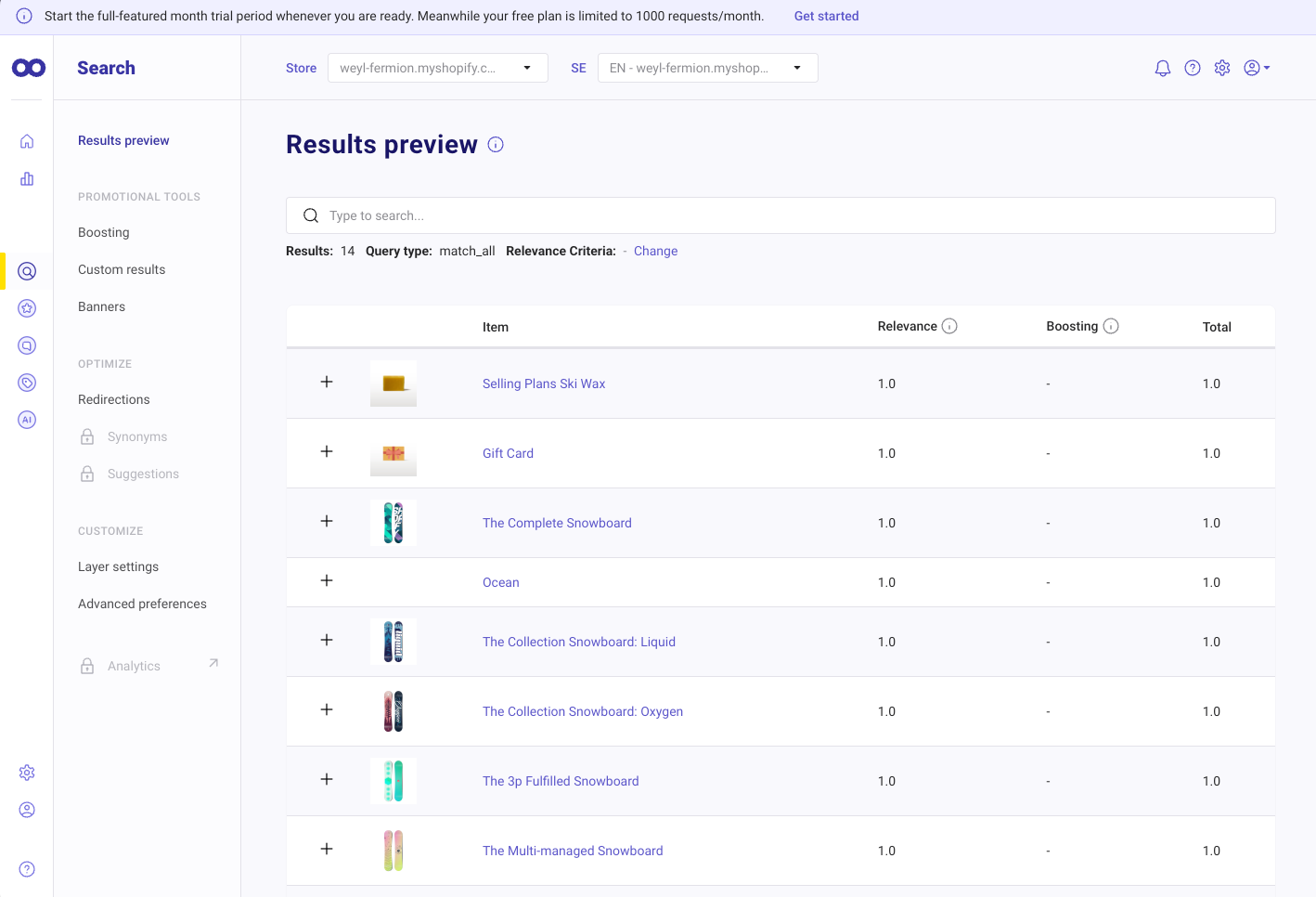
The Search panel opens on a Results preview. You type a search and see the matching products in a table, each with a Relevance score, a Boosting score, and a Total. With the search box empty, our store returned 14 results, each scored 1.0, with the query type shown as match_all. A Relevance Criteria link lets you change how results are ranked.
That table is the most useful thing in the panel. When a product sits lower than you expect, you can see how much of its position comes from the search match and how much from your own boosting.
The menu beside it holds the tools that change those results:
- Promotional tools: Boosting, Custom results, and Banners.
- Optimize: Redirections, Synonyms, and Suggestions. Synonyms and Suggestions were locked on our free plan. Doofinder’s own pricing places synonyms on Basic, and the listing puts search suggestions on Pro.
- Customize: Layer settings, for the search layer’s look and behavior, and Advanced preferences.
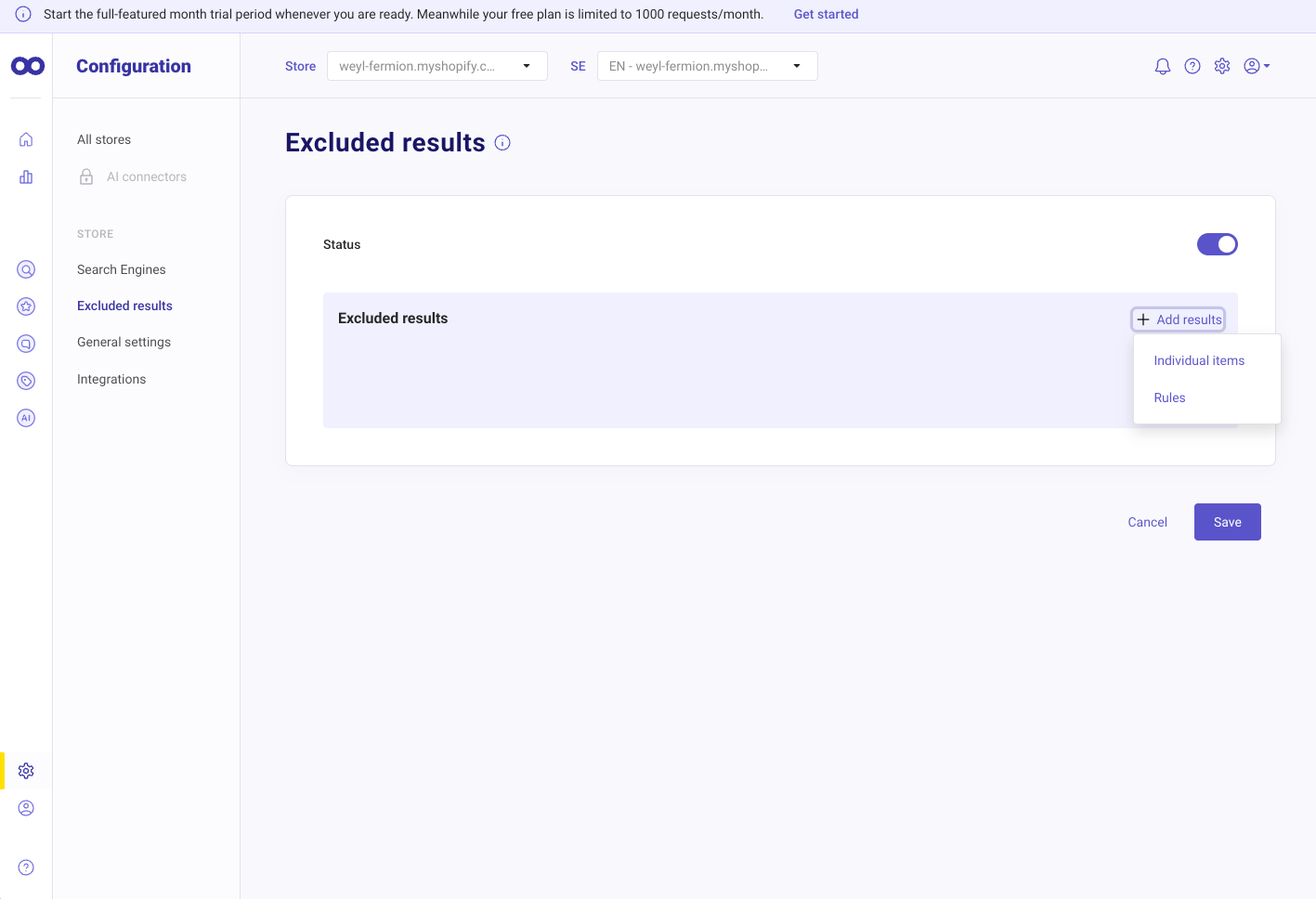
Excluded results lives under Configuration. It has a Status switch and an Add results menu with two choices: Individual items or Rules. Doofinder’s docs say you can exclude up to 100 items one by one. Rules hide groups of products by an attribute you have set up as a filter, such as brand, color, or category, and you can combine conditions with AND and OR.
The docs also say exclusions apply everywhere Doofinder shows products: search, the layer’s first results, recommendations, and quizzes. Hide a product line once, and it drops out of Doofinder’s search, recommendations, and quizzes together.
Search engines are how Doofinder handles languages. The Create Search Engine window says each search engine supports a single language and currency. Our store had one published search engine in English, priced in AED, marked as the default. The same window can create search engines for other content, such as blog articles, pages, and categories, from a feed URL, an uploaded file, Doofinder’s API, or sample data. Uploads accept .csv, .xml, .txt, and .jsonl files, plus compressed files, up to 625 MB.
The General settings page also has an Industry field, which the app says helps it tune search to the kind of products you sell. A cookie consent switch decides whether shoppers must accept cookies to get every Doofinder feature.
Recommendations: Three Carousels Ready to Add
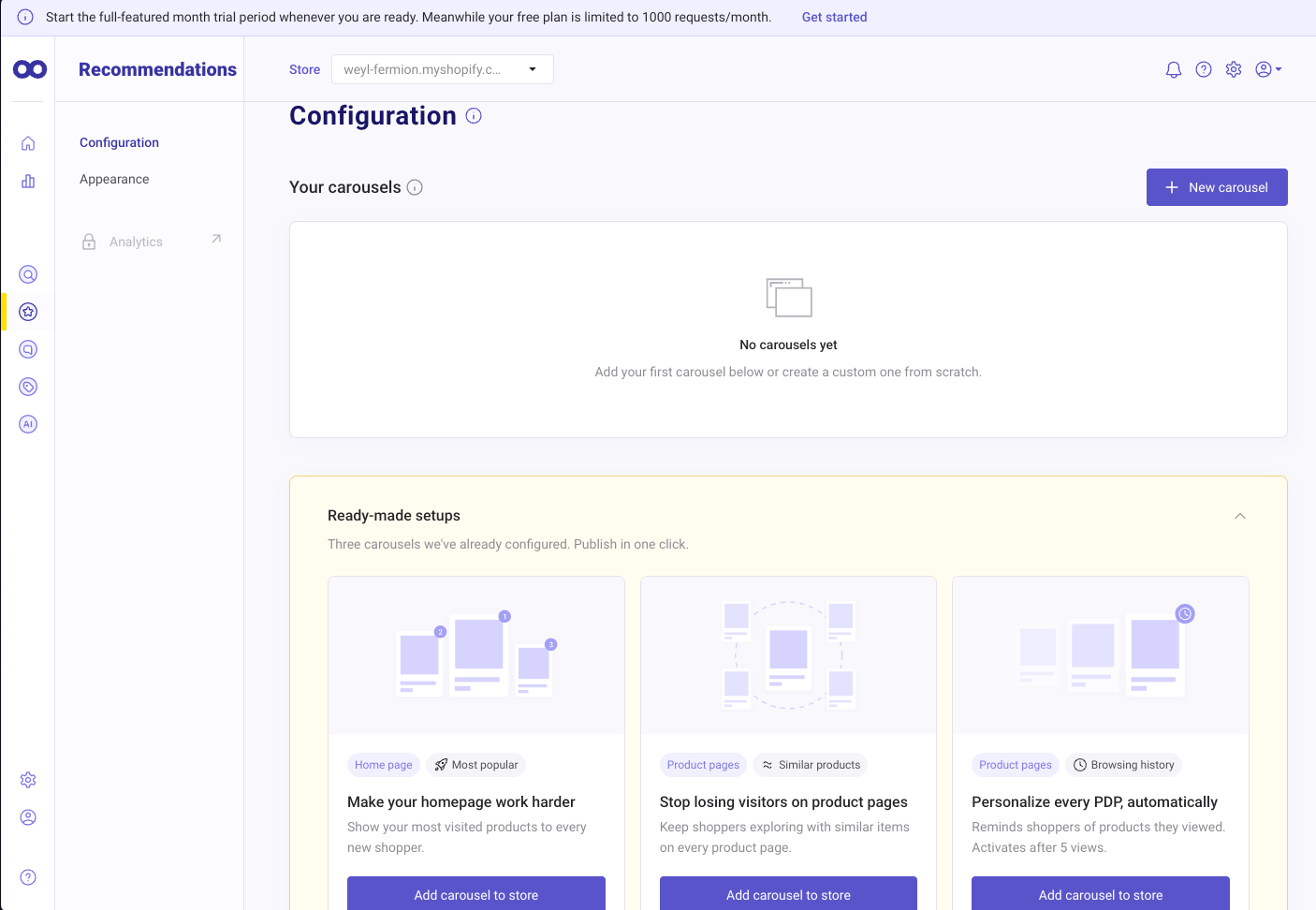
Recommendations has its own area, with Configuration and Appearance pages. Our store had no carousels yet, but the page offered three ready-made setups, each with an Add carousel to store button:
- A home page carousel of the most visited products, shown to every new shopper.
- A product page carousel of similar items.
- A product page carousel based on browsing history, which the screen says starts after five views.
A New carousel button lets you build your own from scratch. The ready-made options are a quick way to get something live without planning a recommendation strategy first.
Doofinder’s docs say every recommendation feature works during the trial, and your plan decides what stays after it. The listing says Pro adds dynamic recommendations and Advanced adds control over recommendation flows. Recommendation analytics were locked on our free plan, and we did not add a carousel to the storefront.
Integrations, Analytics, and the AI Assistant
The Integrations page lists three connections:
- Google Analytics, with a switch, to measure Doofinder’s effect on your store.
- Guaranteed Reviews, to show verified star ratings in search results. Doofinder’s docs say this needs a line added to the product card template, which takes some HTML knowledge.
- Klaviyo, which the docs say sends Doofinder search activity to Klaviyo so you can build segments and flows around it.
The Analytics area has pages for Search, Recommendations, Category Merchandising, and the AI Assistant. All four were locked on our free plan.
The AI Assistant page showed an Upgrade plan button. On the plan screen, the AI Assistant appears as a switch on Pro (1,500 AI responses a month) and Advanced (3,500), and as “available and tailored” on Enterprise. It is not offered on Basic. The screen did not show whether switching it on adds to the bill. A setup video on the same page named Advanced or Enterprise as the required plans, which doesn’t match the plan screen, so confirm with Doofinder which plan you need before counting on it.
Where It Falls Short: A High Floor and Hard-to-Predict Usage
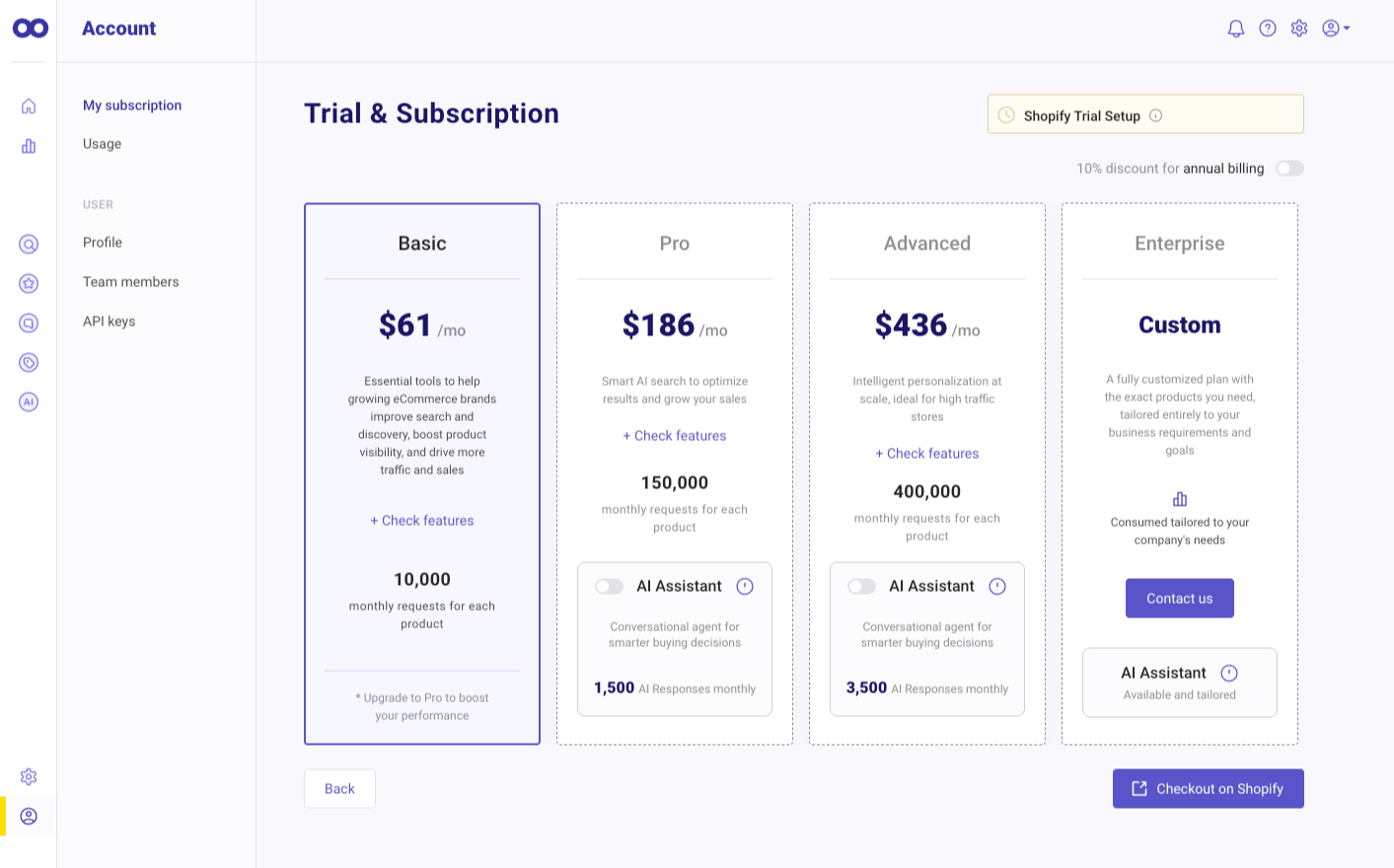
The plan screen shows four plans. Basic is $61 a month with 10,000 monthly requests for each product. Pro is $186 with 150,000. Advanced is $436 with 400,000. Enterprise is custom. A switch gives 10% off for annual billing, and checkout runs through Shopify.
Two things make this hard for smaller stores.
The floor is high. The cheapest paid plan is $61 a month. Before the trial, our store’s free plan was capped at 1,000 requests a month, with synonyms, suggestions, and every analytics page locked. That is enough to explore the admin, not to run a live store.
Requests are not searches. Doofinder’s docs say a request is counted each time its server responds, and a single search often creates several, depending on the features you use. By default, results start appearing after the third keystroke. Catalog indexing also uses requests, including real-time updates when you save a product, which the docs suggest turning off to save calls. Even browsing the Doofinder admin, such as the statistics page, counts.
So 10,000 requests will cover far fewer than 10,000 shopper searches. Then there is the gap between plans. Pro gives 15 times Basic’s requests for about three times the price, with nothing in between. A store that outgrows Basic has one option, and it costs $125 more a month.
The plan screen’s wording, “for each product”, also needs care. Doofinder sells search, recommendations, and other tools as separate products, so ask how your allowance applies before you choose a plan.
Our development store had no real traffic, so we could not measure how fast requests get used. The Account area has a Usage page, and that is the screen to watch during your trial.
Pricing and Value
Here is Doofinder’s pricing on the Shopify App Store as of October 14, 2026, in US dollars:
| Plan | Monthly | Annual | Monthly requests | What it adds |
|---|---|---|---|---|
| Basic | $61 | $661.44 | 10,000 | AI guided search, custom results, product recommendations, quiz maker |
| Pro | $186 | $2,011.44 | 150,000 | AI alerts, multi-index, search suggestions, dynamic recommendations; AI Assistant option |
| Advanced | $436 | $4,711.44 | 400,000 | 1:1 personalized results, AI visual search, recommendation flow control, 365-day analytics; AI Assistant option |
| Enterprise | Custom | Custom | Tailored | Custom plan |
Annual billing saves 10%. Charges are billed every 30 days through Shopify. The listing shows a 15-day free trial on each paid plan, while the in-app banner described a full-featured trial of a month that you start when you’re ready. Check the length when you begin it.
What it costs a small store. For a few hundred products and modest traffic, $61 a month is a lot. Smart Product Filter & Search, which Blinto reviewed earlier this month, starts at $14 a month for up to 500 products. Shopify’s own Search & Discovery app is free. Doofinder makes sense when search already brings in meaningful sales and you will use its merchandising tools.
Where the real decision sits. For most stores, the choice is Basic or Pro. Basic includes the core merchandising tools. Pro is where search suggestions, multi-index search, and the AI Assistant option come in, along with a much bigger request allowance. If your trial shows Basic’s 10,000 requests running out, budget for $186.
What Merchants Say
As of October 14, 2026, Doofinder shows a 4.7-star rating from 763 reviews. 726 are five stars, about 95%. There are 18 one-star reviews and one each at two and three stars.
The positive reviews often mention helpful onboarding from Doofinder staff, fast search on large catalogs, and the design of the search layer and analytics.
We read all 20 one-to-three-star reviews. A few patterns stand out:
- Search stopping: Several merchants say search broke without warning and needed support to fix, sometimes during holiday sales. The newest of these is from September 2026.
- Request-based billing: Older reviews from 2022 to 2024 say usage climbed faster than expected because of how searches and keystrokes were counted as requests. One 2026 review reports a sharp price increase.
- Support: Some merchants describe slow or generic replies and a chatbot as the first line of help, including in 2026.
Doofinder has replied publicly to many low-star reviews over the years, often offering to follow up. The newest reply we found was from March 2026. Several later low-star reviews had no public reply. That doesn’t mean they went unanswered in private, but it gives a buyer less to go on.
We didn’t run into these problems, because we didn’t test the storefront. They are good reasons to test search on mobile during the trial and to know how to reach support before a busy period.
What We Liked
- A clear ranking preview: The Results preview shows the relevance, boosting, and total score for each product.
- Plenty of merchandising tools: Boosting, custom results, banners, and redirections sit in one menu.
- Exclusions that apply everywhere: Hide products one by one or by rule, and they disappear from search, recommendations, and quizzes.
- Ready-made carousels: Three recommendation setups can be added to the store in one click.
- Search beyond products: Separate search engines can cover other languages and content such as blog articles and pages.
- Useful integrations: Google Analytics, Guaranteed Reviews, and Klaviyo connect from one page.
What Could Be Better
- High entry price: No paid plan costs less than $61 a month.
- Usage is hard to predict: One search can use several requests, and indexing and admin use count too.
- A big jump to Pro: Nothing sits between 10,000 and 150,000 requests, or between $61 and $186.
- A thin free plan: 1,000 requests a month, with synonyms, suggestions, and analytics locked.
- Unclear AI Assistant plan: The plan screen and the in-app setup video disagree on which plans include it, and it isn’t on Basic.
- One manual setup step: The theme script has to be switched on by hand.
- Reliability and support complaints: Recent low-star reviews describe search outages and slow help.
Who Doofinder Is Best For
Doofinder suits established stores where search already drives sales and someone on the team will actively tune results. The Results preview, boosting, custom results, banners, and exclusion rules reward stores that merchandise search by hand.
It also fits stores selling in more than one language, since each search engine handles its own language and currency, and stores that want search beyond products, such as blog articles and help pages.
Stores using Klaviyo get a direct way to bring search behavior into their email segments and flows.
Who Should Consider an Alternative
Small stores with modest traffic will struggle to justify $61 a month. Shopify’s free Search & Discovery app covers basic filters and search. Apps priced by product count, such as Smart Product Filter & Search or Searchanise, cost less for a small catalog.
High-traffic stores on a tight budget should model their request usage carefully. The jump from Basic to Pro is steep, and some of the sharpest reviews come from stores surprised by usage or price.
Stores that mainly want an AI shopping assistant should confirm the plan and any extra cost with Doofinder first, since it isn’t on Basic.
Final Verdict
Doofinder gives merchants a lot of control over what shoppers find. The Results preview makes ranking easy to understand, the merchandising tools are all in one menu, and exclusions carry across every Doofinder tool.
So, will your store outgrow the $61 Basic plan? It depends on traffic and settings more than catalog size. Because one search can use several requests, a store with steady search traffic may reach 10,000 sooner than it expects. The only step up is Pro at $186.
Our advice: start the trial when you have time to use it fully, and switch on the theme script right away. Turn off real-time indexing if your catalog rarely changes, check the Usage page each week, and test search on mobile. By the end of the trial, you will know which plan your traffic needs.
Frequently Asked Questions
Does Doofinder have a free plan?
Not one that suits most live stores. Before the trial, our store was on a free plan limited to 1,000 requests a month, with synonyms, suggestions, and analytics locked. Paid plans start at $61 a month.
What counts as a request?
Doofinder counts a request each time its server responds. One shopper search often creates several. Catalog indexing, real-time product updates, API calls, and browsing the Doofinder admin also use requests.
Which plan includes the AI Assistant?
It isn’t on Basic. The plan screen offers it as an option on Pro with 1,500 AI responses a month and on Advanced with 3,500. An in-app setup video named Advanced or Enterprise, so confirm with Doofinder before you upgrade.
Can Doofinder search in more than one language?
Yes. Each search engine handles one language and currency, and a store can have several search engines.
Did Blinto test Doofinder on a live storefront?
No. We reviewed the admin, plan limits, and pricing on a development store using the free plan. We did not test storefront search, search quality, the AI Assistant, request usage, speed, or support.