
A shopper lands on your “Boots” collection, picks a size, sorts by price, and moves to page two. To you, that’s one visit. To a search app that bills by pageviews, it can be four. When a plan is measured that way, the number on the pricing card and the traffic it really covers can be very different.
Prefixbox AI Search & Filter replaces your store’s search bar, search results page, and collection page filters with its own. Made by Prefixbox, it adds typo-tolerant autocomplete, AI search, filters built from metafields and metaobjects, merchandising rules, and an AI chat agent. It launched on the Shopify App Store in December 2023, carries the Built for Shopify badge, and holds a 5.0 rating from 59 reviews as of October 14, 2026. Every one of those reviews is five stars.
The catch is the price gap. The Free plan covers 500 searches a month. The cheapest paid plan, Essentials, costs $139 a month. Nothing sits in between. So the question we wanted to answer is: is Free enough to run a live store, and if not, what does the $139 step actually buy you?
We installed Prefixbox on a Shopify development store, stayed on the Free plan, and went through every area of its admin. The admin is clean and easy to follow. The Free plan, though, is closer to a test drive than a plan you can run a store on.
Key Takeaways
- Free is for testing, not trading: 500 searches, 1,000 products, 15 AI chats, and no direct support. Collection page views, filtering, sorting, and paging all count toward the 500.
- The first paid step is $139: Essentials adds 34,000 searches, 4,000 products, 400 AI chats, direct support, and much higher merchandising limits.
- Product count can set your plan: Products over your plan’s limit don’t sync and don’t appear on the storefront, so a large catalog may need Standard or above even with modest traffic.
- A clean, well-organized admin: Synonyms, field management, search relevance, languages, catalog sync, and color mapping sit on one Configuration page.
- Support is the standout in reviews: Merchants consistently describe a hands-on onboarding team that helps with setup and design.
- Best fit: Established stores with real search and collection traffic, a mid-sized catalog, and the budget for a done-with-you setup.
Our Verdict
Worth a trial for established stores that want hands-on help with search. Not a fit for small stores looking for a cheap upgrade from Shopify’s default search.
Prefixbox’s admin is one of the tidier ones in this category. The settings are grouped into plain cards with one-line explanations, the home screen gives you a four-step setup guide, and your plan usage sits right on the dashboard. Merchants praise the team behind it, especially for setup and design help.
The trade-off is cost structure. Free counts every search and collection pageview against 500 a month, and filtering, sorting, and paging add more. That allowance will run out quickly on a live store. The next step is $139 a month, which is a big jump for a small shop.
If your store already gets steady traffic to search and collection pages, start the 14-day trial on the plan that fits your catalog and watch the usage counters. If you’re a small store, Shopify’s free Search & Discovery app or a lower-priced search app is the more sensible starting point.
What Prefixbox AI Search & Filter Offers
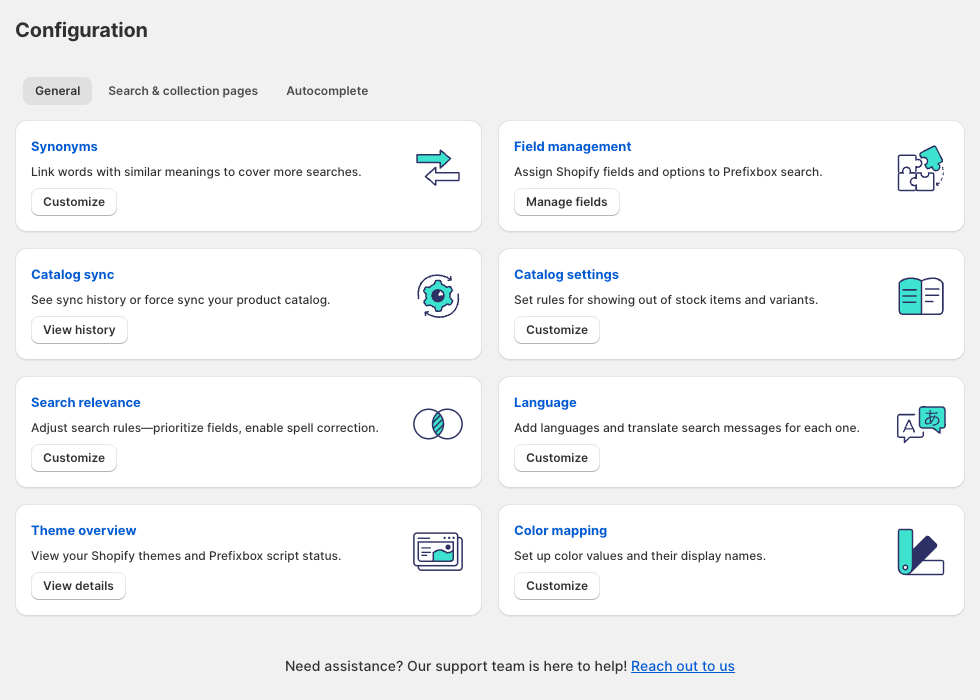
Prefixbox runs inside the Shopify admin. Its menu has five areas: Configuration, Merchandising, Analytics, Account details, and Integrations.
On the storefront, the app is made of a few separate parts that you switch on in the theme editor:
- Autocomplete: a typo-tolerant search bar that suggests keywords, products, and collections as shoppers type.
- AI Search Engine: the full search results page with filters and sorting.
- AI Collections Page: Prefixbox’s filters and product grid on your collection pages.
- AI Agent: a chat assistant for product discovery and support questions.
The Configuration page is the control room. Its General tab has eight cards: Synonyms, Field management for choosing which Shopify fields feed search, Catalog sync, Catalog settings for out-of-stock items and variants, Search relevance for field priority and spell correction, Language for translating search messages, Theme overview for checking script status on each theme, and Color mapping for color filter swatches. Two more tabs cover the search and collection pages and the autocomplete.
Merchandising holds two tools: Promotions, to put chosen products first, and Redirects, to send a search term straight to a page. Prefixbox’s docs say promotions can be tied to a search term and a campaign period.
Filters can be built from product options, metafields, metaobjects, and tags, and the listing says Free includes unlimited filters. The app also supports Shopify Markets and Shopify Plus.
The Integrations page offered one-click connections to six apps: Judge.me, Yotpo, Junip, and REVIEWS.io for review stars on product tiles, Swym Wishlist Plus for wishlists, and Latori Best Price Indicator for showing the lowest recent price.
What We Tested
We installed Prefixbox on a Shopify development store and stayed on the Free plan. We did not start a paid trial.
We went through the Home screen and setup guide, the Configuration page, Merchandising, Analytics, Account details with its plan and usage view, the full plans screen, and Integrations.
We did not test the storefront. The initial catalog sync was still running when we reviewed the admin, and the embed status on the Home screen showed Inactive. So we did not see autocomplete, search results, collection filters, or the AI agent working on a live theme. We also did not build promotions or redirects, judge search quality or speed, view analytics with real traffic, or contact support.
This review covers the admin, setup path, plan limits, and pricing. It makes no claims about search accuracy, storefront design, or sales impact.
Getting Started: A Short Setup Guide and a Required Core Embed
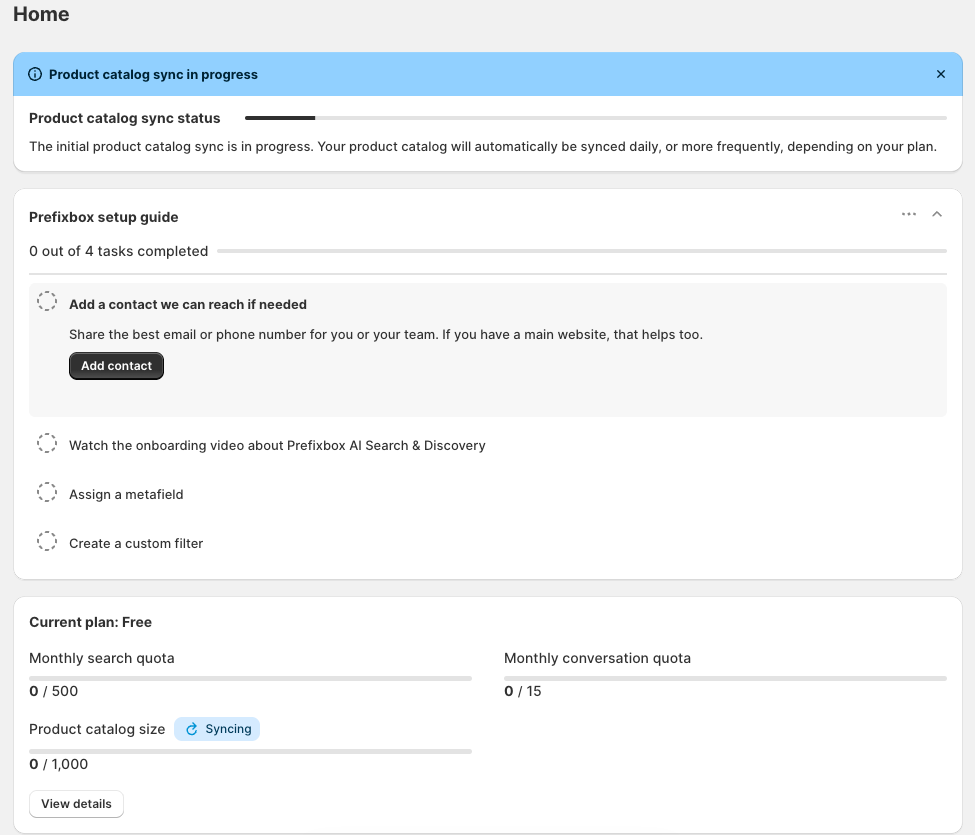
As soon as we installed the app, the Home screen showed the initial product catalog sync in progress. A note said the catalog would then sync daily, or more often depending on the plan. Prefixbox’s docs say most features work while the sync runs, so you can keep setting things up.
Below that is a setup guide with four tasks: add a contact the Prefixbox team can reach, watch an onboarding video, assign a metafield, and create a custom filter. The first task says a lot about how Prefixbox works. It asks for your email or phone number so the team can get in touch. That matches what merchants describe in reviews: the onboarding team often reaches out to help.
The Current plan card sits right on the Home screen, with live counters for monthly searches, AI chat conversations, and catalog size. That’s handy on a plan with tight limits.
Going live takes a few steps. The docs say you first switch on the Prefixbox Core embed, which loads the search engine in the background. Then you turn on each module, Autocomplete, AI Search Engine, and AI Collections Page, as an app embed in the theme editor. Prefixbox recommends doing this on a duplicate theme first, and the Theme overview card shows the script status on each theme. When you move to your live theme, you have to switch the Core embed on again.
The app needs an Online Store 2.0 theme. The docs say stores still on a vintage theme must update first.
A few setup details are worth knowing early:
- Old search bars can linger. Autocomplete hides your theme’s search by default, but some themes and apps leave it visible. The docs suggest adding a small custom CSS rule in the embed’s settings to hide it.
- Out-of-stock products are hidden by default. You can change this under Catalog settings.
- Filter logic is fixed. Different filters combine with AND, and values inside one filter combine with OR. The docs say this can’t be changed.
- The AI agent needs extra steps. You switch on a separate agent embed and turn on Hybrid search under Search relevance. The docs say changes to the agent’s design, persona, or excluded pages go through Prefixbox support.
Where It Falls Short: Free Runs Out Fast, and the Next Step Is $139
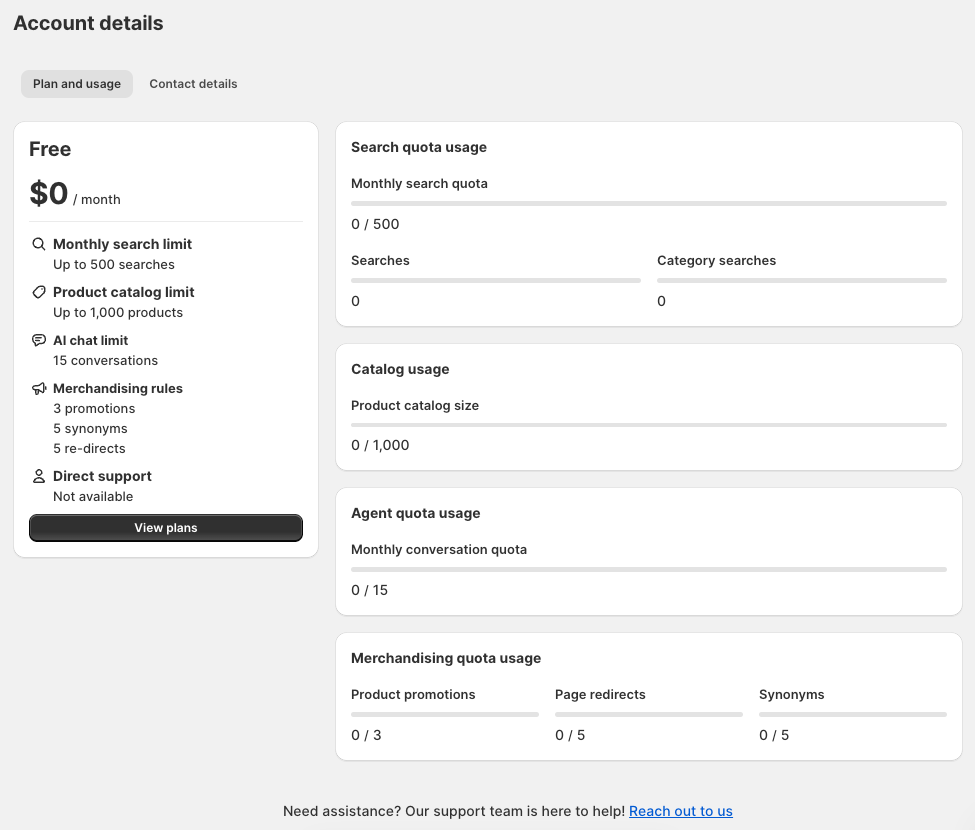
The Account details page lays out the Free plan clearly: up to 500 searches a month, 1,000 products, 15 AI chat conversations, 3 promotions, 5 synonyms, and 5 redirects. Direct support is listed as not available.
The usage panel is the most useful part of this screen. It splits the monthly search quota into Searches and Category searches. In other words, collection pages draw from the same 500 as the search bar.
Prefixbox’s help center confirms how this works. A search is counted per results pageview, and a category search is counted per collection pageview. Paging, sorting, and filtering each add another pageview. So a shopper who opens a collection, filters by size, and goes to page two has used three.
That changes how far 500 goes. It works out to about 16 pageviews a day across search and collections combined. If 50 shoppers a day each view just two search or collection pages, the month’s allowance is gone in about five days. Free is useful for setting up and trying the admin, but not for running a live store.
Two other Free limits matter:
- Daily sync. The docs say Free re-syncs your catalog every 24 hours, against every 3 hours on Essentials and every 2 hours on Standard and Advanced. You can force a sync by hand at any time.
- No direct support. For an app whose reviews lean heavily on the team’s help, this matters. That help is the app’s biggest strength, and Free doesn’t list it.
Then there is the gap. Nothing sits between Free and Essentials at $139 a month. The listing and help center don’t say what happens to your storefront search once the monthly search allowance runs out, so ask Prefixbox before you rely on Free on a live theme.
The catalog limit needs attention too. The docs say products above your plan’s limit don’t sync and won’t appear on the storefront. A store with 4,500 products can’t use Essentials, which stops at 4,000, even if its traffic is low. It needs Standard at $229.
Pricing and Value
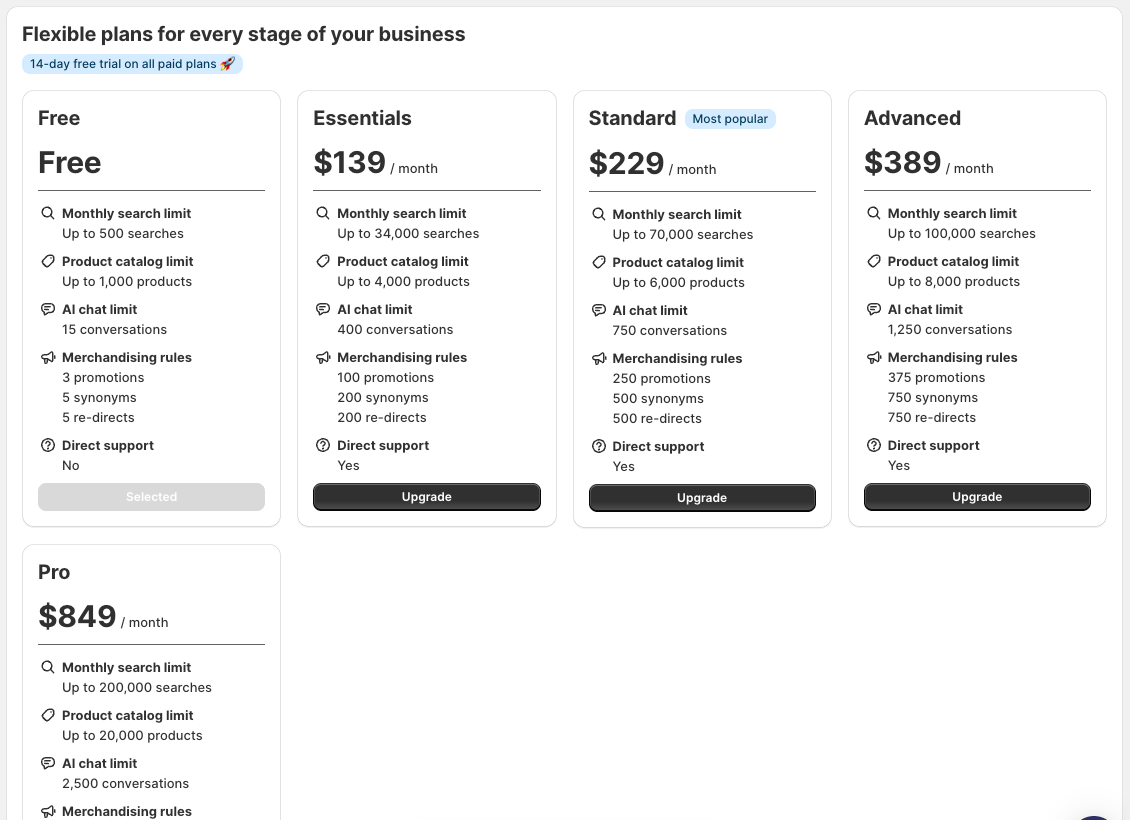
Here are the plans shown in the app as of October 14, 2026, in US dollars:
| Plan | Monthly | Searches a month | Products | AI chats | Promotions / synonyms / redirects | Direct support |
|---|---|---|---|---|---|---|
| Free | $0 | 500 | 1,000 | 15 | 3 / 5 / 5 | No |
| Essentials | $139 | 34,000 | 4,000 | 400 | 100 / 200 / 200 | Yes |
| Standard | $229 | 70,000 | 6,000 | 750 | 250 / 500 / 500 | Yes |
| Advanced | $389 | 100,000 | 8,000 | 1,250 | 375 / 750 / 750 | Yes |
| Pro | $849 | 200,000 | 20,000 | 2,500 | 2,000 / 2,000 / 2,000 | Not visible in our screenshot |
The in-app plans screen showed a Pro plan at $849 that the App Store listing did not show. The listing also adds two things the in-app cards don’t: analytics history of 90 days on Essentials, 180 on Standard, and 365 on Advanced, and design customization by the Prefixbox team on paid plans. The help center says design help starts from Standard, so confirm which plan includes it before you choose Essentials for that reason.
All paid plans include a 14-day free trial, and each merchant gets one trial. Billing runs through Shopify every 30 days. The help center says you can’t cancel a subscription directly. You either downgrade to Free or uninstall. If you downgrade, you must first delete any promotions, synonyms, or redirects over the lower plan’s limit.
What it costs per search. Essentials works out to about $4.09 per 1,000 searches, Standard about $3.27, Advanced about $3.89, and Pro about $4.25. Standard is the best value per search. Advanced costs more per search than Standard, because part of what you pay for is a larger catalog allowance.
What it costs a small store. $139 a month is a lot for a store with a few hundred products. Shopify’s own Search & Discovery app is free and covers basic filters, synonyms, and boosts. Doofinder, which Blinto also reviewed this month, starts at $61. Prefixbox earns its price when search and collection pages drive real sales and you want the team’s help to set them up.
What Merchants Say
As of October 14, 2026, Prefixbox has 59 reviews, all five stars. There are no one-, two-, three-, or four-star reviews to learn from, so the picture comes only from positive feedback.
The patterns are consistent:
- Hands-on onboarding: Many merchants say the Prefixbox team contacted them, helped with setup, and adjusted the search design to match their theme, sometimes within hours.
- Better than default search: Several say shoppers find products more easily than with Shopify’s built-in search, including stores with many similar listings.
- Responsive support: Support is the most-praised part of the app, with several staff members named by merchants.
A few small caveats show up inside the positive reviews. One merchant hit a minor bug that was fixed within hours. Another needed design adjustments to match a heavily customized store. One reviewer was still waiting on promised help when they posted.
Keep in mind that many reviews were left within days or a few weeks of installing, and some before the store had launched with the app. They speak well of setup and support, but say less about how the app holds up over many months. Prefixbox replies to most reviews.
What We Liked
- A clear, well-organized admin: Every setting sits on a labeled card with a one-line explanation of what it does.
- Usage on the Home screen: Search, AI chat, and catalog counters are visible without digging.
- Honest usage breakdown: The Account page splits searches from category searches, so you can see where your allowance goes.
- Deep catalog support: Filters, sorting, and search can use metafields, metaobjects, and product options.
- Useful integrations: Review apps, a wishlist app, and a price indicator connect from one page.
- A team that gets involved: Merchant reviews consistently describe hands-on help with setup and design.
What Could Be Better
- Free is very limited: 500 pageviews a month across search and collections, 1,000 products, and no direct support.
- A big jump to paid: Nothing sits between $0 and $139 a month.
- Every pageview counts: Filtering, sorting, and paging each use the allowance, which makes usage harder to predict.
- Hard catalog limits: Products over the plan limit don’t appear on the storefront.
- Fixed filter logic: The AND/OR filter behavior can’t be changed.
- Mixed plan details: The Pro plan appears in the app but not on the listing, and the listing and help center differ on which plans include design help.
- No critical reviews to weigh: With every review at five stars, and many written early, there’s little independent evidence about long-term reliability.
Who Prefixbox AI Search & Filter Is Best For
Prefixbox suits established stores with steady traffic to search and collection pages. For them, 34,000 or 70,000 pageviews a month is a realistic allowance, and the merchandising limits on paid plans are generous.
It fits stores with complex catalogs that rely on metafields, metaobjects, or product options to filter, such as products sold in many fits, models, or specs.
And it suits merchants who want a team to help set up and style search rather than doing it all themselves. That help is the most consistent theme in its reviews.
Who Should Consider an Alternative
Small stores with low traffic will struggle to justify $139 a month, and Free won’t cover a live store. Shopify’s free Search & Discovery app is the place to start.
Stores with large catalogs but modest traffic should check the product limits closely. You may need a higher plan for your catalog size alone.
Stores still on a vintage theme will need to move to an Online Store 2.0 theme first.
Final Verdict
Prefixbox AI Search & Filter has a clean admin, solid catalog and filter support, and a team that merchants praise again and again. The admin is easy to find your way around.
So, is the jump from Free to $139 worth it? For a store with real traffic and a catalog of up to 4,000 products, Essentials is where Prefixbox becomes a usable product. Free is a test drive. It counts every search and collection pageview, filter, sort, and page against 500 a month, and it doesn’t include direct support.
Our advice: set it up on a duplicate theme, then start the 14-day trial on the plan that matches your catalog size. Watch the Searches and Category searches counters for the full two weeks. Double that figure, add a margin for busy periods, and you’ll know whether Essentials covers you or Standard is the better buy.
Frequently Asked Questions
Is Prefixbox AI Search & Filter free?
There is a Free plan with 500 searches a month, 1,000 products, and 15 AI chat conversations. It doesn’t include direct support. Paid plans start at $139 a month, with a 14-day free trial.
Do collection pages count toward the search limit?
Yes. Prefixbox counts each collection pageview as a category search, and these share the monthly quota with regular searches. Filtering, sorting, and paging add more pageviews.
What happens if my catalog is bigger than my plan allows?
Prefixbox’s docs say products above the plan limit don’t sync and won’t appear on your storefront. You’d need to move up to a plan that covers your catalog.
Does Prefixbox work with my theme?
It works with Online Store 2.0 themes, including current Shopify Theme Store themes and custom themes that support theme app extensions. Vintage themes need to be updated first.
Did Blinto test Prefixbox on a live storefront?
No. We installed the app on a development store, stayed on the Free plan, and reviewed the admin, setup path, and plans. We did not test storefront search, filters, the AI agent, search quality, or support.