
Shopify variants cover size and color. They don’t cover a name printed on a mug, a monogram on a pillow, or a message on a neon sign. For that, you need a personalization app, and ideally one that shows the shopper what they’re getting before they pay.
Zepto Product Personalizer is built around that idea. It adds personalization fields to product pages and can draw the shopper’s input onto a product preview image as they type.
I installed it on a development store, looked through its templates and asset library, built a single-line text field with live preview, and checked how the field showed up on a product page. Here’s what I found.
Key Takeaways
- Main fit: Stores selling personalized products where a visual preview helps shoppers commit, like custom text, monograms, and printed items.
- Strongest finding: The text field editor is detailed, with font, size, alignment, and color controls, plus a live preview on the product image.
- Biggest limitation: There is no free plan, and plans cap the number of personalizable products and custom orders.
- Buying guidance: Starter ($9.99/month) covers 50 products and 100 custom orders. Pick a tier by your catalog size and monthly custom-order volume.
Our Verdict
Recommended for stores that sell visually personalized products.
Zepto Product Personalizer gives you more than a form field. The editor lets you control how text looks on the product image, and the built-in templates give you a starting point for common products. Every plan includes all option types, price add-ons, and conditional logic, so you aren’t paying more to unlock features.
The trade-offs are the paid-only pricing, usage caps on each tier, and a small but serious pattern of merchant reports about options disappearing from product pages or slow fixes on technical problems. Merchant ratings are otherwise very strong.
What Zepto Product Personalizer Offers
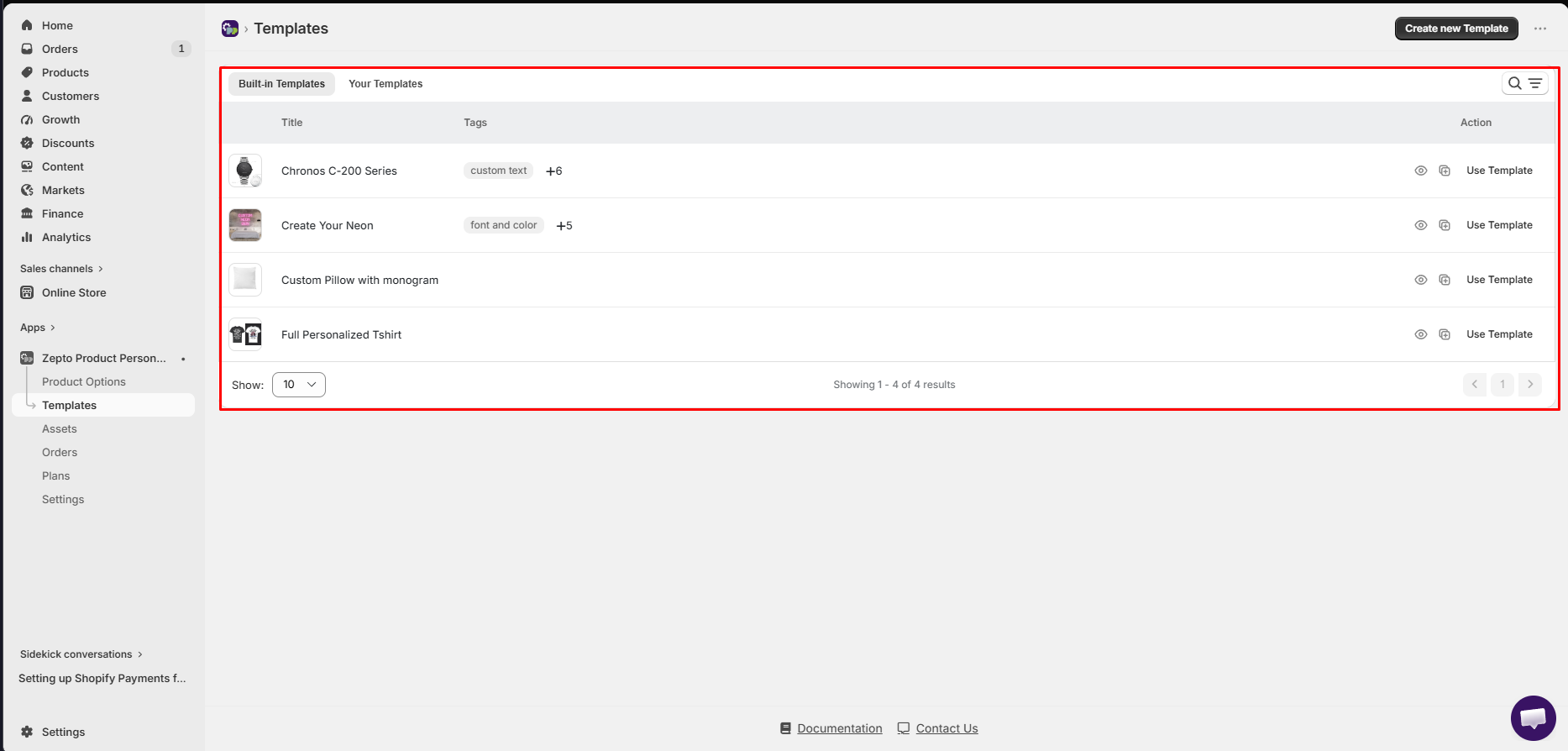
The app’s admin menu has six sections: Product Options, Templates, Assets, Orders, Plans, and Settings.
Templates is a good place to start. The Built-in Templates tab showed four examples in my store: a watch, a neon sign, a pillow with a monogram, and a fully personalized T-shirt. Each has a preview button, a copy button, and a Use Template action. There is also a Your Templates tab and a Create new Template button for your own designs.
Beyond text, the app supports image and color swatches, dropdowns, buttons, monogram inputs, custom fonts, color choices, and upload fields. Conditional logic can show or hide options based on earlier choices, and options can add to the product price.
What We Tested
I installed Zepto Product Personalizer on a Shopify development store on the Starter plan. I browsed the built-in templates, opened the Assets library, created a single-line text field with live preview enabled, and checked the field on a live product page. I also reviewed the in-app plans page.
I did not test uploads, swatches, conditional logic, price add-ons, custom font uploads, the Storefront Interaction setting, order handling, or support. This review makes no claims about how those perform.
Building a Live-Preview Text Field
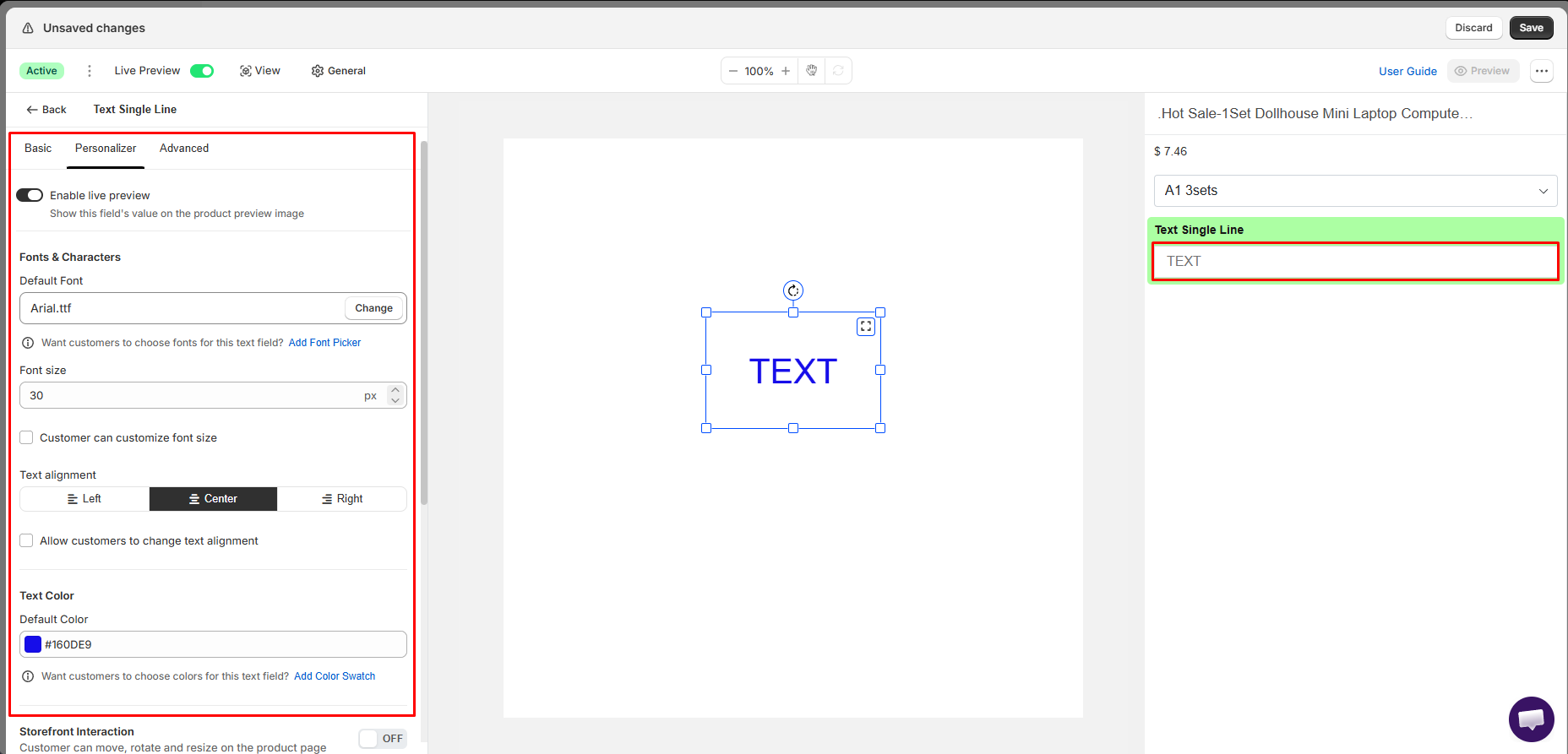
The field editor splits into three tabs: Basic, Personalizer, and Advanced. The Personalizer tab is where the app stands apart from a plain product options app.
With “Enable live preview” switched on, the field’s value is drawn on the product preview image. The canvas in the middle shows a text box you can move, resize, and rotate, and a panel on the right mirrors the product page with the new field in place.
The Fonts & Characters section sets a default font (Arial in my case), a font size in pixels, and text alignment (left, center, or right). Checkboxes let shoppers change the font size or alignment themselves. The Text Color section sets a default color by hex code. For each one, there’s a shortcut to add a font picker or a color swatch if you want shoppers to choose.
Lower down, a Storefront Interaction toggle lets shoppers move, rotate, and resize the element on the product page. I left it off.
The editor also has zoom controls, a User Guide link, and a Preview button. There’s a lot on one screen, so expect a short learning curve, but the settings are clearly labeled.
How It Looks on the Storefront
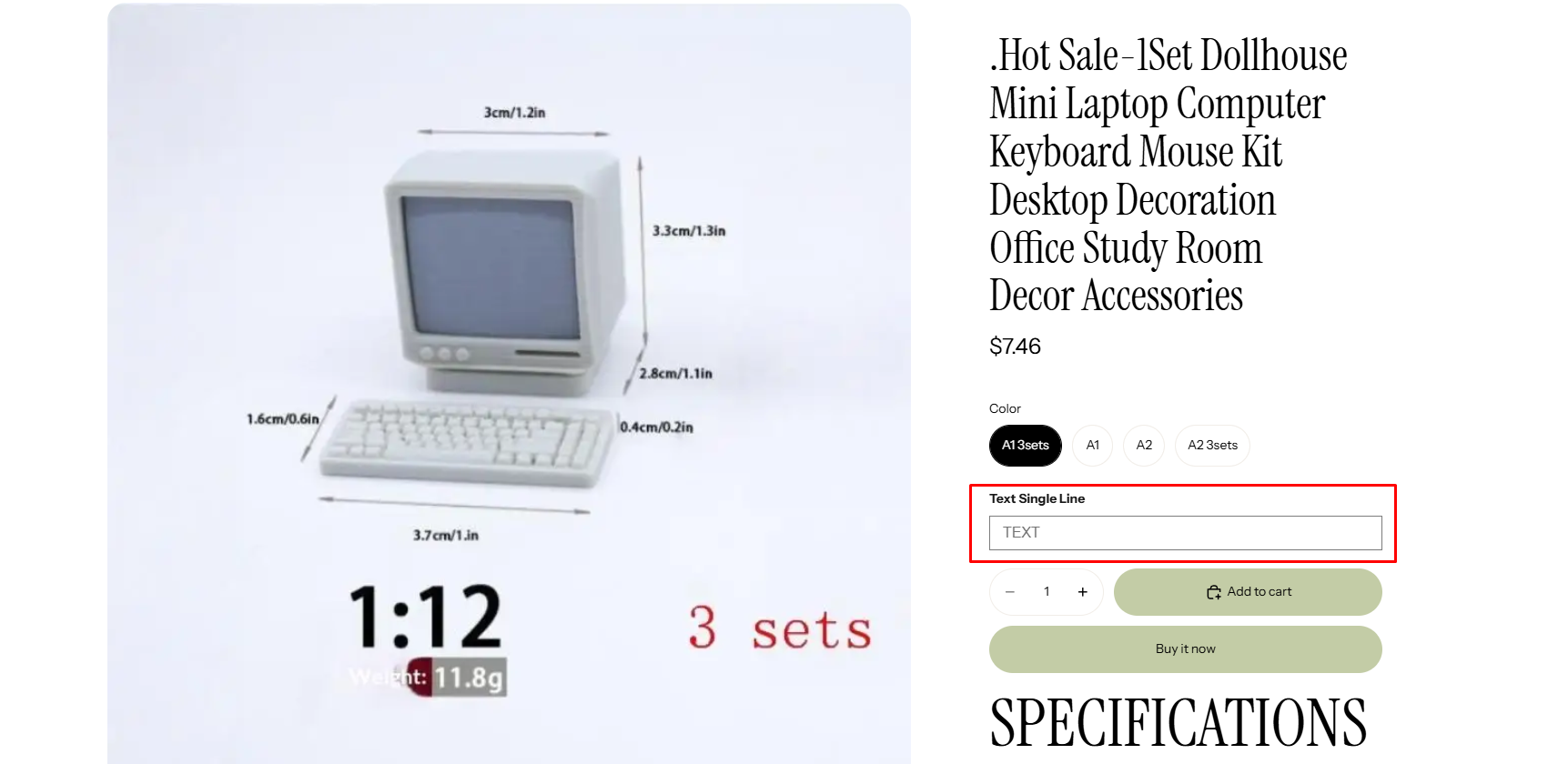
On the product page, the text field appeared below the variant buttons and above the quantity selector and Add to cart button. It matched the theme’s styling without any code changes on my side.
Managing Fonts, Colors, and Images
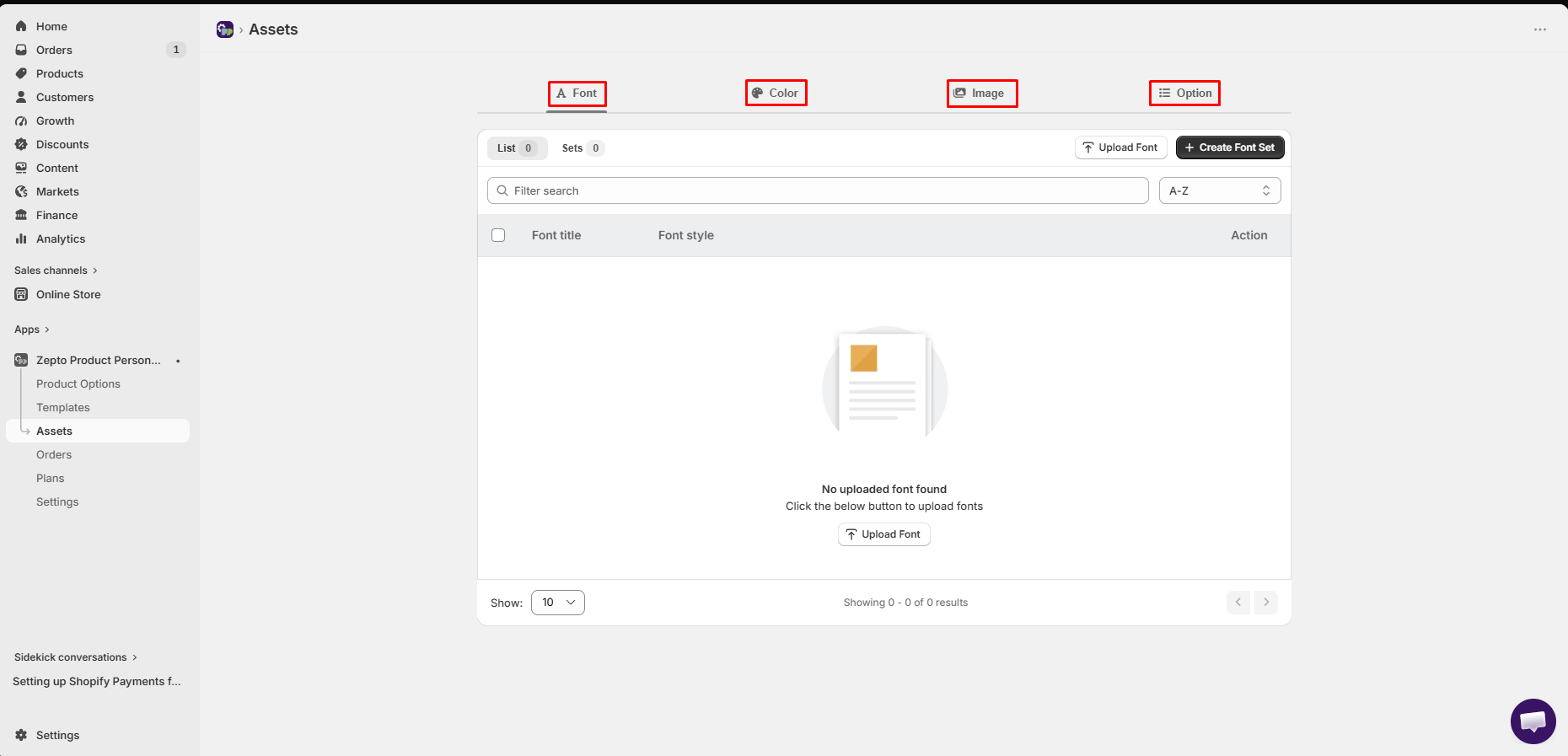
Assets is a shared library with four tabs: Font, Color, Image, and Option. In the Font tab, you upload fonts and group them into font sets. A font set is what powers a font picker on the product page. The list starts empty, so plan to upload the fonts you want before building a font picker.
Keeping assets in one place makes sense if you reuse the same fonts and colors across many products.
Where It Falls Short
There is no free plan. The cheapest tier costs $9.99 a month, so this isn’t the app for trying out personalization with zero spend.
Each plan also caps personalizable products and custom orders. On Starter, that’s 50 products and 100 custom orders. A busy gift store could outgrow a lower tier in peak season, so check your numbers before choosing.
Reliability is the other thing to weigh. Most merchant feedback is very positive, and support is often praised. But a few merchants describe personalization options vanishing from product pages, hours of lost sales during a bug, or technical fixes taking days. Some also found the app slow. If personalization drives most of your revenue, test thoroughly and keep an eye on product pages after theme or app updates.
Pricing and Value
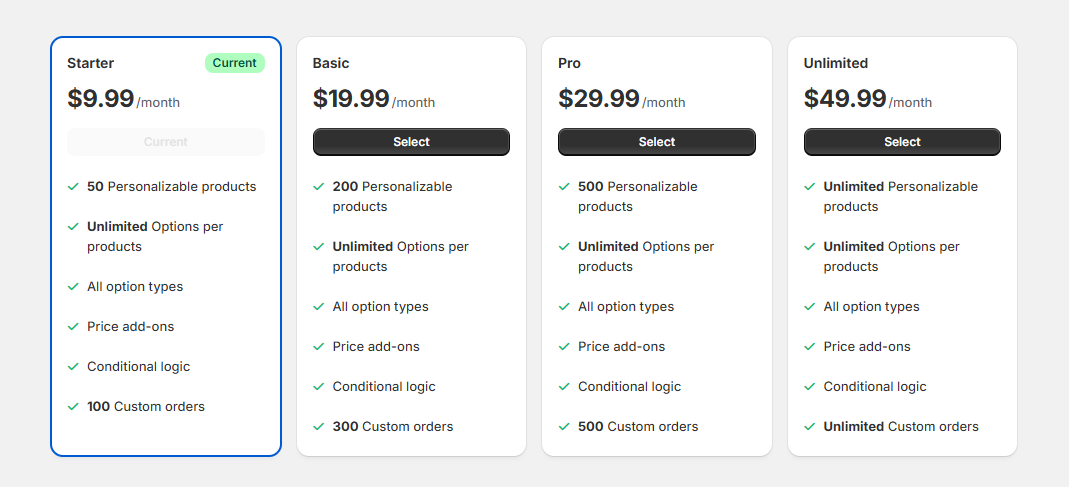
This is what the in-app plans page showed during my test:
| Plan | Price | Personalizable products | Custom orders |
|---|---|---|---|
| Starter | $9.99/month | 50 | 100 |
| Basic | $19.99/month | 200 | 300 |
| Pro | $29.99/month | 500 | 500 |
| Unlimited | $49.99/month | Unlimited | Unlimited |
Every plan includes unlimited options per product, all option types, price add-ons, and conditional logic.
The value is in that consistency. You don’t lose features on the cheaper plans, only capacity. A small shop with a focused catalog can run everything on Starter. Price add-ons also help the app pay for itself if you charge for personalization.
What We Liked
- Live preview on the product image: Shoppers see their text on the product as they type.
- Detailed text controls: Default font, size, alignment, and color, each optionally opened up to shoppers.
- Built-in templates: Watch, neon sign, monogram pillow, and T-shirt examples to start from.
- Shared asset library: Fonts, colors, images, and options managed in one place.
- Same features on every plan: Plans differ only by products and custom orders.
What Could Be Better
- No free plan: Paid from the first tier.
- Usage caps: Product and custom-order limits on every plan below Unlimited.
- Busy editor: Many settings on one screen take a little time to learn.
- Occasional reliability reports: A minority of merchants report options disappearing or slow technical fixes.
Who Zepto Product Personalizer Is Best For
It suits stores selling custom text products, monogrammed items, printed apparel, signs, and gifts, where seeing the result on the product helps the shopper buy. It’s also a good fit if you want to charge extra for personalization.
Who Should Consider an Alternative
If you only need a simple gift note or checkbox, a basic product options app with a free plan will cost less. And if you process a very high volume of custom orders on a tight budget, compare the Unlimited plan against alternatives first.
Final Verdict
Zepto Product Personalizer does the core job well: it adds personalization fields and shows shoppers a live preview of their design. The text editor is thorough, and every plan gets the full feature set.
The main questions are cost and scale. Count your personalizable products and monthly custom orders, pick the matching plan, and test your key products carefully before a busy season.
Frequently Asked Questions
Does Zepto Product Personalizer have a free plan?
No. Plans start at $9.99 a month (Starter) and go up to $49.99 a month (Unlimited).
Can shoppers see a preview of their personalization?
Yes. With live preview enabled on a field, the shopper’s input is drawn on the product preview image.
Can customers choose their own font and color?
Yes. You can add a font picker using a font set built from uploaded fonts, and a color swatch for text color.
Can personalization options change the price?
Yes. Price add-ons are included on all plans. We did not test them in this review.