
Shopify variants cover size and color. They don’t cover gift wrapping, an engraving line, a paid add-on, or an option that should only appear for one variant. For that, you need a product options app.
Hulk Product Options, from HulkApps, is one of the established apps in this category. It adds custom fields to product pages, lets you charge for them, and can show or hide options with rules.
The question I wanted to answer is practical: which of its plans do you actually need? Many of the features merchants want most, like conditional logic and percentage charges, are not on the entry plan. I went through the admin to build an option set, assign it to products, add a paid option, and set up a conditional rule, and I compared that against the plan list.
Key Takeaways
- Main fit: Stores that need paid add-ons and extra product fields beyond Shopify’s variants, like gift wrapping, uploads, or swatches.
- Strongest finding: The option set editor walks you through three clear steps: Options, Assign to Products, and Conditions.
- Biggest limitation: Conditional logic starts on the $20/month Advanced plan, and the rule editor shows errors without telling you how to fix them.
- Buying guidance: Basic ($10/month) covers simple paid add-ons. Plan on Advanced if you need show/hide rules or percentage charges.
Our Verdict
Recommended for stores selling paid add-ons, with a close look at the plan tiers first.
The admin is well organized, and the option editor gives you more control over charges than I expected, including weight per value and a one-time charge toggle. Assignment is flexible, with options for all products, selected products, conditions, collections, and customer tags.
The trade-offs are the user experience and the pricing structure. In the conditional logic editor, I ran into an error that gave no hint about how to resolve it. There is also no free plan for live stores, and conditional logic sits on Advanced. Merchant feedback is mostly positive, especially about support, but a recurring complaint is theme compatibility: options not showing correctly after a theme change, or conflicting with theme scripts.
What Hulk Product Options Offers
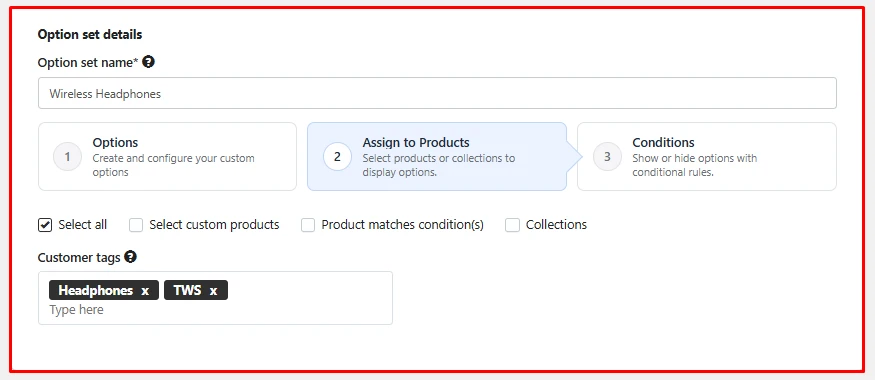
Everything is built around option sets. You name a set, then work through three steps:
- Options: Create and configure the custom fields.
- Assign to Products: Choose where the set appears.
- Conditions: Show or hide options with rules.
For assignment, you can select all products, pick custom products, match products by condition, or choose collections. There is also a customer tags field. In my set I added two tags, which is useful if some options should only apply to a certain group of customers.
The app menu inside Shopify admin has sections for Option sets, Manage options, Orders, Settings, Pricing, and Help and Support.
What We Tested
I worked inside the app’s admin on a Shopify store. I created an option set for wireless headphones, used the product assignment step, built a paid option, and set up a conditional logic rule. I also reviewed the plans on the pricing page.
I did not check how options looked on a live storefront, place test orders, test file uploads, or contact support. This review makes no claims about those areas.
Building a Paid Option
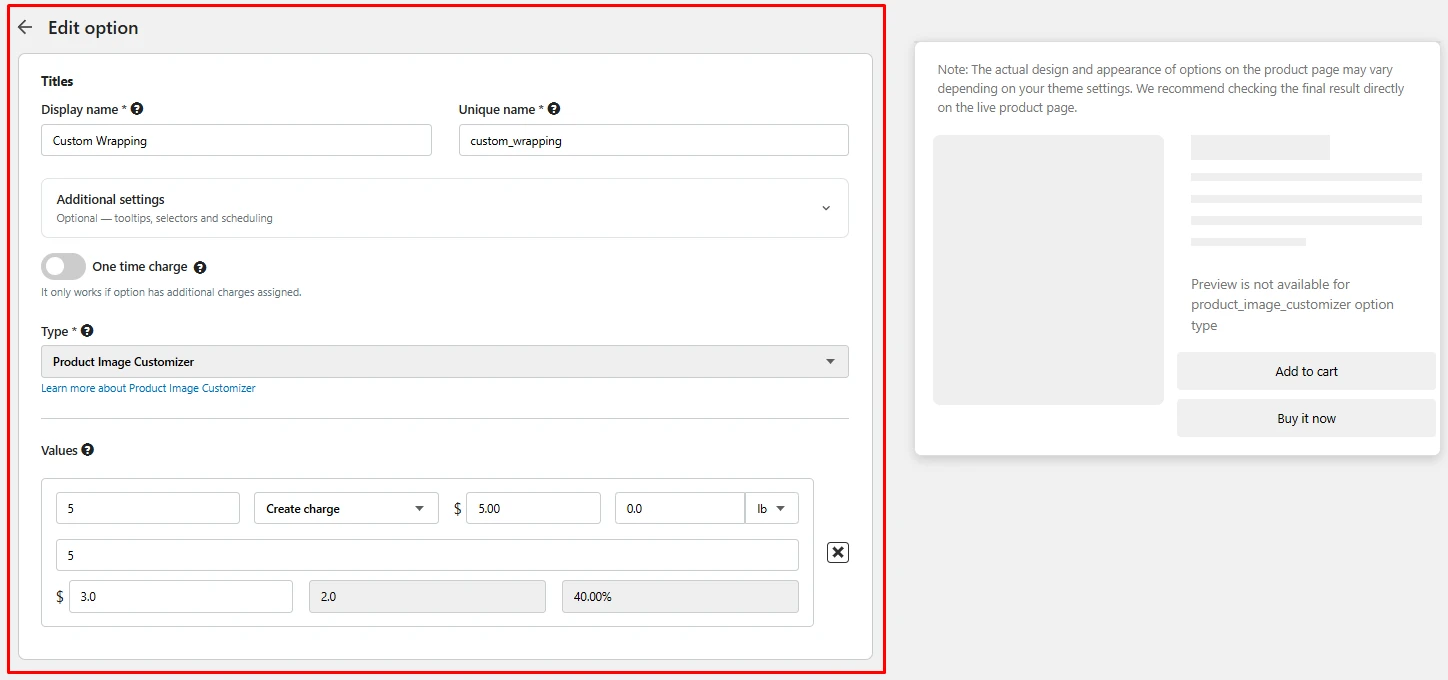
I created a “Custom Wrapping” option. Each option has a display name for shoppers and a separate unique name for internal use. An Additional settings panel holds optional tooltips, selectors, and scheduling.
Each value has a charge setting. I set a $5.00 charge, and each value also has a weight field with a unit selector, which matters if you ship by weight. Below that, the value row showed a cost field and calculated amounts. There is also a one-time charge toggle, which only applies when the option has a charge assigned. That’s handy for things like a setup fee that shouldn’t multiply with quantity.
For the type, I picked Product Image Customizer. This is where I hit a small snag: the live preview panel said preview is not available for that option type. The panel also notes that the final look on the product page depends on your theme, so you’ll need to check the live product page yourself.
Conditional Logic: Useful, but on a Higher Plan
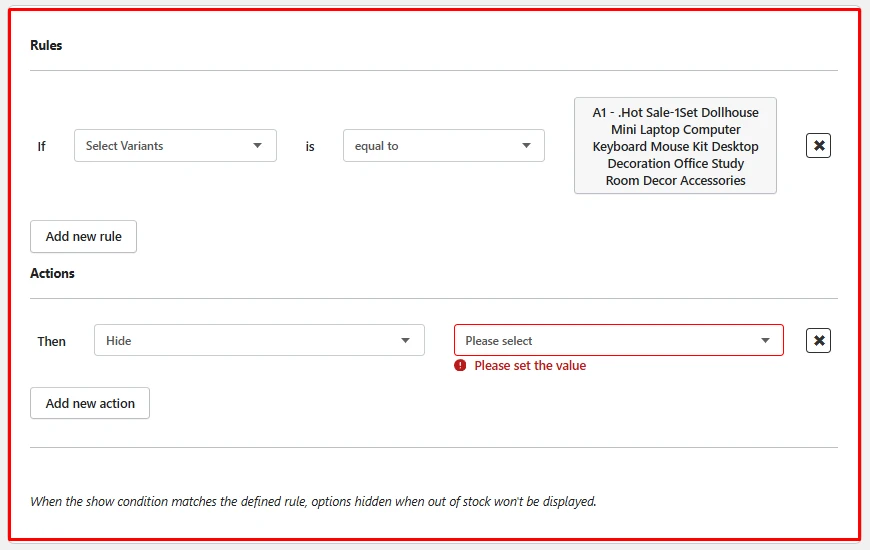
The Conditions step is where the app gets more capable. Rules follow an If / Then format. I set the rule to trigger when the selected variant is equal to a specific variant, then chose Hide as the action. You can add more rules and more actions.
This is also where the app’s user experience let me down. When I left the target option empty, the editor showed a red “Please set the value” error, but nothing more. It didn’t explain which value it wanted, why the field was empty, or what to do next. The dropdown just said “Please select”, so I had to work it out by trial and error. For a merchant setting up rules for the first time, that kind of bare error message slows things down and makes the tool feel harder than it is. A note at the bottom also explains that options hidden when out of stock won’t show when the condition matches.
This is exactly the kind of control a store with several variants needs. The catch is cost. The pricing page lists conditional logic on the Advanced plan, and enhanced conditional logic on Enterprise. If show/hide rules are the reason you’re installing the app, budget for Advanced from day one.
Theme compatibility is the other point to plan for. A number of merchants report options not displaying after switching themes, or scripts clashing with their theme. Support usually gets credit for fixing these, but test the storefront after any theme change, especially before a busy period.
Pricing and Value
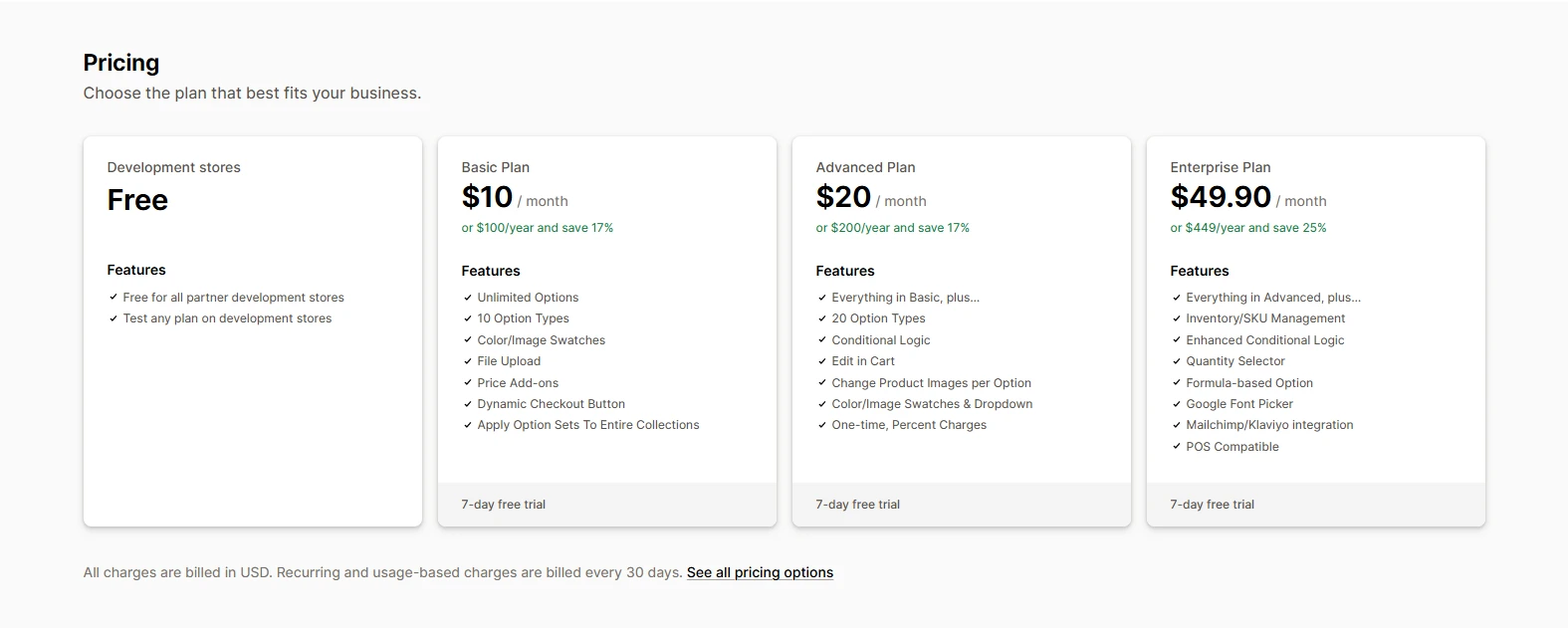
This is what the pricing page showed:
| Plan | Price | Highlights |
|---|---|---|
| Development stores | Free | Free on partner development stores; test any plan |
| Basic | $10/month or $100/year | Unlimited options, 10 option types, color/image swatches, file upload, price add-ons, dynamic checkout button, apply option sets to entire collections |
| Advanced | $20/month or $200/year | Everything in Basic, plus 20 option types, conditional logic, edit in cart, change product images per option, swatches and dropdown, one-time and percent charges |
| Enterprise | $49.90/month or $449/year | Everything in Advanced, plus inventory/SKU management, enhanced conditional logic, quantity selector, formula-based options, Google Font picker, Mailchimp/Klaviyo integration, POS compatibility |
Each paid plan has a 7-day free trial. Charges are billed in USD.
For value, Basic is enough if you only need paid extras on product pages, like a gift wrap fee or an upload field. Most stores with variant-dependent options will need Advanced, since that is where conditional logic, one-time charges, and per-option product images start. Enterprise makes sense if you need SKU-level inventory for options, formula pricing, POS, or the email integrations.
What We Liked
- Clear three-step setup: Options, assignment, and conditions are separate and easy to follow.
- Flexible assignment: All products, custom selection, conditions, collections, and customer tags.
- Detailed charge controls: Per-value charges, weight, and a one-time charge option.
What Could Be Better
- Conditional logic isn’t on Basic: Show/hide rules start on the Advanced plan.
- No free plan for live stores: The free tier is for development stores only.
- Preview gaps: Some option types, like the Product Image Customizer, can’t be previewed in the editor.
- Unhelpful error messages: The conditional logic editor shows an error without explaining how to fix it.
- Theme compatibility: Some merchants report display issues after theme changes or script conflicts.
Who Hulk Product Options Is Best For
It suits stores that sell paid extras such as gift wrapping, personalization, or add-on services, and stores that need options to change by variant or customer group. It’s also a reasonable pick for merchants who expect to grow into SKU-level option inventory or POS on the Enterprise plan.
Who Should Consider an Alternative
If you want a free plan for a live store, this app doesn’t offer one. If you only need one simple text field on a few products, paying for an options app may be more than you need. Check whether your theme supports the field first.
Final Verdict
Hulk Product Options handles the core job well: extra product fields, paid add-ons, and rules for when options appear. The admin is organized, and the charge settings go further than many merchants will need.
The main thing to get right is the plan. Decide up front whether you need conditional logic or percentage charges, because that decides between Basic and Advanced. Use the 7-day trial to check the options on your live theme before you commit.
Frequently Asked Questions
Is Hulk Product Options free?
Only on development stores. Paid plans for live stores start at $10 a month for Basic, with Advanced at $20 and Enterprise at $49.90. Each has a 7-day free trial.
Which plan includes conditional logic?
Conditional logic starts on the Advanced plan. Enhanced conditional logic is on Enterprise.
Can I charge extra for an option?
Yes. Price add-ons are on every paid plan. One-time and percentage charges start on Advanced.
Can I show options only to certain products or customers?
Yes. You can assign an option set to all products, selected products, products matching conditions, or collections, and you can add customer tags.