
Shopify limits how much you can ask shoppers on a product page. You get variants, and that’s about it. If you sell personalized items, made-to-order goods, or products with optional extras, you quickly need more: a gift message checkbox, an engraving text box, a color swatch, a file upload.
Globo Product Options, Variant is one of the best-known apps for this. It adds custom fields to product pages without touching your theme code.
The question I wanted to answer: how far can a merchant get on the free plan before the paywall matters? I installed the app on a development store, built an option set with a checkbox field, assigned it to products, and checked which settings were locked.
Key Takeaways
- Main fit: Stores that need extra product fields, like checkboxes, text inputs, swatches, or uploads, beyond Shopify’s variants.
- Strongest finding: A clear two-step setup (build the option, then assign products) with a live preview beside the editor.
- Biggest limitation: Option pricing and useful controls such as minimum and maximum selections and default values are locked behind a paid plan.
- Buying guidance: Start on the free plan to build and assign simple options. Upgrade to Premium ($9.90/month) or Advanced ($19.90/month) when you need the locked controls.
Our Verdict
Recommended, especially as a free starting point.
Globo Product Options gives you a lot on the free plan: unlimited option sets, unlimited products, basic conditional logic, and more than 15 option types. The editor is organized, and assigning an option set to products is quick.
The catch is that several everyday settings sit on higher plans. You’ll see them in the editor with a lock, which makes the upgrade path clear but can be frustrating when you just want a max-selection rule. Merchant feedback is overwhelmingly positive, though a small number of reviews describe slow or unhelpful support on more complex issues.
What Globo Product Options Offers
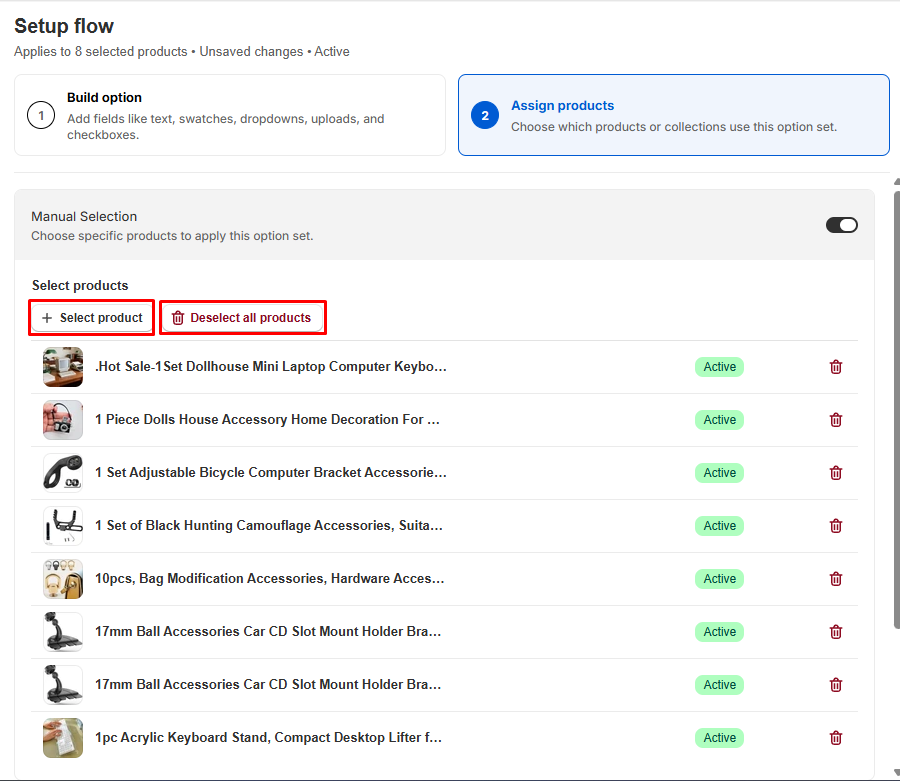
The app works with option sets. Each set is a group of custom fields that you attach to one or more products. Setup follows two steps:
- Build option: Add fields like text, swatches, dropdowns, uploads, and checkboxes.
- Assign products: Choose which products or collections use the set.
For assignment, there are three routes: manual selection of specific products, automatic rules based on product conditions like tags or collections, and applying the set to all products.
The option set editor also has a sidebar for Customers, Countries, and Translations, a language selector, and a sales channel setting. Customer and country rules are listed as Advanced plan features.
What We Tested
I installed Globo Product Options on a Shopify development store and used the free plan. I created an option set with a checkbox field, used the in-app preview, manually assigned the set to eight products, and checked the matching-products preview. I also reviewed the pricing page inside the app.
I did not test paid features, file uploads, add-on pricing, conditional logic rules, or checkout and order behavior. I also didn’t check how the options looked on the live storefront theme or contact support. This review makes no claims about those areas.
Building an Option Set
Building a field is simple. For my checkbox, I set a name for the product page and a separate name for the cart page, added an option value (“Write message”), and could add help text. There are toggles to make a field required or hide its label, and a swatch style choice between default, color, and image.
Each option value also has a price field, but it is a paid feature: on the free plan it carries the same star marker as other locked settings. If your options need to add to the product price, you will need to upgrade. Values can be added one by one or in bulk.
The live preview on the right updates as you edit, so you can see the checkbox above the Add to cart button before saving. That’s a small thing, but it saves a lot of back and forth.
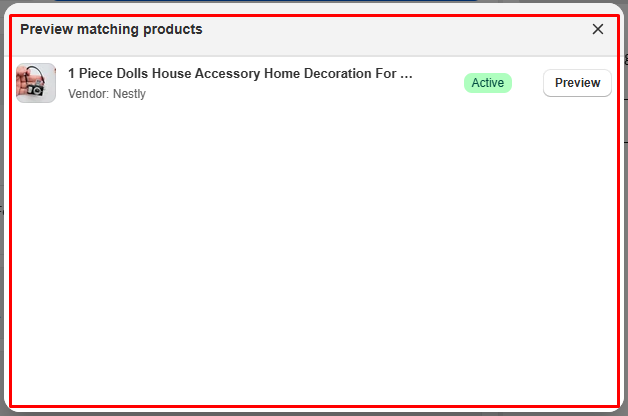
Assigning products was just as quick. I picked products with a Select product button, and each one appeared in a list with its status and a delete button. A “Preview matching products” window shows exactly which products the set applies to, with a Preview button for each. This is useful once you use automatic rules, because you can check what a rule actually matched before going live.
Where It Starts to Fall Short: Locked Settings
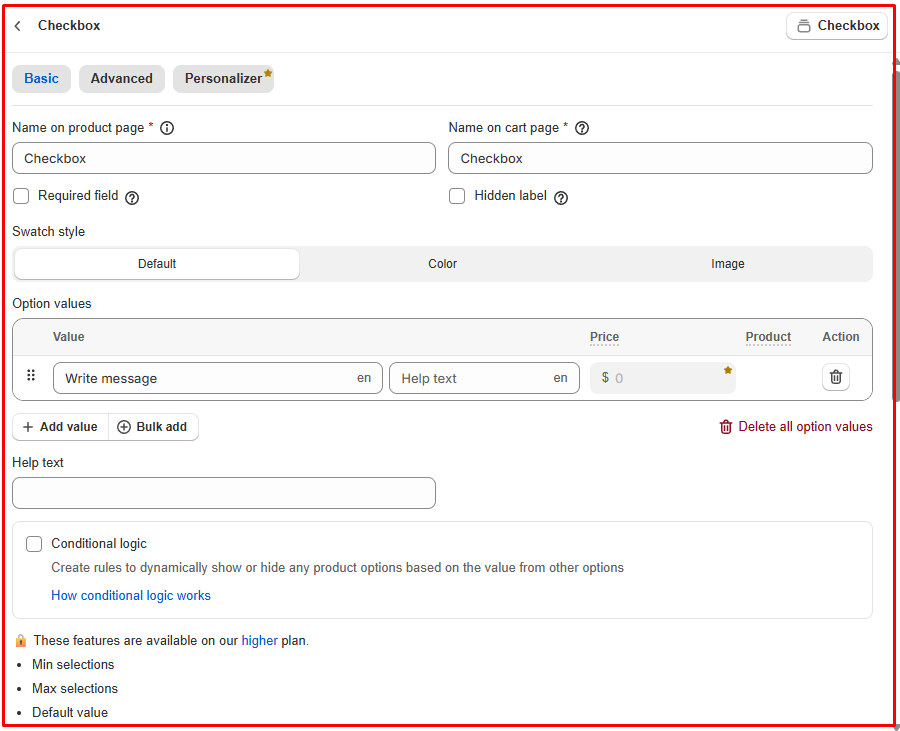
The free plan is generous, but you’ll hit locks quickly. On my checkbox field, the editor showed a note that min selections, max selections, and default value are available on a higher plan. The Personalizer tab and the price field on option values are paid features too, so free-plan options can’t add to the product price.
These aren’t exotic settings. If you sell a “choose up to 3 extras” option, a max-selection rule is exactly what you need. On the free plan, you can’t set it.
I like that the locked features are visible rather than hidden, because you know what you’d get by upgrading. But merchants should plan their options first and check which settings each one needs before deciding the free plan is enough.
Support is the other point to weigh. Most feedback about the team is positive, but a few merchants describe slow replies on complex issues. If your store depends on options working at checkout, test your setup well before a busy period.
Pricing and Value
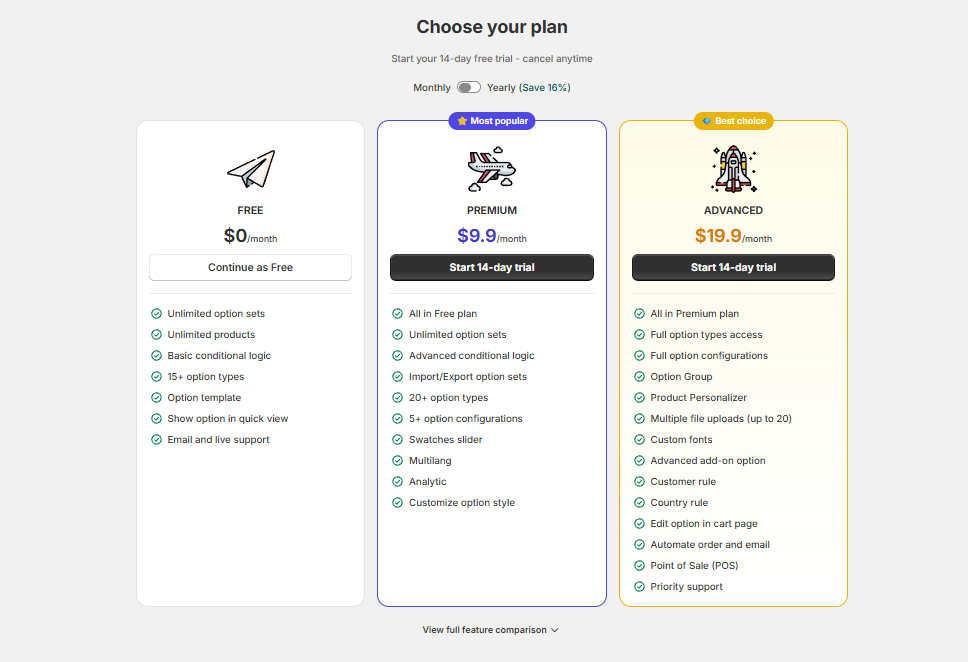
This is what the in-app pricing page showed during my test:
| Plan | Price | Highlights |
|---|---|---|
| Free | $0 | Unlimited option sets and products, basic conditional logic, 15+ option types, option templates, show options in quick view, email and live support |
| Premium | $9.90/month | Everything in Free, plus advanced conditional logic, import/export, 20+ option types, 5+ option configurations, swatch slider, multilanguage, analytics, option styling |
| Advanced | $19.90/month | Everything in Premium, plus full option types and configurations, option groups, Product Personalizer, up to 20 file uploads, custom fonts, advanced add-ons, customer and country rules, edit options on the cart page, order and email automation, POS, priority support |
Paid plans include a 14-day free trial, and yearly billing saves 16%.
For value, the free plan covers simple needs well: a gift note, an engraving field, a checkbox for gift wrap. Premium is a small step up for stores that need multiple languages, analytics, or more control over option logic. Advanced is where personalization, file uploads, add-on pricing, and POS support live, so stores selling custom products will likely end up there.
What We Liked
- Generous free plan: Unlimited option sets and products, with more than 15 option types.
- Clear two-step setup: Build the option, then assign products. Hard to get lost.
- Live preview: You see each field above the Add to cart button while editing.
- Flexible assignment: Manual selection, automatic rules, or all products, plus a preview of matching products.
- Separate product and cart labels: Useful for keeping the cart clean.
What Could Be Better
- Everyday settings are locked: Min and max selections and default values need a higher plan.
- Option pricing is paid-only: The price field on option values is locked on the free plan.
- Personalization needs Advanced: The Product Personalizer and larger file uploads sit on the top plan.
- Support can be uneven: Most feedback is positive, but some merchants report slow help on complex problems.
Who Globo Product Options Is Best For
It’s a strong fit for stores selling personalized gifts, made-to-order products, or items with optional extras like gift wrap or engraving. It also suits merchants who want to start free and only pay once they need advanced rules or personalization.
Who Should Consider an Alternative
If you need a full visual product customizer as your main selling point, check that the Advanced plan’s Personalizer fits your use case before committing. If you only need a single extra field on one product, a simpler app or a theme setting may be enough.
Final Verdict
Globo Product Options solves the core problem well: it lets you ask shoppers for more than Shopify’s variants allow, without code. The free plan is enough to build and assign real option sets, and the setup is easy to follow.
The main caveat is the paywall on everyday controls like max selections. Map out the options your products need, check which ones are locked, and start on the free plan before choosing Premium or Advanced.
Frequently Asked Questions
Is Globo Product Options free?
Yes. The free plan includes unlimited option sets and products, basic conditional logic, and more than 15 option types. Premium costs $9.90 a month and Advanced $19.90 a month.
Can I apply options to many products at once?
Yes. You can select products manually, use automatic rules based on product conditions like tags or collections, or apply an option set to all products.
Can I limit how many checkboxes a shopper selects?
Yes, but min and max selections are available only on a higher plan, not on the free plan.
Does it support file uploads?
The app lists file uploads, with multiple uploads of up to 20 files on the Advanced plan. We did not test uploads in this review.