
Shopify variants handle size and color. They stop being enough when you want a gift message box, a logo upload, or an extra charge for engraving. That’s the gap a product options app fills.
SC Product Options is built by Shop Circle. Long-time merchants may know it under its earlier name, Bold Product Options. It adds custom fields to product pages, and its higher plan adds paid extras, conditional fields, swatches, and editing options from the cart.
I went through the app’s admin on a store: the dashboard, the option set builder, the settings area, and the display styling screen. I also checked the current plans and read the merchant feedback, especially the less positive reviews.
Key Takeaways
- Main fit: Stores that need extra fields on product pages, such as text boxes, file uploads, or extra choices that Shopify variants don’t cover.
- Strongest point: A clear three-step option set builder, plus detailed styling controls for how options look on the storefront.
- Biggest limitation: Paid add-ons, conditional logic, swatches, and cart editing are all on Premium. Basic covers fields, not upsells.
- Buying guidance: Decide whether you need to charge for options before picking a plan. That one question decides between $14.99 and $39.99 a month.
Our Verdict
A solid, mature options app, but most merchants who want to earn more from options will need Premium.
The admin is simple to find your way around, and building an option set takes three clear steps. The styling settings go deeper than I expected. The catch is the plan split: Basic is for collecting information from shoppers. If you want to charge extra for options or show fields only when they’re needed, you’re paying for Premium.
What SC Product Options Offers
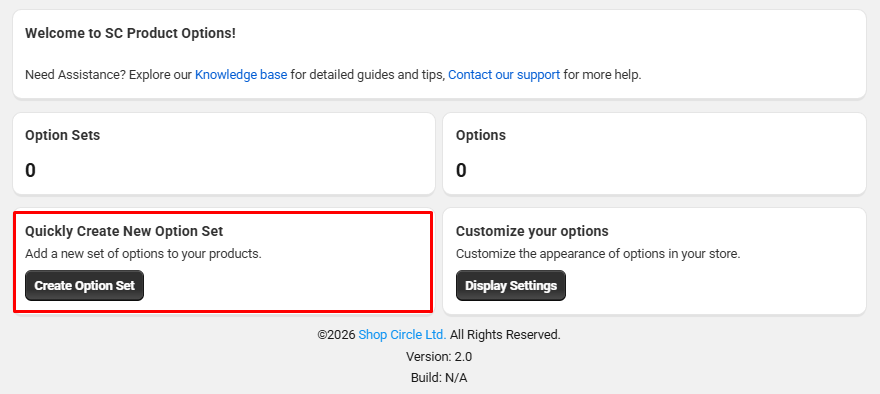
The app opens on a simple dashboard. At the top, a welcome panel links to the knowledge base and to support. Below that, two counters show how many option sets and options you have. Then there are two shortcuts: Create Option Set and Display Settings.
The left menu has five sections: Option Sets, Conditions, Product Search, Settings, and Pricing.
The app keeps two ideas apart. An option is a single field, like a text box or a dropdown. An option set is a group of options that you apply to one product or many. You can reuse an option you’ve already built in a new set, so you don’t have to build the same field twice.
The Settings page splits into four areas:
- Display Settings: how options look to shoppers
- Edit in Cart Settings: the look of the cart editing feature
- Frontend Settings: how options are displayed on the storefront
- Language Settings: the language of the app
What We Tested
I went through the SC Product Options admin on a store: the dashboard, the option set builder, the Settings page, and the Display Settings screen. I also reviewed the plan page.
I did not finish building an option set or check one on a live product page. I did not test paid add-ons, conditional logic, swatches, file uploads, cart editing, checkout, or support. Anything about those features below comes from the app’s plan list and documentation, not from my own testing.
Building an Option Set
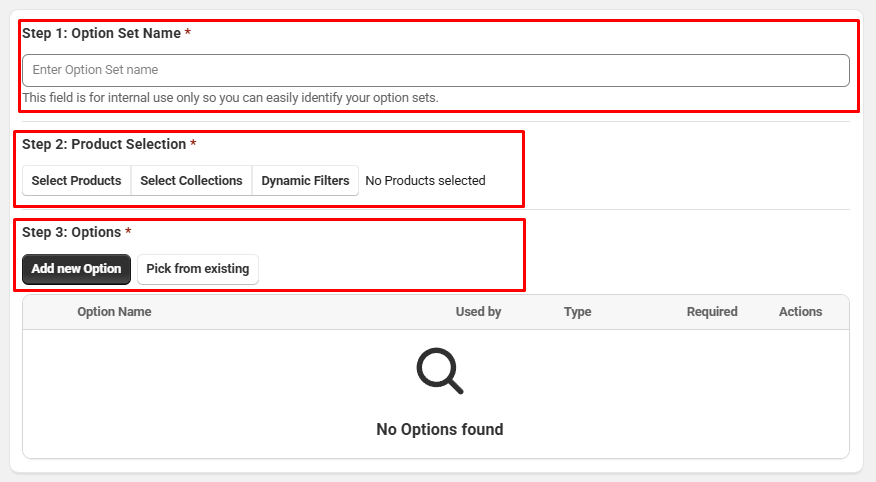
The Create Option Set screen walks you through three required steps.
Step 1: Option Set Name. This name is only for you. The app notes that shoppers never see it. It just helps you keep track of your sets.
Step 2: Product Selection. You can pick specific products, whole collections, or use Dynamic Filters. For a large catalog, collection and filter assignment is much faster than picking products one at a time.
Step 3: Options. You can add a new option or choose Pick from existing to reuse one. Added options appear in a table that shows the option name, how many sets use it, its type, whether it’s required, and actions.
This layout is easy to follow. Each step is clearly labeled and marked as required, so it’s hard to save a half-finished set by mistake.
When you first install the app, it syncs your Shopify products before you can assign them. Shop Circle says this takes from a few seconds to a few minutes, depending on catalog size.
Display Settings: Styling Without Code
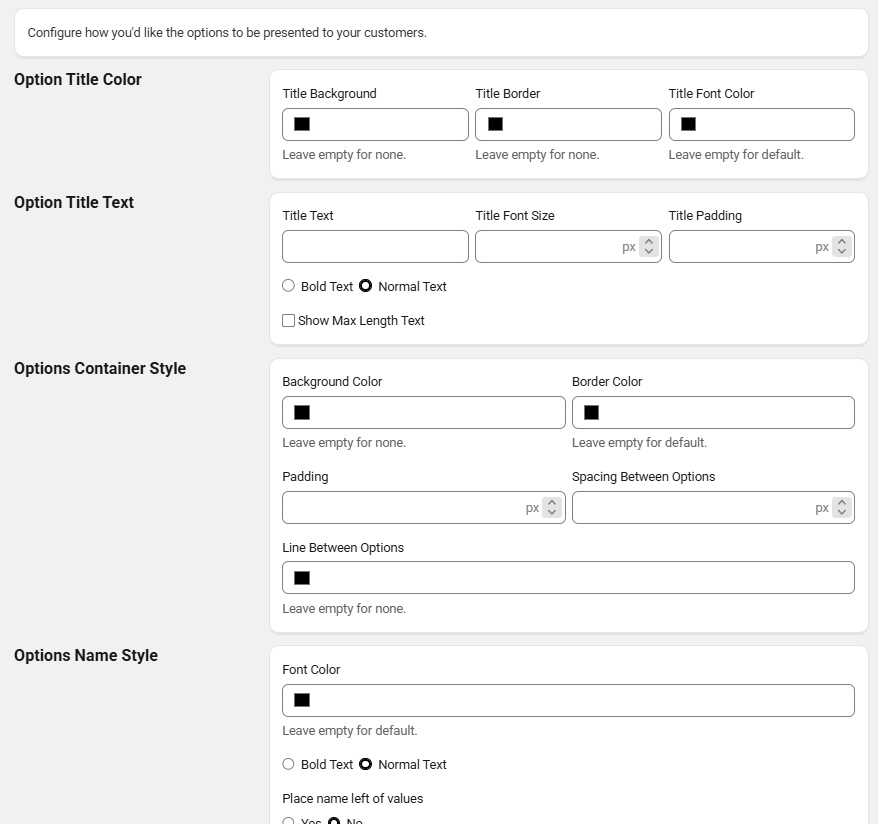
The Display Settings screen is where you match the options to your theme without code. It’s split into groups:
- Option Title Color: title background, border, and font color
- Option Title Text: title text, font size, padding, bold or normal text, and a choice to show max-length text
- Options Container Style: background color, border color, padding, spacing between options, and a line between options
- Options Name Style: font color, bold or normal text, and whether to place the name to the left of the values
Most fields say “Leave empty for none” or “Leave empty for default,” so you only change what you need. That’s a sensible approach. You can start with your theme’s look and adjust a few colors rather than styling everything from scratch.
One thing to know: this screen changes how the options look, not where they sit. Shop Circle’s documentation says moving options to a different spot on the product page needs a code change.
Pricing and Value
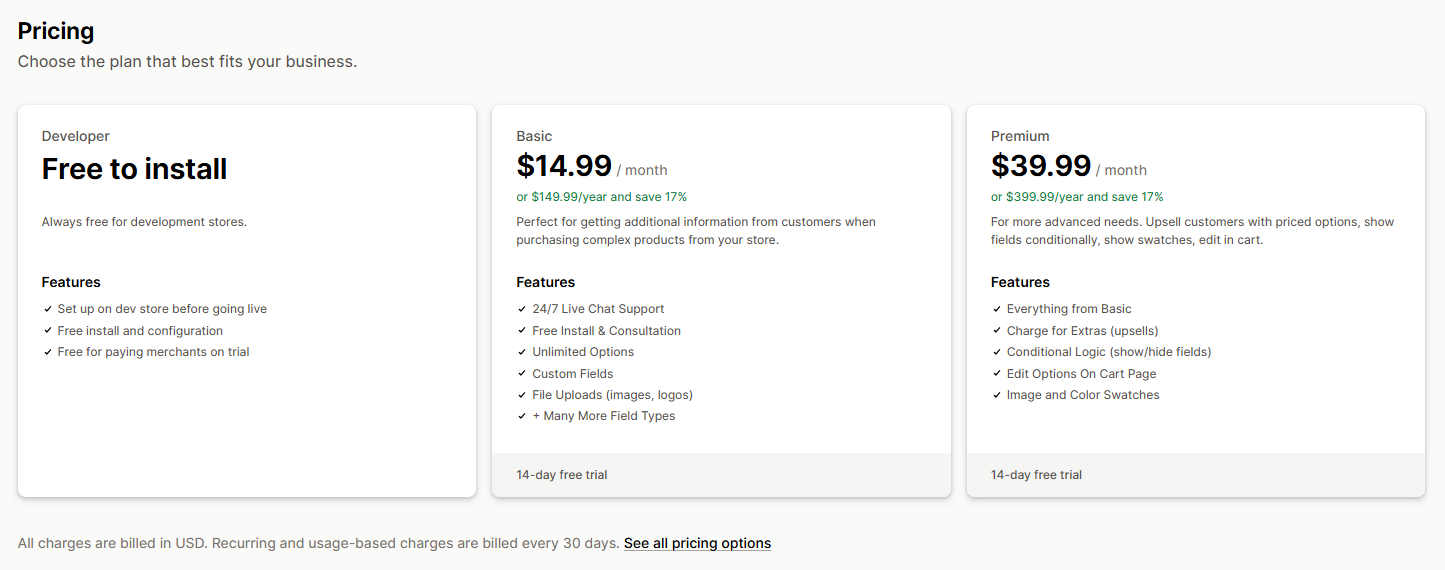
At the time of writing, SC Product Options has three plans:
- Developer: free, for development stores only. You can set up on a dev store before going live.
- Basic: $14.99 per month, or $149.99 per year. It includes unlimited options, custom fields, file uploads for images and logos, more field types, 24/7 live chat support, and free install and consultation.
- Premium: $39.99 per month, or $399.99 per year. It adds paid extras (upsells), conditional logic to show or hide fields, editing options on the cart page, and image and color swatches.
Both paid plans have a 14-day free trial. Annual billing saves about 17%. Please confirm current prices on the Shopify App Store before installing.
Basic is good value if you only need to collect information, such as an engraving name, a gift note, or an uploaded logo. But the features that earn money, like charging for extras, are all on Premium. At $39.99 a month, Premium costs more than some single-plan options apps that include paid add-ons. Compare that against what you expect to earn from those extras.
Where It Falls Short
The key features sit on Premium. Paid add-ons, conditional logic, and swatches are basic needs for many personalization stores. Putting all of them on the higher plan makes Basic feel limited for those stores.
Setup can need help. A recurring theme in merchant reviews is that the app isn’t always easy to set up alone. Many positive reviews describe support stepping in to configure options or fix a theme conflict. That’s good if support is quick when you need it, but it also means some stores won’t get a smooth setup on their own.
Options can take time to appear. Shop Circle’s own help content says options show on product pages once the product sync finishes, which can take up to an hour. Don’t panic if a new set doesn’t show up immediately.
Placement needs code. The styling controls are thorough, but moving options to a new spot on the page needs a code change, according to the app’s documentation.
What We Liked
- Clear three-step builder: Name, products, options, with each step marked as required.
- Flexible product selection: Assign by product, by collection, or with dynamic filters.
- Reusable options: Pick from existing options instead of rebuilding them.
- Detailed display settings: Colors, padding, spacing, and font weight without code.
- Free on development stores: You can build and test before going live.
- 24/7 live chat support on paid plans.
What Could Be Better
- Paid add-ons, conditional logic, and swatches all need Premium.
- Setup may need support help, based on merchant feedback.
- New option sets can take time to show while the product sync runs.
- Moving options on the page needs code.
- No free plan for live stores.
Who SC Product Options Is Best For
Basic suits stores that need to collect details from shoppers, such as names, notes, or uploaded logos, without charging for them. Premium suits stores selling personalized or made-to-order products where extras carry a price, and where fields should only appear for certain choices.
Who Should Consider an Alternative
If you want paid add-ons and conditional logic without paying $39.99 a month, look at a single-plan app like Infinite Options. If you want a free plan for a live store, Globo Product Options has one. If you’re comparing tiered apps, see our Hulk Product Options review.
Final Verdict
SC Product Options is a well-organized options app with an easy option set builder and detailed styling controls. Basic works for collecting information. For upsells, conditional fields, and swatches, plan on Premium.
Use the free development store plan or the 14-day trial to build your most complex product, check it on your theme, and make sure you’re comfortable with the setup before you commit.
Frequently Asked Questions
How much does SC Product Options cost?
At the time of writing, Basic is $14.99 per month and Premium is $39.99 per month, with yearly billing available. Both have a 14-day free trial. It’s free on development stores.
Can I charge extra for options on the Basic plan?
No. Charging for extras is a Premium feature.
Does it support conditional logic?
Yes, on Premium. You can show or hide fields based on what the shopper chooses.
Does it support file uploads?
Yes. File uploads for images and logos are included from the Basic plan. We did not test uploads in this review.
Is SC Product Options the same as Bold Product Options?
Yes. It’s the same app, now published under the Shop Circle name.