
Shopify variants only go so far. As soon as you want an engraving box, a gift-wrap checkbox, or a width and height field, you need a product options app.
Infinite Options, built by ShopPad, is one of the longest-running apps in this space. It adds custom fields to product pages and lets you charge extra for some of them.
I installed it on a development store, built an option set with a date picker, assigned it to a product, and checked it on the storefront. I also went through the most critical merchant reviews, because that’s where the most useful warnings are.
Key Takeaways
- Main fit: Stores that need extra product fields, like text boxes, dropdowns, swatches, checkboxes, or date pickers, beyond Shopify’s variants.
- Strongest point: A clean option set editor with 15 option types and a hover preview that shows how each one looks, so merchants don’t have to test types one by one.
- Biggest limitation: Recent critical reviews describe options failing to load for shoppers, slow support resolutions, and a redesigned admin that some merchants find harder to use.
- Buying guidance: A single paid plan with a free trial. Use the trial to test your key product pages across browsers and devices before relying on it.
Our Verdict
A capable options app, but test the storefront carefully before you depend on it.
Infinite Options covers the core job well. Setup was straightforward in my test, and you get many field types, bulk assignment, conditional logic, and price add-ons in one plan, with no tiers to decode.
The concern is reliability and support. Most merchant feedback is positive, but the recent one-star reviews share a theme: when something breaks, fixes can be slow. For a store where personalization is the product, that matters more than any feature.
What Infinite Options Offers
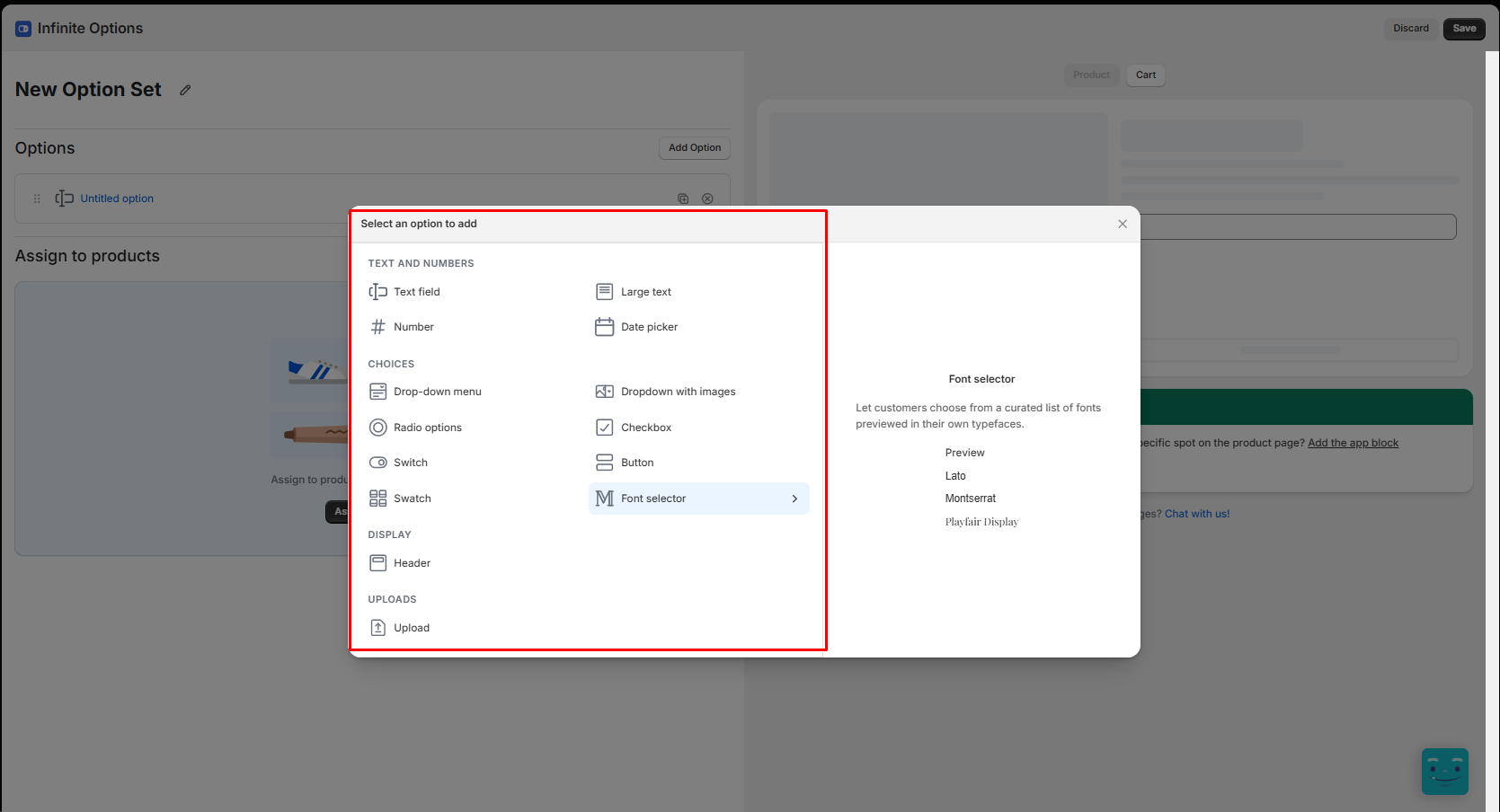
The app works with option sets. A new set opens on a two-part screen: Options at the top and Assign to products below, each with a clear empty state and a single button to get started. On the right, a preview panel switches between Product and Cart views, and a link offers chat help for design changes.
Clicking Add Option opens a picker grouped into four sections:
- Text and numbers: Text field, Large text, Number, Date picker
- Choices: Drop-down menu, Dropdown with images, Radio options, Checkbox, Switch, Button, Swatch, Font selector
- Display: Header
- Uploads: Upload
Hovering an option shows a short description and a preview on the right. For Swatch, it explained that values show as small color or pattern tiles and can collapse into an accordion. For Font selector, it showed sample fonts like Lato, Montserrat, and Playfair Display, each previewed in its own typeface. This hover preview was my favorite part of the editor, and it saves a lot of time. Without it, you’d have to add each option type, save, and check the storefront one by one to see which fits your product. Here, you just hover and see how it will look. Merchants can compare all 15 types in a few seconds and pick the right one on the first try.
Assignment works with rules. In my test, the rule read “When product Variant is” followed by a product, and I could add more rows joined with “or”. The heading then updated to “Assign to 1 product”, with a Preview link beside it. Sets can also be assigned by tag, vendor, product type, handle, or to all products, which helps with large catalogs.
Conditional logic shows or hides fields based on earlier choices. For example, you can show an engraving text box only after a shopper ticks “Add engraving”. One limit to plan around: conditions only work within the same option set. A choice in one set can’t control fields in another.
The app also connects with other tools, including Klaviyo, Recharge, Order Printer, GemPages, MESA, and ShopPad’s upload app, Uploadery.
Integrations and Automation Templates
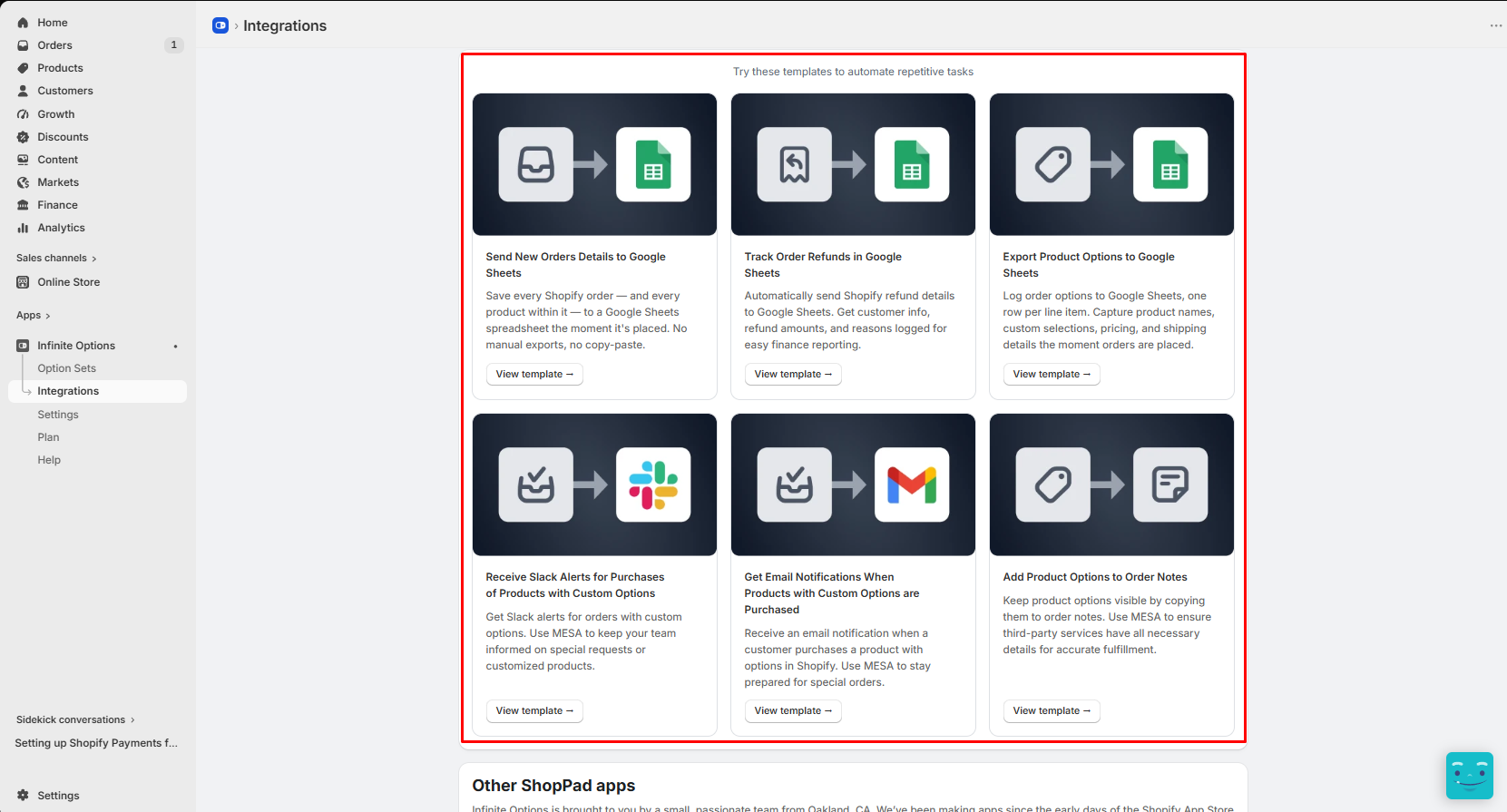
The app’s menu has five sections: Option Sets, Integrations, Settings, Plan, and Help. The Integrations page offers ready-made templates for automating repetitive order tasks. I saw six:
- send new order details to Google Sheets
- track order refunds in Google Sheets
- export product options to Google Sheets, one row per line item
- get Slack alerts for purchases with custom options
- get email notifications when products with custom options are bought
- add product options to order notes
Several of these templates say they run through MESA, a separate automation app. The last one is the most practical for fulfillment: copying options into order notes helps third-party services see what the customer chose. I only viewed these templates. I didn’t run any of them.
What We Tested
I installed Infinite Options on a Shopify development store. I created a new option set, added a Set Date field using the date picker, browsed the full option picker, assigned the set to one product with a variant rule, and checked the product page on the live storefront theme.
I also looked through the Integrations page. I did not test price add-ons, the automation templates, conditional logic, uploads, the font selector, checkout or order behavior, or support. I also didn’t test across browsers or devices, which matters given the complaints below.
How It Looks on the Storefront
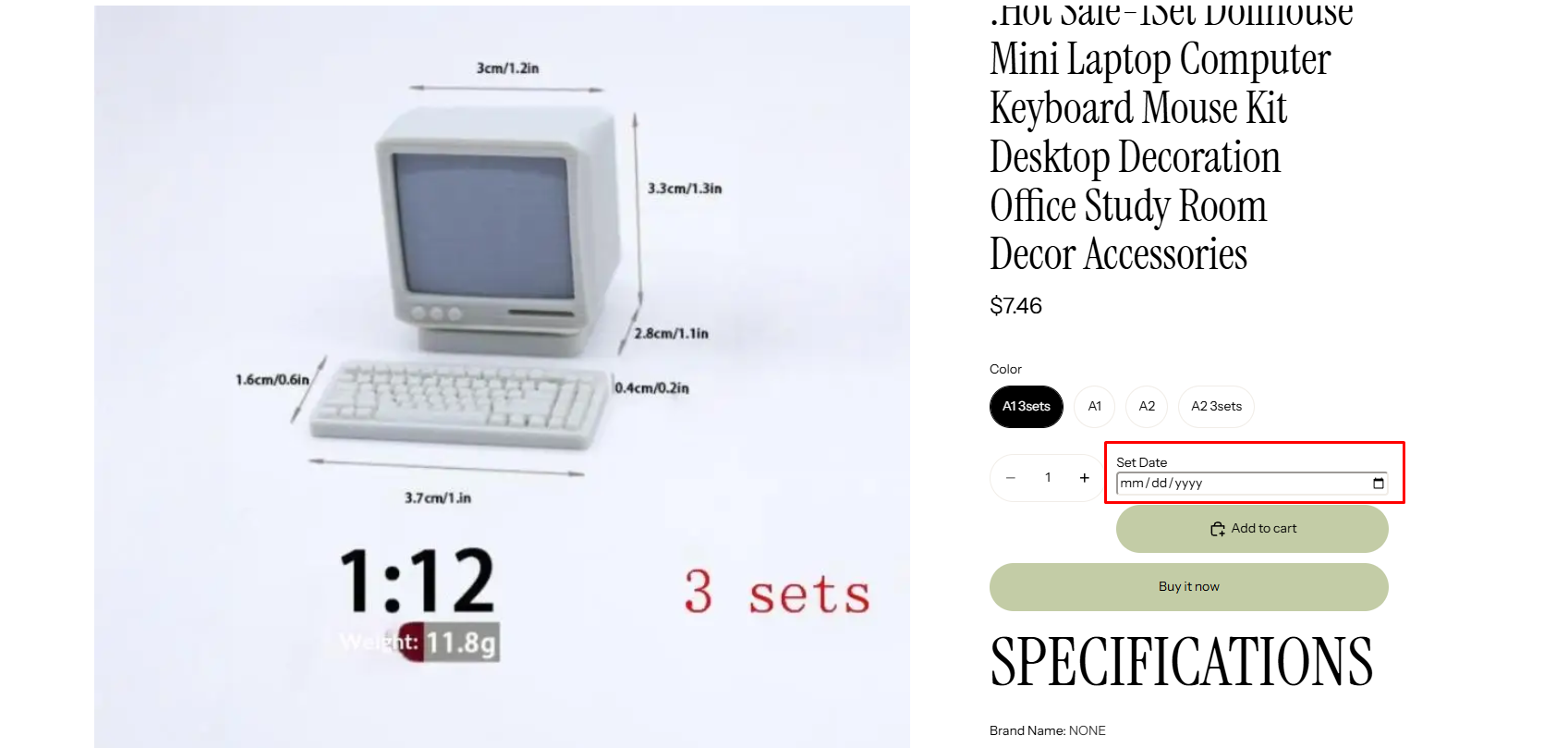
On the product page, the Set Date field appeared below the variant buttons, next to the quantity selector and above Add to cart. It used the browser’s standard date input with a calendar icon. It fit the theme without any code changes.
The editor also notes that you can add the app block if you want the options in a specific spot on the product page, which gives you more control over placement.
How Price Add-Ons Work
You can add a price to individual values in dropdowns, radio buttons, checkboxes, and swatches. For example, gift wrap could cost $5 extra.
Behind the scenes, the app does this with a hidden add-on product. When a shopper picks a paid option, that add-on product is added to the cart alongside the main item.
This approach is common among options apps, but it’s worth understanding before you launch. The extra charge shows up as a separate product, which can affect how orders, reports, and inventory look. Check how it appears in your cart, order emails, and fulfillment tools.
Where It Falls Short
The lowest-rated recent reviews point to three issues.
Options not loading for shoppers. One merchant who relies on personalization described customers regularly reporting that the name field and color choices didn’t appear. They also found the troubleshooting advice they got unhelpful. The developer’s reply came weeks later and asked for collaborator access to the store.
Slow support resolutions. Another merchant said a problem stayed unsolved for about a week despite clear instructions, then fixed it themselves with custom code in around half an hour. They rated the app itself as average but marked it down for support.
A redesigned admin. In September 2026, a merchant complained that a layout change made the app more complicated to use. If you’ve used Infinite Options before, expect some relearning.
These are a small share of the app’s overall feedback, and the developer does respond publicly. But they’re serious for a store where personalization drives sales. Test your most important products thoroughly during the trial, and keep checking them after theme or app updates.
Pricing and Value
At the time of writing, Infinite Options is listed at $12.99 per month on a single plan, with a 14-day free trial. Please confirm the current price on the Shopify App Store before installing.
The single plan is simple. You don’t need to compare tiers or worry about features being locked. For stores that need more than one or two fields, that’s good value compared with tiered apps where price add-ons or conditional logic cost extra.
The trade-off is that there’s no free plan. If you only need one simple field, a free options app may be enough.
What We Liked
- One plan, full feature set: No tiers to compare.
- Flexible assignment rules: Assign by variant, with more rules joined by “or”.
- Wide range of field types: 15 types, including date picker, switch, font selector, and upload.
- Hover previews in the option picker: Hover over any option type to see how it will look, with no need to test each one on the storefront. A real time-saver and a genuinely good user experience.
- Worked on the storefront without code: My date field showed up cleanly on the product page.
- Conditional logic: Show fields only when they’re needed.
- Ready-made automation templates: Send orders and options to Google Sheets, Slack, email, or order notes.
What Could Be Better
- Storefront reliability complaints: Some merchants report options failing to load for shoppers.
- Slow fixes on complex issues: Recent reviews describe week-long waits.
- Admin redesign: Some long-time users find the new layout harder to use.
- Conditional logic is set-bound: Conditions can’t cross option sets.
- Add-on pricing uses a hidden product: Check how it affects orders and reports.
- No free plan.
Who Infinite Options Is Best For
It suits stores that need many custom fields across large catalogs, such as made-to-order goods, gifts with messages or engraving, or products sold by size. The bulk assignment and single plan make it easy to roll out widely.
Who Should Consider an Alternative
If personalization is your main revenue driver and you can’t risk options failing on product pages, compare support track records before choosing. If you need shoppers to see their text drawn on the product image, look at a personalizer app instead, like Zepto Product Personalizer. And if you want a free starting point, Globo Product Options has a free plan.
Final Verdict
Infinite Options offers a lot for one flat monthly price: many field types, bulk assignment, conditional logic, and price add-ons. On features alone, it’s a strong pick.
The caution is reliability and support. Use the free trial to test your key products on different browsers and devices, check how add-on prices show up in orders, and decide whether you’re comfortable with the support risk.
Frequently Asked Questions
How much does Infinite Options cost?
At the time of writing, it’s listed at $12.99 per month with a 14-day free trial. There’s no free plan.
Can I charge extra for an option?
Yes. You can add a price to values in dropdowns, radio buttons, checkboxes, and swatches. The app adds a hidden add-on product to the cart to apply the charge.
Does it support conditional logic?
Yes. Fields can show or hide based on earlier choices, but only within the same option set.
Does it support file uploads?
Yes. Upload is one of the option types in the picker. We did not test uploads in this review.