
Shopify variants cover size and color. They don’t cover a name for engraving, a booking date, a special request, or a paid gift-wrap option. That’s where a product options app comes in.
OPTIS Product Options, Variant is built by OPTIS, the team previously known as BSS Commerce. It adds custom fields to product pages, comes with a library of ready-made templates, and has a free plan alongside three paid tiers.
The question I wanted to answer is the one most merchants ask first: what can you actually do for free, and when do you need to pay? I went through the dashboard and setup guide, the option type list, the template library, and the settings for a text box, and I checked the plan page to see which features sit behind each tier.
Key Takeaways
- Main fit: Stores that need extra product fields, such as text boxes, dropdowns, checkboxes, and swatches, and want to start on a free plan.
- Strongest point: A clear setup guide, a template library built around real use cases, and an editor with a preview beside it.
- Biggest limitation: Price add-ons, SKUs, character limits, default values, and several option types are marked Advanced. Conditional logic is limited to one product on Free.
- Buying guidance: Free works for collecting simple information. Most stores that charge for extras will need the Advanced plan at $9.99 a month.
Our Verdict
A well-organized options app with a usable free plan, but the features that earn money start on Advanced.
The admin is tidy. The dashboard shows whether the app is live on your theme, the setup guide walks you through three steps, and the templates give you a head start for things like bookings and tours. Merchant feedback is overwhelmingly positive, with support mentioned often.
The free plan is fine for basic fields. But as soon as you want to charge for an option, add a SKU, limit characters, or show and hide fields with rules across more than one product, you’re looking at Advanced or higher.
What OPTIS Product Options Offers
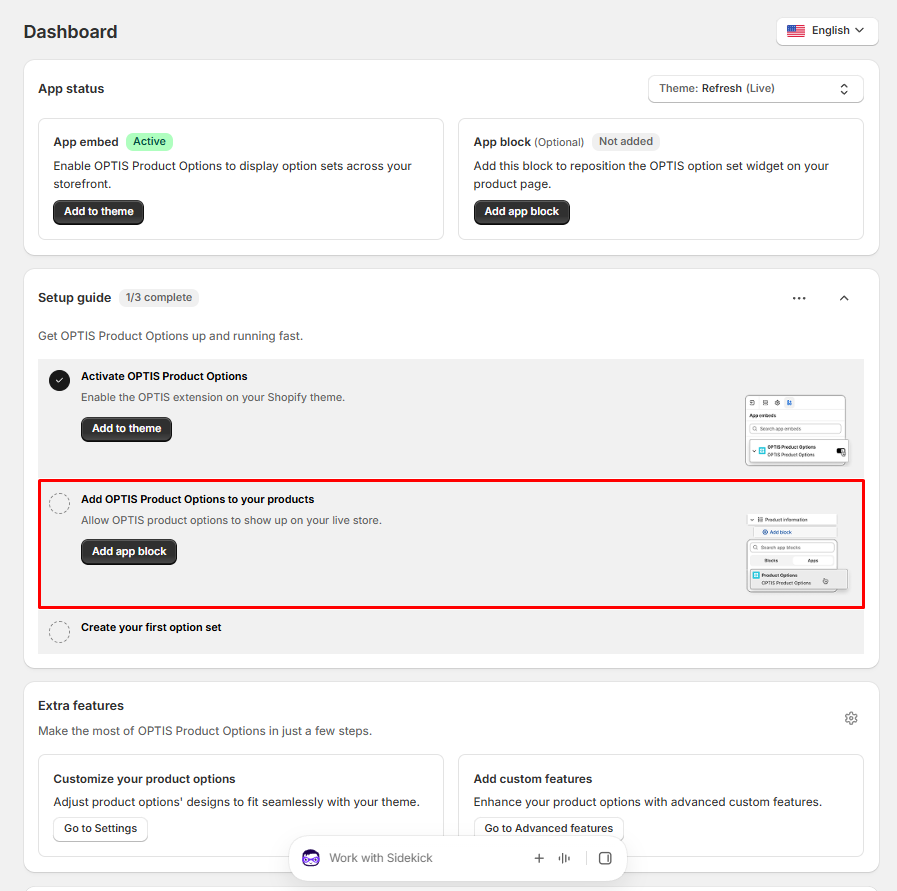
The dashboard opens with an App status panel. It shows which theme you’re checking, whether the app embed is active, and whether you’ve added the optional app block, which lets you reposition the options widget on the product page.
Below that is a Setup guide with three steps:
- Activate OPTIS Product Options by enabling the extension on your theme
- Add the app block to your products so options show on the live store
- Create your first option set
Each step has a button and a small illustration of where to click in the theme editor, which helps if you haven’t added an app block before. An Extra features section links to design settings, so you can match options to your theme, and to advanced custom features. There’s also a language selector in the corner.
What We Tested
I went through the OPTIS Product Options admin on a store on the Free plan. With the app embed active, I opened the option picker and the template library, added a text box to an option set and went through its Content settings, and reviewed the plan page.
I did not finish and publish an option set on a live product, test add-on pricing or conditional logic, place a test order, or contact support.
Option Types
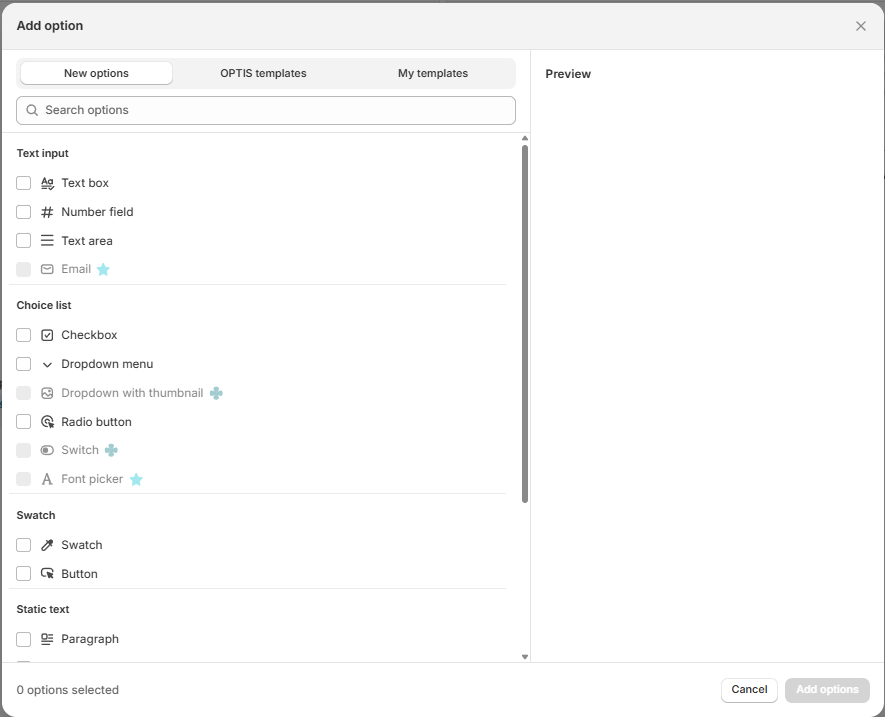
The Add option window has three tabs: New options, OPTIS templates, and My templates. Under New options, the types are grouped like this:
- Text input: text box, number field, text area, and email
- Choice list: checkbox, dropdown menu, dropdown with thumbnail, radio button, switch, and font picker
- Swatch: swatch and button
- Static text: paragraph, with more further down the list
On the Free plan, some types are greyed out with a plan icon next to them: email, dropdown with thumbnail, switch, and font picker. The core fields most stores need, such as text box, dropdown, checkbox, radio button, and swatch, were available to add.
Templates
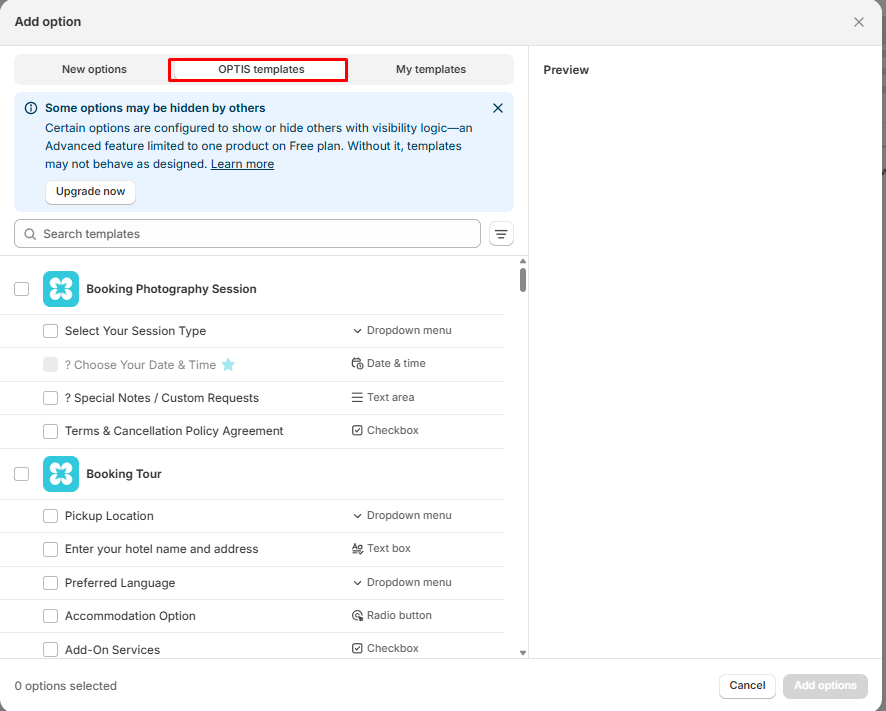
The OPTIS templates tab is one of the more useful parts of the app. Each template is a ready-made group of fields for a specific use case. Two I saw at the top:
- Booking Photography Session: session type dropdown, date and time picker, a text area for special requests, and a terms checkbox
- Booking Tour: pickup location dropdown, a text box for hotel name and address, preferred language, accommodation radio buttons, and add-on services checkboxes
You can tick the whole template or just the fields you want. That’s a faster start than building a booking form field by field.
There’s a catch, and the app is upfront about it. A notice at the top explains that some template fields show or hide others using visibility logic, which is an Advanced feature limited to one product on the Free plan. Without it, templates may not behave as designed. In the Photography Session template, the date and time field was marked as a paid field.
Field Settings
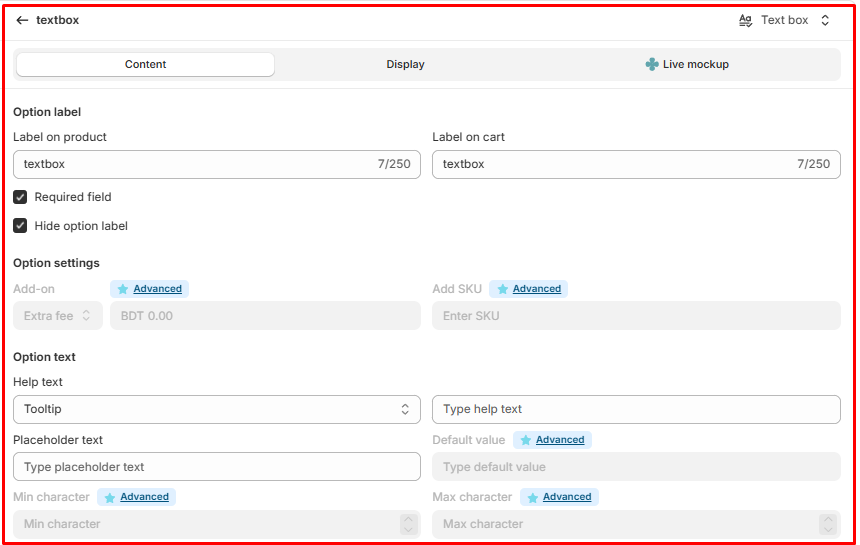
Each option has three tabs: Content, Display, and Live mockup. For a text box, the Content tab includes:
- Separate labels for the product page and the cart, each up to 250 characters
- Required field and Hide option label checkboxes
- Help text, shown as a tooltip, and placeholder text
Several settings on this tab are marked Advanced and locked on Free: the add-on extra fee, SKU, default value, and minimum and maximum characters.
The separate cart label is a nice detail. You can keep a short label on the cart and order while using a friendlier one on the product page. A preview on the right shows the field next to a sample product, with desktop and mobile views, and the option set can be set to Live from the top bar.
Pricing and Value
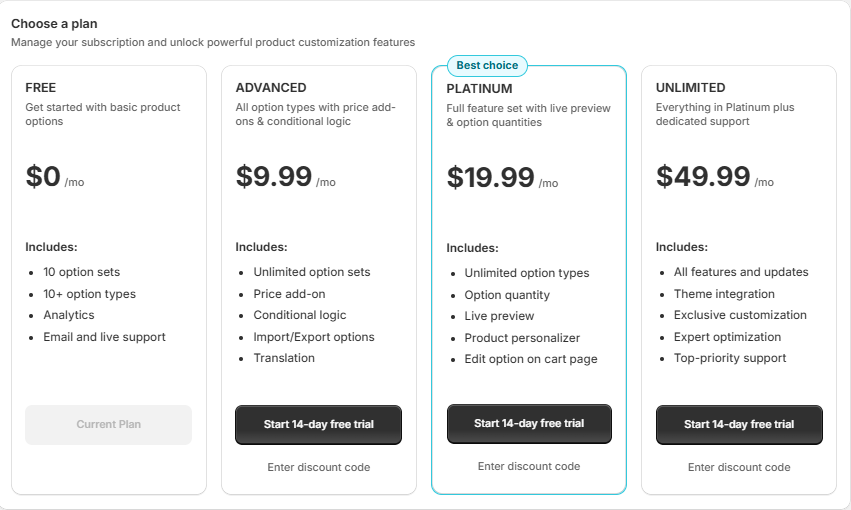
At the time of writing, OPTIS has four monthly plans:
- Free: $0. 10 option sets, 10+ option types, analytics, and email and live support.
- Advanced: $9.99 per month. Unlimited option sets, price add-ons, conditional logic, import and export of options, and translation.
- Platinum: $19.99 per month. Unlimited option types, option quantity, live preview, a product personalizer, and editing options on the cart page.
- Unlimited: $49.99 per month. Everything in Platinum plus theme integration, exclusive customization, expert optimization, and top-priority support.
Paid plans come with a 14-day free trial. Please confirm current prices on the Shopify App Store before installing.
Free is generous enough to try the app properly and to run simple information fields. Advanced is the plan most selling stores will need, because that’s where price add-ons and conditional logic live, and at $9.99 a month it’s on the affordable end for this category. Platinum makes sense if you want shoppers to see a personalized product preview or edit their choices in the cart.
Where It Falls Short
Money-making features start on Advanced. Add-on fees and SKUs are locked on Free, so you can collect information but can’t charge for it.
Templates lean on paid features. Some template fields use visibility logic or paid option types, so a free-plan template may not work exactly as built.
Useful text controls are locked. Character limits and default values need Advanced, which matters for things like engraving fields with a length limit.
Live preview for shoppers is a Platinum feature. The editor has a preview, but the shopper-facing live preview and personalizer sit two tiers up.
What We Liked
- Clear setup guide with theme editor illustrations.
- App status panel showing the app embed and app block at a glance.
- Template library built around real use cases like bookings and tours.
- Separate product and cart labels for each option.
- A free plan with 10 option sets and the core option types.
- Affordable Advanced plan for add-ons and conditional logic.
What Could Be Better
- Price add-ons and SKUs need Advanced.
- Character limits and default values are locked on Free.
- Conditional logic is limited to one product on Free.
- Some option types and template fields are paid.
- Shopper live preview and the personalizer are Platinum-only.
Who OPTIS Product Options Is Best For
Free suits stores that need simple extra fields, like a gift note or a dropdown, without charging for them. Advanced suits most stores selling paid extras or using rules to show and hide fields. Platinum suits stores selling personalized products that want shoppers to see a live preview.
Who Should Consider an Alternative
If you want a free plan with more option types unlocked, compare our Aris Product Options and King Product Options reviews. For other paid-tier options, read our Globo Product Options and Hulk Product Options reviews.
Final Verdict
OPTIS Product Options is easy to get set up. The dashboard tells you exactly what’s missing, the templates save time, and the editor is clean.
For most selling stores, though, the real starting point is Advanced, because that’s where add-on pricing, SKUs, and conditional logic live. Build your options on Free, check them on your theme, and upgrade when you’re ready to charge for extras.
Frequently Asked Questions
Is OPTIS Product Options free?
Yes. The free plan includes 10 option sets, 10+ option types, analytics, and email and live support. Paid plans start at $9.99 per month.
Can I charge extra for options on the free plan?
No. Price add-ons start on the Advanced plan.
Does OPTIS support conditional logic?
Yes. Conditional logic is part of the Advanced plan. On Free, visibility logic is limited to one product.
Does it have templates?
Yes. The OPTIS templates tab includes ready-made field groups for use cases such as booking a photography session or a tour. There is also a My templates tab for your own.