
Shopify variants cover the basics, like size and color. But plenty of products need more than that: a text box for a name, a photo upload, a gift checkbox, or a date. A product options app adds those fields to the product page without touching your variants.
Qikify Custom Product Options is one of the most-reviewed apps in this category, with a 4.9-star rating from more than 900 reviews on the Shopify App Store at the time of writing. It has a free plan, and its paid plans add price add-ons, extra option types, and POS support.
I wanted to see how much a merchant can do before paying. I opened the option set editor, looked through the option types, added a custom text field, assigned it to all products, and checked how it looked on a live product page.
Key Takeaways
- Main fit: Stores that want extra product fields, such as text boxes, swatches, photo uploads, and checkboxes, and want to start for free.
- Strongest point: A clear two-step editor with a live preview, and a free plan with many of the core option types.
- Biggest limitation: Price add-ons, file upload, the font selector, and several other option types need a paid plan, and the free plan shows a “Powered by Qikify Product Options” line under your options.
- Buying guidance: Start on Free to build and check your fields. Move to Unlimited when you need to charge for extras or need the locked option types.
Our Verdict
A strong free starting point for adding custom fields, with paid plans reserved for the features that earn money.
The editor is easy to follow, and the free plan includes unlimited option sets and products, conditional logic with Shopify variants, and live chat support. The custom text field I added appeared on the product page exactly where I expected, under the variant buttons and above Add to cart.
The trade-off is that price add-ons, several option types, CSV import and export, and POS support sit on the $19.99 Unlimited plan. Merchant feedback is overwhelmingly positive, especially about support, but a small number of reviews mention slow replies and theme conflicts.
What Qikify Custom Product Options Offers
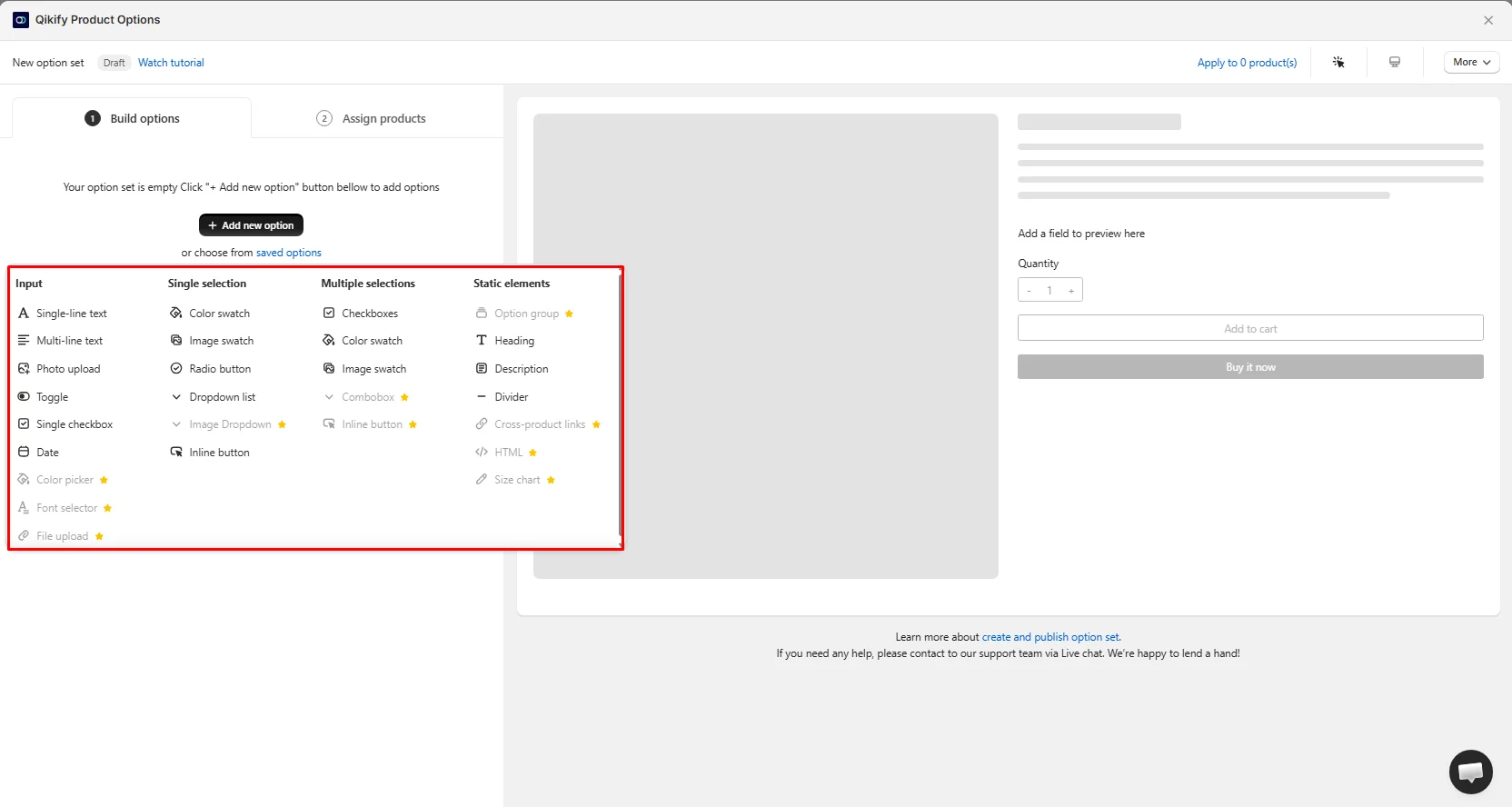
Everything in the app is organized around option sets. An option set is a group of fields you build once and then apply to products. A new set opens in Draft, with a Watch tutorial link at the top and a live preview of a product page on the right.
When you click Add new option, the app shows every option type, sorted into four groups:
- Input: Single-line text, Multi-line text, Photo upload, Toggle, Single checkbox, Date, Color picker, Font selector, and File upload
- Single selection: Color swatch, Image swatch, Radio button, Dropdown list, Image Dropdown, and Inline button
- Multiple selections: Checkboxes, Color swatch, Image swatch, Combobox, and Inline button
- Static elements: Option group, Heading, Description, Divider, Cross-product links, HTML, and Size chart
Some types are greyed out and marked with a star in the picker. On my free install, those were Color picker, Font selector, File upload, Image Dropdown, Combobox, the multi-select Inline button, Option group, Cross-product links, HTML, and Size chart. Everything else was available to use.
You can also start from saved options instead of building each field from scratch, which helps when several product types share the same fields.
What We Tested
I installed Qikify Custom Product Options on a store, created a new option set, browsed the option type picker, added a single-line text field labeled “Add Custom Text”, published the set, assigned it to all products, and checked the result on a live product page. I also reviewed the app’s pricing plans.
I did not test price add-ons, conditional logic, photo or file uploads, the date picker, editing options in the cart, POS, checkout behavior, or support response times.
Building an Option Set
The editor has two steps across the top: Build options, where you add your fields, and Assign products, where you choose where the set appears.
I added a single-line text field. In the live preview, it showed up with its label, a character counter reading 0/100, and a “Limit 100 characters” note under the box. That counter is a small but useful touch for things like engraving or name printing, where shoppers need to know how much space they have.
The top bar also has an Apply to products shortcut that shows how many products the set is on, plus a More menu. A live chat bubble sits in the corner of the editor, and a line at the bottom points you to the help article for creating and publishing a set.
Assigning Products
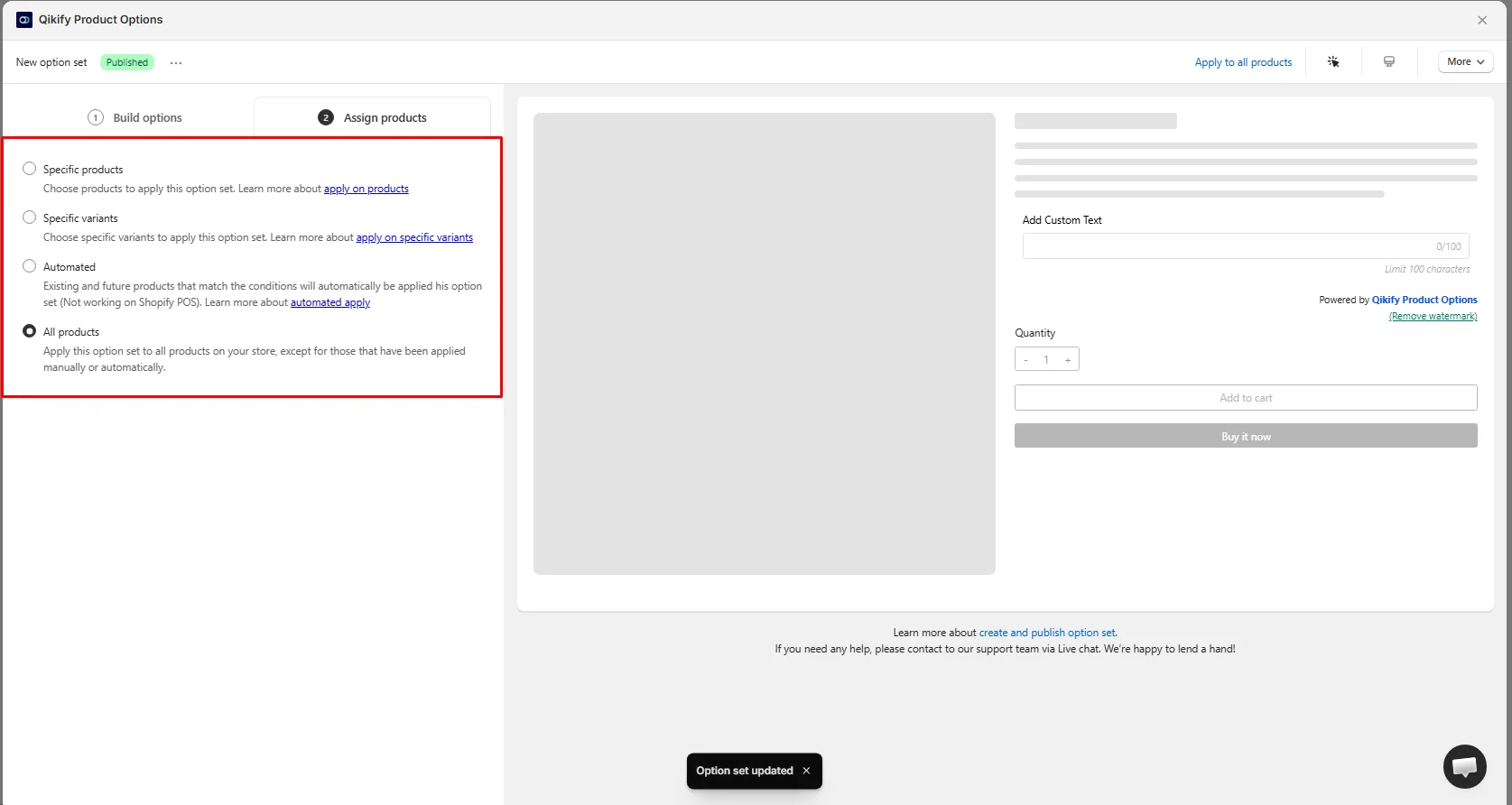
The Assign products step gives you four ways to choose where a set shows:
- Specific products: only the products you pick.
- Specific variants: only certain variants of a product.
- Automated: existing and future products that match conditions you set. The app notes this does not work on Shopify POS.
- All products: every product in the store, except products already covered by another set, either manually or automatically.
I chose All products. After publishing, the set showed a green Published label and the top bar changed to Apply to all products.
The variant-level option stands out. It lets you show a field only on, say, the personalized version of a product, rather than on every variant. Automated assignment is the practical choice for large catalogs where new products arrive often. Just keep the POS note in mind if you also sell in person.
The preview also shows what free-plan shoppers will see: a Powered by Qikify Product Options line under the field, with a Remove watermark link next to it in the editor.
How It Looks on the Product Page
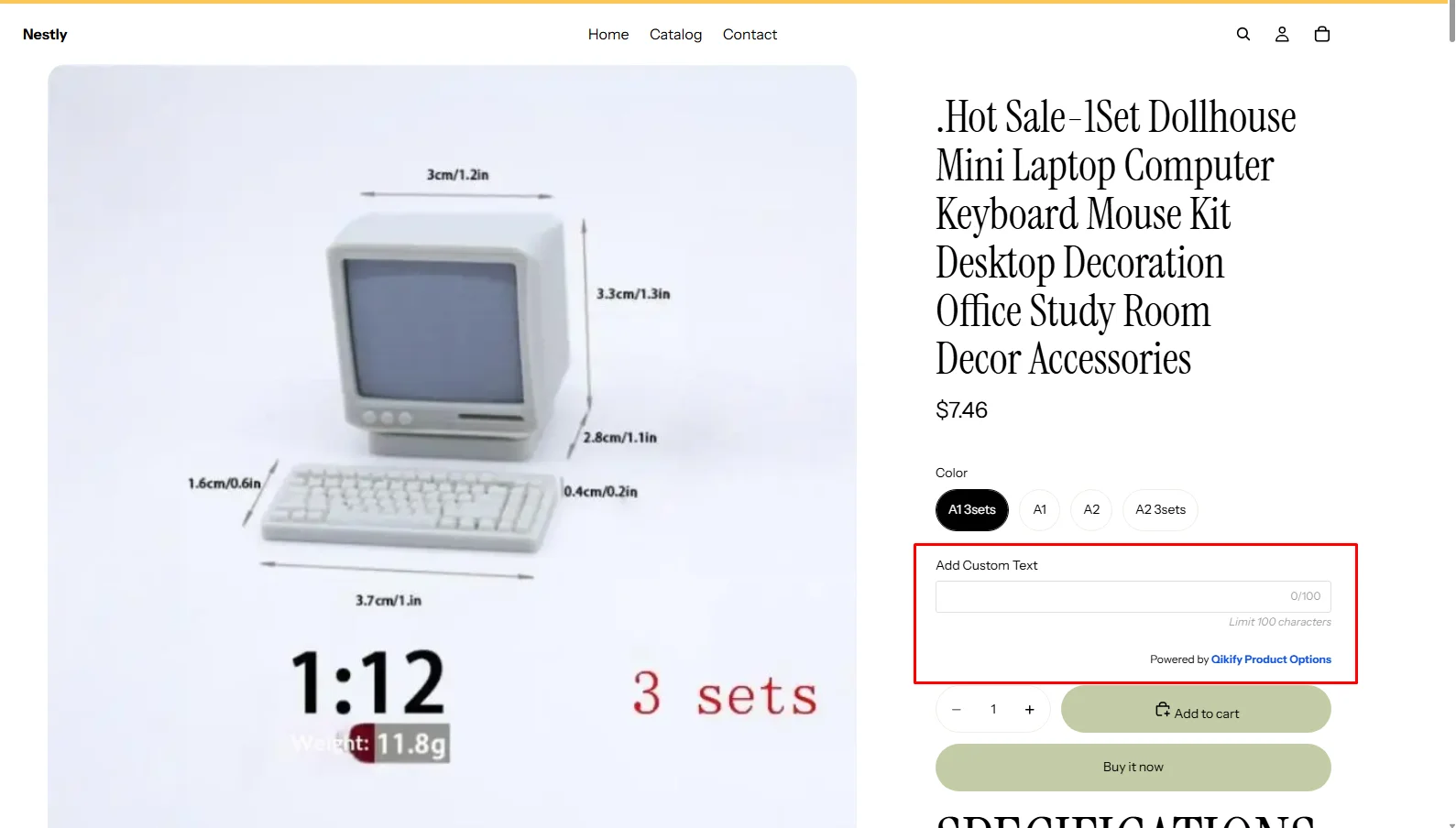
On the live product page, the text field sat between the product’s Color variant buttons and the quantity selector, above Add to cart and Buy it now. It used the theme’s fonts and spacing, so it looked like part of the page rather than a bolted-on widget. The character counter and limit note carried over from the preview.
The “Powered by Qikify Product Options” line was visible on the storefront too. On a free plan that’s expected, but some merchants will want it gone before launch.
I checked one theme only. Theme compatibility is where a few merchants have reported problems, so check your own product pages carefully after installing.
Pricing and Value
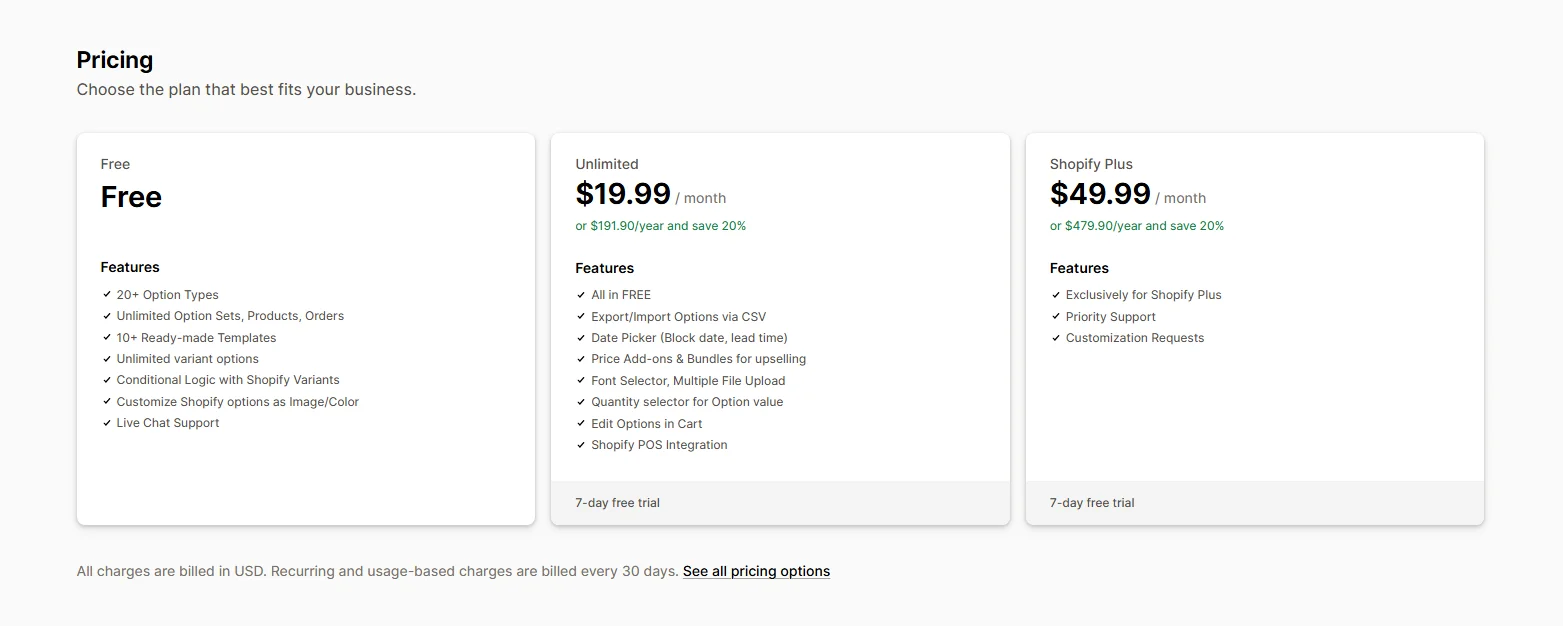
At the time of writing, Qikify has three plans:
- Free: 20+ option types, unlimited option sets, products, and orders, 10+ ready-made templates, unlimited variant options, conditional logic with Shopify variants, Shopify options shown as images or colors, and live chat support.
- Unlimited: $19.99 per month, or $191.90 per year (20% off). Everything in Free, plus CSV import and export of options, a date picker with blocked dates and lead time, price add-ons and bundles for upselling, the font selector and multiple file upload, a quantity selector for option values, editing options in the cart, and Shopify POS integration.
- Shopify Plus: $49.99 per month, or $479.90 per year (20% off). For Shopify Plus stores only, with priority support and customization requests.
Paid plans come with a 7-day free trial. Please confirm current prices on the Shopify App Store before installing.
The free plan is generous for stores that only need to collect information from shoppers. Unlimited is the plan most selling stores will land on, because price add-ons live there. The Shopify Plus plan is limited to Plus stores, so most merchants only need to compare Free and Unlimited.
Where It Falls Short
Paid extras need Unlimited. On Free, you can collect text, photos, dates, and selections, but you can’t charge for them.
Several option types are locked. File upload, font selector, color picker, size chart, HTML, and option groups are greyed out on the free plan.
Branding on Free. A “Powered by Qikify Product Options” line shows under your options on the storefront.
Automated assignment skips POS. The app says automated assignment does not work on Shopify POS.
Occasional support and theme complaints. Most merchants praise support highly. But a few low-rated reviews describe waiting hours or longer for help, and some mention duplicate Add to cart buttons or conditional logic not behaving as expected. If your launch date is close, test on your theme during the trial.
What We Liked
- Free plan with unlimited option sets and products.
- Clear two-step editor with a live preview.
- Wide range of option types, grouped so they’re easy to find.
- Flexible assignment: by product, by variant, automated, or store-wide.
- Character counter and limit on text fields, shown to shoppers.
- Fields blend into the theme on the product page.
What Could Be Better
- Price add-ons need the Unlimited plan.
- Ten option types are locked on Free.
- Branding line shows on the free storefront.
- Automated assignment doesn’t work on POS.
- A few reports of slow support and theme conflicts.
Who Qikify Custom Product Options Is Best For
The free plan suits stores that need custom fields, like a name box, a photo upload, or a gift checkbox, without charging for them. Unlimited suits stores selling paid extras, such as engraving or gift wrap, or stores that need file uploads, CSV import and export, or POS. The Shopify Plus plan suits Plus merchants who want priority support and custom work.
Who Should Consider an Alternative
If you want another free starting point to compare against, see our Aris Product Options and Globo Product Options reviews. If you prefer a single plan with no tiers to compare, look at Infinite Options. For other tiered apps, read our SC Product Options and Hulk Product Options reviews.
Final Verdict
Qikify Custom Product Options makes it easy to add custom fields for free. The editor is clear, the assignment choices are flexible, and the fields fit neatly into the product page.
For stores that want to charge for extras, though, Unlimited is the real starting point. Build your option sets on Free, check them on your own theme, and upgrade when you’re ready to add prices.
Frequently Asked Questions
Is Qikify Custom Product Options free?
Yes. The free plan includes 20+ option types, unlimited option sets, products, and orders, conditional logic with Shopify variants, and live chat support. Paid plans start at $19.99 per month.
Can I charge extra for options on the free plan?
No. Price add-ons and bundles are on the Unlimited plan.
Can I show options on only some variants?
Yes. The Assign products step includes a Specific variants choice.
Does it work with Shopify POS?
Shopify POS integration is on the Unlimited plan. The app notes that automated product assignment does not work on POS.
Can I remove the “Powered by” line?
The free plan shows a “Powered by Qikify Product Options” line, with a Remove watermark link in the editor. We didn’t test which plan removes it.