
Shopify variants handle size and color well enough. But many stores need more: a color swatch, a text box for a name, a gift option, or a paid add-on. That’s what a product options app is for.
Aris Product Options, Variants is built by Arisify. It stands out in this category because it has a real free plan with unlimited options. Paid plans add price add-ons, more option types, a personalizer with live preview, and API access.
The question I wanted to answer is simple: how far can a merchant get on the free plan, and when do you have to pay? I went through the app’s onboarding, the template library, and the option set editor with its live preview, and I checked which settings are locked behind a paid plan.
Key Takeaways
- Main fit: Stores that want extra product fields, such as swatches, text boxes, and checkboxes, and want to start for free.
- Strongest point: A clean option set editor with a live preview beside it, plus a template library you can start from.
- Biggest limitation: Price add-ons, the display mode setting, translations, and some templates all need a paid plan. The free plan’s preview also shows a “Powered by Aris” line.
- Buying guidance: Start on Free to build and check your options. Move to PRO when you need to charge for add-ons.
Our Verdict
One of the strongest free starting points in this category, as long as you don’t need to charge for options.
The editor is easy to follow, and the live preview means you see what shoppers will get as you build. The free plan includes unlimited options and 22 option types, which is a lot to get at no cost.
The catch is that the features that earn money sit on paid plans. Price add-ons start on PRO, and some styling and translation settings are locked too. Merchant feedback is very positive overall, especially about support, but a few low-rated reviews describe serious problems when an issue needed urgent help.
What Aris Product Options Offers
When you first open the app, a welcome screen offers a 14-day free trial and three ways to begin: Use template, Start from scratch, or I’ll do this later. There’s also a language picker at the top.
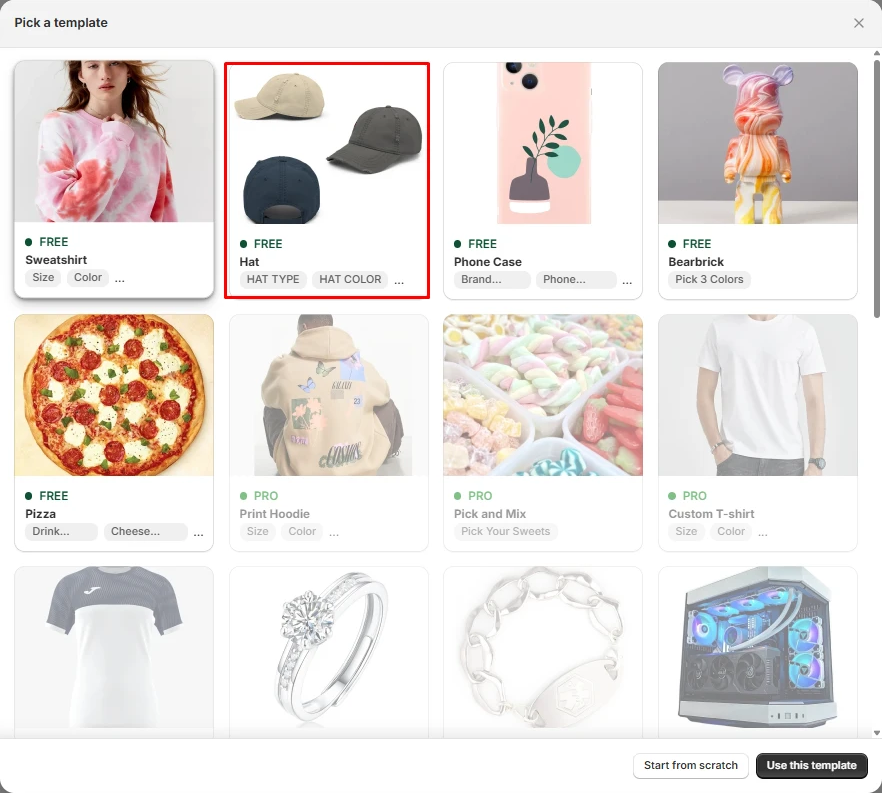
The template library is a nice touch. Each template is built around a real product and shows the first few options it includes. I saw these:
- Free: Sweatshirt (size, color), Hat (hat type, hat color), Phone Case (brand, phone model), Bearbrick (pick 3 colors), and Pizza (drink, cheese)
- PRO: Print Hoodie (size, color), Pick and Mix (pick your sweets), and Custom T-shirt (size, color)
More templates sit further down the list, with pictures of products like a sports shirt, a ring, a bracelet, and a gaming PC. For a merchant who isn’t sure how to structure options, a template is a faster start than a blank page.
What We Tested
I went through the Aris Product Options admin on a store. I opened the welcome screen and the template library, created a new option set from scratch, added a required color swatch, assigned it to all products, viewed the live preview, explored the settings menu, and opened the Widget settings. I also reviewed the plan page.
I did not save and publish the option set or check it on a live product page. I did not test price add-ons, conditional logic, file uploads, the personalizer, POS, checkout, or support.
Building an Option Set
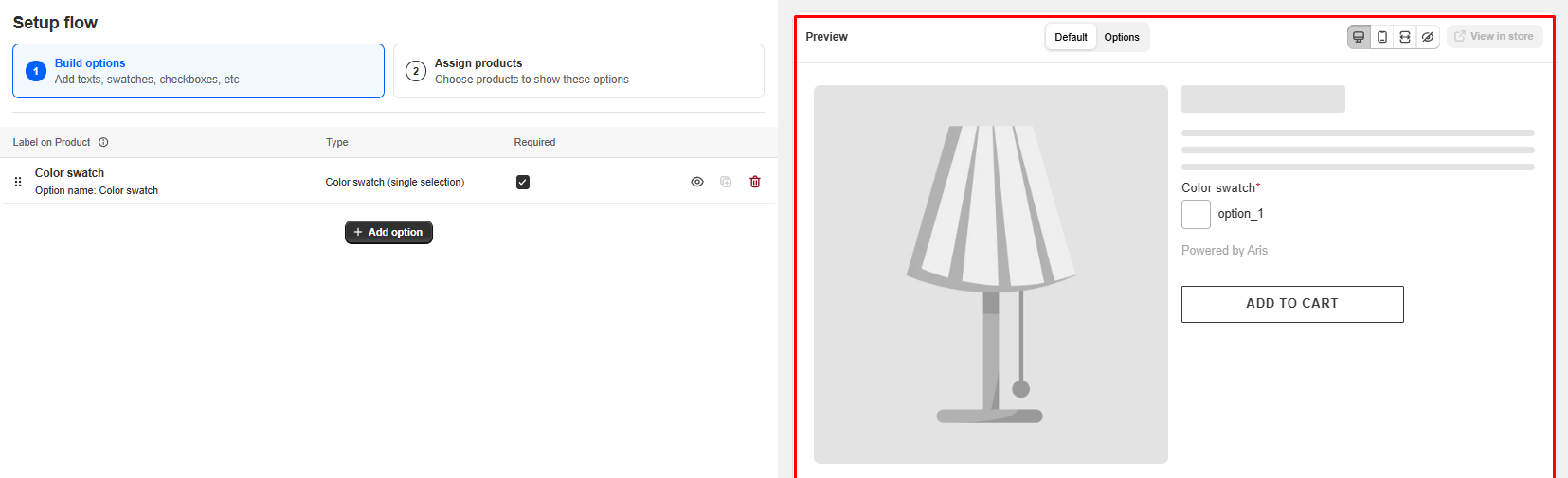
The option set editor has two steps at the top: Build options, where you add text fields, swatches, checkboxes, and more, and Assign products, where you choose which products show them.
I added a color swatch. In the options table, it appeared with its label on the product, its type, “Color swatch (single selection)”, and a Required checkbox, which I turned on. Each row has buttons to hide, duplicate, or delete the option, and you can drag rows to reorder them.
The best part is the live preview on the right. It shows a sample product page with the swatch, marked as required, sitting above the Add to Cart button. Buttons along the top switch between desktop and mobile views, and there’s a View in store link. Seeing the result while you build saves a lot of back and forth.
The top bar has a few more controls: an Active status, an All channels setting, Save as Template to reuse your work, and undo and redo.
Option Set Settings: Who Sees Your Options, and When
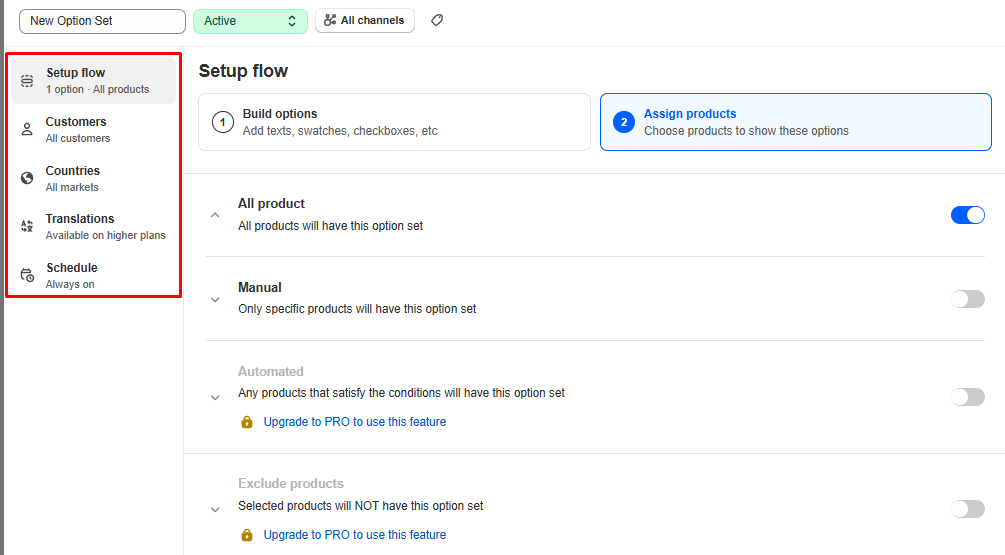
Every option set has its own settings menu on the left side of the editor. Each item shows its current setting underneath, so you can see at a glance how the set is configured without opening each one.
- Setup flow: the options themselves and the products they’re assigned to. Once I added the swatch and assigned it, this read “1 option · All products”.
- Customers: who sees the options. It’s set to all customers by default.
- Countries: which markets the options show in. It’s set to all markets by default.
- Translations: for showing options in other languages. This one is marked “Available on higher plans.”
- Schedule: when the options are live. It’s set to “Always on” by default.
This goes beyond choosing which products show a set. You can also decide which customers and which countries see a set, and when it runs. That’s handy for things like a seasonal gift option or an add-on you only offer in one market.
The defaults are sensible, too. A new set shows to everyone, everywhere, all the time, so you only need to touch these settings when you want to narrow things down. I didn’t change the customer, country, or schedule settings in my test, so I can’t say how detailed each one gets.
Assigning products
The Assign products step gives you four ways to choose where a set shows, each with its own switch:
- All product: every product gets the option set. This is what I used.
- Manual: only the products you pick.
- Automated: any product that meets conditions you set. This is locked to PRO.
- Exclude products: products you pick will not get the set. This is also locked to PRO.
On the free plan, then, you can apply a set to your whole catalog or to hand-picked products. Rule-based assignment and exclusions need PRO. For a small catalog, Manual is enough. For a large one where new products arrive often, Automated is the more practical option, so factor that into your plan choice.
Once the set was assigned, the preview showed the color swatch above Add to Cart, with “Powered by Aris” beneath it and a small Remove watermark link.
Pricing and Value
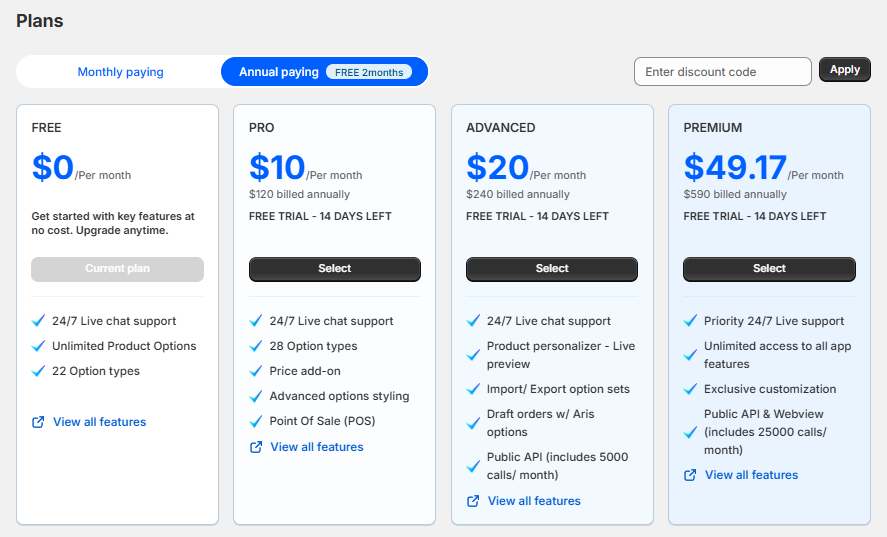
At the time of writing, Aris has four plans. These are the annual prices shown in the app, which come with two months free:
- Free: $0. 24/7 live chat support, unlimited product options, and 22 option types.
- PRO: $10 per month, billed $120 a year. 28 option types, price add-ons, advanced options styling, and Point of Sale (POS).
- Advanced: $20 per month, billed $240 a year. A product personalizer with live preview, import and export of option sets, draft orders with Aris options, and a public API with 5,000 calls a month.
- Premium: $49.17 per month, billed $590 a year. Priority 24/7 live support, access to all app features, exclusive customization, and a public API and webview with 25,000 calls a month.
Paid plans include a 14-day free trial, and monthly billing costs more than the annual prices above. Please confirm current prices on the Shopify App Store before installing.
The free plan is strong value. Several popular options apps have no free plan for live stores at all. PRO is the plan most selling stores will need, because price add-ons live there. At $10 a month on annual billing, it’s on the low end for a paid options app. Advanced and Premium only make sense if you need the personalizer, bulk import and export, or API access.
Where It Falls Short
Money-making features need PRO. On Free, you can collect information from shoppers, but you can’t charge for extras.
Settings locked on Free. Display mode, translations, automated product assignment, and excluding products are paid features, and the free preview shows Aris branding.
Rare but serious support complaints. Most merchants praise support highly. But one low-rated review describes a store being disrupted for a day while waiting for help with an urgent issue. Another says POS didn’t work as expected and the POS documentation was out of date. These are a small share of the feedback, but if POS or round-the-clock uptime matters to you, test carefully during the trial.
What We Liked
- A real free plan: Unlimited options and 22 option types at no cost.
- Live preview while you build: See the product page update as you add options, on desktop or mobile.
- Template library: Start from a ready-made example instead of a blank page.
- Detailed targeting: Control options by customer, country, channel, and schedule.
- Reusable work: Save any option set as a template.
- Affordable PRO plan for price add-ons.
What Could Be Better
- Price add-ons need PRO.
- Display mode, translations, automated assignment, and product exclusions are locked on Free.
- “Powered by Aris” shows in the free plan’s preview.
- Some templates are PRO-only.
- A few reports of slow help on urgent issues and POS problems.
Who Aris Product Options Is Best For
The free plan suits stores that need extra fields, like swatches, text boxes, or checkboxes, without charging for them. PRO suits most stores selling paid extras, such as gift wrap or engraving. Advanced and Premium suit stores that need a visual personalizer, bulk import and export, or API access.
Who Should Consider an Alternative
If you want a single plan with no tiers to compare, look at Infinite Options. If you want another free starting point to compare against, see our Globo Product Options review. And if you’re weighing tiered apps, read our SC Product Options and Hulk Product Options reviews.
Final Verdict
Aris Product Options makes it easy to start for free. The editor is clear, the live preview is genuinely useful, and the template library gives you a head start.
For most selling stores, though, PRO is the real starting point, because that’s where price add-ons live. Build your options on Free, check them in the preview and on your theme, and upgrade when you’re ready to charge for extras.
Frequently Asked Questions
Is Aris Product Options free?
Yes. The free plan includes unlimited product options, 22 option types, and 24/7 live chat support. Paid plans start at $10 per month on annual billing.
Can I charge extra for options on the free plan?
No. Price add-ons start on the PRO plan.
Does it have a live preview?
Yes. The option set editor shows a live preview of the product page as you build, with desktop and mobile views. A separate product personalizer with live preview is on the Advanced plan.
Can I translate options?
Translations are available on paid plans. On the free plan, the Translations tab says it’s available on higher plans.