
Yotpo is the enterprise name in Shopify loyalty. Its listing talks about VIP tiers, twenty-plus pre-built campaigns, and analytics dashboards, and its paid plan starts at $199 a month. That is a different league from the $10 and $15 entry plans most loyalty apps charge.
But Yotpo also has a Free plan for stores under 100 orders a month. So the question for a small merchant is not whether Yotpo is capable. It is: what do you actually get on the Free plan, does the core loop work, and what happens when you need more?
We installed Yotpo Loyalty on a Shopify development store running the Horizon theme, completed its four-step onboarding on the Free plan, switched on the theme embed, placed a $1,299 test order as a logged-in customer, and redeemed 400 points for a $20 reward.
The loop worked cleanly, and in one respect it was the tidiest of the four loyalty apps we have tested on this store. The catch is what sits on the other side of the Free plan’s ceiling.
Key Takeaways
- The core loop worked on Free: A $1,299 test order credited 1,299 points at one point per dollar. Redeeming 400 of them produced a short code that took $20.00 off the next order, and the confirmation page showed the discount line.
- Onboarding is four guided steps and the program design is preset: Sticky bar branding, a program strategy and rewards package, two email reminders, and launch. We ended up with a 25-point joining bonus, one point per $1, and $5, $10, and $20 rewards without editing a single rule.
- The balance updated the moment we redeemed: The sticky bar dropped from 1,299 to 899 points on the same screen that showed the code. That is a small thing that two competitors we tested did not get right.
- The first paid step is $199 a month: There is nothing between Free and Pro. Yotpo’s documentation also places the Earning Rules page on Pro and above, and VIP tiers on the custom-quote Premium plan.
- Public feedback is polarised: The listing shows a 4.7 rating from about 970 reviews, but 5% are one star, and the negatives concentrate on forced plan migrations, feature gating, and slow chat-only support.
Our Verdict
Yotpo Loyalty is a good fit for a small Shopify store that wants a polished points program with referrals, at no cost, and that is comfortable with preset program design.
In our test, every merchant-critical step worked. Onboarding took us from install to a launched program in four screens. The theme embed was a single toggle. The sticky bar appeared on the storefront, showed the points balance, listed the rewards, and generated a code that Shopify checkout applied. The order confirmation showed −$20.00 against the subtotal. The two email reminders were switched on for us.
The caution is about what happens next. The Free plan is capped at fewer than 100 orders a month, and the next plan is $199. Yotpo’s own documentation says the Earning Rules page, custom rewards, and a dedicated rewards page are Pro features, and VIP tiers only appear on the custom-quote Premium plan. If you expect to outgrow 100 orders within a year, price Pro before you launch, because the merchants who left the harshest public reviews are mostly the ones who felt pushed into a plan they had not budgeted for.
What Yotpo Loyalty Offers
Yotpo Loyalty is the loyalty and referrals product from Yotpo, the company better known for its reviews app. Its Shopify App Store listing carries the Built for Shopify badge and describes a no-code loyalty and rewards program with points, referrals, VIP tiers, more than twenty pre-built campaigns, analytics dashboards, and Shopify POS support. The app launched in 2015, which makes it one of the oldest in the category.
The listing’s “Works with” section includes Shopify Checkout, customer accounts, Shopify POS, Shopify Flow, Gorgias, Klaviyo, Recharge, and Yotpo’s own reviews and SMS products.
Inside the admin, the navigation is organised around Home, Customers, Analytics, Manage Program, On-Site Widgets, Communications, Integrations, and Program Settings. Our test focused on onboarding, the theme embed, the sticky bar, and the storefront result. We did not test referrals, VIP tiers, campaigns, POS, or any integration.
What We Tested
We installed Yotpo Loyalty on a Shopify development store in September 2026. The store uses the Horizon theme and contains a small catalogue of test jerseys priced between $999 and $1,299.
Our test covered:
- the welcome screen and Terms of Service acceptance,
- the four-step onboarding: sticky bar, program definition, email reminders, and launch,
- enabling the Yotpo Loyalty & Referrals app embed and widget loader in the theme editor,
- the admin home dashboard on the Free plan,
- the storefront sticky bar and its expanded rewards panel as a logged-in customer,
- a $1,299 test order and the points it credited,
- redeeming 400 points for a $20 reward,
- and completing a second order with that code applied.
We did not test referrals, VIP tiers, pre-built campaigns, the rewards page, points redemption at checkout, Shopify POS, any listed integration, the email templates beyond their onboarding toggles, mobile rendering, importing balances from another app, or Yotpo’s support team. We stayed on the Free plan throughout. Pricing and plan features were checked on the App Store listing and Yotpo’s own pricing page.
What Public Sources Add
On September 22, 2026, the Shopify App Store listing showed a 4.7 rating from about 970 reviews, with 84% at five stars and 5% at one star. That one-star share is higher than the other loyalty apps we have reviewed, and the reasons are consistent.
Recent five-star reviews most often credit named support agents for quick help, straightforward setup, and reliable day-to-day performance.
The one- and three-star reviews from the past two years describe a different experience. The most common theme is pricing pressure: merchants describe being moved off a discontinued plan, losing integrations in the process, and paying several times more for the replacement. Others report percentage-based discounts and other basic features locked behind higher tiers, a charge that arrived during a trial, chat-only support that took days or weeks to resolve a problem, a POS feature that stayed broken for months, and a migration from another loyalty app that lost most of the existing members. One recent review calls the app poorly suited to multi-language stores. Some of these have developer replies. We did not reproduce any of them.
Treat the plan and migration complaints as the ones to take seriously. They are about business terms, not bugs, and they are the kind of problem a test store cannot surface.
Getting Started: Four Screens and the Program Is Designed for You
The app opened on a welcome screen with a Terms of Service checkbox, a Get started button, and an “Upgrade to Gold” link in the corner. Gold is not a plan name that appears on the listing or on Yotpo’s pricing page today, which is a small inconsistency; we did not click it.
Onboarding is four steps with a progress indicator.
Step one brands the Rewards Sticky Bar: a program name (we used “zenden Rewards”), a colour, and a font from a dropdown. A live preview showed the bar at the bottom of a mock storefront. A note explained that the bar would not appear on the store until launch.
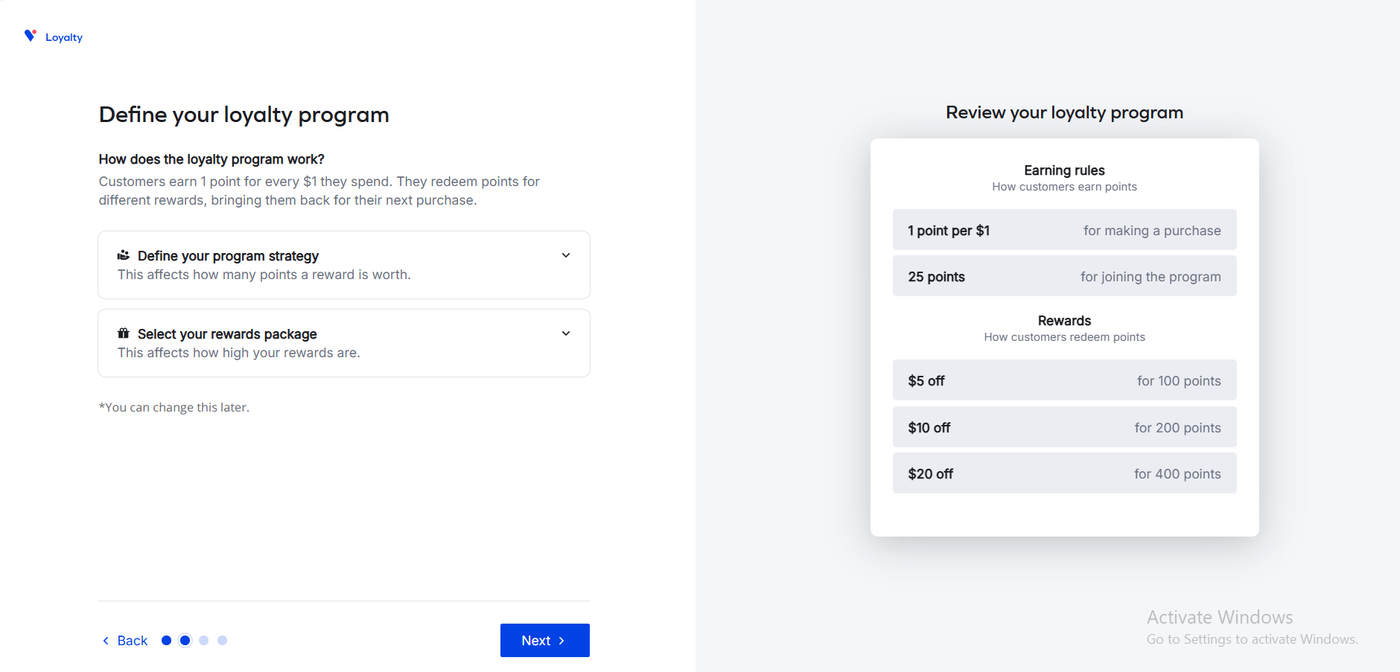
Step two defines the program, and this is where Yotpo differs from apps that ask you to build rules. It presents two collapsible choices, a program strategy and a rewards package, with a note that each affects how many points a reward is worth. A panel on the right summarised the result: one point per $1 for a purchase, 25 points for joining, and three rewards, $5 for 100 points, $10 for 200, and $20 for 400. We accepted what it showed us.
Step three offers two email reminders, a redemption reminder when a customer has enough points for a reward and a reward-received email carrying the code. Both were switched on by default with preview links.
Step four summarises the program and explains what launch does: the sticky bar appears, customers start earning, they can redeem, emails are scheduled, and referrals can be built afterwards. A Finish later option is there for merchants who want to pause.
In the theme editor, the Yotpo Loyalty & Referrals embed has two switches: a Widget loader, which we turned on, and an SDK loader for custom front-ends that needs developer resources, which we left off. A “Yotpo Loyalty & Referrals activated” toast confirmed it.
Nothing required code. The trade-off is control: we never saw an individual rule editor during onboarding, and Yotpo’s documentation states the Earning Rules page is available on Pro and above. On Free, the program you launch is the package you picked.
The Admin Home Is Built for Measuring, Not Configuring
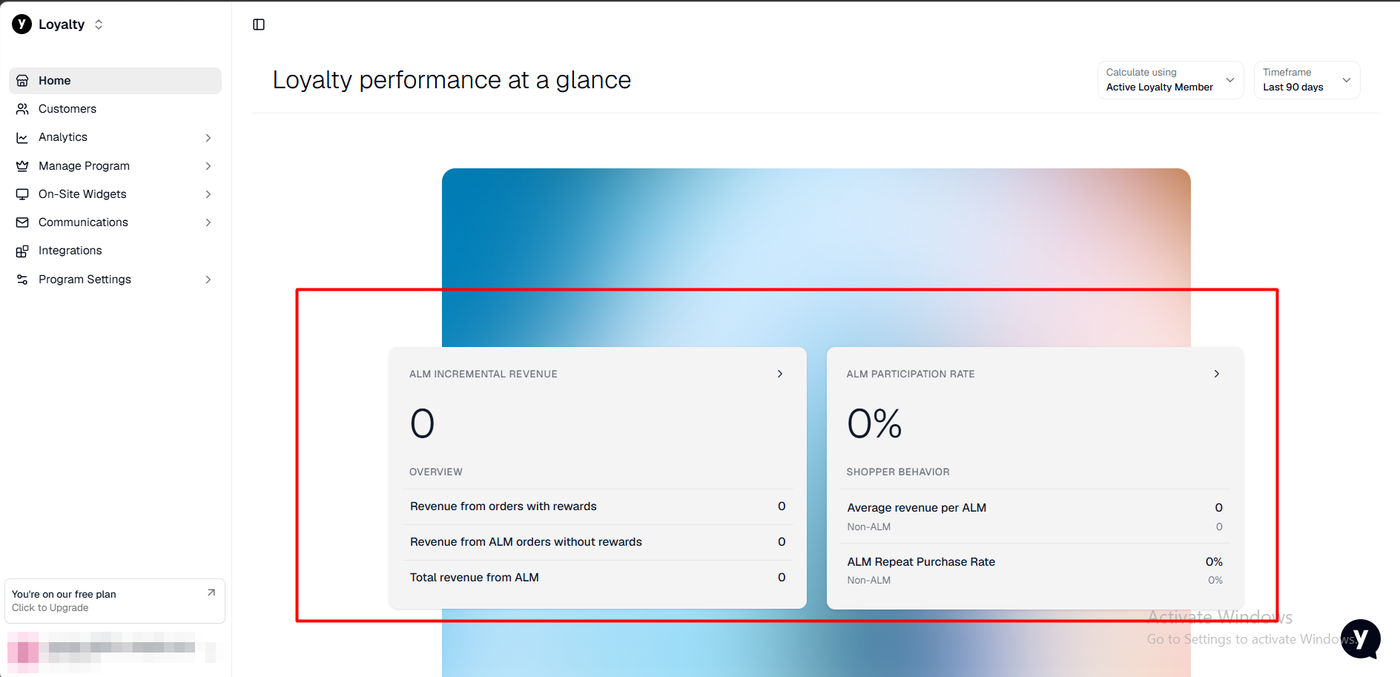
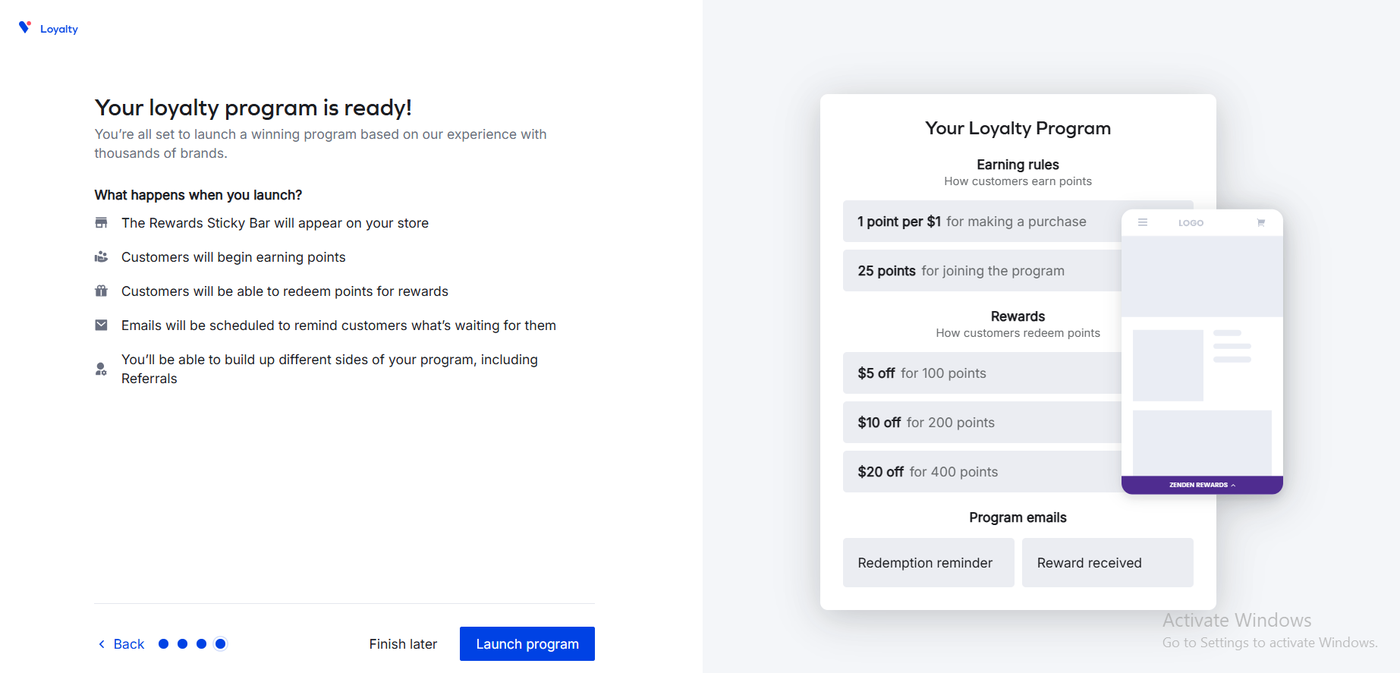
After launch, the admin home opened on “Loyalty performance at a glance”: a dashboard of incremental revenue from active loyalty members, participation rate, average revenue per member versus non-members, and repeat purchase rate, all at zero on our fresh install, with a 90-day timeframe selector. A panel in the sidebar confirmed we were on the free plan.
This is a notable design choice. Appstle and Rivo both open on setup guides and program status. Yotpo opens on outcome metrics. For a merchant who already knows what a loyalty program is for, that is the right first screen. For a first-time merchant it means the configuration lives one level down, under Manage Program and On-Site Widgets.
We did not have real traffic, so we cannot say how accurate or useful those metrics are in practice.
Earning Points: One Point Per Dollar, Shown in the Bar
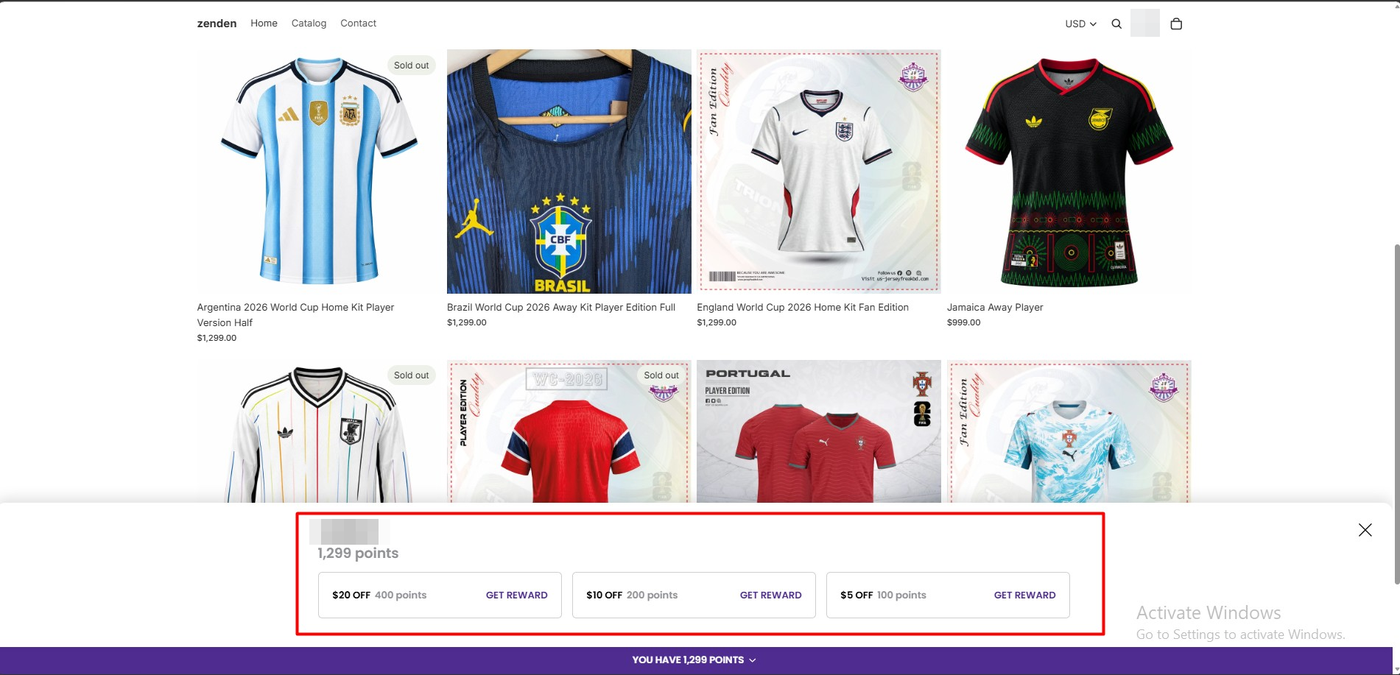
On the storefront, a purple bar across the bottom of every page read “You have 1,299 points” after we placed a $1,299 order for a jersey as a logged-in customer. That is exactly one point per dollar.
Clicking the bar slid open a panel with the customer’s name, the balance, and the three rewards, each with a Get Reward button. The panel lists the largest reward first, which nudges a customer toward the $20 tier rather than the $5 one.
We did not see the 25-point joining bonus in the balance. Our test customer account already existed before the program launched and we did not go through a separate join step, so we cannot say when that bonus is awarded. If you migrate existing customers, check how joining points are handled.
We did not measure how long the points took to appear after the order.
Redeeming: A Short Code, an Immediate Deduction, and the Discount on the Order
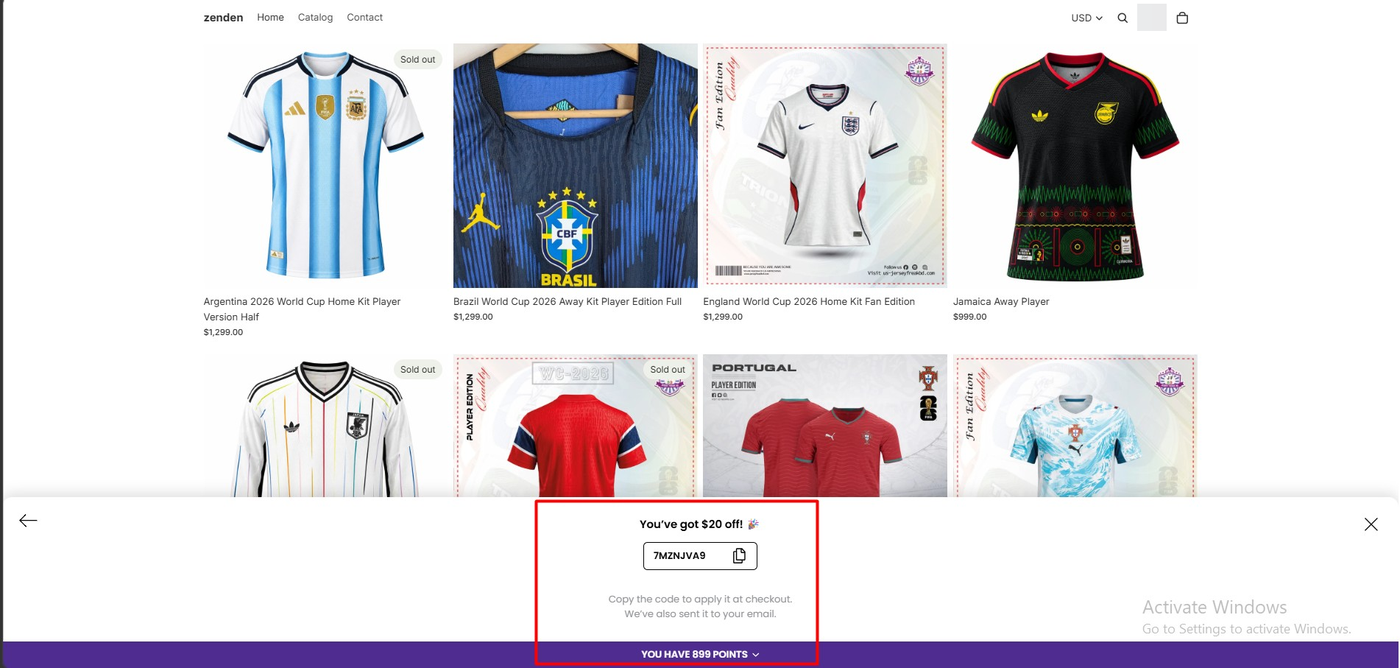
Choosing the $20 reward showed “You’ve got $20 off!” with an eight-character code, a copy button, and a note that the code applies at checkout and had also been sent by email. On the same screen, the bar already read 899 points, so the 400-point deduction was reflected instantly.
That instant update deserves a mention. On the same store, Rivo’s panel header still showed the pre-redemption balance after we spent points, and Appstle listed the same reward twice. Yotpo’s redemption screen was the clearest of the three.
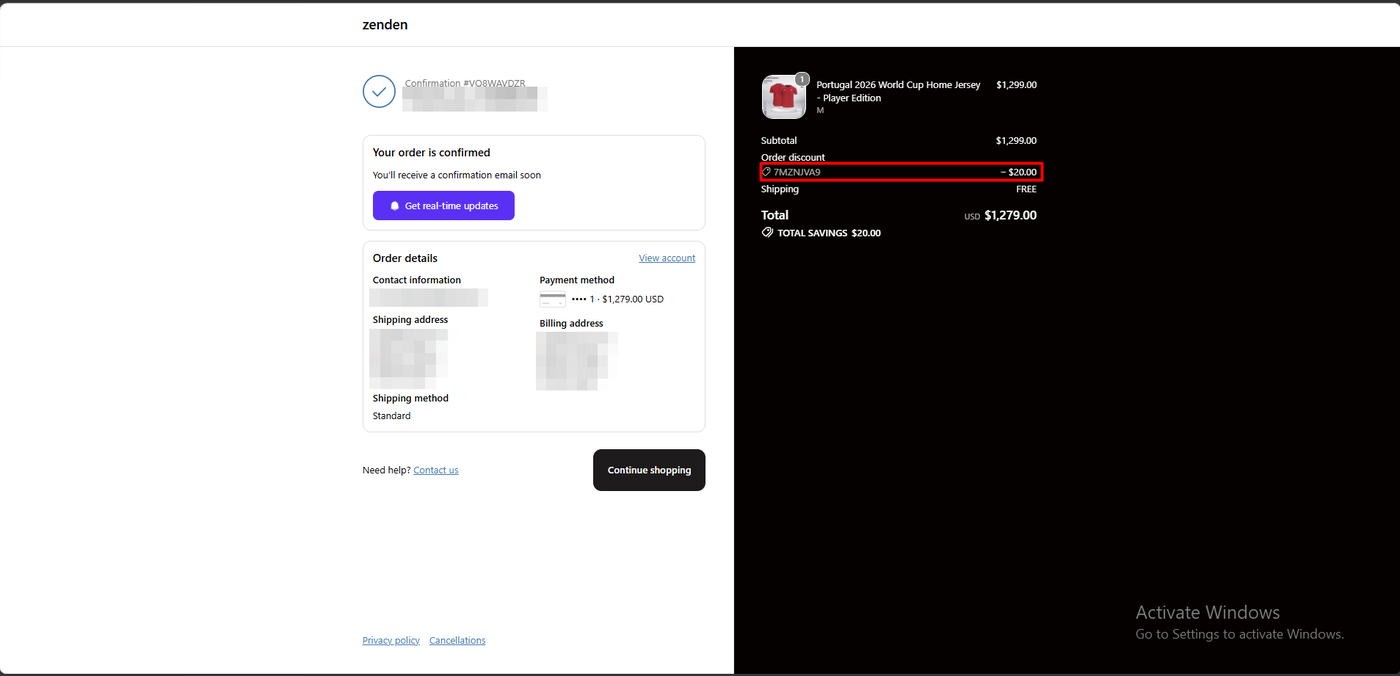
We placed a second $1,299 order with the code. The confirmation page showed an order discount of −$20.00, a total of $1,279.00, and a “Total savings $20.00” line. The reward became a Shopify discount on a paid order.
Two things we did not check: whether the promised email actually arrived, and whether the code could be applied automatically rather than pasted at checkout. The listing lists “Redeem Points at Checkout” as a Pro feature, so on Free, copy-and-paste is the path.
The Preset Ladder Is Sensible, and Identical to a Competitor’s
The default program rewards 5% of spend: one point per dollar, cashed in at five cents a point. On a $1,299 order, that is three $20 rewards with points to spare. For a store with a high average order value, 5% is a real margin decision, and it is worth knowing that Rivo shipped exactly the same ladder, 100/200/400 points for $5/$10/$20, on the same store. Appstle’s default was a 3% rate with a single $3 reward.
Two consequences follow. First, if 5% is too generous for your margins, you need the program strategy and rewards package options in onboarding, or the Pro plan’s rule editor, to change it. We did not test how much the Free-plan presets can be varied. Second, the ladder tops out at $20, so a customer with a large balance spends it one reward per order.
Pricing and Value
We checked pricing on the App Store listing and on Yotpo’s own pricing page on September 22, 2026. No pricing screen was captured inside the app, because we did not open the upgrade flow.
| Plan | Price | Order threshold | What the listing includes at this tier |
|---|---|---|---|
| Free | $0 | Fewer than 100 monthly orders | Rewards Sticky Bar, points for purchases, points exchanged for discounts, referral program, reporting and analytics, AI chat support |
| Pro | $199/month | 500 orders included, then per-order pricing | Rewards page, additional ways to earn, more rewards, redeem points at checkout, webhooks, Klaviyo and Recharge integrations, technical support via email |
| Premium | Custom quote | — | Yotpo’s pricing page places VIP tiers here |
| Enterprise | Custom quote | — | Very high-volume programs |
The listing describes Pro’s per-order pricing as $0.08 to $0.20 per order above 500 orders, while Yotpo’s pricing page shows a sliding scale of $0.20, $0.10, and $0.05 per order across three volume bands. The two sources do not match exactly. Depending on which rate applies, a Pro store doing 1,500 orders a month should expect somewhere between about $280 and $350 before any add-ons. Charges are billed in USD every 30 days, and the listing mentions no trial.
The practical reading for a small merchant is simple. Free is a real plan for a store under 100 orders a month, and it includes referrals, which several competitors charge for. The step up is steep. There is no $10 or $30 tier; Pro is $199, and that is where a rule editor, a rewards page, checkout redemption, and the named integrations live. If VIP tiers are the reason you want a loyalty app, you are looking at a custom-quote plan.
What We Liked
- The balance deducted on the spot: 1,299 became 899 on the same screen as the reward code, with no refresh.
- Referrals are on the Free plan: The listing includes a referral program at $0, which Rivo lists on its $49 plan.
- Onboarding made the decisions for us: Four screens, two preset choices, and a launched program with a 5% ladder and two emails already switched on.
- The admin opens on outcomes: Incremental revenue, participation, and repeat rate from loyalty members are the first thing a merchant sees.
What Could Be Better
- A $199 cliff after Free: There is no intermediate plan. A store that crosses 100 orders a month moves from $0 to $199, and the rule editor and rewards page are on the far side of that cliff.
- Preset design on Free: We never saw a per-rule editor during onboarding, and Yotpo’s documentation confirms the Earning Rules page is Pro and above. Merchants who want a specific earn rate on Free should check what the strategy presets allow before launch.
- “Upgrade to Gold” does not match the current plan names: A small inconsistency, but it is the first upgrade prompt a new merchant sees.
- The one-star reviews are about terms, not bugs: Forced plan migrations, tier gating, trial billing, and slow chat support recur across recent public reviews. We did not experience any of these, and we did not contact support, so we cannot confirm or refute them.
Who Yotpo Loyalty Is Best For
Yotpo Loyalty fits Shopify stores under 100 orders a month that want a points and referral program with a polished storefront widget and outcome analytics, free, without designing rules. It is also the natural choice for stores already on Yotpo Reviews or Yotpo SMS that want one vendor, although we did not test those integrations.
Who Should Look Elsewhere or Budget for Pro
If you are near or above 100 orders a month, or you know you will want custom earning rules, a rewards page, or checkout redemption, budget $199 a month from the start and compare that against the $10 to $49 tiers elsewhere. If VIP tiers are central, ask Yotpo for a Premium quote before committing.
If you are migrating an existing program with a large member base, the public reviews suggest testing the import on a sample and confirming which integrations survive the move.
We have also tested Rivo, Appstle Loyalty, and Joy Loyalty Program on the same development store with the same $1,299 test order. Yotpo’s redemption flow was the cleanest, Appstle’s Free plan has the highest order ceiling at 250, and Rivo’s Free plan sits between them at 200. We have not run them head to head, so we are not ranking them here.
Final Verdict
Yotpo Loyalty answered our question. On the Free plan, a merchant can install it, launch a preset points program in four screens, earn points on a real order, redeem them for a short code, and see the discount on a completed Shopify order. The redemption experience was the clearest of the loyalty apps we have tested on this store.
What the Free plan does not offer is room to grow cheaply. The order ceiling is the lowest of the apps we have tested, the next plan is $199, and program customisation sits on that plan.
That earns a Recommend for stores under 100 orders a month that are happy with a preset program, with a firm instruction to price the Pro plan before launch if growth is the plan verdict.
Frequently Asked Questions
Is Yotpo Loyalty free?
Yes, for stores with fewer than 100 monthly orders. On September 22, 2026, the listing’s Free plan included the Rewards Sticky Bar, points for purchases, points redeemed as discounts, a referral program, reporting and analytics, and AI chat support. The paid Pro plan is $199 a month.
Does Yotpo Loyalty work without coding?
In our test, yes. We completed the four-step onboarding in the app, turned on the Widget loader under App embeds in the Shopify theme editor, and never edited theme code. An SDK loader for custom front-ends exists but is marked as needing developer resources.
How do customers redeem Yotpo Loyalty points?
In our test, the customer opened the sticky bar on the storefront, chose a reward, and received a short discount code with a copy button; the app said it also emailed the code. The balance dropped immediately. The code was applied at checkout and appeared on the order confirmation. Redeeming points directly at checkout is listed as a Pro feature we did not test.
Can I change the earning rules on the Free plan?
Onboarding offered a program strategy and a rewards package rather than individual rules, and Yotpo’s documentation places the Earning Rules page on Pro and above. We did not test how far the Free-plan presets can be adjusted after launch.
Does Yotpo Loyalty include VIP tiers?
The listing describes VIP tiers, and Yotpo’s pricing page places them on the Premium plan, which is priced by quote. We did not test them.