
Every loyalty app we have reviewed has a free plan, and the number that matters is how long you get to stay on it.
CWILL Loyalty’s answer is the shortest we have seen. The free tier covers 50 monthly orders, and the plan screen states what happens next in three words: Unavailable after exceeded.
Not throttled. Not billed as overage. Unavailable. So the question for this review was whether the program underneath that ceiling is good enough to be worth upgrading for.
We installed it on a Shopify development store, accepted the default 5% earn rate, placed a real order, redeemed a coupon, and watched it come off a completed checkout.
Key Takeaways
- The loop worked. A $5 coupon redeemed from the storefront panel applied at checkout and reduced a real order from $1,299.00 to $1,294.00, with the discount on the confirmation page.
- The free plan has a hard stop at 50 monthly orders, described on the plan screen as unavailable once exceeded — the tightest free ceiling among the loyalty apps we have reviewed.
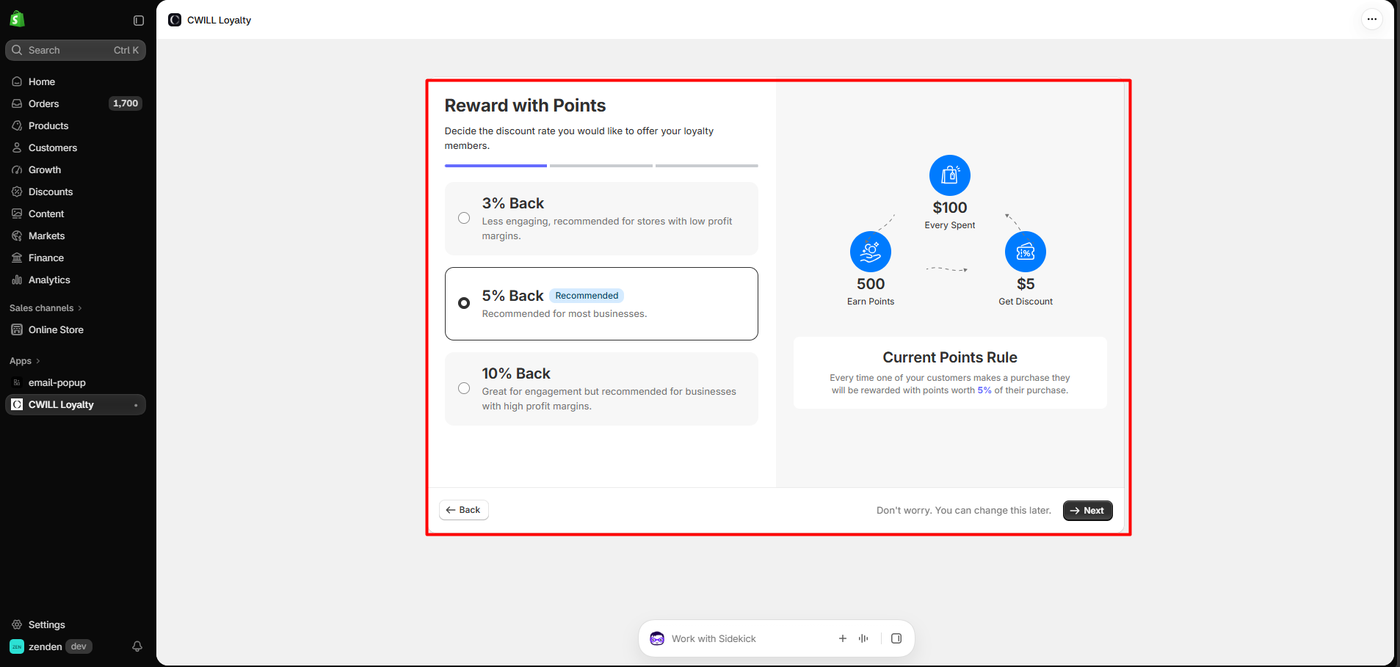
- Onboarding sets the economics for you, offering 3%, 5% or 10% back with 5% pre-selected and the maths spelled out: $100 spent earns 500 points, worth $5 off.
- Paid plans are priced per order and the overage is steep — $20 per additional 100 orders on Starter, $15 on Growth.
- The program sat Inactive after onboarding finished, needing a separate Activate click before anything ran.
Our Verdict
CWILL Loyalty is a reasonable choice for a small Shopify store that already knows it will pay, and a poor way to trial a loyalty programme on the cheap.
The mechanics worked. Setup was three screens, the theme embed was one toggle, and the storefront launcher appeared on the first load. Earning and redemption behaved exactly as the rules described, and the coupon became a real Shopify discount on a paid order.
The reservations are about the ceiling and the clarity around it. Fifty orders a month is roughly two a day; most stores worth running a loyalty programme on will pass that in the first week, and the plan screen says the programme becomes unavailable rather than degrading gracefully. The first paid tier is $19 for 200 orders, and above that each extra hundred orders costs $20 — more than the plan itself. Model your order volume before you install, not after.
What CWILL Loyalty Offers
CWILL Loyalty & Referrals is a points, referrals and VIP-tier app. Its Shopify App Store listing carries the Built for Shopify badge, notes that the app was formerly called Loloyal, and describes points programmes, referrals, VIP tiers, limited-time offers and a loyalty page. It launched in October 2021.
Listed integrations include Shopify Checkout, customer accounts, POS, Flow and Admin, plus Judge.me, Klaviyo, PageFly, Seal Subscriptions and Willdesk — the last of which we reviewed separately and which comes from the same stable of apps.
Inside the admin, the navigation covers Program, Brand Style, Customers, Analytics, Integrations, Billing and Preferences, with the Program page split into Points, Referrals, VIP, Email, Popup and Campaign tabs.
What We Tested
We tested CWILL Loyalty in October 2026 on a Shopify development store called zenden, running the Horizon theme with a jersey catalogue and about 1,700 orders of history.
Our test covered the install permissions, the three-step onboarding, the plan and billing screen, enabling the app embed in the theme editor, the Program page with its earn and redeem rules, a real $2,598 order placed on the store, the storefront rewards panel, redeeming a $5 coupon, and completing a second order with that coupon applied.
We did not test referrals, VIP tiers, email, popups, campaigns, the loyalty page, points expiry, Brand Style customisation, analytics, Shopify POS, any listed integration, or mobile rendering. We stayed on the free plan, so no trial, upgrade, overage charge or billing event occurred — and we did not approach the 50-order ceiling, so we did not observe what happens when it is crossed. Pricing was read from the in-app billing screen and the App Store listing.
What Public Sources Add
On October 9, 2026 the listing showed a 4.9 rating from about 810 reviews, with 95% at five stars. Recent reviews run to September 2026.
Praise clusters on responsive support with named agents, the breadth of the programme compared with simple discount apps, customisable branding and emails, multi-language support, and the Klaviyo and Judge.me integrations.
The small negative set is operationally specific and worth reading. Merchants describe points not syncing when customer accounts are merged, edited orders not recalculating points, online and in-store POS points behaving as separate balances that cannot be combined, a dashboard widget exposing lifetime store sales to all staff without permission controls, and support that took two days of circular conversation to grasp a question. One merchant reported that orders from other marketplaces counted toward the monthly order allowance — directly relevant if you sell on Amazon or eBay alongside Shopify and are budgeting against an order cap.
We did not reproduce any of this. The order-counting report is the one to verify for yourself, because it determines which plan you actually need.
Onboarding Picks Your Economics
The install dialog requests customer data including sensitive device and activity data, staff and contributor data, and read-write access to customers, products, orders, discounts, store analytics and the online store.
Onboarding then runs three screens, opening with a marketing panel of vendor case-study figures and a choice between “I’m an experienced loyalty user” and “New to loyalty”.
The second screen is the one that matters. Reward with Points asks for a discount rate with three options: 3% back, described as less engaging and suited to low margins; 5% back, labelled Recommended and pre-selected; and 10% back, pitched at high-margin businesses. A panel on the right spells out the result — $100 spent, 500 points earned, $5 discount — with a plain-language summary beneath it.
That is a good piece of design. A merchant choosing a loyalty rate is making a margin decision, and the app states the cost in percentage terms before anything launches. It is also, for what it is worth, the same 5% default we have seen from several other apps in this category.
The third screen picks a launcher theme from seven presets with a live preview, and the last promotes referrals, VIP tiers and a loyalty page before a Launch your program button.
The Program Needed Activating Afterwards
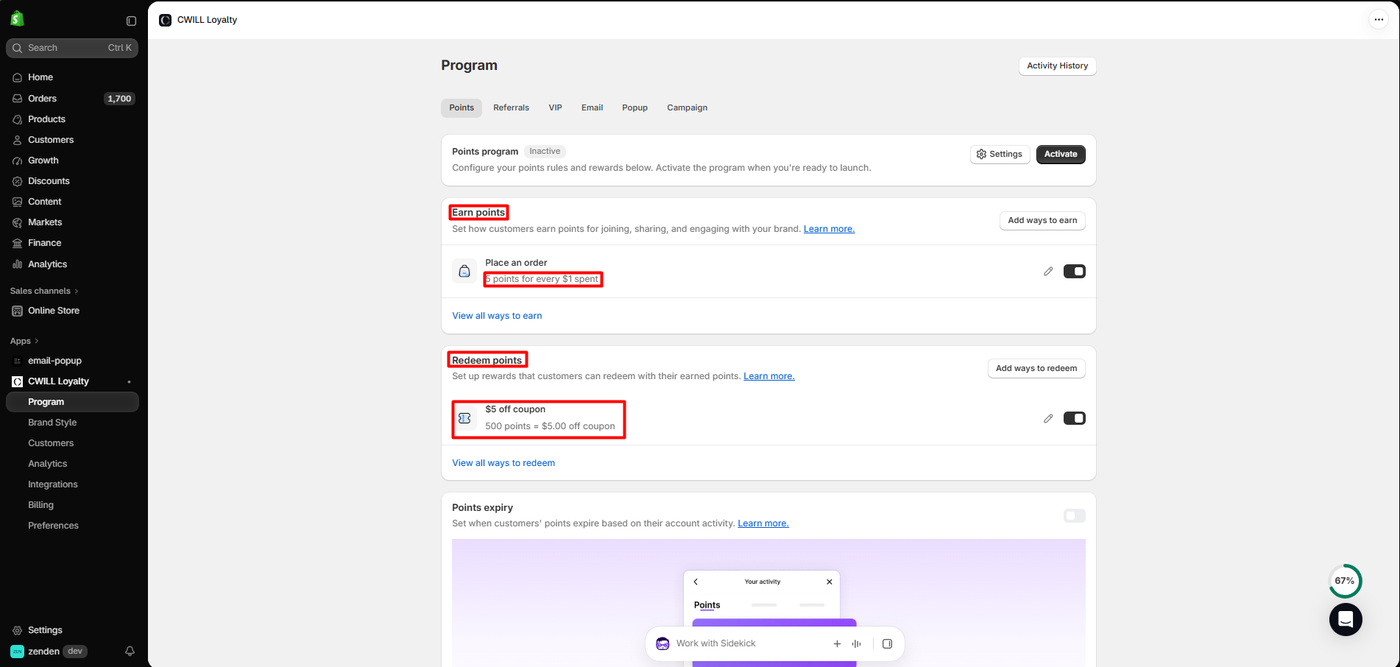
Enabling the storefront was one toggle on the CWILL Loyalty app embed in the theme editor, which exposes no settings of its own. A red Rewards launcher appeared at the bottom left of the storefront immediately.
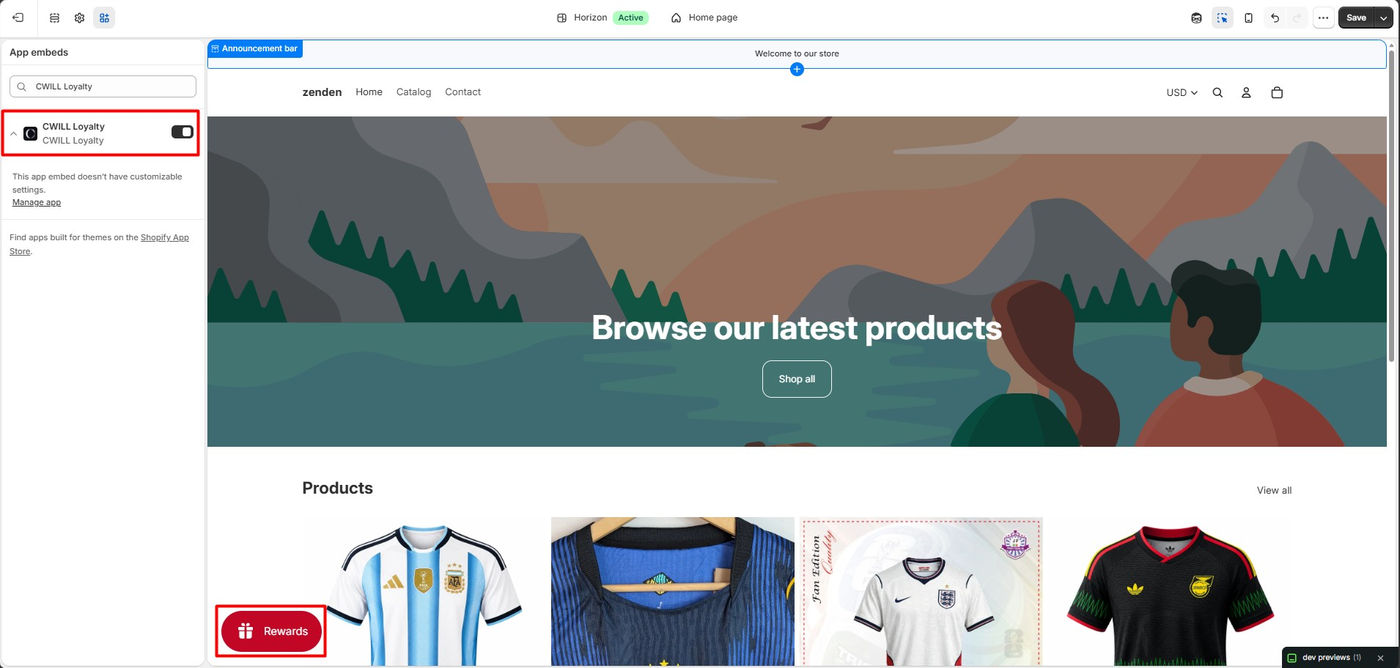
The Program page confirmed the rules onboarding had created: Place an order — 5 points for every $1 spent, and $5 off coupon — 500 points = $5.00 off coupon. Points expiry was present and switched off.
One detail is worth flagging. After completing onboarding and pressing Launch your program, the Points program still showed as Inactive, with a separate Activate button beside it. We cannot say whether that is a lag in the status indicator or a genuine second step, but a merchant who assumes the launch button finished the job should check this screen before announcing a programme to customers.
Earning and Redeeming
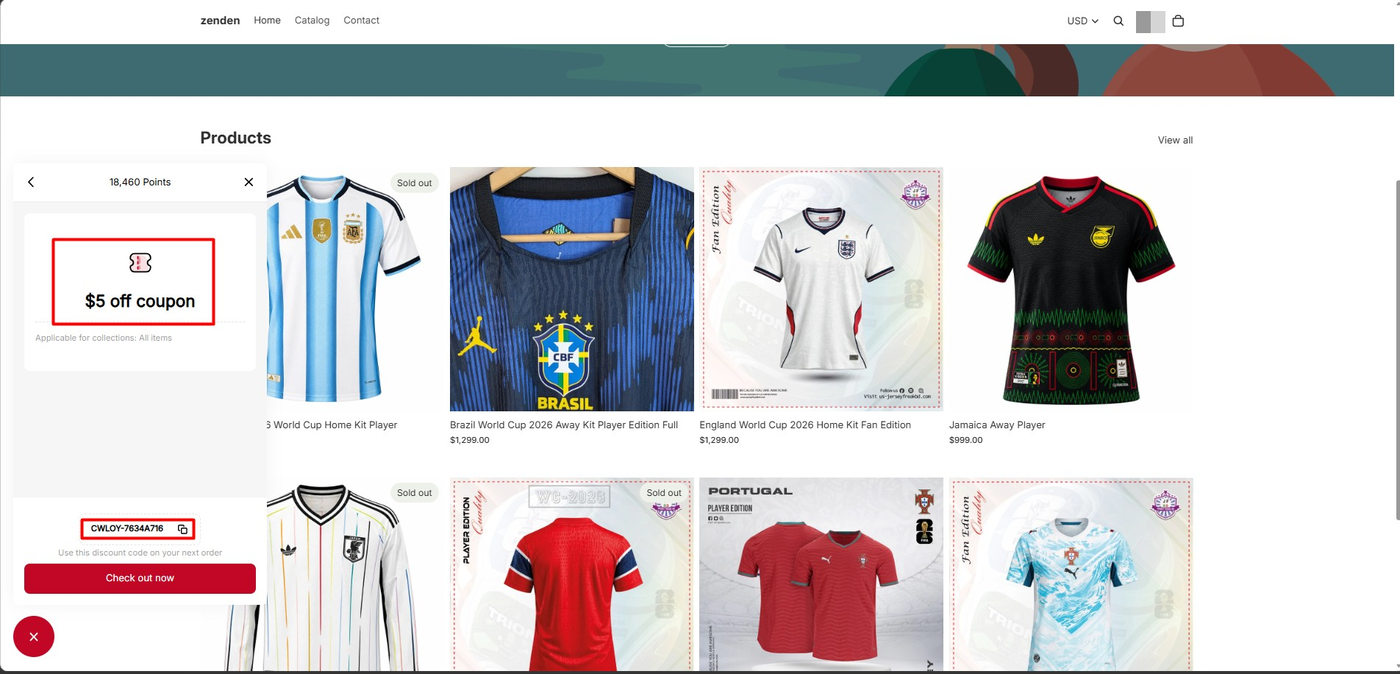
We placed a real order on the store for $2,598.00 and opened the rewards panel as a signed-in customer.
The panel showed a balance of 18,460 points and a $5 off coupon card, applicable to all items, with a generated code prefixed CWLOY-, a copy button, and a Check out now action. We did not reconcile that balance against individual orders — the store carries a long history of test orders, and we did not open the customer’s activity log to see what the app had counted.
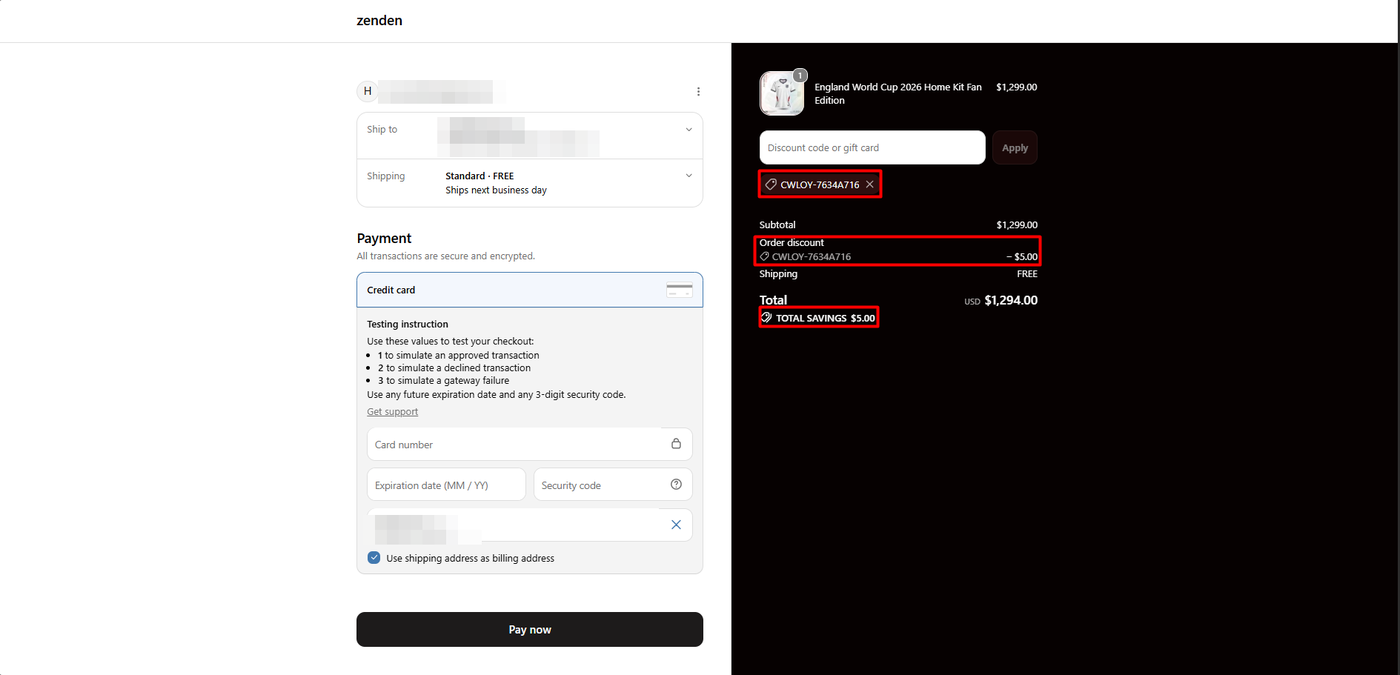
Taking the coupon to checkout on a $1,299.00 jersey, the code was attached, the summary showed an order discount of −$5.00, total savings of $5.00, and a total of $1,294.00.
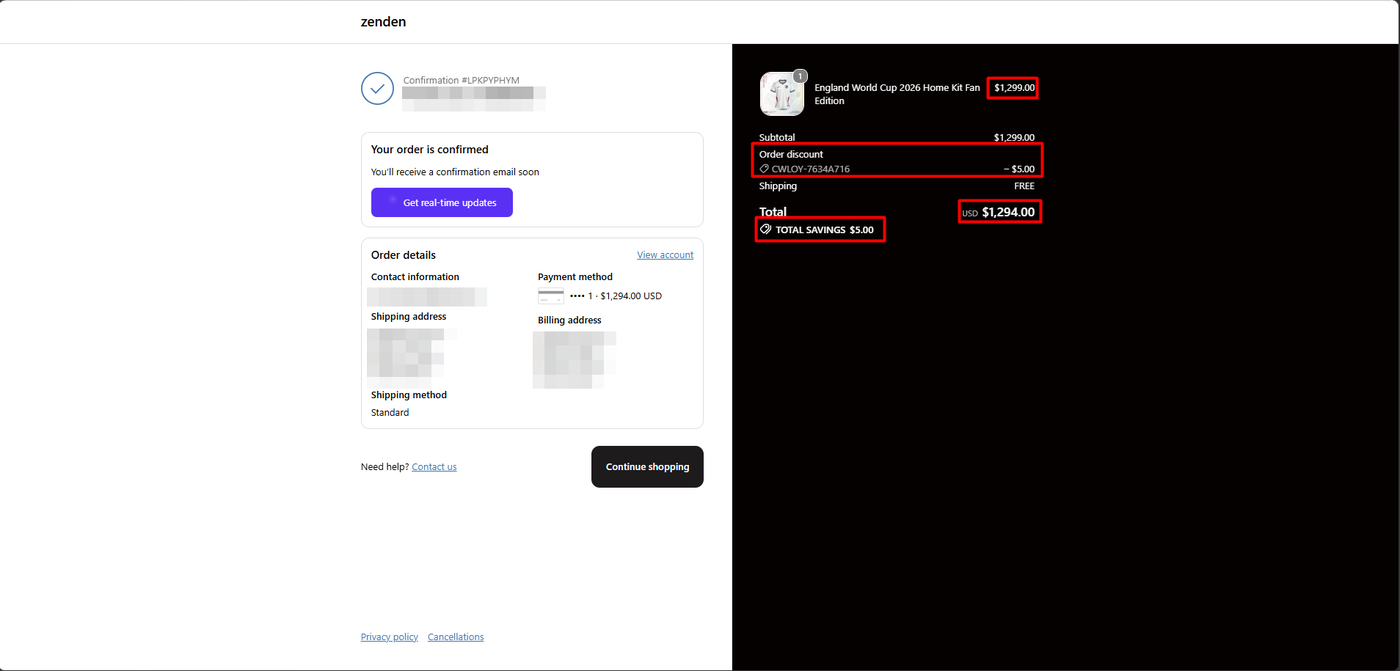
The confirmation page repeated it. The reward became a real Shopify discount on a completed order, which is the only test of a loyalty app that finally counts.
Worth noting what the ratio means in practice. At 5 points per dollar and 500 points per $5 coupon, a customer needs to spend $100 to earn $5 — so the balance we were holding represented a lot of accumulated history for one small coupon. That is the arithmetic of a 5% programme, and it is why the earn rate is the most consequential setting in the whole app.
Pricing, and the Ceiling
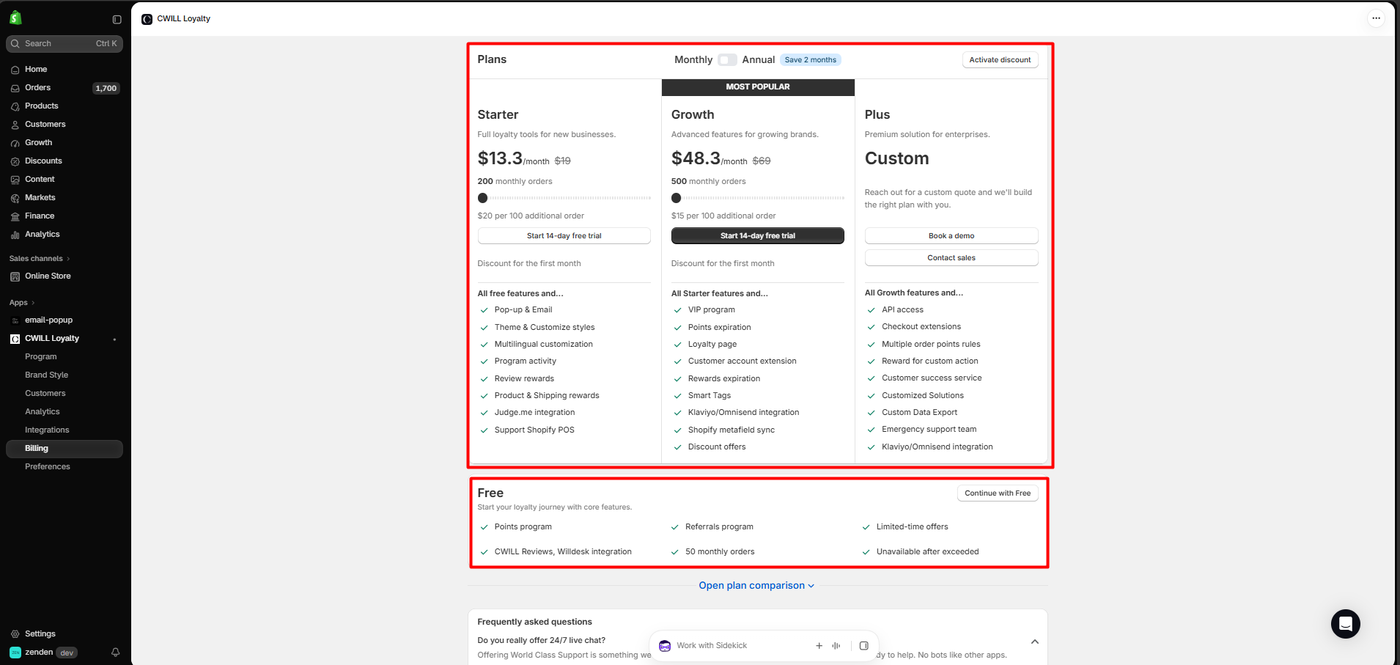
The billing screen and the public listing broadly agree on structure, and differ on the headline numbers.
| Plan | Listing price | Orders included | Notes |
|---|---|---|---|
| Free | $0 | 50 monthly orders | Points, referrals, limited-time offers, Willdesk and reviews integrations, custom CSS. Plan screen states unavailable after exceeded |
| Starter | $19/month | 200 monthly orders | 14-day trial; $20 per additional 100 orders |
| Growth | $69/month | 500 monthly orders, scaling to 3,000 | 14-day trial; $15 per additional 100 orders; adds VIP, points expiry, loyalty page, Klaviyo/Omnisend |
| Plus | Custom, from $599 | Custom | API access, checkout extensions, custom data export |
In the app, the same tiers appeared discounted — Starter at $13.30 and Growth at $48.30, with the full prices struck through, an “Activate discount” button and a note that the discount applies to the first month only.
Three practical conclusions.
Fifty orders is the whole decision. It is about two orders a day. Any store with enough traffic to justify a loyalty programme will cross it quickly, and the plan screen’s wording suggests the programme stops rather than degrades. Treat the free tier as a demo you run before committing, not a plan you operate on.
The overage is more expensive than the plan. On Starter, exceeding 200 orders costs $20 per additional hundred — more than the $19 subscription. A store doing 400 orders a month pays $19 plus $40, so $59, which is close to Growth’s $69 for 500 orders with VIP tiers and a loyalty page included. Work out where that crossover sits for your volume before choosing.
Check what counts as an order. A merchant has publicly reported marketplace orders counting toward the allowance. If you sell anywhere besides Shopify, confirm how the cap is measured.
What We Liked
- The reward rate is explained in margin terms during setup, with the points-to-dollars maths on screen.
- One-toggle activation and a launcher visible on the storefront straight away.
- The coupon reached the order, applying cleanly at checkout and appearing on the confirmation.
- A real free tier feature-wise — points, referrals and limited-time offers are included rather than gated.
- Broad language support and integrations listed well beyond the price point.
What Could Be Better
- A 50-order free ceiling described as unavailable once exceeded, which is the tightest in this category among the apps we have reviewed.
- Overage that outprices the subscription on the entry plan.
- The programme still read Inactive after onboarding had ostensibly launched it.
- First-month-only discounting in-app against full prices on the listing.
- Sourced operational complaints: points not syncing on merged accounts, edited orders not recalculating, POS and online balances kept separate, and a dashboard exposing lifetime sales to all staff. We experienced none of these.
Who CWILL Loyalty Is For, and Who Should Look Elsewhere
CWILL Loyalty suits small Shopify stores that have already decided to pay for a loyalty programme and want points, referrals and VIP tiers from one vendor, especially stores already running Willdesk or the same publisher’s other apps.
Look elsewhere if you want to run a loyalty programme free for any meaningful period. Every loyalty app we have reviewed completed the same basic earn-and-redeem loop, so on the free tier the deciding factor is simply headroom:
| App | Free monthly order limit |
|---|---|
| LoyaltyLion | 400 |
| Joy | 250 |
| Appstle Loyalty | 250 |
| Rivo | 200 |
| Yotpo Loyalty | Under 100 |
| CWILL Loyalty | 50 |
Those figures come from each app’s published plan information rather than from testing the limits, and the feature sets behind them differ. But if your plan is to prove the concept before paying, CWILL gives you the least room to do it. If multi-channel selling means your order count exceeds your Shopify count, the gap matters more still.
Final Verdict
CWILL Loyalty did what a loyalty app has to do. We set a 5% earn rate in three screens, enabled it with one toggle, and watched a redeemed coupon take $5.00 off a real order and show up on the confirmation page. The setup is clear, the economics are stated honestly during onboarding, and the storefront panel is clean.
What you are choosing alongside it is the tightest free ceiling in the category, an overage rate that exceeds the entry subscription, and a status screen that did not quite match the button we had just pressed.
Recommended for stores that have budgeted for a paid loyalty plan and modelled their order volume first — not as a free programme you grow into.
Frequently Asked Questions
Is CWILL Loyalty free?
There is a free plan covering 50 monthly orders, including the points programme, referrals, limited-time offers and custom CSS. The in-app plan screen states the free plan is unavailable once that limit is exceeded. Paid plans start at $19 a month for 200 orders with a 14-day trial.
What happens when you pass the free order limit?
The plan screen’s wording is “Unavailable after exceeded”, which reads as the programme stopping rather than charging overage. We did not reach the limit during testing, so we did not observe it directly — confirm the behaviour with the vendor before relying on the free tier.
How much does CWILL Loyalty cost as you grow?
Starter is $19 a month for 200 orders with $20 per additional 100; Growth is $69 for 500 orders with $15 per additional 100. That makes the overage dearer than the Starter subscription itself, so a store around 400 orders a month should compare Starter plus overage against Growth directly.
Does CWILL Loyalty work without coding?
In our test, yes. We completed onboarding, enabled the CWILL Loyalty app embed in the Shopify theme editor, and never edited theme code. The embed exposes no settings; styling lives in the app’s Brand Style area, which we did not test.
Was this app previously called something else?
Yes. The App Store listing notes it was formerly Loloyal. Older merchant reviews and third-party write-ups still refer to it under that name.
Does the free plan include referrals and VIP tiers?
Referrals are listed on the free plan alongside the points programme and limited-time offers. VIP tiers are not — the listing places them on the Growth plan, together with points expiry, the loyalty page and the Klaviyo and Omnisend integrations. We did not test referrals or VIP tiers.