
The five loyalty apps we have reviewed before this one all do the same job. AiTrillion does fifteen.
Loyalty is one module in a suite that also covers email, SMS, WhatsApp, push, reviews, popups, memberships, affiliates, workflow automation and more. The pitch is consolidation: one subscription instead of five. The question that matters for a merchant shopping specifically for loyalty is narrower. Does the loyalty module inside a general marketing suite hold up on its own, and what does it cost to find out?
We subscribed to AiTrillion on a Shopify development store, selected only the loyalty module, built three earning rules and one reward from scratch, enabled the theme extension, and redeemed as a logged-in customer.
The loop worked. And the earning-rule editor turned out to be the most detailed of any loyalty app we have tested. The complications are all on the billing side.
Key Takeaways
- The loop worked: A $10 reward claimed for 500 points produced a code that took $10.00 off a completed order, with the discount line on the confirmation page and a total of $824.58.
- There is no free plan on the Shopify App Store listing: The cheapest listed plan is $9 a month for up to 50 orders. AiTrillion’s own site does show a free tier for up to 250 contacts, but a merchant arriving from the App Store will not see it.
- The same $19 charge carries three different plan names: Shopify’s approval screen called it the Starter Plan; the App Store listing prices Starter at $9 and Basic at $19; AiTrillion’s site lists $19 as Basic on contact-based pricing and Essential on order-based pricing.
- Usage charges sit on top of the subscription: Shopify’s approval screen set an app spending limit of up to $100 per 30 days for usage-based charges. No other loyalty app we have reviewed billed this way.
- The earning rules are unusually granular, and some are still locked at $19: A single purchase rule carries an approval period in days, a paid-versus-fulfilled trigger, three discount-exclusion modes and a revert-on-cancellation switch. Refer a friend, VIP program and points expiry all showed padlocks on our paid plan.
Our Verdict
AiTrillion suits a Shopify merchant who wants to consolidate several marketing tools and is willing to treat loyalty as one part of a bigger subscription.
In our test the loyalty module did its job. We built three earning rules, designed a reward with a minimum-purchase condition, switched on the theme extension, and watched the storefront wallet credit a balance and issue a working discount code. The rule editor gave us controls that most dedicated loyalty apps do not expose at all.
The reservations are commercial rather than technical. There is no free plan on the App Store, so evaluating the app means subscribing or running the 14-day trial. The plan you are on is named differently depending on where you look. Usage-based charges can add to the monthly bill. And on a paid plan we still met padlocks on referrals, VIP tiers and points expiry, which are exactly the features most merchants expect in a loyalty program.
If loyalty is the only thing you need, cheaper and simpler apps exist. If you are genuinely replacing four or five tools, the arithmetic can work in AiTrillion’s favour, provided you price the right plan first.
What AiTrillion Offers
AiTrillion bills itself as an all-in-one Shopify marketing platform. Its Shopify App Store listing carries the Built for Shopify badge, lists the app under Loyalty and Rewards, and describes loyalty rewards, referrals, product reviews, email, SMS, WhatsApp, memberships, affiliates, product recommendations and an AI chat agent. The app launched in 2019 and the listing advertises support for more than thirty languages.
The listing’s “Works with” section includes Shopify Checkout, customer accounts, Shopify POS and Shopify Flow.
Inside the admin, AiTrillion asks you to pick which modules you want before anything else, then shows only those in the sidebar. We selected Loyalty rewards alone. Under it sit Dashboard, Set up program, Display on store, Members, Settings and Analytics. We did not test any other module, and we did not test referrals, VIP tiers, memberships, affiliates, reviews, email, SMS, WhatsApp, push, popups, POS or the AI agent.
What We Tested
We tested AiTrillion in September 2026 on a Shopify development store called Nestly, running the Tinker theme with a small catalogue of accessories. This is a different store from the one we used for our five previous loyalty reviews, so the cross-app comparisons in this article are limited to app behaviour rather than like-for-like store conditions. Test orders were placed with cash on delivery.
Our test covered:
- AiTrillion’s own pricing page and the Shopify subscription approval screen,
- the module picker and the loyalty-module setup checklist,
- the Display on store tabs for the launcher and the widget appearance,
- three earning rules: Make a purchase, Buy $X get Y points, and On X Orders get Y points,
- one redemption reward: $10 off for 500 points with a $100 minimum purchase,
- enabling the AiTrillion app embed in the Shopify theme editor,
- the storefront launcher and Loyalty Wallet widget as a logged-in customer,
- claiming the reward and receiving a code,
- and completing an order with that code applied.
We did not test referrals, VIP tiers, points expiry, memberships, affiliates, product reviews, email, SMS, WhatsApp, web push, popups, workflow automation, Shopify POS, the AI agent, mobile rendering, importing balances from another app, or AiTrillion’s support team. We did not reach the end of the 14-day trial, so we did not observe billing, usage charges, downgrade or uninstall behaviour. Pricing was read from the Shopify listing, the Shopify subscription approval screen and AiTrillion’s own pricing page.
What Public Sources Add
On September 24, 2026, the Shopify App Store listing showed a 4.9 rating from 311 reviews, with 91% at five stars and 3% at one star. That is the highest rating and the smallest review count of the six loyalty apps we have reviewed. The most recent reviews are from September 2026.
The positive reviews cluster tightly around two themes. The first is support: merchants name individual agents and describe calls and walkthroughs. The second is consolidation, and it is the reason most of them chose the app — running loyalty, email, reviews and memberships from one dashboard instead of juggling separate subscriptions.
The small negative set is about money and expectations. Merchants describe a plan that was presented as free but needed payment for the useful features, a price that moved sharply on renewal while the module allowance shrank, an existing loyalty setup becoming inaccessible without paying more, email deliverability and sending allowances falling short at the price paid, and leftover app code on the storefront after uninstalling. One reviewer objected to being contacted on WhatsApp unprompted after installing. The developer replied to most, though one reply disputed the reviewer’s motives rather than the substance.
We did not reproduce any of this. The pattern worth carrying into your own evaluation is that the complaints are about what a given price actually includes, which is also where our own pricing findings landed.
Getting Started: A Suite First, a Loyalty App Second
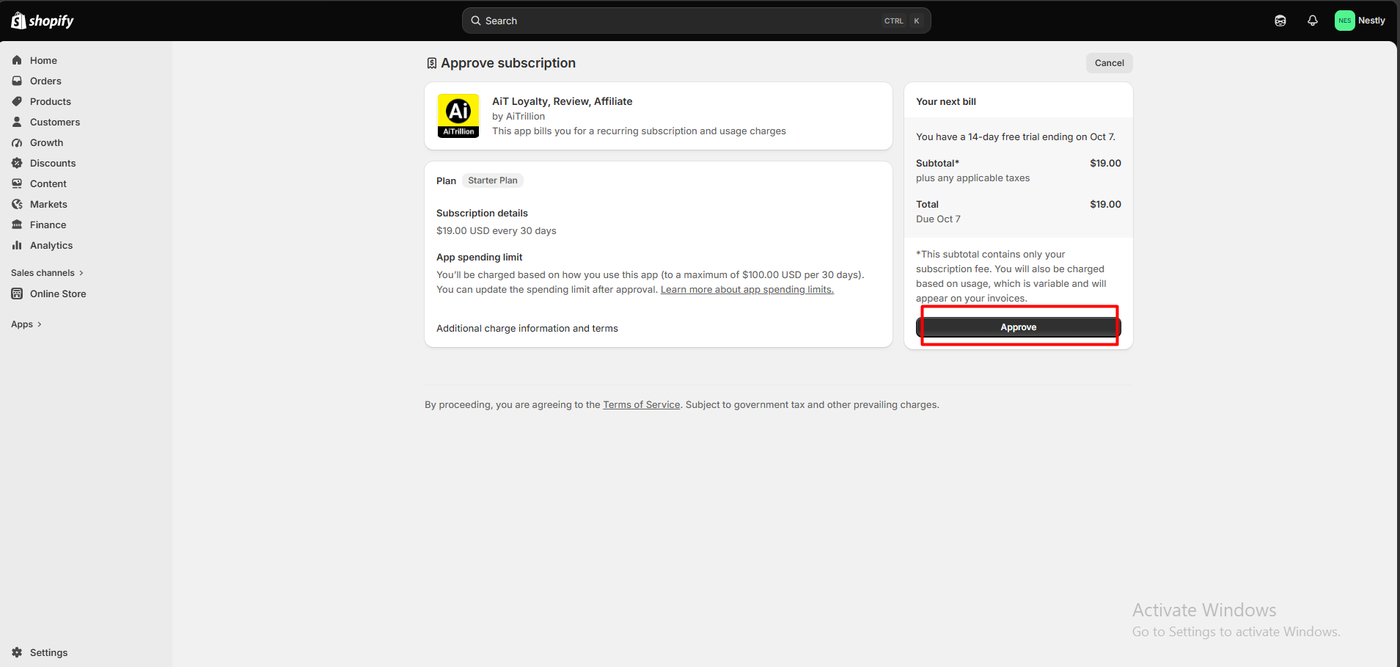
Installing AiTrillion starts with a Shopify subscription approval, not a setup wizard. Ours read Starter Plan, $19.00 USD every 30 days, with a 14-day free trial and a line that matters: an app spending limit, charged on usage, of up to $100.00 USD per 30 days on top of the subscription. Shopify’s own note explains the subtotal covers the subscription only and that usage charges appear separately on invoices.
That is a different billing shape from every other loyalty app we have reviewed. Those charge a flat monthly fee tied to order volume. Here, email, SMS and push sending sit in the same subscription, so consumption can add to the bill.
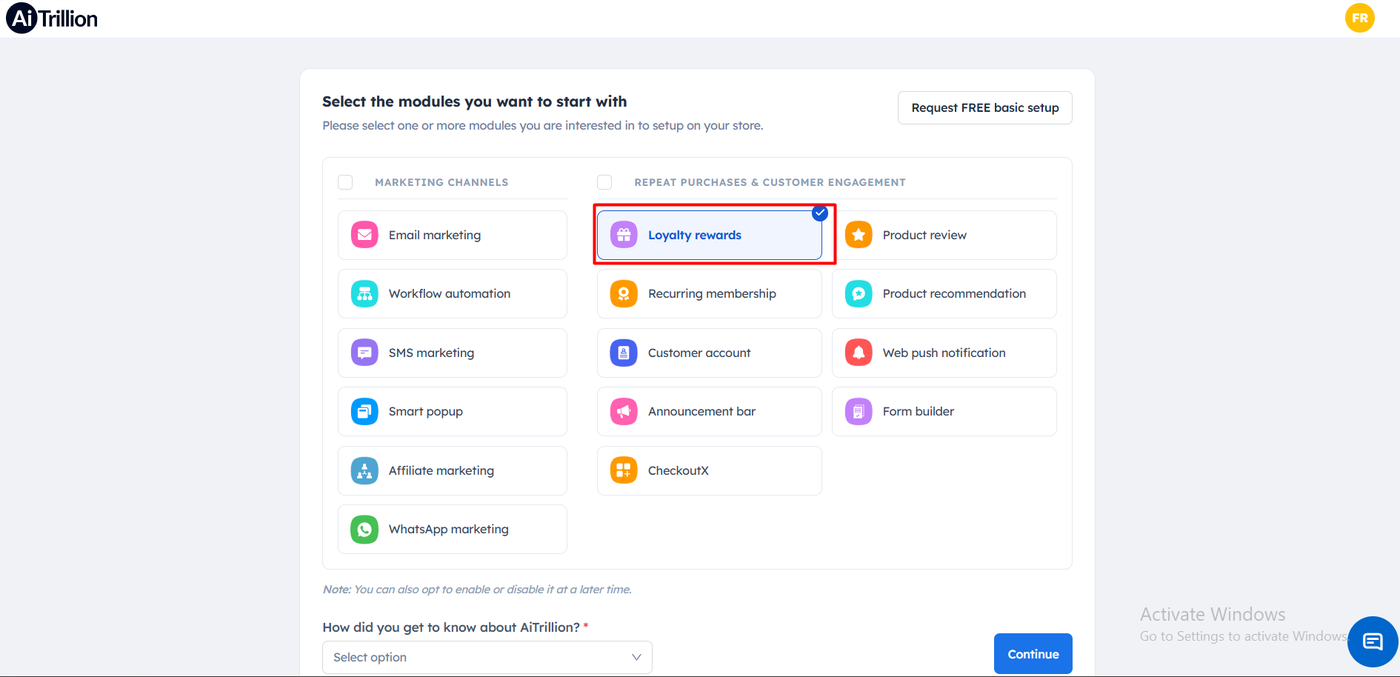
After approval, AiTrillion asks which modules you want to start with. Fifteen are offered across two groups: marketing channels (email, workflow automation, SMS, smart popup, affiliate, WhatsApp) and repeat purchases and customer engagement (loyalty rewards, recurring membership, customer account, announcement bar, CheckoutX, product review, product recommendation, web push, form builder). A note says you can enable or disable any of them later. There is also a button offering a free basic setup done for you, and a required dropdown asking how you heard about AiTrillion.
We selected Loyalty rewards only. The sidebar then showed just that module, with everything else tucked under “More modules”. For a merchant who wants one job done, that is a good decision by the product: the suite gets out of the way.
The home screen carried two banners. One asked us to set a password for future logins. The other said the theme extension still needed enabling through the Shopify admin, with a guide link, a direct access button, and a “Mark as done” option. The loyalty module then presented a five-item checklist: enable the module, set up earn points, set up redeem points, enable the loyalty button on the store, and an advanced setup section.
Under Display on store, the Launcher tab controlled the button label, background colour from eight swatches, light or dark icon and text, bottom-left or bottom-right position, and a “Hide on mobile” switch, all against a live preview. The Appearance tab handled the widget header text before and after login, five system templates, and separate signed-out and signed-in cards. A third tab, Widgets, carried a padlock.
The Earning Rules Are the Most Detailed We Have Seen
The Earn points screen lists eight store activities: celebrate birthday, make a purchase, refer a friend, store visit, Buy $X get Y points, On X Orders get Y points, leave a review, and gift code. Each has an on/off toggle. Refer a friend carried a padlock on our $19 plan, as did VIP program and Point expiry in the sidebar.
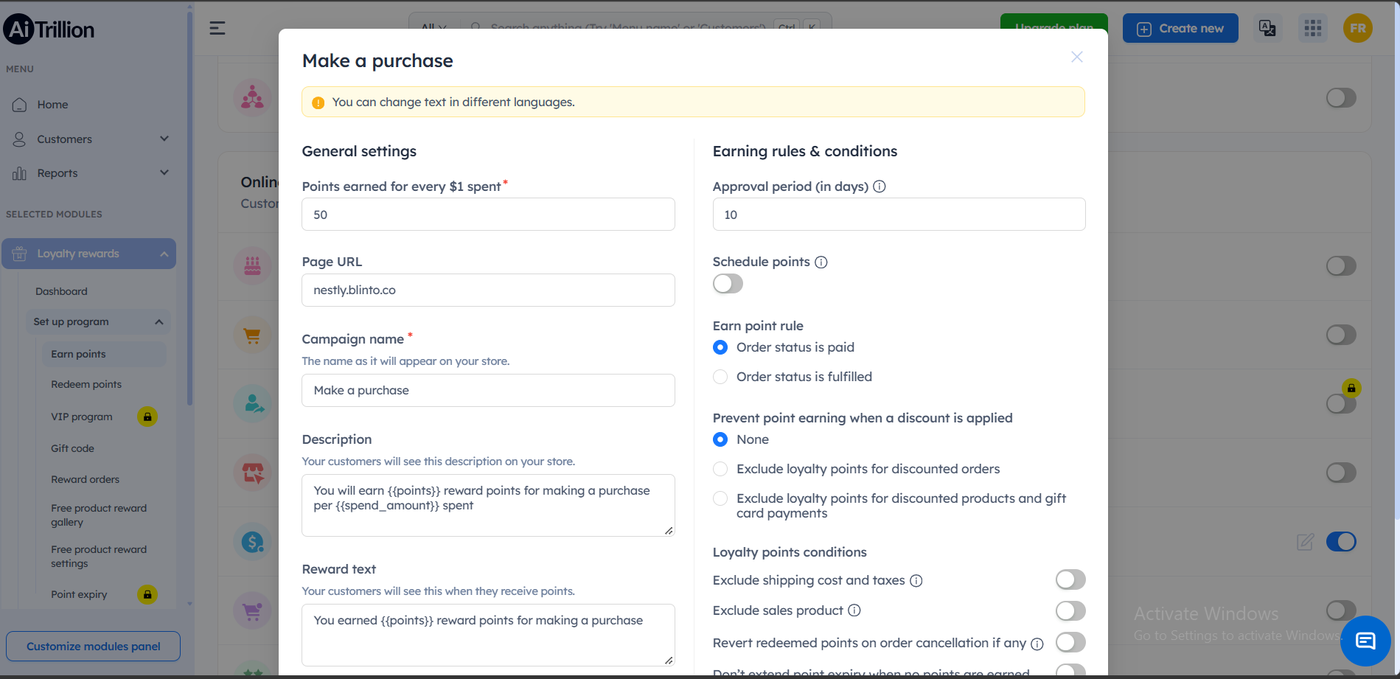
Opening the Make a purchase rule shows why this app is different. Alongside the points-per-dollar field and the customer-facing text, the right-hand column carried:
- an approval period in days, which we left at 10,
- a Schedule points toggle,
- an earn trigger of order status is paid or order status is fulfilled,
- three settings for preventing point earning when a discount is applied: none, exclude points for discounted orders, or exclude points for discounted products and gift card payments,
- and switches to exclude shipping cost and taxes, exclude sale products, and revert redeemed points on order cancellation.
No other loyalty app we have tested exposes that much control over a single earning rule. The approval period is the same idea LoyaltyLion uses to hold points pending until an order settles; AiTrillion adds the discount and refund conditions on top. For a merchant who has been burned by points awarded on discounted or later-cancelled orders, these are the settings that prevent it.
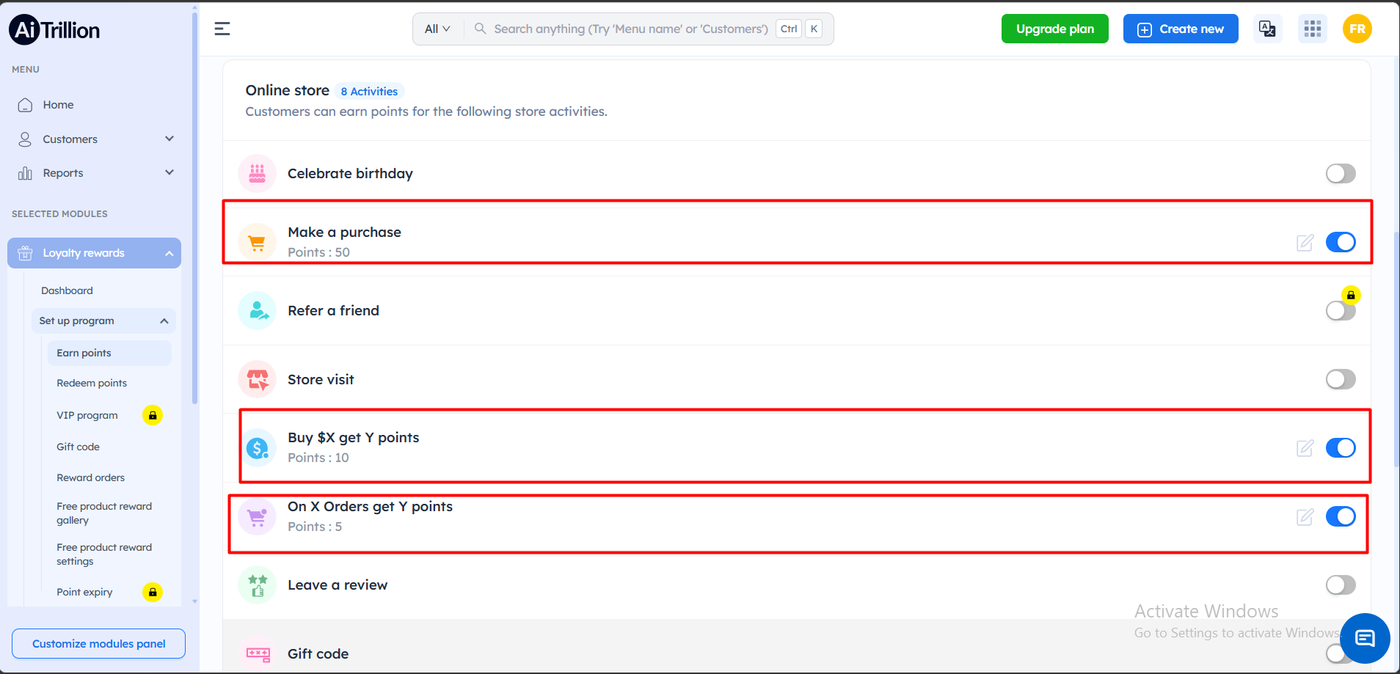
We enabled three rules and left the rest off. Buy $X get Y points awards a fixed 10 points for reaching a $100 spend goal. On X Orders get Y points awards 5 points for completing one purchase with a minimum spend of $50. Both carried the same paid-or-fulfilled trigger. All three ran at once, which means earning can be stacked from spend, from goals, and from order counts in the same program.
The customer-facing strings are template-based, using placeholders for points and amounts, with a note that the text can be translated into other languages.
Designing the Reward: A Minimum Purchase, and a POS Switch
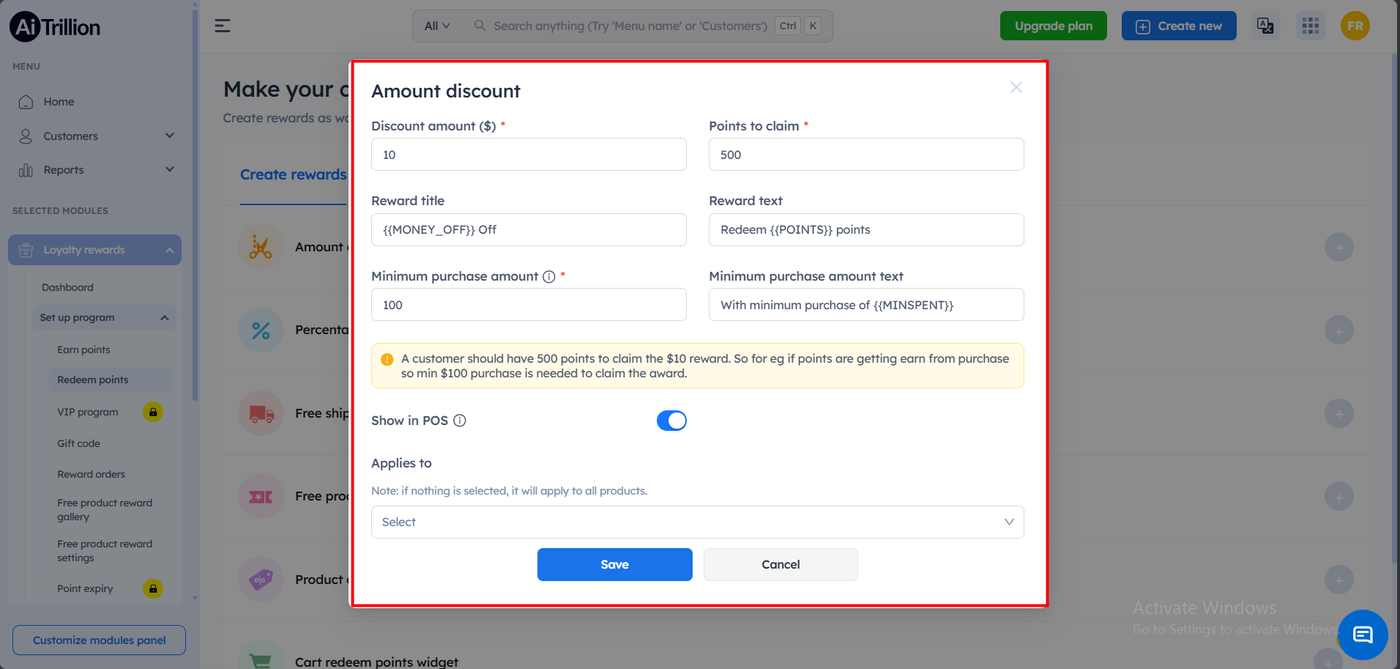
Redeem points offers reward types as tiles, including amount discount, percentage discount, free shipping, free product, product discount and a cart redemption widget. We built one: $10 off for 500 points, with a $100 minimum purchase.
Two details stood out. The first is a yellow explainer the app writes itself, spelling out that a customer needs 500 points to claim the $10 reward, and that if points come from purchases, a $100 spend is needed to get there. It is a small piece of honesty about programme economics at the moment a merchant is setting the numbers, and none of the other apps we tested does it.
The second is a Show in POS toggle on the reward itself, on by default. We did not test Shopify POS, so we cannot say how it behaves in store, but reward-level control is more granular than a plan-level POS switch.
An “Applies to” selector lets a reward be limited to chosen products, with a note that leaving it empty applies it to everything. After saving, the View rewards tab listed our reward with claim and use counters both at zero.
Switching the program on for the storefront was a single toggle in the Shopify theme editor, under App embeds, next to the other apps installed on that store.
The Storefront Wallet and the Redemption
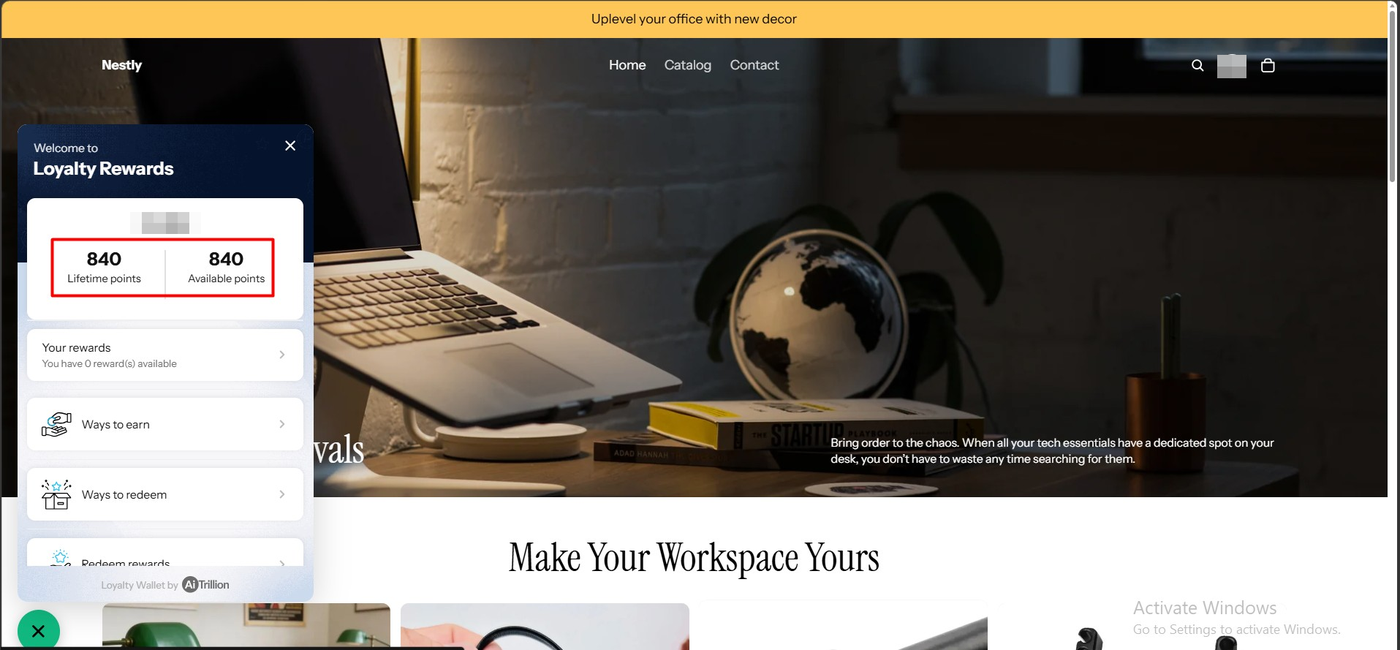
On the storefront, a green “Rewards” launcher sat at the bottom left. Opening it gave a panel headed “Welcome to Loyalty Rewards” with the customer’s greeting and two figures side by side: 840 lifetime points and 840 available points, then links for Your rewards, Ways to earn, Ways to redeem and Redeem rewards. A footer reads “Loyalty Wallet by AiTrillion”.
Splitting lifetime from available is a useful distinction; lifetime is what a tiered programme would count, available is what can be spent today. We did not reconcile the 840 figure against the individual test orders and the three stacked rules, so we cannot say which rule contributed what. We also never saw a pending state, despite the 10-day approval period we set on the purchase rule, and we did not investigate why.
The vendor’s name is visible in the widget footer. Removing that branding is the kind of thing that usually sits on a higher tier; we did not test whether it can be turned off.
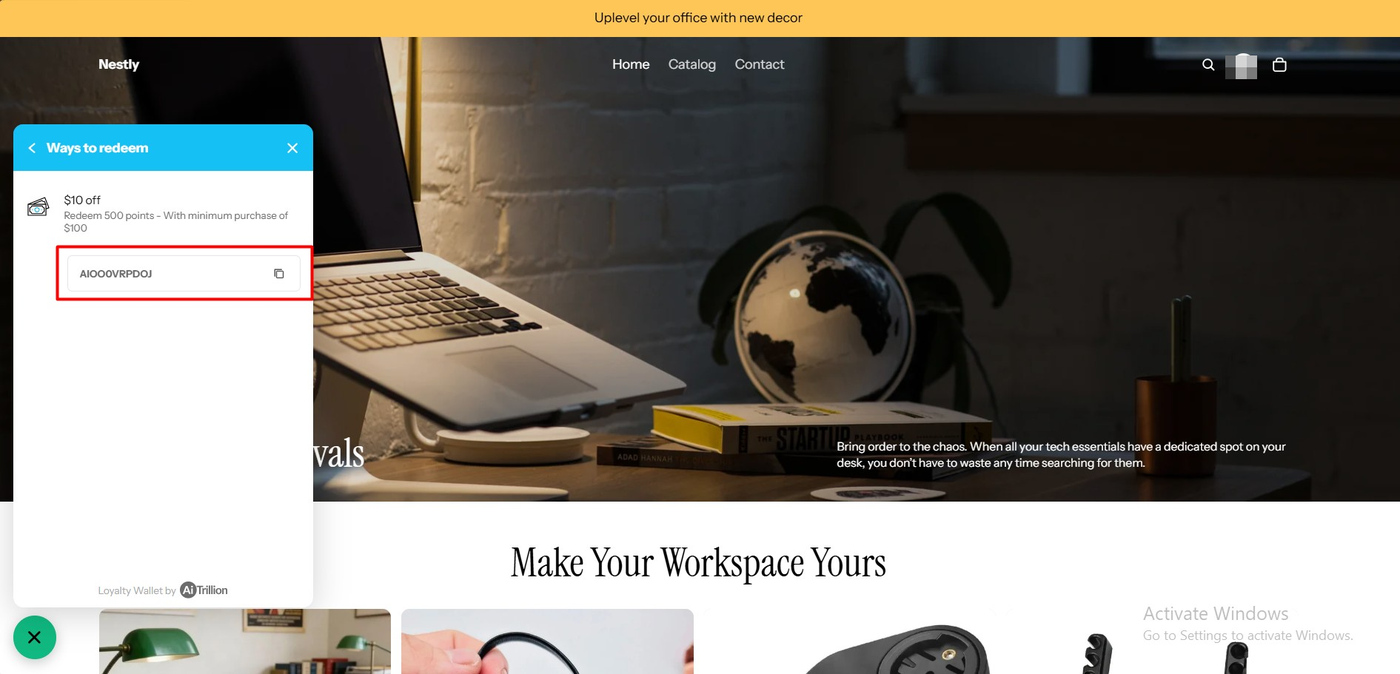
Ways to redeem listed our reward exactly as configured: “$10 off — Redeem 500 points – With minimum purchase of $100”, with a Get Reward button. Claiming it replaced the button with a discount code and a copy icon, in the same panel, with no confirmation step in between.
That last point is worth noting against the app we reviewed immediately before this one. LoyaltyLion asks “spend these points?” before it takes them. AiTrillion, like Rivo and Yotpo, spends on the first tap.
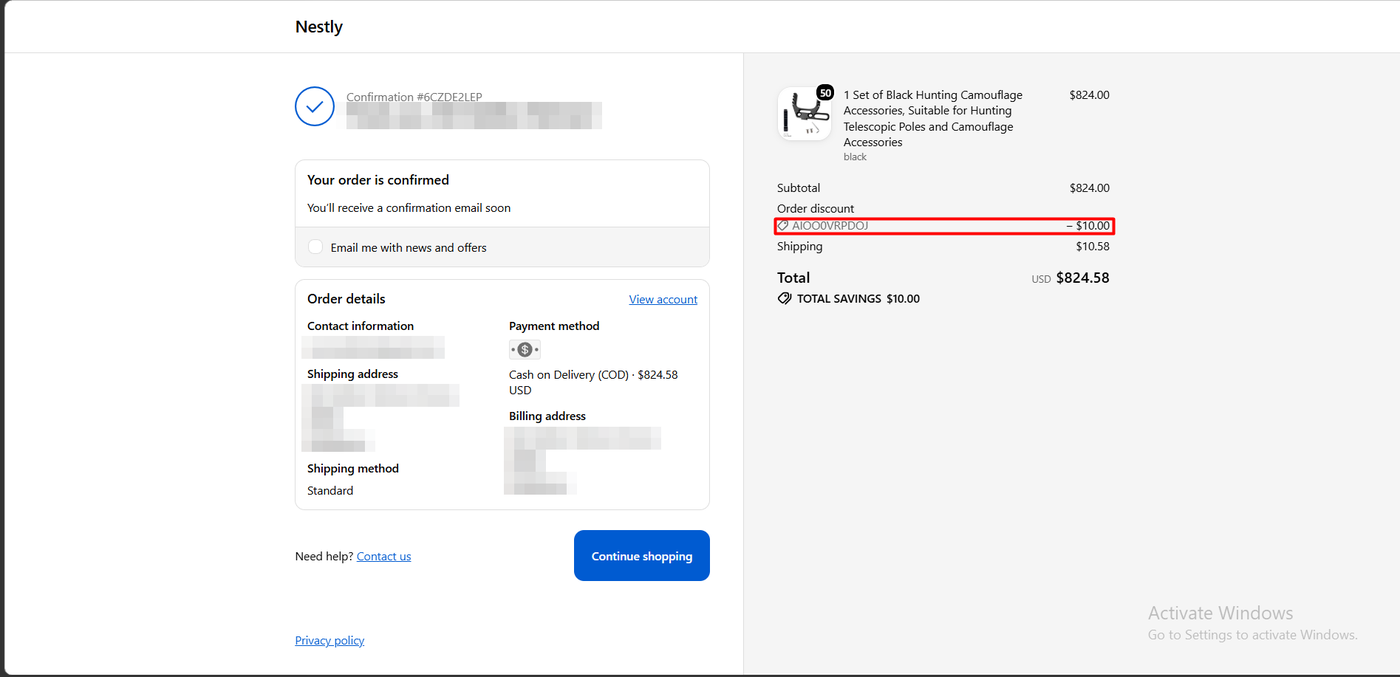
We placed an $824.00 order using the code. The confirmation showed an order discount of −$10.00, a total savings line of $10.00, and a total of $824.58 including shipping. The reward became a real Shopify discount on a real order, and the $100 minimum-purchase condition we set was comfortably met.
We did not check whether the code also arrives by email, and we did not test what happens when a customer tries to use it below the minimum.
Pricing and Value
Pricing is the most complicated part of this review, and the most important.
On Shopify’s App Store listing, checked September 24, 2026, there are three plans and no free tier:
| Plan (listing) | Price | Monthly order limit | Trial |
|---|---|---|---|
| Starter | $9/month | Up to 50 orders | 14 days |
| Basic | $19/month | Up to 150 orders | 14 days |
| Growth | $49/month | Up to 300 orders | 14 days |
All three list the same feature set: email, SMS and WhatsApp campaigns, workflow automations, loyalty rewards and referrals, product reviews, membership and affiliate programs, and recommendations. The listing notes that charges are billed in USD and that recurring and usage-based charges are billed every 30 days.
On AiTrillion’s own pricing page the picture is different again. There are two parallel models, selected by a toggle: contact-based and order-based. Contact-based starts with a free plan for up to 250 contacts, then Starter, Basic at 1,000 contacts, Growth, Professional and several enterprise tiers, with monthly and annual prices that differ. Order-based runs Starter at 50 orders, Essential at 150, Standard at 300 and Growth at 500. Both models attach their own email, SMS and push allowances, and the site advertises a 30-day money-back guarantee.
Three practical conclusions follow.
The plan name on your Shopify bill may not match any plan name you were shown. Our subscription approval screen said Starter Plan at $19 every 30 days. On the App Store listing, $19 is Basic and Starter is $9. On AiTrillion’s site, $19 is Basic under contact-based pricing and Essential under order-based pricing. Whatever you are quoted, confirm the limits rather than the label.
A free tier exists, but not where most merchants will look. AiTrillion’s site shows a free contact-based plan for up to 250 contacts. The Shopify listing shows no free plan at all. If cost is your constraint, that gap is worth a direct question before you subscribe.
Budget for usage, not just subscription. The $100 per 30-day app spending limit on our approval screen is a ceiling, not a bill, but it exists because the app can charge for usage. A loyalty-only merchant may never touch it; a merchant who starts sending email and SMS from the same platform might.
On value, the comparison only works if you are consolidating. At $19 a month for up to 150 orders, AiTrillion is more expensive per order than the free tiers of every other loyalty app we have reviewed, which range from under 100 to 400 monthly orders at no cost. Against four or five separate subscriptions for loyalty, email, reviews, popups and memberships, the same $19 looks very different.
What We Liked
- The most granular earning rules we have tested: approval period, paid-versus-fulfilled trigger, three discount-exclusion modes, exclude shipping and taxes, exclude sale products, and revert redeemed points on cancellation — all on one rule.
- Rules stack: points per dollar, a spend goal and an order-count goal ran together in the same programme.
- The app explains its own maths: a note on the reward screen spelled out how much a customer must spend to reach the points needed.
- Module selection keeps the suite out of the way: choosing only loyalty left a sidebar that looks like a loyalty app.
- Reward-level POS control: the Show in POS switch sits on the individual reward rather than on the plan.
What Could Be Better
- No free plan on the App Store: Evaluating the loyalty module means a trial or a subscription, while every other loyalty app we have reviewed can be launched free.
- The same price carries three plan names: Starter on the Shopify charge, Basic on the listing, Basic or Essential on AiTrillion’s own page, depending on the model.
- Padlocks on a paid plan: Refer a friend, VIP program, Point expiry and the Widgets tab were all locked at $19, and referrals and tiers are core loyalty features rather than extras.
- Usage charges on top: A spending limit of up to $100 per 30 days is a different commitment from a flat monthly fee.
- No confirmation before spending points: The reward is claimed on the first tap.
- Public complaints centre on price and inclusions: Renewal increases, shrinking module allowances and leftover storefront code appear in the small negative review set. We did not reproduce them, and we did not reach a renewal or uninstall.
Who AiTrillion Is Best For
AiTrillion fits Shopify merchants who want to run loyalty alongside email, reviews, memberships or affiliates from one subscription and one dashboard, and who have counted what those tools cost separately today. It also suits merchants who want fine control over exactly when purchase points are awarded — the discount, refund and approval settings are genuinely better than the category norm.
Who Should Look Elsewhere
If loyalty is all you need, start with the free tiers elsewhere in this category; you can launch a working points programme without paying anything. If referrals or VIP tiers are central to your plan, price the tier that unlocks them before committing, because they were locked at $19 in our test. And if you need predictable billing with no usage component, read the spending-limit line on the subscription screen carefully.
We have also reviewed LoyaltyLion, Yotpo Loyalty, Rivo, Appstle Loyalty and Joy Loyalty Program. All of them completed the earn-and-redeem loop in our testing, and all of them have a free plan. AiTrillion is the only one of the six that asks for a subscription up front, and the only one that is a full marketing suite rather than a loyalty app. We have not run them head to head, and this test used a different store, so we are not ranking them here.
Final Verdict
AiTrillion answered our question. The loyalty module inside the suite is a real loyalty programme: we built stacked earning rules, designed a reward with a minimum-purchase condition, and watched the claimed code reduce a completed Shopify order. The rule editor is the best in the category we have tested, and module selection stops the other fourteen tools from getting in the way.
What you are buying alongside it is a pricing surface with three names for one price, a free tier that is invisible from the App Store, usage charges on top of the subscription, and padlocks on referrals and tiers at the entry price.
That earns a Recommend for merchants consolidating several tools, with the plan limits and usage charges confirmed in writing first verdict. Merchants who only want loyalty should start with a free plan elsewhere.
Frequently Asked Questions
Is AiTrillion free?
Not on the Shopify App Store. On September 24, 2026 the listing showed three paid plans starting at $9 a month for up to 50 orders, each with a 14-day trial, and no free plan. AiTrillion’s own pricing page does show a free contact-based tier for up to 250 contacts.
How much does AiTrillion cost?
The App Store listing prices Starter at $9 for 50 monthly orders, Basic at $19 for 150 and Growth at $49 for 300. AiTrillion’s site offers contact-based and order-based pricing with different names and limits, so confirm the limits attached to your quote. Usage-based charges are billed separately; our subscription approval set a limit of up to $100 per 30 days.
Does AiTrillion work without coding?
In our test, yes. We selected the loyalty module, configured earning rules and a reward in the admin, and enabled the AiTrillion app embed in the Shopify theme editor without editing theme code.
Does AiTrillion include referrals and VIP tiers?
Both are advertised, but on our $19 plan the Refer a friend activity, the VIP program and Point expiry all showed padlocks. Confirm which tier unlocks them before subscribing. We did not test either feature.
How do customers redeem AiTrillion points?
In our test, the customer opened the Loyalty Wallet widget on the storefront, chose the reward under Ways to redeem, and received a discount code with a copy button immediately — there is no confirmation step. The code applied as an order discount and appeared on the confirmation page.
What is the approval period in AiTrillion?
It is a delay, set in days on the earning rule, before purchase points become usable. We set ten days on our purchase rule. The storefront widget separates lifetime points from available points, though we did not observe a pending balance during testing.