
Every loyalty app on Shopify has a free plan. What differs is how long you are allowed to stay on it.
LoyaltyLion’s free plan covers 400 orders a month. That is four times what Yotpo allows and double what Rivo allows, and it is the highest free-plan order limit among the loyalty apps we have reviewed. So the question is whether the plan behind that number is a real loyalty program or a demo: can a merchant launch LoyaltyLion on Free, have a customer claim a reward, and see that reward reduce a completed Shopify order?
We ran LoyaltyLion’s six-step setup wizard on a Shopify development store running the Horizon theme, accepted its default program, enabled the SDK from the theme editor, stayed on Free, and claimed a 1,000-point voucher as a logged-in customer.
The loop worked. Two details we had not seen in any other loyalty app on this store turned out to be the most interesting part.
Key Takeaways
- The loop worked on Free: Claiming a $10 voucher for 1,000 points produced a code that took $10.00 off the next order. The confirmation page showed the discount line and a total of $1,289.00.
- 400 orders a month, free: The in-app plan screen confirms the Free plan includes 400 monthly orders, with a points program, money-off vouchers and unlimited members.
- The widget shows pending points: The customer panel reads “26,280 points (0 pending)”. LoyaltyLion runs an approval period on purchase points, and it is the only app we have tested that exposes that state to the shopper.
- Claiming asks for confirmation first: “Spend 1,000 points for this reward?” with a Claim button. Small, but it prevents a mis-tap that spends a customer’s balance.
- The first paid step is $199, and the order allowance is quoted three different ways: The in-app screen says Classic includes 1,000 orders a month, the App Store listing says 500+, and LoyaltyLion’s own pricing page says 500. Confirm the number before you subscribe.
Our Verdict
LoyaltyLion is a strong choice for a small Shopify store that wants a points program it will not outgrow next quarter.
In our test the mechanics were sound. The setup wizard took us from branding to launch in six screens. The SDK switched on from the theme editor with one toggle. The widget appeared at the bottom left of the storefront with the customer’s balance. Claiming a voucher asked for confirmation, deducted the points, and issued a code that Shopify checkout honoured.
The caution is about what happens after Free. There is no intermediate plan: the next step is Classic at $199 a month, and LoyaltyLion’s own pricing page places VIP tiers as an optional add-on there and multi-location POS higher still. The recurring theme in recent negative public reviews is not broken software; it is commercial — annual price rises, moves onto custom plans, and difficulty cancelling. Read the pricing section before you build a program you cannot afford to keep.
What LoyaltyLion Offers
LoyaltyLion is a loyalty and rewards platform that has been on the Shopify App Store since 2014, which makes it the oldest app in this category we have reviewed. Its Shopify App Store listing carries the Built for Shopify badge and describes customisable points programs, VIP tiers, embedding in checkout, customer accounts and POS, customer segments and win-back campaigns, and more than fifty integrations.
The listing’s “Works with” section includes Shopify Checkout, customer accounts, Shopify POS, Shopify Flow, Attentive, Gorgias, Klaviyo, Recharge, Tapcart, and Yotpo.
Inside the admin, the navigation covers Dashboard, Customers, Analytics, Program, Display, plus an Engagement group with Loyalty pass, Challenges and Emails, and then Integrations and Settings. Our test focused on the setup wizard, the widget, and the storefront result. We did not test tiers, challenges, emails, segments, POS, or any integration.
What We Tested
We tested LoyaltyLion on a Shopify development store in September 2026. The store uses the Horizon theme and a small catalogue of test jerseys priced between $999 and $1,299. The admin dashboard was dated September 18, 2026.
Our test covered:
- the six-step setup wizard: Customize, Decide points, Choose rewards, Before you launch, Choose plan, and Prepare to launch,
- enabling the LoyaltyLion SDK app embed in the Shopify theme editor,
- the On-site content widget editor and its theme colour controls,
- the Free plan as shown on the in-app plan screen,
- the storefront loyalty widget and launcher as a logged-in customer,
- the points balance built up from test orders on this store at the default 5 points per $1,
- claiming a $10 voucher for 1,000 points,
- and completing an order with that code applied.
We did not test VIP tiers, challenges, the loyalty pass, referrals, emails, segments, analytics, Shopify POS, any listed integration, the custom-branded loyalty page, mobile rendering, migrating balances from another app, or LoyaltyLion’s support team. We did not start the Classic trial. Pricing was read from the in-app plan screen, the App Store listing, and LoyaltyLion’s pricing page.
One disclosure about the evidence. Some of the wizard screenshots carry admin banners reading that the account is disabled and that the store has been uninstalled, which is normal churn on a development store that has had many apps installed and removed. The storefront, claim and order-confirmation captures show a working program at the time they were taken, and those are the captures our findings rest on.
What Public Sources Add
On September 23, 2026, the Shopify App Store listing showed a 4.6 rating from 538 reviews, with 84% at five stars and 5% at one star. The most recent reviews are from September 2026.
Positive reviews are dominated by one theme: named account managers and support staff who ran onboarding, tailored the program, and handled technical work. Several merchants describe campaign results and growing sign-ups. If you value a human being attached to your account, that is the pattern in the recent feedback.
The one-star reviews tell a commercial story rather than a technical one. Merchants describe annual price increases of 20% or more on custom plans, a free plan that started requiring payment, custom quotes in the $400 to $600 a month range, translation charged as a recurring add-on, and cancellation that was blocked or needed the developer’s involvement. Two reviews mention the SDK’s bundled font slowing the site, with the ability to disable it framed as unavailable on the free tier. Support slowness appears on both sides of the rating split: praised at length in five-star reviews, criticised as taking days or weeks in one-star reviews. LoyaltyLion has replied to nearly all of the negative reviews.
We did not reproduce any of this. But it is a clear signal about where the risk sits with this app: in the contract, not the code.
Setting Up: Six Steps, and the Defaults Are Opinionated
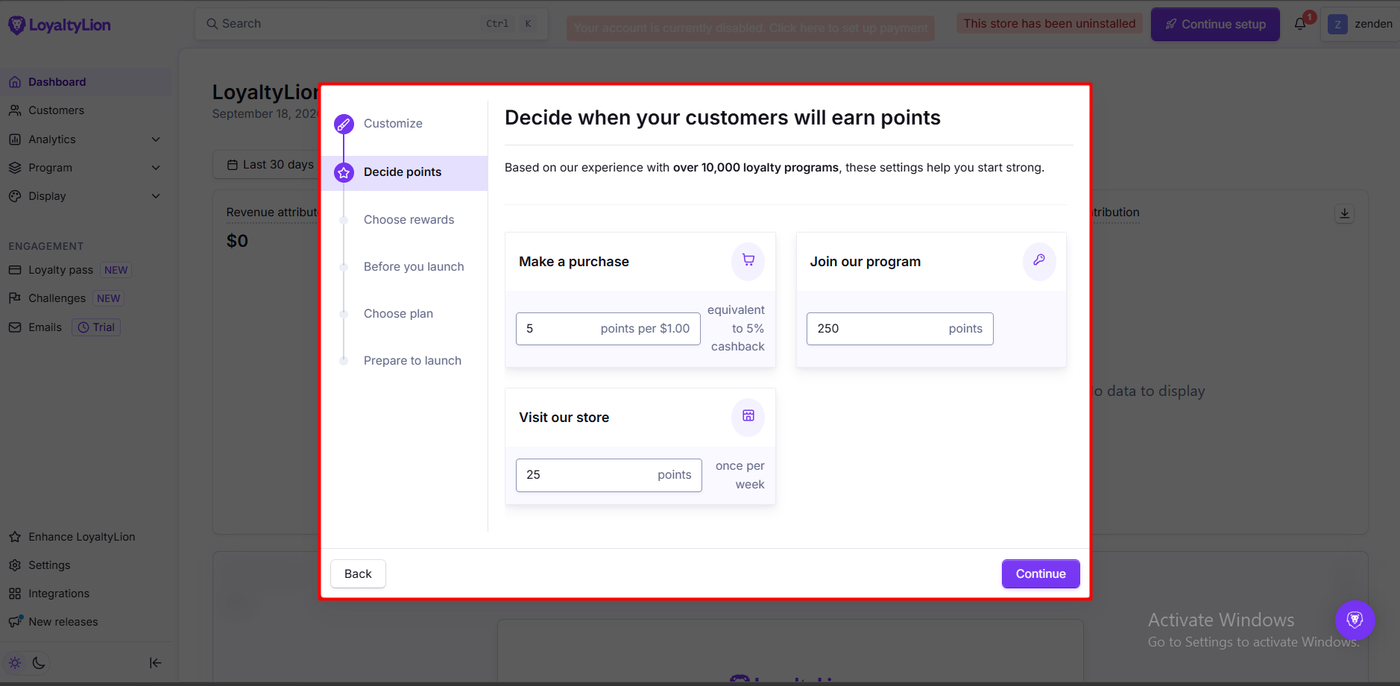
The wizard runs through Customize, Decide points, Choose rewards, Before you launch, Choose plan, and Prepare to launch, with a progress rail down the left.
Customize sets the program name, a primary and secondary theme colour as hex values, the widget background and text colour, and the launcher position, bottom left or bottom right. A live widget preview sits beside the form.
Decide points is where LoyaltyLion shows its hand. It opens by saying the defaults come from experience with more than ten thousand loyalty programs, then presents three earning rules already filled in: 5 points per $1.00 on a purchase, labelled by the app as equivalent to 5% cashback; 250 points for joining the program; and 25 points for visiting the store, once per week. Each value is editable in place, which is a real difference from Yotpo’s preset packages, where we never reached a per-rule editor on the free plan.
Choose rewards presents two pre-built vouchers: $5 for 500 points and $10 for 1,000 points, each deletable, with a plus tile to add more. At 5 points per dollar and a cent a point, that is the same 5% economics the other apps on this store arrived at by different routes.
Before you launch explains the theme step: open the theme editor, turn on the LoyaltyLion SDK under App embeds, save. It tells you plainly that the program will not be visible to customers until launch, and offers a button that opens Shopify directly.
Prepare to launch is a terms-of-service checkbox with Launch program and Launch later.
Nothing in the sequence needed code.
The App Embed Has Settings That Do Not Apply to the Widget
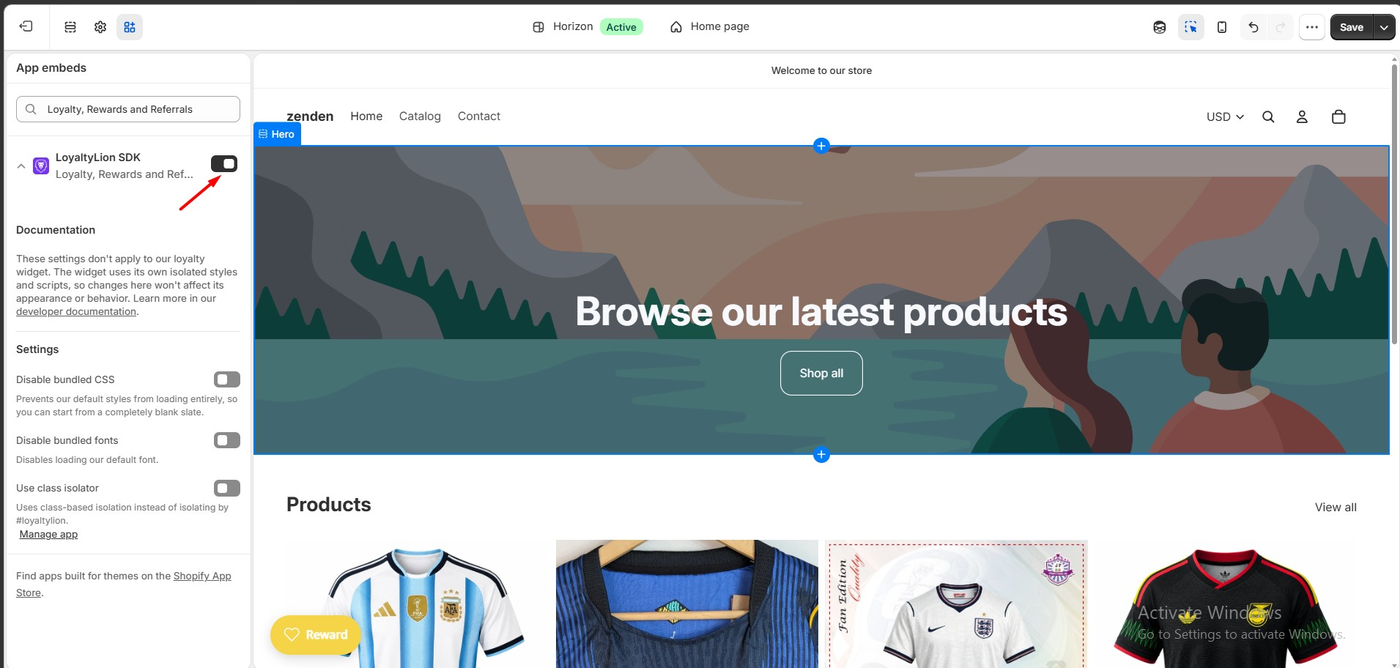
In the theme editor, the LoyaltyLion SDK embed exposes three toggles: Disable bundled CSS, Disable bundled fonts, and Use class isolator. All were off by default.
Directly above them, LoyaltyLion’s own note says these settings do not apply to the loyalty widget, because the widget uses isolated styles and scripts, and points developers to its documentation.
This is worth flagging for two reasons. First, a merchant who opens this panel looking to change how the widget looks is in the wrong place; widget styling lives in the app’s On-site content area, where we found theme colour fields and Global, Popup, Widget and Content tabs. Second, merchants in public reviews have complained about the SDK’s bundled font affecting site performance, and a “Disable bundled fonts” switch sitting right here could easily be mistaken for the fix. We did not test what these toggles do, and we did not measure the app’s effect on page speed.
Earning Points: Five Per Dollar, With a Pending State
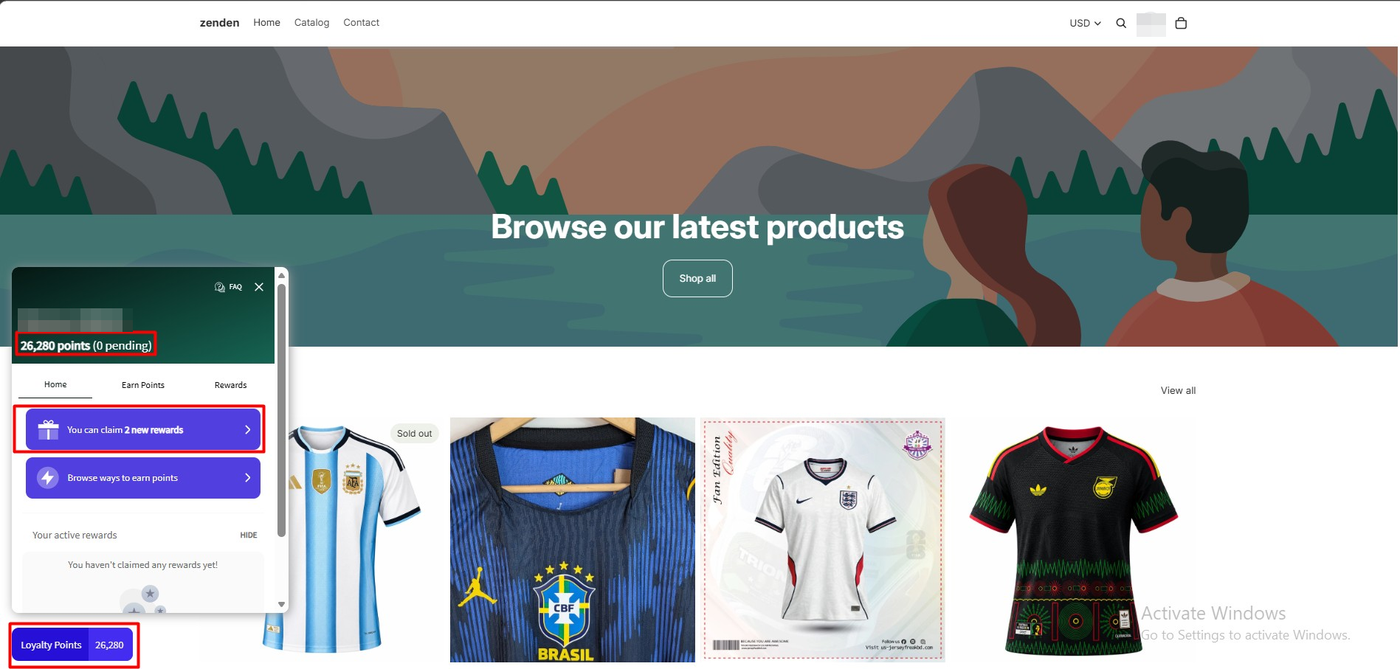
On the storefront, a “Loyalty Points” launcher showing the live balance sits at the bottom left. Opening it gives a panel with the customer’s name, the balance, and three tabs: Home, Earn Points and Rewards.
For our test customer the panel read 26,280 points (0 pending), a balance accumulated from the test orders placed on this store since the program launched, at the default 5 points per $1. We did not reconcile that total order by order in the admin.
The part worth dwelling on is the two words in brackets. LoyaltyLion runs an approval period on purchase points: points appear immediately as pending, and only become spendable once the order is paid and the approval window has passed. Its documentation frames this as matching your returns policy, with 30 days as a recommended maximum. None of the other loyalty apps we have tested on this store surfaced a pending state to the shopper at all.
That cuts both ways. It protects a merchant from awarding spendable points on an order that is later refunded, which matters most for high-value carts. It also means a customer who has just checked out may see a number they cannot use yet, so the approval window needs to be set deliberately rather than left to chance. Our test balance showed zero pending, so we did not observe the waiting state in action.
The Home tab also nudged with “You can claim 2 new rewards” and “Browse ways to earn points”, and the active-rewards area said plainly that nothing had been claimed yet.
Claiming a Reward: A Confirmation Step, Then a Code
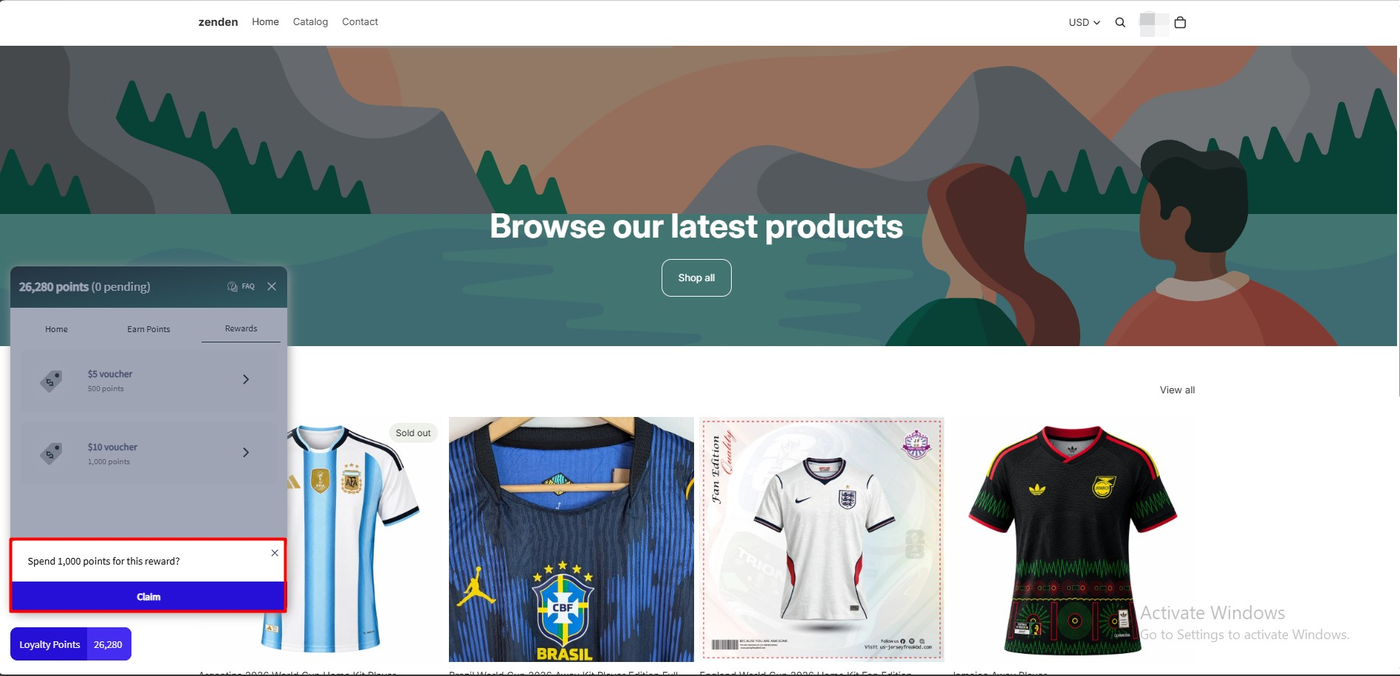
The Rewards tab listed both vouchers: $5 for 500 points, $10 for 1,000 points. Selecting the $10 voucher did not immediately spend the balance. Instead a prompt appeared at the bottom of the panel: “Spend 1,000 points for this reward?” with a Claim button and a dismiss cross.
That confirmation is a small piece of design that none of the other four apps on this store included. On Rivo and Yotpo, a single tap on a reward spends the points. Here, a customer who opens the panel on a phone and brushes a reward row does not lose a thousand points to it.
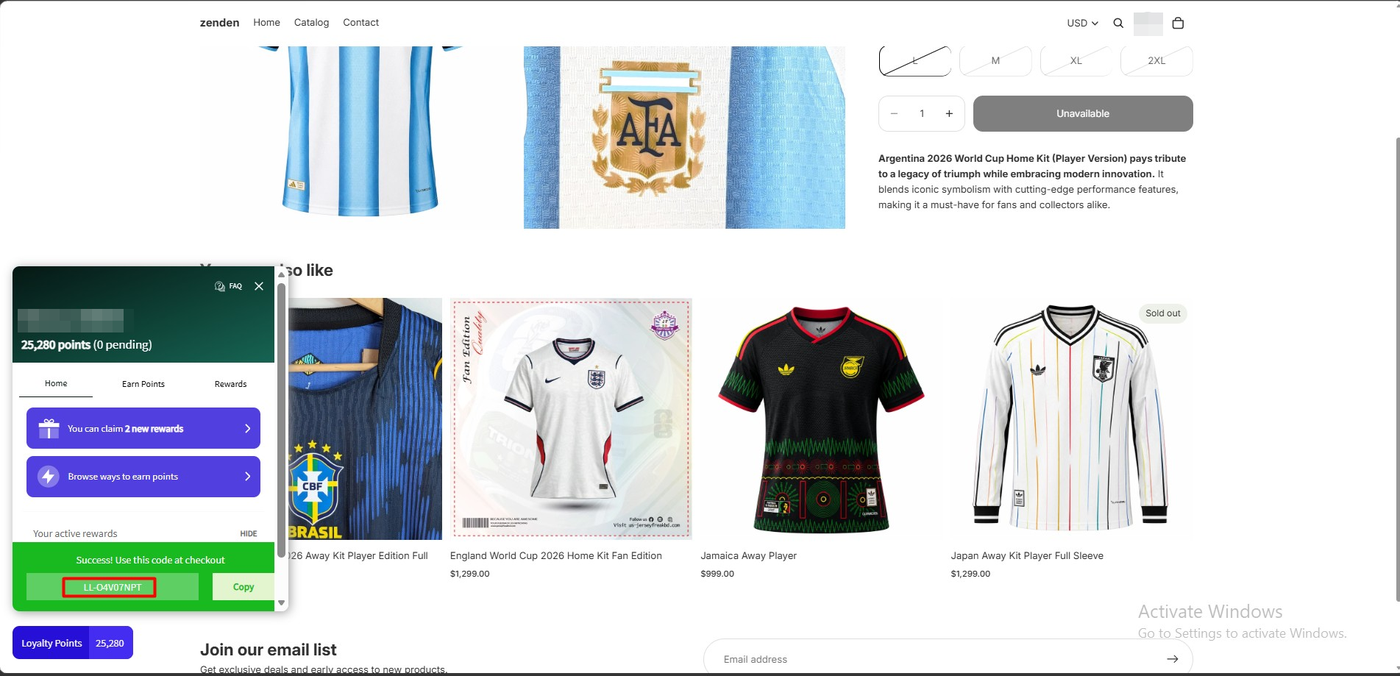
After confirming, the panel showed a green success bar with a code prefixed LL-, a Copy button, and instructions to use it at checkout. The balance in the panel header had already dropped to 25,280 points, exactly 1,000 fewer, with pending still at zero. The deduction and the code appeared in the same view, with no refresh needed.
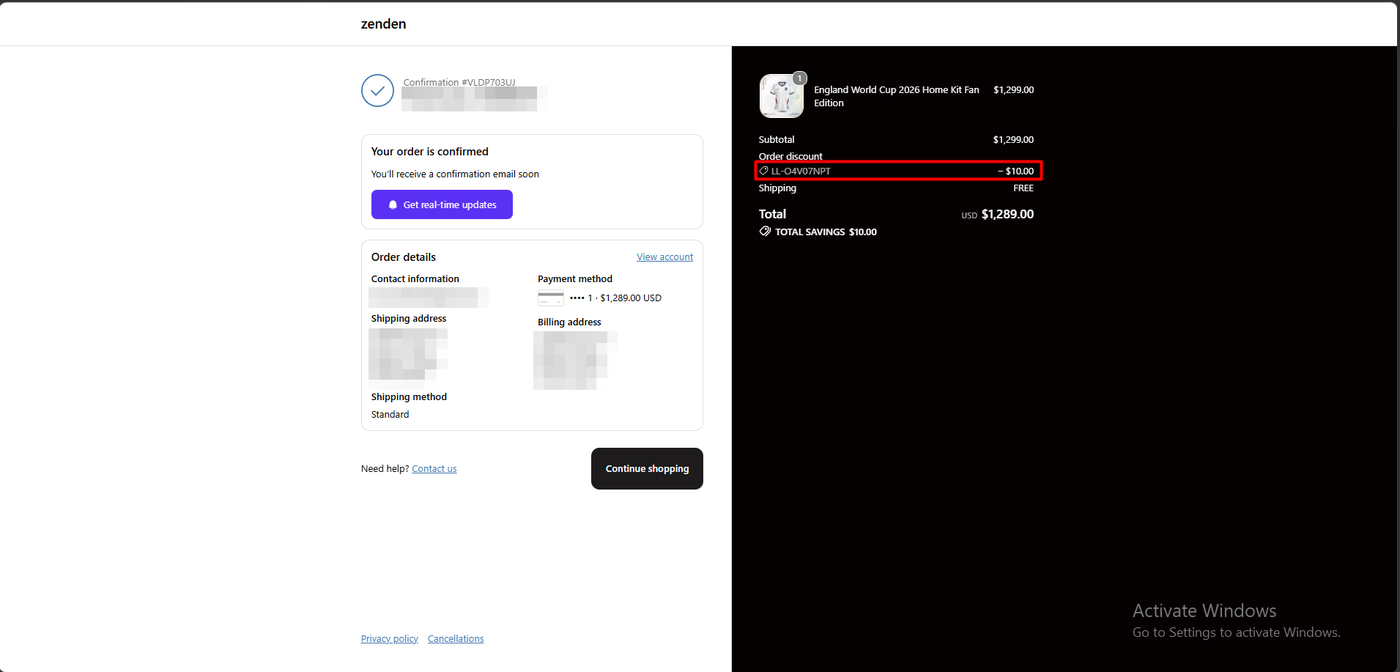
We then placed a $1,299 order using the code. The confirmation page showed an order discount of −$10.00, a total of $1,289.00, and a total savings line of $10.00. The reward became a real Shopify discount on a paid order.
Two things we did not verify: whether the code also arrives by email, and whether it can be applied automatically instead of pasted at checkout.
Pricing and Value
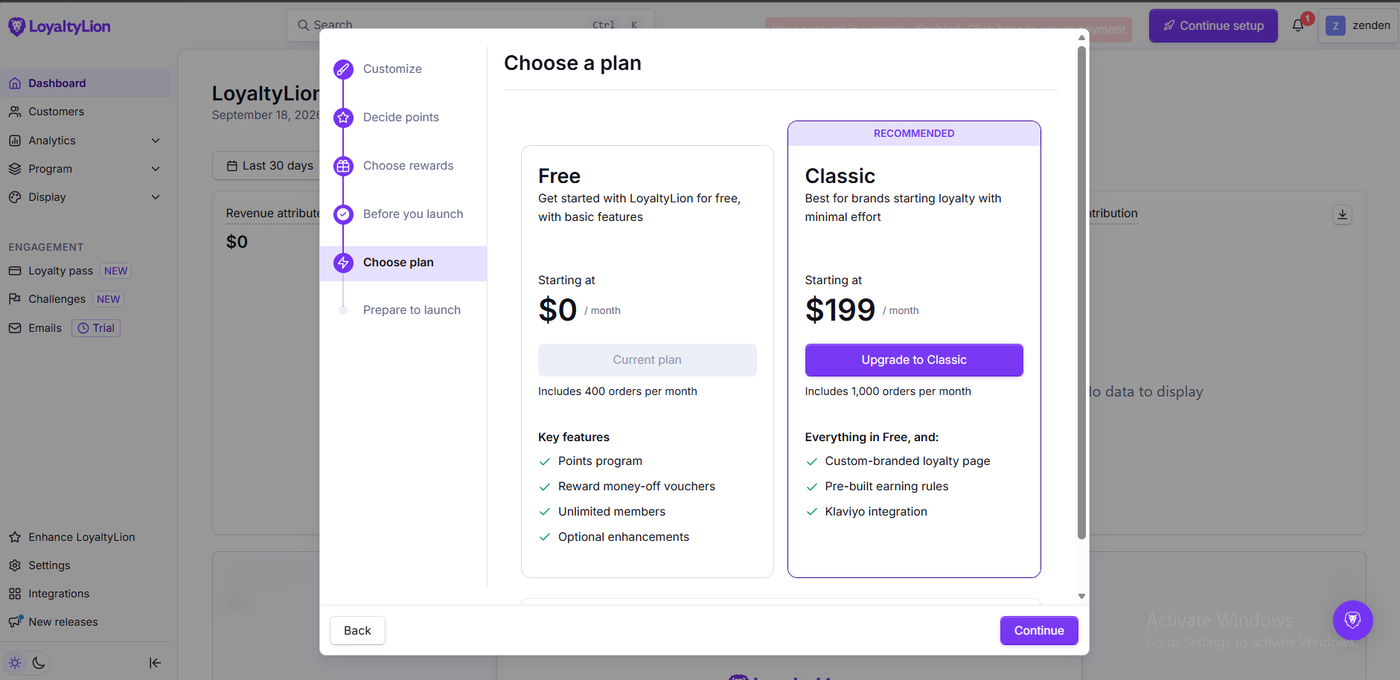
The plan screen inside the wizard showed two options. Free at $0 a month, marked as our current plan, described as basic features, including 400 orders per month, with a points program, money-off vouchers, unlimited members and optional enhancements. Classic at $199 a month, marked Recommended, described as best for brands starting loyalty with minimal effort, including 1,000 orders per month, adding a custom-branded loyalty page, pre-built earning rules and Klaviyo integration.
Checked against the public sources on September 23, 2026, the picture is broader and less consistent.
| Plan | Price | Order allowance | What the sources add at this tier |
|---|---|---|---|
| Free | $0 | 400 monthly orders | Points for on-site activities, money-off rewards, branding options, loyalty analytics, customer segments, real-time notifications, seven pre-written languages |
| Classic | $199/month | In-app: 1,000. Listing: 500+. Pricing page: 500 | 14-day trial, loyalty page design, customisable rules and rewards, unlimited integrations, onboarding, single-location POS; VIP tiers listed as an optional add-on |
| Advanced | Custom quote | — | VIP tiers included, multi-location POS, points on product pages, 130+ languages |
| Plus | Custom quote | — | AI campaigns, automated flows, and the highest volumes |
Three points a merchant should take from that table.
The Classic order allowance is quoted three different ways. One thousand in the app, five hundred plus on the listing, five hundred on the pricing page. Whichever is right, get it in writing before you subscribe, because order volume is what moves you up a tier.
Going over your limit is a conversation, not an automatic charge. LoyaltyLion’s pricing page says that if monthly volume exceeds the contracted threshold by more than 25% across three consecutive months, they will contact you to discuss the plan. That is gentler than per-order overage billing, and it is also exactly the moment several negative reviewers describe their costs jumping.
VIP tiers are not in the $199 plan as standard. The pricing page lists them as an optional add-on on Classic and as included from Advanced, which is custom-priced. If tiers are the reason you are shopping for a loyalty app, that is a quote request, not a checkout.
On value, Free covers everything we tested and 400 orders a month is real room to grow. The honest way to frame LoyaltyLion is that the free plan is generous and the paid entry point is not, so the question is whether you will need Classic within the year.
What We Liked
- The highest free order ceiling we have reviewed: 400 a month, against 250 for Joy and Appstle, 200 for Rivo, and fewer than 100 for Yotpo.
- Editable defaults, not a fixed package: The wizard filled in 5 points per $1, 250 for joining and 25 for a weekly visit, and let us change each number in place.
- The claim confirmation: A deliberate “Spend 1,000 points for this reward?” step before points leave the balance.
- Pending points are visible to the customer: The panel separates approved from pending, which no other app we tested does.
- The deduction and the code appear together: The balance dropped to 25,280 on the same screen that issued the code.
What Could Be Better
- $0 to $199 with nothing in between: Crossing 400 orders a month means a twelvefold jump from free, and VIP tiers still are not standard at that price.
- Three different order allowances for the same plan: In-app, listing and pricing page disagree about what Classic includes.
- Theme-editor settings that do not do what they look like they do: A “Disable bundled fonts” toggle sits directly under a note saying these settings do not affect the loyalty widget, in an app whose bundled font has drawn public performance complaints.
- The commercial complaints are consistent: Price rises, custom-plan quotes and cancellation friction recur across recent one-star reviews. We did not experience any of this, and we did not contact support or attempt to cancel, so we can neither confirm nor refute it.
Who LoyaltyLion Is Best For
LoyaltyLion suits Shopify stores under 400 orders a month that want a points program with editable rules, a customer-facing widget, and enough headroom that they will not be forced to upgrade in their first few months. Stores where a named account manager matters are also a fit, judging by the consistency of that theme in the recent positive reviews.
Who Should Budget for Classic or Look Elsewhere
If you are approaching 400 orders a month, price Classic at $199 now and compare it with the $10 to $49 tiers elsewhere in this category. If VIP tiers or multi-location POS are essential, expect a custom quote rather than a plan you can self-serve.
If your decision hinges on long-term cost certainty, the public reviews describing annual increases and custom-plan pricing deserve a direct question to the sales team before you commit.
We have also tested Yotpo Loyalty, Rivo, Appstle Loyalty and Joy Loyalty Program on the same development store with the same $1,299 test orders. All of them completed the earn-and-redeem loop. LoyaltyLion has the most generous free order limit and the most careful redemption flow; Appstle and Rivo have far cheaper first paid tiers. We have not run them head to head, so we are not ranking them here.
Final Verdict
LoyaltyLion answered our question. A merchant can run the six-step wizard on the free plan, launch a points program with editable earning rules, have a customer claim a voucher, and see that voucher reduce a completed Shopify order. The claim confirmation and the visible pending-points state are the most considered pieces of redemption design we have seen in this category.
What you are choosing alongside that is a pricing ladder with one rung, at $199, and a body of recent public feedback that is far more worried about the commercial relationship than the software.
That earns a Recommend for stores under 400 orders a month, with the pricing conversation settled in writing before you grow into Classic verdict.
Frequently Asked Questions
Is LoyaltyLion free?
There is a free plan. On September 23, 2026, the in-app plan screen and the App Store listing both put it at 400 monthly orders, with a points program, money-off vouchers, unlimited members, branding options, analytics, customer segments and seven pre-written languages. The first paid plan, Classic, is $199 a month with a 14-day trial.
Does LoyaltyLion work without coding?
In our test, yes. We completed the setup wizard, turned on the LoyaltyLion SDK under App embeds in the Shopify theme editor, and never edited theme code.
What are pending points in LoyaltyLion?
Points from a purchase are awarded immediately but held pending until the order is paid and an approval period has passed, and customers cannot spend them until then. The storefront widget shows the pending figure next to the balance. Our test balance showed zero pending, so we did not observe the waiting period itself.
How do customers redeem LoyaltyLion points?
In our test, the customer opened the widget on the storefront, chose a voucher on the Rewards tab, confirmed the point spend at a prompt, and received a discount code with a copy button. The balance dropped immediately, and the code applied as an order discount that appeared on the confirmation page.
Does LoyaltyLion include VIP tiers?
Not as standard on the $199 Classic plan. LoyaltyLion’s pricing page lists VIP tiers as an optional add-on on Classic and as included from the custom-priced Advanced plan. We did not test tiers.
How many orders does the Classic plan include?
The sources disagree. The in-app plan screen we captured says 1,000 monthly orders, the App Store listing says 500+, and LoyaltyLion’s pricing page says 500 included. Confirm the figure with LoyaltyLion before subscribing.