
Most loyalty apps can show a customer a points number. Fewer make it painless to turn that number into money off at checkout, and fewer still do it with sensible defaults before you have touched a single setting.
Rivo is one of the larger names in the Shopify loyalty category, and its listing leads with a Free plan for stores under 200 orders a month. So we asked a narrow question: can a merchant install Rivo, leave the default program as it is, earn points on real orders, and redeem them for a discount that reduces a completed Shopify order?
We installed Rivo on a Shopify development store running the Horizon theme, switched on the app embed and floating widget, placed two test orders as a logged-in customer, and redeemed 400 points for a $20 coupon.
The loop worked. What stood out more was how much of a usable program Rivo hands you before any configuration, and where the plan wall starts.
Key Takeaways
- The core loop worked without configuration: Two $1,299 test orders credited points at one point per dollar. Redeeming 400 points produced a coupon that took $20.00 off the next checkout, and the completed order showed the discount line.
- The defaults are a real reward ladder: Out of the box, Rivo set a 100-point sign-up bonus, one point per $1 spent, and three redemption tiers at $5, $10, and $20. The dashboard summarised this as a 5.0% reward value rate.
- The plan wall starts early: The birthday earning rule was locked behind an upgrade on our install. The listing places VIP tiers, points expiry, analytics, and the referral program on the $49 Scale plan.
- In-app pricing differed from the listing: During our test, the app’s own plan page showed discounted monthly prices with the listing prices struck through. Check the plan page in your admin before budgeting.
- Public feedback is strong but the negatives are serious: The listing shows a 4.7 rating from about 1,450 reviews. The one-star reviews describe billing after uninstall, slow support, a points-balance reset, and a redemption minimum-cart logic problem.
Our Verdict
Rivo is a solid choice for a small Shopify store that wants a points program live quickly and does not want to design reward tiers on day one.
In our test, every step of the merchant-critical path worked. The app embed switched on from the theme editor with no code. The floating widget appeared on the storefront. Points were credited after each order. Redeeming produced a coupon code that Shopify checkout applied, and the order confirmation showed −$20.00 against the subtotal.
The caution is about growth. The Free plan is a points program, not a full loyalty suite. Advanced earning rules and POS need the Essential plan, and the features that most merchants think of as “loyalty,” VIP tiers and referrals, sit on Scale at $49 a month with usage-based pricing above 400 orders. Read the pricing section before you plan a program around those.
What Rivo Offers
Rivo is a loyalty, rewards, and referrals app. Its Shopify App Store listing carries the Built for Shopify badge and describes points, referrals, VIP tiers, and cash-back programs, with rewards that can be discounts, coupons, store credit, POS rewards, free shipping, free products, and early or exclusive access.
The listing’s “Works with” section includes Shopify Checkout, customer accounts, Shopify POS, Shopify Flow, Attentive, Fuego, Gorgias, Klaviyo, Postscript, and Status.
Inside the admin, the navigation is organised around Loyalty, Referrals, VIP Tiers, Customers, Analytics, and Onsite. Our test focused on Loyalty, Onsite, and the storefront result. We did not test referrals, VIP tiers, analytics, POS, or any integration.
What We Tested
We installed Rivo on a Shopify development store in September 2026. The store uses the Horizon theme and contains a small catalogue of test jerseys.
Our test covered:
- the Loyalty Program dashboard and its default earning rules,
- enabling the Rivo app embed in the theme editor,
- the Onsite Display settings and the floating widget preview,
- the in-app plan page,
- the storefront Rewards launcher and panel as a logged-in customer,
- two $1,299 test orders and the points they credited,
- redeeming 400 points for a $20 off coupon,
- and applying that coupon at checkout and completing the order.
We did not start a paid trial, and we did not test referrals, VIP tiers, points expiry, email campaigns, analytics, Shopify POS, any listed integration, mobile rendering, importing balances from another app, or Rivo’s support team. Pricing and plan features were checked on the in-app plan page during testing and on the App Store listing.
What Public Sources Add
On September 22, 2026, the Shopify App Store listing showed a 4.7 rating from about 1,450 reviews, with roughly 94% at five stars and 2% at one star. The app launched in January 2021.
Recent reviews most often credit named support agents, straightforward setup, the flexibility of the points rules, and use alongside Shopify POS.
The one-star reviews from the past year are specific and worth reading before you commit. They include continued billing after uninstalling, unexpected usage-based charges after a migration, a customer points balance that reset to zero, support that went quiet for weeks, slow admin pages that failed to save, and a redemption rule that checked the discounted item’s value instead of the whole cart when applying a minimum. Some have developer replies, including one from the company’s leadership promising a refund. We did not reproduce any of these.
Treat the billing and data-integrity reports as items to verify on your own store: check your Shopify bill after any plan change or uninstall, and spot-check a few customer balances after launch.
Getting Started: The Program Is Already Built
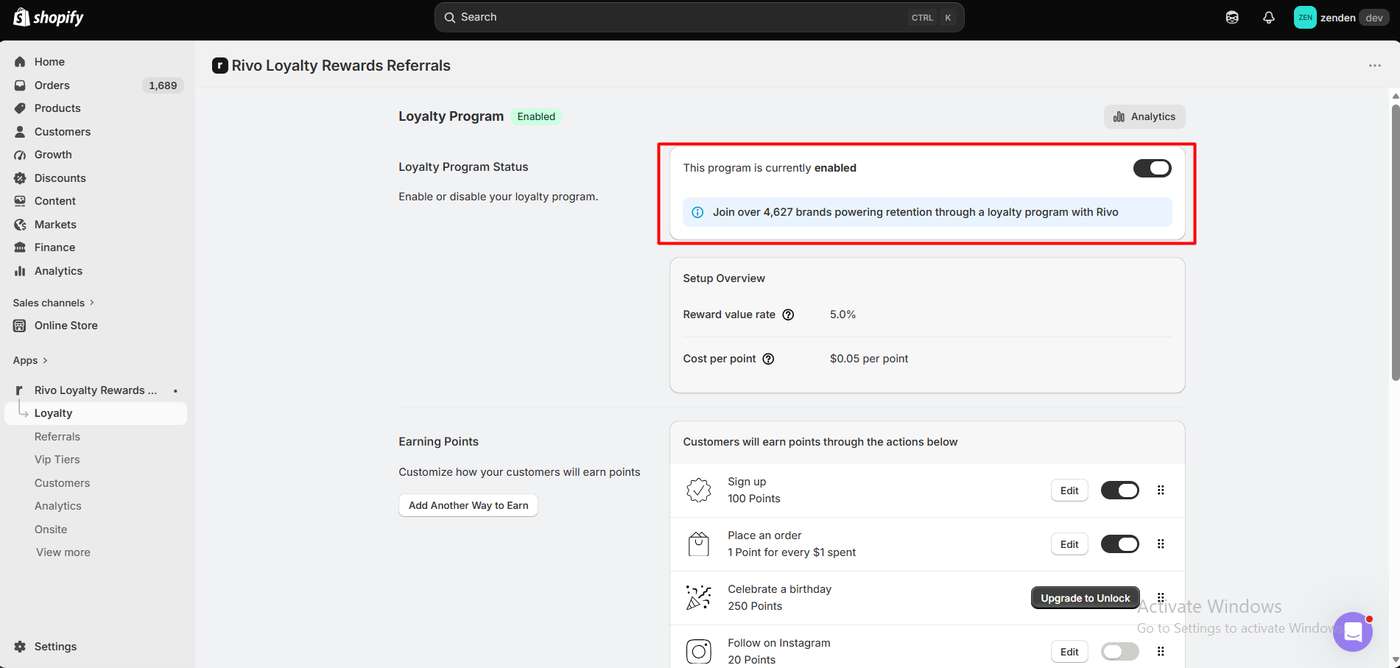
After install, the Loyalty page showed the program as enabled with a toggle to turn it off, and a Setup Overview that summarised the economics in two numbers: a reward value rate of 5.0% and a cost per point of $0.05.
Those numbers come from the defaults underneath. The earning rules were already populated:
- Sign up: 100 points, on.
- Place an order: 1 point for every $1 spent, on.
- Celebrate a birthday: 250 points, marked “Upgrade to Unlock.”
- Follow on Instagram: 20 points, off.
Redemption was also pre-built: a $5 off coupon for 100 points, $10 for 200, and $20 for 400. One point per dollar, cashed in at five cents each, is where the 5.0% figure comes from. We changed none of this.
Switching the app on for the storefront was a theme editor job. Under App embeds, the Rivo embed had a single toggle and no settings of its own; turning it on showed a “Rivo activated” toast. The widget’s look is managed in the app’s Onsite Display area, where the floating widget was already enabled and the settings list covered visibility, colours, corners, banner images, custom CSS, custom icons, removing Rivo branding, and panel order. We left the defaults and did not open the branding-removal or CSS options to check which plan they require.
Nothing in this sequence required code, and there was no multi-step onboarding wizard to complete before the program was usable.
Earning Points: One Point Per Dollar, Credited After the Order
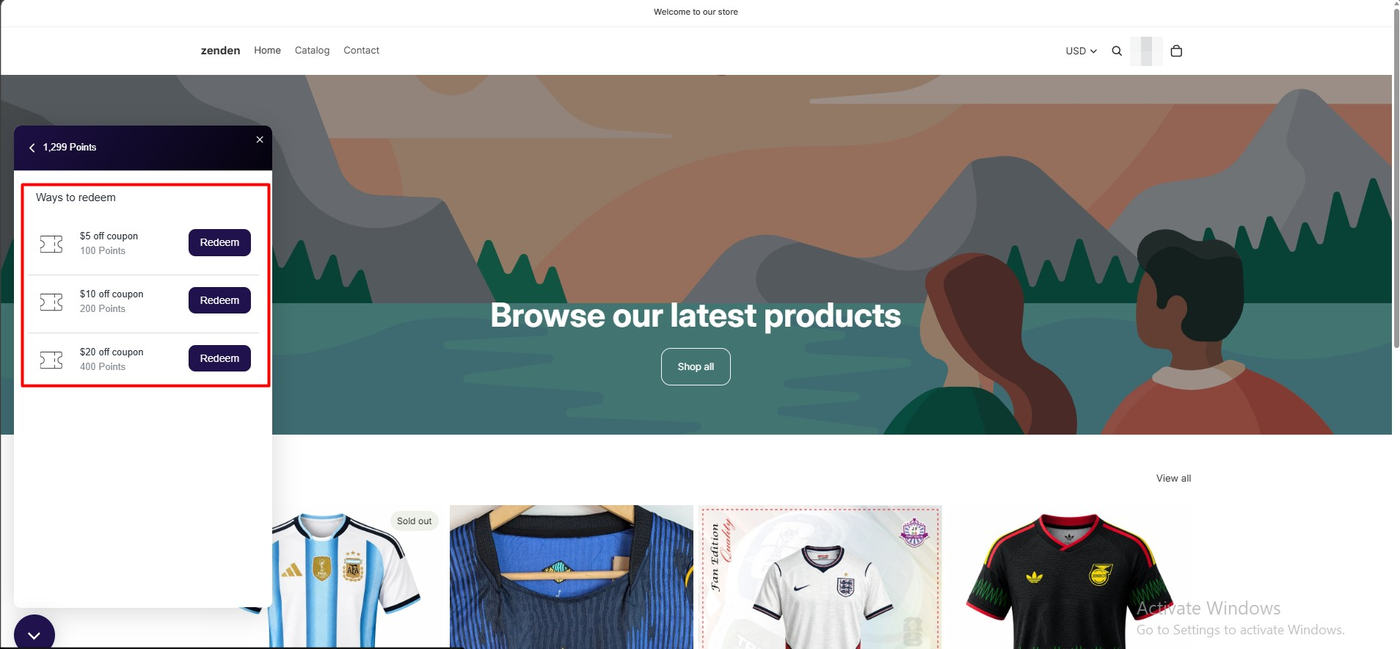
On the storefront, a dark “Rewards” launcher with a star icon appeared at the bottom left. Logged in as a new customer, the panel first showed 100 points, which matches the sign-up rule. At that balance, only the $5 coupon had a Redeem button; the $10 and $20 rows were listed without one, so a customer can see what they are working toward.
We then placed two $1,299 test orders, one jersey each. The panel went on to show 1,299 points and later 2,598 points, which is one point per dollar on each order, and all three redeem buttons became available.
One thing we could not reconcile from our captures: the sign-up bonus and the order points did not appear to add together in the totals we saw, and the panel header still read 2,598 immediately after we spent 400. We did not refresh the panel or open the customer record in the admin to check, so we are noting it rather than calling it a fault. If you launch on Rivo, look at a customer’s activity history after their first order to confirm the balance is what you expect.
We did not measure how long points took to appear after each order.
Redeeming: The Coupon Applied at Checkout
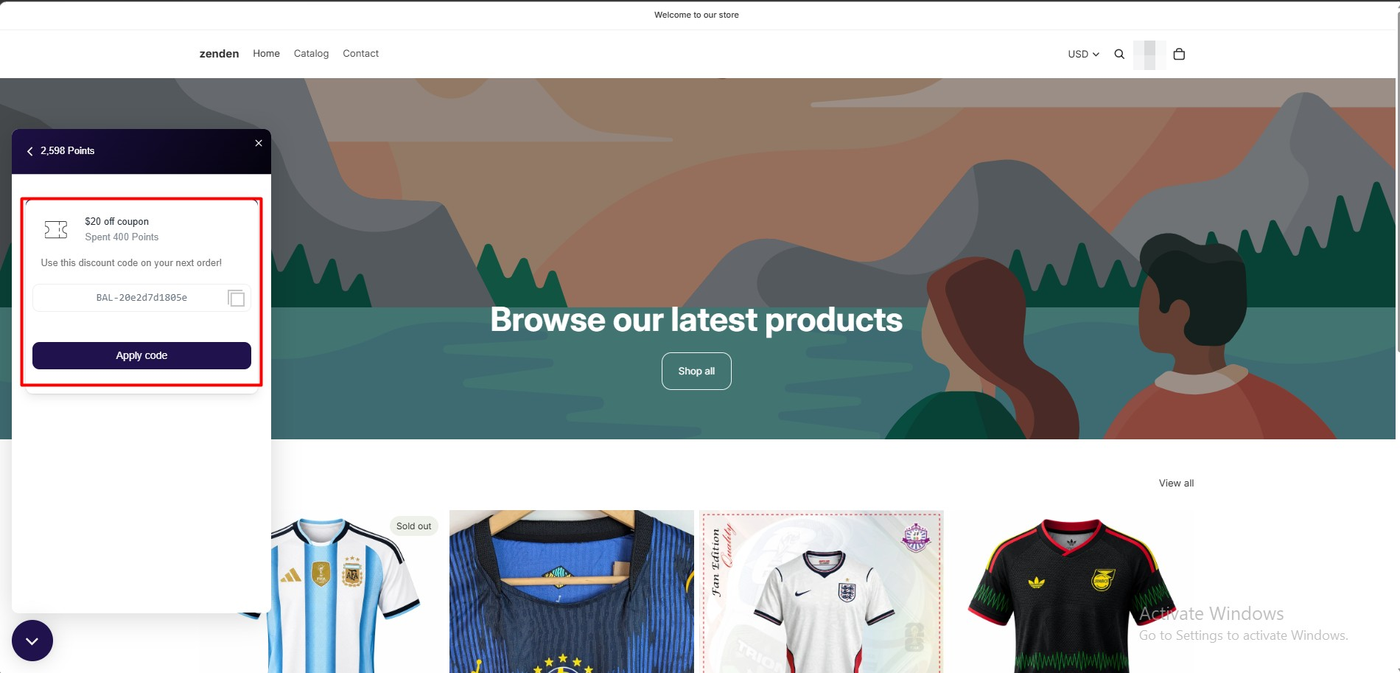
Choosing the $20 off coupon deducted 400 points and generated a discount code prefixed BAL-, with a copy button, a note to use it on the next order, and an Apply code button.
At checkout, the code was attached to the order. The summary showed an order discount of −$20.00, a total of $1,279.00 on the $1,299.00 subtotal, and a “Total savings $20.00” line. We completed the order.
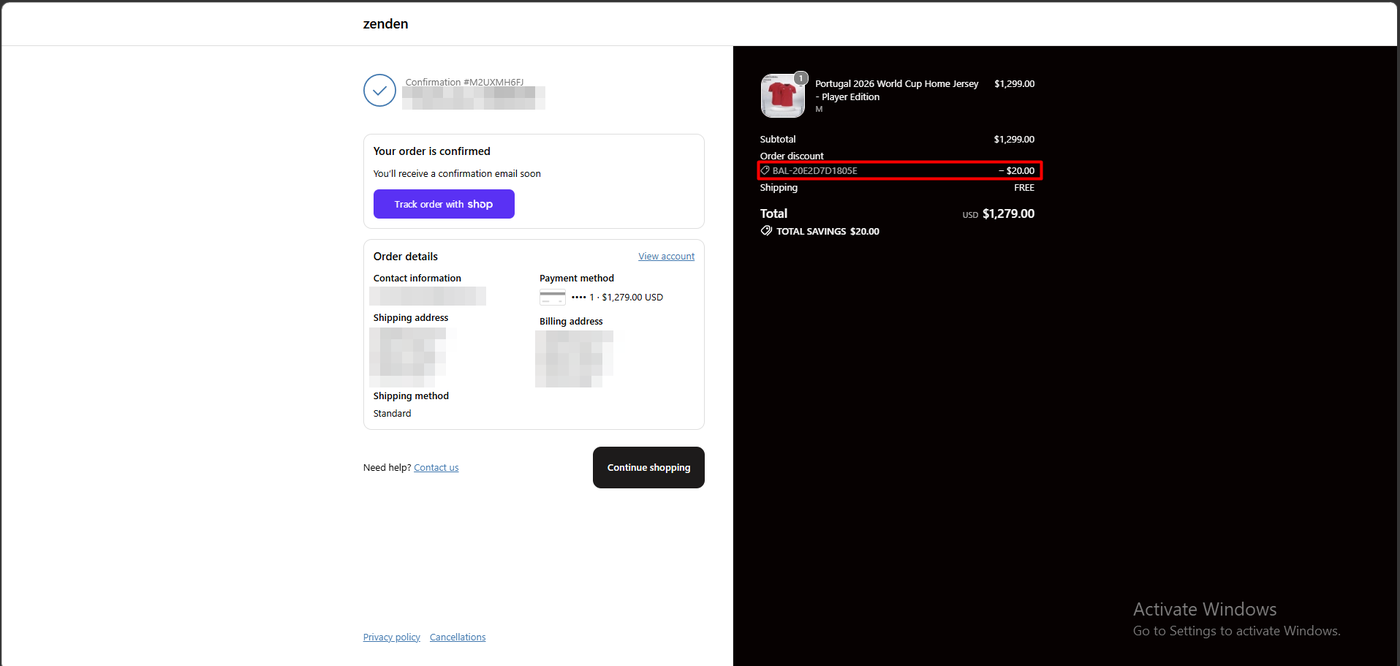
The confirmation page repeated the same discount line and total. That is the result that matters for a merchant: the reward became a Shopify discount on a paid order, not just a number in a widget.
The code itself is a long random string, which is normal for generated single-use discounts. Because the panel offers an Apply code button, the customer does not need to type it, at least on desktop.
The Defaults Are Generous for a High-Ticket Store
The default programme rewards 5% of spend. On our test catalogue, where a single item costs $1,299, one order earned enough points for three $20 coupons with change left over. For a store with that kind of average order value, 5% is a real margin decision, and the dashboard makes the trade visible with its cost-per-point figure.
The other side of the same coin is that the ladder stops at $20. A customer with 2,598 points can only spend them 400 at a time, one coupon per order. Larger fixed rewards, percentage-off rewards, free products, or free shipping would need to be added as new ways to redeem. We did not configure any.
So the defaults are a good starting point, but check two things before launch: whether 5% back is right for your margins, and whether your top tier is large enough for your best customers.
Pricing and Value
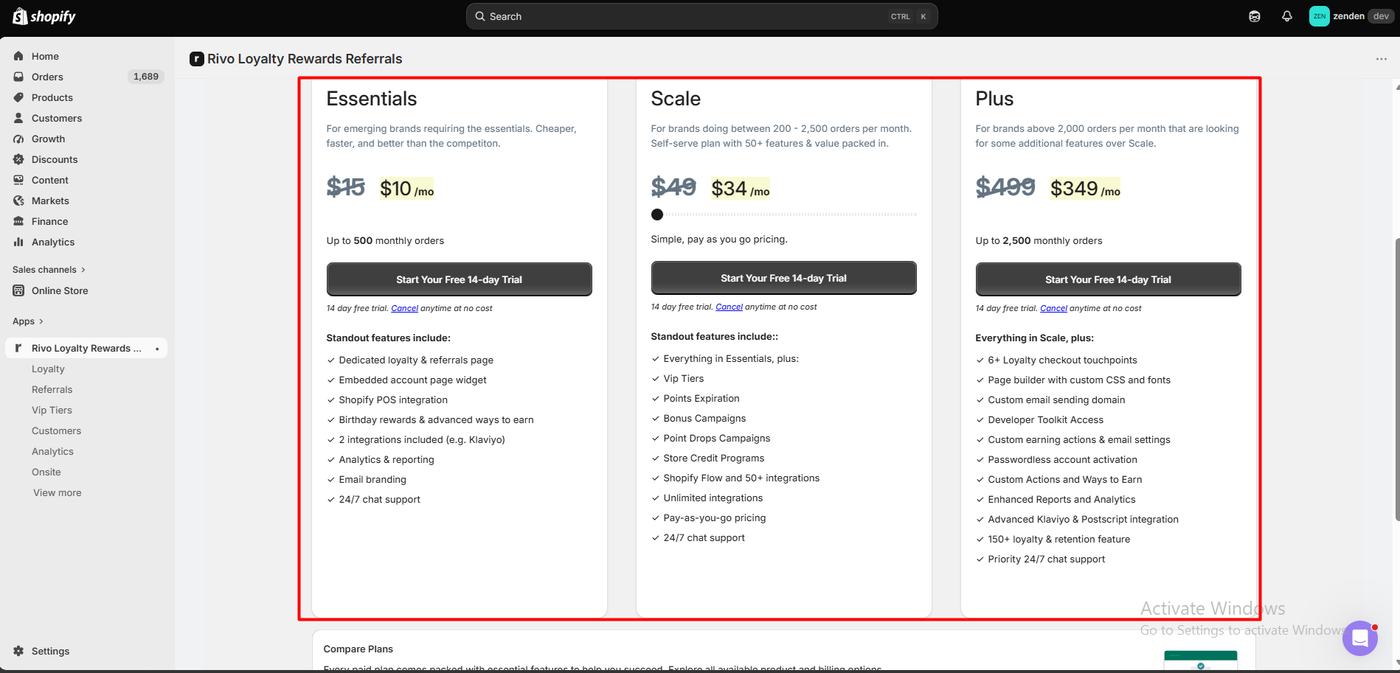
We checked pricing on the App Store listing on September 22, 2026, and on the app’s own plan page during testing. The two did not match, and the difference matters.
The listing showed four plans:
| Plan | Price | Monthly order limit | Trial | What the listing adds at this tier |
|---|---|---|---|---|
| Free | $0 | 200 | None needed | Points program, ways to earn and redeem, branding, automated email campaigns |
| Essential | $15/month | 500 | 14 days | Dedicated loyalty and referral page, theme extensions, on-site prompts, advanced ways to earn, email branding, 2 integrations, Shopify POS, 24/7 human support |
| Scale | $49/month | 400 included, then $20 per 100 orders, capped at $499 | 14 days | Custom CSS and fonts, VIP tiers, points expiry, analytics, bonus campaigns, referrals program |
| Plus | $499/month | 2,500 | 14 days | Custom integrations, advanced analytics, developer toolkit, checkout extensions |
The in-app plan page we captured showed the three paid plans with the listing prices struck through and lower prices beside them: Essentials at $10, Scale at $34 with a pay-as-you-go slider, and Plus at $349, each with a 14-day trial. The Free plan was not visible in that capture. We did not start a trial, so we cannot say how long those prices hold or whether they applied to our store specifically.
The feature lists also differed slightly. The in-app Essentials card mentioned a loyalty and referrals page and analytics and reporting, while the listing places the referral program and analytics on Scale. We did not open the Compare Plans table to settle it. If referrals or analytics are the deciding feature, confirm which plan unlocks them in your own admin before subscribing.
Two practical points follow from this. First, the price you are quoted inside your own admin is the one that matters, so open the plan page before you budget. Second, Scale is usage-based: the $49 covers 400 orders, and a store doing 1,000 orders a month should expect roughly $169, rising toward the $499 cap.
On value, the Free plan covered everything we tested. The first upgrade trigger is the Essential plan for advanced earning rules such as birthdays and for POS. The second is Scale, which is where VIP tiers, points expiry, analytics, and the referral program are listed. If referrals or VIP tiers are the reason you want a loyalty app, budget for Scale from the start.
What We Liked
- A usable program with zero configuration: Sign-up bonus, one point per dollar, and three redemption tiers were live before we changed a setting, and the dashboard summarised the cost as a percentage.
- The redeem list signals progress: At 100 points, the $10 and $20 rows were visible but had no Redeem button, so a customer can see the next reward without being able to misfire on it.
- The discount reached the order: The generated coupon was attached at checkout, reduced the total to $1,279.00, and appeared on the order confirmation.
- One-toggle theme embed: The app embed had nothing to configure in the theme editor and confirmed activation with a toast.
What Could Be Better
- The plan wall starts on the earning rules: The birthday rule was locked on our install, and the listing puts advanced earning, POS, referrals, VIP tiers, and analytics on paid plans.
- Two prices for the same plan: The in-app plan page and the App Store listing showed different monthly prices on the same day. That is confusing for a merchant comparing apps from the listing.
- Balance arithmetic we could not confirm: The numbers we saw each matched a single rule, but the sign-up bonus and order points did not visibly combine, and the header did not update immediately after redemption. We did not investigate further.
- Public reports of billing and data problems: Recent one-star reviews describe charges after uninstall, a points reset, and slow support. We did not experience any of these, and we did not contact support, so we cannot confirm or refute them.
Who Rivo Is Best For
Rivo fits small Shopify stores that want a points program live today with sensible defaults, and that can grow into a paid plan later. If you are under 200 orders a month and a sign-up bonus plus points-per-dollar is your whole program, the Free plan covers the workflow we tested.
It is also a reasonable fit for stores already using Klaviyo, Gorgias, or Postscript, given the listed integrations, although we did not test any of them.
Who Should Upgrade or Consider an Alternative
If birthday rewards, POS earning, or a dedicated loyalty page matter, start on Essential. If VIP tiers, referrals, points expiry, or analytics are central, start on Scale and model the usage pricing against your order volume.
If you are migrating from another loyalty app or changing plans, watch your Shopify bill and your customers’ balances closely for the first month. Those are the two areas where the negative public reviews concentrate.
We have also tested Appstle Loyalty, Joy Loyalty Program, and Smile.io on the same kind of development store. Appstle’s Free plan includes referrals but shipped with a single small reward; Rivo shipped with a three-tier ladder but puts referrals on a paid plan. We have not run them head to head, so we are not ranking them here.
Final Verdict
Rivo answered our question. A merchant can install it, leave the default program untouched, earn points on real orders, and redeem them for a discount that Shopify checkout honours. Every step of that loop worked in our test without code or configuration.
What the Free plan does not include is most of what the listing leads with. Referrals, VIP tiers, and analytics are Scale features with usage-based pricing, and even a birthday rule needs an upgrade.
That earns a Recommend for small stores that want a points program with good defaults, with a clear-eyed look at Scale pricing before planning referrals or VIP tiers verdict. Merchants who have read the recent billing complaints should also plan to check their invoice after any plan change.
Frequently Asked Questions
Is Rivo free?
The App Store listing on September 22, 2026 showed a Free plan for up to 200 orders a month with a points program, earning and redemption rules, branding, and automated email campaigns. Paid plans are listed from $15 a month, though the in-app plan page showed lower promotional prices during our test.
Does Rivo work without coding?
In our test, yes. We enabled the app embed from the Shopify theme editor, left the default program in place, and never edited theme code. Custom CSS and fonts are listed as a Scale plan feature for merchants who want deeper changes.
How do customers redeem Rivo points?
In our test, the customer opened the Rewards panel on the storefront, chose a coupon tier, and received a single-use discount code with an Apply code button. The discount was attached at checkout and appeared on the order confirmation.
Does Rivo include referrals and VIP tiers on the Free plan?
Not according to the listing. Referrals, VIP tiers, points expiry, and analytics are listed on the Scale plan at $49 a month with usage-based pricing above 400 orders. We did not test either feature.
Why does the in-app price differ from the Shopify App Store price?
We do not know. During our test the in-app plan page showed the listing prices struck through with lower prices beside them. Check the plan page inside your own Shopify admin, since that is the price you would be billed.