
A loyalty program only earns its keep if two things happen. Customers need to collect points without anyone at the store doing manual work. And when they cash those points in, the discount has to show up on the actual Shopify order.
Appstle Loyalty promises both on a Free plan that covers up to 250 orders a month. That is a generous ceiling for a small store. So we set out to answer one question: can a merchant install Appstle Loyalty, launch a points program without paying, and see a redeemed reward reduce a real checkout total?
We installed the app on a Shopify development store running the Horizon theme, worked through its four-step onboarding, stayed on the Free plan, placed a test order, and redeemed the points that order earned.
The short answer is yes. The full loop worked. The more useful finding is what the default setup gives you, and what it does not.
Key Takeaways
- The core loop worked on Free: A $1,299 test order earned 3,897 points automatically. Redeeming 300 of them produced a coupon that took $3.00 off the next checkout, and the completed order confirmed the discount.
- Onboarding is short and guided: Four steps cover the launcher button, panel colours, a percent-back earn rate, and the theme app embed. The last step checked the embed status for us before we launched.
- Default rewards are small: At the 3% rate we chose, each redemption was a fixed $3 for 300 points. Merchants will want to design their own reward tiers before going live.
- The bigger features cost more: POS earning, VIP tiers, custom email HTML, and checkout-page redemption all sit on paid plans.
- Public feedback is strongly positive, with a caveat: The listing shows a 5.0 rating from roughly 1,380 reviews. The small number of negative reviews cluster around support handling of technical issues, POS, and migrations.
Our Verdict
Appstle Loyalty is a reasonable choice for a small Shopify store that wants a points-and-referral program running quickly without a subscription.
In our test, the parts that matter most were solid. Setup was guided. The app embed switched on from the Shopify theme editor without code. Points were credited to the customer after an order. The redemption produced a coupon that Shopify checkout honoured, and the order confirmation showed the discount line.
Where you should slow down is program design. The onboarding sets one earn rate and one fixed-value reward. That is enough to launch, but it is not a finished program. Redemption tiers, referral values, and the storefront copy all still need thought, and the more advanced tools, VIP tiers in particular, require the $30 Business plan or higher.
What Appstle Loyalty Offers
Appstle Loyalty is a points, referrals, and store-credit app from the same developer as Appstle Subscriptions. Its Shopify App Store listing carries the Built for Shopify badge and describes points programs, store credits, referral rewards, VIP tiers, cart and checkout redemption, multi-language and multi-currency support, and native Shopify POS integration.
The listing’s “Works with” section includes Shopify Checkout, customer accounts, Shopify POS, Shopify Flow, Judge.me, Klaviyo, Omnisend, Mailchimp, Loox, Stamped, Recharge, Yotpo Subscriptions, Seal, Bold, Recurpay, and Appstle’s own subscription app.
Inside the admin, the navigation is organised around Earn Rewards, Redeem Points, Referrals, VIP Program, Design, and Customers. Our test focused on the first three and the storefront result. We did not test VIP, POS, store credits, or any of the listed integrations.
What We Tested
We installed Appstle Loyalty on a Shopify development store in September 2026. The store uses the Horizon theme and contains a small catalogue of test products.
Our test covered:
- the install permission screen,
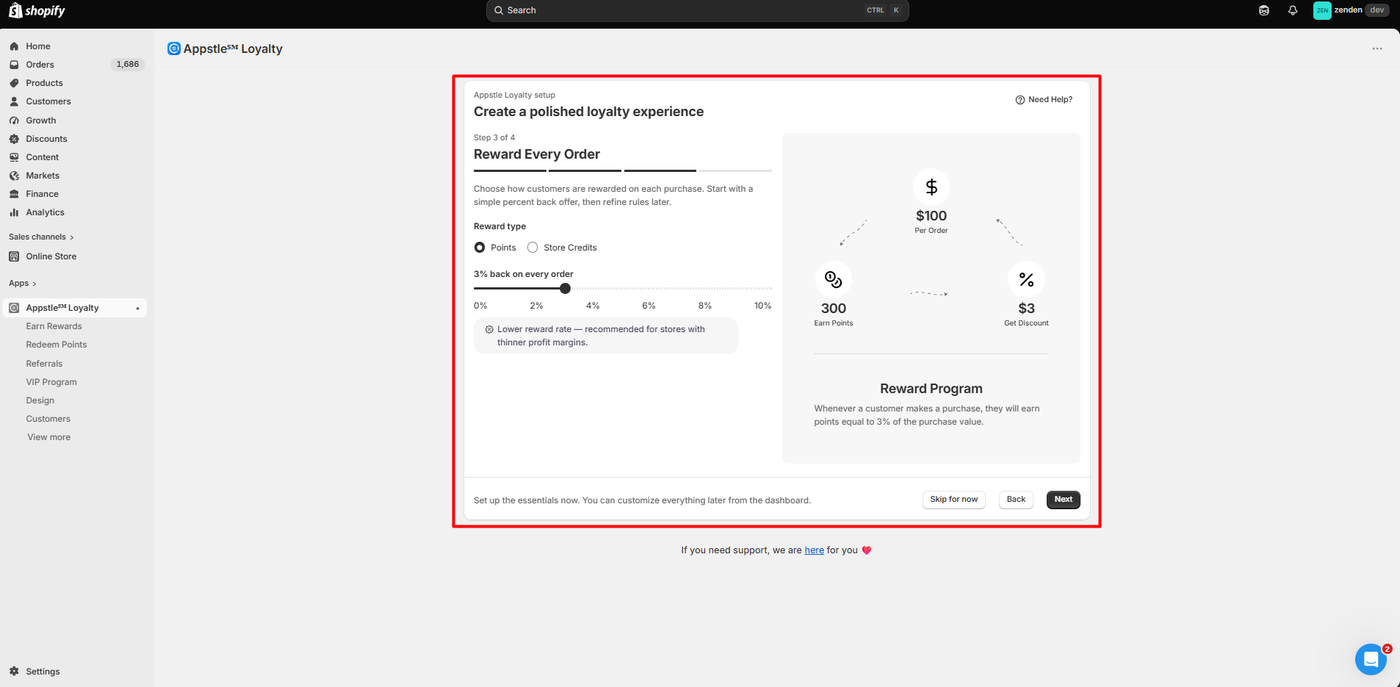
- the four-step onboarding: rewards launcher, rewards panel, order reward rate, and program launch,
- enabling the Appstle Loyalty app embed in the theme editor,
- selecting the Free plan,
- the dashboard setup guide and referral configuration,
- the storefront launcher and rewards panel as a logged-in customer,
- earning points from a completed test order,
- redeeming 300 points for a $3.00 discount reward,
- and applying the generated coupon at checkout and completing that order.
We did not test VIP tiers, store credits, Shopify POS, email notifications, the referral flow end to end, importing points from another app, analytics, or Appstle’s support team. Pricing and plan features were checked in the app’s own plan screen and on the App Store listing.
What Public Sources Add
On September 21, 2026, the Shopify App Store listing showed a 5.0 rating from about 1,380 reviews, with roughly 97% at five stars. The app launched in February 2023.
Recent reviews most often credit the support team, the amount of functionality available on the Free plan, and help migrating points from other loyalty apps. Several merchants mention using it alongside Shopify POS.
The small set of one- and three-star reviews is more specific. Reported problems include a POS redemption failure that support struggled to investigate, a migration that produced incorrect point balances, continued billing after a downgrade to Free, CSS conflicts with a customised theme, and missing activity logs. Some of these have developer replies acknowledging the issue. We did not reproduce any of them.
Treat those as a checklist for your own testing. If POS, migration, or a heavily customised theme is part of your setup, test that path before launch.
Getting Started: Four Steps, Then a Plan Choice
The install dialog asks for access to customer data, staff data, and store data including orders, discounts, store credit, and Shopify Functions. That is a broad scope, but consistent with an app that issues discounts and credits.
Onboarding is a four-step wizard, and each step can be skipped.
Step one configures the storefront launcher: the button text, whether it shows an icon, text, or both, and which icon to use. Step two sets the rewards panel colour from seven presets or a custom value, plus the greeting, emoji, and subtitle. It also offers an opt-in requirement, with a note that POS customers cannot opt in from the storefront.
Step three is the earn rule. A slider sets a percent-back rate between 0% and 10%, with a choice of points or store credits as the reward type. We left it at 3%. The preview explained the maths clearly: a $100 order earns 300 points, worth a $3 discount. A hint under the slider described 3% as a lower rate suited to thinner margins.
Step four is launch. This screen checked the theme app embed status on its own and reported it as On for our Horizon theme, with the time it last checked. We had switched the embed on from the theme editor a moment earlier. The embed had no configurable settings there, which was fine, because the design lives in the app.
After launch, the app asked us to pick a plan. We chose Free, and the dashboard then showed a three-item setup guide: ways to earn, rewards, and referrals. The first two were already complete from onboarding. Setting a referral rule of $5 off for both the referrer and the friend moved the guide to 3/3.
Nothing in this sequence required code or a developer.
Earning Points: Automatic After the Order
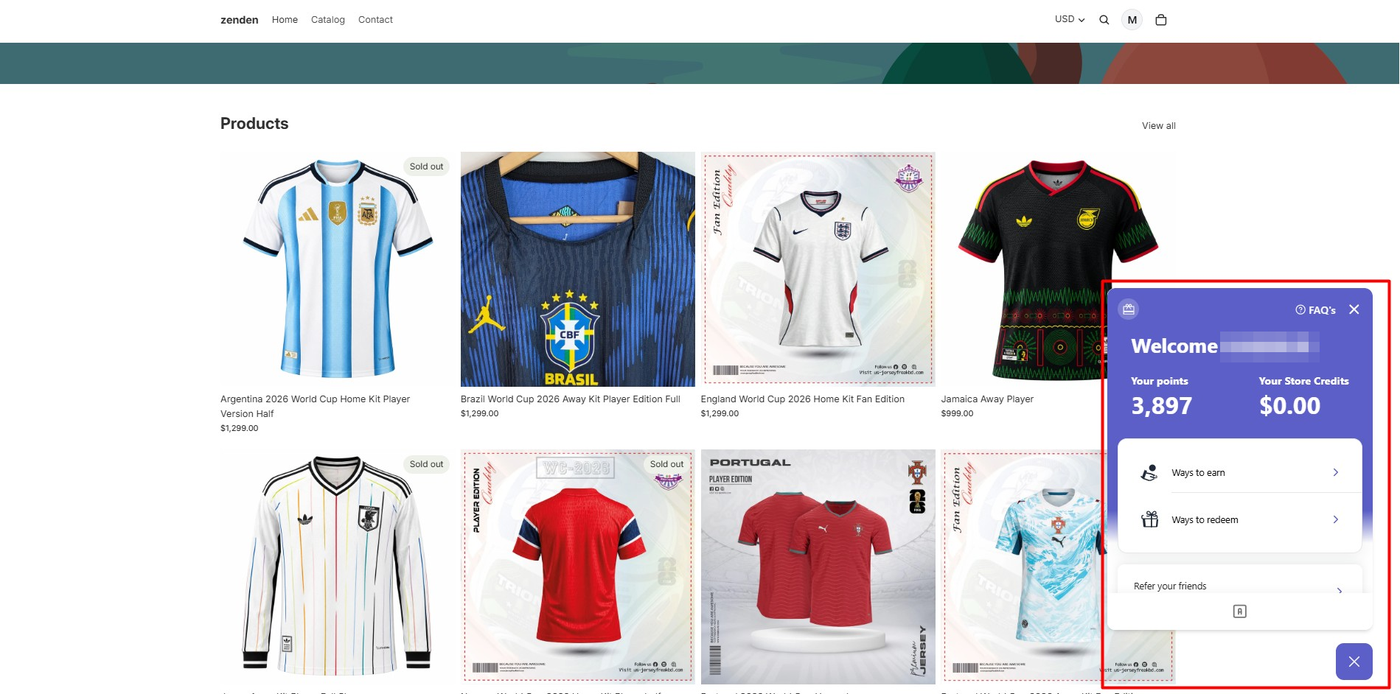
With the embed on, a purple “Loyalty Points” launcher appeared at the bottom right of the storefront. For a logged-in customer with no history it showed a balance of 0.
We then placed a $1,299 test order for a single jersey. When we reopened the panel, the balance read 3,897 points, which is exactly 3% of the order value at 300 points per $100. We did not have to approve or trigger anything.
The panel also showed a store credit balance of $0.00 and three sections: ways to earn, ways to redeem, and a referral link. The layout is compact and easy to read on desktop. We did not check it on a phone.
Redeeming: The Coupon Applied at Checkout
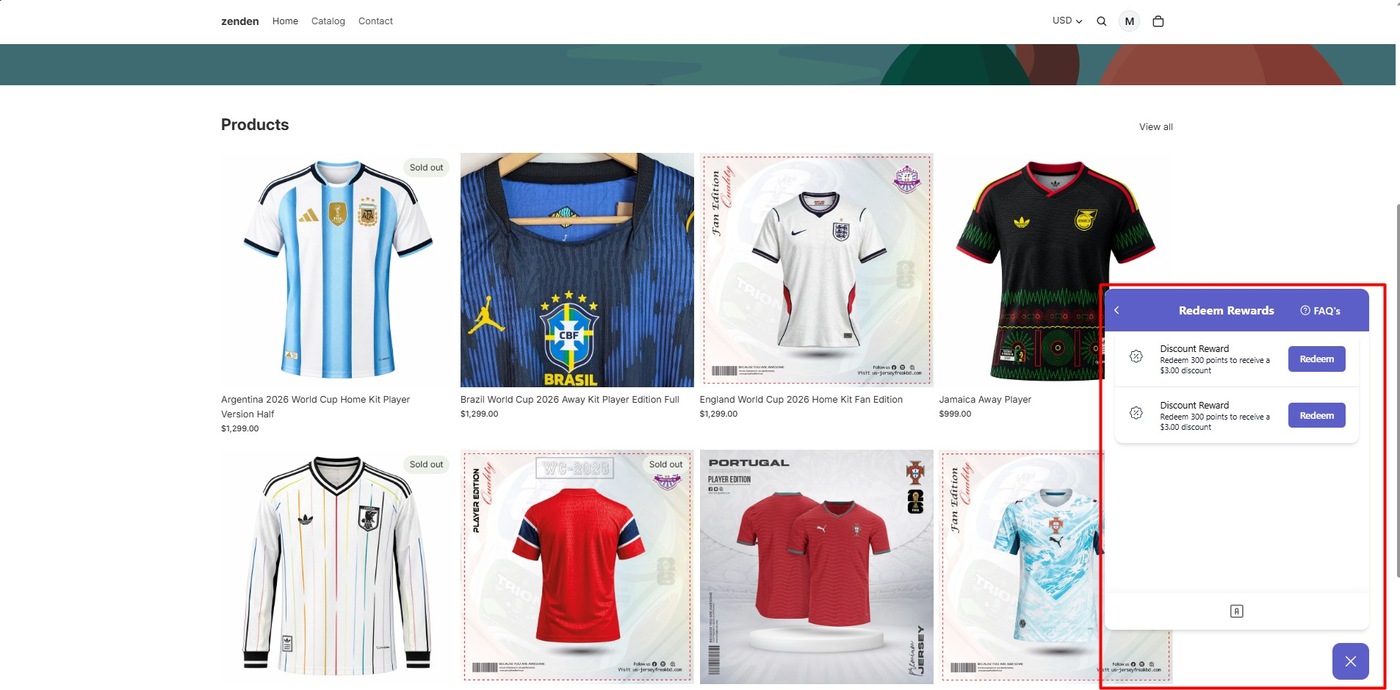
The Redeem Rewards screen listed a discount reward: 300 points for a $3.00 discount. Redeeming it generated a coupon code and a note that the discount would be applied at checkout, and that the cart might still show the full price.
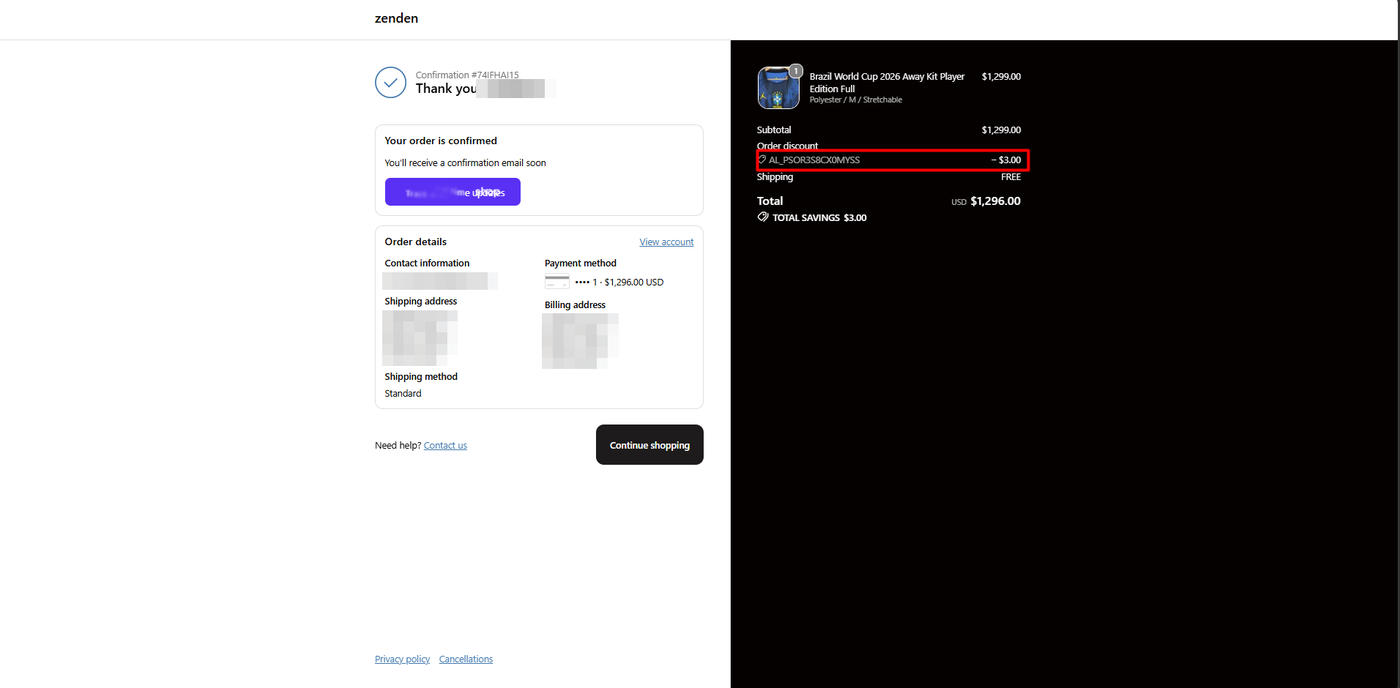
That note matches what we saw. The cart did not change. At checkout, the code was already attached, the order summary showed an order discount of −$3.00, and the total dropped from $1,299.00 to $1,296.00. We completed the order, and the confirmation page showed the same discount line and total savings.
This is the part that matters for a merchant. The reward was not just a number in a widget. It became a Shopify discount that reduced a paid order.
Two smaller things we noticed. The Redeem Rewards list showed the same $3 reward twice; we did not work out why. And the coupon was a single-use code with a long random string, which is normal for generated discounts but not something a customer will remember.
The Default Reward Is Small Relative to What Customers Earn
The 3% rate we chose credited 3,897 points for one $1,299 order. The only reward available to redeem was a fixed $3.00 for 300 points.
So a customer who just spent $1,299 could redeem twelve separate $3 coupons, one order at a time. That is technically correct and it works, but it is not a program most merchants would want to ship. Higher-value tiers, percentage rewards, or free-product rewards need to be designed in the Redeem Points area, which we did not configure.
This is not a bug. It is the difference between “launched” and “designed”. Plan an hour for reward structure after onboarding, especially if your average order value is high.
Referrals: Configured, Not Exercised
The referral rule we set gives the referring customer and the referred friend $5 off any product, applied when the friend accepts the invitation. The screen also offered a social media referral option and a custom referral domain tab, the latter tied to the Business Premium plan in the app’s plan screen.
We configured the rule and confirmed it showed as Active. We did not send a referral link, sign up a second customer, or verify the rewards. Treat the referral feature as present and configurable, not tested.
Pricing and Value
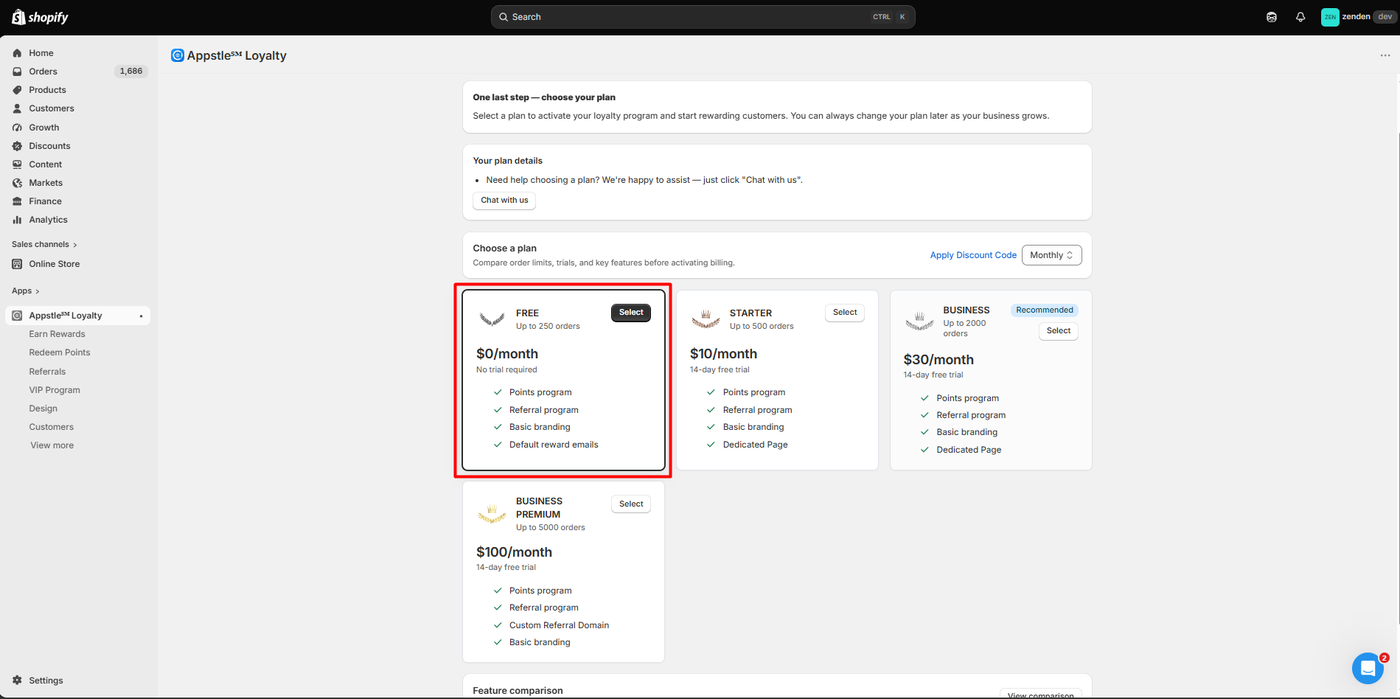
We checked pricing in the app’s own plan screen during testing and on the Shopify App Store listing on September 21, 2026. Plans are priced by monthly order volume rather than by feature alone.
| Plan | Price | Monthly order limit | Trial | What the listing adds at this tier |
|---|---|---|---|---|
| Free | $0 | 250 | None needed | Points earning and reward rules, loyalty page, store credits, referral program, default reward emails |
| Starter | $10/month | 500 | 14 days | Shopify POS earning and redemption, dedicated loyalty page |
| Business | $30/month | 2,000 | 14 days | VIP program, points redemption for free products, advanced redemption settings, custom email HTML |
| Business Premium | $100/month | 5,000 | 14 days | Checkout points redemption (Shopify Plus), advanced analytics, custom referral domain |
The listing states an additional $0.05 per order beyond each plan’s limit, and annual billing at a discount.
For the merchant in our test scenario, a small store under 250 orders a month that wants points and referrals, Free is genuinely usable. The upgrade triggers are order volume, POS, and VIP tiers. If VIP tiers are the reason you want a loyalty app, budget for Business from day one.
What We Liked
- Launch checks are built in: Step four of onboarding read the theme embed status itself and told us the program was ready, which removes a common “why is my widget not showing” failure.
- Points credited without intervention: The 3,897-point balance appeared after the order with no manual approval.
- The discount reached the order: The redeemed coupon reduced the checkout total and appeared on the order confirmation.
- The Free plan is a real plan: 250 orders a month, points, referrals, store credits, and a loyalty page, with no trial clock.
What Could Be Better
- The default reward needs design work: One fixed $3 reward against a 3% earn rate leaves high-spend customers with an awkward pile of small coupons until you build proper tiers.
- The duplicate reward entry was confusing: The same $3 reward appeared twice in the customer’s redeem list. Cosmetic, but it would raise questions from a real shopper.
- VIP and POS are paid: Two of the features the listing leads with are unavailable on Free.
- Public reports of rough support on hard problems: A few merchants describe support explaining the product rather than debugging POS, migration, or billing issues. We did not contact support, so we cannot confirm or refute this.
Who Appstle Loyalty Is Best For
Appstle Loyalty fits small Shopify stores that want a points and referral program live this week, at no cost, without touching theme code. It is also a natural fit for stores already using Appstle Subscriptions, given the shared developer and the listed integration.
If you are under 250 orders a month and your program is points plus referrals, the Free plan covers the tested workflow.
Who Should Upgrade or Consider an Alternative
If you run Shopify POS and want in-store earning, start on Starter. If VIP tiers or free-product rewards are central, start on Business.
If you are migrating an existing loyalty balance or run a heavily customised theme, test that path carefully before committing. Those are the areas where the negative public reviews concentrate.
We have also tested Joy Loyalty Program and Smile.io on the same kind of development store. Joy’s core loop also worked but its admin navigation was harder to follow; Smile’s customisation limits appeared sooner. We have not run the three head to head, so we are not ranking them here.
Final Verdict
Appstle Loyalty answered our question. A merchant can install it, launch a points program on the Free plan, earn points on a real order, and redeem them for a discount that Shopify checkout honours. Every step of that loop worked in our test without code.
What it does not do is design the program for you. The onboarding defaults are a starting point, not a finished reward structure, and the features that make a loyalty program feel premium, VIP tiers, POS, and checkout redemption, are on paid plans.
That earns a Recommend for small stores on the Free plan, with an hour reserved for reward design verdict. Larger or POS-driven stores should price the Business plan and test their specific integrations before relying on it.
Frequently Asked Questions
Is Appstle Loyalty free?
Yes. On September 21, 2026, the Free plan covered up to 250 orders a month with points, referrals, store credits, and a loyalty page. Paid plans start at $10 a month for 500 orders and add POS, VIP tiers, and other features at higher tiers.
Does Appstle Loyalty work without coding?
In our test, yes. We enabled the app embed from the Shopify theme editor, completed onboarding in the app, and never edited theme code. Merchants with heavily customised themes have reported CSS conflicts in public reviews, so check the storefront after enabling.
How do customers redeem Appstle Loyalty points?
In our test, the customer opened the rewards panel on the storefront, chose a discount reward, and received a single-use coupon code. The discount applied at checkout and appeared on the order confirmation. Cart and checkout-page redemption without a code are listed as higher-plan features we did not test.
Does Appstle Loyalty support VIP tiers?
The listing and the in-app navigation both include a VIP program, but it is a Business plan feature at $30 a month. We did not test it.
Can I move my existing loyalty points to Appstle Loyalty?
Merchants in public reviews describe importing balances from other loyalty apps, and some credit support for helping. One negative review describes a migration that produced incorrect balances. We did not test migration, so verify a sample of customers after any import.