
Most loyalty apps make you choose between a free plan with limits and a paid plan with room to grow. Casa Loyalty skips that choice. Its Shopify App Store listing shows one price: Free.
That makes it a tempting place to start. The question for this review was whether a free app gives you a program that works, and what you need to watch when you build it yourself.
We installed Casa Loyalty on a Shopify development store, built a points program, placed a real order, redeemed a coupon, and watched it come off a completed checkout. The loop worked. Along the way, the values Casa pre-filled showed how easy it is to give away more than you meant to.
Key Takeaways
- The full loop worked. A $2,598 order earned 259,800 points. Redeeming 100 of them gave a 1% coupon that took $12.99 off a $1,299 order, for a total of $1,286.01.
- The app is listed as free, with no plans or order limits shown on the listing.
- You build the program yourself. Onboarding asked about the business, then a 0/3 checklist asked us to create at least one way to earn and one way to redeem. The forms come pre-filled.
- The rule options are flexible: per-dollar or fixed points, spending thresholds, first-order bonuses, per-customer limits, and rewards limited to a collection or a minimum spend.
- The pre-filled values overgive. The forms suggested 100 points per $1 and 100 points for a 1% coupon. Kept as they were, $1 of spending earns a 1% coupon whose value grows with the size of the next basket.
Our Verdict
Casa Loyalty is a strong pick for Shopify stores that want a free, flexible points program and are happy to set the rules themselves.
The mechanics held up. The rules we created worked as written, the storefront panel showed the balance and a QR code for in-store use, and the coupon became a real Shopify discount on a completed order. Public reviews also point to fast, hands-on support from named staff.
The catch is in the starting numbers. Casa does not launch a program for you. You create each rule, and the forms come pre-filled. We kept Casa’s suggested values: 100 points per $1 spent, and 100 points for a 1% off coupon. Together they let a customer turn $1 of spending into a discount worth $12.99 on a big order. Change them before you launch.
What Casa Loyalty Offers
Casa Loyalty Points & Rewards comes from Casa Apps. Its Shopify App Store listing carries the Built for Shopify badge and shows a launch date of June 17, 2024.
The listing describes points, VIP tiers, referrals, store credit and gift cards in one app. It promises rewards at checkout, through Shopify POS, on a loyalty page and in customer accounts. It also mentions point multipliers, spending goals, birthday rewards and social rules. It says the team specialises in “advanced custom loyalty use cases for Shopify Plus stores,” with 24/7 live chat and “founder-led support.”
Listed integrations include Checkout, customer accounts, Shopify POS and Admin, plus Gorgias, Judge.me, Klaviyo, Omnisend, Recharge and Smartrr. The listing claims 25 or more integrations in total and 32 languages.
What We Tested
We tested Casa Loyalty in October 2026 on a Shopify development store called zenden. It runs the Horizon theme with a football jersey catalogue and about 1,700 orders of history.
Our test covered the install permissions, the onboarding form, the dashboard checklist, the earning and reward settings, the Program page, and the three theme app embeds. On the storefront, signed in as a customer, we placed a real $2,598 order, checked the points balance, redeemed a 1% coupon, and completed a second order with that code applied.
We did not test referrals, VIP tiers, Surprise & Delight, limited-time offers, gift cards, store credit, POS rewards or the in-store QR code, emails, the landing page, any integration, mobile layouts or migration. We did not see a billing or plan screen, and we did not contact support. Pricing comes from the App Store listing, checked on October 12, 2026.
Setup: You Build the Program
The install dialog asks to view customer data, including sensitive, device and activity data, and staff data. It also asks to view and edit customers, products, orders, discounts, gift cards, store credit and the online store.
Onboarding is one short form. “Supercharge Sales with Casa Loyalty!” asks for a business category and, optionally, monthly e-commerce earnings. It does not ask about a reward rate. Within moments, a support chat bubble from a named agent welcomed us by first name.
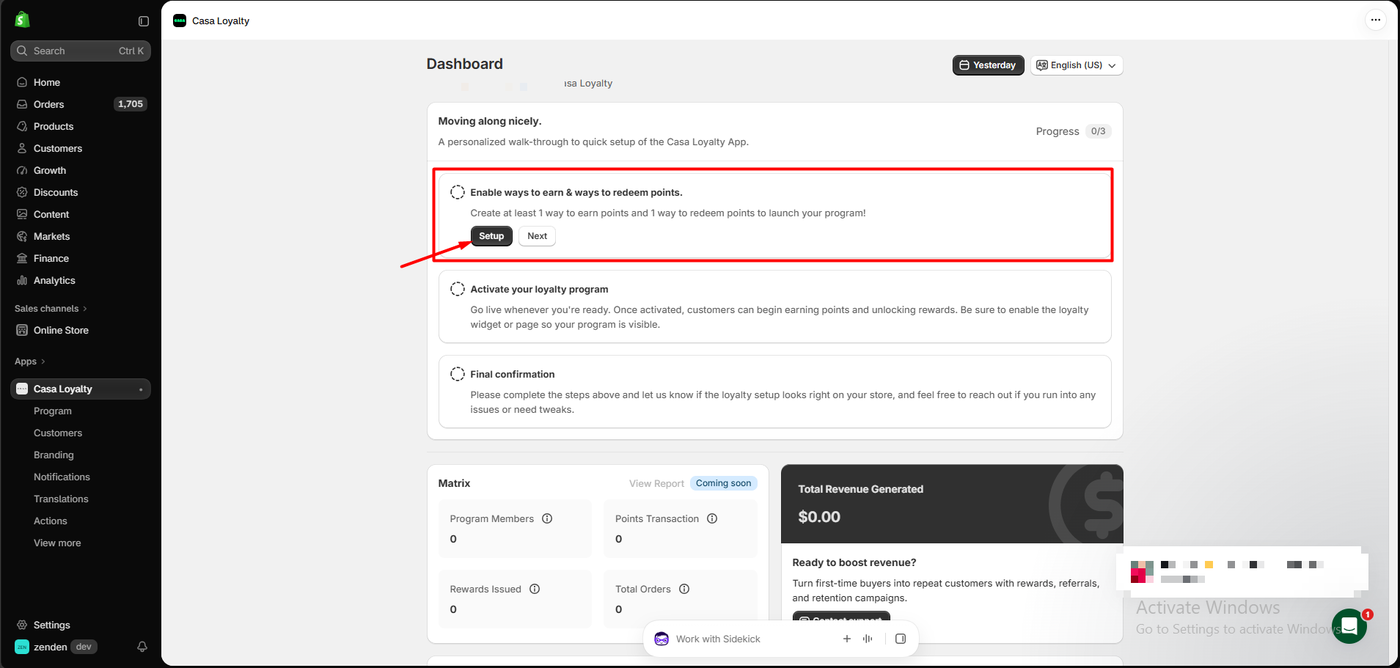
The dashboard then opens on a checklist at 0/3:
- Enable ways to earn and ways to redeem points. “Create at least 1 way to earn points and 1 way to redeem points to launch your program!”
- Activate your loyalty program, with a reminder to enable the widget or page.
- Final confirmation, asking you to tell the Casa team if the setup looks right.
That last step reflects how Casa works. It is built around the team helping you, not around a self-running wizard.
Below the checklist, the metrics panel shows members, point transactions, rewards issued and total orders. Its View Report link was marked Coming soon, so detailed reports were not available to us.
The Earning and Reward Settings
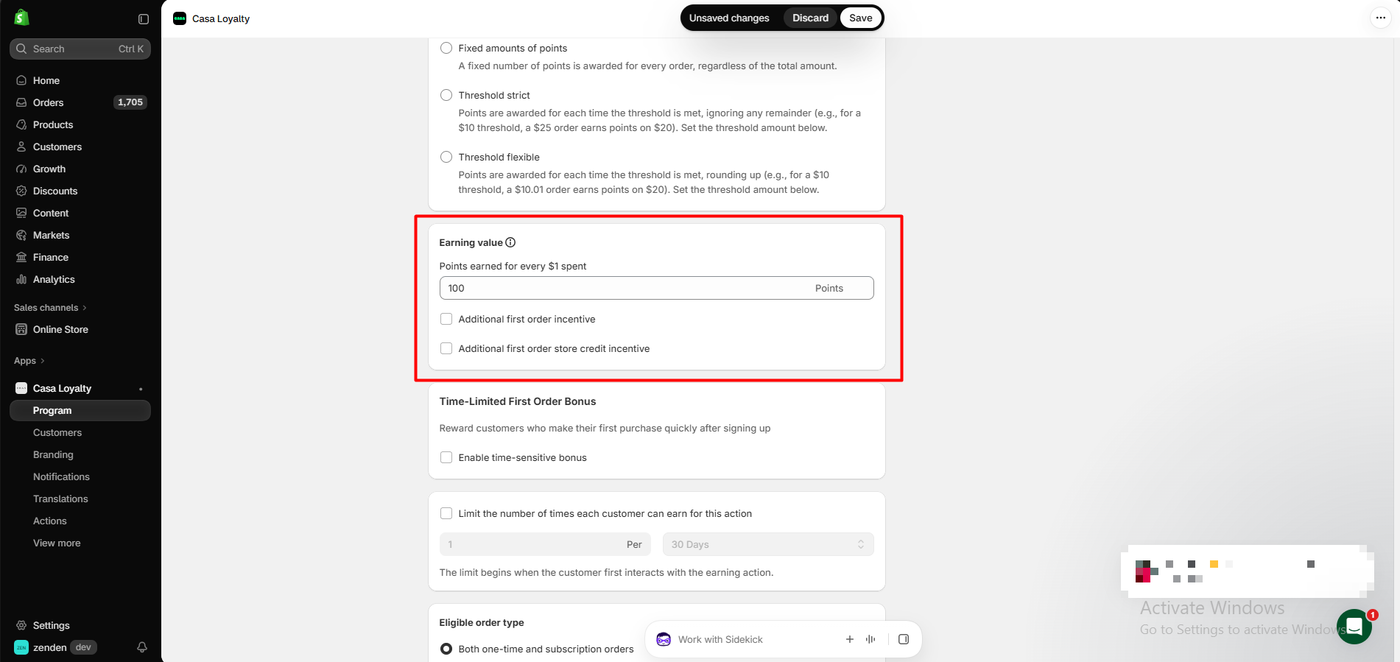
This is where Casa stands out. The Place an order rule offers four ways to award points:
- Points for every $1 spent
- A fixed number of points per order, whatever the total
- Threshold strict: points each time a spend threshold is met, ignoring the remainder. The app’s own example is a $10 threshold, where a $25 order earns points on $20.
- Threshold flexible: the same, but rounding up, so a $10.01 order earns points on $20
Below that sit an additional first-order incentive, a first-order store credit incentive, a time-limited first-order bonus for customers who buy soon after signing up, a limit on how often each customer can earn, and a choice of one-time, subscription or both order types. The form came pre-filled with 100 points for every $1 spent. We kept that value and left every bonus off.
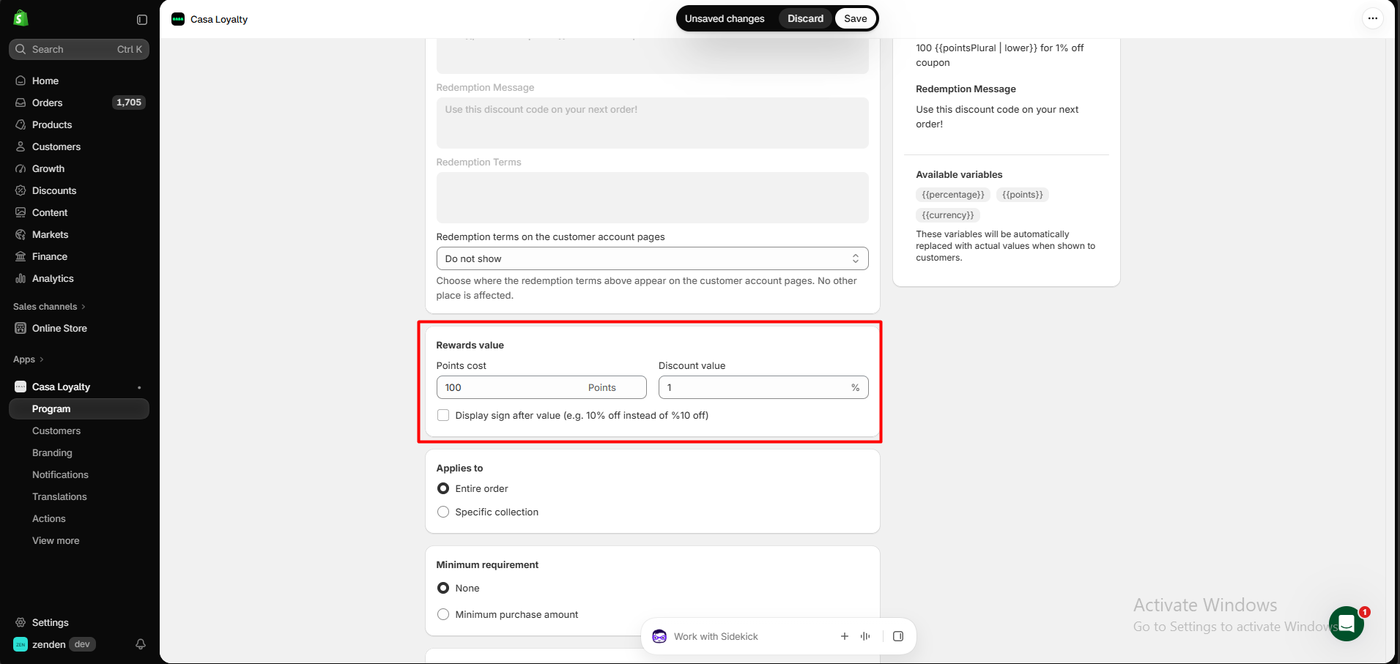
The reward form is just as flexible. You set a points cost and a discount value, choose whether it applies to the entire order or a specific collection, and add a minimum purchase if you want one. The form came pre-filled at 100 points for 1% off. We kept that, on the entire order, with no minimum.
Two small polish points showed up here. A checkbox labelled “Display sign after value (e.g. 10% off instead of %10 off)” is off by default, so our reward appeared to shoppers as “%1 off coupon.” Tick it before launch. The admin preview also showed raw template text, “100 {{pointsPlural | lower}} for 1% off coupon,” although the storefront displayed the reward correctly.
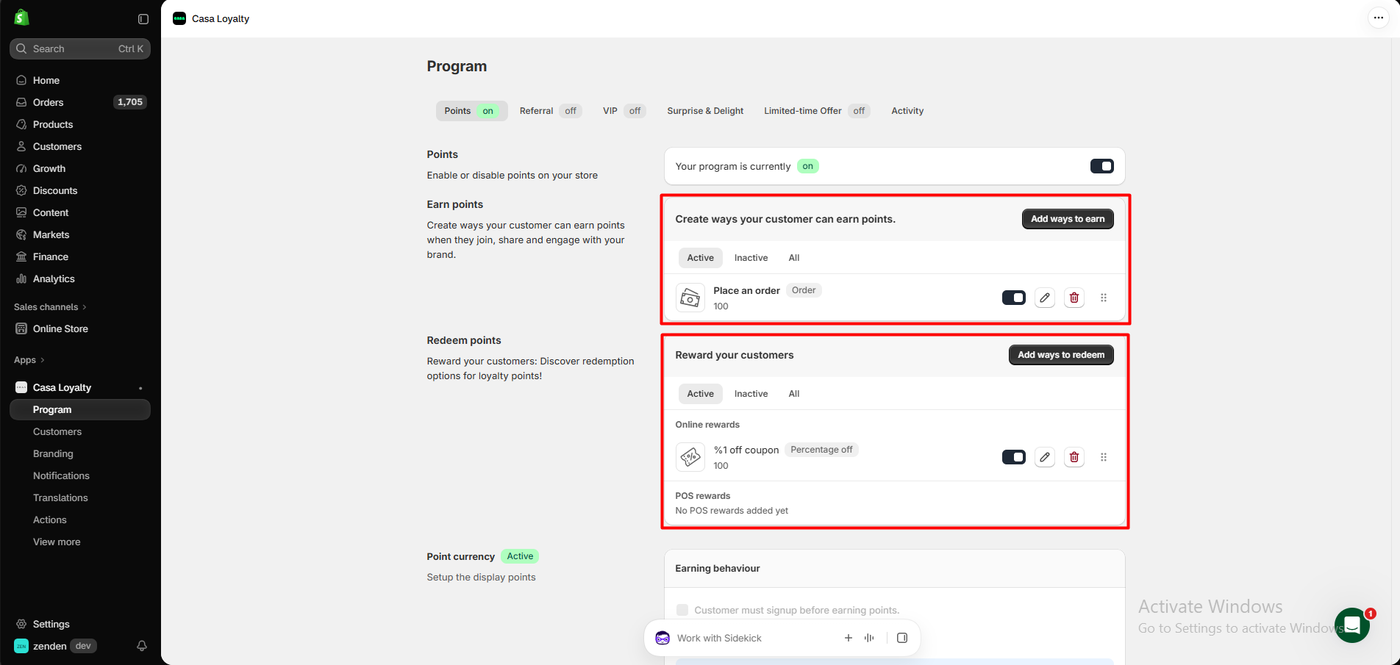
The Program page brings it together. Tabs cover Points (on), Referral (off), VIP (off), Surprise & Delight, Limited-time Offer (off) and Activity. “Your program is currently on,” with one earning rule and one online reward. A separate POS rewards section read “No POS rewards added yet.”
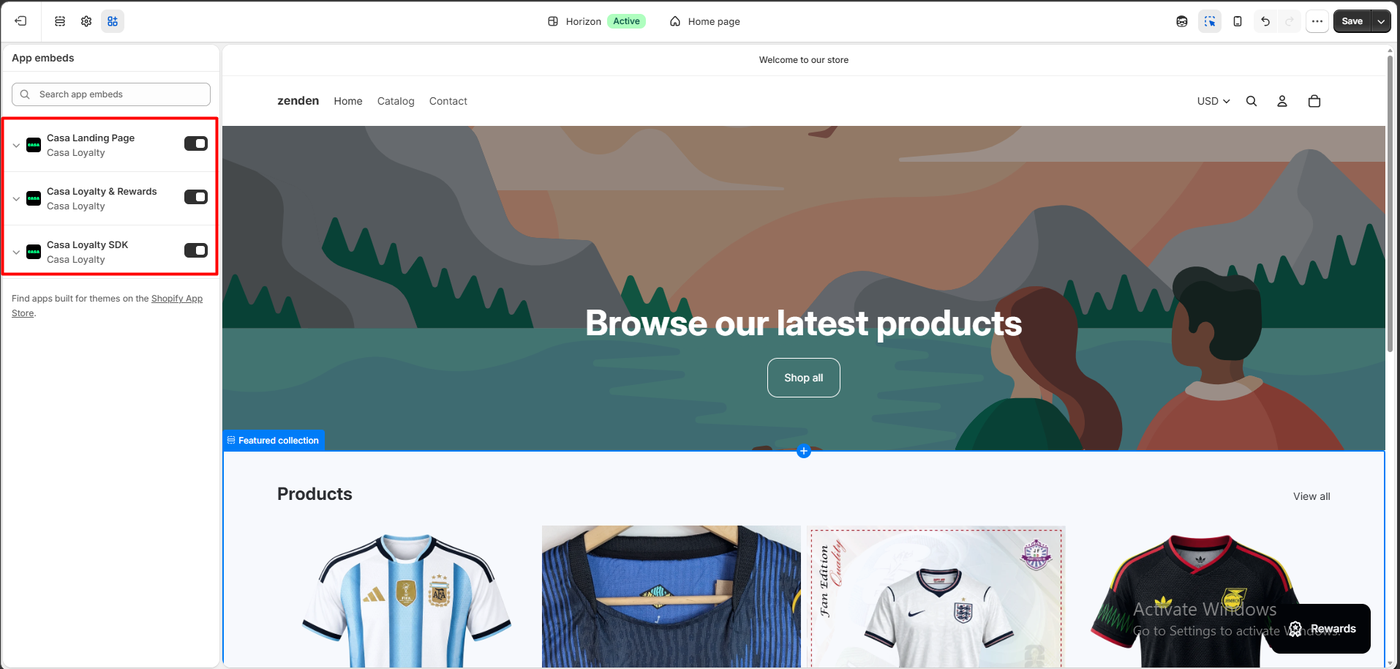
In the theme editor, Casa adds three app embeds: Casa Landing Page, Casa Loyalty & Rewards, and Casa Loyalty SDK. All three were on in our test, and a black Rewards launcher appeared at the bottom right of the storefront.
Earning: One Order, 259,800 Points
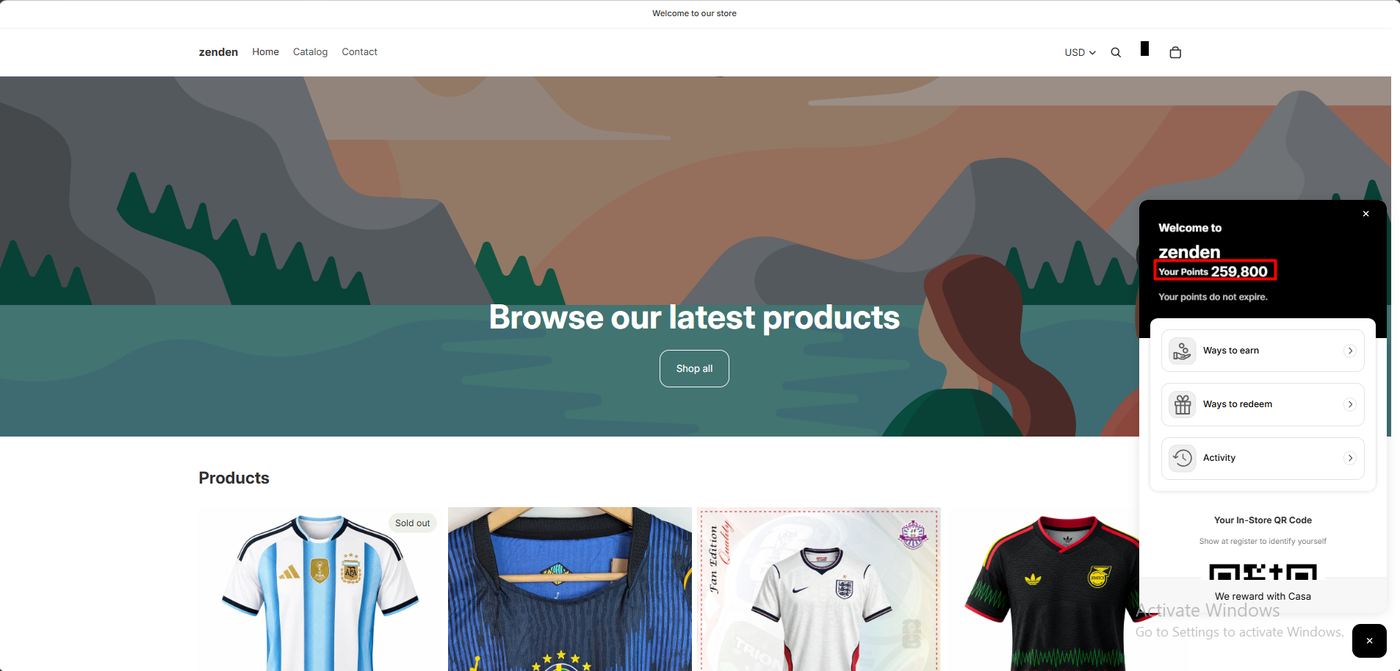
We bought two England home jerseys for $2,598.00 with free shipping.
The rewards panel then showed 259,800 points. That is exactly 2,598 × 100, so the balance matches the earning rule. The panel also said “Your points do not expire,” and listed ways to earn, ways to redeem and an activity history.
One nice touch sits below those links: “Your In-Store QR Code — Show at register to identify yourself.” That ties the online balance to Shopify POS without a separate card. We did not test it at a register.
Redeeming: The Coupon Reached a Real Order
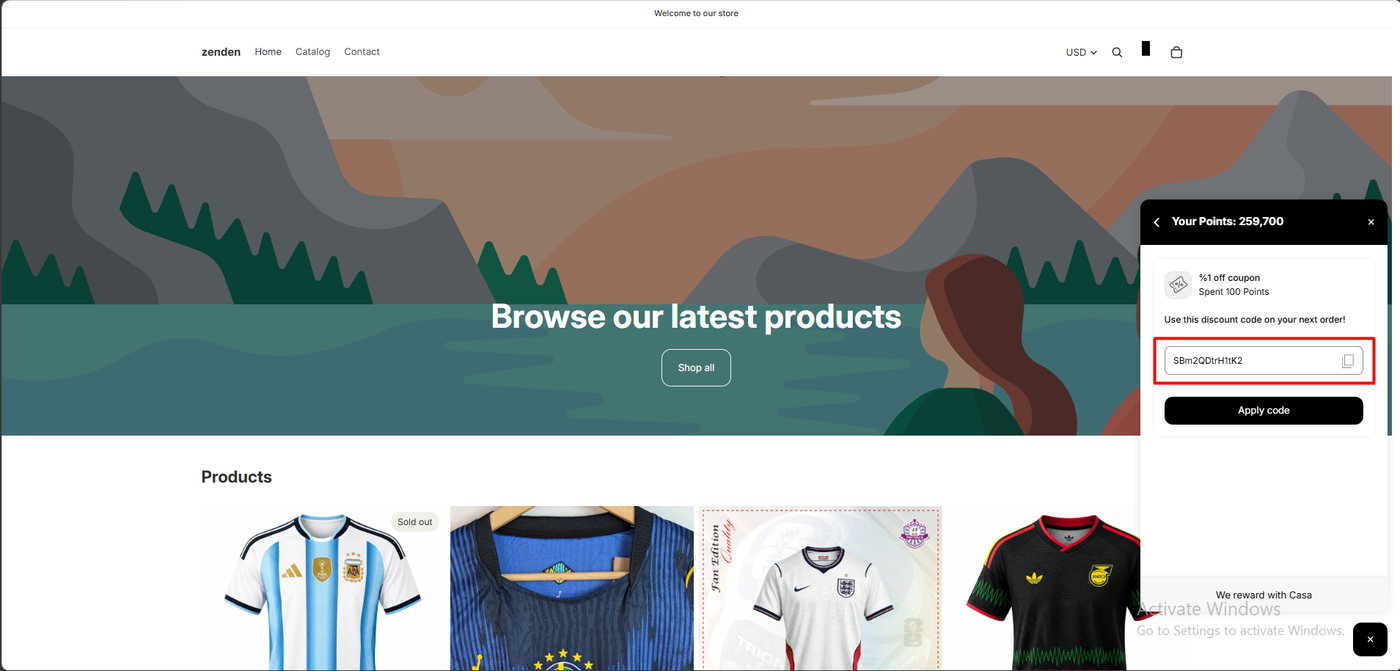
Ways to redeem showed one option, “%1 off coupon — 100 points,” with a Redeem button.
Redeeming took the balance from 259,800 to 259,700. The panel showed “Use this discount code on your next order!” with a generated code, a copy button and an Apply code button.
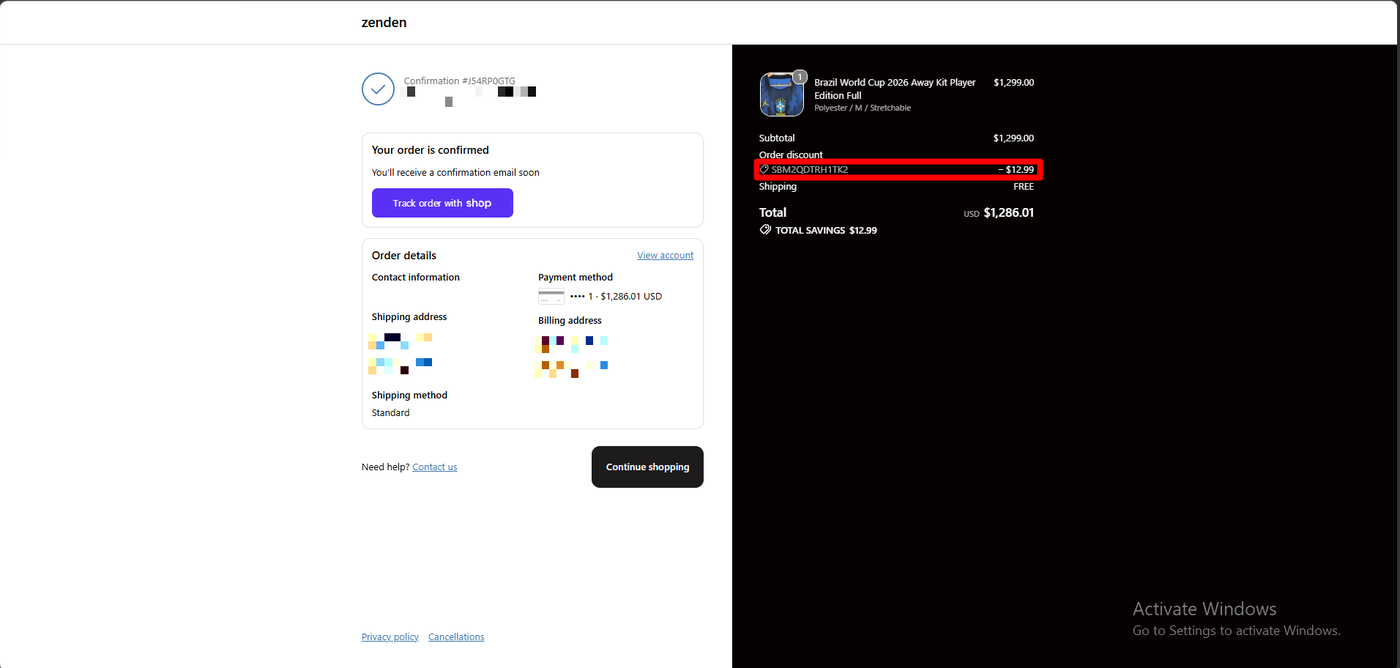
We used it on a Brazil away jersey at $1,299.00. Checkout showed the code as an order discount of −$12.99, and the confirmation repeated it: total savings $12.99 and a total of $1,286.01.
So the reward became a real Shopify discount on a completed order. That is the test that counts.
The Maths Behind a Percentage Reward
Now look at what those numbers mean. At 100 points per $1, $1 of spending earns 100 points. At 100 points per coupon, that is one 1% coupon for every dollar spent.
A 1% coupon is not worth a fixed amount. It is worth 1% of whatever the customer buys next. On our $1,299 jersey it was worth $12.99, so one dollar of past spending paid for a $12.99 discount. Our customer was still holding 259,700 points afterwards.
We redeemed once, so we did not test whether several coupons can be stacked on one order. Shopify discount rules may limit that. Even with one code per order, though, this setup hands out far more value than most merchants would intend.
These are the values Casa pre-filled, not numbers we chose. A merchant who accepts the suggestions, as we did, launches with this exposure, and we saw no warning about what a point is worth. Before you launch:
- Check what one point is worth. Divide the reward value by its points cost, then compare it with what a customer earns per dollar.
- Prefer fixed-amount rewards, or add a minimum purchase or a collection limit to percentage rewards.
- Use the threshold or limit options if you want to cap how fast points build up.
Casa Loyalty Pricing
On October 12, 2026 the App Store listing showed a single price: Free. It listed no paid plans, no order or member limits, no trials and no usage charges.
That is unusual in this category. Most loyalty apps we have reviewed cap their free plans by monthly orders and charge to go further.
Two things are worth asking before you rely on it.
What, if anything, is charged. The listing pitches advanced custom work for Shopify Plus stores and dedicated managers. It does not say whether that work, or any future plan, costs money. We did not see a billing screen during our test.
What “free” includes at scale. With no limits listed, ask support to confirm in writing that your order volume and the features you need stay free.
What Public Sources Add
On October 12, 2026 the listing showed a 5.0 rating from 483 reviews, with 473 at five stars, nine at four, none at two or three, and one at one star.
Praise centres heavily on support. Merchants name individual staff, often Vinay, Sam and Ateeb, and describe quick, hands-on help with setup, code and design changes, sometimes late at night. Some mention switching from other loyalty apps, and some point out that much of it is free.
The criticism is about the same thing. The single one-star review, from an Australian store in January 2026 after seven days, says the merchant contacted the help desk twice, disputes the 24/7 claim, and says a promised three-hour email reply had not arrived after five hours. No developer reply was visible. A four-star review from the same month describes early confusion and a contact who seemed unreachable, then a quick Zoom call that fixed things. Another four-star merchant says they decided to “give the app another go.”
We did not contact support, so we cannot add our own view. The pattern suggests that support is the product’s biggest strength, and that the experience depends on reaching the right person.
What We Liked
- Free on the listing, with no order limits shown.
- Very flexible earning rules: per-dollar, fixed, two threshold modes, first-order and time-limited bonuses, and per-customer limits.
- Flexible rewards, with collection limits, minimum spend and redemption terms.
- The loop worked, from points to code to a discount on a completed order.
- An in-store QR code in the storefront panel, and points that do not expire.
What Could Be Better
- No ready-made program. You start at 0/3 and create every rule yourself.
- The pre-filled values overgive. 100 points per $1 with a 100-point 1% coupon lets $1 of spending fund a discount that grows with the basket.
- “%1 off” formatting by default, and raw template text in the admin preview.
- Reports marked “Coming soon” on the dashboard.
- Three separate app embeds to manage in the theme.
- Unclear commercial model. The listing says Free but also pitches custom work for Plus stores without prices.
- Sourced support complaints about slow first replies, which we did not experience or test.
Who Is Casa Loyalty Best For?
Casa Loyalty suits Shopify stores that want a free, highly configurable points program and are comfortable setting their own rules, or that want the Casa team to help build a custom one. It also makes sense for stores planning to use Shopify POS, given the QR code and POS reward options.
Look elsewhere, or get help first, if you want a program that works out of the box with sensible defaults, or if you need detailed reporting today.
On free headroom, Casa sits at the top of the apps we have reviewed:
| App | Free monthly order limit |
|---|---|
| Casa Loyalty | None listed (app listed as Free) |
| LoyaltyLion | 400 |
| Essent Loyalty | 250 loyalty-influenced |
| Joy | 250 |
| Appstle Loyalty | 250 |
| Rivo | 200 |
| Yotpo Loyalty | Under 100 |
| CWILL Loyalty | 50 |
These figures come from each app’s published plan information, not from testing the limits, and the feature sets behind them differ. If you want defaults that get you live in minutes, Essent Loyalty builds a full program from one reward-rate choice.
Final Verdict
Casa Loyalty did what a loyalty app has to do. We built an earning rule and a reward, earned 259,800 points on a real order, and watched a redeemed coupon take $12.99 off a completed checkout. It is free on its listing, its rule options are very flexible, and merchants consistently praise its support.
What you are taking on is the design work. Casa’s pre-filled values are generous enough to be risky, so work out what a point is worth and change them before you go live.
Recommended for stores that want a free, flexible loyalty program and will replace the pre-filled values with their own, or will lean on Casa’s team to help.
Frequently Asked Questions
Is Casa Loyalty free?
Its Shopify App Store listing shows a single price, Free, with no plans or limits listed. The listing also mentions custom work for Shopify Plus stores without stating a price, so confirm with Casa if you need that level of help.
Does Casa Loyalty set up a program for you?
Not in our test. Onboarding asked for a business category and optional monthly earnings, then the dashboard asked us to create at least one way to earn and one way to redeem before launch. The forms came pre-filled with 100 points per $1 and 100 points for 1% off. We recommend changing both.
Why did a 1% coupon save $12.99?
A percentage coupon is worth that percentage of the order it is used on. Our 1% coupon cost 100 points, the value Casa pre-filled, and we used it on a $1,299 jersey, so it saved $12.99. Fixed-amount rewards, or a minimum spend or collection limit, keep the cost predictable.
Do Casa Loyalty points expire?
In our test, the storefront panel said “Your points do not expire.” We did not look for an expiry setting.
Does Casa Loyalty work with Shopify POS?
The listing says it runs online and in store through Shopify POS. Our storefront panel showed an in-store QR code for customers to show at the register, and the Program page had a POS rewards section. We did not test POS.
Does Casa Loyalty work without coding?
In our test, yes. We created the rules in the app and switched on three app embeds in the theme editor without touching theme code.