
When a customer wants to know where their order is, the default answer in Shopify is a link to the carrier’s website. That works, but it sends the shopper away from your store at the exact moment they are thinking about you. Order tracking apps fix this with a branded tracking page on your own domain.
Tracktor Order Tracking is one of the oldest apps in this space. It is built by ShopPad, the team behind the MESA automation app, and it launched on the Shopify App Store in June 2015. It has a 4.7-star rating from 154 reviews, the Built for Shopify badge and a free Starter plan for 25 orders a month.
We installed Tracktor on Blinto’s Shopify development store in October 2026. We went through the six-step setup tour, the tracking page settings, carrier mapping, the Orders & Fulfillments list, Mission Control, Integrations and Delivery Reports. Our short answer: Tracktor gives you a lot of control over the tracking page for a low price, and its automation options run deep. The catch is a very small free plan, and a setup that asks you to think about carrier mapping before tracking works smoothly.
Key Takeaways
- Best feature: One settings page controls the whole tracking page, from four layouts and a brand colour to which details customers see.
- Practical fix: Carrier mapping links the carrier you chose in Shopify to the one you really shipped with, so orders do not get stuck before tracking starts.
- Strongest extra: A Tracktor API with webhooks, plus 145 ready-made MESA automation templates.
- Main limitation: Starter covers only 25 orders a month. Shopify email and SMS notifications start on Flex, and branding removal starts on Growth.
- Plan gates: Product recommendations, custom HTML and CSS, and custom order statuses are listed on Essential at $49.99 a month.
- Our scope: Our store had no shipped orders with tracking numbers, and the storefront was password protected. We did not test tracking accuracy, emails or support.
Our Verdict
Tracktor is a good fit for stores that want a tracking page they can shape to their brand, and for teams that like to automate what happens after an order ships.
The best part of our test was the Tracking Page settings. Layout, colours, which details to show, estimated delivery dates, location substitution, carrier translation and date formats all sit on one long page with a live preview. The Integrations area is the other standout, with an API key, webhooks and a library of automation templates.
The trade-offs are the plan structure and setup. Twenty-five orders a month on the free plan is enough to try the app, not to run a store. The in-app tour also points out that orders can sit in “Order Ready” when a carrier mapping is missing, so you need to check that step on day one. Older and some more recent merchant reviews describe orders that did not track, which fits the same risk.
What Tracktor Offers
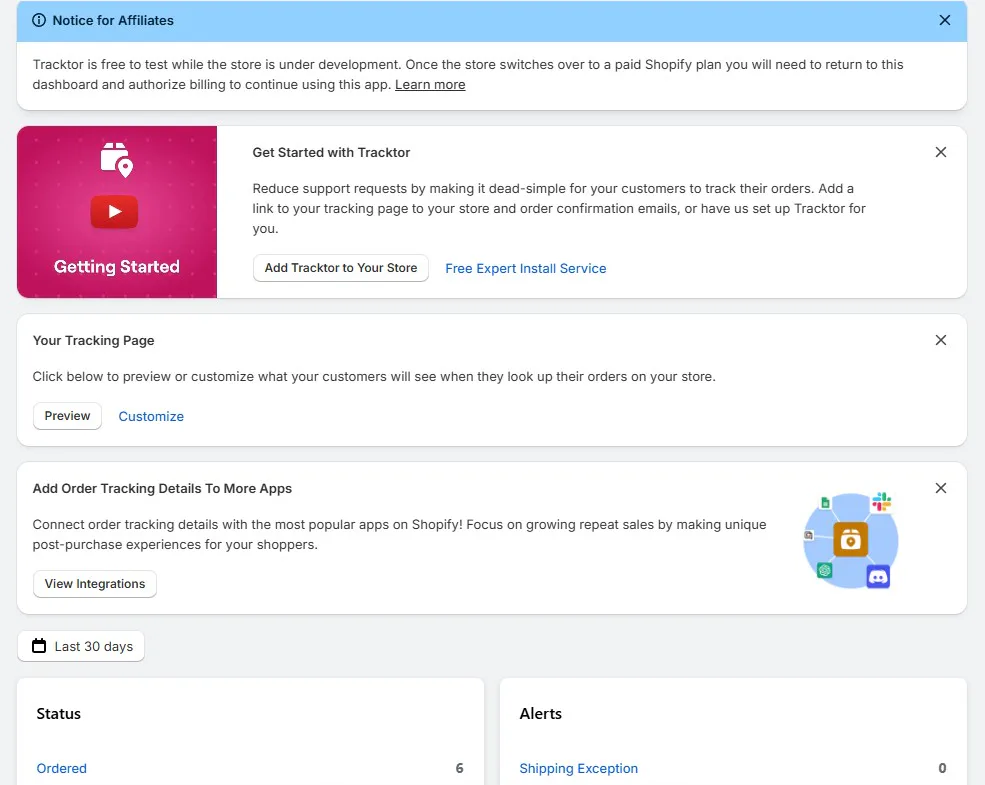
Tracktor Order Tracking is built by ShopPad Inc. Inside Shopify admin, its menu has seven areas: Tracking Page, Orders & Fulfillments, Mission Control, Integrations, Delivery Reports, Account and Help.
The home screen shows a getting-started card, a shortcut to preview or customize the tracking page and a card for connecting other apps. Below that sit two panels for the last 30 days. Status counts orders by stage, starting with Ordered, Order Ready and In Transit. Alerts counts problems such as Shipping Exception and Pending Details. Our store showed 6 orders as Ordered and every alert at zero.
The core features are:
- Branded tracking page: A tracking and order lookup page on your store, with four layouts and detailed display settings.
- Carrier support: The listing says more than 1,700 carriers in its description and more than 1,900 in its plan details. The setup tour says 1,000+.
- Carrier mapping: Match the carrier picked in Shopify to the carrier you actually used.
- Shipping notifications: Out for Delivery and Delivered updates through Shopify’s own shipping templates.
- Mission Control and Delivery Reports: A live order feed, average days to delivery and lookup statistics.
- Integrations: MESA automations, Klaviyo, Omnisend and UpOrder, plus a Tracktor API and webhooks.
The listing also names Shopify Flow, Gorgias, Zendesk and OrderlyEmails among the apps it works with. We did not connect any integration.
A Free Expert Install Service link offers to have the Tracktor team set the app up for you. We did not use it.
What We Tested
We installed Tracktor on Blinto Dev, a Shopify development store we use for testing.
We worked through:
- the six-step setup tour
- the full Tracking Page settings and the in-app preview
- the Orders & Fulfillments list
- Mission Control
- the Integrations page, including the API and webhook settings
- Delivery Reports
We did not track a real parcel. Our orders were not fulfilled, so the Fulfillments list was empty and Mission Control found no packages in transit. Our storefront was password protected, so we saw the tracking page only in the in-app preview, not on the live store. We did not send a notification, turn on the Tracking URL setting, connect MESA or another app, create a webhook or contact support.
So we can judge how Tracktor is set up, how much control it gives you and what each plan includes. We cannot judge tracking accuracy, how fast statuses update, email delivery or whether it reduces support tickets.
Setup: A Guided Tour of One Big Settings Page
The home screen opens with a welcome card and a Start Setup Tour button. The tour has six steps, and all of them happen on the Tracking Page screen:
- Customize the Look: layout, colours and map style.
- Choose What to Show: carrier name, tracking number, package details and delivery updates.
- Preview Your Page: expand the preview panel, then view the page on your store.
- Add More Carriers: carrier mapping, for orders that stop updating.
- Shipping Updates: the notification settings.
- You’re all set: add a tracking link to your store menu.
The tour is short and points at the right settings. One rough edge: the last step embeds a how-to video for adding the page to your store menu, and in our test YouTube showed it as removed by the uploader. The step still links to the docs and the support icon, but a new merchant loses the one visual guide for that task.
A notice at the top of the home screen also explains billing on development stores. Tracktor is free to test while the store is in development, and you have to come back and approve billing once the store moves to a paid Shopify plan.
The Tracking Page Settings: The Best Part
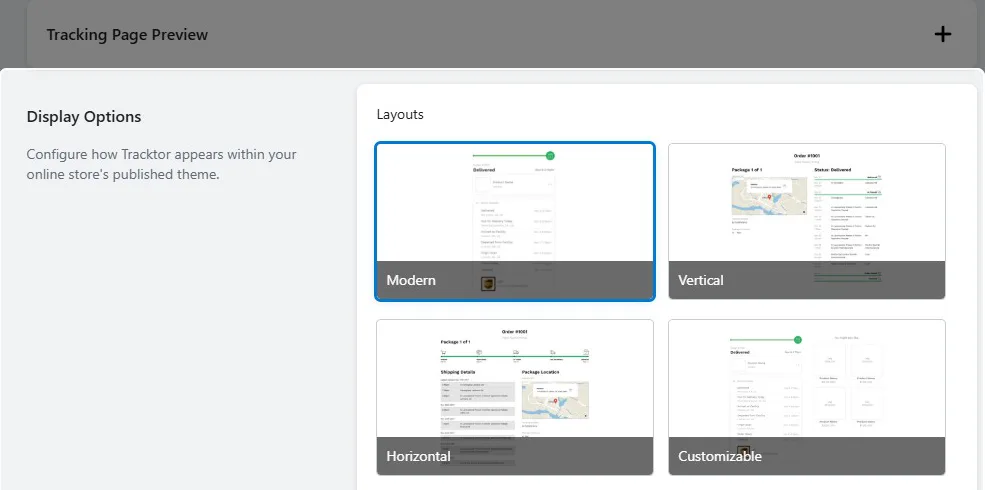
The Tracking Page screen is where Tracktor earns its place. It starts with Display Options and four layouts: Modern, Vertical, Horizontal and Customizable. Modern was selected by default, with a green brand colour you can change.
Further down, a set of checkboxes controls what customers see:
- carrier name and logo
- tracking number
- package contents, with product and quantity
- the tracking details section
- estimated delivery date, shown when the carrier provides one
- product recommendations based on past purchases, which was off by default
A few settings stand out because they solve real store problems:
- Location Substitution: Replace a carrier’s location message with your own, for example naming your fulfilment centre instead of the raw scan location. This helps dropshipping stores that do not want to show where a parcel started.
- Automatic Carrier Translation: Translate the status messages that carriers send.
- Date and Time Formats: Choose short and long date formats and the time format.
A Tracking Page Preview panel stays pinned at the bottom of the screen. Expanded, it showed a sample delivered order with a progress bar, the product and a More Details link. It is small, but it lets you check changes without leaving the settings.
Why this matters: a page that matches your brand, shows what is in the box and gives a delivery date answers the customer’s question without a support email.
The catch is that several of these settings are tied to paid plans on the listing. Estimated delivery dates, location substitution and carrier translation are listed from Growth. Product recommendations are listed on Essential. On our development store, where Tracktor is free to test, they were all visible.
Where Tracktor Falls Short: Carrier Mapping and a Small Free Plan
Two things would affect a real store, and one is worth checking early.
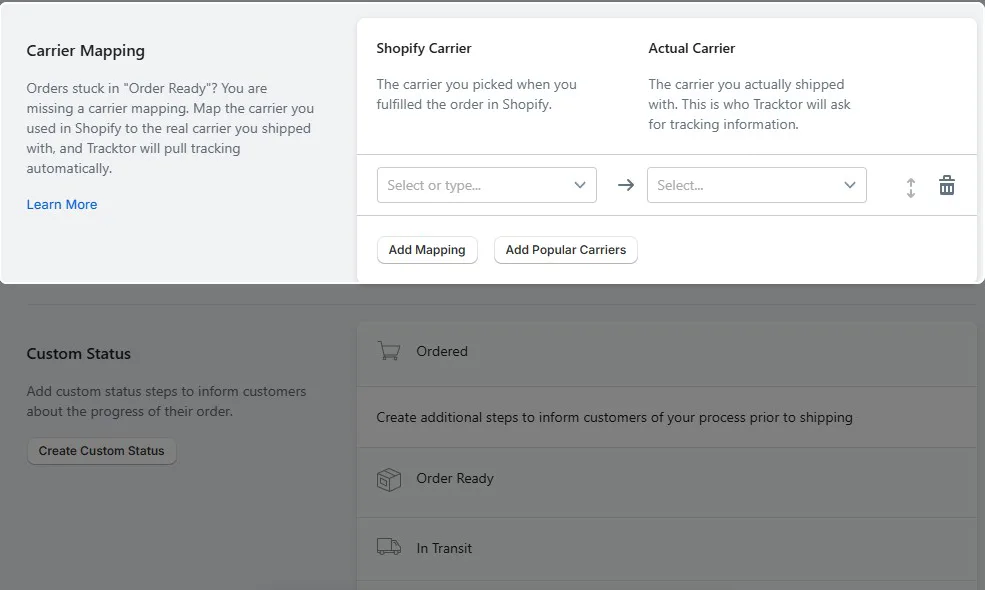
Carrier mapping needs attention. The Carrier Mapping section says it plainly: if orders are stuck in “Order Ready”, a carrier mapping is probably missing. You pick the carrier you chose in Shopify, then the carrier you actually shipped with, and Tracktor asks that carrier for tracking. There is an Add Popular Carriers button to speed this up. It is a sensible tool, but it means tracking is not fully automatic for every store. If you ship with smaller or regional carriers, test a few real parcels first. Some merchant reviews describe orders that never tracked or carriers that did not work, and a recent one describes ongoing tracking delays. The developer replied to the recent ones and asked the stores to contact support.
The free plan is small. Starter covers 25 orders a month. That is enough to set up and test the page, but most live stores will pass it quickly. Shopify email and SMS notifications are not on Starter at all. They start on Flex at $4.99 a month.
Notifications rely on Shopify. Out for Delivery and Delivered updates use Shopify’s own shipping templates, and you need Shopify’s delivery notifications turned on. A separate Tracking URL setting, off by default, replaces carrier links in Shopify with your tracking page. The screen notes that turning it on sends customers a shipping email when the order is fulfilled and a second email with a shipping update. We did not turn it on, so we cannot say how those emails look.
On the plus side, the Custom Status section lets you add steps before shipping, between Ordered and Order Ready. That is useful for made-to-order or pre-order stores that want to explain the wait. The listing places custom order statuses on Essential.
Integrations, API and Automations
The Integrations page opens with MESA, ShopPad’s own automation app, and a library of 145 automation templates. Examples on the page include:
- tag Shopify orders with fulfillment status updates
- update a Tracktor status from Shopify order tags
- trigger a Klaviyo message when an order is delivered
- send Shopify orders to Google Sheets
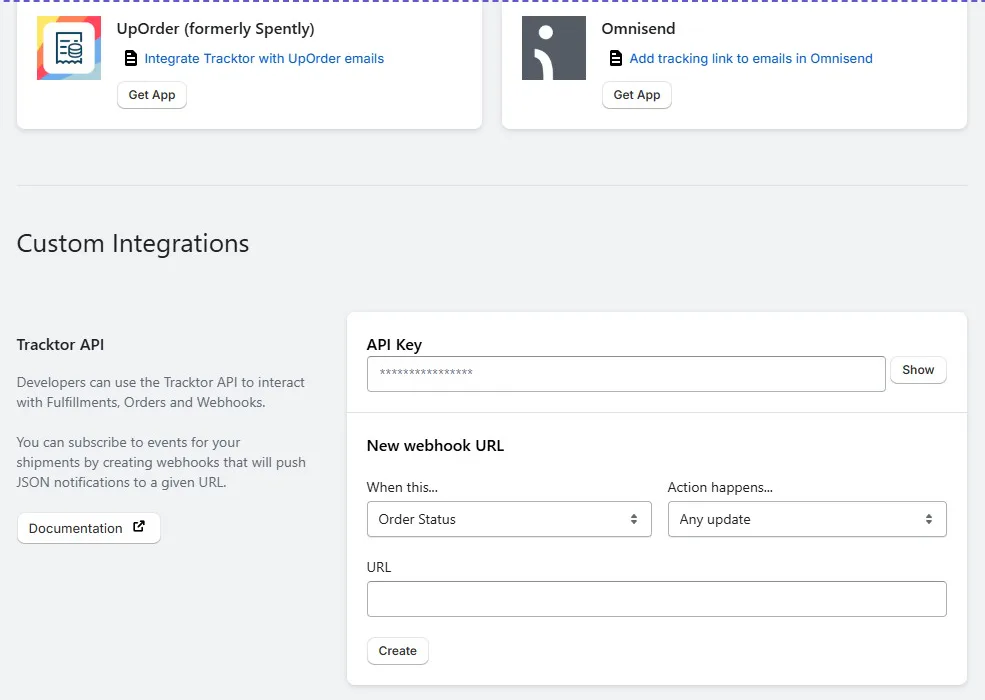
The Supported Apps section includes MESA, Klaviyo, Omnisend and UpOrder (formerly Spently), each with a guide for adding the tracking link or connecting the app.
At the bottom, Custom Integrations shows a Tracktor API key and a webhook builder. You pick an event, such as any Order Status update, and enter a URL that receives a JSON notification. For a store with a developer, this opens up custom workflows beyond the built-in integrations.
The trade-off is that many of the templates run through MESA, which is a separate app. If you want those automations, expect to install and set up MESA as well.
Mission Control and Delivery Reports
Mission Control is a live view for the last 90 days. It shows average days to delivery, with counts of orders, packages and exceptions, and a feed of new orders. Our store had 8 orders, 0 packages and 0 exceptions. With nothing shipped, the screen said it could not find any packages in transit and asked us to start fulfilling orders.
Delivery Reports opens with Realtime Statistics. An Orders & Lookups chart covered the past month, from 13 September to 13 October, and showed a few small spikes of activity on our store. The Shipments report was empty and explained that it compares packages to total orders. Like Mission Control, it needs real shipments to judge.
The Orders & Fulfillments screen has two tabs, Fulfillments and Orders, with filters for status and alerts, more filters and an Export button. Our Fulfillments tab showed “No fulfillments found”.
Pricing and Value
Tracktor prices its plans by monthly order volume, billed every 30 days in USD. This is what the Shopify App Store listing showed on 13 October 2026:
| Plan | Price per month | Orders per month | Extra orders | Free trial |
|---|---|---|---|---|
| Starter | Free | 25 | Not listed | — |
| Flex | $4.99 | 200 | $0.05 each | 14 days |
| Growth | $8.99 | 400 | $0.05 each | 14 days |
| Essential | $49.99 | 2,000 | $0.05 each | 14 days |
What each plan adds:
- Starter: real-time tracking page, carrier integrations, carrier mapping and fulfillment updates.
- Flex: adds Shopify email and SMS notifications.
- Growth: adds dropship location substitution, automatic carrier translation, estimated delivery dates and removing Tracktor branding.
- Essential: adds product recommendations, custom HTML and CSS, custom order statuses, and order and fulfillment report CSVs.
We did not open the Account page, so we have not seen in-app plan details. Check the current price for your volume before you approve billing.
So where does each plan make sense? Starter is for testing. Flex at $4.99 is the cheapest way to add notifications. Growth at $8.99 is the real value plan: 400 orders, estimated delivery dates and no Tracktor branding is a strong mix for the price. Essential is a large jump at $49.99, so it makes sense mainly for stores that need custom statuses, product recommendations or full HTML and CSS control.
What Merchants Report
Tracktor’s rating is built mostly on five-star reviews. The common themes are a branded tracking page that keeps shoppers on the store, fewer “where is my order” emails, easy setup, reliable running and responsive support.
The small number of one- to three-star reviews point to limits worth knowing:
- Orders not tracking: Several stores describe orders that did not track, carriers that did not work or ongoing tracking delays.
- Usage costs: Some older reviews were unhappy with per-order charges on top of the monthly fee, or with how lookups counted toward limits.
- Support: A few stores describe support that could not solve their problem.
- Page control: One store wanted to wrap the tracking page fully in its own layout.
Many of these reviews are several years old, and the app and its plans have changed since. The developer has replied to the most recent ones. We did not run into these issues because we did not track live parcels, but check them during your trial.
What We Liked
- Deep page control: Four layouts, a brand colour and checkboxes for every detail customers see.
- Location substitution: Useful for dropshipping stores that want to control location messages.
- Clear carrier mapping: The screen tells you exactly why an order might be stuck and how to fix it.
- Automation depth: An API, webhooks and 145 MESA templates.
- Cheap value plan: Growth is $8.99 a month for 400 orders, with branding removal and estimated delivery dates.
- Setup help: A short guided tour and a Free Expert Install Service offer.
What Could Be Better
- Small free plan: Starter covers only 25 orders a month and has no email or SMS notifications.
- Carrier mapping work: Orders can sit in Order Ready until a mapping is set, and some merchants report orders that did not track.
- Big jump to Essential: Custom statuses, product recommendations and custom HTML and CSS cost $49.99 a month.
- MESA for many automations: The template library leans on a second app.
- A broken tour video: The final setup step’s how-to video had been removed in our test.
Who Tracktor Is Best For
Tracktor fits stores that care about how their tracking page looks and want fine control over it without editing code. The layouts, display settings and preview make that easy.
It also suits dropshipping stores, thanks to location substitution and carrier mapping, and stores that sell internationally and want carrier messages translated.
Stores with a developer, or that already use MESA, Klaviyo or Omnisend, will get the most from Tracktor. The API, webhooks and templates let you connect tracking to the rest of your stack.
Who Should Upgrade or Consider an Alternative
Stores shipping more than 25 orders a month should plan for a paid plan from the start. Growth at $8.99 is the sensible starting point for most.
Stores that want a fully hands-off setup, where tracking works without mapping carriers, should test a handful of real parcels during the 14-day trial before committing.
If you need a bigger free allowance, Track123 offers 50 free orders a month. We have also reviewed 17TRACK, AfterShip and CWILL Order Tracking. We have not run them head to head, so we are not ranking them here.
Final Verdict
Tracktor gives Shopify stores a lot of control over their tracking page for a modest price. In our test, the settings were clear, the layouts were varied and the integrations went further than we expected from a tracking app.
The main caveats are the 25-order free plan, the need to check carrier mapping before tracking runs smoothly, and the large step up to Essential for some page features.
Our advice: install it, pick a layout, set your carrier mappings and ship a few real orders. Check that each one moves past Order Ready and matches the carrier’s own tracking. If it does, Growth at $8.99 a month is the plan most stores should start on.
Frequently Asked Questions
Is Tracktor free?
Yes. The Starter plan is free for 25 orders a month and includes the tracking page, carrier integrations, carrier mapping and fulfillment updates. Shopify email and SMS notifications start on the Flex plan. Tracktor is also free to test on a Shopify development store.
How much does Tracktor cost?
On 13 October 2026, the Shopify listing showed Flex at $4.99 a month for 200 orders, Growth at $8.99 a month for 400 orders and Essential at $49.99 a month for 2,000 orders. Paid plans charge $0.05 per extra order and include a 14-day free trial.
Can I remove the Tracktor branding?
Yes, from the Growth plan. Branding removal is not included in Starter or Flex.
Why are my orders stuck in Order Ready?
Tracktor says this usually means a carrier mapping is missing. Map the carrier you chose in Shopify to the carrier you actually shipped with, and Tracktor will pull the tracking.
Does Tracktor have an API?
Yes. The Integrations page shows a Tracktor API key and lets you create webhooks that send JSON notifications when an order status changes.
Did you test real tracking during the review?
No. Our development store had no shipped orders with tracking numbers, and the storefront was password protected. We could not test tracking accuracy, status updates or email delivery.