
“Where is my order?” is the question every shipping store answers over and over. A branded tracking page on your own domain answers it before the customer has to ask, and keeps them on your store instead of a carrier’s website.
Synctrack AI Order Tracking is built by Trakow and has been on the Shopify App Store since March 2021. It has a 4.8-star rating from 94 reviews, the Built for Shopify badge and a free plan for 60 orders a month. Its newest angle is AI: an in-app analytics assistant, and a way to ask Claude, ChatGPT and other AI tools about your shipments.
We installed Synctrack on Blinto’s Shopify development store in October 2026, on the Free plan. We went through the welcome flow, the four-task onboarding guide, the dashboard, the Tracking Page screen, Notifications & Alerts, Analytics, Settings and the plans page. Our short answer: Synctrack is quick to set up and gives a lot away for free, including eight shipment status emails. The catch is that the features that make a tracking app really useful for a growing store, like estimated delivery dates and courier mapping, sit on the $49 Scale plan.
Key Takeaways
- Best feature: A free plan with 60 orders a month, a branded tracking page and status emails for eight shipment events.
- Fast start: The welcome flow lets you sync orders from the last 7 or 30 days in the background, then a four-task guide walks you through the rest.
- AI extras: Connections for Claude, ChatGPT, Perplexity, Grok and other AI tools, plus an AI Analytics Assistant that the plans page lists from Scale.
- Main limitation: Estimated delivery dates, courier mapping, location hiding and fulfillment performance analytics start on Scale at $49 a month, a big jump from Launch at $6.
- Watch for: Some merchants report problems with the AI connection and, in older reviews, with certain carriers syncing.
- Our scope: Our store had no shipped orders with tracking numbers. We did not test tracking accuracy, email delivery, the AI connection or support.
Our Verdict
Synctrack is a good fit for small stores that want a branded tracking page and automatic shipment emails without paying anything at first.
The best part of our test was how quickly it got going. The app asks how far back to sync your orders, runs that in the background, and hands you a short checklist. Notifications are the other standout. Eight status emails are ready to switch on, and the free plan includes them.
The trade-offs are the plan structure and a few rough edges. The jump from Launch to Scale is large, and that is where some of the most practical features live. The dashboard also carries a promotion for another app, and the default sender address is the developer’s own no-reply email until you change it.
What Synctrack Offers
Inside Shopify admin, the app appears as Synctrack OrderTrack. Its menu has seven areas: Analytics, Shipments, Tracking Page, Notifications & Alerts, Settings, Feedbacks and Subscription Plans.
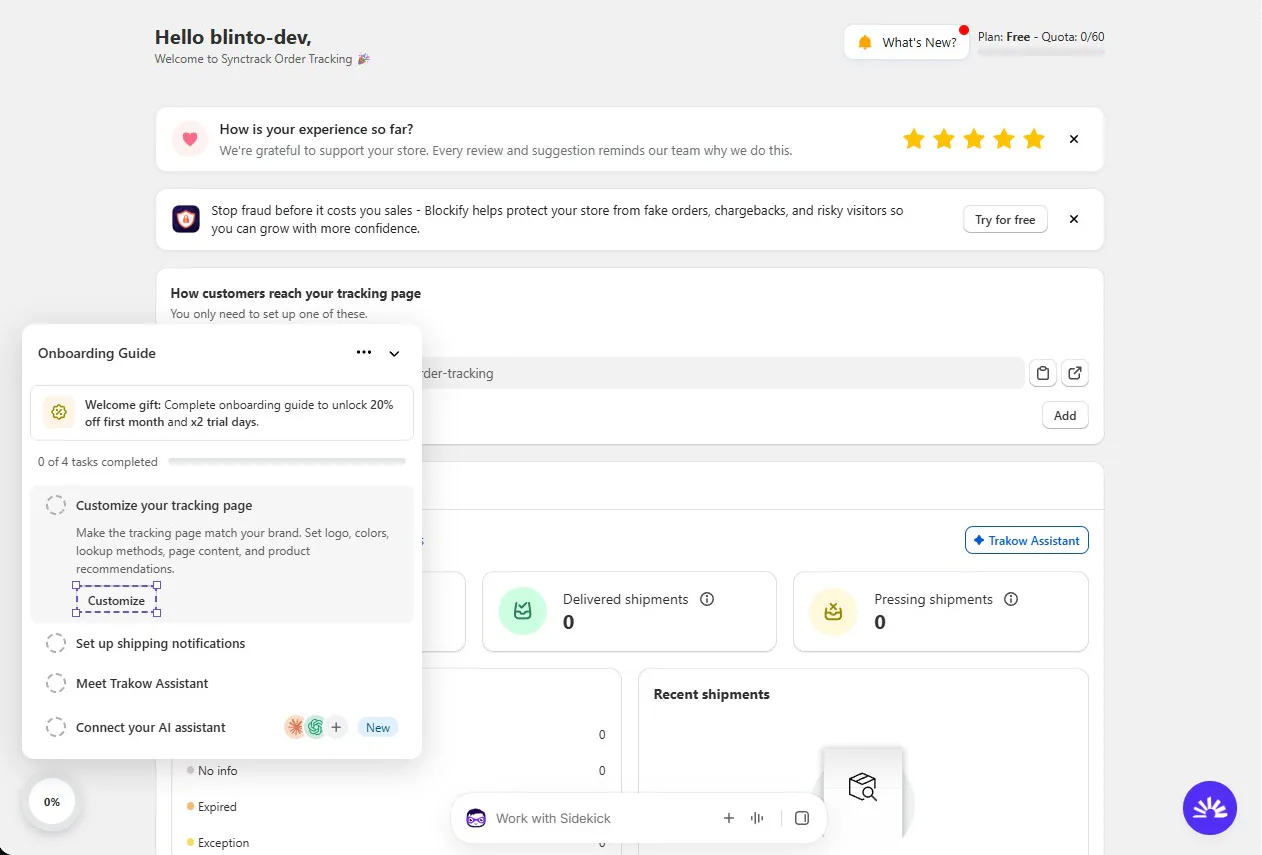
The dashboard shows your plan and order quota at the top. Below that, a card shows how customers reach your tracking page, with its URL and an Add button. Shipment counts follow, with Delivered and Pressing shipments, a status list and a Recent shipments panel. On our store everything was at zero, since nothing had shipped.
The core features are:
- Branded tracking page: A tracking and order lookup page on your store, with an editor for logo, colours, lookup methods, page content and product recommendations.
- Carrier coverage: The plans page lists more than 2,880 couriers, including DHL, USPS and UPS.
- Shipment emails: Automatic emails for eight shipment statuses, plus alerts to yourself.
- Analytics: A shipments overview, with fulfillment performance on higher plans.
- AI tools: The Trakow Assistant and connections for outside AI assistants.
The listing also names Shopify Flow, Klaviyo and Twilio among the apps it works with. We did not connect any of them.
What We Tested
We installed Synctrack on Blinto Dev, a Shopify development store we use for testing.
We worked through:
- the welcome screen and order sync step
- the four-task onboarding guide
- the dashboard
- the Tracking Page screen
- Notifications & Alerts
- Analytics
- Settings, including the AI Assistants page
- the Subscription Plans page
We did not track a real parcel. Our orders were not fulfilled, so the shipment counts were empty and Analytics was still calculating. We did not view the tracking page on the live store, open an email template, send a notification, connect an AI assistant, start a paid trial or contact support.
So we can judge how Synctrack is set up, what it offers and what each plan includes. We cannot judge tracking accuracy, how fast statuses update, email delivery or how well the AI tools answer questions.
Setup: A Short Welcome Flow and a Four-Task Guide
The app opens on a welcome screen with a Get started button. The next step asks how far back to sync your orders: no past orders, the last 7 days or the last 30 days. Seven days is marked as recommended, and the screen says syncing runs in the background, so you can move on straight away.
After that, an Onboarding Guide follows you from screen to screen. It has four tasks:
- Customize your tracking page: logo, colours, lookup methods, page content and product recommendations.
- Set up shipping notifications: automatic tracking updates for customers, plus alerts when shipments are delayed or have exceptions.
- Meet Trakow Assistant: shipment trends and delivery performance, powered by AI.
- Connect your AI assistant: ask an outside AI tool about any shipment.
Each task links to the right screen, and a progress ring fills as you go. Finishing all four unlocks a welcome gift: 20% off and a 14-day trial for your first paid month, applied automatically on the plans page or with a code.
The guide is clear and gets you to the important screens quickly. It does stay on top of the page content while it is open, so you may want to collapse it once you are done.
The Tracking Page
The Tracking Page screen is simple. A Tracking page editor card has Customize and View buttons, and the page URL sits underneath with a copy button and a reminder to add the link to your store menu. A Preview button sits at the top.
The same screen promotes estimated delivery dates on the product page and at checkout, with a Set up now button. A help banner links to live chat for common problems, such as a tracking page that is not showing.
We did not capture the inside of the editor, so we cannot describe its layout options in detail. The onboarding guide and the plans page say you can set your logo, colours, lookup methods and content, and that custom tracking page design starts on Scale.
Shipment Notifications: Generous on the Free Plan
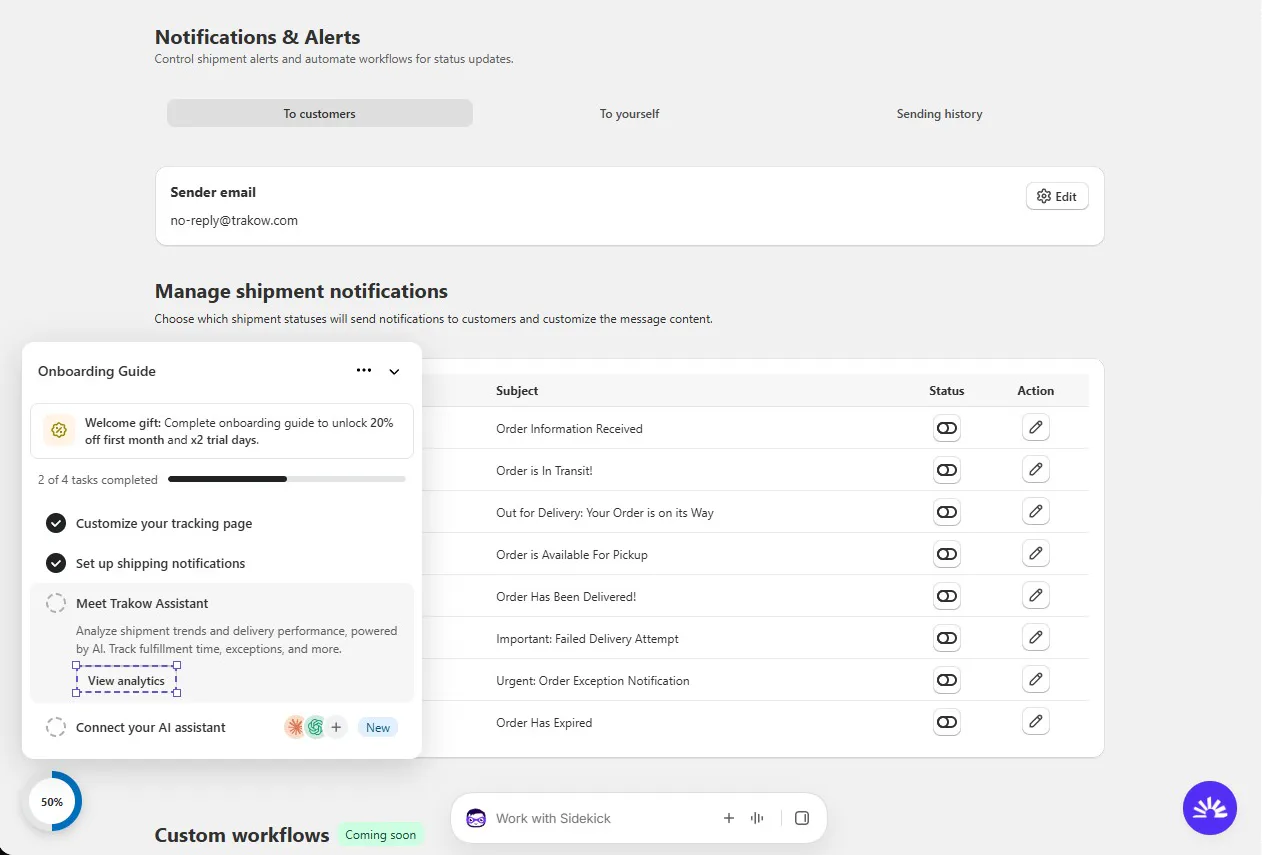
Notifications & Alerts is the most complete part of the app. It has three tabs: emails to customers, alerts to yourself and a sending history.
Under Manage shipment notifications, there are eight status emails, each with its own toggle and edit button:
- Order information received
- In transit
- Out for delivery
- Available for pickup
- Delivered
- Failed delivery attempt
- Exception
- Expired
Why this matters: failed delivery and exception emails are the ones that save support time, because customers hear about a problem before they write in. Having them on the free plan is a real plus.
Two things to check. The sender email is set to a no-reply address on the developer’s domain by default. There is an Edit button, so set your own before you go live. And a Custom workflows section further down was marked Coming soon.
Analytics and AI Assistants
The Analytics screen has two tabs: Shipments overview and Fulfillment performance. Fulfillment performance carries a Scale lock. Shipments overview has cards for untracked, exceptional and expired shipments, with a date range and a Trakow Assistant button. The Trakow Assistant button showed on our Free plan, but the plans page lists the AI Analytics Assistant from Scale, so expect the full version to need that plan. On our store, the data was still being calculated, so we saw only loading cards.
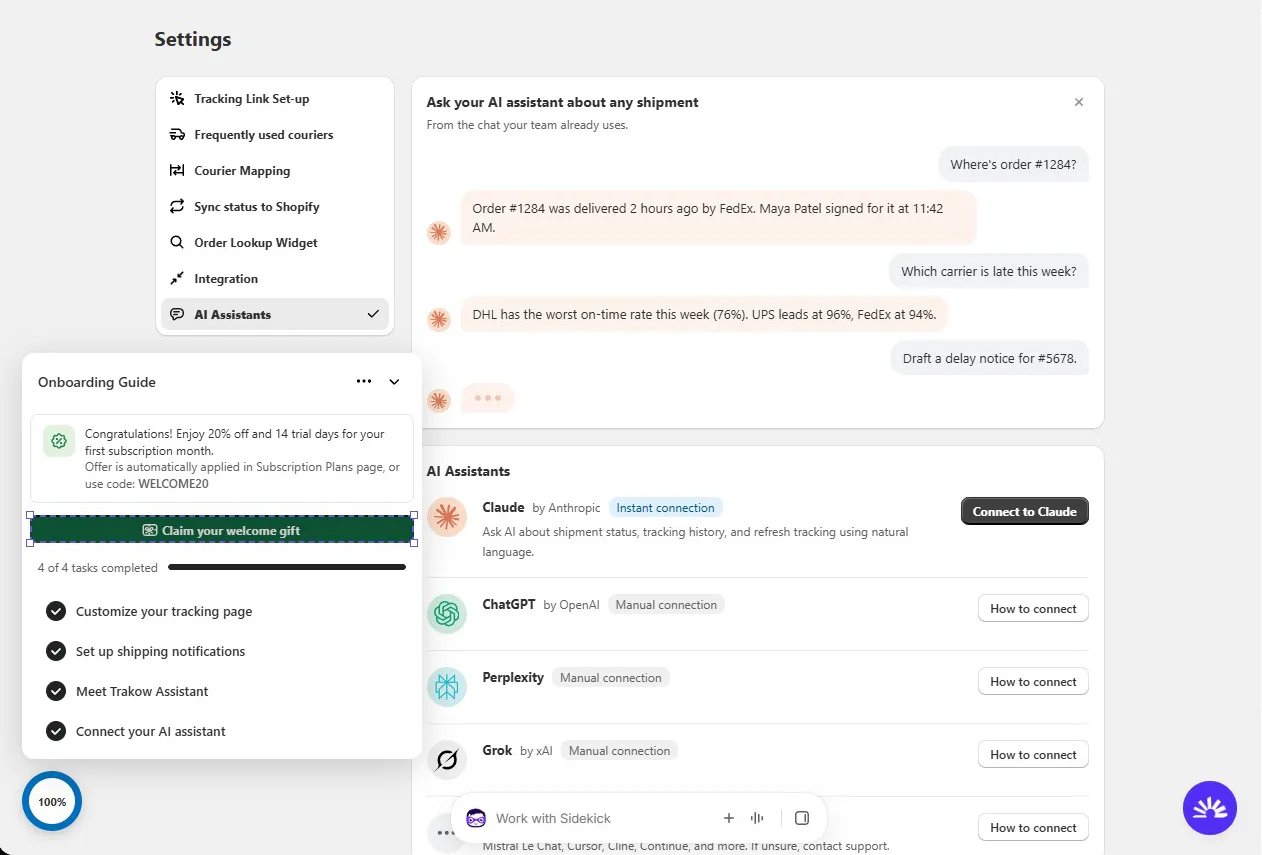
The Settings screen is where the newer AI features live. The AI Assistants page lets you connect outside AI tools to your shipment data. Claude by Anthropic has an instant connection. ChatGPT, Perplexity and Grok use a manual connection with a How to connect guide, and the page names other tools such as Mistral Le Chat, Cursor and Cline. The idea is that your team can ask about an order’s status or a carrier’s performance from the chat tool they already use. The example conversation on the page is a sample, not real store data.
We did not connect an assistant, so we cannot say how well it works. One recent merchant review reports that the connection is unreliable, so test it before you rely on it.
The rest of the Settings menu covers the practical setup: Tracking Link Set-up, Frequently used couriers, Courier Mapping, Sync status to Shopify, the Order Lookup Widget and Integration. We did not open these pages. The plans page places courier mapping on Scale.
Where Synctrack Falls Short
Three things would affect a real store.
The big jump to Scale. Launch at $6 a month adds product upsells, an analytics dashboard, custom shipment statuses and CSV export. But estimated delivery dates, courier mapping, hiding or replacing shipping locations, custom tracking page design and fulfillment performance analytics all start on Scale at $49. For a store that ships with smaller carriers or dropships, that is a steep step.
Courier issues in older reviews. A few lower-rated reviews describe carriers that did not sync, wrong courier names that broke tracking updates, and one regional carrier that did not work at all. These reviews are a few years old, and the developer replied that the issues were fixed or being worked on. Still, ship a few real orders with your own carriers during the trial.
Some clutter in the admin. The dashboard shows a review prompt and a promotion for another app. They can be closed, but they push the useful content down on first visit.
Pricing and Value
Synctrack prices its plans by monthly order volume, billed every 30 days in USD. This is what the Shopify App Store listing showed on 14 October 2026:
| Plan | Price per month | Price per year | Orders per month | Free trial |
|---|---|---|---|---|
| Free | $0 | — | 60 | — |
| Launch | $6 | $60 | 200 | 7 days |
| Scale | $49 | $490 | 2,000 | 7 days |
| Pro | $99 | $990 | 5,000 | 7 days |
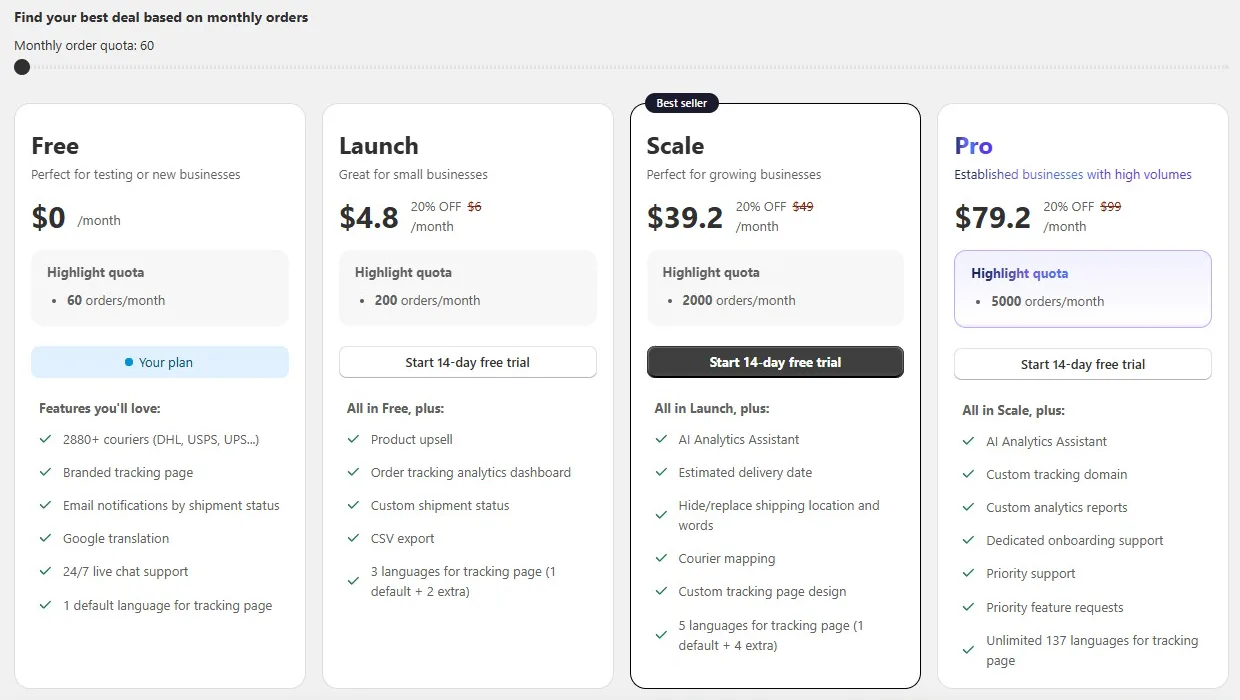
Inside the app, the plans page showed the same quotas with 20% off each paid plan and a 14-day free trial. That matches the welcome gift for finishing onboarding, which applies to the first month. After that, expect the regular price.
What each plan adds, based on the in-app plans page:
- Free: 2,880+ couriers, a branded tracking page, email notifications by shipment status, Google translation, 24/7 live chat support and one tracking page language.
- Launch: adds product upsells, an order tracking analytics dashboard, custom shipment statuses, CSV export and three tracking page languages.
- Scale: adds the AI Analytics Assistant, estimated delivery dates, hiding or replacing shipping locations and words, courier mapping, custom tracking page design and five languages.
- Pro: adds a custom tracking domain, custom analytics reports, dedicated onboarding, priority support, priority feature requests and up to 137 tracking page languages.
The developer’s own website showed different numbers for some plans when we checked, so confirm the price in the app before you approve billing.
So where does each plan make sense? Free is a genuine starting point for a small store, not just a test, thanks to the 60-order quota and status emails. Launch at $6 is cheap and adds custom statuses and upsells. Scale at $49 is the plan most growing stores will end up on, because that is where estimated delivery dates and courier mapping live. Pro at $99 is for high-volume stores that want their own tracking domain.
What Merchants Report
Synctrack’s rating is built almost entirely on five-star reviews, with only five reviews at three stars or below. The most common theme by far is responsive, friendly support. Others mention simple setup and customers being able to see where their parcels are.
The lower-rated reviews point to limits worth knowing:
- AI connection: A recent review reports that the AI assistant connection often fails.
- Courier syncing: Older reviews describe carriers that did not sync and wrong courier names that affected tracking updates.
- Shopify status sync: One review from early 2025 wanted delivery statuses sent back to Shopify. The Settings menu now has a Sync status to Shopify option, though we did not test it.
- Support speed: A couple of reviews found support slow, even when it solved the problem in the end.
The developer replied to most of the lower-rated reviews. We did not run into these issues because we did not track live parcels, but they are worth checking during your trial.
What We Liked
- Generous free plan: 60 orders a month, a branded tracking page and status emails at no cost.
- Eight status emails: Including failed delivery and exception alerts, ready to switch on.
- Fast onboarding: Background order sync and a clear four-task guide.
- AI connections: An easy route to ask Claude and other AI tools about shipments.
- Cheap first upgrade: Launch at $6 adds custom statuses, upsells and CSV export.
- Room to grow: Up to 137 tracking page languages and a custom domain on Pro.
What Could Be Better
- Big jump to Scale: Estimated delivery dates and courier mapping cost $49 a month.
- Default sender email: Emails come from the developer’s no-reply address until you change it.
- Promotions in the admin: A review prompt and another app’s banner on the dashboard.
- AI and courier reports: Some merchants report an unreliable AI connection and, in older reviews, carrier sync problems.
- Pricing differs by source: The listing, the app and the developer’s website did not all show the same figures.
Who Synctrack Is Best For
Synctrack fits small stores that want a branded tracking page and automatic shipment emails without paying for them. The free plan covers both, with room for 60 orders a month.
It also suits teams that already use Claude, ChatGPT or another AI tool and want to ask about shipments from there.
Stores that sell in several countries can add more tracking page languages as they move up the plans, from one on Free to 137 on Pro.
Who Should Upgrade or Consider an Alternative
Stores shipping more than 60 orders a month should plan for Launch at least. If you need estimated delivery dates or courier mapping from day one, budget for Scale at $49.
Stores that dropship or use smaller regional carriers should test several real parcels during the trial before committing.
If you want to compare options, we have also reviewed Track123, Tracktor, 17TRACK, AfterShip and CWILL Order Tracking. We have not run them head to head, so we are not ranking them here.
Final Verdict
Synctrack gives small Shopify stores a lot for free: a branded tracking page, a 60-order quota and eight shipment status emails. In our test, setup was quick, and the AI assistant connections are an unusual extra for a tracking app.
The main caveats are the large step up to Scale for estimated delivery dates and courier mapping, the default no-reply sender address, and merchant reports about the AI connection and some carriers.
Our advice: install it on the Free plan, finish the onboarding guide to unlock the welcome discount, set your own sender email and ship a few real orders. If tracking updates arrive correctly for your carriers, Free or Launch is enough for many small stores, and Scale is the step to take when you need delivery dates and courier mapping.
Frequently Asked Questions
Is Synctrack free?
Yes. The Free plan covers 60 orders a month and includes a branded tracking page, 2,880+ couriers, email notifications by shipment status and 24/7 live chat support.
How much does Synctrack cost?
On 14 October 2026, the Shopify listing showed Launch at $6 a month for 200 orders, Scale at $49 a month for 2,000 orders and Pro at $99 a month for 5,000 orders. Yearly billing costs $60, $490 and $990. The listing shows a 7-day free trial on paid plans.
Does Synctrack show estimated delivery dates?
Yes, from the Scale plan. Launch and Free do not include them.
Can I connect Synctrack to Claude or ChatGPT?
Yes. The AI Assistants page in Settings offers an instant connection for Claude and manual connections for ChatGPT, Perplexity, Grok and other tools. We did not connect one during our test.
Did you test real tracking during the review?
No. Our development store had no shipped orders with tracking numbers. We could not test tracking accuracy, status updates, email delivery or the AI connection.