
“Where is my order?” is one of the most common questions a Shopify store gets. Each one takes time to answer. Most could be answered by a clear tracking page and a few well-timed emails. That is the job 17TRACK Order Tracking sets out to do.
17TRACK is a well-known parcel tracking brand, and its Shopify app is popular. It holds a 4.9-star rating from 4,445 reviews on the Shopify App Store. It has the Built for Shopify badge and a free plan for 50 shipments a month.
So we wanted to answer a simple question. How fast can a store get tracking running with 17TRACK, and when does the free plan stop being enough?
We installed 17TRACK on Blinto’s Shopify development store in October 2026. We went through the onboarding, set up carriers, synced orders, added a tracking link to the store menu and checked the notification settings and plans. Our short answer: setup is guided and fast, and the exception alerts are a smart idea. But the app pushes offers at almost every step, emails need manual setup, and key features sit on the Pro plan.
Key Takeaways
- Fast, guided setup: A three-step checklist covers carriers, a tracking link in your store menu and email notifications. We finished the first two in a few clicks.
- Best idea: Custom Exception Alerts flag problem parcels, such as shipments with no tracking update for more than 3 days.
- Dropshipping mode: One toggle hides Chinese addresses from tracking details, which matters for stores that ship from overseas suppliers.
- Main drawback: Bonus offers and upgrade banners appear at almost every step, and every email starts switched off.
- Price: The free plan covers 50 shipments a month. Customer emails start on Basic, and branding removal and delivery dates start on Pro.
- Our scope: This was a partial hands-on test on a store with no real shipments. We did not send an email or track a live parcel.
Our Verdict
17TRACK is a good fit for small and mid-sized Shopify stores that want a tracking page running quickly. It is an especially good fit for dropshipping stores that need to hide where parcels really come from.
The best thing we found was how much of the setup is done for you. The app synced past orders on its own and picked common carriers. It also turned the tracking link into a one-click menu install. The exception alerts are the feature we would point most store owners to. They show you problem parcels before the customer writes in.
The trade-offs are noise and plan gates. During setup we were offered free “tracking opportunities” three times, plus a bonus quota and a first-month discount. Each offer is generous on its own. Together, they make it harder to see what you actually get. And the features many stores will want, such as delivery dates and an unbranded page, need the Pro plan.
The steps we took finished without any visible errors. But our store had no shipped orders with real tracking numbers. So this verdict covers setup and settings, not tracking accuracy or email delivery.
What 17TRACK Offers
17TRACK Order Tracking is built by 17TRACK and launched on the Shopify App Store in January 2021. Inside Shopify admin, its menu has six main areas: Shipments, Tracking Page, Notifications, Returns, Analytics and Billing.
The core features are:
- Order sync: Shopify orders sync on their own, and the app lists support for more than 3,300 carriers.
- Branded tracking page: A tracking page you can link from your store’s header or footer.
- Email notifications: Customer and seller emails for each shipping status, plus custom email flows.
- Exception alerts: A dashboard list of parcels that are late, stuck or stopped.
- Dropshipping mode: A setting that hides Chinese addresses from tracking details.
- Analytics: Basic reports on paid plans, with deeper delivery reports on the top plan.
The app’s Integration page lists Apple Wallet Order Tracking, PayPal, Klaviyo, Omnisend, Shopify Flow and Shopify Email. The Shopify listing also names Judge.me, Loox and Trustpilot. We did not connect any of them.
What We Tested
We installed 17TRACK on Blinto Dev, a Shopify development store we use for testing. We started on the free plan. When onboarding ended, the app added a one-week premium trial and 200 free tracking opportunities.
We worked through:
- the four-slide welcome guide
- the Get Started checklist on the dashboard
- the carrier setup and dropshipping mode screen
- the Sync orders option, where we chose a 90-day range
- the tracking menu install, where we turned on the header link
- the customer and seller notification screens and the custom flow templates
- the in-app plan page and the Integration page
We did not track a real parcel. Our store had no shipped orders with tracking numbers, so every count stayed at zero. We did not turn on or send any email. We did not open the tracking page editor, try the AI tracking page, use returns, view analytics with real data, connect an integration or contact support.
So we can judge how 17TRACK is set up, how clear its settings are and what each plan includes. We cannot judge tracking accuracy, update speed, email delivery or whether it cuts support tickets.
Setup: Guided, Fast and Mostly Done for You
The first time you open 17TRACK, a four-slide guide explains the main ideas. These are a branded tracking page, 50 free tracking quotas a month, and automatic status sync with email updates. One slide offers a trial of an AI tool that builds a tracking page in one click. Publishing that page needs the Pro plan. We did not try it.
At the end, a welcome screen said our orders from the past 30 days had already synced for free.
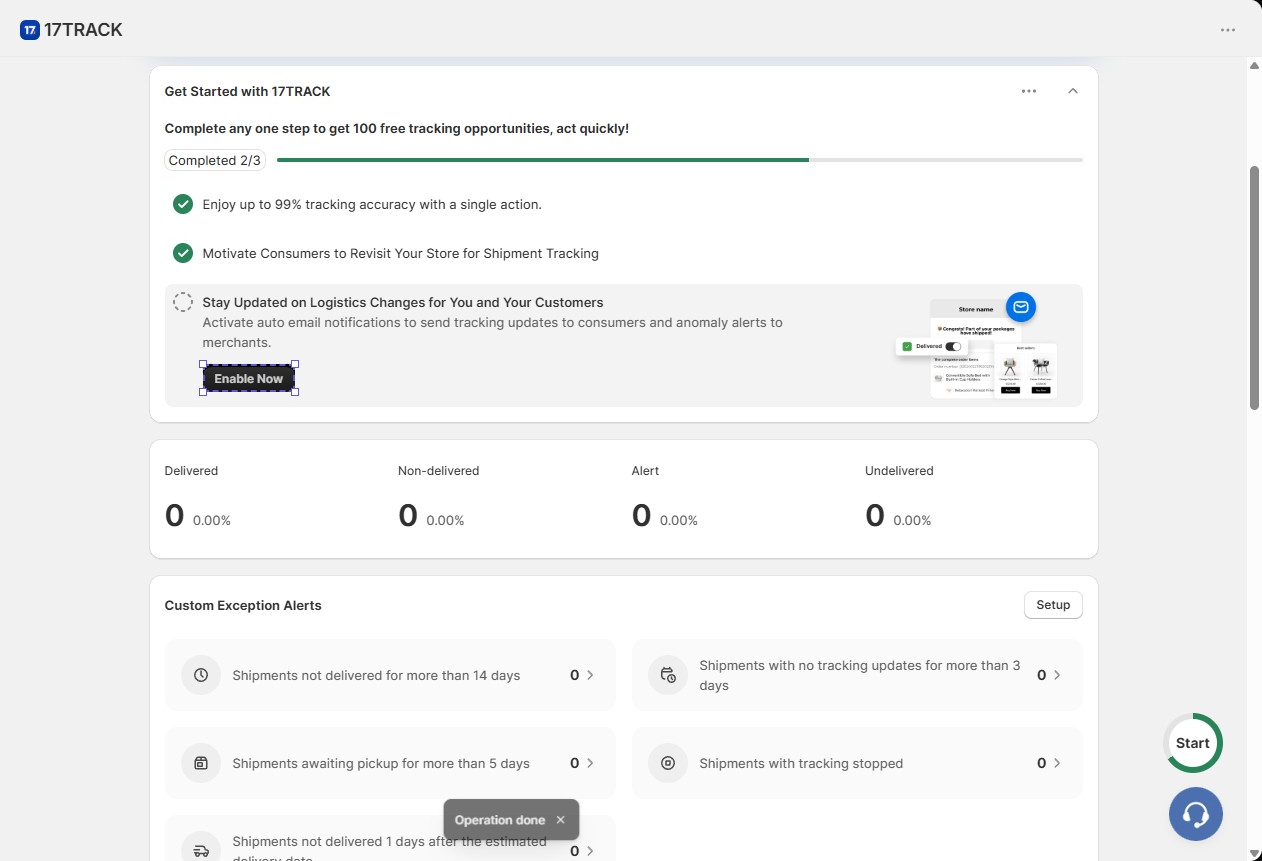
The dashboard then shows a Get Started checklist with three steps.
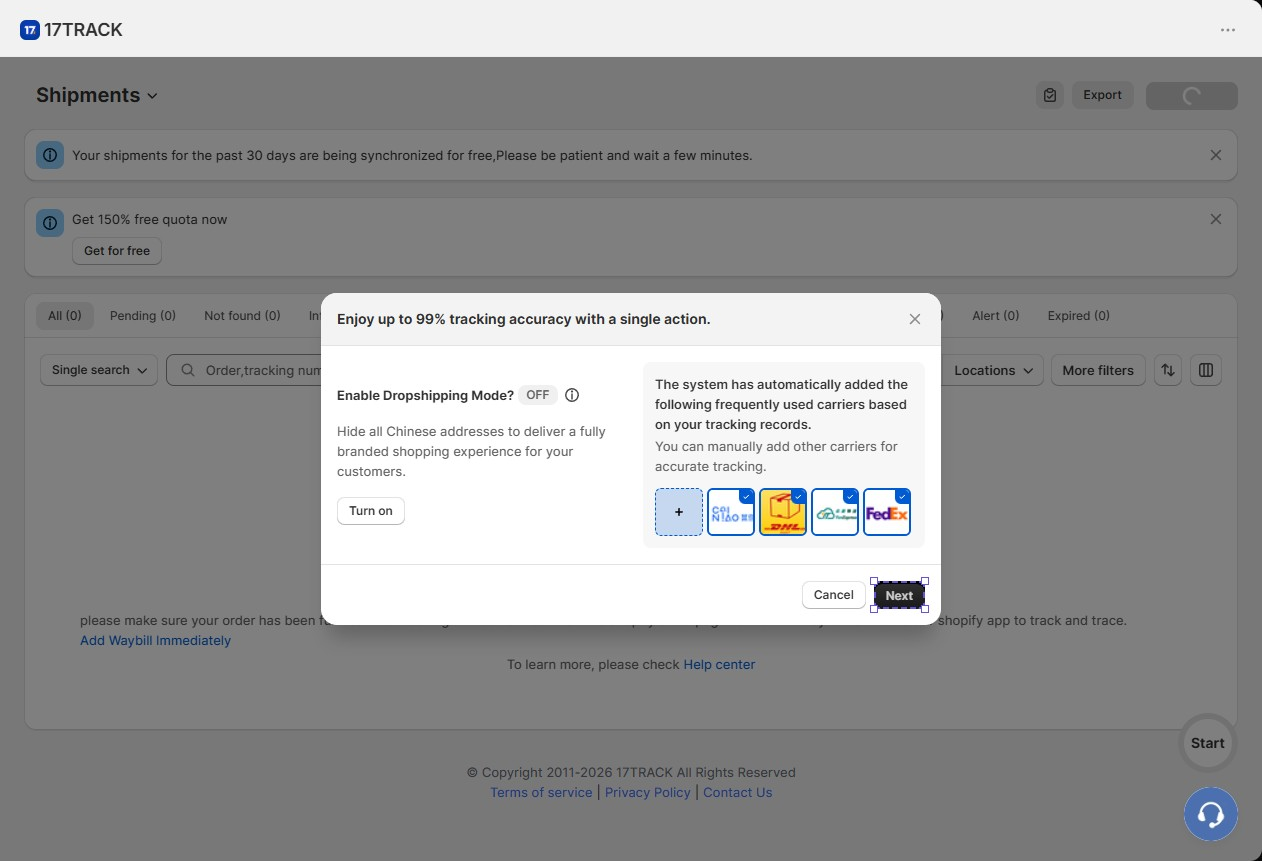
Step 1: Carriers. This step opens one screen with two choices. On the right, 17TRACK had already added common carriers, including Cainiao, DHL and FedEx. You can add more by hand. The app says it gives these carriers priority when it matches tracking numbers.
On the left is Dropshipping Mode, which was off by default. Turning it on hides all Chinese addresses, so tracking looks fully branded to the customer. For a store that ships from suppliers in China, this matters. A customer who sees an unexpected overseas origin is more likely to ask questions or ask for a refund. We did not test it on a live parcel, so we cannot confirm how fully it hides origin details.
Step 2: Tracking link. This step adds a link to your store’s menu. The link is called “Track Your Order” by default, and you can rename it. You choose Install to Header or Install to Footer, each with a small preview. We turned on the header link. The app confirmed it and marked the step complete. There was no theme editing or code. We did not view the live storefront, so we cannot say how the tracking page looks to shoppers.
Step 3: Notifications. This step sends you to the email settings, which we cover below.
We also used Sync orders on the Shipments page. By default, 17TRACK syncs orders shipped in the last 30 days. You can pick a longer range, and we chose 90 days. The app warns that this cannot be undone. For a store moving from another tracking app, this brings older parcels in from the start.
Exception Alerts: The Most Useful Part
The dashboard shows counts for Delivered, Non-delivered, Alert and Undelivered parcels. Below that is a panel called Custom Exception Alerts. It lists parcels that need attention:
- not delivered for more than 14 days
- no tracking updates for more than 3 days
- awaiting pickup for more than 5 days
- tracking stopped
- not delivered 1 day after the estimated delivery date
Why this matters: most tracking apps help customers check their own orders. These alerts help the store spot trouble first. A parcel with no scan for three days is the kind of order that turns into an angry email a week later. Seeing it on the dashboard gives you time to contact the carrier or the customer first.
Our counts were all zero, so we could not see how the alerts behave with real data.
Where 17TRACK Falls Short: Offers, Plan Gates and Email Setup
Three things slowed us down or would affect a real store.
Too many offers. We were given 50 free tracking opportunities at the start, 200 at the end of onboarding, and the checklist promised 100 more. A “150% free quota” banner sat on the Shipments page. A banner offered 15% off the first month for stores that upgrade by 13 October. The screens do not make clear how these bonuses relate to the monthly plan limits. A store owner who wants a simple answer to “how many orders can I track for free?” may need to check Billing or ask support.
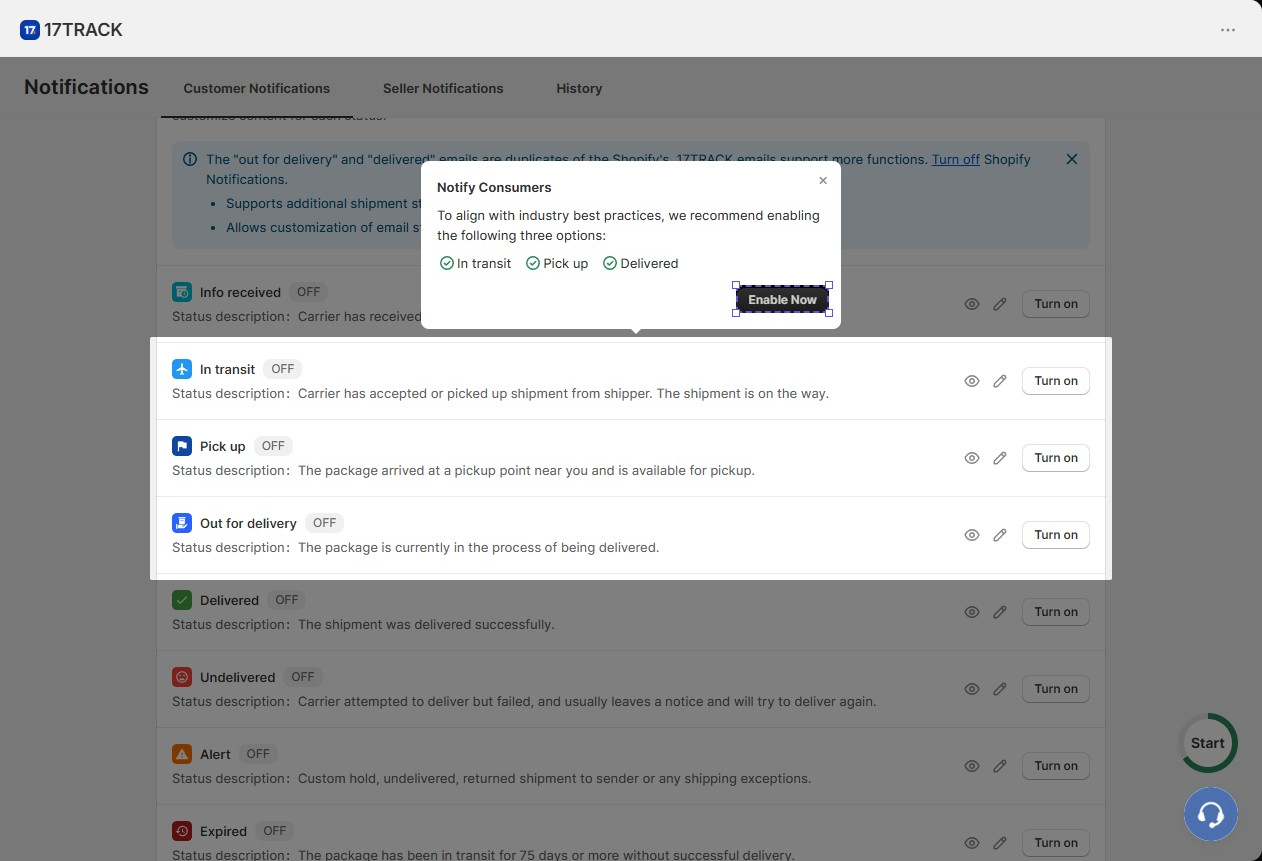
Emails start switched off. Customer emails are listed by status: Info received, In transit, Pick up, Out for delivery, Delivered, Undelivered, Alert and Expired. Each has a preview, an edit button and a Turn on button. Every one was off by default. A prompt suggested turning on In transit, Pick up and Delivered as a start. Seller emails, which go to you, were also off. The app suggested turning on the Alert email first.
Duplicate emails are possible. A banner warned that 17TRACK’s “out for delivery” and “delivered” emails repeat the ones Shopify already sends. The app suggests turning off Shopify’s versions. If you skip that step, customers may get two emails for the same event.
On the plus side, the email area has useful flow templates. One tells customers about each package when an order ships in parts. Another sends a thank-you email with product picks after delivery. The best one emails the customer to fix their details when delivery fails because of a wrong address. That can save a return, a reship and a support chat. We did not turn on or send any email, so we cannot judge design or delivery.
Pricing and Value
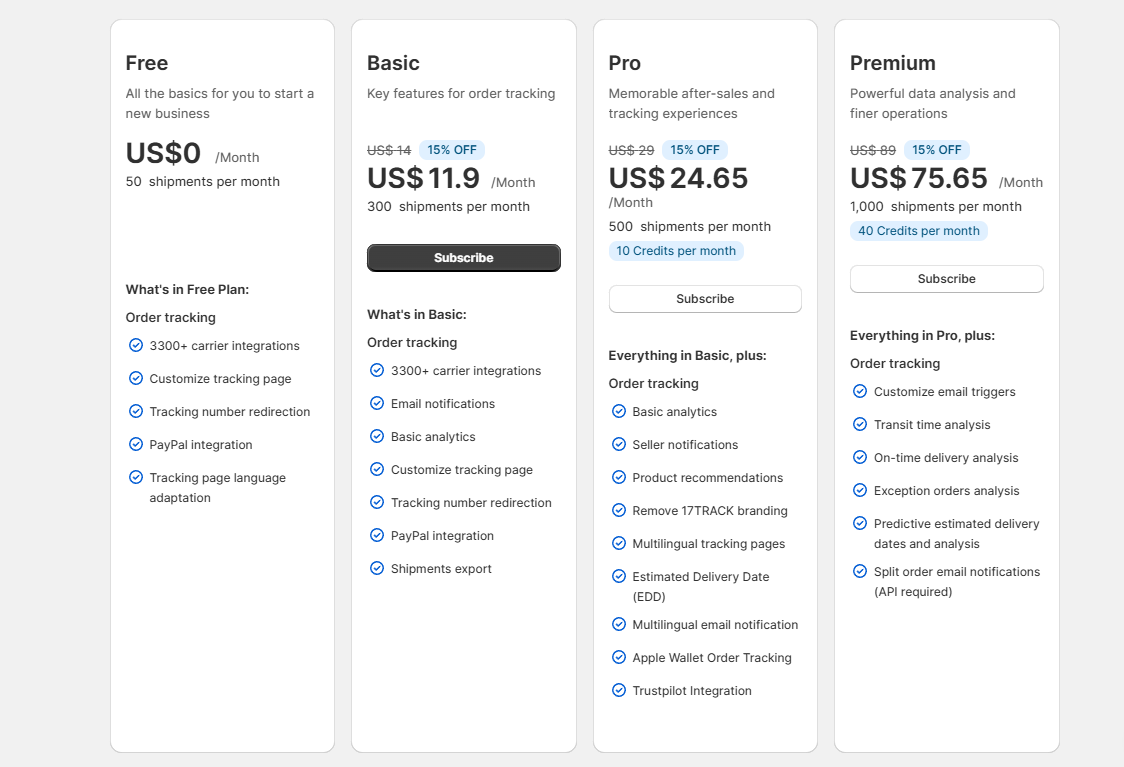
17TRACK prices its plans by monthly shipment volume. This is what the in-app plan page showed on 6 October 2026:
| Plan | Price per month | Shipments per month |
|---|---|---|
| Free | $0 | 50 |
| Basic | $14 ($11.90 with the 15% first-month offer) | 300 |
| Pro | $29 ($24.65 with the offer) | 500, plus 10 credits |
| Premium | $89 ($75.65 with the offer) | 1,000, plus 40 credits |
The Shopify listing showed other price points on the same day, such as Basic at $9 for 200 shipments and Pro at $49 for 1,000. Because the price depends on your volume, confirm the exact plan on the Billing page before you subscribe.
What each plan adds:
- Free: more than 3,300 carriers, a tracking page you can customise, tracking number redirection, PayPal integration and tracking page language support.
- Basic: adds email notifications, basic analytics and shipment export.
- Pro: adds seller emails, product picks, removing 17TRACK branding, multilingual pages and emails, estimated delivery dates, Apple Wallet tracking and Trustpilot integration.
- Premium: adds custom email triggers, delivery time and exception reports, predicted delivery dates and split-order emails.
So where does Free stop? It is a real starting point for a very small store that only needs a tracking page. But customer emails start on Basic. Branding removal and delivery dates start on Pro. A growing store that wants a fully branded experience should budget for Pro, not Basic.
What Merchants Report
17TRACK’s rating is built mostly on five-star reviews. The common themes are easy setup, wide carrier coverage, a clean tracking page, fewer order-status questions and fast support.
A small number of recent one-star reviews point to limits worth knowing:
- Tracking page content: One store could not add a welcome message to the tracking page. The developer confirmed this is not built in.
- Old orders: One store said orders older than 180 days could not be looked up, which caused trouble for warranty checks.
- No pay-as-you-go: One store wanted to buy credits without a monthly plan.
- Repeat emails: One store felt customers got duplicate emails. This matches the warning we saw in the app.
- Support: A few reviews describe slow or scripted replies. The developer answers most low-star reviews and often offers a refund or a dedicated manager.
We did not run into these issues, but check them during setup if they apply to your store.
What We Liked
- Guided setup: The checklist turns carriers, the tracking link and emails into three clear steps.
- Automatic order sync: Orders from the last 30 days synced on install, and we could extend the range to 90 days.
- One-click tracking link: Adding “Track Your Order” to the header needed no theme editing.
- Exception alerts: The dashboard flags late, stuck and stopped parcels so you can act before customers complain.
- Dropshipping mode: One toggle hides Chinese addresses for stores that ship from overseas.
- Smart flow templates: The failed-delivery email that asks customers to fix their address is a useful touch.
- Free plan: 50 shipments a month is enough to try the app properly.
What Could Be Better
- Too many offers: Bonus quotas and discount banners appeared at almost every step, which made plan limits harder to follow.
- Emails need manual setup: Every email starts off, and you need to turn off matching Shopify emails to avoid duplicates.
- Key features need Pro: Delivery dates, multilingual pages and emails, and removing 17TRACK branding are not on Free or Basic.
- Check the price: Prices depend on shipment volume, so confirm your exact plan in Billing before you upgrade.
Who 17TRACK Is Best For
17TRACK fits dropshipping stores first. The dropshipping mode, the focus on global carriers and the last-mile carrier details all suit stores that ship long distances from overseas suppliers.
It also suits small stores that want a working tracking page today. The free plan, automatic sync and one-click menu link mean you can be up and running fast without touching your theme.
Stores that get a steady flow of “where is my order?” emails should look closely at the exception alerts and the failed-delivery flow. They are the features most likely to cut support work.
Who Should Upgrade or Consider an Alternative
Stores that want an unbranded page or estimated delivery dates should plan for Pro from the start. If that price is too high for your volume, compare it with other tracking apps before committing.
Brand-focused stores that want full control over tracking page content should test the editor during the trial. Merchant reviews mention limits, such as no built-in welcome message.
Stores that need customers to look up old orders for warranty or returns should check the lookup window first.
Stores with very uneven volume that would rather pay per shipment may find the monthly plans a poor fit.
Final Verdict
17TRACK makes it quick to get order tracking running on Shopify. In our test, it synced orders, picked carriers and added a tracking link to the store menu in a handful of clicks. The exception alerts are a smart way to catch problem parcels early.
The main caveats are noise and plan gates. The app layers bonus offers on top of its plans, every email starts off, and the features many stores will want most sit on Pro.
Our advice: start on the free plan and add the tracking link. If you move to Basic, turn on the In transit, Pick up and Delivered emails, and turn off Shopify’s matching emails. Ship a few real orders and watch the exception alerts. Then confirm in Billing which plan your monthly volume needs.
Frequently Asked Questions
Is 17TRACK free?
Yes. There is a free plan for 50 shipments a month. It includes the tracking page, carrier support and PayPal integration. Customer emails start on the Basic plan.
How much does 17TRACK cost?
It depends on your shipment volume. On 6 October 2026, the in-app plan page listed Basic at $14, Pro at $29 and Premium at $89 a month. Check the Billing page in the app for the exact price for your volume.
Does 17TRACK work for dropshipping?
Yes, it is built with dropshipping in mind. Dropshipping Mode hides Chinese addresses from tracking details with one toggle. We saw the setting but did not test it on a live parcel.
Does 17TRACK send emails automatically?
It can, but every email is off by default. You turn on each status you want. The app also suggests turning off Shopify’s own “out for delivery” and “delivered” emails to avoid duplicates.
Which plan includes estimated delivery dates?
In the in-app plan table, estimated delivery dates start on Pro. Premium adds predicted delivery dates and reports.
Did you test real tracking during the review?
No. Our development store had no shipped orders with tracking numbers. We could not test tracking accuracy, status updates or email delivery.