
Every store that ships physical products gets the same message again and again: “Where is my order?” Each one takes a few minutes to answer, and they pile up fast after a busy weekend. A tracking page on your own store lets customers check for themselves, and shipment emails tell them about problems before they write in.
Avada Order Tracking promises both, for free. It is made by SUN Commerce by Avada, launched on the Shopify App Store on 31 October 2025, and carries the Built for Shopify badge. When we checked, it had a 5.0 rating from 45 reviews and listed only one plan: Free.
So the question we wanted to answer was simple: can a free app give a small store a proper branded tracking page and shipment emails, or do the gaps show up quickly?
We installed it on Blinto’s Shopify development store in October 2026 and worked through the whole setup checklist. Our short answer: the setup is fast and the feature list is long for a free app, with a tracking page, shipment emails, upsells, analytics and even an AI connector. The trade-offs are that emails come from Avada’s address unless you connect your own mail server, the tracking page carries a “Powered by” line, and the app is still young, with a short track record.
Key Takeaways
- Best fit: Small and new stores that want a branded tracking page and shipment emails without a monthly fee.
- Fast start: A four-step Quickstart turns on the app, the tracking page, emails and upsells. We completed three of the four during our test.
- More than tracking: Product recommendations on the tracking page, an analytics screen, exception alerts and an AI connector are all in the menu.
- Main limitation: Emails go out from Avada’s no-reply address unless you set up your own SMTP server, and the tracking page shows a “Powered by Avada Order Tracking” line.
- Watch for: The app is about a year old with 45 reviews. Test it with your own carriers before relying on it.
- Our scope: We did not track a shipped parcel, send a customer email, connect an AI assistant or contact support.
Our Verdict
Avada Order Tracking is a good free choice for a store that wants to stop answering “where is my order?” by hand and does not want to pay for a tracking app yet.
The best part of our test was how little work it took. The Quickstart checklist links straight to each setup screen, the tracking page is created for you on your store’s domain, and the screens are clean and easy to follow. For a free app, it covers a lot: email triggers, product upsells, analytics and an AI connector.
The trade-offs are about polish and proof. Customer emails come from noreply@avada.io by default, which looks less professional than your own domain. The tracking page shows Avada’s name at the bottom. And because the app launched in late 2025, there is not much history to show how it handles carrier problems over time. Merchants so far are very positive, but 45 reviews is still a small sample.
What Avada Order Tracking Offers
Avada Order Tracking adds a customer-facing tracking page to your store and keeps customers updated by email as their orders move.
Inside Shopify admin, the app menu has these areas:
- Orders: your synced Shopify orders.
- Order tracking page: the page URL, lookup form, status display and style.
- Estimated delivery date: delivery estimates for customers.
- Translation: language settings.
- Email Notifications: shipment update emails and sender settings.
- Product Upsell: product recommendations on the tracking page.
- Analytics: order and delivery trends.
- Exception Alerts: alerts for shipment exceptions.
- Integrations: including an AI connector.
- Settings.
The listing describes the app as a multi-carrier tracker that syncs orders from Shopify and shows real-time shipping status and estimated delivery dates. It also says the tracking page can appear in 38 languages, detected automatically. The listing does not say how many carriers it supports. We did not test delivery estimates, translation or exception alerts.
What We Tested
We installed Avada Order Tracking on Blinto Dev, a Shopify development store we use for testing, on the Free plan.
We worked through:
- the home dashboard and the four-step Quickstart checklist
- turning on the app embed in the theme
- the Order tracking page settings and preview
- Email Notifications, including sender settings and email delivery options
- Product Upsell, including choosing products for the tracking page
- the Analytics screen
- the AI Connector (MCP) page under Integrations
We did not track a real shipment. Only one order showed up in Analytics, and nothing had been delivered. We did not send a customer email, look at the tracking page on the live storefront, set up estimated delivery dates, open the Translation or Exception Alerts screens, connect an AI assistant or contact support.
So we can judge how the app is set up, what it offers and how its settings work. We cannot judge tracking accuracy, how quickly statuses update, email delivery or support quality.
Setup: A Four-Step Checklist
The app opens on a home screen with a Quickstart card and four tasks:
- Enable app: turns on the app so it shows on your store.
- Customize page: preview and adjust the tracking page, including the lookup form, status timeline and styling.
- Set up Email Notifications: shipment update emails for customers.
- Set up Product Upsell: related products on the tracking page.
Each task has a button that takes you to the right screen, and a progress bar fills as you go. We completed the first three. After we clicked Activate, the app embed status further down the dashboard changed from Not added to Active.
Below the checklist, a Key metrics card shows the last 30 days: total orders, delivered rate, orders in transit and exceptions. All four were at zero on our store at the start.
One small annoyance: the top of the dashboard carries a banner promoting a separate customer feedback app. It can be closed, but it is the first thing you see.
The Tracking Page
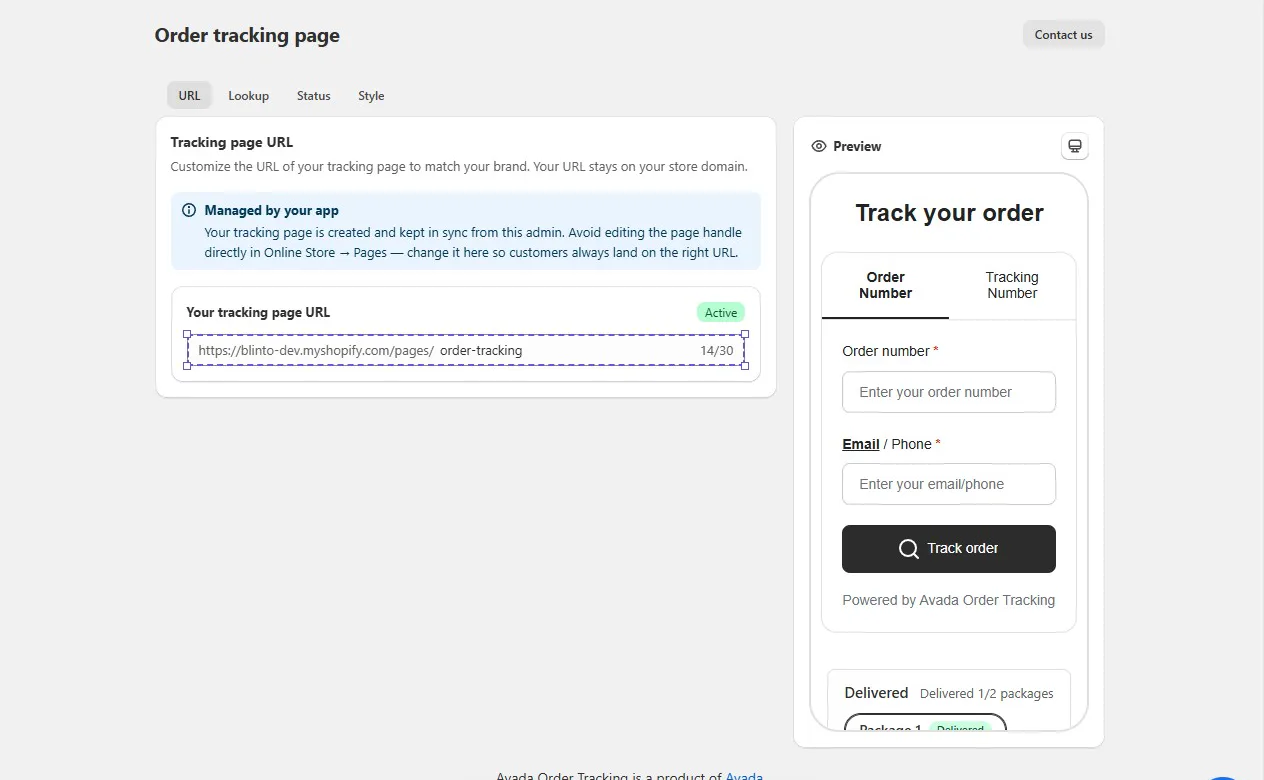
The Order tracking page screen has four tabs: URL, Lookup, Status and Style. A live preview sits on the right.
The URL tab is a nice touch. The app creates the page on your store’s own domain, at /pages/order-tracking by default, and lets you change the end of the address, up to 30 characters. A note explains that the app manages the page, so you should change the address here rather than in Online Store → Pages. That avoids a common problem where a page gets renamed and customers land on a broken link.
In the preview, customers can search by order number plus email or phone, or switch to a tracking number. The preview also shows a delivery status with packages listed separately, which matters if you split orders into more than one shipment.
At the bottom of the form, the preview shows a “Powered by Avada Order Tracking” line. We did not find an option to remove it during our test. For most small stores this is minor, but brands that care about a fully white-label experience should check.
We did not open the Lookup, Status or Style tabs in detail, so we cannot describe every design option. The listing says you can change the page’s colours and layout to match your brand.
Shipment Emails: Easy to Start, Better With Your Own Domain
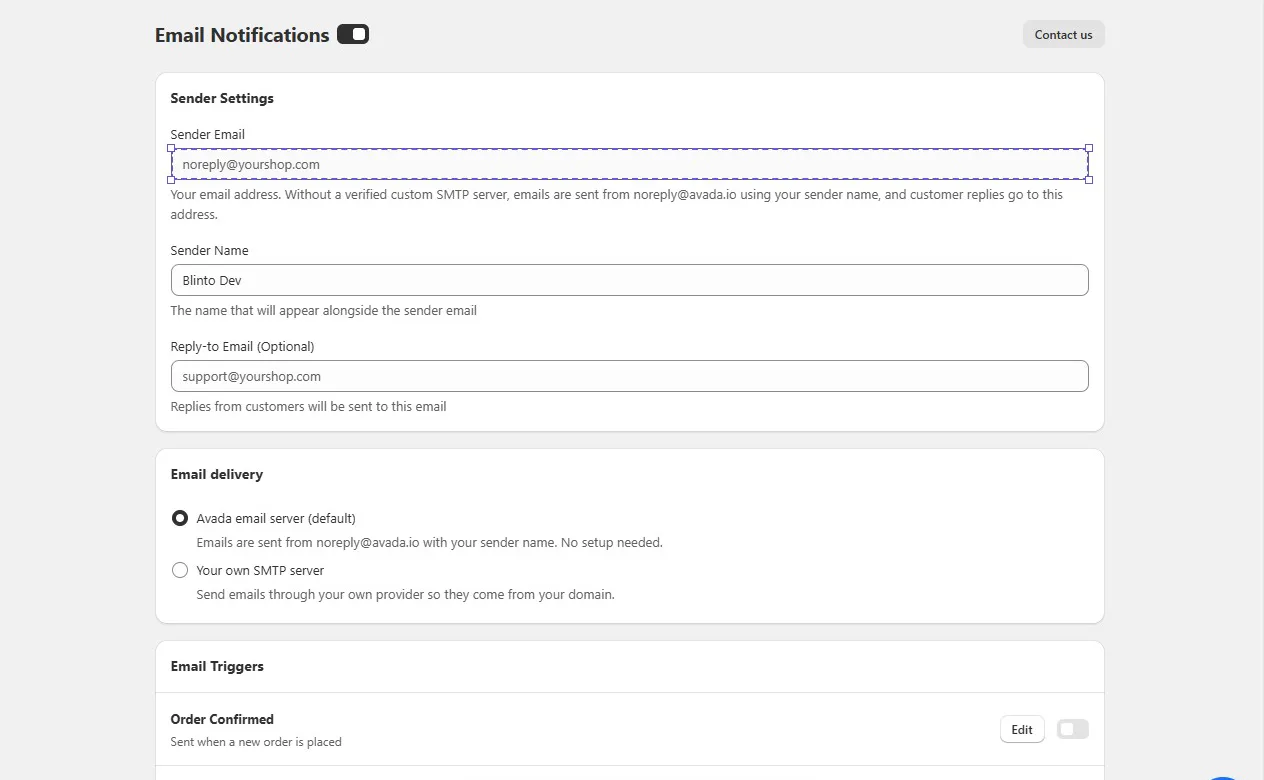
The Email Notifications screen has a master switch at the top, then three sections: Sender Settings, Email delivery and Email Triggers.
Sender Settings lets you set a sender email, a sender name and an optional reply-to address. The Email delivery section explains the catch. By default, emails go through Avada’s email server and are sent from noreply@avada.io, using your sender name. Customer replies go to your address. If you want emails to come from your own domain, you need to choose “Your own SMTP server” and connect your own email provider.
Why this matters: an email from your store’s own domain looks more trustworthy and is easier for customers to recognise. The default works with no setup, which is fine for testing or a very small store. But if your brand matters, plan to set up SMTP before you go live. We entered a test sender address but did not connect an SMTP server or send an email.
Under Email Triggers, each email has its own toggle and Edit button. The first two we saw were:
- Order Confirmed: sent when a new order is placed.
- Shipped: sent when the order is fulfilled and has a tracking number.
Both were switched off when we opened the screen, so you need to turn on each email you want. We did not scroll through or edit the full list of triggers.
Product Upsell on the Tracking Page
Customers who check their tracking page are already engaged with your store. Product Upsell uses that moment to show them more products.
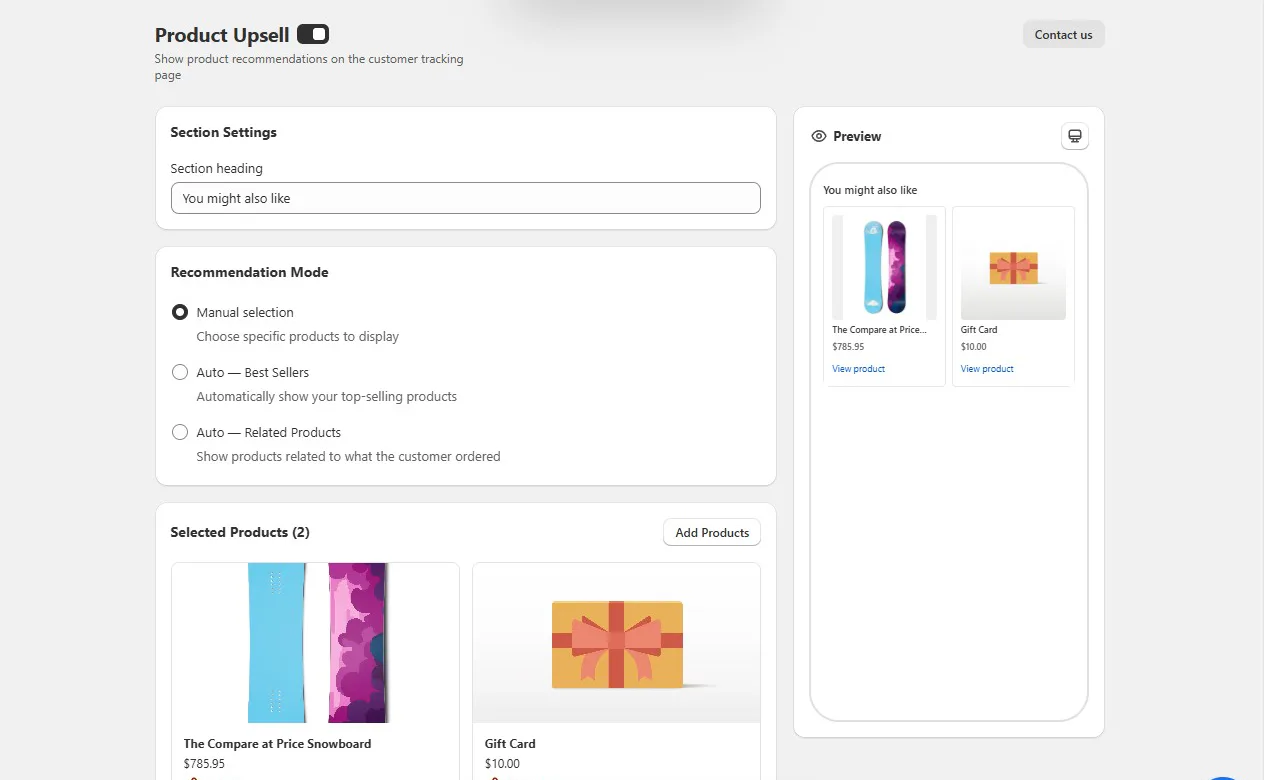
The settings are straightforward. You set a section heading (“You might also like” by default) and pick one of three recommendation modes:
- Manual selection: you choose the products.
- Auto — Best Sellers: your top-selling products.
- Auto — Related Products: products related to what the customer ordered.
We switched the feature on, chose Manual selection and added two products from our test catalogue. The preview on the right showed them as product cards with a price and a View product link.
The app pitches this as a way to lift repeat sales and order value, but we did not test it with real customers, so we cannot say how much it would add. It is a simple, free extra, and the related products mode is the one most worth trying.
Analytics
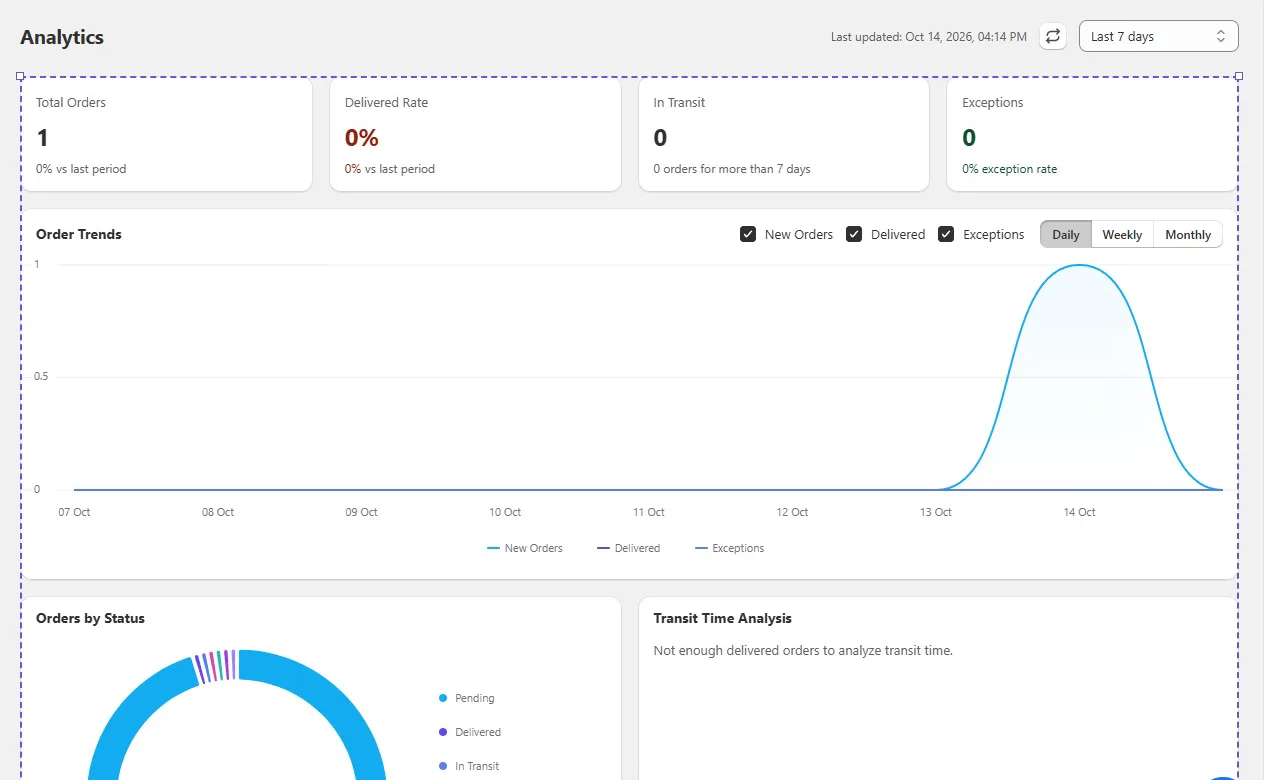
The Analytics screen gives a quick picture of how orders are moving. It has cards for total orders, delivered rate, orders in transit (with a count of orders in transit for more than 7 days) and exceptions. Below that are an Order Trends chart, with new orders, delivered and exceptions shown daily, weekly or monthly, an Orders by Status chart and a Transit Time Analysis panel.
On our store, the screen picked up one new order. Transit Time Analysis said there were not enough delivered orders to analyse yet, which is honest rather than showing empty charts as data. With real shipping volume, the “in transit for more than 7 days” count and the exception rate are the two numbers that would help most, since they point to orders that may turn into support tickets.
We cannot say how accurate the numbers are, because nothing in our test was shipped or delivered.
AI Connector (MCP)
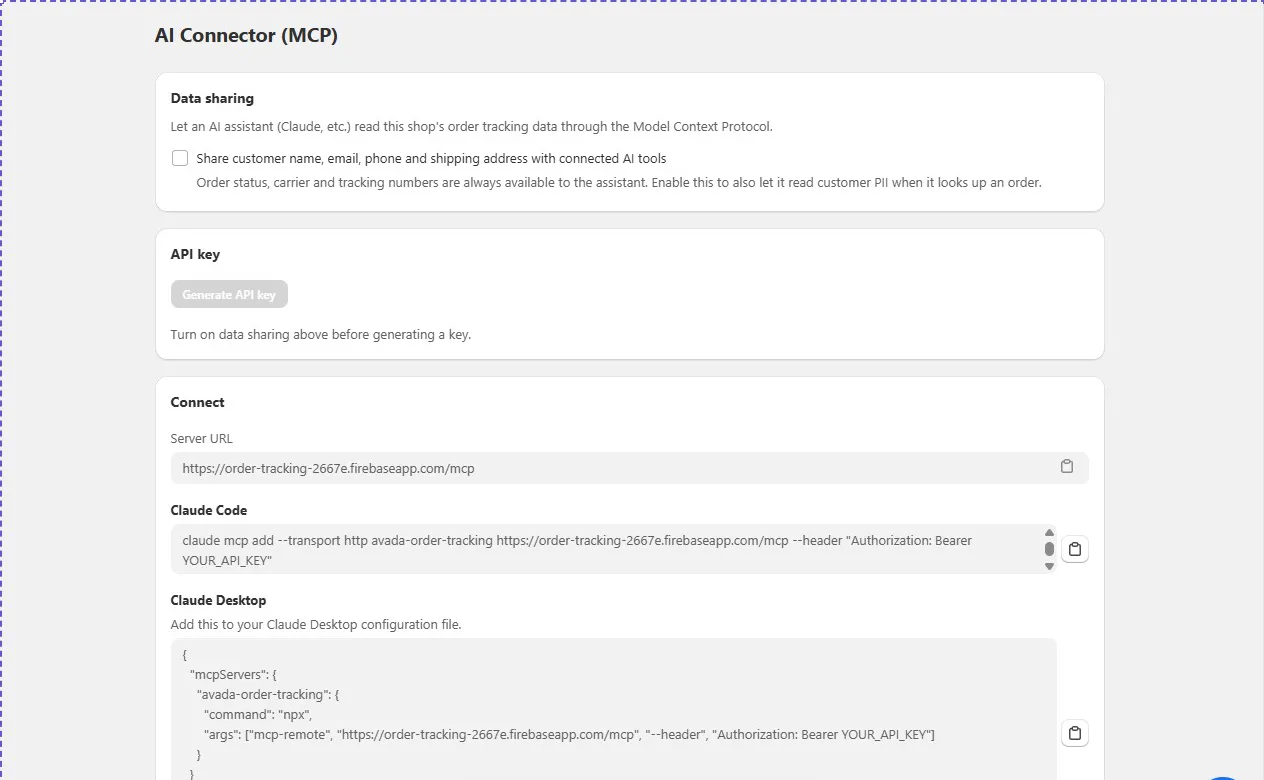
Under Integrations, the app has an AI Connector page. It lets an AI assistant such as Claude read your store’s order tracking data, so your team could ask about an order’s status from a chat tool instead of opening Shopify.
The page has three parts:
- Data sharing: order status, carrier and tracking numbers are always available to the connected assistant. A separate checkbox also shares customer name, email, phone and shipping address.
- API key: a button to generate the key that the assistant uses.
- Connect: a server URL plus ready-made setup lines for Claude Code and Claude Desktop.
It is unusual to see this in a free tracking app, and the setup instructions are clear. One thing to note: on our screen, the Generate API key button was greyed out with a note to turn on data sharing first, and the only option in that section was the customer details checkbox. That suggests you may need to share customer details to connect an assistant at all. We did not generate a key or connect an assistant, so check this before you rely on it, especially if you have privacy rules to follow.
Where Avada Order Tracking Falls Short
Four things would matter for a real store.
Emails from Avada’s address by default. Unless you connect your own SMTP server, customers receive emails from noreply@avada.io. It works, but it looks less like your brand. Setting up SMTP takes extra work and an email provider.
Avada branding on the tracking page. The preview shows “Powered by Avada Order Tracking” under the lookup form. We did not see a way to hide it.
A short track record. The app launched in October 2025. Its 45 reviews are all four or five stars, which is encouraging but not a lot of history. There are no lower-rated reviews yet to show how it handles harder carrier cases.
Language coverage for emails. One merchant asked for all features, including the automatic emails, to be available in more languages. The listing promotes 38 tracking page languages, but if you sell in many countries, check that your shipment emails can be translated as well.
Pricing and Value
Avada Order Tracking is free. On 14 October 2026, the Shopify App Store listing showed a single Free plan, with no paid tiers, order limits or trial period listed. We used it on the Free plan, and every screen we opened was available to us.
That makes the value easy to judge. You get a branded tracking page on your domain, shipment email triggers, product upsells, analytics and an AI connector at no cost. The real costs are indirect: an email provider if you want emails from your own domain, and your time checking that it tracks your carriers correctly.
Free apps can add paid plans later, so check the listing again before you build your support process around it.
What Merchants Report
Merchant reviews are overwhelmingly positive. The most common theme by far is fast, helpful support, often through live chat. Others say the app is easy to set up and use, and that the tracking page fits their brand.
A few reviews add useful detail:
- Carrier handling: One merchant shipping with a Canadian carrier says the app follows shipments through hand-offs to final-mile carriers.
- Setup problems fixed by support: One merchant whose tracking page was not showing says live chat fixed it quickly.
- Languages: One four-star review asks for more language support, including for automatic emails.
We did not test support ourselves, and the review count is still small, so treat these as early signals.
What We Liked
- Genuinely free: Tracking page, emails, upsells, analytics and an AI connector with no paid plan listed.
- Quick setup: A four-step checklist that links to each screen.
- Tracking page on your domain: Created for you, with an address you can change safely from the app.
- Flexible lookup: Customers can search by order number with email or phone, or by tracking number.
- Upsell options: Manual, best-seller and related-product recommendations on the tracking page.
- AI connector: Ready-made setup for Claude Code and Claude Desktop.
What Could Be Better
- Default sender address: Emails come from noreply@avada.io unless you connect your own SMTP server.
- “Powered by” line: Avada’s name appears on the tracking page.
- Emails start switched off: Each trigger needs turning on by hand.
- Promotion on the dashboard: A banner for another app sits at the top.
- Young app: About a year on the App Store and 45 reviews so far.
- AI data sharing: Connecting an assistant may require sharing customer details.
Who Avada Order Tracking Is Best For
Avada Order Tracking suits small and new Shopify stores that want a branded tracking page and shipment emails without adding a monthly bill. It is also a good fit for stores that want to try product recommendations on the tracking page before paying for a bigger post-purchase tool.
Teams that already use Claude may also like the AI connector, as long as they are comfortable with the data sharing settings.
Who Should Consider an Alternative
If you need emails from your own domain and do not want to manage an SMTP setup, or you want a tracking page with no third-party branding, look at a paid tracking app.
High-volume stores and stores that rely on smaller regional carriers should test several real shipments first, given the app’s short history.
If you want to compare options, we have also reviewed Synctrack, Track123, Tracktor, 17TRACK, AfterShip and CWILL Order Tracking. We have not run them head to head, so we are not ranking them here.
Final Verdict
Avada Order Tracking gives a small Shopify store a lot for nothing: a tracking page on your own domain, shipment email triggers, tracking page upsells, analytics and an AI connector. In our test, setup was quick and the screens were clear.
The main caveats are the default noreply@avada.io sender, the “Powered by” line on the tracking page and the app’s short track record.
Our advice: install it, complete the Quickstart, turn on the emails you need and set up your own SMTP server if your brand matters. Then ship a few real orders with your usual carriers. If tracking updates arrive correctly, it is a hard app to beat on price.
Frequently Asked Questions
Is Avada Order Tracking free?
Yes. On 14 October 2026, the Shopify App Store listing showed only a Free plan, with no paid tiers listed.
Can customers track orders without a tracking number?
Yes. The tracking page lets customers look up an order with the order number plus their email or phone. They can also search by tracking number.
Can emails come from my own domain?
Yes, but only if you connect your own SMTP server. By default, emails are sent from noreply@avada.io with your store’s sender name.
Can I connect Avada Order Tracking to Claude?
The app has an AI Connector page with setup lines for Claude Code and Claude Desktop. You need to generate an API key first. We did not connect an assistant during our test.
Did you test real tracking during the review?
No. Our development store had no shipped orders, so we could not test tracking accuracy, status updates, email delivery or estimated delivery dates.