
When a customer cannot find their parcel, they email the store. When enough customers do that, a small team spends hours each week on “where is my order?” replies. A branded tracking page and timely shipping emails can answer most of those questions before they are asked.
AfterShip is one of the oldest names in this space. It launched on the Shopify App Store in 2012, has the Built for Shopify badge and holds a 4.6-star rating from 1,501 reviews. But unlike some rivals, its useful features sit behind paid plans that charge per shipment.
So the question we wanted to answer was simple. Is AfterShip worth paying for, and what do you actually get for the money?
We installed AfterShip on Blinto’s Shopify development store in October 2026 and used its 7-day trial. We built and saved a tracking page, turned on four email flows, viewed a sample shipment and checked the analytics and plans. Our short answer: the setup is polished and the tracking page builder is the best part. But the paid plans add up fast, overage fees apply per shipment, and merchant reviews raise real billing concerns.
Key Takeaways
- Best part: The tracking page builder gives you a ready-made layout with logo, brand colour, font and rounding controls, plus a desktop and mobile preview.
- Quick setup: A three-step checklist covers importing shipments, turning on customer emails and launching the tracking page.
- Deep analytics: The analytics area has 13 report tabs, from transit time to support ticket insights and revenue.
- Main drawback: Branded pages, email and SMS start on Essentials at $11 a month for 100 shipments, with fees for every shipment over the limit.
- Billing risk: Recent low-star reviews focus on overage charges and hard cancellations. Check your plan limits closely.
- Our scope: This was a partial hands-on test with a sample shipment only. No real email or SMS was sent.
Our Verdict
AfterShip is a good fit for growing Shopify brands that want a polished, branded tracking experience and will use the analytics. It is less suited to small stores on a tight budget.
The strongest thing we found was the tracking page builder. You start from a ready-made layout that already shows your store name. You then add your logo, pick a brand colour and font, and preview the result on desktop and mobile. Once saved, the app offers to add a link to your store menu.
Email setup was also clear. Each shipping status is its own flow with an on and off switch, and we turned on four of them.
The trade-off is cost. The free plan covers 50 shipments a month with basic features. Branded pages with your logo, email and SMS start on Essentials at $11 a month for 100 shipments, plus $0.08 for each extra shipment. Custom domains, AI delivery dates and the full analytics suite need Premium at $70 a month. And several recent merchant reviews describe surprise overage charges and slow cancellations.
The steps we took finished without visible errors. But we only tracked a sample shipment. So this verdict covers setup, settings and plans, not tracking accuracy or email delivery.
What AfterShip Offers
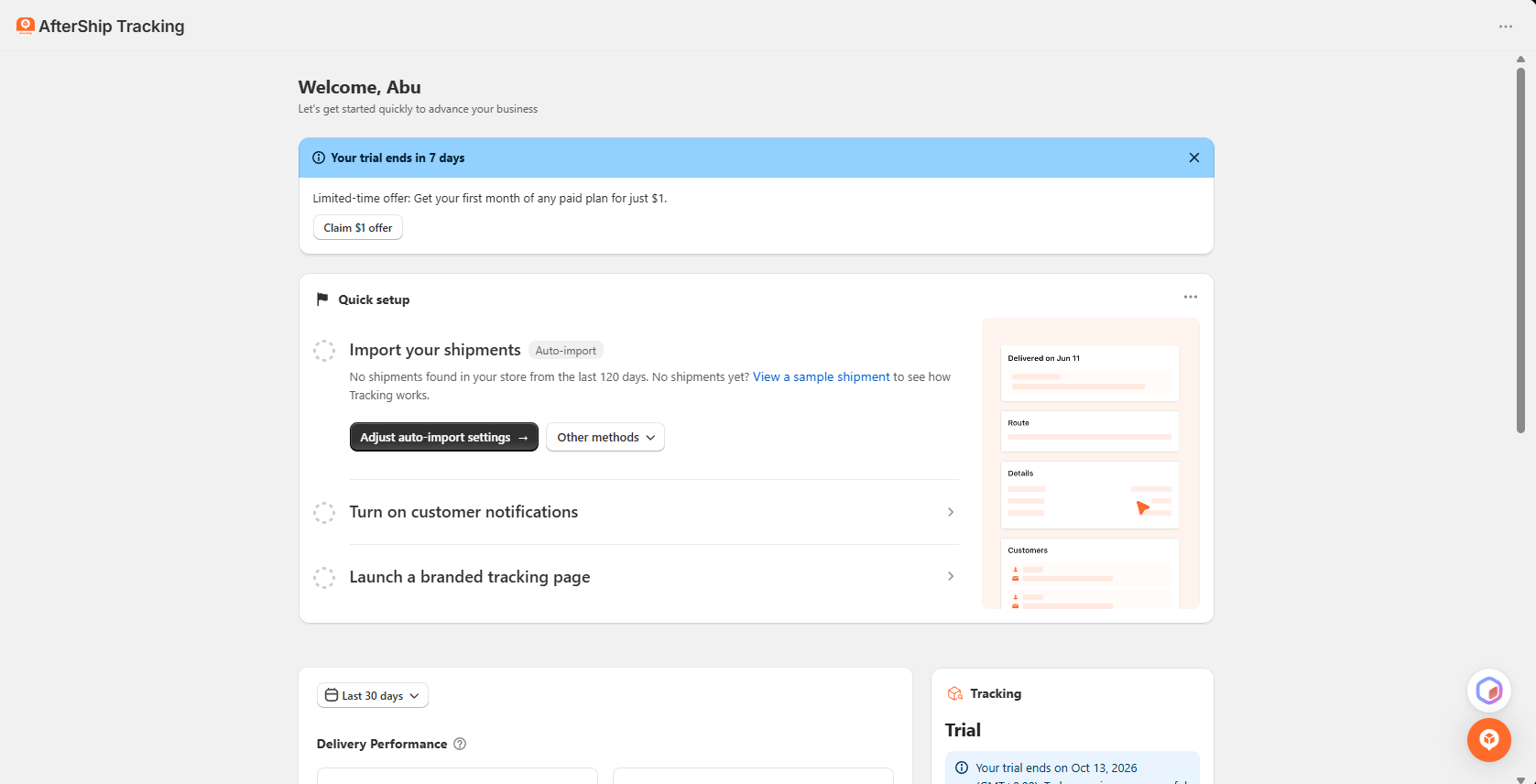
AfterShip Order Tracking is built by AfterShip. In Shopify admin, the app appears as AfterShip Tracking. Its menu includes Tracking dashboards, Tracking pages, Notifications, Analytics, Estimated delivery dates, Order edits, Protection, Offers, Pricing, Apple Order Tracking, Settings and Getting started.
The core features are:
- Shipment dashboard: One list of all shipments, with tabs for exceptions, failed attempts, expired, out for delivery, delivered and pending.
- Branded tracking page: A tracking page and order lookup page in your store’s style.
- Email and SMS flows: Automatic updates for each shipping status.
- Estimated delivery dates: Carrier dates on Free, with AI-powered dates on Premium.
- Analytics: Reports on shipments, transit time, on-time delivery, exceptions and more.
The listing says AfterShip works with more than 1,100 carriers. It also names Attentive, Gorgias, Klaviyo, Loox, ShipStation, Zendesk and Shopify Flow among the apps it works with. The app is available in English, German, French, Spanish and Italian. We did not connect any integration.
What We Tested
We installed AfterShip on Blinto Dev, a Shopify development store we use for testing. We used the 7-day trial, which was set to end on 13 October 2026.
We worked through:
- the home screen and the Quick setup checklist
- the tracking page builder, where we saved a default tracking page
- the menu link options shown after saving
- the Shipments list, using AfterShip’s sample shipment
- the Notifications area, where we turned on four email flows
- the Analytics area
- the in-app Pricing page
We did not track a real parcel. Our store had no shipments in the last 120 days, so we used the sample shipment the app offers. No email or SMS was sent, because no real shipment triggered a flow. We did not launch the page on the live storefront, use AI page building, set up delivery date widgets, order edits or protection, connect an integration or contact support.
So we can judge how AfterShip is set up, how clear its tools are and what each plan costs. We cannot judge tracking accuracy, email delivery, SMS delivery or whether it cuts support tickets.
Tracking Page Builder: The Strongest Part
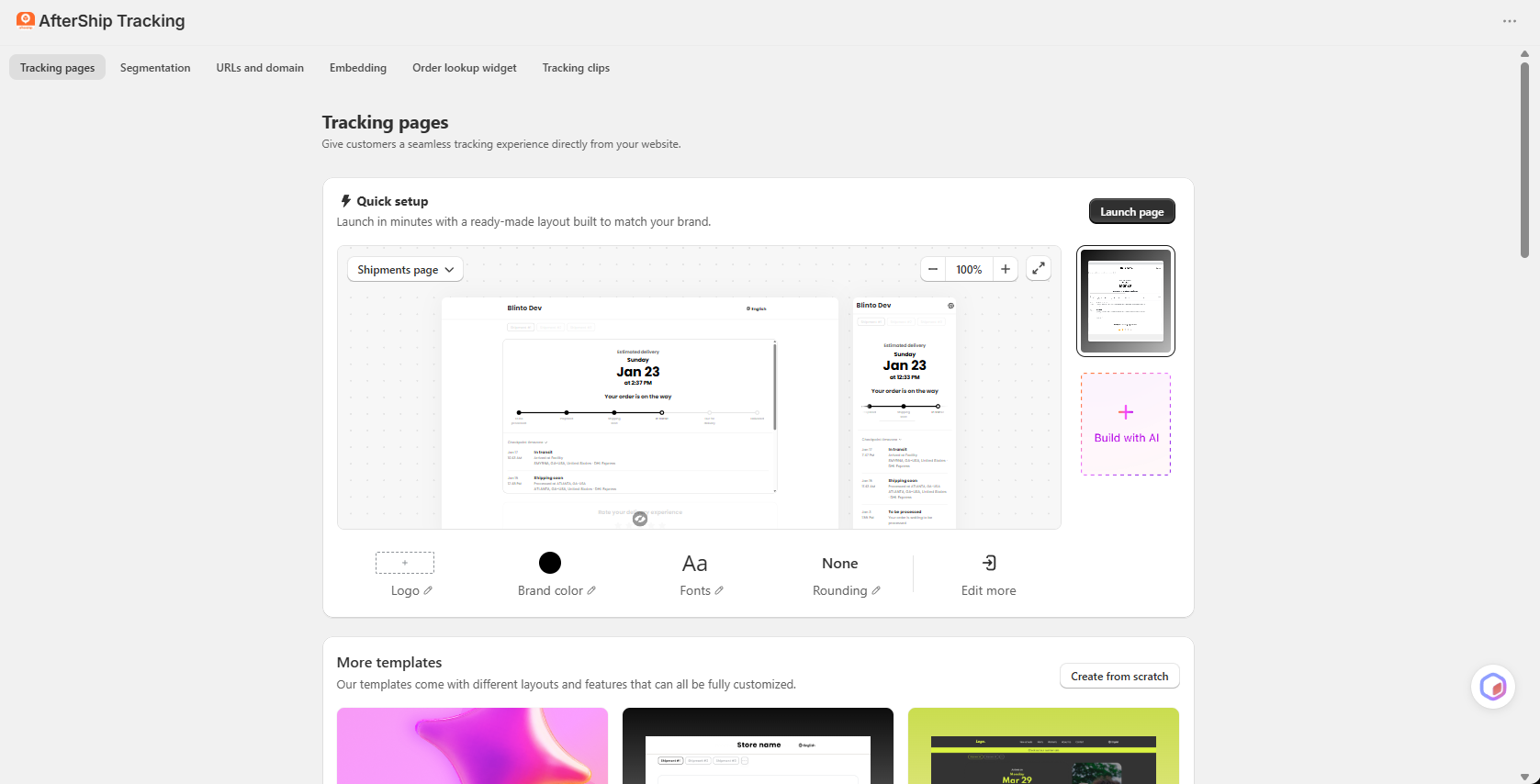
This was the best part of AfterShip.
The Tracking pages area opens with a Quick setup card. It promises a page you can launch in minutes with a ready-made layout. The preview already showed our store name, with a desktop and mobile view side by side. Below it are four simple controls: Logo, Brand colour, Fonts and Rounding. An Edit more link opens the full editor. There is also a Build with AI option and a set of other templates, or you can create a page from scratch.
Above the builder, tabs lead to more options: Segmentation, URLs and domain, Embedding, an Order lookup widget and Tracking clips.
When we saved the page, AfterShip showed two parts: an order lookup page and a shipments tracking page. It then asked where to add a link: the main menu, the footer menu or the customer account menu. It also gave a page URL on an aftership.com subdomain that you can copy and paste anywhere.
Why this matters: most store owners do not want to design a tracking page. They want one that looks like their store and is easy to find. AfterShip gets you there with a few choices and no code.
Two details are worth noting. The saved page preview showed a small “Powered by AfterShip” footer. And the Create page button showed “1/1”, which suggests a limit on how many pages you can have. We did not check which plans change either of these.
Notifications: Clear Flows With Built-In SMS
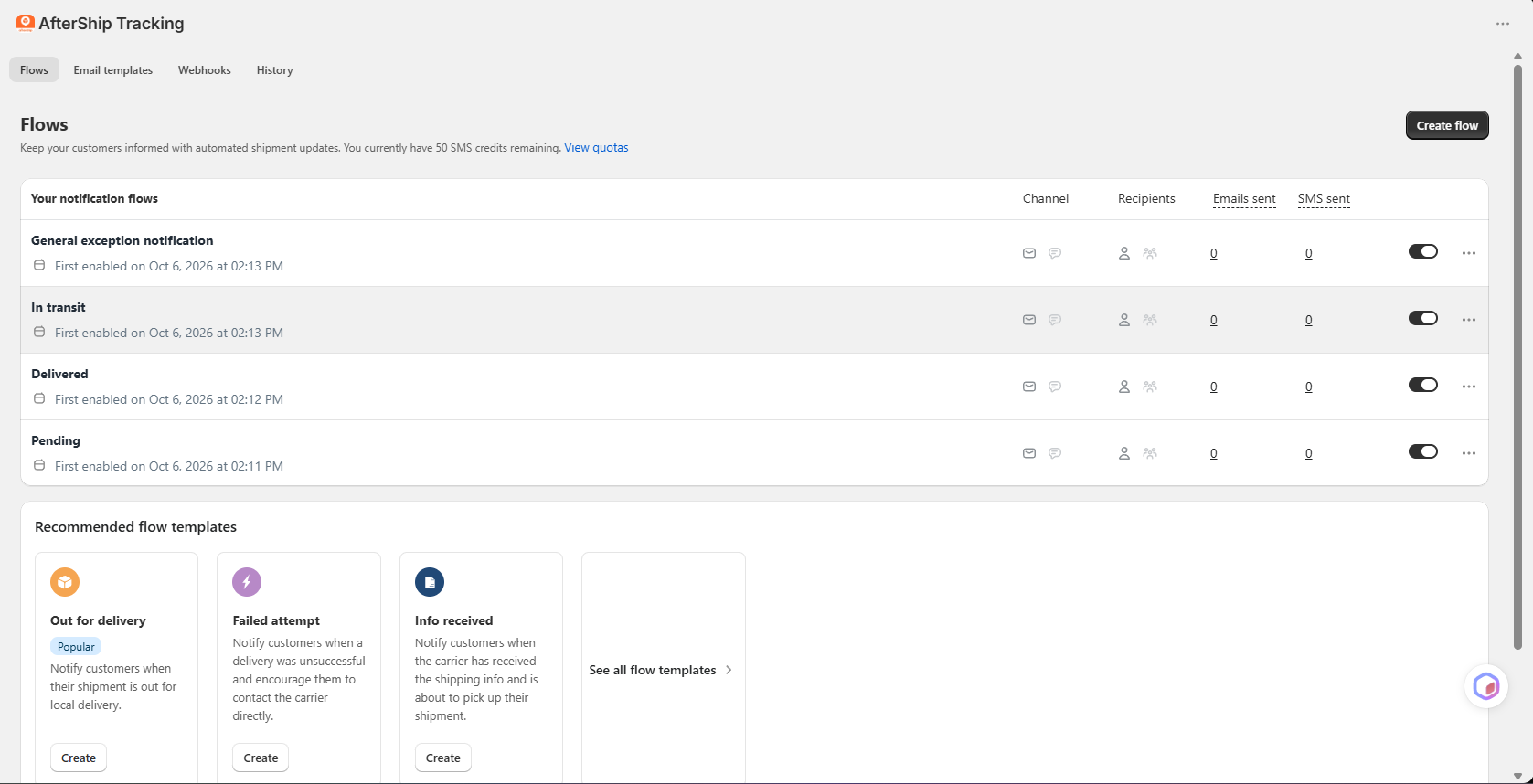
The second Quick setup step points to customer notifications. AfterShip calls these flows.
Each flow covers one shipping status and has its own on and off switch. We turned on four: General exception notification, In transit, Delivered and Pending. Each row shows the channels, the recipients, and how many emails and SMS messages it has sent. Ours showed zero, since no real shipment triggered them.
Below the active flows, AfterShip suggested more templates: Out for delivery (marked Popular), Failed attempt and Info received, with a link to see all templates. Other tabs cover Email templates, Webhooks and History.
The page also said we had 50 SMS credits left. SMS is part of the Essentials plan on the listing, which is useful for stores whose customers prefer texts. We did not send an SMS, so we cannot comment on delivery or extra SMS costs.
The layout is easy to read. You can see at a glance which updates are live.
Shipments and Analytics
The Shipments list lets you bring in orders several ways. It has CSV import, App import, Update shipments by CSV and an Add shipment button. Our sample shipment showed the carrier, status, latest event, origin, destination, transit time, estimated delivery date and an on-time status.
The home screen said no shipments were found from the last 120 days. On the listing, every plan includes a free first import of up to 500 shipments. That helps stores moving from another tracking app.
The Analytics area is extensive. It has 13 tabs: Shipments, Order-to-delivery time, Transit time, On-time shipments, Exceptions, Shipment events, Support ticket insights, Notifications, Tracking pages, Page tracking clips, Revenue insights, Shipment reviews and Apple Wallet Order Tracking. You can filter by date, status, carrier, service and destination, and export a PDF or email the dashboard.
Our only data was the sample shipment, so the charts showed one delivery. We cannot judge how accurate the reports are. On the listing, the full analytics suite is a Premium feature, so stores on Essentials should check which reports they keep after the trial.
Where AfterShip Falls Short: Cost and Billing
AfterShip’s tools are polished. The main concern is what they cost and how billing works.
Per-shipment pricing. Every paid plan includes a set number of shipments. Each shipment over that limit costs extra: $0.08 on Essentials and $0.12 on Premium. A store that has a busy month can pay much more than the base price.
Key features need Premium. On the listing, Free covers basic tracking for 50 shipments. Your logo, email and SMS start on Essentials. A tracking page on your own domain, AI delivery dates, product picks on the tracking page and the full analytics suite need Premium at $70 a month.
Billing complaints. AfterShip’s rating is lower than some rivals, and 7% of its ratings are one star. Recent low-star reviews often focus on billing. Merchants describe overage charges they did not notice, being charged after uninstalling, and cancellations that took several attempts. One merchant said a feature they used moved to a higher plan. The developer replies to many of these reviews and offers to review the charges.
We did not experience these problems in our short trial. But they are a pattern worth taking seriously. If you try AfterShip, note your trial end date, check how many shipments you send each month, and watch the overage line on your bill.
Pricing and Value
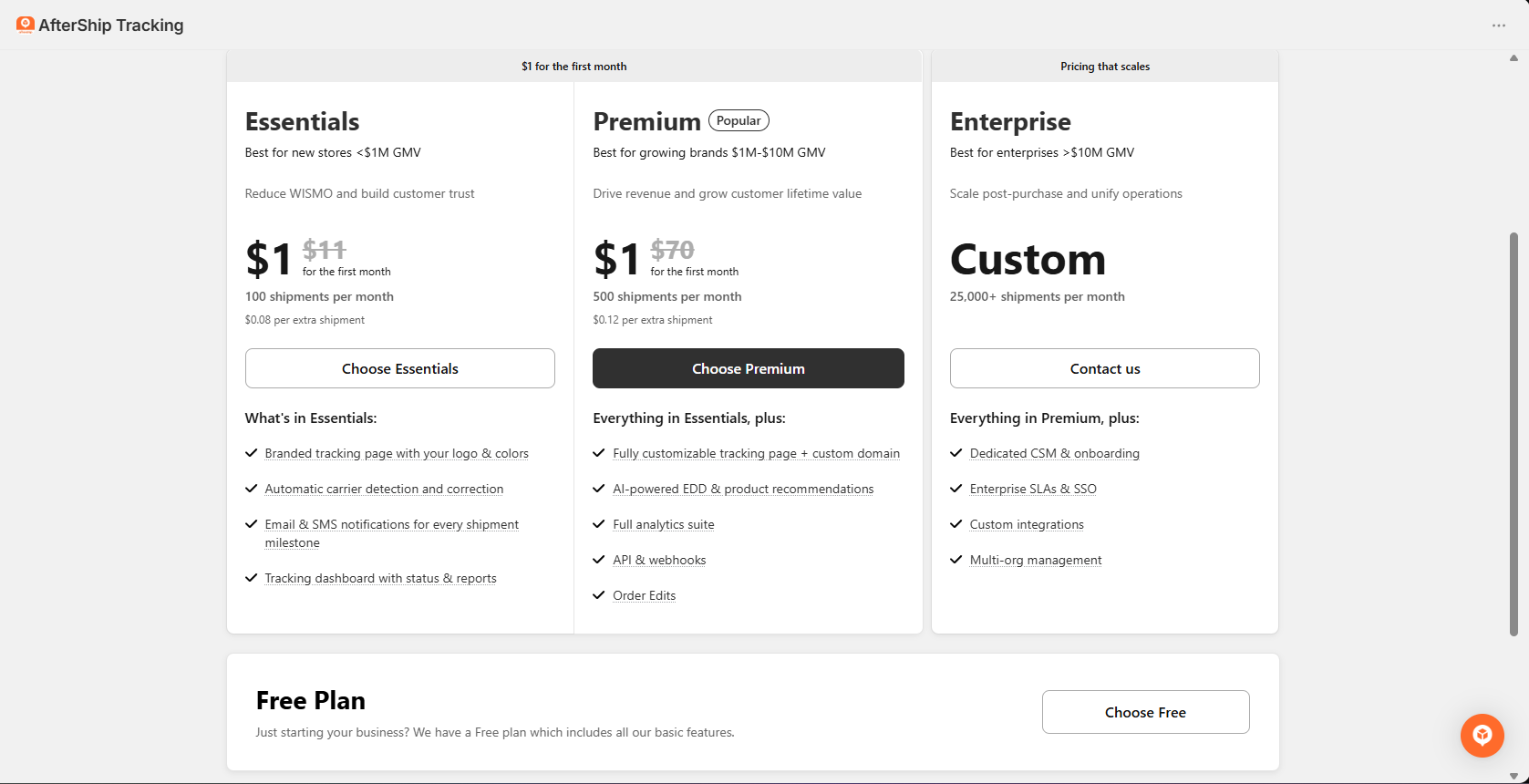
The in-app Pricing page and the Shopify listing matched on 6 October 2026:
| Plan | Price per month | Shipments per month | Extra shipments |
|---|---|---|---|
| Free | $0 | 50 | — |
| Essentials | $11 (or $108 a year) | 100 | $0.08 each |
| Premium | $70 (or $708 a year) | 500 | $0.12 each |
| Enterprise | Custom | 25,000+ | Custom |
During our test, both Essentials and Premium were offered at $1 for the first month. The paid plans include a 7-day free trial.
The app sizes each plan by store revenue. Essentials is aimed at stores under $1 million in sales, Premium at $1 million to $10 million, and Enterprise above that.
What each plan adds:
- Free: more than 1,100 carriers, the tracking dashboard, a branded tracking page and carrier delivery dates.
- Essentials: your logo and colours on the tracking page, automatic carrier detection, email and SMS for each shipping milestone, and status reports.
- Premium: a fully customisable page on your own domain, AI delivery dates and product picks, the full analytics suite, API and webhooks, and order edits.
- Enterprise: a dedicated success manager, SLAs and SSO, custom integrations and multi-org management.
So is it worth paying for? For a store sending about 100 parcels a month, Essentials at $11 is fair for a branded page plus email and SMS. But a store sending 300 parcels a month on Essentials would pay for 200 extra shipments, which adds about $16. At that point, Premium’s larger allowance may be the better deal, but it costs $70. Stores should work out their real monthly volume before choosing.
What We Liked
- Polished page builder: A ready-made layout, simple brand controls and a desktop and mobile preview made the tracking page quick to set up.
- Flexible page links: You can link the page from the main menu, footer or customer account menu, or copy the URL.
- Clear notification flows: Each status has its own switch, so it is easy to see which updates are live.
- SMS included: SMS sits next to email in the same flows, with 50 credits shown in our account.
- Deep analytics: Thirteen report tabs cover delivery speed, exceptions, support tickets and revenue.
- Easy imports: CSV, app import and a free first import of up to 500 shipments help stores switching apps.
What Could Be Better
- Cost adds up: Per-shipment overage fees can push the bill well above the base price in a busy month.
- Key features need Premium: Custom domains, AI delivery dates and the full analytics suite are $70 a month.
- Billing concerns: Recent merchant reviews describe surprise charges and hard cancellations.
- Branding on the page: The saved tracking page preview showed a “Powered by AfterShip” footer.
Who AfterShip Is Best For
AfterShip fits growing Shopify brands that care about a polished post-purchase experience. The page builder, flows and analytics work well together, and the Premium plan adds a page on your own domain and AI delivery dates.
It also suits stores that want SMS updates without a separate SMS app, since SMS sits inside the same flows as email.
Brands with a support team that tracks “where is my order?” tickets may get extra value from the support ticket and exception reports.
Who Should Upgrade or Consider an Alternative
Small stores on a tight budget may find AfterShip expensive. The free plan is limited, and the paid plans charge for every shipment over the limit. A tracking app with a more generous free plan may suit them better.
Stores with uneven monthly volume should be careful. A busy season can bring large overage charges.
Stores that want a custom domain or AI delivery dates should budget for Premium from the start.
Final Verdict
AfterShip is a polished, mature tracking app. In our test, the tracking page builder was the clear highlight, and the notification flows were easy to set up and read. The analytics go deeper than most tracking apps.
The main caveat is cost. The useful features start on paid plans, extra shipments cost more, and recent merchant reviews describe billing surprises.
Our advice: use the 7-day trial to build your tracking page and turn on the In transit, Delivered and exception flows. Then work out how many shipments you send in a typical and a busy month. If Essentials covers your volume, it is good value. If not, compare the Premium price with other tracking apps before you commit.
Frequently Asked Questions
Is AfterShip free?
There is a free plan for 50 shipments a month. It includes the tracking dashboard, a branded tracking page and carrier delivery dates. Email and SMS notifications start on the Essentials plan.
How much does AfterShip cost?
On 6 October 2026, Essentials cost $11 a month for 100 shipments and Premium cost $70 a month for 500 shipments. Extra shipments cost $0.08 and $0.12 each. Enterprise is priced on request.
Does AfterShip charge for extra shipments?
Yes. Each paid plan includes a set number of shipments, and each one over the limit is charged. Check your monthly volume before choosing a plan.
Does AfterShip send SMS updates?
Yes. SMS is part of the notification flows on the Essentials plan and above. Our trial account showed 50 SMS credits. We did not send an SMS during the review.
Can I use my own domain for the tracking page?
On the listing, a tracking page on your own domain is a Premium feature. On our trial, the page used an aftership.com subdomain.
Did you test real tracking during the review?
No. Our development store had no recent shipments, so we used AfterShip’s sample shipment. We could not test tracking accuracy or email delivery.