
Every store that ships physical products gets the same question again and again: “Where is my order?” Shopify’s own shipping emails help, but a carrier’s tracking page looks nothing like your store. A branded tracking page keeps that moment on your own domain, and tracking apps compete on how quickly they get one live.
Track123 Order Tracking is one of the bigger names in this space. It has a 4.9-star rating from 1,753 reviews on the Shopify App Store, the Built for Shopify badge and a free plan for 50 orders a month.
We installed Track123 on Blinto’s Shopify development store in October 2026 and stayed on the free Starter plan. We went through onboarding, the dashboard, the tracking page editor, the Orders list, Analytics and the in-app plan page. Our short answer: the tracking page is ready the moment onboarding ends, and the editor is one of the clearest we have seen in this category. The catch is that the free plan has a hard ceiling, and a few of the best page sections are paid.
Key Takeaways
- Fastest win: A branded tracking page was ready at the end of onboarding, at the store’s own
/apps/track123address, with no theme editing. - Best feature: The page editor lets you drag sections into order, preview each delivery status and switch between desktop and mobile views.
- Useful for support: The dashboard flags shipments stuck at a failed attempt or out for delivery for more than 3 days, and shipments with no update for more than 2 weeks.
- Main limitation: On Starter, tracking stops once you pass 50 orders in a month. Paid plans charge $0.05 per extra order instead.
- Plan gates: Product recommendations and the Instagram feed need an upgrade, and removing Track123 branding starts on Advanced at $49 a month.
- Our scope: Our store had no shipped orders with tracking numbers. We did not test tracking accuracy, emails or support.
Our Verdict
Track123 is a strong pick for small and mid-sized Shopify stores that want a good-looking tracking page running today, with room to grow into analytics and integrations later.
The best part of our test was how little setup the tracking page needed. It existed before we touched anything, and the editor made it easy to see what a shopper would see at each stage of delivery. The shipment performance panel on the dashboard is also practical. It points you at the parcels most likely to turn into a support ticket.
The trade-offs are the plan structure and tracking reliability. The free plan simply stops tracking once you exceed 50 orders in a month, so a growing store will hit that wall quickly. The app itself warns that wrong carrier matching can leave orders stuck on Pending, and some merchant reviews describe wrong or delayed statuses. We could not test this with real parcels, so treat it as something to check in your first few weeks.
What Track123 Offers
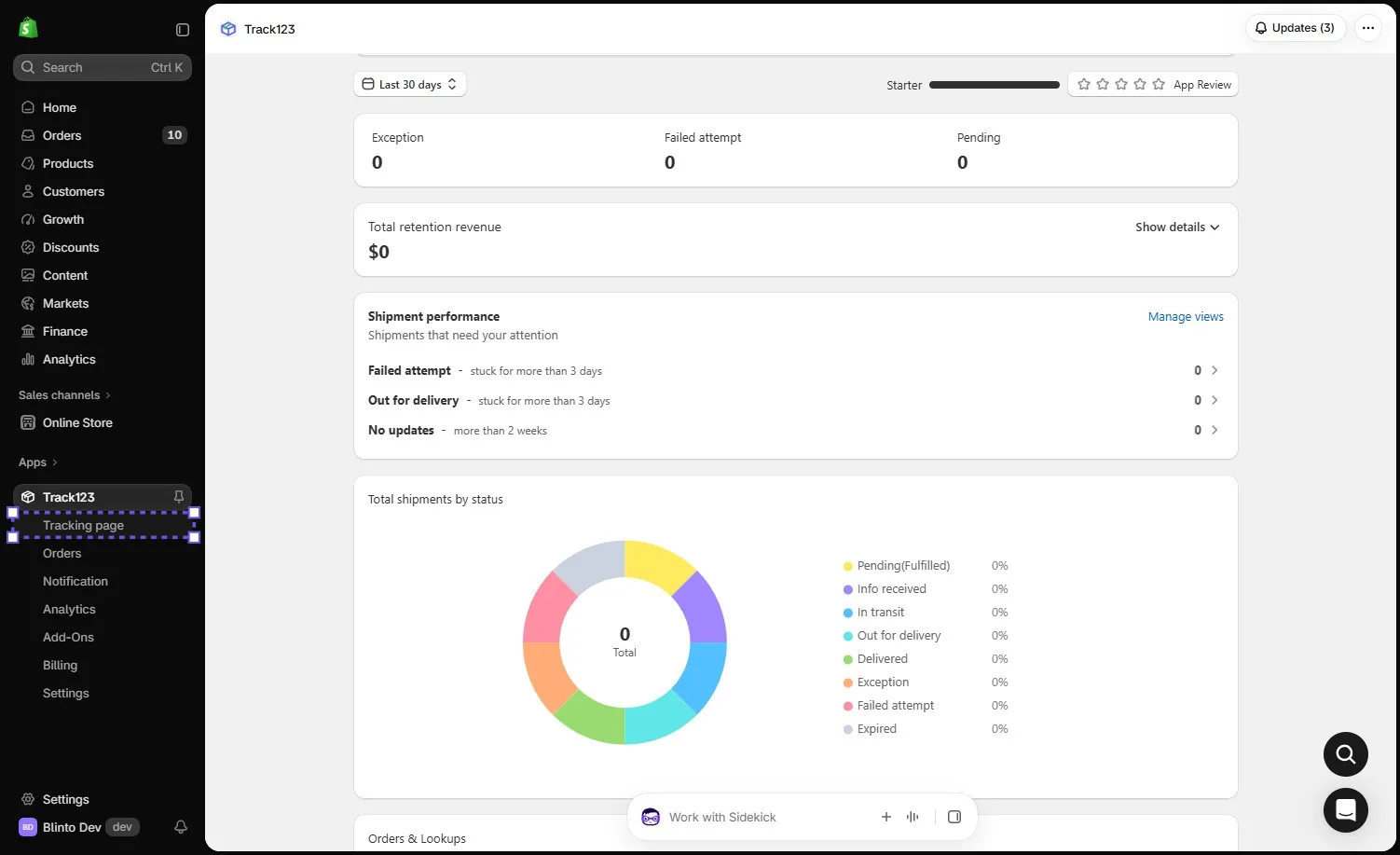
Track123 Order Tracking is built by Track123 and launched on the Shopify App Store in January 2022. Inside Shopify admin, its menu has seven areas: Tracking page, Orders, Notification, Analytics, Add-Ons, Billing and Settings.
The core features are:
- Branded tracking page: A ready-made page on your store’s domain, with a drag-and-drop editor.
- Automatic order import: Shopify orders and shipments come in on their own, with support for more than 1,500 carriers on the free plan.
- Shipment monitoring: Dashboard counts by delivery status, plus a panel of shipments that need attention.
- Notifications: Shopify’s native shipping emails on the free plan, with custom email notifications from Growth.
- Analytics: Reports on shipments, order-to-delivery time, transit time, the tracking page, exceptions, notifications and shipment reviews.
- Dropshipping mode: The listing describes a mode that hides China-related shipping details from customers. We did not open it.
The Shopify listing names integrations with PayPal and Stripe, Klaviyo, Apple Wallet, Google Maps, Shopify Flow and Royal Mail. The in-app plan page adds Omnisend, Slack and Gorgias on the Advanced plan. We did not connect any of them.
What We Tested
We installed Track123 on Blinto Dev, a Shopify development store we use for testing, and stayed on the free Starter plan.
We worked through:
- the five-slide onboarding guide
- the dashboard and its shipment performance panel
- the Tracking page screen, including translation settings
- the tracking page editor, its sections and status previews
- the Orders list, filters and tools
- the Analytics tabs
- the in-app plan page
We did not track a real parcel. The orders Track123 listed were unfulfilled, so they showed as Pending and every dashboard count stayed at zero. We did not open the Notification settings or send an email, add the page to our store menu, try the Add-Ons, connect an integration or contact support.
So we can judge how Track123 is set up, how clear its tools are and what each plan includes. We cannot judge tracking accuracy, how fast statuses update, email delivery or whether it reduces support tickets.
Setup: A Tracking Page Before You Start
The first screen is a short welcome guide with five slides. The last one says the branded tracking page is ready and shows its address, which is your store domain followed by /apps/track123. From there you can view plans or open the page editor, and a short guide link explains how to add the page to your store’s navigation.
That ordering is the right one. With many tracking apps, the page is something you build after connecting carriers and emails. With Track123, a working page exists from minute one, and everything else is refinement.
The Tracking page screen keeps the next steps in one place:
- Add to menu: A banner with an Add to menu button for putting the page in your store’s navigation.
- Pages: The default “Track order status” page, with view counts, a Customize button and a Create new option for extra pages.
- Get Inspired and View default page: Buttons for ideas and for checking the live page.
- Translation: The page was set to English. A note says the page language changes automatically when customers switch language in your store, and that you can edit the default translation text.
The Tracking Page Editor: The Best Part
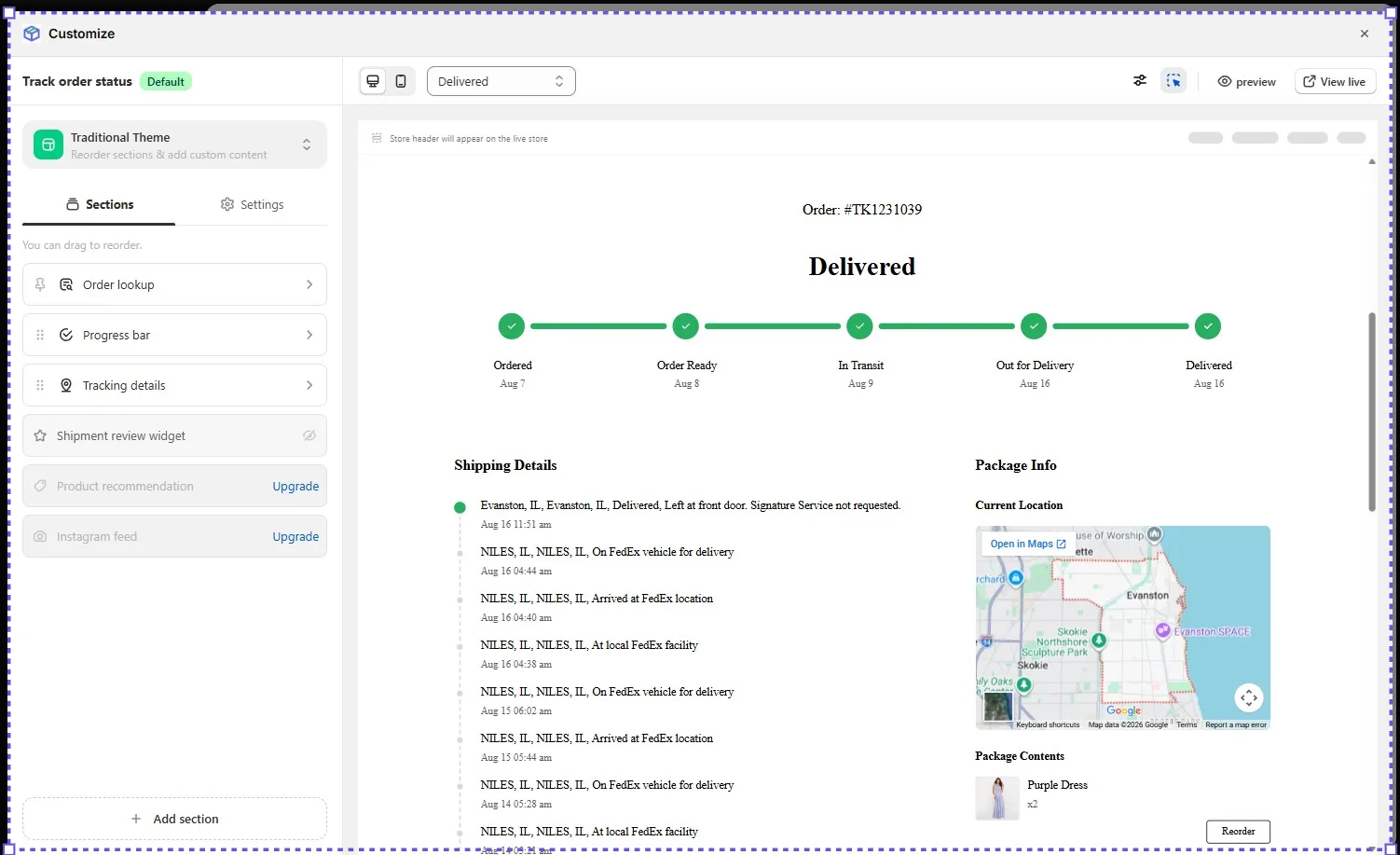
The editor opens on a “Traditional Theme” with two tabs, Sections and Settings. Sections can be dragged into a new order, and an Add section button sits at the bottom. The default sections are:
- Order lookup
- Progress bar
- Tracking details
- Shipment review widget, which was hidden by default
- Product recommendation, marked Upgrade
- Instagram feed, marked Upgrade
On the right, a live preview shows a sample order. A dropdown at the top switches the preview between delivery statuses. We previewed Delivered, which showed a five-step progress bar from Ordered to Delivered, a full list of carrier scan events, a map of the current location, the package contents and a Reorder button. You can also flip between desktop and mobile previews, open a full preview or view the page live.
Why this matters: a customer who checks tracking is already on your site and thinking about the order. A clear progress bar and scan history answer the question without a support email. The Reorder button and package contents turn the page into a small chance to sell again.
The catch is that two of the most commercial sections, product recommendations and the Instagram feed, are locked on the free plan. The editor shows them, but you need to upgrade to use them.
Where Track123 Falls Short: Free Plan Ceiling and Tracking Reliability
Two things would affect a real store, and one is worth checking.
The free plan stops at 50. The plan page says Starter tracking is “unavailable after quota is exceeded”. Growth and Advanced charge $0.05 per extra order instead, so paid plans keep working when you have a busy month. A store that ships more than about 50 orders a month should treat Starter as a trial, not a long-term plan.
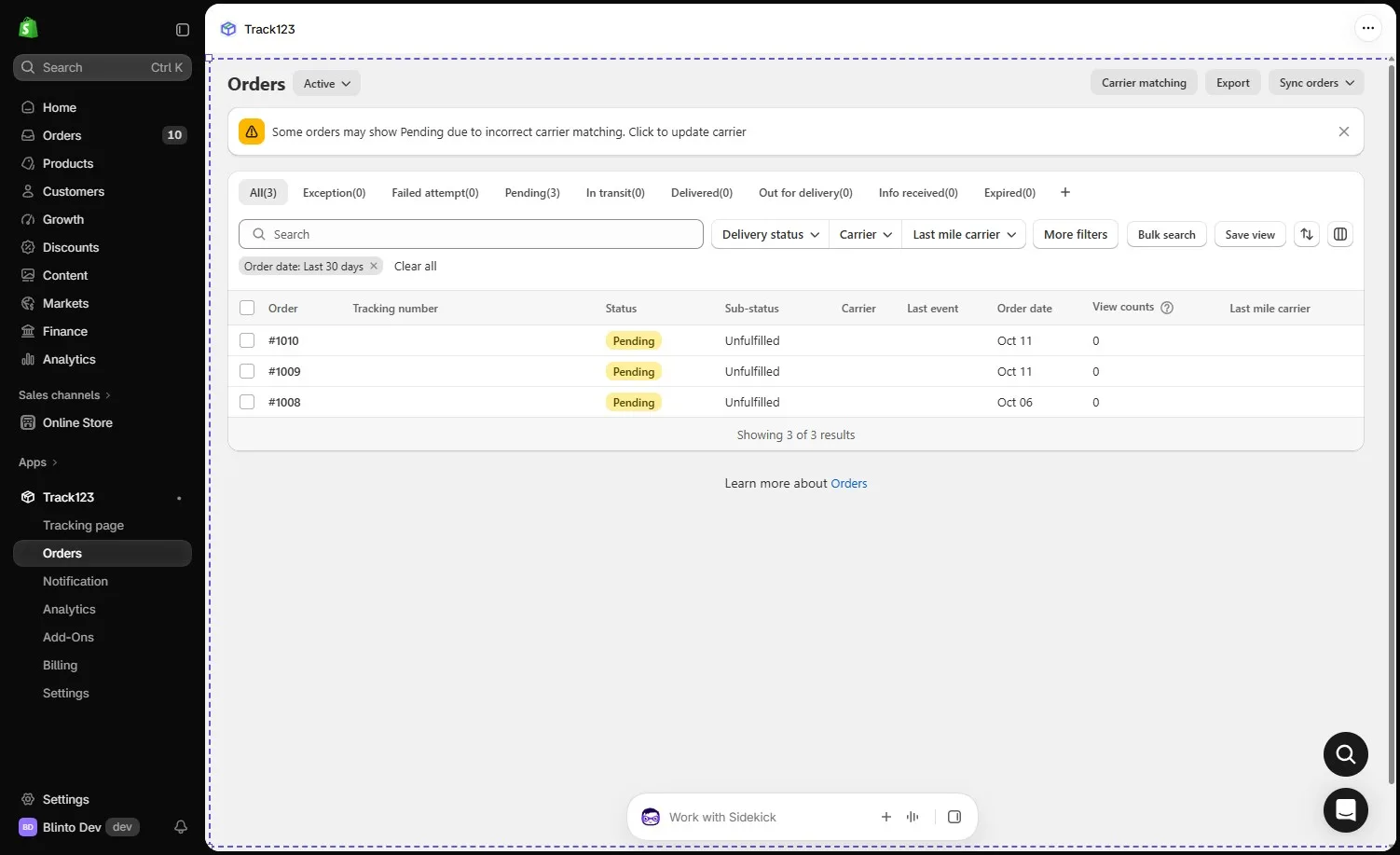
Carrier matching can need attention. The Orders page showed a standing warning that some orders may show Pending because of incorrect carrier matching, with a Carrier matching button to fix it. Our three orders were Pending because they had not been fulfilled, so we could not see whether matching worked on live parcels. Some merchant reviews describe statuses that were wrong, stuck or a day behind the carrier, which fits the same risk. The developer usually replies that the issue has been fixed.
Analytics need real shipments to judge. The Analytics tabs opened with greyed-out sample charts rather than our store’s data. The listing includes basic analytics on Starter, while shipment and ROI analytics are listed under Growth. With no shipments in our store, we could not tell how much of the Analytics area works on the free plan.
On the plus side, the Orders page is well built for a support team. It has status tabs, filters for delivery status, carrier and last-mile carrier, a bulk search, saved views, export and a View counts column for each order.
Pricing and Value
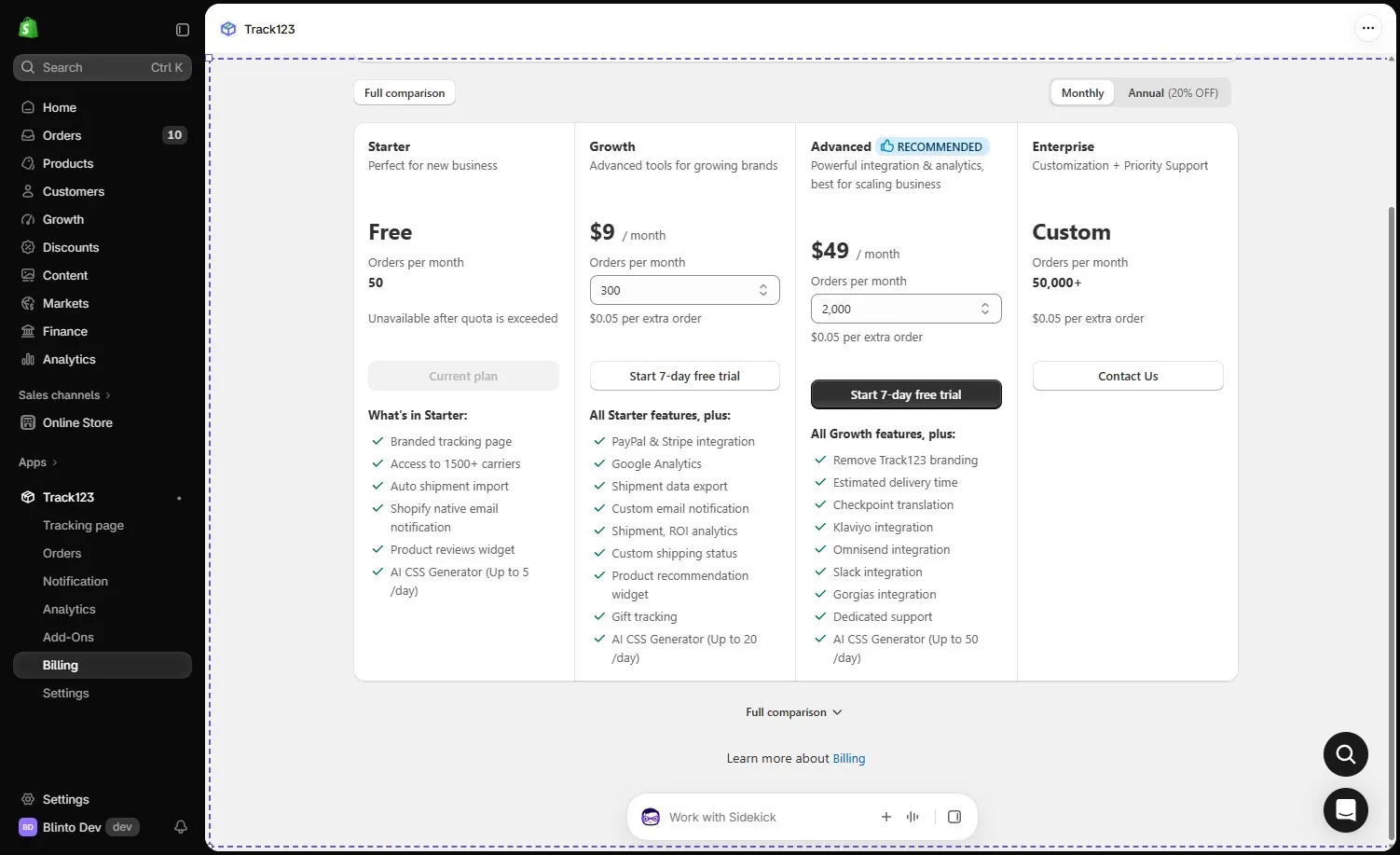
Track123 prices its plans by monthly order volume. This is what the in-app plan page showed on 13 October 2026:
| Plan | Price per month | Orders per month | Extra orders |
|---|---|---|---|
| Starter | Free | 50 | Tracking stops |
| Growth | $9 | 300 | $0.05 each |
| Advanced | $49 | 2,000 | $0.05 each |
| Enterprise | Custom | 50,000+ | $0.05 each |
Growth and Advanced both offer a 7-day free trial. The plan page also has an annual option at 20% off. The Shopify listing showed annual prices of $84 for Growth and $468 for Advanced on the same day. Growth and Advanced have a volume selector, so check the exact price for your volume on the Billing page.
What each plan adds:
- Starter: branded tracking page, more than 1,500 carriers, automatic shipment import, Shopify native email notifications, a product reviews widget and an AI CSS generator for up to 5 uses a day.
- Growth: adds PayPal and Stripe integration, Google Analytics, shipment data export, custom email notifications, custom shipping statuses, shipment and ROI analytics, the product recommendation widget and gift tracking.
- Advanced: adds removing Track123 branding, estimated delivery time, checkpoint translation, Klaviyo, Omnisend, Slack and Gorgias integrations, and dedicated support.
So where does each plan make sense? Starter is a real way to try the page, but it is too small for most live stores. Growth at $9 is good value for a store that wants custom emails and PayPal tracking sync. A brand that wants a fully unbranded page or estimated delivery dates needs Advanced, which is a big step up at $49.
What Merchants Report
Track123’s rating is built mostly on five-star reviews. The common themes are easy setup, a clean interface, a customizable tracking page, wide carrier coverage, fewer order-status questions and responsive chat support.
A small number of one- to three-star reviews point to limits worth knowing:
- Status accuracy: Several stores describe parcels showing the wrong status, a delayed update or a status sync that stopped.
- Old or repeat emails: A few stores say customers received delivery emails for orders that arrived days or weeks earlier.
- Email editing: One store could not edit email content itself and needed the support team to do it.
- Support quality: Some reviews describe slow, scripted or bot-like replies, although many five-star reviews praise support.
The developer replies to most low-star reviews, usually saying the issue was fixed. We did not run into these issues because we did not track live parcels, but check them during your trial.
What We Liked
- Page ready on install: A branded tracking page existed at the end of onboarding, with no theme editing.
- Clear editor: Draggable sections, status previews and desktop and mobile views make the page easy to shape.
- Automatic translation: The page follows the language customers choose in your store.
- Useful exception panel: The dashboard flags failed attempts, stuck deliveries and shipments with no update for 2 weeks.
- Support-friendly Orders page: Filters, bulk search, saved views and view counts help answer tickets quickly.
- Cheap first upgrade: Growth is $9 a month for 300 orders, with overage instead of a hard stop.
What Could Be Better
- Hard stop on Free: Tracking is unavailable once Starter’s 50 orders a month are used.
- Locked page sections: Product recommendations and the Instagram feed need an upgrade.
- Branding removal costs $49: Removing Track123 branding and showing estimated delivery time both start on Advanced.
- Carrier matching: The app warns that wrong carrier matching can leave orders on Pending, and some merchants report wrong statuses.
- Email depth on Free: Starter relies on Shopify’s native emails. Custom email notifications and custom shipping statuses start on Growth.
Who Track123 Is Best For
Track123 fits small and growing stores that want a professional tracking page with almost no setup. The page is live straight after onboarding, and the editor is simple enough for a store owner to manage without a developer.
It also suits multilingual stores, since the tracking page follows the store’s language automatically.
Stores with a support team will get value from the dashboard’s exception panel and the Orders filters. They make it easy to find the parcels most likely to cause a complaint.
Who Should Upgrade or Consider an Alternative
Stores shipping more than 50 orders a month should plan for Growth from the start, because Starter stops tracking at the limit.
Brands that want a fully unbranded page, estimated delivery dates or Klaviyo integration need Advanced. If $49 a month is too much for your volume, compare it with other tracking apps before committing. We have also reviewed 17TRACK and AfterShip, the other large tracking apps in this category.
Stores that depend on exact, up-to-the-hour status updates should test carrier matching on real parcels during the 7-day trial, given the app’s own warning and the status complaints in some reviews.
Final Verdict
Track123 makes the first step of order tracking almost effortless. In our test, the branded tracking page was ready before we had done anything, and the editor made it simple to see and shape what shoppers would see at each delivery stage.
The main caveats are the 50-order ceiling on the free plan, the paid gates on the page’s sales sections and branding removal, and the need to watch carrier matching once real parcels flow through.
Our advice: install it on Starter, customize the page and add it to your store menu. Ship a handful of real orders and check that each one leaves Pending and matches the carrier’s own tracking. If it does, Growth at $9 a month is the sensible next step for most stores.
Frequently Asked Questions
Is Track123 free?
Yes. The Starter plan is free for 50 orders a month and includes the branded tracking page, more than 1,500 carriers and Shopify native email notifications. Tracking is unavailable once you go past 50 orders in a month.
How much does Track123 cost?
On 13 October 2026, the in-app plan page listed Growth at $9 a month for 300 orders and Advanced at $49 a month for 2,000 orders, with $0.05 per extra order. Enterprise is priced on request. Annual billing is about 20% cheaper.
Can I remove the Track123 branding?
Yes, on the Advanced plan. Branding removal is not included in Starter or Growth.
Does the tracking page support other languages?
Yes. The page language changes automatically when a customer switches language in your store, and you can edit the default translation text.
Why do my orders show Pending in Track123?
Orders that have not been fulfilled show as Pending, as ours did. The app also warns that wrong carrier matching can leave shipped orders on Pending, and the Orders page has a Carrier matching tool to fix it.
Did you test real tracking during the review?
No. Our development store had no shipped orders with tracking numbers. We could not test tracking accuracy, status updates or email delivery.