
Most Shopify stores do not need a new theme. They need four or five things the current theme does not do — a comparison table, a proper FAQ block, trust badges, a video in the right place on the product page. Hiring a developer feels heavy. Installing a page builder and rebuilding pages inside it feels heavier.
Section Store sells a third option: add ready-made sections to the theme you already have. It became known for one-time purchases, but the app now presents that model alongside a subscription toolkit.
We installed Section Store: Theme Sections on a Shopify development store to see what a merchant meets on day one. Our question: is this still a one-time-purchase alternative, or should you now evaluate it as a subscription app?
Both routes exist. Individual sections remain available, but the app gives far more weight to Section Store Plus at $15 per month — a price that also makes older articles quoting $10 out of date.
Key Takeaways
- The one-time route survives. You can still buy individual sections and, in the app’s words, they are “yours forever.”
- But Plus is the default. The dashboard leads with “Start with Plus,” the plan card is badged Recommended, and “Try Plus Free” sits in the header on every screen.
- Plus is $15/month, seen on two in-app screens on 16 September 2026 and matching the App Store listing.
- Conversion features are subscription-only. Every conversion block we saw was locked, and a bundle can be built and previewed but not published without Plus.
- Most sections are advertised at $0–$9 — the developer’s public claim, not a uniform price. No per-section price appeared in-app.
- Test one section before buying several. Merchant reports show recurring theme-compatibility friction.
Our Verdict
Section Store now combines two buying models under one name, and you should choose between them before spending time on setup.
If you need a handful of specific sections and nothing else, the one-time route remains available and clearly signposted. That is the clearest reason to consider Section Store over a full page builder. If what drew you in was conversion blocks, quantity breaks, the cart drawer or the AI product-page setup, you are evaluating a $15/month subscription with a 14-day trial — good value if it replaces several apps, but a different decision from buying one section once.
Our recommendation is Consider, not an unconditional install. Take the one-time route when you need a specific section and can test it on your real theme. Take Plus when you will actively use the conversion toolkit, not because the dashboard recommends it.
What We Tested
We installed Section Store on a Shopify development store on 16 September 2026 with no sections purchased and no Plus subscription — the state a merchant is in minutes after install. We worked through the dashboard, Conversion Blocks, Bundles & Quantity Breaks, and the AI Product Page Setup entry flow, recording the plan boundaries we hit.
We did not buy a section, insert one into a theme, view any storefront output, complete the AI setup, build a bundle, contact support, or measure speed or conversion. We did not uninstall the app, so the “yours forever” claim is untested — the most important gap here, and one we will address in a follow-up.
That makes this a Level 2 — Partial Hands-On Test of the app’s plan structure and first-run experience. It reviews the buying decision, not the sections themselves. Everything below about what sections do on a live theme is vendor documentation or merchant reporting, labelled as such.
What Section Store Offers
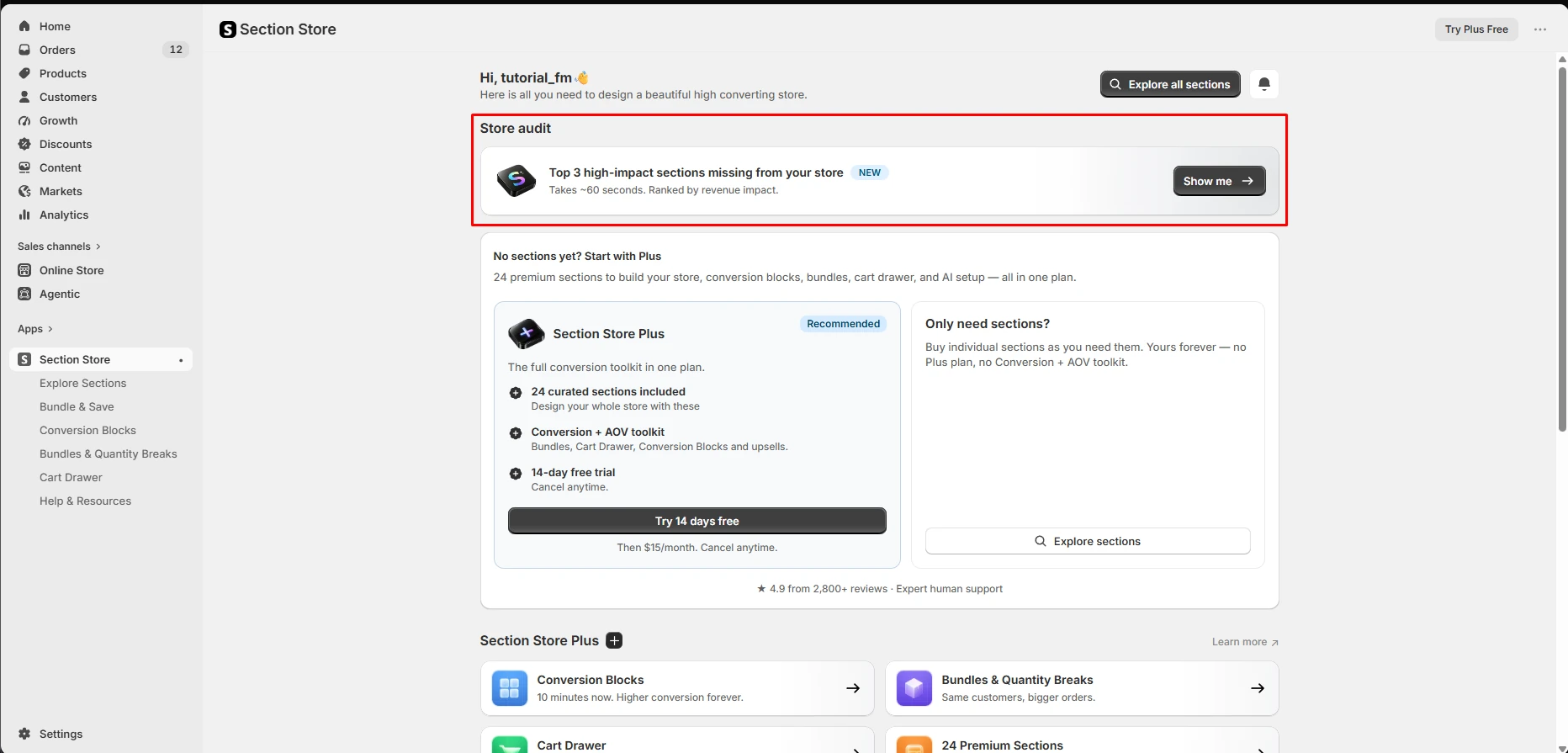
The dashboard presents two routes, and it is not subtle about which it prefers.
The headline reads “No sections yet? Start with Plus — 24 premium sections to build your store, conversion blocks, bundles, cart drawer, and AI setup — all in one plan.” The Plus card is badged Recommended and ends with “Try 14 days free / Then $15/month. Cancel anytime.” The other route sits to the right in a smaller panel: “Only need sections? Buy individual sections as you need them. Yours forever — no Plus plan, no Conversion + AOV toolkit.” That panel shows no price.
Credit where it is due: the app is honest about the trade and does not bury the second route. But the visual weight is entirely on the subscription, and a merchant who arrived expecting a section marketplace is looking at a monthly plan within about three seconds.
The dashboard displayed “★ 4.9 from 2,800+ reviews” during our test. The Section Store website advertises more than 750 sections.
What You Get Without Plus
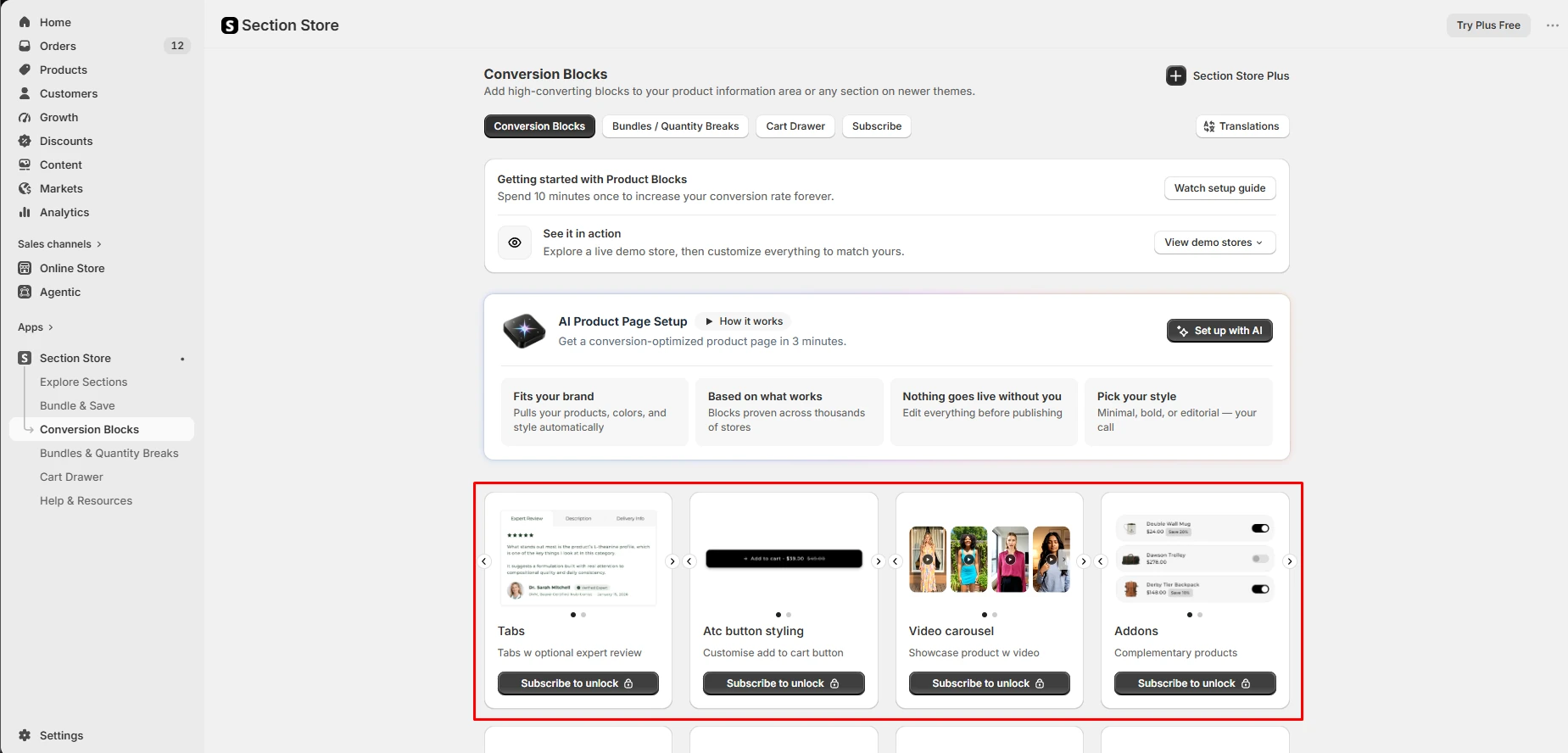
The Conversion Blocks screen is where the free experience runs out fastest. Every block card was padlocked with “Subscribe to unlock” — Tabs, add-to-cart button styling, video carousel, product add-ons. We found no free block to try.
What is available without paying is the supporting material, and there is more of it than most apps at this price bother with: a setup guide, browsable live demo stores, three narrated video guides (Section Store Overview 5:06, AI Block Setup 2:49, Cart Drawer Setup 7:25), and a “Store audit” offering the top three sections missing from your store.
Those demos are useful for shortlisting, but none proves a section will behave inside your theme. We found no in-theme trial during this test; if one is offered for the section you want, use it on a duplicate theme before paying.
The Bundle You Can Build but Cannot Publish
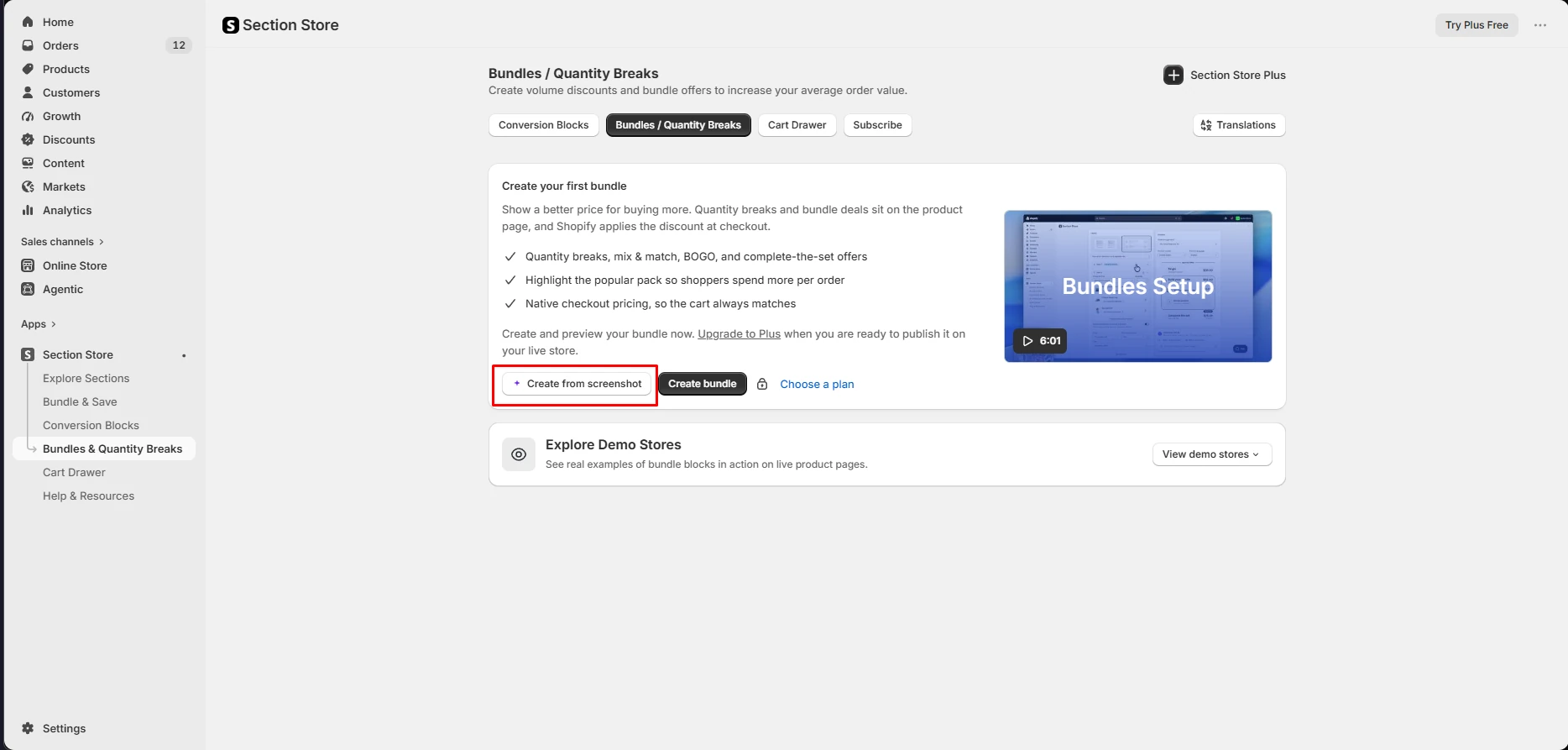
This was the sharpest thing we found.
The screen invites you to build: quantity breaks, mix and match, BOGO, complete-the-set offers, with Shopify applying the discount natively at checkout. There is a “Create bundle” button and an AI-assisted “Create from screenshot” option. Then, in smaller text beneath the feature list: “Create and preview your bundle now. Upgrade to Plus when you are ready to publish it on your live store.”
The boundary is clear enough — create and preview without Plus, publish with it — and the disclosure appears before setup begins, so it is not hidden. But it is one line of grey text while the create buttons carry the visual weight. Surfacing the Plus requirement beside the primary action would make the cost harder to miss.
What the Subscription Is Really Selling
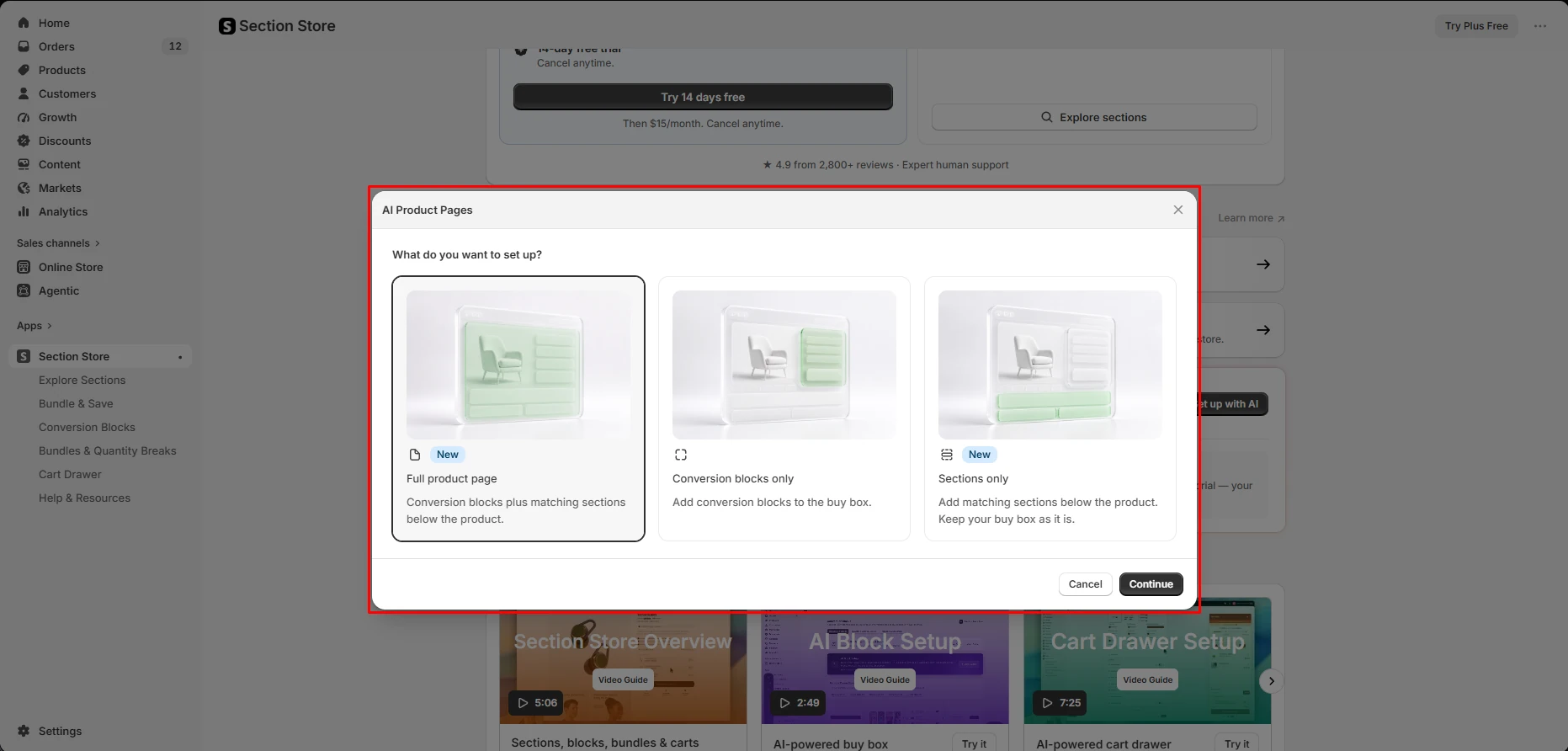
The AI Product Page Setup is the clearest statement of what Plus is for. It offers three modes — a full product page, conversion blocks only, or sections only, that last one letting a merchant happy with their buy box leave it alone. The pitch is a conversion-optimized product page in three minutes, with nothing going live until you approve it.
What the screen shows is how the subscription expands Section Store beyond a marketplace: Plus packages product-page setup, conversion blocks, bundles and a cart drawer into one monthly toolkit.
The vendor’s AI-credit guide adds limits the screen does not mention. AI setup runs are capped at five free per store — one-time, not monthly — after which the vendor lists $5 for 10 more, and both full AI setup and those top-up packs require Plus. Plus includes 15 section-customisation credits per billing cycle that do not roll over, and each purchased section carries two AI credits the vendor says do not expire. Re-check the guide before relying on AI for repeated production work.
Pricing and What It Actually Costs
Current picture, verified in-app on 16 September 2026:
| Route | Cost | What you get |
|---|---|---|
| Individual sections | Most advertised at $0–$9; one-time | The section and two AI credits, per the vendor. No Plus toolkit. |
| Section Store Plus | 14-day trial, then $15/month | 24 curated sections, conversion blocks, bundles, cart drawer, upsells, monthly AI credits. |
| Extra AI setup runs | $5 for 10 after the five free | Requires active Plus, per the vendor. |
Use $15/month for budgeting. We saw it on two in-app screens, and the App Store listing matched on 16 September 2026. Articles still quoting $10 are out of date.
“Most sections $0–$9” is a range, not a promise. It appears on the Section Store website but on none of the in-app screens we tested, including the “Only need sections?” panel. Check the exact price before buying.
At $15/month, Plus costs $180 over twelve uninterrupted months before AI top-ups. If you need a few sections and not the toolkit, one-time purchases are the simpler structure. If bundles, conversion blocks, the cart drawer and several included sections genuinely replace other subscriptions, the calculation changes. Compare the tools you will actually use, not the headline section count.
A subscription page builder like PageFly or EComposer occupies a similar monthly slot but solves a different problem: those build pages, this drops components into the theme you have.
What We Liked
- The one-time route is preserved and stated plainly. Nobody wanting one section is funnelled into a subscription to get it.
- Plus is a real bundle, not a feature tax. 24 sections plus bundles, cart drawer, conversion blocks and AI setup in one $15/month line plausibly replaces two or three apps.
- Onboarding beats the category norm. Three narrated video guides, demo stores and a setup guide, all before you pay.
- The vendor documents its boundaries in detail — billing, cancellation, AI credits, installation and refunds — once you know where to look.
What Could Be Better
- The one-time reputation no longer tells the whole story. The dashboard opens with a $15/month recommended plan. Clearer side-by-side pricing would cut first-run confusion.
- Nothing in Conversion Blocks was testable unsubscribed. One usable sample block would let merchants judge quality on their own theme before starting Plus.
- The bundle publishing limit needs more emphasis. That work has no storefront value until Plus is active.
- The per-section price is missing where it matters — the “Only need sections?” panel shows no number.
- The AI limits are more complex than the setup screen suggests. Free runs, monthly credits, section credits and top-up packs follow different rules.
The Risks Worth Testing First
Compatibility is the main unresolved risk. In the lower-rated App Store reviews we sampled, merchants repeatedly described sections that failed to render, conflicted with a theme or another app, or needed more troubleshooting than expected. Others described fast support and successful fixes. These are merchant reports, not our findings, and the overall rating remains 4.9.
The refund policy is more specific than “no refunds.” Digital purchases are generally final, but the current policy says the vendor will troubleshoot on a duplicate of a supported OS 2.0 theme and approve a refund if it cannot make the section work as described, plus a one-time exchange within 14 days when a working section simply is not a fit.
Cancelling treats the two routes differently. The billing guide says uninstalling cancels Plus automatically and removes Plus-only blocks, bundles and the cart drawer, while purchased sections remain in the theme. Before uninstalling on a live store, duplicate the theme and check which Plus elements are active.
Sections are licensed per store. The licence guide says a paid section may be used commercially only on the store it was bought from, so agencies should budget per store.
A sensible sequence: duplicate your OS 2.0 theme, buy one section before buying a group, and test it on desktop and mobile against your existing sliders, carts and upsell apps before committing.
Who It Is For, and Who Should Look Elsewhere
Best for merchants who want one or two specific sections — a comparison table, a better FAQ block, a testimonial layout. The advertised $0–$9 range makes this the cleanest version of the pitch, provided the section works on your theme.
Also worth it for a conversion toolkit in one line item. If you were already weighing a separate bundles app, a cart drawer app and a section library, $15/month is a reasonable consolidation — provided you evaluate it as a subscription from the outset rather than discovering it at the publish step.
Look elsewhere if you came to avoid a recurring charge but need bundles, the cart drawer or conversion blocks. Those are Plus-only, and no amount of per-section buying reaches them.
Look elsewhere if you need to build pages rather than add components. PageFly, EComposer and GemPages construct whole layouts; Section Store fills gaps in a theme you are keeping.
Be cautious if your theme is unusual or heavily customised, or if you run several stores, where per-store licensing changes the economics. Once you need many sections and each needs real modification, the comparison becomes buy-versus-build, and custom section development is worth pricing against a stack of purchases.
Final Verdict
Back to the problem we started with: a theme you like, a few gaps you do not.
Section Store still addresses that need, and the one-time route is its clearest distinction from a monthly page builder. But the app leads with a $15/month plan, keeps the conversion features we inspected behind it, and reserves live bundle publishing for Plus. That does not make it poor value — it means the route matters.
If you need one section, start in Explore Sections, verify the price, and test it on a duplicate theme. If you need the toolkit, start the trial deliberately and account for the AI allowances. What we cannot yet tell you is whether a section installs cleanly on your theme, or what survives uninstalling — material gaps in this Level 2 review. Treat your first section as a compatibility test.
Frequently Asked Questions
How much is Section Store Plus?
$15 per month after a 14-day free trial, cancel anytime, as displayed in the app on 16 September 2026. Some third-party articles still report $10.
How much does one section cost?
The developer website says most sections cost $0–$9 as a one-time purchase. That range did not appear on the in-app screens we tested, and “most” does not mean every section.
Do I keep my sections if I uninstall the app?
The vendor’s billing documentation says purchased sections remain in the theme while Plus-only blocks, bundles and the cart drawer are removed. We did not run that uninstall test, so this is attributed policy rather than a verified result.