
You may like your Shopify theme but still need a few extra features. Maybe you want a countdown, a statistics section, video testimonials, or a better mega menu.
A section library can be a cheaper option than hiring a developer or rebuilding pages with a page builder.
G: Theme Sections & Blocks from Grouptify is listed as free. We installed it on a Shopify development store to see what “free” actually gives you.
The answer is simple: some parts are easy to use for free, but most of the app is not fully self-serve.
Free sections have an Install button. Pro sections send you to another Grouptify product. Conversion Blocks can also be free, but you need to contact support to unlock them.
Key Takeaways
- Free sections are easy to install. They have an Install button directly in the library.
- The dashboard showed 0 of 81 Pro sections unlocked on our fresh test store.
- Pro sections did not show a price inside the app. They sent us to a paid theme page or another app listing.
- Conversion Blocks were marked Free but had no Install button. The app asked us to contact support to unlock them.
- Free installation help can be useful. But it also means you cannot fully test those blocks on your own schedule.
- The app is best judged by how much control you want. The free section library is self-serve. The rest depends on another product or the support team.
Our Verdict
The main question here is not just price. It is how much you can do on your own.
The free section library works in a straightforward way. A free section has an Install button, and we did not see a payment step.
The experience changes when you move beyond those sections.
The 81 Pro sections do not show a normal upgrade price. In our test, using a locked section sent us outside the app. We reached either a paid theme page or another Shopify app listing.
Conversion Blocks use a different system. They can be free, but you cannot install them yourself from the block page. The app asks you to start a support chat so the team can unlock the blocks and help with installation.
That can be a good fit if you want help. It is less useful if you want to test and install everything yourself.
In practice, there are three ways to get something out of the library, and only one of them is fully self-serve:
| What you want | How you get it | What it costs you |
|---|---|---|
| A Free section | Click Install in the library | One click |
| One of the 81 Pro sections | Follow the redirect to a paid theme or another Grouptify app | A purchase or another app install |
| A Conversion Block | Ask support to unlock it in chat | A conversation, on the support team’s timeline |
Our practical advice is simple: install the app, filter the library to Free Sections, and check whether the sections you need are available there. If they are, the app may solve your problem without extra cost. If they are not, expect another step before you can use the Pro sections or Conversion Blocks.
What We Tested
We tested G: Theme Sections & Blocks on a Shopify development store on 18 September 2026.
The store started with:
- 0 installed sections
- 0 installed blocks
- 0 unlocked Pro sections
We checked the dashboard, browsed the Section Library, used the filters, opened locked Pro sections, and opened a Conversion Block detail page.
We did not:
- install a Pro section
- buy a theme
- install another Grouptify app
- contact support
- install a section or block on a live storefront
- test theme compatibility
- measure performance
- test uninstall behaviour
This is therefore a Level 2 — Partial Hands-On Test. It focuses on the app’s access model and first-run experience. It does not judge how well the sections perform after installation.
We did not publish a rating, review count, or pricing table because we could not verify them.
What G: Theme Sections & Blocks Offers
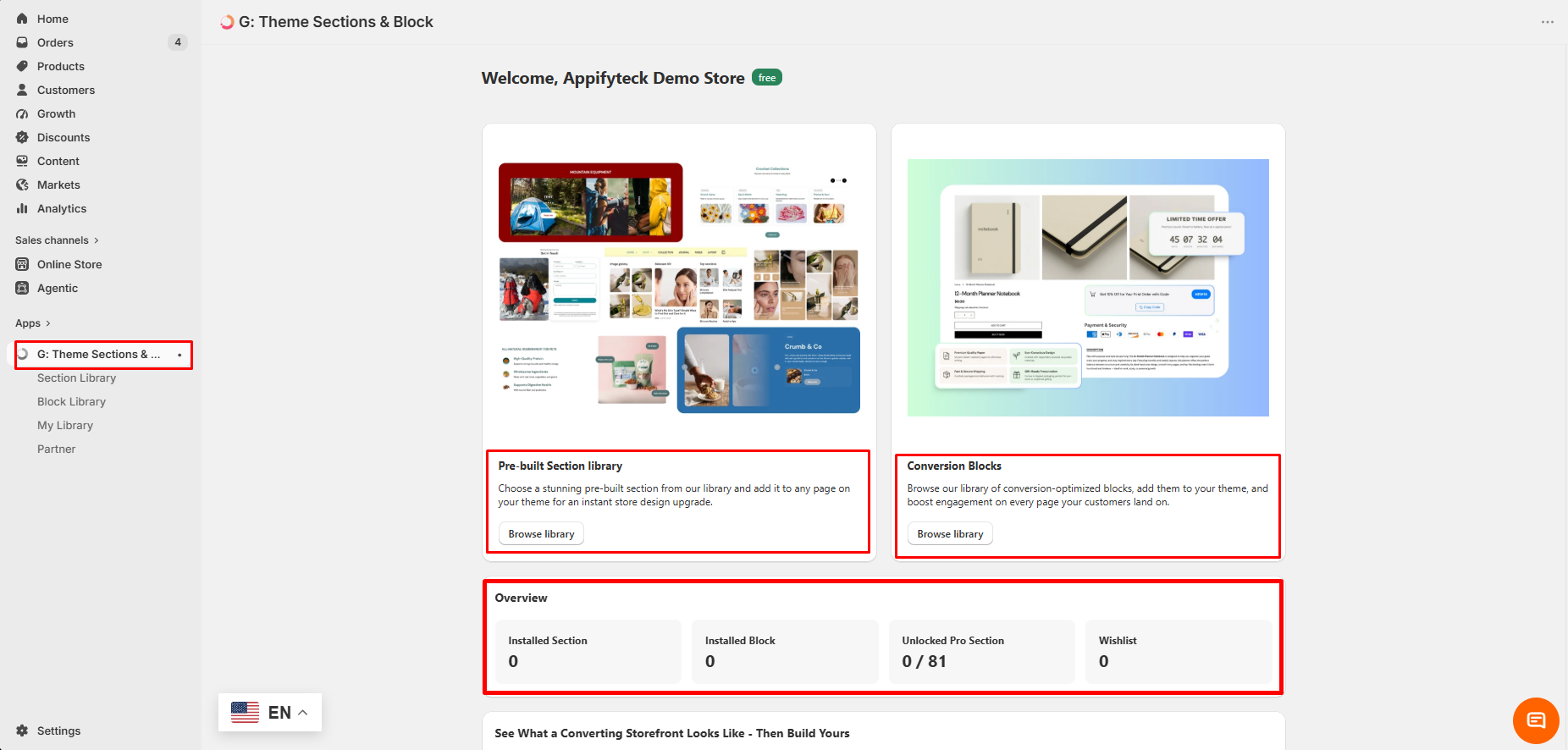
The app has two main libraries:
Pre-built Section Library — sections that can be added to Shopify theme pages.
Conversion Blocks — smaller conversion-focused elements that can be added inside a section.
The left menu also includes My Library and Partner.
The dashboard showed these counters:
- Installed Section: 0
- Installed Block: 0
- Unlocked Pro Section: 0 / 81
- Wishlist: 0
That 0/81 number is useful because it tells you immediately that a large part of the library is locked.
The dashboard also showed a green free badge beside the store name. This appears to describe the account status. It can still be easy to read it as a statement about the whole app.
Free Sections Are Straightforward
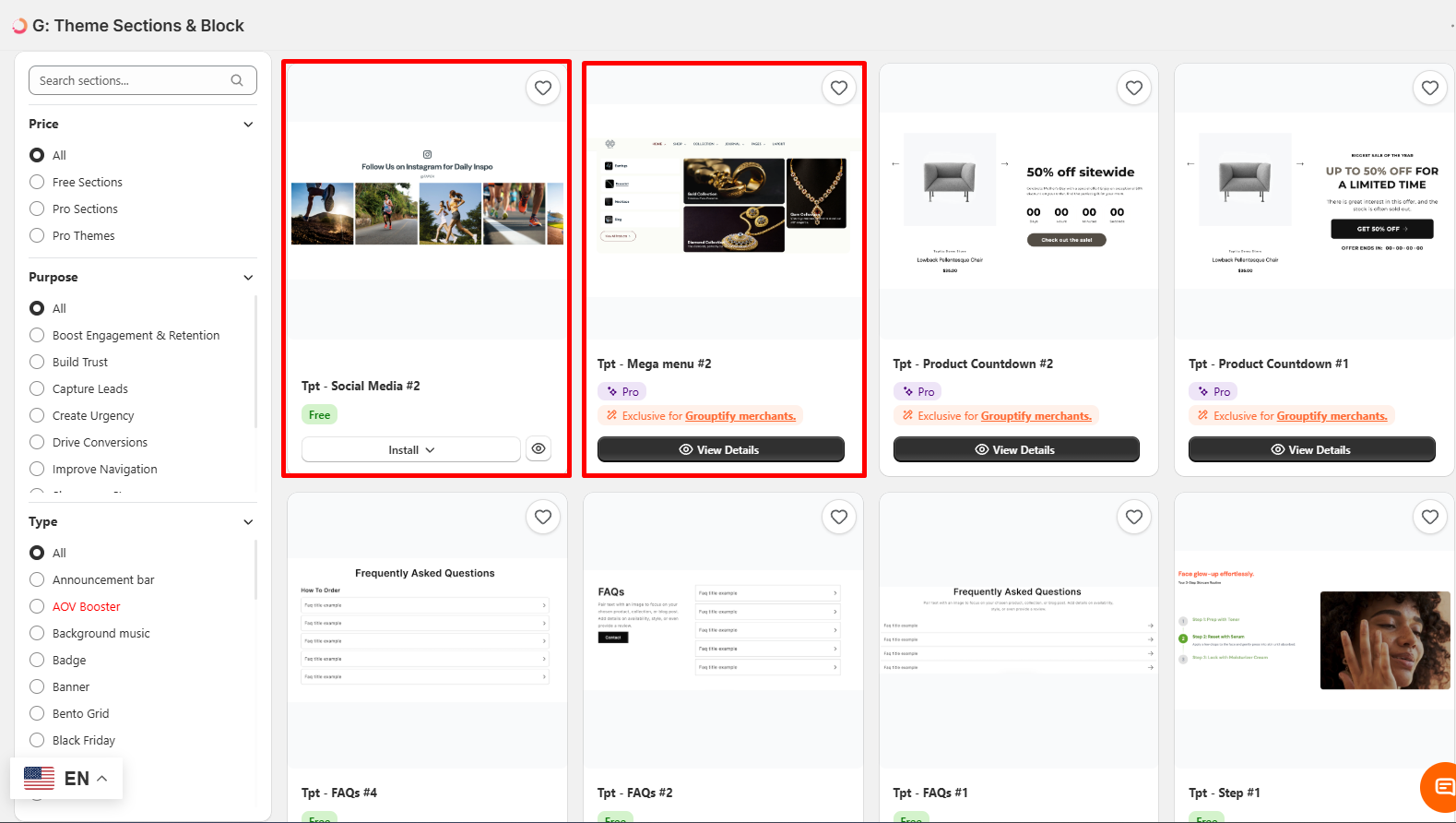
Free sections were the easiest part of the app to understand.
For example, the section Tpt - Social Media #2 showed:
- a green Free badge
- an Install button
- a preview button
There was no upgrade screen or visible payment step.
The library also has useful filters. You can filter by:
- Price — All, Free Sections, Pro Sections, Pro Themes
- Purpose — Build Trust, Capture Leads, Create Urgency, Drive Conversions, Improve Navigation, and more
- Type — Announcement Bar, Badge, Banner, Bento Grid, Black Friday, and many others
The Purpose filter is especially useful because merchants often know the result they want before they know the exact section type.
Pro Sections Use a Different Unlock Path
The Pro cards look different from the free cards.
A Pro section showed:
- a purple Pro badge
- the text “Exclusive for Grouptify merchants”
- a View Details button
- no Install button
- no visible price
We expected the next step to show a plan or checkout.
It did not.
When we tried to use locked templates, the app sent us outside the app. We saw two types of destinations:
- a paid theme page
- another Shopify App Store listing with an install prompt
We did not complete either route.
This means the Pro system is not a normal in-app paid tier, at least in the path we tested. Instead, access appears to depend on using another Grouptify product.
That makes the cost harder to understand from inside this app. You need to check the price and requirements of the product you are being sent to.
Conversion Blocks Are Free but Support-Gated
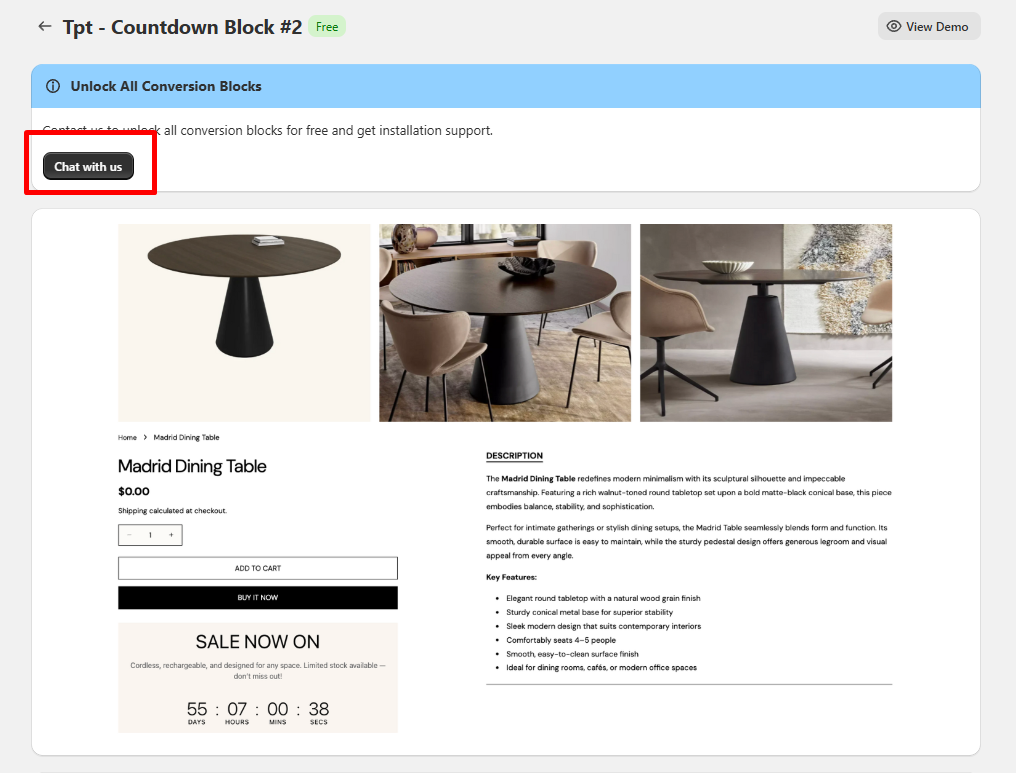
Conversion Blocks use a separate system.
We opened Tpt - Countdown Block #2. It had a green Free badge.
But there was no Install button.
Instead, the page showed this message:
Unlock All Conversion Blocks — “Contact us to unlock all conversion blocks for free and get installation support.”
The page also had a Chat with us button.
So the block itself may be free, but access is not self-serve. You need to contact support first.
There are two sides to this.
The benefit: installation help can be valuable, especially for merchants who do not want to deal with theme setup problems.
The downside: you cannot test the block whenever you want. You also cannot install two blocks quickly and compare them without involving support.
We did not contact the support team, so we cannot comment on response time or service quality.
We also noticed one small demo issue. The countdown demo was shown on a dining table product page, but part of the text referred to something being “cordless” and “rechargeable.” That looked like placeholder copy from another product.
Many Conversion-Focused Sections Were Pro
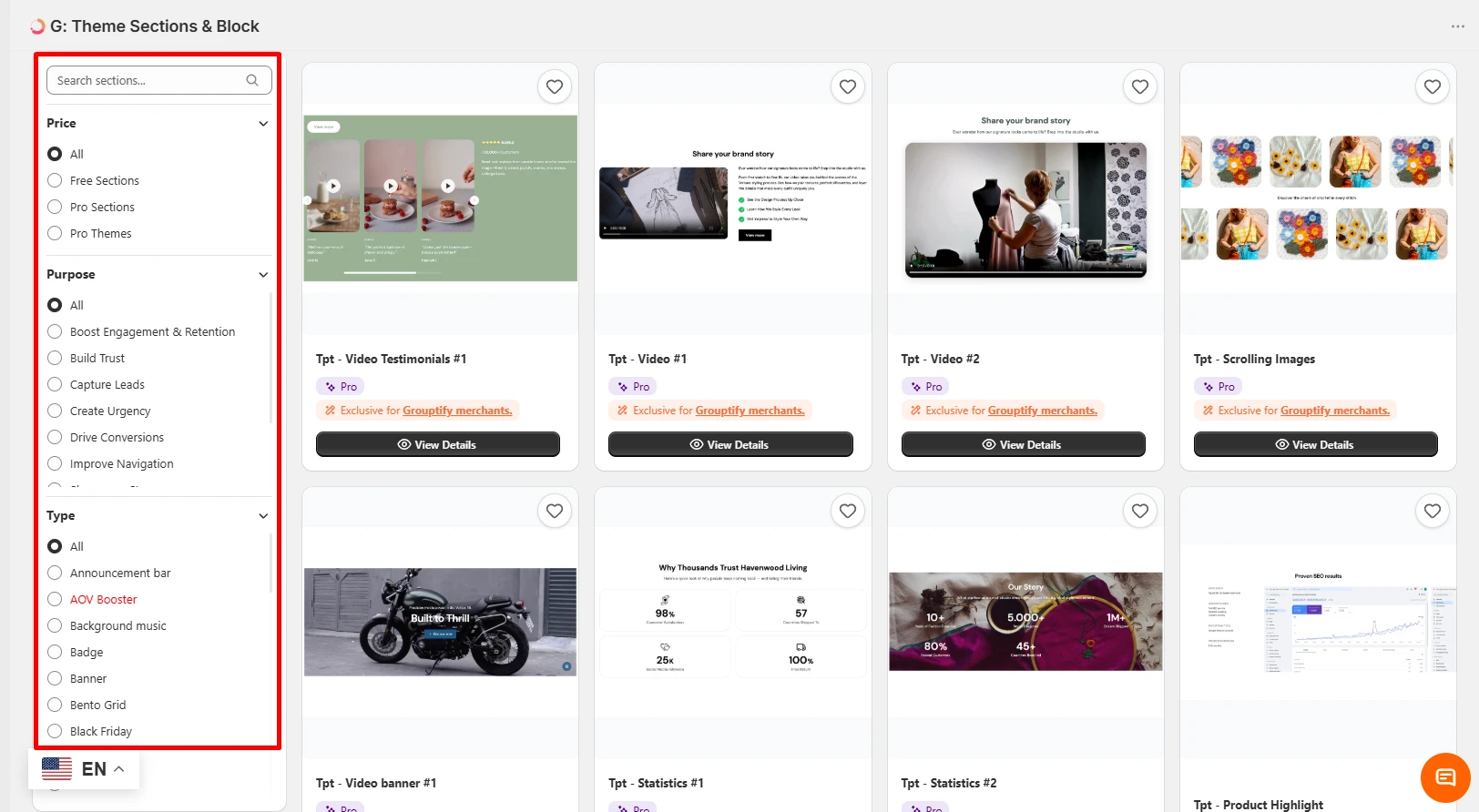
In the part of the library we checked, many conversion-focused sections were Pro.
Examples included:
- Video Testimonials
- Video sections
- Scrolling Images
- Video Banner
- Statistics
- Product Highlight
- Product Countdown
- Mega Menu
The free sections we saw included lighter layout elements such as FAQ sections, a social media section, and a step section.
This matters because many merchants install a section app specifically for conversion-focused elements. In this app, several of those features were behind the Pro route.
Pricing and Value
We are not publishing a normal pricing table because we could not verify one.
Inside the app, the Free sections and Conversion Blocks cost nothing. The Pro sections showed no price at all. Their cost is the cost of whatever product the redirect sends you to, and the app does not tell you that number.
So we are not saying the app has no paid costs. We are saying the cost of the Pro route is not shown inside this app, and you should check it before you rely on a Pro section.
Value, in short: if the sections you need are in the Free filter, this is strong value, because you pay nothing. If you need Pro sections, the value depends entirely on whether you already wanted the theme or app the redirect points to.
For comparison, Section Store shows a more direct pricing model, while page builders such as PageFly, EComposer and GemPages use visible plan pricing.
What Other Merchants Report
We read the app’s lower-rated merchant reviews. There are only a handful below four stars, and most of the three-star ones give little or no reason.
The clearest complaint came from a merchant whose app showed as installed but would not load. The developer replied the next day and moved the conversation to email. On the other critical reviews we read, the developer also replied within a day.
That is too little feedback to call a pattern. It does suggest that problems get a quick first response.
What We Liked
- Free sections are simple to understand and install.
- The 0/81 Pro counter is visible on the dashboard.
- The filters make the library easier to browse.
- Purpose-based filters are useful for merchants.
- Free installation help for Conversion Blocks may be valuable for non-technical users.
- Preview and wishlist controls make it easier to shortlist sections before using them.
What Could Be Better
- A Free badge should explain when support is required. “Free — contact us to unlock” would set a clearer expectation.
- Conversion Blocks need a self-serve option. Even an optional manual install path would give merchants more control.
- Pro cards should explain where the unlock route leads. Merchants should not have to discover that after clicking.
- Pricing is unclear inside the app. A merchant cannot quickly estimate the cost of the Pro route.
- The account-level free badge is slightly ambiguous.
- Many conversion-focused sections were in the Pro group.
- Some demo content needs more polish.
- The
Tpt -naming makes the library harder to scan.
What We Could Not Establish
We could not confirm:
- how fast support resolves issues, beyond the quick public replies to critical reviews
- what happens during the block unlock process
- the cost of the Pro redirect routes
- whether one Grouptify product unlocks all Pro sections
- whether the sections work well across Shopify themes
- what code is added to the theme
- what happens after uninstalling the app or related products
- the full Conversion Blocks catalogue
- what the Pro Themes filter includes
- performance impact
These points need further testing before we can make stronger claims.
Who G: Theme Sections & Blocks Is Best For
Merchants who only need a few free sections.
If you need an FAQ, social media section, or similar layout element, the free library may be enough.
Non-technical merchants who want installation help.
The support-assisted Conversion Block setup may be useful if you prefer help over self-service.
Merchants who want to browse ideas before committing.
The filters, previews, and demos make the library useful for exploring section types.
Merchants already using Grouptify products.
The Pro system may make more sense if you are already part of the Grouptify ecosystem.
Who Should Look Elsewhere
Merchants who need full self-service.
The Pro and Conversion Block routes both add another step.
Merchants working on a tight deadline.
Support-gated setup can slow down your workflow.
Merchants who need video, statistics, testimonials, countdowns, or similar conversion sections.
Many of these were Pro in our test.
Merchants who want to keep their app stack small.
The Pro route may require another app or product.
Agencies and developers managing many stores.
A support-assisted install process may not scale well across multiple client stores.
Merchants who need clear pricing before they start.
This app did not give us that clarity inside the product.
A Quick Way to Decide
- Install the app and set the Price filter to Free Sections. If what you need is there, you are done, at no cost.
- If you need a Pro section, click through and note where it sends you. Check that product’s price and whether you would use it anyway.
- If you need a Conversion Block, decide whether you are happy to wait for support to unlock and install it.
- Before going live, install anything new on a duplicate theme first. We did not test theme compatibility.
Final Verdict
G: Theme Sections & Blocks has a useful free section library and a well-organised browsing experience.
The free part is easy to understand. Find a Free section, click Install, and continue.
The rest is less direct.
The 81 Pro sections we saw were tied to other Grouptify products. Conversion Blocks could be free, but they required support contact before installation.
That does not make the app bad. It simply means the app is not fully self-serve.
The best first step is to install it and filter to Free Sections. If the sections you need are there, the app may be a good free solution.
If they are not, check the next requirement carefully before you commit. You may need another product or help from the support team.
Frequently Asked Questions
Is G: Theme Sections & Blocks really free?
It is free to install, and the Free sections we checked had direct Install buttons with no visible payment step. Conversion Blocks were also described as free, but they required support contact before installation. The dashboard separately showed 81 Pro sections.
Can I install a Conversion Block myself?
Not in our test. The block page had no Install button. It asked us to contact support to unlock the blocks and get installation help.
How much do the Pro sections cost?
We did not see a price for the Pro sections inside the app. When we tried to use locked templates, we were sent to a paid theme page or another Shopify app listing. We did not complete either route, so we cannot give a verified total cost.
What does “Exclusive for Grouptify merchants” mean?
In our test, it meant that access to the locked sections was connected to another Grouptify product. We reached a paid theme page and another Shopify app listing. We did not test far enough to confirm which product unlocks which sections.
Which sections are free and which are Pro?
The free sections we saw included FAQ, social media, and step-style sections. The Pro group included video, video testimonials, statistics, product highlights, countdowns, and mega menu sections. The fastest way to check the current split is to use the Price filter inside the app.
Will these sections work with my theme?
We did not install a section or block on a live storefront, so we cannot confirm theme compatibility. Test on a duplicate theme before using any new section in production.